
Braze vs Salesforce Marketing Cloud vs Maestra: 14 Features and Real Pricing [2026]

The median Braze buyer pays about $88,507 a year (Vendr), while Salesforce Marketing Cloud lists plans from $1,500/org/mo before add-ons. On a feature list, the two look almost the same: journeys, email, SMS, push, and AI on top.
Braze starts from the mobile app, so it shines when the app is the product. Salesforce starts from its CRM, so it shines when sales and service already run there.
If you’d rather not staff either one with engineers or consultants, Maestra is the third option: one platform for e-commerce marketing, plus a marketer who runs it.
This Braze vs Salesforce Marketing Cloud comparison covers 14 categories, from journeys and customer data to support and pricing, using live pricing pages and verified reviews from the last 12 months.
Quick Verdict – the Best Customer Engagement Platform for Each Buyer
Choose Braze if your product is an app and you need real-time journeys across push, in-app, and messaging. Choose Salesforce Marketing Cloud if your company already runs on Salesforce CRM and wants marketing in the same ecosystem. Choose Maestra if you want email, SMS, loyalty, and on-site personalization to work as one program, with a marketer who runs it.
Braze doesn’t publish prices; third-party contract data puts the median around $88,507 a year, or roughly $7,400 a month (Vendr). Salesforce Marketing Cloud, now sold as Agentforce Marketing, starts at $1,500/org/mo billed annually, before add-ons. Maestra starts at $2,000/mo for the CDP plus unlimited email, with the first 100,000 active profiles included.
Content:
Comparison Summary
| Feature | Braze | Salesforce Marketing Cloud | Maestra |
|---|---|---|---|
| Omnichannel Flows | 🏆 ⭐⭐⭐⭐⭐ • Real-time app and site triggers • Tests up to 4 paths, winner rolls out automatically • AI step picks the branch | ⭐⭐⭐ • Triggers from Sales and Service Cloud • Path tests on opens or clicks • Any edit needs a new journey version | 🏆 ⭐⭐⭐⭐⭐ • Email, SMS, push, and WhatsApp in one flow • Site popups, promo codes, and loyalty points as steps • A/B tests against a control on orders |
| Customer Data & Segmentation | ⭐⭐⭐⭐ • Visual segment builder with preview • Everyday segments look back 30 days • Warehouse sync every 15 minutes | ⭐⭐⭐ • SQL segments on the legacy stack • Visual segments in Data 360 • Data 360 at $240 per 1,000 profiles a year | 🏆 ⭐⭐⭐⭐⭐ • CDP in every plan: web, app, and store data • Nested and RFM segments, no SQL • Live segments that trigger flows |
| ⭐⭐⭐⭐ • Drag-and-drop or code editor • Live data at send time, 20-inbox preview • Liquid for advanced personalization | 🏆 ⭐⭐⭐⭐⭐ • Content blocks swap by customer data • Einstein send times and subject lines • Up to 150M emails in Enterprise+ | ⭐⭐⭐⭐ • Unlimited emails • Brand templates and blocks built for you • Drag-and-drop, AMP, and AI-built drafts | |
| SMS & WhatsApp | 🏆 ⭐⭐⭐⭐⭐ • SMS, MMS, RCS, and WhatsApp in every edition • Replies can start a journey • AI agents answer texts (beta) | ⭐⭐⭐⭐ • RCS with branded cards and buttons • Email-to-SMS cascades in Journey Builder • Two-way texting in the Advanced edition | 🏆 ⭐⭐⭐⭐⭐ • SMS, MMS, RCS, WhatsApp, Viber, and Telegram • Texts in the same flows as email and loyalty • Clicks and orders tracked per text |
| Mobile Push & In-App | 🏆 ⭐⭐⭐⭐⭐ • Live order updates on the iPhone lock screen • In-app feed, banners, and pop-ups • Feature rollouts for product teams | ⭐⭐⭐ • Push, in-app, and an app inbox • Store and beacon location triggers • App messaging in the Advanced edition | ⭐⭐⭐⭐ • Push and in-app on the same segments as email • In-app pop-ups, feed, and banners • Frequency caps, A/B tests, revenue per message |
| AI Capabilities | 🏆 ⭐⭐⭐⭐⭐ • AI picks offer, channel, and timing per customer • Assistant drafts campaigns and journeys • AI agents inside journeys | ⭐⭐⭐⭐ • Agentforce builds the brief, audience, and journey • Einstein send-time and frequency tools • About $0.10 per agent action | ⭐⭐⭐⭐ • Claude or ChatGPT connected via MCP • Maestra AI in reports suggests next steps • Next Best Action and 14 recommendation models |
| Site Personalization | ⭐⭐⭐ • Pop-ups, slide-ins, and in-page banners • Different banner per segment • Store pages stay the same for everyone | ⭐⭐⭐⭐ • Banner versions by audience rule • ML and rule-based site recommendations • $8,000/mo add-on on top of Data 360 | 🏆 ⭐⭐⭐⭐⭐ • Catalog, product pages, and minicart change per visitor • Pop-ups, quizzes, games, and bars • $1,515/mo module |
| Product Recommendations | ⭐⭐⭐ • Bestsellers, trending, and recently viewed • AI picks from the Pro edition • Inside messages only | ⭐⭐⭐⭐ • Email picks chosen at open • Site picks with boosting and bundles • Site recommendations sold separately | 🏆 ⭐⭐⭐⭐⭐ • 14 models across site, email, and texts • Rules the team tunes by hand • Included in the base plan |
| Loyalty & Promotions | ⭐⭐ • Partner apps such as Talon.One and Antavo • Promo codes uploaded as lists • A second contract for loyalty | ⭐⭐⭐ • Points, tiers, vouchers, and a member portal • Partner programs from the Growth edition • From $20,000/mo | 🏆 ⭐⭐⭐⭐⭐ • Points, cashback, tiers, and referrals • Promo codes and gift cards • Balance shown in emails and on the site |
| Reporting & Analytics | ⭐⭐⭐ • Revenue per journey step • Uplift against a control group • Custom queries cover 60 days | 🏆 ⭐⭐⭐⭐⭐ • Paid media and email in one view • Custom attribution models • Marketing Intelligence at $10,000/mo | ⭐⭐⭐⭐ • Revenue by campaign, flow, and segment • Control groups by channel, flow, or promo • Included in the base plan |
| Ease of Use & Implementation | ⭐⭐⭐⭐ • Easy for marketers after setup • 60 to 90 days of engineering integration • Liquid code for personalization | ⭐⭐ • Separate studios per channel • SQL, AMPscript, and JavaScript • Certified partners for setup | 🏆 ⭐⭐⭐⭐⭐ • Your Maestra marketer does the setup • Migration in 2 to 4 weeks • No code in daily work |
| Customer Support & Services | ⭐⭐⭐ • 24/7 technical support • Onboarding and services priced separately • Often run through partner agencies | ⭐⭐ • Standard support answers in 2 days • 1-hour Premier at 30% of license fees • Success manager at a custom price | 🏆 ⭐⭐⭐⭐⭐ • Forward Deployed Marketer in every plan • Shared Slack, replies in about 5 minutes • Free migration |
| Integrations & Ecosystem | ⭐⭐⭐⭐ • Snowflake, BigQuery, and Databricks sync • Shopify integration with 90 days of orders • Salesforce link isn’t native | 🏆 ⭐⭐⭐⭐⭐ • The largest app marketplace • Sits next to Sales and Service Cloud • Shopify connector still in beta | ⭐⭐⭐⭐ • 150+ integrations, from Shopify to Magento • Missing connectors built free • Real-time API and mobile SDKs |
| Pricing | $$$ • No public prices • Median contract about $7,400/mo • Billed on users plus per-message credits | $$$ • Public prices from $1,500/org/mo • Billed annually • SMS, Data 360, AI, and loyalty billed separately | $$ • From $2,000/mo with unlimited email • Public, predictable prices • Month-to-month billing • Any module off anytime |
Braze vs Salesforce Marketing Cloud vs Maestra: Omnichannel Flows
Omnichannel flows winner: Braze and Maestra – Braze for app-event journeys where AI picks the winning path, Maestra for flows that also reach the website and the loyalty balance.
| Braze | Salesforce Marketing Cloud | Maestra |
|---|---|---|
| 🏆 ⭐⭐⭐⭐⭐ • Real-time app and site triggers • Tests up to 4 paths, winner rolls out automatically • AI step picks the branch | ⭐⭐⭐ • Triggers from Sales and Service Cloud • Path tests on opens or clicks • Any edit needs a new journey version | 🏆 ⭐⭐⭐⭐⭐ • Email, SMS, push, and WhatsApp in one flow • Site popups, promo codes, and loyalty points as steps • A/B tests against a control on orders |
Braze: Real-Time Journeys With Automatic Winners
Canvas is built for journeys that react to what a customer does, right when they do it. A journey can start from any action in the app or on the site, branch on what the customer does next, and use a different channel on each branch: push, in-app, email, SMS, or WhatsApp.
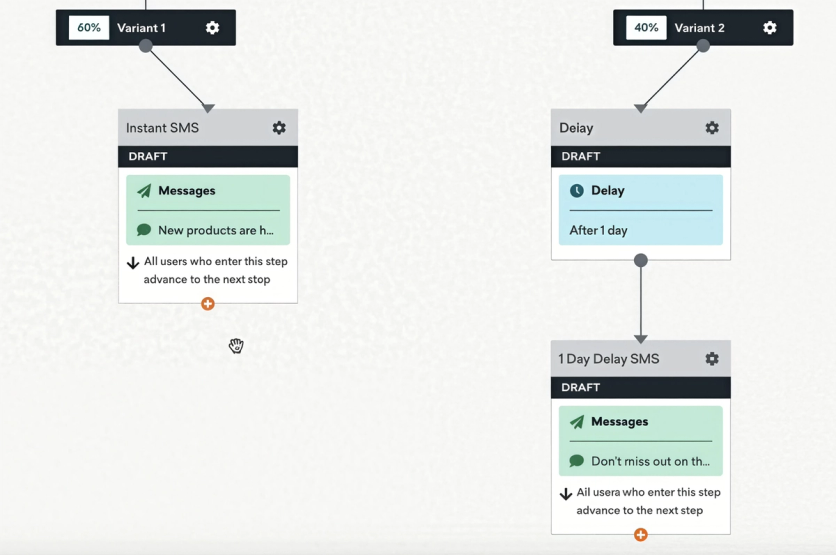
Braze Canvas tests an instant SMS against one sent a day later, with traffic split 60/40 between the two paths
Testing is where Canvas pulls ahead. You can run up to four versions of a journey against a control, and once one wins, Braze sends everyone else down it automatically. An AI step can also choose the branch or adjust the message for each customer.
Within the same journey, you can show the customer ads on Meta, Google, or TikTok.
A marketing reviewer in May 2026 called the “drag-and-drop interface and decision paths” the platform’s highlight. The same review carries a warning: the platform let the reviewer schedule a send for a time that had already passed, and the campaign never went out.
The catch is structure. Once a journey is live, you can change messages and timing but not add or reorder branches, so a rethink means rebuilding it.
Salesforce Marketing Cloud: Journeys Tied to CRM Data
Journey Builder’s strength is the Salesforce data behind it. A journey can start when a record changes in Sales or Service Cloud, and along the way it can create a lead, open a case, or update an opportunity. Marketing and sales then act on the same customer at the same time.
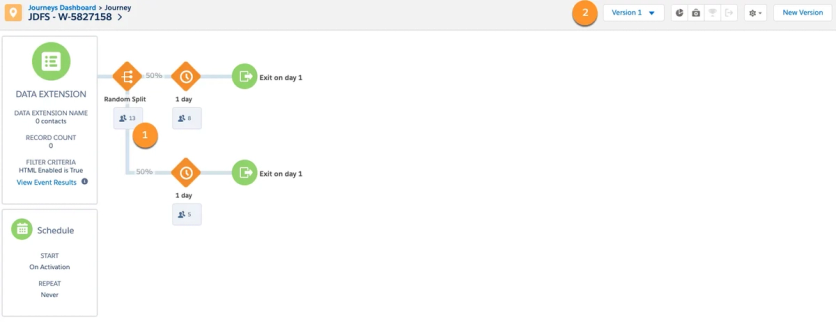
Journey Builder splits contacts into test paths; the audience comes from a data table prepared ahead of time
It covers the standard toolkit too: branches by engagement or customer data, waits tied to dates, and path tests that pick a winner on opens or clicks.
Changing a running journey is harder. Any change to its steps means publishing a new version, and reviewers describe setup as fragile. A senior demand generation manager reviewing in June 2026 put it bluntly: “Setting up a journey is very disjointed and clunky. It has a lot of points of failure, which means testing is extensive and complex.”
Marketing Cloud Next adds a second builder on Salesforce Flow, so teams that buy both generations maintain journeys in two places.
Maestra: One Flow for Messages, Site, and Loyalty
Maestra’s flows are built around the moments that move e-commerce revenue: an abandoned cart, a price drop on a saved item, a product back in stock in the customer’s region, a first order, a lapse. Each flow fires for the exact product and customer, so the message names what the shopper actually wanted.
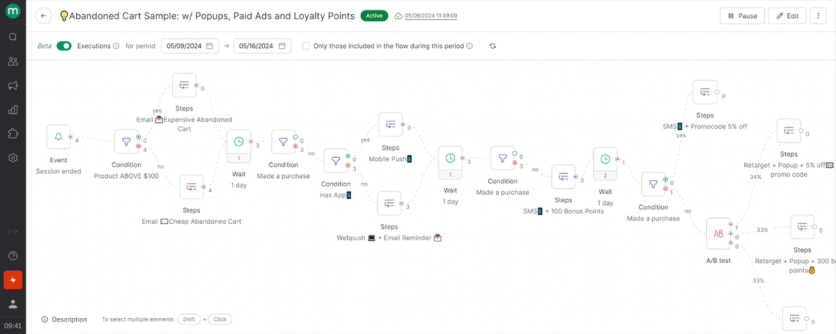
One Maestra abandoned-cart flow sends email, SMS, and push, retargets through ads, shows a popup, and awards loyalty points
One flow can do more than send. Alongside email, SMS, WhatsApp, and push, it can show a popup on the site, issue a promo code, credit loyalty points, and show the customer ads on Meta or Google.
Built-in A/B tests compare up to five versions against a control group on orders or AOV, and a Forward Deployed Marketer builds and tunes the flows with you.
Reports show the revenue each flow brings in, down to every email or text inside it, so it’s clear which step sells and which one needs work. Blossom Flower Delivery’s advanced abandonment journey produced a 5x revenue boost.
Takeaway: App-event journeys with heavy testing favor Braze. Journeys built on Salesforce CRM data stay easiest in Journey Builder. Journeys that also have to change the website and the loyalty balance fit Maestra.
Braze vs Salesforce Marketing Cloud vs Maestra: Customer Data & Segmentation
Customer data winner: Maestra – fine-grained segments in every plan, without a second product or SQL.
| Braze | Salesforce Marketing Cloud | Maestra |
|---|---|---|
| ⭐⭐⭐⭐ • Visual segment builder with preview • Everyday segments look back 30 days • Warehouse sync every 15 minutes | ⭐⭐⭐ • SQL segments on the legacy stack • Visual segments in Data 360 • Data 360 at $240 per 1,000 profiles a year | 🏆 ⭐⭐⭐⭐⭐ • CDP in every plan: web, app, and store data • Nested and RFM segments, no SQL • Live segments that trigger flows |
Braze: Easy Segments, a Warehouse for the Rest
Braze makes segments easy for marketers to build and check. A digital manager wrote in May 2026 that previewing users in a segment means being able to “quickly look up business-relevant statistics without involving our data team.”
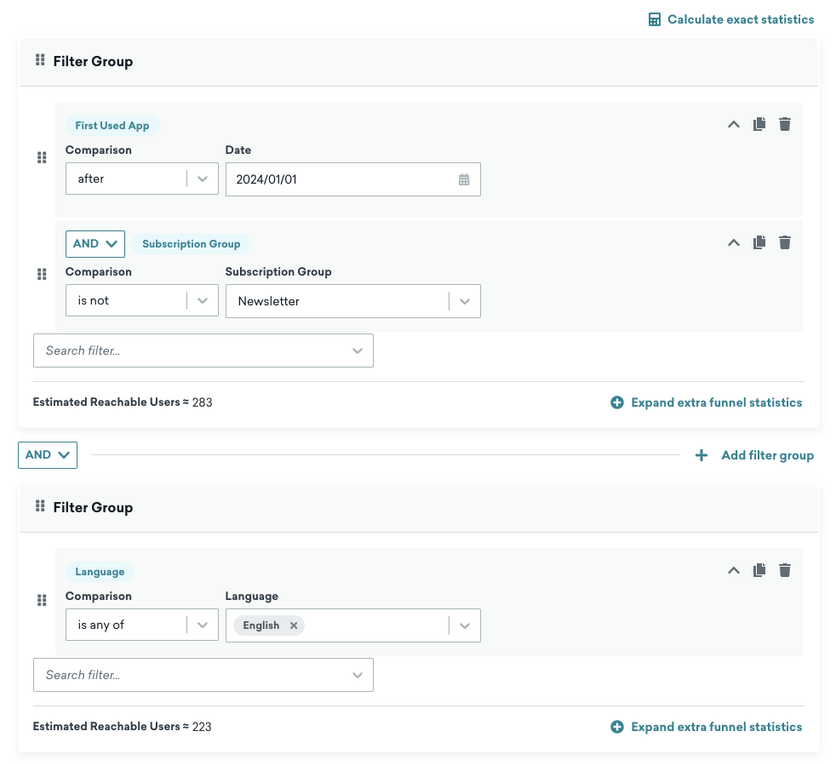
Braze’s segment builder stacks filter groups and shows estimated reachable users as each condition is added
Everyday segments only look back 30 days, though. Audiences built on longer purchase history, up to two years, need a separate segment type, and the most detailed ones are written in SQL.
Braze is designed to sit on top of a data warehouse. If your customer data lives in Snowflake, BigQuery, or Databricks, it syncs in every 15 minutes or can be queried in place, with the query costs landing on your warehouse bill. Without a warehouse and a data team, much of that power stays out of reach.
The same May 2026 reviewer flagged the ceiling: past event details can’t drive personalization in Canvas messages.
Salesforce Marketing Cloud: SQL or a Separate CDP
On the legacy stack, customer data lives in tables called data extensions, and anything beyond a simple filter is written in SQL. A mid-market reviewer in June 2026 put it plainly: “if you don’t know SQL, you’re in real trouble.”
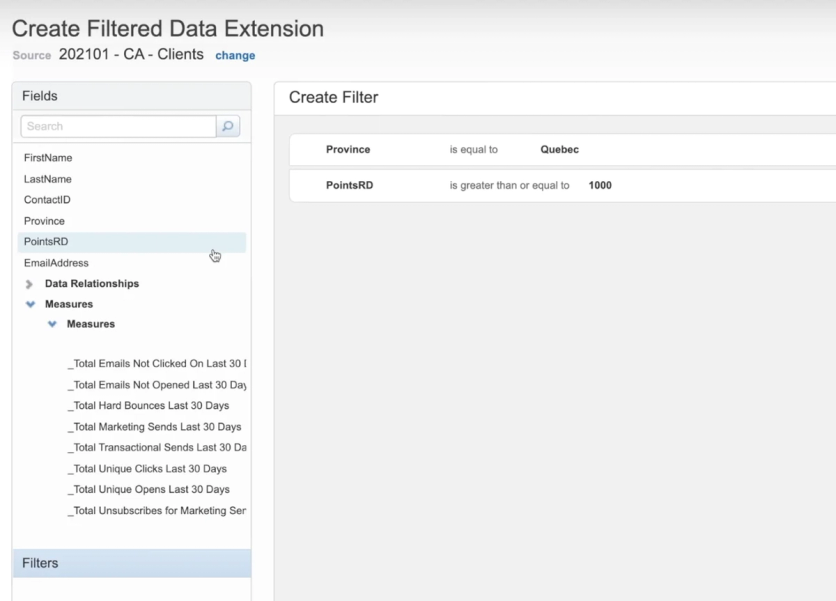
Simple audiences are filtered field by field in Salesforce Marketing Cloud; anything more complex moves to SQL
Those queries time out after 30 minutes, and Salesforce itself suggests moving large datasets to a warehouse or its CDP. A running journey also works from a snapshot of its audience, so new data fields don’t reach it until you publish a new version.
Marketing Cloud Next answers this with Data 360, the renamed Data Cloud. Segments are built in a visual editor and refresh every few hours, and profiles are billed separately at $240 per 1,000 a year plus usage credits.
Either way, the data layer is a project: legacy buyers inherit SQL, and Next buyers set up and budget Data 360 first.
Maestra: A Real-Time CDP in Every Plan
Maestra’s CDP comes with every plan, so there’s no data project before marketing can start. Purchases, site and app behavior, and in-store sales merge into one customer record, and duplicate profiles are joined automatically.
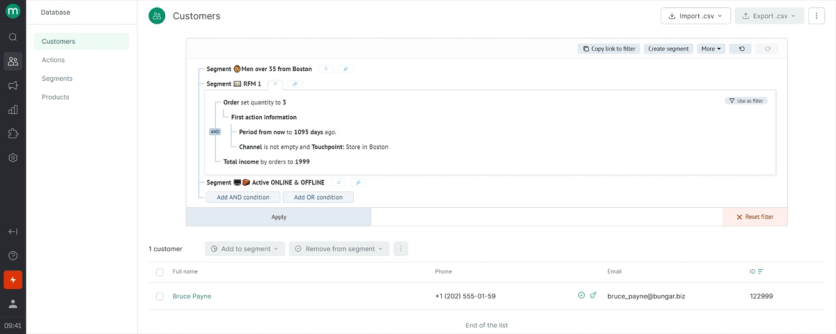
Nested segments in Maestra combine an RFM group, a store audience, and online-plus-offline activity in one filter, no query language
Marketers can slice that data as finely as they need, without SQL. They can nest segments inside each other, sort customers by how recently, how often, and how much they buy, or add fields like each customer’s most-viewed product. Segments recalculate on their own and can start a flow the moment someone enters one.
Visitors who haven’t signed up yet still count. Their browsing is saved and added to the profile once they leave an email or phone number.
Sena merged two regional accounts into one segmentation hub and grew campaign-driven revenue 8.6x, from 1.8% to 6.8% of total revenue. Coolibar added 33.6% in campaign revenue after leaving Klaviyo.
Takeaway: Teams with a data warehouse and engineers get the most from Braze. Teams already paying for Data 360 are set up for Salesforce. Teams that want unified profiles and live segments without a data project should look at Maestra.
Braze vs Salesforce Marketing Cloud vs Maestra: Email
Email winner: Salesforce Marketing Cloud – its email engine was built for the largest senders and still shows it.
| Braze | Salesforce Marketing Cloud | Maestra |
|---|---|---|
| ⭐⭐⭐⭐ • Drag-and-drop or code editor • Live data at send time, 20-inbox preview • Liquid for advanced personalization | 🏆 ⭐⭐⭐⭐⭐ • Content blocks swap by customer data • Einstein send times and subject lines • Up to 150M emails in Enterprise+ | ⭐⭐⭐⭐ • Unlimited emails • Brand templates and blocks built for you • Drag-and-drop, AMP, and AI-built drafts |
Braze: High Volume, Thin Composer
Braze handles large email programs well. Marketers can build in a drag-and-drop editor or in code, personalize with live data pulled at send time, and preview how each email looks across 20 inboxes before it goes out.
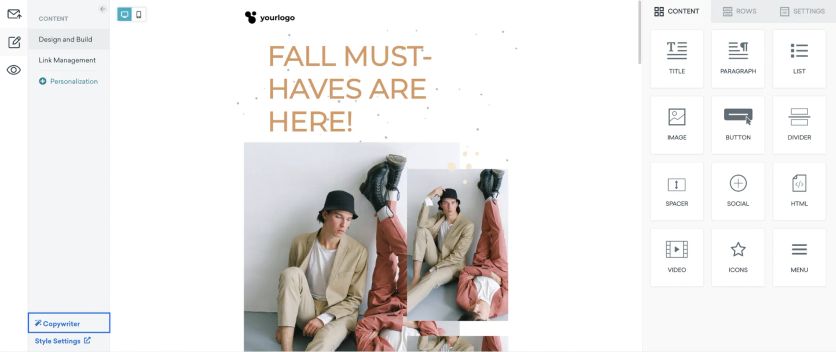
Braze’s drag-and-drop email editor, with an AI copywriter and a personalization panel
Deliverability help is solid: Braze brings inbox-provider reputation data into the dashboard and plans IP warm-up with a specialist. The trade-off is effort, since advanced personalization is written in Braze’s templating language, Liquid.
The composer draws the most complaints. A lifecycle marketing lead reviewing in April 2026 liked Canvas but noted that “in the HTML editor, there’s no preview of the html you’re building.” Email volume also uses up credits, so send growth shows up on the invoice.
Salesforce Marketing Cloud: Built for the Biggest Senders
Email is the one category where the legacy stack’s age helps. Email Studio descends from ExactTarget, the platform that defined enterprise email, and it’s built for very large sends.
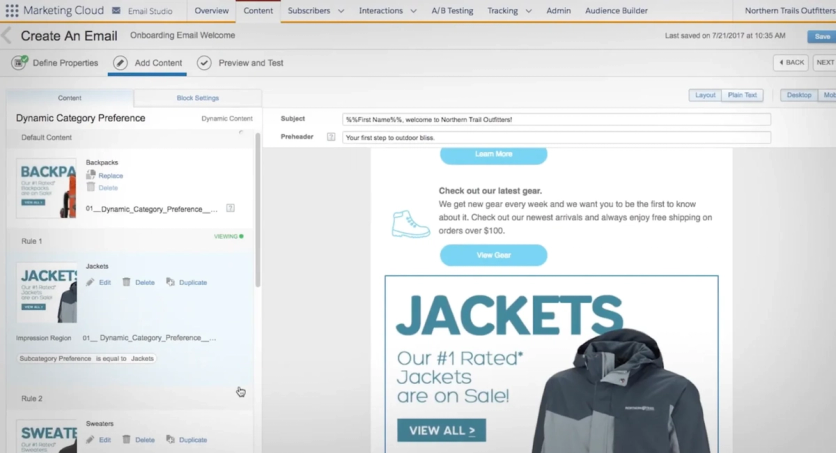
Email Studio swaps content blocks by rule, here by category preference; deeper personalization logic is written in AMPscript
Marketers can swap content blocks by customer data, and Einstein suggests send times, mailing frequency, and subject-line wording. The Enterprise+ edition bundles 150 million email messages, and brands sending more than 250,000 emails a month get a dedicated IP and a branded sending domain as part of a required package.
Deliverability tooling is mature in a way younger platforms still chase.
The caveat is cost discipline. An enterprise reviewer in June 2026 warned that without a strategy the platform “tends to become an email sending tool that is too expensive.” Personalization written in AMPscript also keeps email work close to developers.
Maestra: Unlimited Sends, Data From Every Channel
Maestra’s email module comes with unlimited emails, so a bigger list or a busier calendar never raises the email bill.
A Forward Deployed Marketer builds branded templates for each type of email you send, from new arrivals and sales to newsletters and abandoned carts. The templates break into ready blocks for products, promo codes, and countdowns. Your team then puts together new emails from those blocks in the drag-and-drop editor, with an interactive AMP version when you want one.
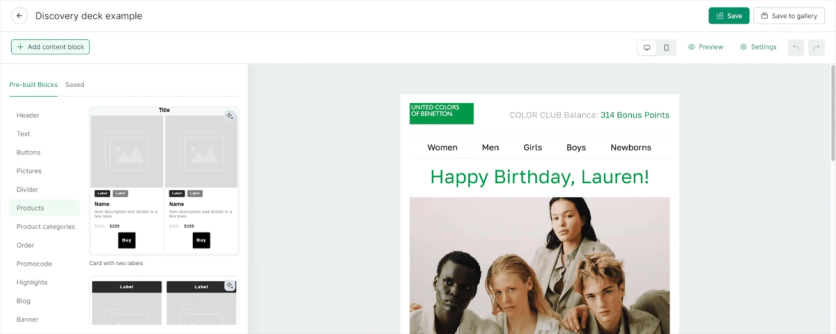
Maestra’s email composer pulls the reader’s loyalty balance into the header, next to pre-built product and promo-code blocks
Claude or ChatGPT can build a Maestra email for you as well. You describe the campaign in a sentence, and a draft made from your brand’s blocks appears in Maestra, waiting for your team to check it.
A Maestra email can pull in data from every other channel: a shopper’s loyalty balance, the promotion live in their region, or back-in-stock picks in their size. The same data picks the offer, so a loyal buyer gets a referral code and a lapsing one gets a reason to come back.
At German Kabirski, a promo code from an email also appears in a floating bar on the website, so shoppers can copy it at checkout. Blue Q’s email-driven sales grew 39% after a switch from Sendlane to Maestra.
Takeaway: For the biggest sending programs, Salesforce’s email infrastructure is the proven choice. Braze fits when email is one channel among many in an app-led program. Maestra fits when you want unlimited emails and a marketer building the flows behind them.
Braze vs Salesforce Marketing Cloud vs Maestra: SMS & WhatsApp
SMS & WhatsApp winner: Braze and Maestra – both send texts and messenger campaigns from the same journeys as email. Salesforce matches most of the channels, but they’re split across two stacks and bought as credit packs.
| Braze | Salesforce Marketing Cloud | Maestra |
|---|---|---|
| 🏆 ⭐⭐⭐⭐⭐ • SMS, MMS, RCS, and WhatsApp in every edition • Replies can start a journey • AI agents answer texts (beta) | ⭐⭐⭐⭐ • RCS with branded cards and buttons • Email-to-SMS cascades in Journey Builder • Two-way texting in the Advanced edition | 🏆 ⭐⭐⭐⭐⭐ • SMS, MMS, RCS, WhatsApp, Viber, and Telegram • Texts in the same flows as email and loyalty • Clicks and orders tracked per text |
Braze: Every Texting Channel in Every Edition
Braze includes SMS, MMS, RCS, and WhatsApp in every edition, so adding a channel doesn’t mean a new contract. Sends still use up credits, which is where the cost shows.
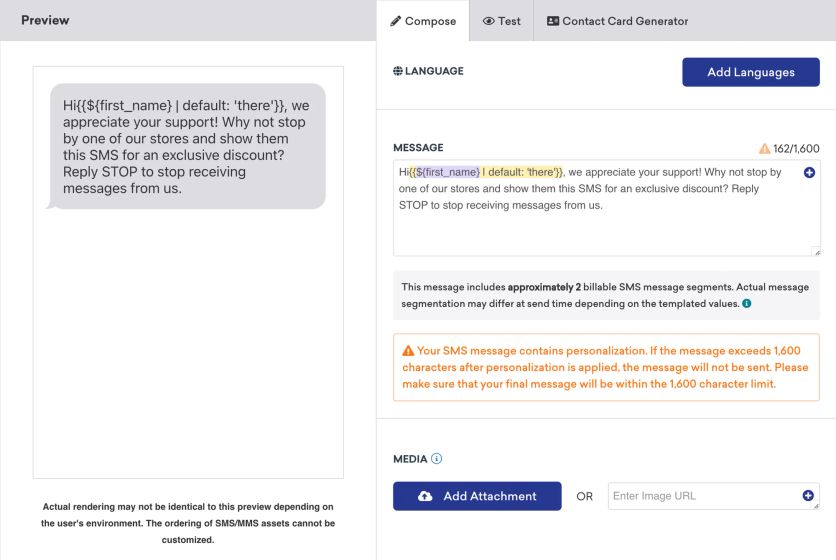
Braze’s SMS composer shows how many billable message parts a personalized text will use before it sends
The compliance basics are handled: opt-in and opt-out keywords, double opt-in, and short links that track clicks per customer. A reply can start a journey, and RCS messages carry the brand’s name and logo, buttons, and carousels.
WhatsApp supports two-way conversations, product carousels from the catalog, and in-chat forms. Braze’s newest AI works on texts too. Its conversational agents answer customers on SMS, RCS, and WhatsApp around the clock, use what Braze knows about each customer, and suggest products. They’re still in beta as of September 2026.
Salesforce Marketing Cloud: RCS and Two-Way Texts, Split Across Two Stacks
Marketing Cloud Next added RCS in the Summer ’26 release. An RCS message carries the brand’s verified name and logo, product cards, carousels, and reply buttons, so a shopper can browse and answer without leaving the messaging app. Two-way conversations, where customers text back and get a reply, need the Advanced edition.
On the legacy stack, Journey Builder runs cascades across channels. A journey can send an email, check who didn’t open or click it, and text only those customers. Links in texts are shortened and tracked per customer, and clicks show up in the journey’s reports. The short links stop working after 90 days.
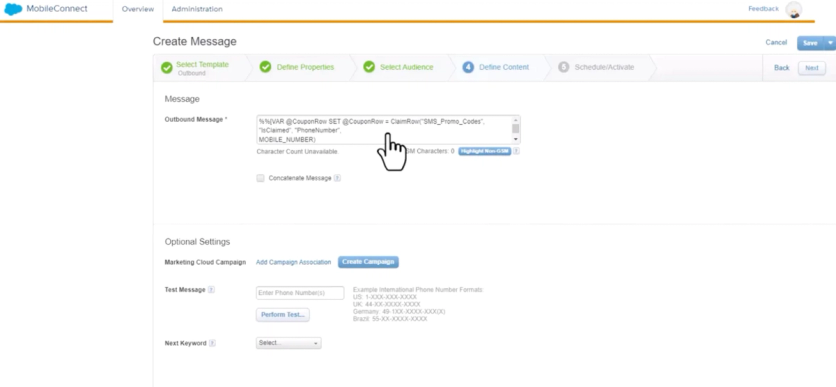
Pulling a unique promo code into an SMS in MobileConnect takes AMPscript written into the message itself
WhatsApp runs on both stacks, with approved templates for campaigns, free-form replies once a customer writes back, and buttons, images, and video.
Buying and running it takes more assembly. On Marketing Cloud Next, texts come as credit packs bought on top of the edition, and customer replies use credits too. On the legacy stack, SMS runs in a separate tool, MobileConnect, and moving between the two WhatsApp options means rebuilding existing journeys and templates.
A mid-market reviewer in September 2026 wanted WhatsApp tracked like email and found that “at this point, I feel the integration is not sufficient.”
Maestra: Texts and Regional Messengers in the Same Flows
Maestra sends SMS, MMS, RCS, WhatsApp, Viber, Telegram, and other messengers popular in a region from the same flows as email, so a text can follow an unopened email without a second tool. The SMS module costs $250/mo, and each US text adds $0.0035 plus carrier fees. WhatsApp and the other messengers come as one module at $420/mo.
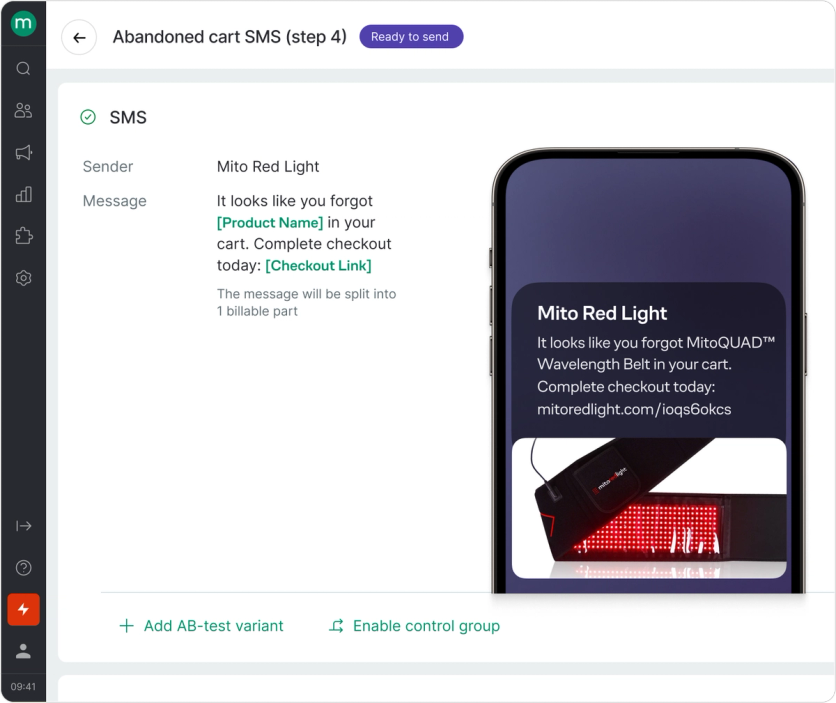
Maestra’s SMS editor fills in the product and checkout link, with an A/B variant and a control group one click away
The compliance work is built in. Customers can subscribe by texting a keyword, opt-outs are recognized even when someone writes “no thanks” instead of STOP, and every consent change is stored for audits. RCS messages fall back to plain SMS on phones that don’t support them.
Short links track clicks and orders back to each text, so SMS revenue shows up in the same reports as email.
MPD raised WhatsApp deliverability from 53% to above 80% and cut send costs 10% along the way. Selkirk Sport’s SMS-attributed revenue grew 149% year over year.
Takeaway: Pick Braze for an app-led program where texts work alongside push and AI chooses the channel for each customer. Pick Maestra when texts and messengers should run in the same flows as email, the site, and loyalty. Salesforce works for a team already on Marketing Cloud that can manage texting across two stacks and credit packs.
Braze vs Salesforce Marketing Cloud vs Maestra: Mobile Push & In-App
Push and in-app winner: Braze – it adds app formats neither rival offers, such as live order updates on the iPhone lock screen and feature rollouts for product teams.
| Braze | Salesforce Marketing Cloud | Maestra |
|---|---|---|
| 🏆 ⭐⭐⭐⭐⭐ • Live order updates on the iPhone lock screen • In-app feed, banners, and pop-ups • Feature rollouts for product teams | ⭐⭐⭐ • Push, in-app, and an app inbox • Store and beacon location triggers • App messaging in the Advanced edition | ⭐⭐⭐⭐ • Push and in-app on the same segments as email • In-app pop-ups, feed, and banners • Frequency caps, A/B tests, revenue per message |
Braze: Lock-Screen Updates and Feature Rollouts
Braze can keep an order or delivery status on the iPhone lock screen and update it as the order moves, so the customer follows it without opening the app. Inside the app, it runs pop-ups, a message feed, and banners built into a screen.
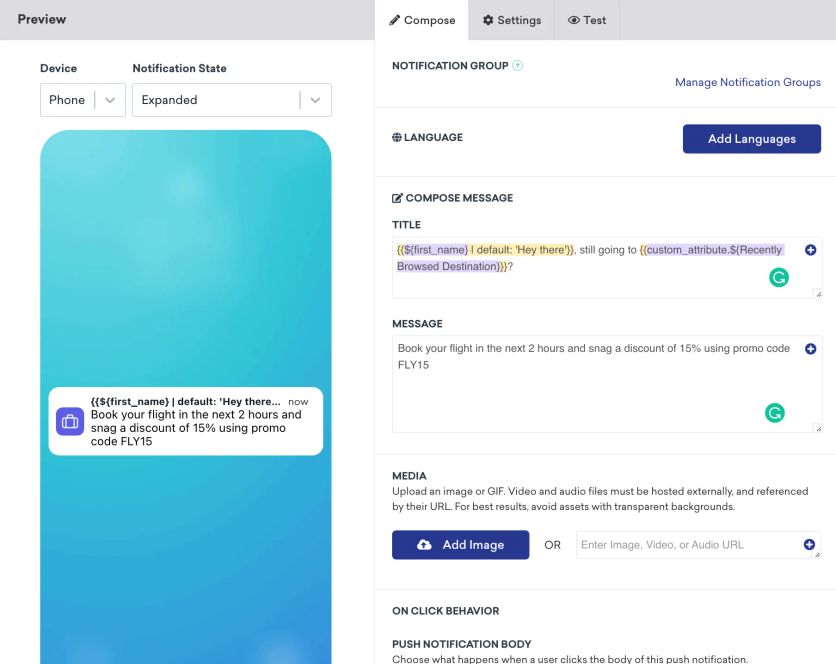
Braze’s push composer previews the notification on a phone and personalizes it with customer data
Product teams can switch a new app feature on for a chosen audience and widen the rollout step by step. They do it in the same tool marketing uses to message those customers.
A senior marketing manager reviewing in June 2026 praised how Braze “ties email, in-app messaging, and push notifications into a single platform.” The same reviewer noted that some non-AI features “feel like they were shipped once and then left untouched.”
All of this runs on the Braze SDK, so an engineer has to set it up.
Salesforce Marketing Cloud: Core App Channels and Location Triggers
Salesforce covers the core app channels: push notifications, in-app messages, and an app inbox. Its distinctive feature is location, since messages can fire when a customer walks near a store or a Bluetooth beacon.
On the legacy stack, push comes only with the Corporate and Enterprise editions. On Marketing Cloud Next, app messaging needs the Advanced edition.
There’s no way to roll out app features or put live updates on the lock screen. An enterprise reviewer in September 2026 also flagged the cost: “It’s been a costly investment – not so much Marketing Cloud itself, but all the push sends.”
Maestra: Push and In-App on the Same Segments
Maestra runs push and in-app messages from the same flows and segments as email and SMS, so an app user gets one coordinated journey instead of separate campaigns.
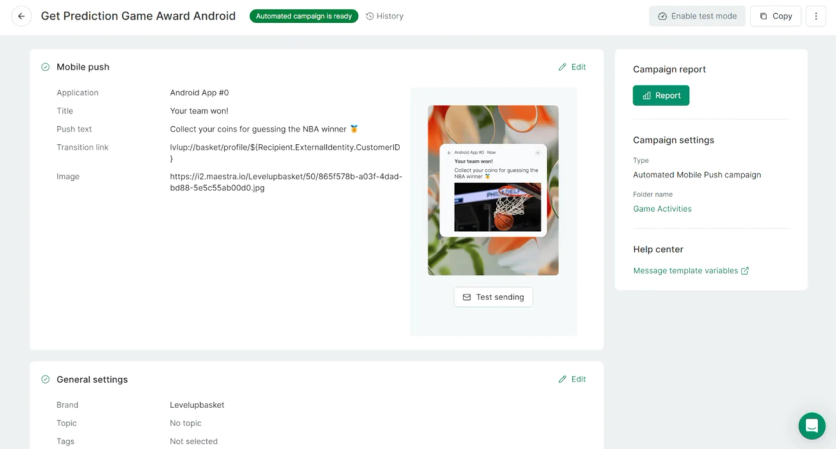
An automated Maestra push for Level Up Basketball deep-links app users straight to the coins they won
In-app messages can pop up, wait in a feed inside the app, or sit as a banner built into a screen. They can use ready templates or a fully custom design and target by segment, screen, product, or city. Frequency limits keep them from piling up, and A/B tests show which ones drive orders.
Revenue from every in-app message shows up in reports, and an in-app can ask for push permission at the right moment.
Maestra doesn’t put live updates on the lock screen or roll out app features.
Takeaway: If the app is the product and you need live lock-screen updates or gradual feature rollouts, Braze is the clear pick. Salesforce makes sense when store-proximity triggers matter. Maestra fits when push and in-app messages should follow the same segments as the rest of your marketing.
Braze vs Salesforce Marketing Cloud vs Maestra: AI Capabilities
AI winner: Braze – its AI already decides the offer, channel, and timing for each customer, and it’s generally available.
| Braze | Salesforce Marketing Cloud | Maestra |
|---|---|---|
| 🏆 ⭐⭐⭐⭐⭐ • AI picks offer, channel, and timing per customer • Assistant drafts campaigns and journeys • AI agents inside journeys | ⭐⭐⭐⭐ • Agentforce builds the brief, audience, and journey • Einstein send-time and frequency tools • About $0.10 per agent action | ⭐⭐⭐⭐ • Claude or ChatGPT connected via MCP • Maestra AI in reports suggests next steps • Next Best Action and 14 recommendation models |
Braze: AI That Decides for Each Customer
Braze’s AI goes furthest in deciding for you. Its decisioning engine, built from the OfferFit acquisition completed in June 2025, picks the offer, channel, timing, and content for each customer and keeps learning from the results.
An AI assistant inside Braze drafts campaigns, journeys, segments, and templates and asks for approval before each change. Teams can also plug AI agents into journeys, running on Braze’s default model or their own. In September 2026 Braze added a self-serve version of the decisioning engine that also works with Salesforce Marketing Cloud and Klaviyo.
AI agents use credits, and an education-sector reviewer in September 2026 found the AI only moderately accurate and not always clear about what was AI and what was a rule.
Salesforce Marketing Cloud: AI Agents, Paid per Use
Salesforce has put AI agents at the center of its marketing suite, now sold as Agentforce Marketing. On Marketing Cloud Next, an agent drafts a campaign brief, builds the audience, writes the email and SMS, and sets up the journey, and a marketer refines each piece.
A newer campaign agent is due in the Advanced edition by October 2026. The older Einstein features, such as send-time and frequency optimization, carry on in the legacy stack.
Users are warming up at their own pace. A campus marketing manager reviewing in June 2026 liked “how Agentforce assists with content creation, audience strategy, and campaign optimization while still allowing me to maintain control.”
Others are less convinced. An IT vice-president writing on TrustRadius in November 2025 said: “I haven’t seen too many use cases for AI integration in Marketing Cloud yet.” Agent actions are paid per use, at roughly ten cents each.
Maestra: AI in Your Chat, Your Reports, and Your Recommendations
AI is built into Maestra at every level. An AI assistant such as Claude or ChatGPT can connect to Maestra through MCP. A marketer describes the task in plain words, and the assistant builds the segment, sets up the email campaign, or pulls a report on any campaign or flow. Nothing goes out until someone on the team approves it.
Inside the platform, Maestra AI works in the reports. It reads the business metrics and explains what changed: which numbers dropped, which flow to rework, and what to test next. That makes it a good partner for brainstorming the next campaign.
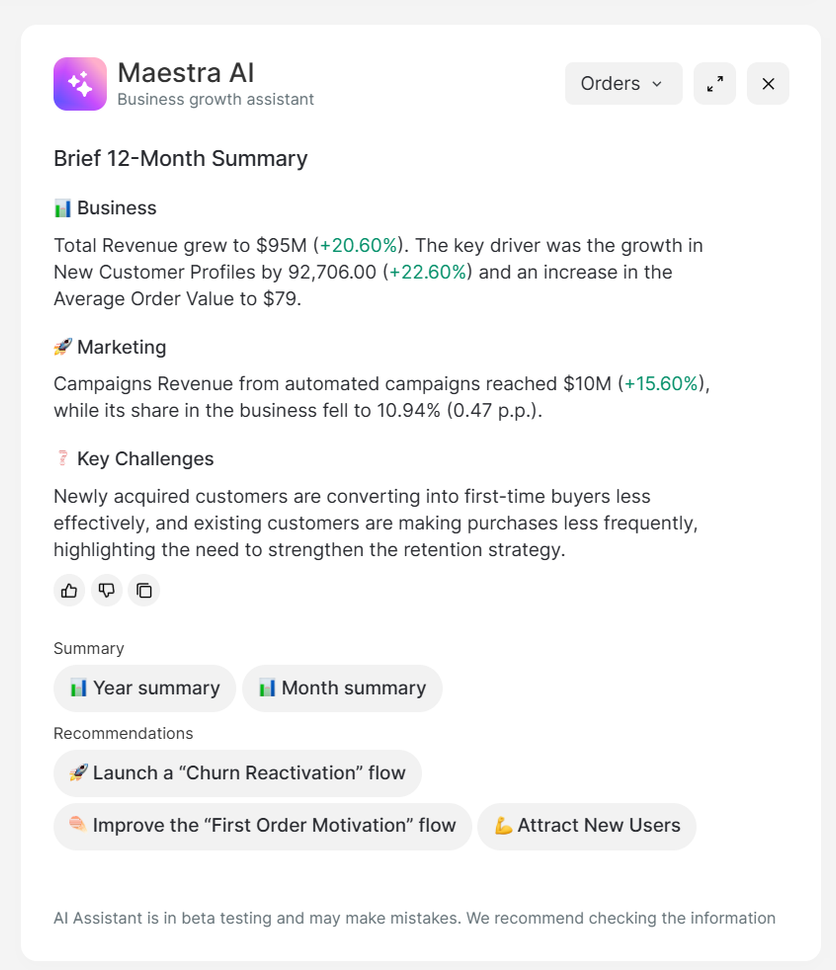
Maestra AI sums up a year of revenue in the reports and suggests which flows to launch or improve next
For specific jobs, Maestra runs its own models. Next Best Action predicts when each customer is ready to buy again and sends the email at that moment. Fourteen recommendation models pick products for the site, emails, and texts.
The recommendation models bend to how you merchandise. A recommendation block can draw only from the product groups you choose, such as new arrivals or discounted items, and a manual mapping decides which categories get recommended together.
Takeaway: For autonomous decisioning that’s already in production, choose Braze. For AI agents inside a Salesforce stack you already own, choose Salesforce. For AI you direct in plain language and models you tune to your own merchandising, choose Maestra.
Braze vs Salesforce Marketing Cloud vs Maestra: Site Personalization
Site personalization winner: Maestra – it changes the storefront for each visitor at under a fifth of Salesforce Personalization’s $8,000/mo, and a Forward Deployed Marketer sets it up.
| Braze | Salesforce Marketing Cloud | Maestra |
|---|---|---|
| ⭐⭐⭐ • Pop-ups, slide-ins, and in-page banners • Different banner per segment • Store pages stay the same for everyone | ⭐⭐⭐⭐ • Banner versions by audience rule • ML and rule-based site recommendations • $8,000/mo add-on on top of Data 360 | 🏆 ⭐⭐⭐⭐⭐ • Catalog, product pages, and minicart change per visitor • Pop-ups, quizzes, games, and bars • $1,515/mo module |
Braze: Campaigns Placed on the Page
Braze can place campaign content on your website: pop-ups, slide-ins, banners inside the page, and simple landing pages. A banner on a product page can show a different message to each segment.
What Braze doesn’t do is change the store itself. Catalog order and product-page content stay the same for every visitor unless a developer builds it, and free landing pages are limited to five.
A team lead reviewing in September 2026 listed landing pages and web forms among the pain points.
Salesforce Marketing Cloud: Deep Site Personalization, Sold Separately
Salesforce sells website personalization as a separate product, Salesforce Personalization, at $8,000/org/mo. It runs on Data 360, so the customer data platform has to be in place first.
A marketer picks a spot on the site, such as the homepage banner, and creates several versions of it. Each version has its own audience rule, so a visitor who browsed mountain bikes five times sees the mountain-bike banner, and everyone else sees the generic one. The same approach covers pop-ups, info bars, and product recommendation blocks.
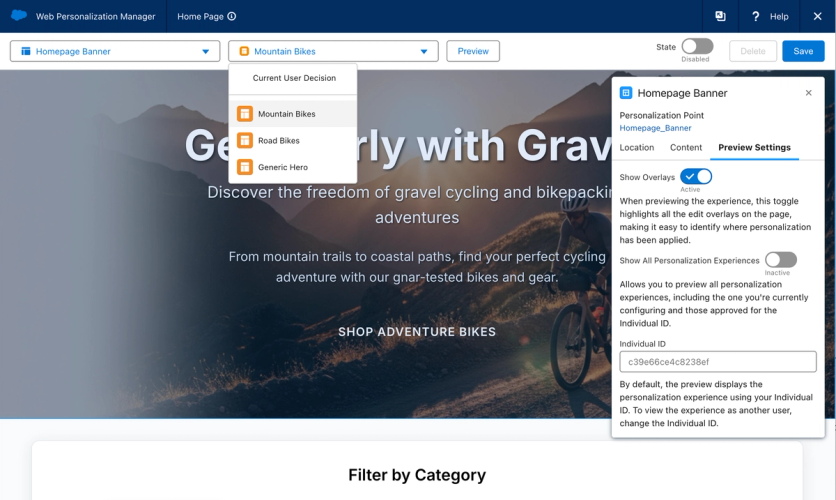
Salesforce’s Web Personalization Manager swaps the homepage banner by audience, here between Mountain Bikes, Road Bikes, and a generic version
Recommendations come in two kinds. Rule-based ones follow the logic you set, such as top sellers above $10. Others are trained toward a goal, such as more revenue, and learn from views, add-to-carts, and purchases.
Every test runs against a control group, and the report shows the lift and how reliable the result is. The same decisions can also shape emails and the mobile app, which joined in July 2026.
The setup is developer work. Someone has to connect the site to Data 360, map the pages and product data, and code the templates before a marketer can place anything. The older Marketing Cloud Personalization is still sold, and a $15,000/mo bundle covers both.
An enterprise analyst writing in March 2026 put the upside plainly: “For organizations operating at scale, Salesforce Marketing Cloud offers the depth needed for personalization.”
Maestra: The Storefront Itself Changes
Maestra changes the storefront itself for each visitor. Catalog pages, product pages, the minicart, and promotional pop-ups adjust in session, using the same segments as email and SMS. It’s a separate module, Onsite Experience Personalization, at $1,515/mo on top of the CDP base.
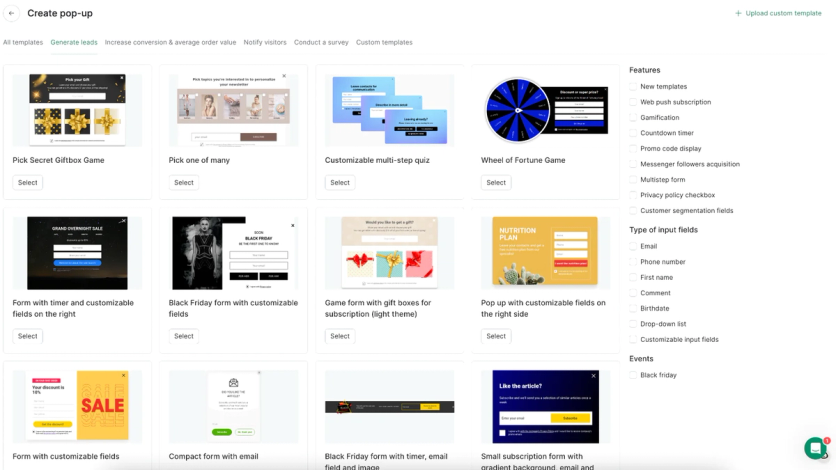
Maestra’s onsite module adds gamified forms, quizzes, and lead popups to the storefront personalization
Marketers can run pop-ups, quizzes, games, banners, and bars, and aim them by segment, cart contents, page, traffic source, device, or location. A submitted form can create a customer profile or start a flow. A/B tests compare offers and designs, so the team can keep the version that converts best.
Website personalization brings Blossom Flower Delivery 9% incremental revenue, measured against a control group; one of its two social-proof notifications lifted revenue per session 34%. Nat’v Basics increased popup conversion 24% without deeper discounts by testing the welcome offer.
Takeaway: If on-page messages are enough, Braze covers them. If you need enterprise personalization inside Salesforce and have the budget, Salesforce Personalization delivers. If the storefront itself should change for each shopper, Maestra is built for it.
Braze vs Salesforce Marketing Cloud vs Maestra: Product Recommendations
Recommendations winner: Maestra – recommendations on the site, in email, and in texts, with published results and no extra cost.
| Braze | Salesforce Marketing Cloud | Maestra |
|---|---|---|
| ⭐⭐⭐ • Bestsellers, trending, and recently viewed • AI picks from the Pro edition • Inside messages only | ⭐⭐⭐⭐ • Email picks chosen at open • Site picks with boosting and bundles • Site recommendations sold separately | 🏆 ⭐⭐⭐⭐⭐ • 14 models across site, email, and texts • Rules the team tunes by hand • Included in the base plan |
Braze: Recommendations Inside Messages
Braze adds product recommendations to messages: bestsellers, trending items, recently viewed products, or AI picks based on each customer’s behavior.
The AI picks need about six months of data and a sizable audience to work well, and they come with the Pro edition. On the entry tier, recommendations refresh weekly.
It’s built for message moments, such as back-in-stock and price-drop alerts, rather than storefront merchandising.
Salesforce Marketing Cloud: Email Picks Included, Site Picks Sold Separately
In email, Salesforce shows recommended products that are chosen when the customer opens the message, based on up to six months of browsing and purchase history.
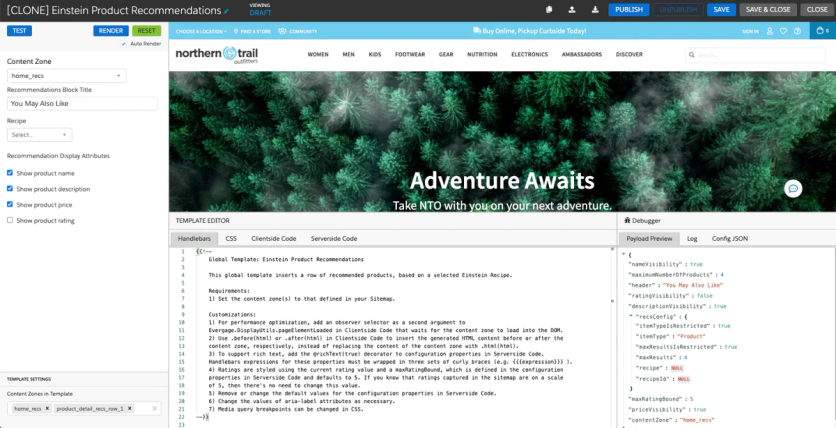
Site recommendations in Salesforce’s personalization product are set up in a code template
Recommendations on the website live in the separate Personalization product, which adds finer controls such as boosting or excluding items and building bundles.
The pieces exist; the assembly spans two or three products depending on the stack.
Maestra: 14 Models Across Site, Email, and Texts
Maestra shows recommendations everywhere the customer looks, from the website to emails and texts, and the picks stay consistent from one channel to the next.
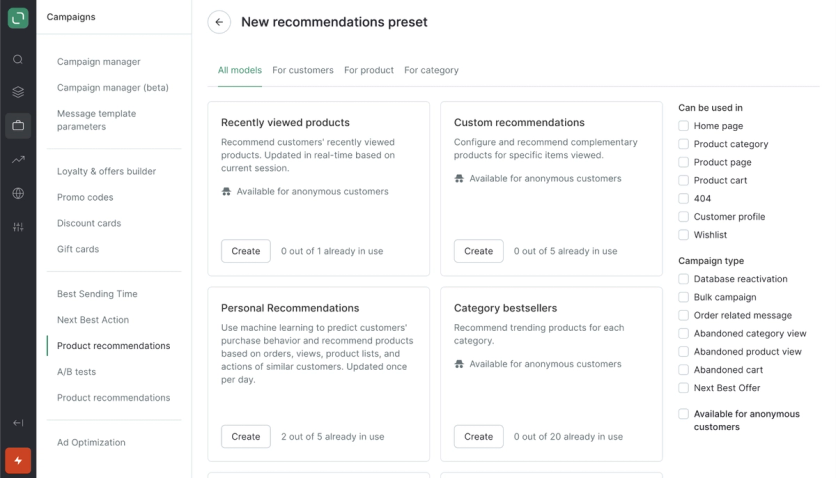
Maestra’s recommendation models show where each can run, from the home page and cart to abandoned-cart campaigns
There are 14 ready models, from bestsellers and similar items to frequently bought together, personal picks, and recently viewed. Items the customer already bought or that are out of stock drop out automatically, and the picks update within seconds of a view or an order.
Most of the models run on rules the team can read and change by hand. A block can be limited to a product segment, such as one brand, a new collection, or items on sale, a manual mapping sets which categories get recommended together, and custom sets follow the brand’s own merchandising logic.
Recommendations are included in the base plan, so they don’t need a separate module.
Enlightened Equipment reached 15% website conversion growth with AI-powered recommendations. At Blue Q, shoppers who engage with recommendations have a 28.7% higher average order value.
Takeaway: Braze and Salesforce put recommendations inside messages first. Maestra is the pick when the same recommendations need to appear on the site, in email, and in texts.
Braze vs Salesforce Marketing Cloud vs Maestra: Loyalty & Promotions
Loyalty winner: Maestra – built-in loyalty against a partner directory and a five-figure add-on.
| Braze | Salesforce Marketing Cloud | Maestra |
|---|---|---|
| ⭐⭐ • Partner apps such as Talon.One and Antavo • Promo codes uploaded as lists • A second contract for loyalty | ⭐⭐⭐ • Points, tiers, vouchers, and a member portal • Partner programs from the Growth edition • From $20,000/mo | 🏆 ⭐⭐⭐⭐⭐ • Points, cashback, tiers, and referrals • Promo codes and gift cards • Balance shown in emails and on the site |
Braze: Loyalty Through Partners
Braze doesn’t have its own loyalty program. It connects to partners such as Talon.One, Voucherify, and Antavo, so points and tiers live in a different product from the one talking to your customers, with a second contract to match.
Promo codes work the same way. Braze doesn’t create them: you upload a list, and if it runs out, messages that need a code simply don’t send. Shopify stores generate codes in a separate Shopify app first.
Salesforce Marketing Cloud: Loyalty Management From $20,000/mo
Salesforce does have a full loyalty product, Loyalty Management, with points, tiers, vouchers, partner programs, and a member portal. Its Starter edition costs $20,000/org/mo, with Growth at $35,000 and Advanced at $45,000, billed annually.
Starter covers up to 100,000 members, and partner programs start at Growth. Inside marketing campaigns on the legacy stack, unique coupon codes are pulled in with code.
For a global retailer running several programs, it’s an option. For everyone else, that’s a marketing-platform budget spent on loyalty alone.
Maestra: Built-In Points, Tiers, and Referrals
Maestra’s loyalty is built in: points, cashback, tiers, referrals, promo codes, and gift cards. It shares the customer record with messaging, so a flow can award points and an email can show the balance without any integration.
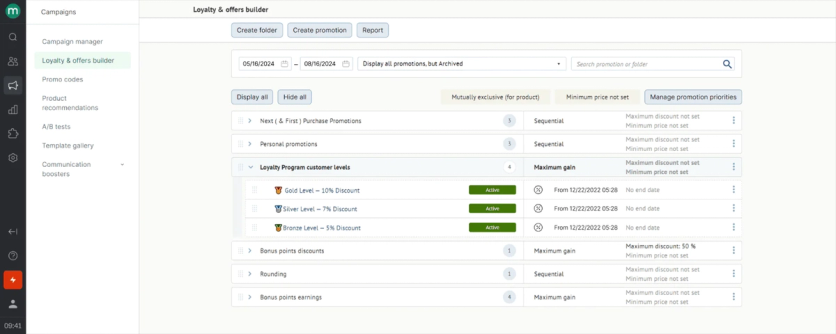
Maestra’s loyalty builder runs Gold, Silver, and Bronze tiers next to bonus-point rules and personal promotions
Marketers set the rules themselves, from points per dollar to double-points days and caps on how much can be paid with points, and decide how discounts stack. The loyalty report shows how members' order value compares with everyone else’s.
JOLYN moved loyalty from Yotpo to Maestra and now pushes points instead of discounts. One campaign gifted 100 bonus points with a clear expiry date and brought in three times the revenue the team expected. I Love Linen doubled members’ cashback for one day during a sale and announced it by email and SMS. It became the brand’s strongest sales day of the month, with sales up 31% over the sale-period baseline.
Takeaway: Braze users run loyalty through a partner. Salesforce fits global retailers with several programs and an enterprise budget. Maestra fits brands that want loyalty to show up inside their emails, texts, and site.
Braze vs Salesforce Marketing Cloud vs Maestra: Reporting & Analytics
Reporting winner: Salesforce Marketing Cloud – for brands that need paid media and email in one attribution model and can add a $10,000/mo product for it.
| Braze | Salesforce Marketing Cloud | Maestra |
|---|---|---|
| ⭐⭐⭐ • Revenue per journey step • Uplift against a control group • Custom queries cover 60 days | 🏆 ⭐⭐⭐⭐⭐ • Paid media and email in one view • Custom attribution models • Marketing Intelligence at $10,000/mo | ⭐⭐⭐⭐ • Revenue by campaign, flow, and segment • Control groups by channel, flow, or promo • Included in the base plan |
Braze: Solid Reports, BI for the Big Picture
Braze reports well on individual campaigns and journeys, including revenue per step and uplift against a control group. Ready-made dashboards cover e-commerce revenue and segments.
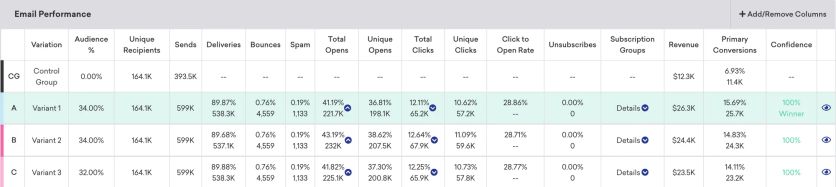
Braze’s email performance table compares variants against a control group and flags the winner by confidence
Bigger questions need more work. Custom queries only reach the last 60 days, and full event data has to be exported to a warehouse or an analytics tool, an option included in many Pro and Enterprise plans.
An enterprise reviewer in September 2026 said native reporting is limited, so most teams add a BI tool or Amplitude on top.
Salesforce Marketing Cloud: Paid-Media Attribution, at a Price
Salesforce’s top analytics product, Marketing Intelligence, costs $10,000/org/mo. It brings paid media from Google, Meta, and LinkedIn into the same view as email and journeys, with custom attribution and AI help on budgets.
Without it, reporting is thinner. The standard reports on the legacy stack show campaign-level daily totals, typically for 90 days, with no customer-level detail.
Users notice: one June 2026 reviewer on G2 wished for “better reporting capabilities” precisely because their team hadn’t bought the intelligence product.
Maestra: Revenue by Channel, Segment, and Program
Maestra reports revenue by campaign, flow, segment, and program, from website personalization to in-app messages, and every report exports to a spreadsheet. Reporting is included in the base plan.
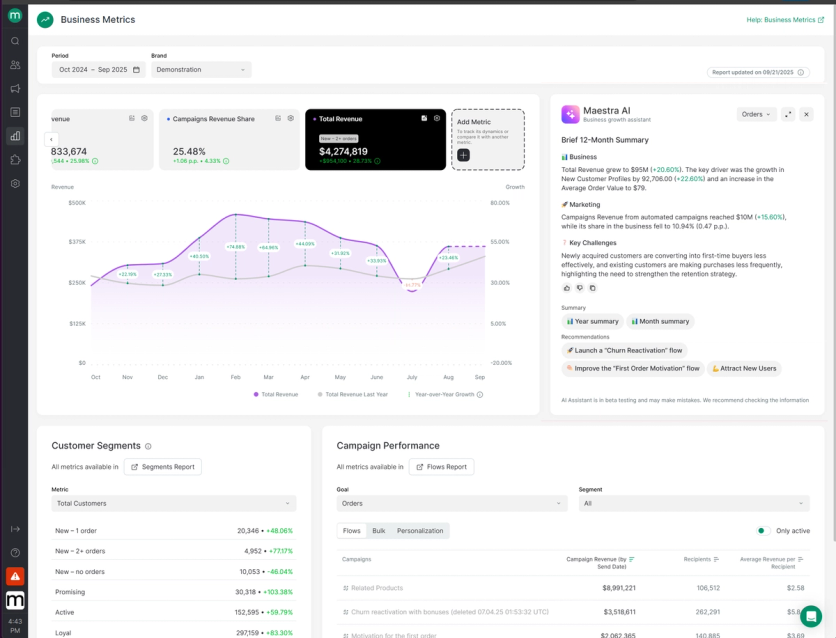
Maestra’s Business Metrics dashboard puts revenue, segment movement, and campaign performance on one screen, with an AI summary
Control groups show what marketing actually added. A brand can hold back a slice of customers from a whole channel, a single flow, or a promotion and see the difference in sales.
D-Steimatzky tracks direct communications at 29.4% of revenue from the dashboard, with no BI project behind it.
Takeaway: If leadership wants paid media and email in one attribution model, Salesforce’s Marketing Intelligence covers it. Braze fits teams that already have a BI tool to finish the job. Maestra fits teams that want channel revenue answered inside the platform.
Braze vs Salesforce Marketing Cloud vs Maestra: Ease of Use & Implementation
Ease of use winner: Maestra – a Forward Deployed Marketer runs the setup, so the marketing team doesn’t depend on engineers to launch or change campaigns.
| Braze | Salesforce Marketing Cloud | Maestra |
|---|---|---|
| ⭐⭐⭐⭐ • Easy for marketers after setup • 60 to 90 days of engineering integration • Liquid code for personalization | ⭐⭐ • Separate studios per channel • SQL, AMPscript, and JavaScript • Certified partners for setup | 🏆 ⭐⭐⭐⭐⭐ • Your Maestra marketer does the setup • Migration in 2 to 4 weeks • No code in daily work |
Braze: Easy Day to Day After the Integration
Once the integration is in place, marketers find Braze easy to learn and run email, push, SMS, and in-app messages without asking developers for help each time.
Getting there takes engineers. Braze plans 60 to 90 days from kickoff to integration, G2 reviewers put the average implementation at four months, and personalization written in Liquid keeps testing work high afterward.
Salesforce Marketing Cloud: Studios, SQL, and Partners
The legacy platform is split into separate studios for email, mobile, and automation. A CRM director reviewing in December 2025 noted “little commonality in the UI among them.” An enterprise reviewer in June 2026 added that the interface “definitely feels like it’s the last to be updated in the Salesforce ecosystem.”
Daily work often needs SQL, AMPscript, and JavaScript, which is why many teams hire certified specialists. Marketing Cloud Next also requires a Salesforce Enterprise or Unlimited org and Data 360.
Salesforce steers buyers to its own services team and certified partners for implementation. It doesn’t publish rates, and one Salesforce partner estimates a Growth setup at roughly $10,000 to $30,000.
Maestra: A Marketer Runs the Ramp
Maestra staffs the ramp instead of documenting it. A Forward Deployed Marketer builds segments, flows, and integrations with your team from day one.
Maestra does almost all of the migration: the plan, integrations, flows, templates, and warming up the sending domain. The brand grants access and approves the timeline, the old platform stays live until everything is ready, and standard migrations take two to four weeks.
German Kabirski launched 31 workflows within four months of onboarding and reached 2,349% ROI. Its executive director summed up the work: “It was pleasant and easy to work together despite the time difference.”
Takeaway: Braze works for teams with engineers for the first integration and for the personalization code that follows. Salesforce needs specialists or partners from the start. Maestra fits marketing teams that want to run everything themselves, with a Forward Deployed Marketer doing the setup.
Braze vs Salesforce Marketing Cloud vs Maestra: Customer Support & Services
Support winner: Maestra – hands-on help comes with every plan at no extra cost.
| Braze | Salesforce Marketing Cloud | Maestra |
|---|---|---|
| ⭐⭐⭐ • 24/7 technical support • Onboarding and services priced separately • Often run through partner agencies | ⭐⭐ • Standard support answers in 2 days • 1-hour Premier at 30% of license fees • Success manager at a custom price | 🏆 ⭐⭐⭐⭐⭐ • Forward Deployed Marketer in every plan • Shared Slack, replies in about 5 minutes • Free migration |
Braze: Services Sold Separately
Braze sells hands-on help as separate services: onboarding and migration, ongoing account management, training, creative, and deliverability, each priced on request. Technical support runs around the clock, and onboarding often goes through partner agencies.
A small-business reviewer in June 2026 described time with the sales team and their onboarding partner as never feeling “built around how we actually operate,” with timely answers hard to extract.
Reviews split. One enterprise reviewer in September 2026 said support falls short of other vendors, while another the same day called it next level.
Salesforce Marketing Cloud: Faster Support at 30% of License Fees
Standard support comes with every license and answers within two days. Premier support costs 30% of net license fees and promises a one-hour response on critical issues, and the top tier adds a dedicated success manager at a custom price.
Standard support draws recurring complaints from reviewers who have to re-explain custom implementations to rotating staff. A mid-market reviewer in January 2026 found that after a few cases the human agents seemed “just as clueless” about the setup as the team was.
Add partner implementation and professional services, and the services budget rivals the license budget (see the six best Salesforce Marketing Cloud alternatives).
Maestra: A Forward Deployed Marketer on Every Plan
Every Maestra plan includes a Forward Deployed Marketer, who handles migration, setup, and ongoing optimization. There’s no services price list, and migration is free.
Each marketer works with fewer than 15 brands, joins a weekly call and a shared Slack channel, and replies in chat in about five minutes. The work covers strategy, deliverability, flows, segments, the website, and A/B tests.
Magnum Bikes made the switch from Klaviyo that way and doubled online orders. At G-Plans, the team singled out the shared Slack: “Having direct access to them via Slack has been the most helpful thing in the world.”
Takeaway: With Braze, service quality depends on the partner you get. With Salesforce, premium help is a separate budget line. With Maestra, the person running your setup is part of the plan.
Braze vs Salesforce Marketing Cloud vs Maestra: Integrations & Ecosystem
Integrations winner: Salesforce Marketing Cloud – the ecosystem is the product’s strongest argument.
| Braze | Salesforce Marketing Cloud | Maestra |
|---|---|---|
| ⭐⭐⭐⭐ • Snowflake, BigQuery, and Databricks sync • Shopify integration with 90 days of orders • Salesforce link isn’t native | 🏆 ⭐⭐⭐⭐⭐ • The largest app marketplace • Sits next to Sales and Service Cloud • Shopify connector still in beta | ⭐⭐⭐⭐ • 150+ integrations, from Shopify to Magento • Missing connectors built free • Real-time API and mobile SDKs |
Braze: Strong With Data Teams
Braze connects to a large partner network across commerce, data, and agencies, and it’s strongest with data teams: it pulls from all major warehouses and sends event data back out to analytics tools.
For Shopify stores, a ready integration syncs browsing, carts, checkouts, orders, and refunds, and brings in 90 days of past orders.
Its soft spot, ironically for this comparison, is Salesforce itself. The developer who reviewed Braze in May 2026 reported that “the Salesforce integration also disappointed, the connection is not native and we ended up building around the gaps ourselves.”
Salesforce Marketing Cloud: The Largest Ecosystem, Next to the CRM
This is Salesforce’s category. Its app marketplace, renamed AgentExchange in 2026, is the largest here, and marketing sits beside the CRM your sales team already uses. Warehouse data from Snowflake, BigQuery, or Databricks can be used without copying it.
On the legacy stack, marketing still connects to the CRM through an older connector built for Salesforce Classic. Marketing Cloud Next lives on the core platform, and the two generations can pass customers to each other.
One e-commerce footnote: the official Shopify connector for Data 360 is still in beta, so Shopify brands mostly connect through third-party apps.
Maestra: 150+ Native Integrations, Custom Ones Built Free
Maestra has 150+ ready integrations, including Shopify, BigCommerce, Magento, WooCommerce, and Salesforce Commerce Cloud, plus help-desk and analytics tools. Its team builds any missing connector during onboarding at no extra charge.
An API exchanges customer and order data in real time with CRMs, ERPs, and store systems, and mobile SDKs cover iOS, Android, Flutter, and React Native. Audiences sync to Meta and Google ads.
Coolibar moved from Klaviyo to Maestra, and its CRM lead called it “the smoothest migration I’ve ever seen!” The brand provided access, answered a few questions about the database, and helped warm up the sending domain. The Forward Deployed Marketer handled the rest.
Takeaway: If your company runs on Salesforce, its ecosystem is the strongest reason to stay. Braze fits teams whose data lives in a warehouse. Maestra fits e-commerce brands that want their integrations built for them.
Braze vs Salesforce Marketing Cloud vs Maestra: Pricing
Pricing verdict: Maestra – every price is public, and the base already covers what Salesforce bills as add-ons.
| Braze | Salesforce Marketing Cloud | Maestra |
|---|---|---|
| • No public prices • Median contract about $7,400/mo • Billed on users plus per-message credits | • Public prices from $1,500/org/mo • Billed annually • SMS, Data 360, AI, and loyalty billed separately | • From $2,000/mo with unlimited email • Public, predictable prices • Month-to-month billing • Any module off anytime |
Braze: Custom Pricing, Billed by Users and Credits
Braze pricing: Custom pricing (contact sales). Braze sells four editions, Go, Select, Pro, and Enterprise, priced by monthly active users plus credits spent on each message and some AI features.
Every edition includes email, push, SMS, RCS, WhatsApp, and in-app messages. Predictive AI and AI recommendations start at Pro, and ad audiences, in-app cards, and webhooks all spend credits too.
The pricing page shows no figures. Vendr’s negotiated-contract data, a third-party estimate, puts the median Braze contract around $88,507 per year (roughly $7,400 a month), with an observed range of roughly $20,000 to $478,000.
Two 2026 reviews describe the model from inside. An enterprise user in April 2026 disliked “how the use it or lose it credits work.” A June 2026 reviewer found “the bill mounts up faster than platforms that fold more into a flat fee.”
Salesforce Marketing Cloud: From $1,500/org/mo, Then Add-Ons
Salesforce Marketing Cloud pricing: From $1,500/org/mo (billed annually) for Marketing Cloud Next Growth, with Advanced at $3,250. That’s where the list starts.
Growth includes 180,000 email credits a year and Advanced 360,000, and each additional business unit costs $2,500 a month.
SMS and WhatsApp are credit add-ons, Data 360 profiles run $240 per 1,000 per year, and Agentforce consumes Flex Credits at $500 per 100,000 requests. The legacy Engagement+ editions run $2,000 to $30,000/org/mo.
Personalization ($8,000), Marketing Intelligence ($10,000), and Loyalty Management ($20,000+) each bill separately.
Salesforce deserves credit for publishing all of it. Budgeting still requires a spreadsheet and a solutions engineer.
Maestra: From $2,000/mo With Unlimited Email
Maestra pricing: From $2,000/mo for the customer data platform plus unlimited email, with the first 100,000 active profiles included. Only active profiles are billed, so a dormant list costs nothing to store.
The $1,300/mo base already covers product recommendations, reporting, ad audience sync, the AI assistant connector, and a Forward Deployed Marketer. Channels come as monthly modules: SMS, MMS, and RCS from $250/mo plus per-message fees, onsite personalization at $1,515/mo, and loyalty for Shopify at $1,010/mo.
Billing is month-to-month with no setup fees, any module can be switched off at any time, email sends are unlimited, and a US text costs $0.0035 plus carrier fees. Extras are listed too: an additional brand costs $1,000/mo, and dedicated sending IPs cost $3,000/mo.
Takeaway: Choose Braze if a negotiated enterprise contract is normal for you. Choose Salesforce if you can price each product you need before you sign. Choose Maestra if you want to start with the channels you use now and add modules later.
Final Verdict: Braze vs Salesforce Marketing Cloud vs Maestra
Choose Braze if your product is an app and your lifecycle program leans on push, in-app, and real-time triggers, with engineers committed to the integration. Its real-time journeys and AI decisioning are the sharpest in this comparison, and marketers like using them day to day. Budget for the credit model and watch it.
Choose Salesforce Marketing Cloud if your company already runs on Salesforce CRM and buys platforms the way enterprises do: with systems integrators, multi-year contracts, and a services budget. The ecosystem, paid-media attribution, and email scale are unmatched here, and so is the head count needed to run it. Before you sign, check which generation you’re buying: Engagement+ or Marketing Cloud Next.
Choose Maestra if you’re a mid-size or scaling e-commerce brand that runs marketing on several separate tools. Maestra replaces the ESP, CDP, loyalty app, personalization tool, and recommendations engine with one platform, plus a Forward Deployed Marketer who runs it, so the marketing team doesn’t wait on engineers.
To see what that would replace in your own stack, book a Maestra demo and bring your current Braze or Salesforce invoice.
FAQ
- Salesforce Marketing Cloud has three weaknesses that come up repeatedly in reviews from the last 12 months. The learning curve is steep: segmentation often needs SQL, and email personalization runs on AMPscript. Setup is disjointed, with separate studios and journeys that need extensive testing. Costs stack up, because SMS, personalization, loyalty, and analytics each bill separately. Maestra answers all three: a Forward Deployed Marketer builds the program, so your team doesn’t need SQL or AMPscript, and module prices are public. Magnum Bikes works this way: a lean team runs product-specific flows, geo-targeted campaigns, and on-site personalization, and online orders doubled year over year.
- Braze is better for app-first brands that need real-time journeys and more texting channels, with far less setup burden. Salesforce Marketing Cloud is better for large organizations standardized on Salesforce that want marketing inside the same ecosystem as sales and service. Reviews from the last 12 months favor Braze on usability (4.4 vs 4.0 on G2) and Salesforce on ecosystem breadth. E-commerce brands that want email, SMS, loyalty, and the site to work as one program typically shortlist Maestra. Urban Armor Gear, for example, replaced Klaviyo, Yotpo Loyalty, and Frosmo with Maestra and cut its marketing-stack costs 64%.
- Yes, Braze connects to Salesforce through partner connectors. Many teams run Braze for messaging alongside Salesforce CRM. A May 2026 G2 review notes the connection isn’t native, so expect engineering work around the edges. If the goal is marketing and customer data in one platform without stitching, Maestra ships both together. G-Plans connected its website and both mobile apps, so every customer action updates the profile in real time and shapes the next campaign. Its customer lifetime value doubled in a year.
- Braze publishes no prices, and third-party contract data puts its median around $88,507 per year. That is roughly $7,400 a month, billed on monthly active users plus Action Credits. Salesforce Marketing Cloud publishes list prices: Marketing Cloud Next from $1,500/org/mo billed annually, with SMS, WhatsApp, personalization, loyalty, and analytics as separate line items that can multiply the total. Maestra starts at $2,000/mo for the CDP plus unlimited email, with the first 100,000 active profiles included and month-to-month billing. SMS, loyalty, and onsite personalization come as monthly modules you can switch off anytime.
- Braze is generally faster to implement than Salesforce Marketing Cloud. It requires an engineering integration up front, and an enterprise reviewer in April 2026 called it easy to pick up and learn afterward. Salesforce Marketing Cloud implementations typically run through certified partners and professional services, and reviewers describe steep SQL and AMPscript requirements on the legacy stack. Maestra takes a third route: a Forward Deployed Marketer does the implementation with you, with no setup or onboarding fees. Sena went live in two weeks, with its Maestra marketer migrating and improving every existing flow.