
10 CDP Capabilities That Actually Matter When Choosing a Platform
The 10 Must-Have CDP Capabilities at a Glance

Ten capabilities separate CDPs that drive revenue from databases that eat budgets alive:
- Data Unification & Identity Resolution
- Segmentation
- Journey Orchestration
- Omnichannel Activation
- Real-Time Processing
- Predictive Analytics & AI
- Reporting & Revenue Attribution
- Integrations & Scalability
- Compliance
- Customer Success & Support
These ten features actually make your data work. Trends can make you focus on feature-list length, trendy AI, or integration counters. But those are secondary. If the platform can't deliver on the basics, no amount of AI on top will generate revenue.
Here are the stats from Maestra's 2026 CDP Market Analysis:
- 71% of consumers expect personalized interactions, and 76% get frustrated when personalization is missing (McKinsey)
- 65.7% of marketers cite data integration as their top challenge (MarTech’s Survey)
- 20.7% flag data silos as the primary barrier to growth (MarTech’s Survey)
- 31% of marketing leaders cite data availability and quality as the primary barrier to AI adoption (Gartner)
Here's what each must-have CDP capability looks like when done right – and what to look for beyond the feature checklist:
1. Data Unification & Identity Resolution
This is the foundation. Without it, everything else falls apart.
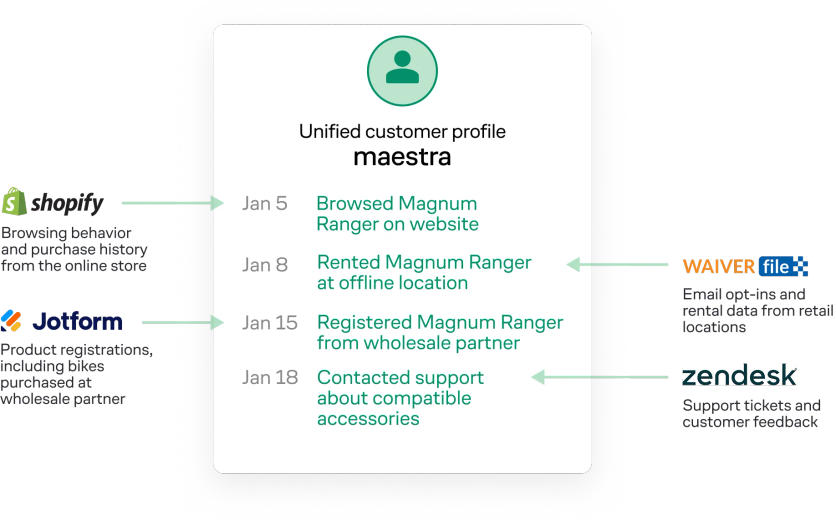
Magnum Bikes unified customer profiles in Maestra
Identity resolution comes in two flavors:
• Deterministic matching links records through hard identifiers – email, phone number, login ID. High accuracy, but it only works when the customer has identified themselves.
• Probabilistic matching uses signals like device type, IP, and browsing patterns to estimate matches. Broader reach, lower certainty.
The best CDPs update profiles in real time, so every touchpoint reflects in the profile immediately. The payoff is a seamless customer experience. You won't email someone a discount on the product they bought yesterday at full price in the app. You won't send an SMS about a sale they already attended. Every channel sees the same, current customer – the baseline expectation customers have today, whether they realize it or not.
Sena, a motorcycle accessories brand operating across US and European Shopify stores, had the same customer appearing as two separate people depending on which region they purchased from. Unifying cross-regional data in Maestra's CDP gave them a single customer view – the foundation for coordinated email, SMS, site personalization, and analytics across both regions. Within a year, Sena achieved 2.2x total revenue growth.
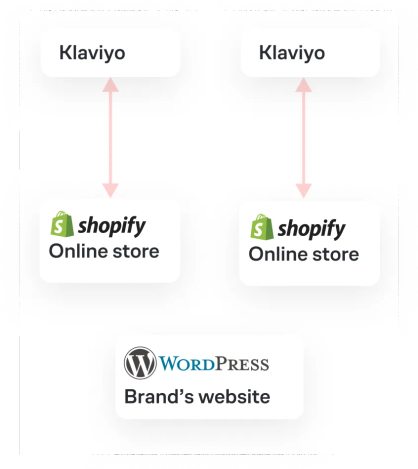
Sena’s previous stack: separate Klaviyo accounts per region
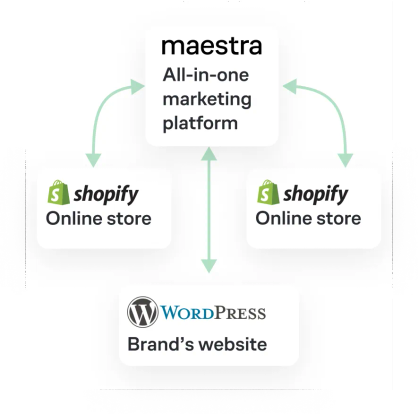
Sena’s stack with Maestra: unified profiles across US and EU
What to ask vendors on a demo call:
- Can the CDP ingest data from every source in our stack – web, app, POS, CRM, support tools?
- Is it real-time or batch? How fast do profiles update after a new event?
- How are duplicates identified and merged? What happens when two profiles conflict on a key field?
- How do you handle cross-device and cross-channel identity merging for anonymous visitors?
- Can the platform maintain real-time updates at the scale of our event volume – tens of millions of events per day?
- If we operate across multiple regions or brands, can we manage them from a single account with shared profiles?
- Can we add new attributes (customer, order, event) at any time without downtime or schema migration?
2. Segmentation
Segmentation is where unified data becomes actionable. Many CDPs are built as data boxes – they store customer records, and you push that data out to email tools, loyalty apps, and personalization engines to actually use it. That's painful: data gets delayed or lost, integrations need constant babysitting, and teams end up using a small fraction of what the CDP stores.
Good CDPs do the opposite. The data immediately works from the same platform – you build complex segments, trigger flows in any channel, and personalize the site without pushing data anywhere.
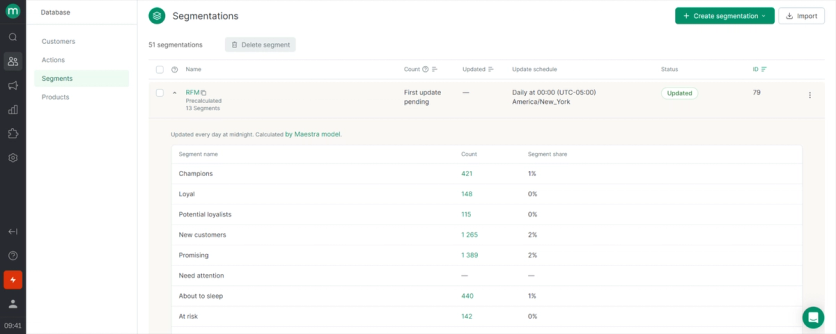
The data activation layer is essential. The baseline today: behavioral, transactional, and lifecycle data combined dynamically. The marketer should be able to build a segment like "customers who viewed a category three times in the past week, spent $100+ in the last 90 days, and haven't opened an email in 14 days" – in a visual builder, without filing a ticket with engineering. Maestra supports nested conditions, calculated and custom fields, RFM analysis, and predictive scores as segment attributes.
What to ask vendors on a demo call:
- Can marketers build segments themselves in a no-code interface, or do they need SQL?
- Does the platform support out-of-the-box RFM segmentation or do we build it ourselves?
- Can we segment by subscription source (e.g., "customers acquired via Meta ads")?
- Can we segment by in-session behavior like pages viewed, scroll depth, or cart state as those events happen?
- Can we layer engagement-based segments like email/SMS opens, clicks, or unsubscribes on top of behavioral and transactional data?
- Does the builder support nested conditions?
- Can I create calculated fields and custom attributes at the profile level?
- Can I segment on real-time behavior – for example, "viewed product X three times in the past 48 hours and still has it in cart"?
- How does segment size scale? Can segments of several million profiles update in real time as behavior changes?
- Are predictive scores (churn, LTV, purchase likelihood) available as segment attributes?
3. Journey Orchestration
A good CDP lets you build cascading personalized workflows: if a customer opens email but doesn't buy → wait 2 days → send SMS with a special offer → if still no action → show an on-site popup reminder next visit. The key word is personalized: a good journey reacts to what each customer does in real time (added to cart, browsed a category, price dropped on a watched product) and adapts across every channel. For example, Maestra’s journey builder supports personalization on any profile attribute, event, or real-time signal. German Kabirski, a luxury jewelry brand, launched 31 personalized flows – with personal promo codes, abandoned items, product recommendations – across email and website using Maestra's journey builder.
This is where most CDPs quietly fail, because the advanced flows that actually move revenue require more than "email A → wait → email B." They need real-time signals from your ecommerce platform:
- Price Drop Alerts – fires when a product someone viewed goes on sale
- Back in Stock Notifications – fires when a product someone viewed or added to cart comes back in stock
- Low Stock Alerts – urgency messaging when inventory drops below a threshold
- Abandoned Cart by Product or Cart Value – different messages for $50 vs $500 carts, or for specific product categories
- Post-Purchase Cross-Sell – recommendations based on what the customer actually ordered
For any of these to work, a CDP has to process live signals – like product catalog updates, inventory changes, price shifts, or cart events – from Shopify, BigCommerce, WooCommerce, Magento, or any other ecommerce platform. Then the CDP must trigger multi-step flows off them in real time. Many CDPs can't reliably orchestrate complex branching off those signals, so their "abandoned cart flow" collapses back into a generic 1-hour email that goes to everyone the same way. Maestra processes ecommerce platform signals natively.
Coolibar migrated to Maestra specifically because they needed flexible flows. Two months after switching and setting up advanced automations like Price Drop Alerts and Abandoned Collection, their flow revenue was up 62% year-over-year, and revenue from abandoned-item flows alone tripled.

Abandoned Collection: Re-engages visitors who browsed a category but left without adding products
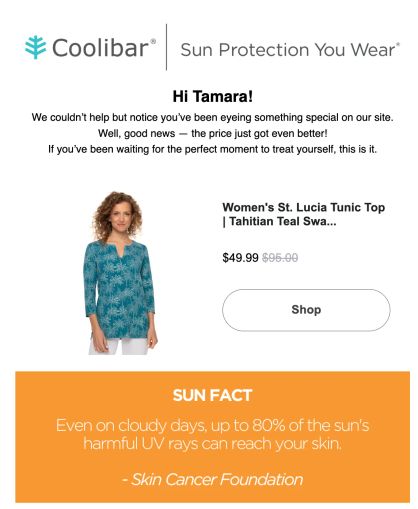
Price Drop Alert: Alerts shoppers when items they viewed or added to cart go on sale
What to ask vendors on a demo call:
- Can a single flow coordinate actions across email, SMS, push, popups, and on-site personalization, or do we need to build parallel workflows?
- Can we trigger different branches based on real-time loyalty data like current points balance, tier changes, expiring rewards?
- Does the platform support multi-step popups as part of a flow: collect email → phone → preferences in sequence?
- Can flows suppress themselves when the customer converts in another channel, for example, stop the cart flow the moment the purchase hits?
- Can I build a flow that branches on real-time signals like product views, cart additions, inventory changes, or price drops?
- How does the platform receive signals from Shopify / BigCommerce / WooCommerce / Magento? Are product catalog, inventory, and pricing events available natively, or do they require custom engineering setup?
- Can I trigger different messages based on cart contents like specific products, product categories, or cart value tiers?
- Can flows branch based on channel response – "if email opens within 48 hours, skip SMS; if not, send SMS with a different angle"?
- Can I build a back-in-stock notification flow today without developer help?
Demo strategy: List the five most complex flows you plan to run, and ask the vendor to build one live during the demo. A good platform shows you a clean builder. A bad one opens a ticket, asks for engineering help, or describes a workaround that involves three tools.
4. Omnichannel Activation
A CDP that unifies data and orchestrates journeys but can only send email is half a product. Your CDP needs to natively support every channel your customers actually use: email, SMS, MMS, RCS, messengers like WhatsApp, push notifications, on-site popups and dynamic content, chatbots, paid media, and POS terminals in physical stores. For example, Sena used omnichannel flow to boost sales visibility. On Memorial Day 2025, they orchestrated a coordinated campaign across email, SMS, and on-site – all from one Maestra flow – and drove 5.6x revenue growth vs the previous year's Memorial Day.
Native channel support is crucial. Many CDPs claim omnichannel but actually require you to push segments to separate tools for each channel. That creates sync lag, inconsistent messaging, and dashboard scatter – exactly the problems a CDP is supposed to eliminate. The right test is simple: can you build a single flow that sends an email, skips to SMS if the email isn't opened, shows an on-site popup with the same offer when the customer returns, and displays their loyalty balance in each message? Maestra does this in one omnichannel journey builder, with email, SMS, MMS, RCS, push, messengers, site personalization, paid media, recommendations, and loyalty programs all living in the same data layer.
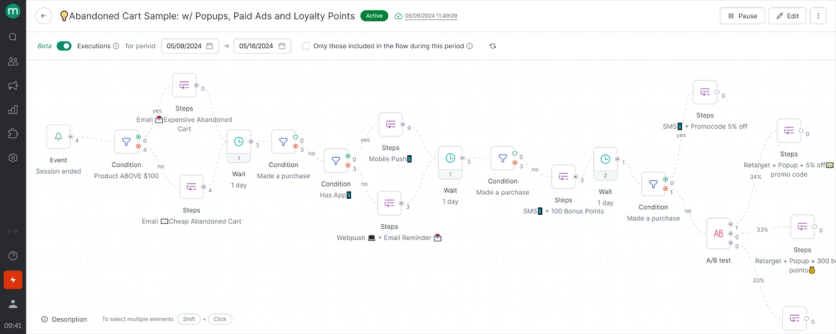
Watch for emerging channels. RCS is replacing plain SMS in markets where carriers support it, and two-way real-time messaging is becoming standard for high-intent customers. A CDP locked into 2022-era channels will feel outdated faster than you'd expect.
What to ask vendors on a demo call:
- How many channels are built-in vs. require third-party integrations?
- What happens when I need a channel you don't support yet?
- Can a single flow coordinate actions across email, SMS, push, popups, and on-site personalization, or do we need to run parallel workflows per channel?
- Does the platform allow channel prioritization rules to prevent over-messaging, for example, "if SMS was sent, suppress email for 24 hours"?
- Can we set per-recipient, per-channel frequency caps (e.g., max 2 emails and 5 SMS per day)?
- Can loyalty program data like points balance, tier status, voucher eligibility be embedded in email, SMS, popups, and on-site content in real time?
- Does the platform support content personalization that stays consistent across channels, for example, an email promo code appearing instantly in a floating bar on the site?
- Can the platform make real-time send-time decisions per recipient based on their past engagement behavior?
- Can A/B tests and holdout groups run natively across emails, flows, popups, and site personalization simultaneously?
- What's your roadmap for emerging channels like RCS, two-way messaging, and in-app conversations?
5. Real-Time Processing
Real-time processing means acting on customer behavior within seconds. A customer adds an item to cart: the CDP should update their profile, recalculate recommendations, and trigger the next action immediately. Enlightened Equipment uses Maestra's upsell bar that updates instantly as customers add items to cart: "Add $12 more for free shipping" switches to "Add $50 more for a free pillow pad" the moment the first threshold is crossed. The upsell bar alone lifted AOV by 38.7%.
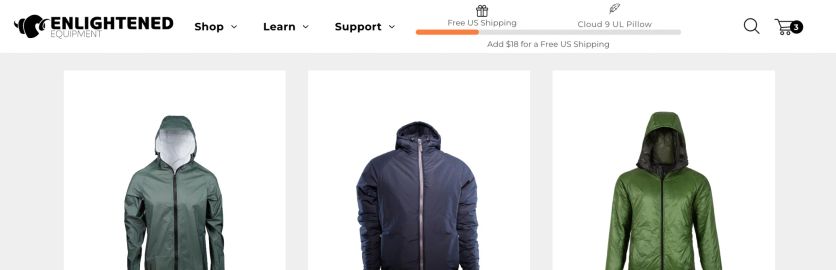
If your "real-time" CDP runs on batch updates every 15 minutes, it's not real-time. It's batch marketing in a real-time costume.
The operational benchmark: sub-second event processing for in-session actions. Anything north of a few seconds is batch dressed up as real-time. Maestra processes events in under 300ms and has proven 10x peak resilience during Black Friday-style traffic spikes. That's what powers in-session personalization – updates a customer sees within the same page view, not on their next visit.
What to ask vendors on a demo call:
- What's your average latency for triggered messages, measured in seconds?
- What's your documented uptime SLA, and can you share the last 12 months of uptime data?
- What sustained send throughput do you support – emails per hour, SMS per minute?
- How does the platform behave during 10x peak traffic spikes (Black Friday, flash sales)? Is auto-scaling automatic, or do we need to give advance warning?
- Can you provide load test results or client references at our projected event volume?
- Are dashboards and segment counts updated in real time, or is there a refresh lag?
- Can the platform send an abandoned-cart SMS within 1 minute of session end?
6. Predictive Analytics & AI
Predictive analytics turns reactive marketing into proactive marketing. Instead of waiting for a customer to drift and running a winback campaign at day 30, the CDP forecasts behavior individually – churn scoring, optimal send time, next-best-action – and helps teams act before the window closes.
These models need history: 90 days of purchase records, email engagement, session behavior, product views, and more. The CDP becomes a learning system – each interaction improves the next prediction. Two questions matter when evaluating: Are the models built in, or do you need a data scientist to build and maintain them? And can the predictions actually trigger campaigns, or are they just numbers on a dashboard?
Maestra has both – built-in ML models for everyday use cases, plus native integrations with external AI tools for specialized use cases. Built-in ML that directly affects revenue includes:
- Next Best Action – a neural network that analyzes each customer's action history and the intervals between actions (purchases, email opens, clicks, product views) and decides daily whether to contact them. When the model decides yes, it automatically triggers a personalized email workflow. Documented results: up to 10x revenue vs non-ML campaign logic.
- Next Best Offer – predicts when each customer is most likely to make their next purchase and automatically sends a personalized recommendation campaign at that exact moment. Customers with monthly reorder cycles get prompted when they're running low; seasonal buyers get campaigns when similar shoppers historically purchase. The ML adapts in real time as patterns change.
- Send-time optimization – picks the hour each individual recipient is most likely to open, based on their past engagement.
- Ready-to-use AI recommendation engines – recently browsed, bestsellers, category bestsellers, post-purchase cross-sell, similar-to-viewed, related products, "often purchased with," personal recommendations, and more. Custom business rules layer on top: exclude out-of-stock, push high-margin products, honor loyalty discounts, respect regional availability. Enlightened Equipment grew website conversion rate by 15% after deploying Maestra's AI-powered recommendations across their site.
What to ask vendors on a demo call:
- Does the platform include built-in predictive models – churn risk, LTV, optimal send time, next-best-product – or do we need a data science team to build them?
- Can predictive scores be used directly as segment attributes (e.g., "customers with churn risk >70% who viewed the sale category this week")?
- Does the platform ship native AI-powered product recommendation engines ready to use across email, SMS, and on-site?
- Can we A/B test AI-based vs rules-based recommendation strategies to measure actual revenue lift?
- Does the platform predict optimal send time per recipient based on past engagement behavior?
7. Reporting & Revenue Attribution
Every marketing team has seen this: revenue ticks up after a campaign, and the retention team credits email, the acquisition team credits paid media, and the CRO team says it was the new recommendations on the homepage. Without reporting that ties dollars back to specific campaigns, flows, and segments, everyone is guessing.
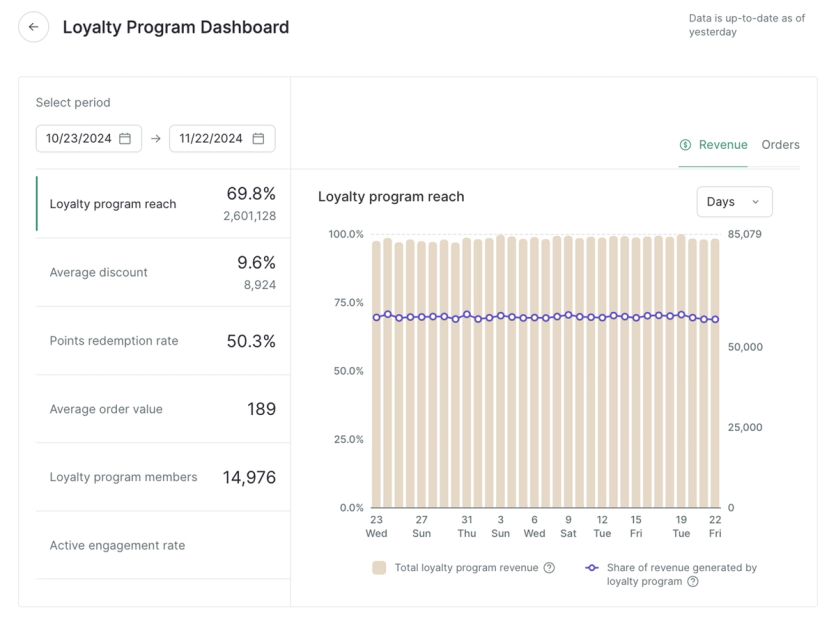
Good reporting works top-down. At the top, a revenue dashboard showing overall performance with flow revenue and campaign revenue separated – so you see at a glance what's pulling weight. Below that, per-campaign deep-dives: revenue, orders, conversion rate, AOV, CTR, open rate, deliverability, unsubscribe rate. Below that, segment-level breakdowns: which customer cohorts actually drove revenue, which lifecycle stages are expanding or shrinking.
Maestra's reporting is built this way. Native revenue dashboard across flows and campaigns. Per-message deep-dives down to individual sends. Subscriber analytics tracking growth, new signups, and unsubs. Segment-level and channel-level attribution. Multi-brand rollups if you run more than one brand. Real-time updates – the dashboard refreshes as events come in, not overnight. Automated alerts when delivery drops, unsubs spike, or an integration fails.
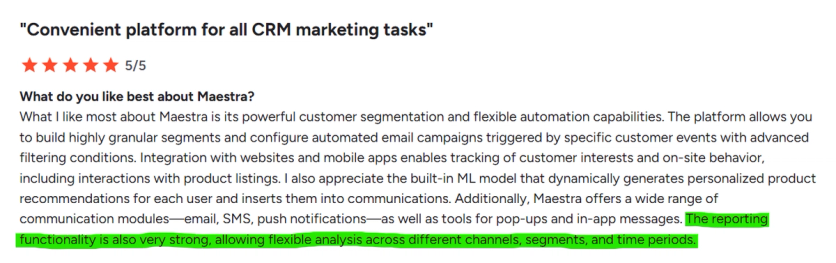
G2 review on Maestra
On attribution, look for more than just last-click. Control groups – holding back a randomized slice of the audience to measure true incremental lift – are the strongest method, but they work alongside channel attribution, assisted attribution, and cohort analysis. Maestra supports both holdout / control group testing and standard attribution models, with statistical significance controls built in.
What to ask vendors on a demo call:
- Does the platform have a native revenue dashboard showing overall, flow-level, and campaign-level performance separately?
- Which metrics are reported out-of-box – revenue, orders, CTR, open rate, conversion rate, unsub rate, deliverability, AOV?
- Are dashboards updated in real time, or on a batch refresh?
- Does reporting combine performance across channels (email + SMS + on-site) into a unified revenue view?
- Can we attribute revenue by segment – loyalty tier, RFM group, acquisition channel, new vs repeat customer?
- Does the platform support control groups and holdout testing natively, with statistical significance controls?
- Do we get detailed deliverability reports per campaign – inbox placement, bounce rates, spam complaints?
- Do we get automated alerts when delivery drops, unsubscribes spike, or integrations fail?
- Do we get quarterly business reviews with a CSM tied to revenue outcomes – not just platform health metrics?
8. Integrations & Scalability
Two questions that share one concern: will this still work a year from now?
Integrations. Don't count the pre-built connectors. Count whether the platform natively connects to your specific stack – your ecommerce platform, your ad networks, your loyalty vendor, and your support tool. A CDP with 1,300 connectors is useless if none of them are for the three tools that actually run your business. Ask the vendor to demo integration with your stack specifically, and ask what happens when you need an integration that doesn't exist yet. Some vendors charge for custom integrations. Some put you in a queue. Maestra builds custom integrations as part of every subscription, because a CDP that can't connect to what you already run can't do its job. If the vendor treats custom integrations as a profit center, you'll feel it every time your stack evolves.
Scalability. A CDP that works at 500K profiles should work identically at 50M. Scalability isn't a slide-deck benchmark – it's whether the platform holds up under real load, during peak traffic like Black Friday or flash sales. Two things to evaluate: your current volume plus 2–3 years of projected growth, and the SLA itself. Read it carefully – is platform capacity spelled out in specific numbers? What happens if the platform fails during Black Friday or a flash sale? Is there a penalty, or just an apology? Maestra is proven at 70M+ customer profiles and 12B+ events, with auto-scaling infrastructure and documented 10x peak resilience. The platform doesn't buckle at scale because it wasn't bolted together from smaller pieces; it was built for this volume from the start.
What to ask vendors on a demo call:
- Which of our specific tools does your platform integrate with natively, not through a marketplace or middleware?
- Are there native real-time integrations with Meta and TikTok for both lead generation and audience targeting?
- When I need a custom integration, who builds it – your team or ours? Is it included in our plan, or priced separately?
- Can external data (loyalty points, offline purchases, NPS scores) be ingested via API and used immediately in segmentation and personalization?
- What's your largest customer by profile count? Can we speak with them as a reference?
- Can the infrastructure handle 10M+ profiles and 10+ brands in one account without performance degradation?
- During 10x peak traffic spikes (Black Friday, flash sales), does the SLA guarantee real-time event ingestion and delivery? What penalties apply if you miss that guarantee?
- What sustained send throughput do you support – emails per hour, SMS per minute? Have you proven it with a client at our volume?
- What does your SLA say about capacity guarantees – are there penalties if the platform can't deliver during peak?
9. Compliance
Compliance is where CDPs meet regulators, and the difference between a marketing checkbox and documented third-party certifications can cost you six figures in a breach. The baseline to look for:
- SOC 2 Type II – demonstrates ongoing operational controls over 6–12 months of monitoring, not a point-in-time snapshot
- ISO 27001 – international standard for information security management
- GDPR (EU) – governs how you handle European customer data, including automated data subject requests
- CCPA (California) – US equivalent for California residents
- HIPAA – required if you handle any health or wellness data
Beyond certifications, four things separate truly compliant platforms from configurable ones:
- Centralized consent management – one place to view and update consent status across every channel
- Automated data subject requests – GDPR right-to-be-forgotten or CCPA access requests fulfilled in a few clicks, not a developer ticket
- Role-based access control – granular permissions so support staff can't see PII unless their role requires it
- Encryption at rest and in transit – AES-256 for stored data, TLS 1.2+ for data in flight; anything less is a 2015-era baseline
Maestra's compliance stack:
- SOC 2 Type II – certified
- ISO 27001 – certified
- GDPR and CCPA – compliant with centralized consent, automated data purging, and audit logs
- HIPAA – compliant (for health and wellness brands)
- Encryption: HTTPS with TLS 1.2/1.3, AES-128/256, strong cipher suites (SHA256/SHA384, Diffie-Hellman, ECDHE)
- Authentication: SSO via SAML; MFA via email or phone (TOTP and passkeys on the roadmap)
- Access control: Flexible role-based permissions – define custom roles with granular rights
- Incident response: Documented breach notification policy with client notification and remediation SLAs
- Data retention: Automated purging for events, customers, and products based on custom rules
- Multi-brand consent guardrails: Brand-level subscription preferences prevent accidental cross-sends while allowing compliant cross-brand campaigns
A note for multi-brand operators: compliance gets exponentially harder when you run several brands under one account. A customer who opted in to Brand A hasn't necessarily opted in to Brand B. The CDP needs to enforce brand-specific consent without blocking legitimate cross-sell, and very few platforms handle this cleanly without manual workarounds.
What to ask vendors on a demo call:
- Which third-party security certifications do you hold – SOC 2 Type II, ISO 27001, HIPAA? Can you share the actual reports, not just the badge on your website?
- What encryption standards are used at rest and in transit? Specifically, AES-256 and TLS 1.2+?
- Is SSO/SAML supported? What MFA options are available – TOTP, email, SMS, passkeys?
- Is role-based access control customizable with granular per-role permissions, or only coarse admin/viewer roles?
- What's the documented breach notification policy and resolution SLA?
- For multi-brand setups, does the platform enforce brand-specific subscription preferences while still allowing compliant cross-sell campaigns under CAN-SPAM / GDPR / CCPA?
- Are data retention and purging configurable per entity (events, customers, orders) based on custom rules?
- How do you handle GDPR / CCPA data subject access requests – manually, or through an automated workflow?
10. Customer Success & Support
This is the capability most evaluation checklists skip – and the one that determines whether your CDP investment pays off or quietly dies. Most vendors sell you a platform. Support is something you wait for, chase, and settle for. That's exactly why the platform doesn't earn its ROI: the features are there, but your team is stuck in queue, reading docs, and building things they shouldn't have to build. Six months in, you're sending the same campaigns you sent before – through a more expensive system.
The data confirms it. An analysis of G2, Capterra, and Trustpilot reviews across major CDP vendors surfaces three pain points on repeat: complex onboarding (222 mentions), high and rising costs (217 mentions), and poor support (192 mentions). These aren't feature complaints. They're what turn a "great platform on paper" into a stalled investment that nobody can explain.
Maestra is built around a different model. Every client gets a dedicated Forward Deployed Marketer. Their job is to make sure you actually get results from the platform, and they do whatever it takes to get you there:
- Migrate your data, templates, and flows for you – not "support you while you migrate," but actually move everything from your old platform into Maestra, verify integrity, and validate parity before switching traffic.
- Handle integration setup, including custom ones. Every tool in your stack gets connected during onboarding. If a custom integration is needed, your marketer (backed by the engineering team) builds it – included, no queue.
- Build your workflows from day one and beyond. The first 5–10 automated flows go live within the first month, built by the marketer and approved by you. New flows, iterations, and campaign optimizations keep coming after that – they continue building for you, not just training your team to do it themselves.
- Warm up your email domain. Full managed warm-up, gradual schedule, DNS/DKIM/SPF setup, branded click tracking, Postmaster configuration – the technical pieces that determine whether emails land in the inbox or spam.
- Run strategic and executional support ongoing. Up to weekly calls with your Maestra marketer covering strategy, campaign reviews, A/B test design, flow building, and quarterly business reviews tied to revenue outcomes.
- Respond to urgent issues within minutes. Live chat and Slack access with your marketer; average first-response time under 5 minutes.

The specifics that matter:
- Each Forward Deployed Marketer manages up to 15 accounts – industry average is 60–125, which turns a manager into a ticket router
- Full dual-run migration (running your old platform and Maestra in parallel to validate flows) is included at no extra cost
- Billing starts only after go-live, not at contract signing – because charging for a platform your team can't use yet is a strange way to start a partnership
- Integration-migration period is typically 4–8 weeks, depending on stack complexity
- No extra fees for post-launch integration help, additional flow builds, or ongoing strategic consulting

What to ask vendors on a demo call:
Onboarding & migration:
- What's the integration-migration period start to finish?
- Will you migrate our data, templates, and flows – or do we?
- Does the platform support dual-run operation (running both systems in parallel to validate flows), and is that included at no extra cost?
- Do you offer managed list warm-up, DNS configuration, and deliverability setup during migration?
- How do you handle headless Shopify environments during integration?
Ongoing support:
- How many accounts does each CSM manage?
- How often do I have calls with my CSM, and what do they cover?
- Do I have a Slack / Teams / direct chat with my CSM?
- Does support include executional work – flow building, pop-up setup, loyalty configuration – at no extra cost?
- What's the live chat response time during working hours?
- Where are your support teams based, and do they cover our time zone?
Pricing transparency:
- Is the transition period free while we're still running on our current platform?
- Is onboarding / CSM support included in the base price, or extra?
- Do you charge extra if your team helps set up additional integrations after launch?
- Are there hidden fees – volume overages, extra seats, premium support tiers? Can you show us the full fee schedule?
Key Takeaways
- Data unification is the foundation. Without identity resolution that merges cross-device and cross-channel records into one profile, every other capability runs on incomplete data. Look for real-time profile updates, not overnight batches.
- Segmentation is where unified data starts driving revenue. The bar is no-code segment building, nested conditions, calculated fields, RFM analysis, and predictive scores – in one interface, without SQL or engineering help.
- Journey orchestration separates data boxes from revenue drivers. The real test: can the platform trigger advanced flows off real-time commerce signals – price drop alerts, back-in-stock, abandoned cart by product or cart value – or does "abandoned cart" collapse to a generic 1-hour email?
- Native omnichannel execution matters more than channel count. If activating a segment requires pushing data to three platforms, you're still dealing with sync delays, inconsistent messaging, and dashboard scatter – the exact problems a CDP is supposed to eliminate.
- Real-time processing means sub-second, not "usually fast." Ask for the actual latency number in milliseconds. If the answer is vague, the platform batches updates – which breaks in-session personalization and real-time triggers.
- Predictive analytics needs history, not real-time data. Churn scoring, optimal send time, and AI recommendations run on 90+ days of historical behavior. Evaluate whether models are built-in or require a data scientist, and whether predictions can actually trigger campaigns.
- Revenue attribution is how you prove what worked. Open rates and click rates track activity; holdout-based attribution tracks dollars. Look for built-in control groups, statistical significance controls, and per-flow / per-segment revenue breakdowns.
- Integrations and scalability answer one question: will this still work a year from now? Skip the connector counter and check native integrations for your specific stack. Read the SLA carefully – is there a penalty if the platform fails during Black Friday, or just an apology?
- Compliance is a regulatory baseline, not a feature. Look for third-party audited certifications (SOC 2 Type II, ISO 27001, HIPAA if applicable), encryption at rest and in transit, and multi-brand consent guardrails if you run more than one brand.
- Customer success is the capability that determines whether the other nine actually generate revenue. Most vendors sell a platform and leave you to figure it out; the right partner assigns a Forward Deployed Marketer who handles migration, flow building, and ongoing optimization.
- Maestra is built to cover all ten capabilities. A real-time CDP with native omnichannel execution, predictive AI, and a dedicated Forward Deployed Marketer on every plan who handles migration, integration, and ongoing optimization – typically live in 4–8 weeks, managed end-to-end. Client revenue results: 56.6% online revenue growth at Magnum Bikes, 52.5% total revenue growth at Enlightened Equipment, 26% campaign-driven revenue growth at JOLYN, 55% email and 149% SMS revenue growth at Selkirk Sport, and 33.6% campaign revenue growth at Coolibar.
- The platform you choose shapes every campaign, segment, and customer interaction that follows. This isn't a software swap – it's an infrastructure decision.
FAQs
- The implementation process depends on the vendor's support model. With fully managed migration (like Maestra's), expect 2–8 weeks from contract to live campaigns. With self-serve platforms, it can take 3–6 months – longer if you need developer resources for integrations. Sena migrated two Klaviyo accounts (US and EU) to Maestra in two weeks – contacts, flows, templates, and segments all handled by Maestra's team. Ecommerce Sales Account Manager Brodie Johnson: "The implementation couldn't have been smoother – just two weeks from start to finish."
- Not with the right platform. Look for CDPs with built-in predictive models – churn scoring, optimal send time, next-best-product – that marketers can activate without writing code. If the vendor requires you to build and train your own models, factor in data science headcount and months of model development. Maestra includes predictive capabilities out of the box. Enlightened Equipment uses Maestra's algorithms to show personalized product recommendations – filtered by gender and purchase history – without any custom model development. Director of Marketing Will Palumbo: "Maestra's ML algorithms understand our product relationships perfectly."
- Track three numbers: incremental revenue from personalized campaigns (measured with control groups), cost savings from platform consolidation (replacing point solutions), and time savings from automation and managed services. Use a control group for revenue attribution – without one, you're guessing. Furniture Fair replaced five separate tools with Maestra, cut stack costs by 27%, and measured 7,543% ROI – with clear attribution across campaigns, flows, and channels.
- Real-time data processing (profiles that update instantly, not overnight), identity resolution (merging anonymous and known visitors across devices), flexible segmentation (nested logic, RFM, calculated fields – not just static lists), native activation channels (ability to act on data without exporting it), and compliance controls (GDPR, CCPA built in, not bolted on). The key test: can you go from insight to live campaign without leaving the platform? Maestra covers all five – with segmentation, activation across email, SMS, push, site personalization, and paid media, plus built-in analytics. Sena unified two separate Klaviyo accounts into Maestra and saw 2.2x total revenue YoY – because segments and triggers finally ran on complete, real-time data across both regions.
- Maestra (all-in-one with real-time CDP purpose-built for ecommerce), Bloomreach (strong in product discovery), and Klaviyo (email-first with basic CDP capabilities). General-purpose CDPs like Segment and mParticle handle ecommerce data but weren't designed around shopping behavior. The test: does the CDP natively understand product catalogs, order histories, cart events, and lifecycle stages – or do you need a data team to map everything? Maestra connects with Shopify, BigCommerce, WooCommerce, and Magento out of the box. Magnum Bikes had customer data siloed across their online store, retail locations, and dealer network – Maestra unified everything into one profile per customer, and online orders grew 111.7%.
- Most CDPs batch-process data on intervals from 5 minutes to 24 hours, which means your "real-time" segment may already be stale by the time a campaign fires. True real-time matters when timing drives revenue: an abandoned cart email sent 18 hours late is significantly less effective than one sent within an hour. It also means on-site personalization reflects what a customer just did – not what they did yesterday. Maestra updates profiles in real time and handles 2 million requests per minute. JOLYN saw a 22% increase in repeat revenue after switching to Maestra, because flows and recommendations reacted to customer behavior in real time rather than on next-day data.
- Maestra (unified marketing platform with built-in real-time CDP), Bloomreach (commerce personalization), Segment (data infrastructure), and Treasure Data (enterprise analytics). The choice depends on whether you need a standalone data layer or a CDP wired directly into execution channels. Maestra's CDP feeds unified profiles straight into email, SMS, push, site personalization, and product recommendations – no third-party connectors required. Audiogon consolidated error-prone segmentation from Optimizely into Maestra – grew active subscribers 75% and transaction fee revenue 70.8%, running three distinct audience programs from one platform.
- Most standalone CDPs offer basic dashboards but require a separate BI tool for deep analysis. Maestra takes a different approach: its CDP includes native real-time dashboards, revenue attribution (last-click and assisted), A/B test analytics with statistical significance, RFM analysis, and Power BI integration – all out of the box. Marketers can segment, launch a campaign, and measure incremental revenue impact without switching tools. Magnum Bikes quadrupled assisted revenue while saving 8 hours monthly on manual reporting. Ecommerce Manager Etan Efrati: "Maestra has been instrumental in providing actionable insights and supporting our evolving retail approach."
- The CDP that delivers the biggest value replaces the most tools while lifting revenue. The real cost of a fragmented stack isn't subscriptions – it's hours spent exporting CSVs, rebuilding segments, and debugging integrations. Maestra covers CDP, email, SMS, push, site personalization, recommendations, loyalty, and analytics in one subscription – with a dedicated Forward Deployed Marketer handling setup and optimization. Furniture Fair replaced five tools with Maestra, achieved 7,543% ROI, and reduced stack costs by 27%. Urban Armor Gear cut stack costs 64% (~$100K/year). Ecommerce Director Nick Salisbury: "Each tool we replaced now works better than before."
- Mid-market brands need a CDP powerful enough to unify data across channels – but one that doesn't require a data engineering team. Enterprise CDPs like Treasure Data or Adobe Real-Time CDP often exceed both the budget and the complexity threshold. Maestra is built for this segment: all features included starting at $2,990/month, month-to-month billing, and a dedicated Forward Deployed Marketer handling integration, migration, and ongoing optimization at no extra cost. Magnum Bikes replaced Klaviyo with Maestra across two Shopify stores and grew online orders 111.7%. Ecommerce Manager Etan Efrati: "Maestra lets our lean team run sophisticated retention marketing without adding headcount."
- Maestra is certified SOC 2 Type II, with built-in GDPR, CCPA, and HIPAA compliance – consent management, data deletion requests, and regional data handling are native, not third-party modules. Other strong options: Tealium (also HIPAA-compliant) and Adobe Real-Time CDP (IAB TCF 2.0, dedicated Privacy Service). The key test: does consent sync across channels in real time, or batch-update overnight? If a customer unsubscribes from SMS at 2 PM, your platform shouldn't send them an SMS at 3 PM. Sena runs its entire customer data infrastructure through Maestra across the US and Europe with compliant data handling across both regions.
- Essential connections: your ecommerce platform (Shopify, BigCommerce, WooCommerce, Magento), ad platforms (Meta, Google Ads, TikTok), analytics (GA4, Amplitude), data warehouses (Snowflake, BigQuery), and support tools (Zendesk, Gorgias). But the real test isn't how many logos a vendor shows – it's whether your specific stack connects without a systems integrator. Maestra offers 150+ native integrations plus an open API – the team builds custom connections at no extra cost. Coolibar completed a full migration from Klaviyo within weeks and saw email/SMS revenue grow 33.6% YoY once everything was connected.