
9 Best Upsell Apps for Shopify [2026]

At 3,000 orders a month, the same upsell job costs $39.99 with one Shopify app and $299 with another, and some apps bill by upsell revenue or page views instead of orders. The 9 apps below also work at different moments: on the product page or in the cart drawer, inside checkout, on a one-click page after payment, or in the emails that follow the order.
This guide compares them on where the offer reaches the shopper, how the app picks products, whether the upsell continues after the order, and what it costs as orders grow.
Prices and Shopify App Store ratings were checked in October 2026, and every quoted complaint comes from a review published in the last 12 months.
Quick Verdict on the Best Upsell Apps for Shopify
The best upsell apps for Shopify in 2026 are Maestra, Rebuy, ReConvert, Zipify OneClickUpsell, Frequently Bought Together, Candy Rack, Wiser, Bold Upsell, and Honeycomb. For mid-size and enterprise brands, Maestra is the strongest pick: upsell bars, bundles, and recommendations run on the site and in email from one real-time customer profile, and a Forward Deployed Marketer chooses the offers, launches them, and measures each one against a control group.
Best for subscription brands that want one app from cart to reorder: Rebuy – Smart Cart, checkout, and one-click post-purchase offers in one app, from $25 a month per package
Best for customizing the pages after payment: ReConvert – two one-click offer pages plus an editable thank-you page, free up to 50 orders
Best for paying only for the upsells you sell: Zipify OneClickUpsell – every placement in one app, billed on upsell revenue with a $999 cap
Best for Amazon-style bundles: Frequently Bought Together – a stable bundle widget on the product page from $9.99 a month
Best for pre-checkout offers: Candy Rack – volume bundles, add-to-cart pop-ups, and its own slide cart, with no revenue share
Best for recommendation widgets on a budget: Wiser – bundles, browsing-based picks, a quiz, and email blocks, with paid plans from $9 a month
Best for every placement at one fee: Bold Upsell – product page to post-purchase email, priced by your Shopify plan
Best for split-tested funnels: Honeycomb – upsell, cross-sell, and downsell funnels with A/B tests on every plan
Best Shopify Upsell Apps at a Glance
| App | Best For | Where Offers Show | Starting Price | Rating |
|---|---|---|---|---|
| Maestra | Mid-size and enterprise brands that want a marketer designing and testing their upsells | Product, cart, home, and 404 pages; checkout (Plus); email, messages, push | From $2,815/mo (CDP + onsite personalization) | 4.8 (G2) |
| Rebuy | Subscription brands that want one app from cart to reorder | Search, product page, Smart Cart, checkout (Plus), post-purchase, thank-you, reorder pages (Plus) | From $25/mo per package (orders-based) | 4.7 (listing currently unavailable) |
| ReConvert | Customizing the pages after payment | Product page, cart, checkout (Plus), post-purchase, thank-you, order status | Free plan; paid from $9.99/mo | 4.8 |
| Zipify OCU | Paying only for the upsells you sell | Product page, pop-ups, cart drawer, checkout (Plus), post-purchase, thank-you | From $9.95/mo after a 30-day trial | 4.6 |
| Frequently Bought Together | Amazon-style bundles on the product page | Product page; cart and checkout (Plus) on paid plans | Free plan (3 bundles); paid from $9.99/mo | 4.9 |
| Candy Rack | Pre-checkout offers with a built-in slide cart | Product page, pop-ups, slide cart, checkout (Plus), post-purchase, thank-you | From $29.99/mo | 4.9 |
| Wiser | Recommendation widgets on a small budget | Home, product, and cart pages; post-purchase, thank-you, email blocks | Free plan; paid from $9/mo | 4.9 |
| Bold Upsell | Every placement at one fee tied to your Shopify plan | Product page, cart, cart drawer, checkout (Plus), post-purchase, email | From $4.99/mo | 4.4 |
| Honeycomb | Upsell funnels with built-in split tests | Product page, cart pop-up, checkout (Plus), post-purchase, thank-you | Free plan; paid from $54.99/mo | 4.7 |
Ratings are from the Shopify App Store, checked October 19, 2026; Rebuy’s is the last one shown before its listing became unavailable, and Maestra’s is from G2.
How to Choose a Shopify Upsell App
Answer these five questions before comparing features. Together they rule out most of the list for any given store.
1. Where the Offer Reaches the Shopper
Upsell apps split by moment. Product-page and cart-drawer offers can still change what goes into the first order. A one-click offer after payment can’t hurt checkout conversion, but it only reaches people who already bought. Shopify keeps offers inside the checkout itself for Plus stores. Pick the moment that matters most for your store, then compare apps that are strong there.
Gift brand Blue Q picked the minicart for its small items, and Head of Marketing Noah Cook-Dubin explains why: “Half our catalog is stuff that sells as an impulse item near the cash register in a store – pencil cases, stickers, small gifts.” An impulse-buys row of products under $10 now sits in the minicart, right before checkout.
2. How the App Picks the Products
Most apps here offer AI picks, manual rules, or both. AI picks save setup time, but they are only as good as the app’s read of your catalog: variants, sizes in stock, what pairs with what. Test the picks on your own product pages before you trust them.
Svaha USA, a themed apparel brand, lists every color of a dress as a separate Shopify product. Its previous recommendation app treated each color as a new item and filled widgets with the same dress in 16 shades. On Maestra, color variants share one card with swatches, and orders with a recommendation click carry 31.7% higher AOV than orders without one.
3. Whether the Upsell Continues After the Order
A thank-you-page offer gets one look. A cross-sell email sent a few weeks later reaches the customer after the first product has arrived. Check whether your upsell app reaches the inbox at all, or whether that job falls to a separate email tool.
Unidragon, a wooden puzzle maker, noticed that most customers stuck to one puzzle category. A cross-sell email flow now starts three weeks after delivery and introduces the brand’s most popular categories, skipping any the customer already owns. The flow generates 7.4% of Unidragon’s total revenue.
4. The Pricing Model Behind the Sticker Price
The apps on this list bill in several different ways. Rebuy, Wiser, and Frequently Bought Together charge by total store orders, so the bill grows with the store whether or not the upsells sell. Candy Rack sets its tier from store orders once, at installation. ReConvert charges by store orders or upsell revenue, whichever is higher. Zipify OCU charges only by the upsell revenue it brings in, Honeycomb by funnel views, and Bold by your Shopify plan.
The gap shows at scale. At 3,000 orders a month, Frequently Bought Together costs $39.99, Candy Rack $199.99, and ReConvert $299. Price every shortlisted app at the order volume and upsell revenue you expect next year, not at today’s.
Maestra bills differently again: by active customer profiles and the modules you use, with no charge per order or per upsell sold.
5. How Many Apps You Stack on the Storefront
Every upsell app adds its own script and its own discount logic to the storefront. Conflicts start when two of them compete for the same cart: Honeycomb’s help center lists 28 apps, cart drawers among them, that block its cart funnels, and a January 2026 review of Bold blames a code conflict for a 70% drop in add-to-cart and checkout rates.
Noah Cook-Dubin of Blue Q puts it bluntly: “On Shopify, if you don’t have a dev team to do a custom build, each of those is a separate app, and your site gets janky fast as you stack them.” Blue Q moved bundles, the upsell bar, and recommendations to Maestra, and its shoppers who engage with recommendations now show 28.7% higher AOV than those who don’t.
1. Maestra – Best for Mid-Size and Enterprise Brands That Want a Marketer Designing and Testing Their Upsells
Starting price: From $2,815/mo (customer data platform + onsite personalization; first 100,000 active profiles included)
G2 rating: 4.8
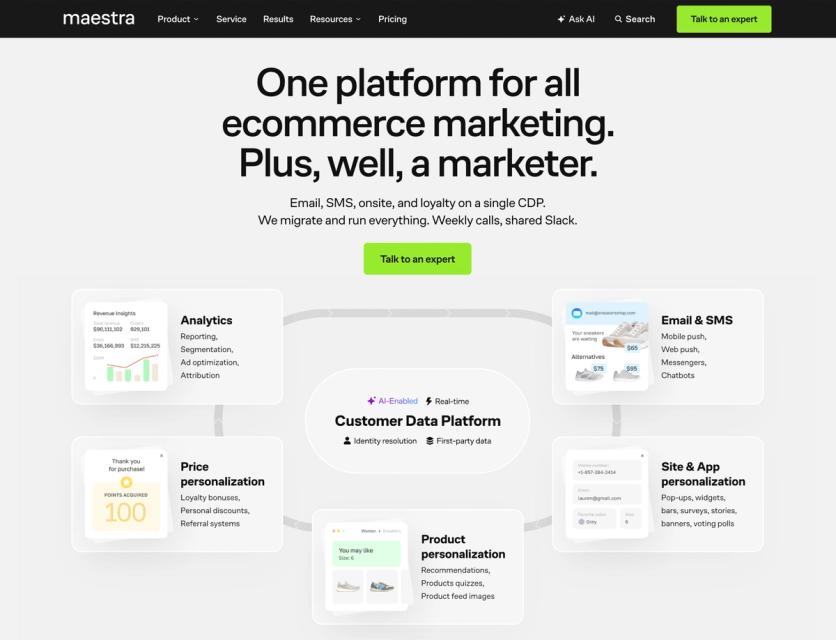
Maestra runs upsells inside a full marketing platform. Upsell bars, bundles, and product recommendations work on the site, and the same recommendations go into email, MMS and RCS messages, and push. All of it reads one real-time customer profile fed by Shopify data.
Every account gets a Forward Deployed Marketer who owns the upsell plan: which offers to show, where they go, and which version wins the A/B test. It’s a different purchase from a $10 app: Maestra makes sense when upsells are one of several jobs you want handled, or when stacked apps have started to slow the store down.
Key Features
Upsell Bars That Count Down to the Next Reward
The bar shows the exact amount left to reach the next benefit: free shipping first, then a gift or a higher reward tier. It switches with the running promotion, so during a gift-with-purchase sale it counts down to the free item.
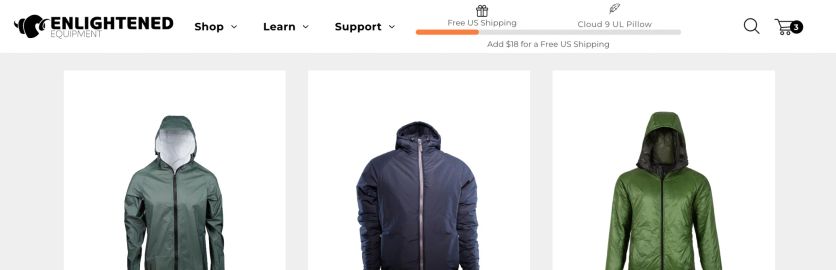
In a 38-day A/B test at Enlightened Equipment, an outdoor gear brand, the bar lifted average order value 38.7% against a control group, or $99.8 per order. Will Palumbo, Director of Marketing at Enlightened Equipment, describes the setup: “Maestra’s Forward Deployed Marketer set up the upsell bar in just one hour – all we had to do was approve the placement and design.”
Product Recommendations on 14 AI Algorithms
Fourteen ready-made algorithms cover the usual upsell spots: related products and “often bought with” bundles on product pages, complements to cart items, bestsellers on 404 and empty-search pages, and post-purchase cross-sells. On Shopify Plus stores, the same recommendations can also sit inside checkout. Business rules let the team pin pairings by color, price, category, or collection, and real-time inventory keeps out-of-stock sizes out of the widgets. A/B tests compare placements on add-to-cart rate, conversion, and AOV.
Defense Mechanisms, a tactical gear maker, set business rules for which gear fits together, so a shopper viewing a plate carrier sees compatible cummerbunds. Recommendations now influence 8.9% of its sales. Jessie Gullikson, Brand Director at Defense Mechanisms, values having both modes: “We can let the AI engine run on autopilot and pick products from our inventory. Or we can adjust it ourselves to match what we know works well together.”
Bundles With a Real Shopify Discount
Bundles carry a real Shopify discount. The shopper unticks what they don’t want, the total updates, and the discount applies only when the minimum number of items you set stays in the cart. Remove one item later, and the rest of the bundle goes back to full price.
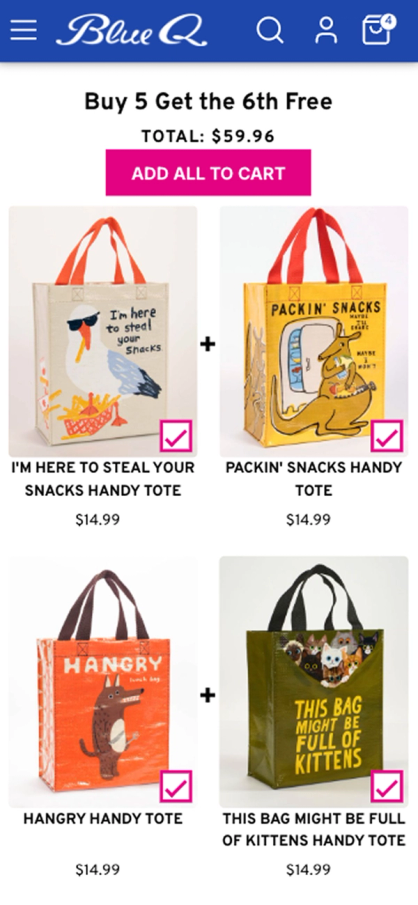
An “often bought with” bundle on Blue Q’s product page lets the shopper add the whole set in one click
The Same Recommendations in Email, Messages, and Push
Recommendation blocks drop into abandoned-cart, post-purchase, and back-in-stock messages, and they follow the same logic as the site. A shopper who skipped a bundle on the product page can see it again in the next email, matched to what they browsed.
JOLYN, a swimwear brand, matches tops and bottoms by color, material, and size on the site and in email, and filters out sizes that are sold out. Recommendations now influence 7% of its sales.
Maestra Support
The Forward Deployed Marketer comes with every plan, with no service tier or annual contract needed to get one. A marketer carries around 15 accounts, meets the brand on a weekly call, and answers in a shared Slack channel, usually within five minutes. A separate technical team handles bugs and integration questions.
For upsells, that means the marketer picks the placements, writes the business rules, designs the widgets to match the theme, and reads the A/B results with you.
Maestra Pricing
Maestra pricing for on-site upsells starts at $2,815/month. The price has two parts:
- The customer data platform, $1,300/month. Every plan starts with it. It includes the first 100,000 active profiles, product recommendations for every channel, reporting, ad audience sync, and the Forward Deployed Marketer.
- Onsite Experience Personalization, $1,515/month. This module puts the upsell bar, recommendation widgets and bundles, popups, quizzes, and badges on the site.
Each active profile beyond the first 100,000 adds $0.013 a month. A profile counts as active in a month when it receives a message, visits the site or app, or places an order. Anonymous visitors and inactive profiles are never billed, and the count is a rolling 12-month average, so a Black Friday spike doesn’t set the price for the year.
Other channels are modules on the same base. Unlimited email adds $700/month and carries the post-purchase cross-sell emails; SMS, loyalty, and push are priced separately. Billing is month-to-month with no long-term commitment, and migration and setup come without extra fees.
Where Maestra Wins
Upsells tested on revenue. Every placement can run against a control group, so the decision to keep a widget rests on AOV and conversion, not only on clicks.
Less manual merchandising. At Selkirk Sport, a pickleball brand, the site merchandising manager used to pick products for every recommendation placement by hand. Automated recommendations now save 15 hours a week of manual curation, and every page still shows in-stock products.
A marketer on the account. The Forward Deployed Marketer plans the offers, builds them, and reads the test results, so upsells keep improving while the in-house team is busy with launches.
Where Maestra Falls Short
No free or self-serve plan. For a store doing a few hundred orders a month, a $10 app is the sensible choice. A $2,815 setup pays off when Maestra also takes over the store’s email, SMS, and popup tools.
Upsells are one part of a platform. Brands that want a single one-click offer after checkout and nothing else will pay for capabilities they won’t use.
When to Switch to Maestra
Three scenarios repeat across published case studies:
- Your upsell widgets show the wrong products. Svaha USA moved its recommendations to Maestra, and 11.2% of its total revenue is now assisted by them.
- Each product line needs its own offers. Magnum Bikes runs separate journeys for premium e-bikes, pre-owned inventory, and accessories, and online order volume grew 111.7% in its first full year on Maestra.
- You pay for several overlapping tools. Urban Armor Gear moved three tools’ worth of work to Maestra and now spends 64% less on its marketing stack, about $100,000 a year.
2. Rebuy – Best for Subscription Brands That Want One App From Cart to Reorder
Starting price: From $25/mo for one package (up to 500 orders); priced by total store orders
Shopify App Store rating: 4.7 (last shown on October 13, 2026; the listing is currently unavailable)
Rebuy Personalization Engine covers more of the Shopify storefront than most apps here. Its recommendation rules drive product pages, its own Smart Cart, checkout on Shopify Plus, a one-click page after payment, and the thank-you page. Search and collections run on separate merchandising rules, and reorder pages linked from email need Shopify Plus.
It’s sold as four packages, each priced by the store’s monthly orders, so a store can start with the cart and add the rest later.
As of October 19, 2026, Rebuy’s Shopify App Store listing reads “This app is not currently available on the Shopify App Store,” and Rebuy hasn’t said why. New stores sign up on Rebuy’s own site, and its status page shows all systems operational.
Key Features
A Smart Cart That Raises the Order Before Checkout
Rebuy replaces Shopify’s cart drawer with its own. The Smart Cart shows recommendations, a tiered progress bar toward free shipping or a gift, gift-with-purchase offers, and a one-click switch from a one-time purchase to a subscription for stores on Recharge or Skio.
One Rules Engine From Search to Post-Purchase
Every widget runs on the same rules: show these products if the cart, customer, tag, UTM link, location, or discount code matches, or let the AI pick. The same logic carries over to checkout offers on Plus and the one-click page after payment, which works on every Shopify plan.
A/B Tests Against No Widget
Tests compare up to two variants with a control, so a store can check whether a widget earns money at all. Testing comes in its own package, Flows & A/B Testing.
Checkout Widgets on Shopify Plus
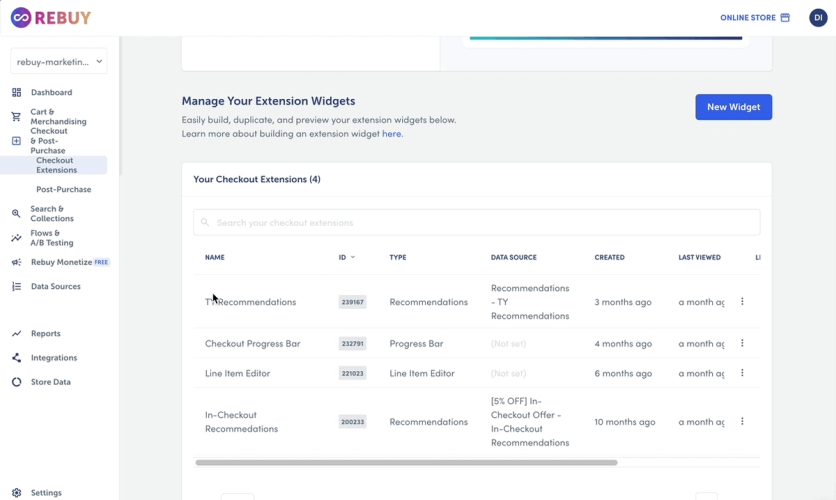
On Shopify Plus, the Checkout & Post-Purchase package adds widgets inside checkout: recommendations, a progress bar toward free shipping or a reward, and a Line Item Editor that switches an item to a subscription. Thank-you and order status page widgets work on every Shopify plan.
Rebuy Support
Chat and email support come with every plan, with live help on weekdays. A dedicated success manager comes with the $499/mo Premium Support add-on or the top plan, and implementation help is sold as a paid service. A US lab-equipment brand credited its account manager in July 2026 and added: “Since using Rebuy, our UPT increased by 10%, helping drive strong performance in H1 and contributing to a 12% lift in sales overall.”
Rebuy Pricing
Each package costs from $25/mo to $45/mo for stores with up to 500 orders a month: Checkout & Post-Purchase $25, Search & Collections $35, Flows & A/B Testing $35, and Cart & Merchandising $45. Buying two to four packages cuts the total by 10–30%. The price climbs with orders: Cart & Merchandising alone reaches $176/mo at 2,000 orders and $425/mo at 5,000, and all four packages come to roughly $910/mo at 5,000 orders. Above 7,500 orders, pricing is quoted. Every package starts with a 14-day trial, and the order count includes point-of-sale orders and subscription renewals.
The free plan, Rebuy Monetize, shows other brands' ads on the thank-you page and pays the store per order; it doesn’t run your own upsells.
Where Rebuy Wins
Range in one app. Few apps on this list cover search, the cart, checkout, the page after payment, and reorder pages in one app, which lets a store retire several cart, bundle, and search apps.
Subscription upsells. Switching a one-time buyer to a subscription inside the cart is built in for Recharge and Skio stores.
Where Rebuy Falls Short
A bill that grows with every order. POS sales and subscription renewals count toward the tier, and each package is priced separately, so a 5,000-order store running all four pays several hundred dollars a month.
Cart stability. A UK store wrote in June 2026 that a Rebuy update took its cart down: “A deployment made by Rebuy caused a critical issue on our Shopify store which prevented customers from accessing and using the cart.” Another store described hours of CSS work and a cart that appeared only some of the time. Rebuy also lacks the Built for Shopify badge.
Compared to Maestra
Rebuy and Maestra overlap more than any other pair here: both run recommendations from the product page through the cart and into email. Rebuy adds a one-click page after payment on every Shopify plan. Maestra keeps the site, email, and messages on one customer profile and includes a marketer who designs the offers and reads the A/B results, a role Rebuy sells as a $499/mo add-on.
3. ReConvert – Best for Customizing the Pages After Payment
Starting price: Free plan (up to 50 orders or $50 in upsell revenue a month); paid from $9.99/mo
Shopify App Store rating: 4.8
ReConvert started as a post-purchase app and still leads with it. A one-click offer page appears after payment and before the thank-you page, and the thank-you and order status pages themselves become editable, with offers, forms, and a birthday collector. Its developer now goes by Upsell.com.
The app also reaches back into the store, with product-page, cart, and cart-drawer offers. It has one of the largest review bases in the category.
Key Features
One-Click Offers Between Checkout and Thank You
Up to two post-purchase pages can follow payment, and an accepted offer is charged without the customer re-entering card details.
An Editable Thank-You and Order Status Page
A drag-and-drop editor turns Shopify’s fixed thank-you page into a page with product offers, a feedback form, and a birthday collector that passes dates to your email platform. The same widgets work on the order status page, which customers revisit to track shipping.
Rules by Product, Cart Value, and Segment
Offers can target a product or collection, a cart value, or a customer segment, combined with AND/OR logic. A/B tests come with every plan.
Bundle and Recommendation Widgets
Bundle and product-recommendation widgets put several products into one post-purchase offer, shown as a grid, a slider, or a list. Bundles support physical products only, and every widget comes with every plan.
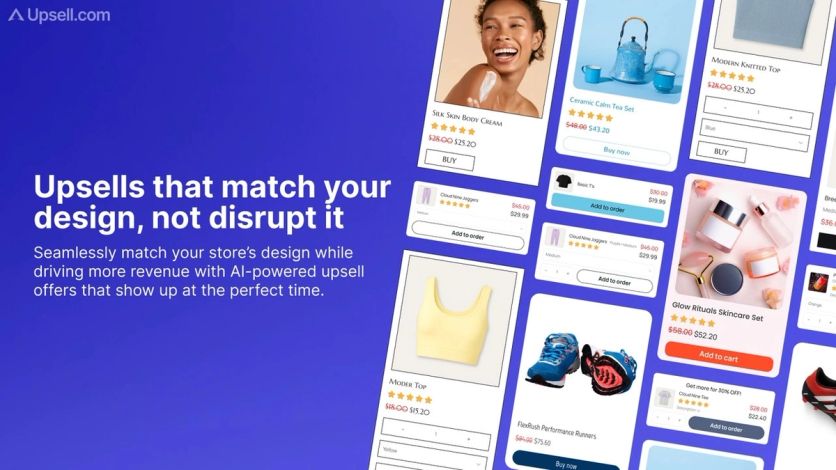
ReConvert, now run by Upsell.com, styles post-purchase offers to match the store’s own product cards
ReConvert Support
Live chat runs 24/7 on every plan. Scale adds priority chat and guided onboarding, and Elite adds a dedicated success manager and a private Slack channel. Recent reviews often credit the support team with fast setup. A US health brand wrote in September 2026: “I had my upsells live in 10 minutes.”
ReConvert Pricing
Free up to 50 orders or $50 in upsell revenue a month. Growth runs from $9.99/mo to $149.99/mo up to 2,000 orders, Scale starts at $299/mo up to 10,000, and Elite at $899/mo up to 20,000, with lower rates on annual billing and custom pricing above 20,000. The tier follows whichever is higher over the last 30 days, store orders or upsell revenue in dollars.
Where ReConvert Wins
The post-purchase experience. Few apps here do as much with the pages after payment: two one-click offer pages, plus a thank-you and order status page you can design like a landing page.
Where ReConvert Falls Short
Billing that tracks the whole store. A Singapore store wrote in December 2025: “They bill you rightaway after the trial based on your TOTAL STORE ORDERS.” Another store reported in January that usage fees exceeded the upsell revenue they produced.
Unwanted third-party offers. A US store wrote in January 2026: “They install a bunch of scam offers like some ‘capital one affilate offers’ on your checkout page that show to all your customers without your consent.” ReConvert also lacks the Built for Shopify badge.
Compared to Maestra
ReConvert owns the minutes after payment. Maestra owns the weeks that follow: post-purchase cross-sell emails built from what the customer bought, plus upsell bars and recommendations on the next visit. A dedicated success manager comes with ReConvert’s Elite plan from $899/mo; at Maestra, a marketer who designs and tests the offers comes with every plan.
4. Zipify OneClickUpsell – Best for Paying Only for the Upsells You Sell
Starting price: From $9.95/mo after a 30-day free trial
Shopify App Store rating: 4.6
Zipify OneClickUpsell covers every placement in one app: a product-page widget, pre-purchase pop-ups, a slide-out cart drawer, checkout offers for Shopify Plus stores, one-click upsells and downsells after payment, and the thank-you page.
Its pricing model sets it apart. The bill follows the upsell revenue the app brings in, not the number of orders the store takes.
Key Features
Every Placement From Product Page to Thank You
Offers can follow the shopper through the whole visit and continue after payment, where one-click upsells and downsells chain together. Checkout offers need Shopify Plus.
A Slide Cart With a Reward Bar
The cart drawer shows up to eight upsell products and a reward bar with up to three tiers, such as free shipping and then a gift. Stores can save up to 15 drawer designs and switch between them for campaigns.
Split Tests With Revenue per Visit
Split tests compare two offers in the app, or up to four variants with the managed Zipify Plus service, and report views, conversion, revenue, and revenue per visit for each. AI picks build offers from store products and past orders.
PostProfit Ads on the Thank-You Page
PostProfit, part of OneClickUpsell, shows partner-brand ads on the thank-you and order status pages and pays the store each time an advertiser’s paid action happens. Payouts go through PayPal, and the ads can be switched off at any time.
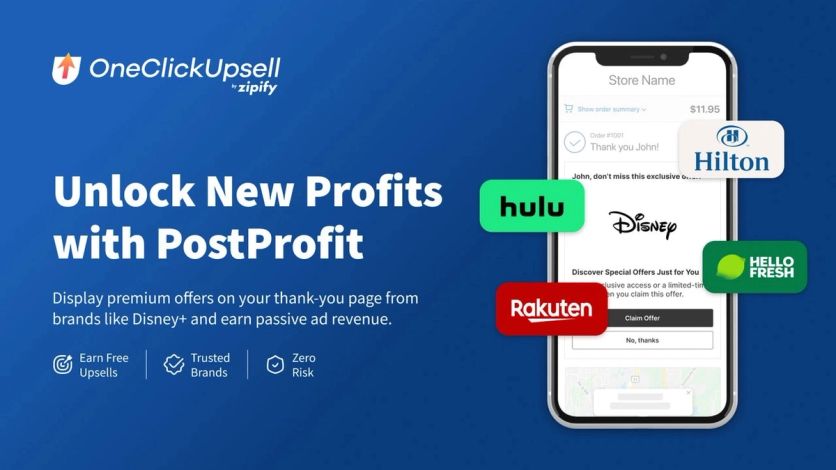
PostProfit, part of Zipify OCU, shows offers from other brands on the thank-you page and shares the ad revenue with the store
Zipify OCU Support
Support runs over live chat, phone, and email. Shopify Plus brands can hand the whole program to Zipify Plus, a managed service with a flat fee. A US brand on Zipify Plus wrote in July 2026 that the team went beyond technical setup, “actually spending time in our store, setting up split tests, adding custom features to the cart for us”.
Zipify OCU Pricing
The price steps up with monthly upsell revenue: $9.95/mo up to $200, $25 up to $500, $49 up to $1,000, $99 up to $2,500, and so on in 14 steps to a $999/mo cap once upsell revenue passes $40,000. Revenue is checked every six hours and includes shipping and tax on upsell items. Billing is month-to-month after a 30-day trial.
Where Zipify OCU Wins
Costs tied to results. A store that sells $150 in upsells pays $9.95, whatever its order count, and the $999 cap means a store selling more than $40,000 in upsells pays 2.5% or less.
Where Zipify OCU Falls Short
Reliability complaints. A multi-year user wrote in April 2026 that upsell payments stopped going through: “In the past few weeks, upsell payments stopped being captured completely - every order has an upsell, but no payment.” A February review describes an offer that never triggered after two hours of setup.
Costs rise with success. Below the cap, every step up in upsell revenue raises the bill, and a UK pet store’s July 2026 review reads in full: “Far too expensive for larger stores.”
Compared to Maestra
Zipify OCU and Maestra both cover the storefront end to end. Zipify adds the one-click page after payment; Maestra adds the customer’s next email and message, with the same recommendation logic and a single profile behind every offer.
5. Frequently Bought Together – Best for Amazon-Style Bundles on the Product Page
Starting price: Free plan (up to 3 manual bundles); paid from $9.99/mo
Shopify App Store rating: 4.9
Frequently Bought Together, made by the Spanish developer Code Black Belt, does one job: the “customers also bought” bundle under the product, with a single button that adds the whole set. It carries the Built for Shopify badge.
The narrow scope is deliberate: there are no post-purchase or thank-you-page offers.
Key Features
Bundles Trained on Your Own Orders
AI suggests bundles from the store’s order history, and manual bundles override it for seasonal sets or pairings you already know sell. AI picks come with the paid plans; the free plan is manual only.
Four Bundle Discounts
A bundle can carry a percentage off, a fixed amount off, the cheapest item free, or free shipping. Star ratings from Judge.me, Loox, and other review apps show inside the widget.
Widgets Beyond the Product Page
Paid plans add a cart-page widget and a checkout block. The cart widget shows general and random recommendations rather than your bundles, and the checkout block needs Shopify Plus.
Global and Random Recommendations
Professional plans add global recommendations, which push chosen products into bundles across the store, for example to clear extra stock, and random picks by vendor, type, collection, or tag. Bundles show manual picks first, then automatic, global, and random ones, in that order.
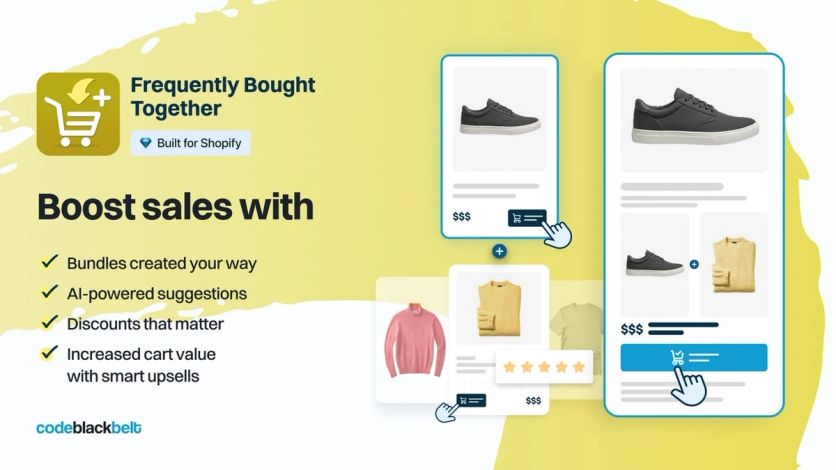
Frequently Bought Together places a bundle of complementary items under the product, with one button to add the set
Frequently Bought Together Support
Paid plans get priority 24/7 support by email; the free plan gets basic support. Recent reviews are mostly short and positive. An Australian store wrote in February 2026: “Since implementing it, we’ve seen a noticeable improvement in average order value because customers naturally add complementary products to their orders.”
Frequently Bought Together Pricing
The free Starter plan allows up to 3 manual bundles. Professional costs $9.99/mo up to 50 orders, $24.99/mo up to 500, and $39.99/mo above that. All three Professional tiers have the same features, move automatically with monthly orders, and start with a 14-day free trial.
Where Frequently Bought Together Wins
A stable bundle widget for little money. The app keeps a 4.9 rating on one of the larger review bases in the category, and reviewers describe the setup as quick.
Where Frequently Bought Together Falls Short
One placement. With no post-purchase page and a cart widget that can’t show your bundles, the app covers only the product page well.
Manual bundles take effort. A US store wrote in January 2026: “Struggling to create manual bundles. It is not user friendly.”
Compared to Maestra
Frequently Bought Together is the cheaper choice for one bundle widget. Maestra’s “often bought with” bundles sit in the same spot but share their logic with cart widgets, the upsell bar, and email, and every placement can be tested against a control group.
6. Candy Rack – Best for Pre-Checkout Offers With a Built-In Slide Cart
Starting price: From $29.99/mo (up to 50 orders); no free plan for live stores
Shopify App Store rating: 4.9
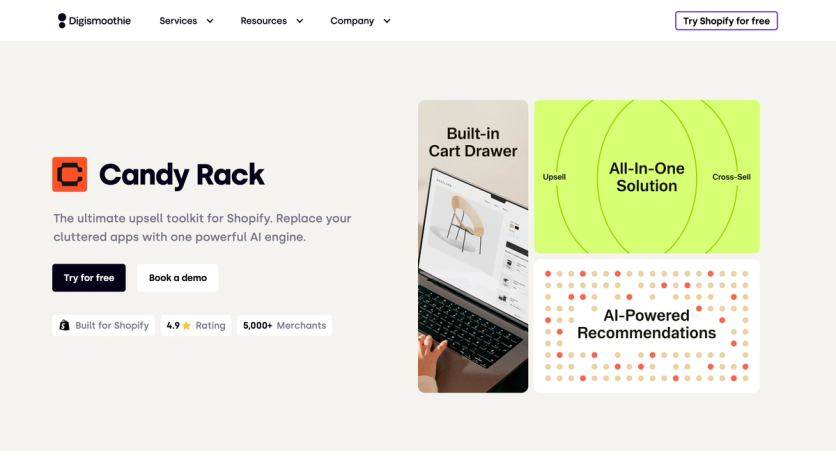
Candy Rack, built by the Prague studio Digismoothie, concentrates on the moments before checkout. Product-page bundles, an add-to-cart pop-up, and its own slide cart do most of the work, and a one-click page follows after payment.
The price is a monthly fee by order volume with no cut of upsell revenue, and every paid plan comes with a 60-day money-back guarantee.
Key Features
Volume Bundles That Show the Saving
Each product can carry up to 10 quantity tiers, each with its own price and an automatic savings badge. Shoppers can pick a different variant for each unit, so “buy three” works for three colors.
A Slide Cart With Add-Ons Tied to Products
Candy Rack’s own cart drawer carries upsells and line-item add-ons, such as a warranty attached to one product. Remove the product, and its add-on leaves the cart with it.
A Choice of Recommendation Engine
For each offer, the merchant picks the source of AI picks: Candy Rack’s own engine, Google Gemini, or Shopify’s product recommendations. Manual offers work alongside them.
A Rewards Bar Toward Free Shipping or a Gift
The slide cart can show a rewards bar with the amount left to spend for free shipping or a gift, updated as items change. The bar only shows the goal: the free-shipping rate or discount itself is set up in Shopify.
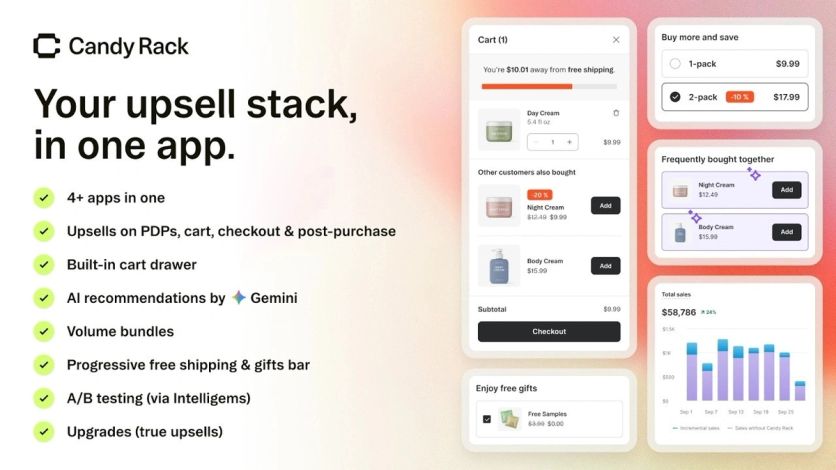
Candy Rack’s slide cart shows a free-shipping bar and add-on offers; volume bundles sit on the product page
Candy Rack Support
Chat and email support run 24/7 on every paid plan. Shopify Plus stores also get priority support, onboarding calls, and upsell strategy advice. A UK store wrote in July 2026: “We have been using Candy Rack for at least 2 years now and it has been seamless.”
Candy Rack Pricing
From $29.99/mo for stores with up to 50 orders a month, $39.99/mo up to 200, and $59.99/mo up to 500, rising to $399.99/mo above 5,000 orders, with a custom quote above 10,000. The tier is set once, at installation, from the store’s orders in the previous 30 days; there’s no revenue share, and each plan starts with an 8-day free trial.
Where Candy Rack Wins
One app for the storefront. Bundles, pop-ups, a slide cart, and post-purchase offers come in a single subscription, so a store can drop a separate cart-drawer app.
Predictable bills. A flat monthly fee with no percentage of upsell revenue keeps the cost the same in a record month.
Where Candy Rack Falls Short
Testing costs extra. A/B tests run through Intelligems, a separate subscription, and only for offers shown before checkout.
No free plan for live stores. Even a store under 50 orders pays $29.99. The only critical review of the past year, posted in July by a Czech store, disputes the free dev-store use and the support: “unfortunately it is an AI driven app with zero human interactions”.
Compared to Maestra
Candy Rack covers the storefront well at a fraction of Maestra’s price. Maestra adds the parts that live outside the site: the same recommendation logic in email and messages, and A/B tests against a control group built into the platform rather than bought separately.
7. Wiser – Best for Recommendation Widgets on a Small Budget
Starting price: Free plan (up to 50 orders a month); paid from $9/mo
Shopify App Store rating: 4.9
Wiser, built by Expert Village Media, is a recommendation app first. Its widgets cover frequently-bought-together bundles, related products, picks based on browsing, bestsellers and new arrivals, and a product quiz.
The entry plans are among the cheapest here, and they include post-purchase offers. The cart drawer and checkout upsells sit on a custom-priced plan.
Key Features
Recommendation Widgets for Every Page
Bundles show a combined price and add the whole set in one click. Related products, “inspired by your browsing” picks, and auto-updating bestseller and new-arrival rows fill the home, product, and cart pages, and manual picks override the AI where you know the right pairing.
Offers After Payment and in Email
Every plan includes a post-purchase offer and an upsell on the thank-you and order status pages. Recommendation blocks also drop into most email tools that accept custom HTML.
A/B Tests on Recommendation Logic
Built-in split tests compare which recommendation logic sells more in a given spot, so the choice between, say, “frequently bought together” and “similar products” rests on results.
Product Add-Ons Next to Add to Cart
A product-page block lists optional extras with checkboxes, so shoppers can include them before adding the main item to the cart, in a grid or a list view.
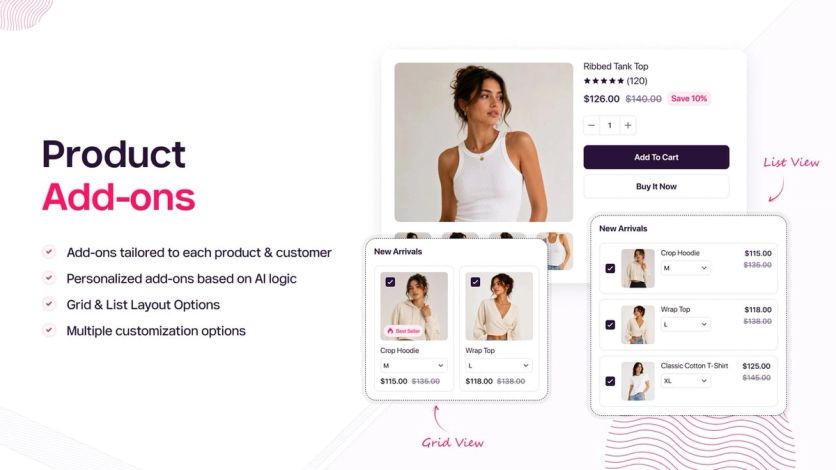
Wiser’s product add-ons let shoppers tick extra items in a list or grid view next to the main product
Wiser Support
Help comes through live chat, a help center, email, phone, and booked demo calls; support hours aren’t published. Many recent reviews name individual support reps and describe setup help during the first days after install.
Wiser Pricing
Free up to 50 orders a month, then $9/mo (51–100), $19/mo (101–300), $49/mo (301–500), $99/mo (501–1,000), and $199/mo (1,001–2,000), with custom pricing above that. Paid plans come with a 14-day free trial. The bill counts every store order and moves to the next tier automatically each month. The Enterprise plan, priced on request, adds the advanced cart drawer, a free-shipping progress bar, tiered discounts, checkout upsells for Shopify Plus stores, and AI search.
Where Wiser Wins
Range of recommendation types for the price. Wiser covers bundles, browsing-based picks, a quiz, and email blocks, with paid plans from $9 a month.
Where Wiser Falls Short
The best upsell tools are custom-priced. The cart drawer, progress bar, tiered discounts, and checkout upsells need Enterprise. Charges are also the theme of the one critical review of the past year, edited in March by a US store: “they take a percentage share of ALL sales on our site”.
No Built for Shopify badge. Wiser doesn’t carry the badge Shopify gives apps that meet its performance and design standards.
Compared to Maestra
Wiser and Maestra both put recommendations into email. The difference is where the data lives: Wiser’s blocks sit inside a separate email tool, while Maestra’s site widgets, emails, and messages read the same customer profile. The free-shipping progress bar that costs an Enterprise contract at Wiser is part of Maestra’s onsite module.
8. Bold Upsell – Best for Every Placement at One Fee Tied to Your Shopify Plan
Starting price: From $4.99/mo (Basic Shopify); no free plan
Shopify App Store rating: 4.4
Bold AI Upsell & Cross-Sell comes from Bold Commerce in Winnipeg, and it’s one of the oldest apps on the Shopify App Store, launched in 2012. It carries the Built for Shopify badge.
It covers more touchpoints than most apps here: product page, cart, cart drawer, checkout on Plus, the post-purchase page, and a post-purchase email.
Key Features
Smart Offers With Manual Override
AI cross-sells pick pairings from the store’s own orders once about 30 days of order data exist. Manual offers run alongside them, and products can be excluded from the AI picks.
Funnels and Free Gifts
Post-purchase funnels branch on accept and decline, and free-gift offers add an item automatically when the cart hits a spend threshold or contains a set product. Built-in discounts mean no separate discount app.
Subscribe-and-Save With Bold Subscriptions
Stores that also run Bold Subscriptions, a separate app, can offer a subscription upgrade on the product page and in subscriber emails.
Upgrade Offers That Swap the Cart Item
A product-page pop-up can offer a bigger size, a larger pack, or a premium version of the item. If the shopper accepts, the upgrade replaces the original item in the cart.
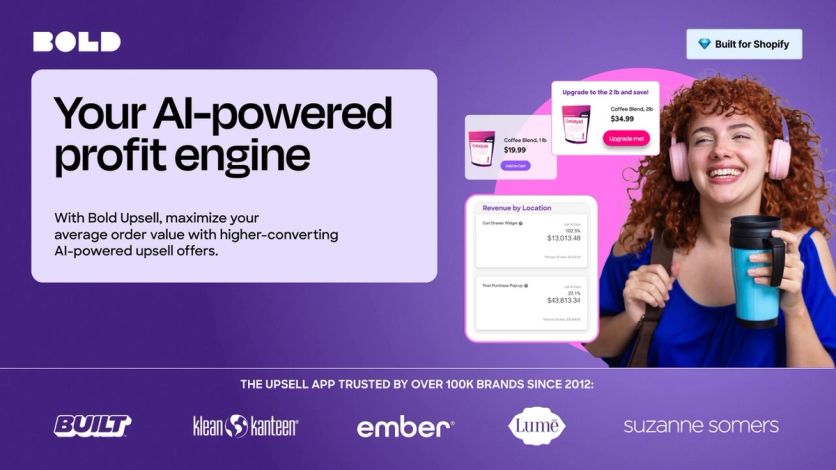
Bold suggests upgrade offers, such as a bigger pack size, and reports upsell revenue by placement
Bold Upsell Support
Support runs through the help center’s chat; hours aren’t published. Bold’s co-founder replies to reviews personally, and a store in Italy wrote in June 2026: “I very much appreciated having direct support from Jay, co-founder of Bold.” An October 2025 review describes reaching only a chatbot when something broke.
Bold Upsell Pricing
The fee follows your Shopify plan, not your order volume: $4.99/mo on Basic, $24.99/mo on Grow, $74.99/mo on Advanced, and $399.99/mo on Plus, where checkout offers are included. Every plan has a 7-day trial and no revenue share. The pricing model has changed twice since October 2025, and stores that installed earlier may still be on legacy plans, so confirm the current terms before installing.
Where Bold Upsell Wins
The widest reach for a small fee. A Basic Shopify store gets product-page, cart, post-purchase, and email offers for $4.99 a month.
Where Bold Upsell Falls Short
Reliability. A US store wrote in January 2026: “our add to cart and completed checkout rates have dropped by 70% due to interruption with our code”. Another review from the same month calls the app buggier than ever. There’s no documented A/B testing and no report export.
Limited payment coverage after checkout. Post-purchase offers show only to buyers who pay with Shopify Payments or Shop Pay.
Compared to Maestra
Bold spreads one fee across many placements; Maestra spreads one customer profile across them. That matters when an offer should depend on what the customer did in the last email or on the last visit, and when every new placement should be tested against a control group before it stays.
9. Honeycomb – Best for Upsell Funnels With Built-In Split Tests
Starting price: Free plan (100 funnel views a month); paid from $54.99/mo
Shopify App Store rating: 4.7
Honeycomb, from Conversion Bear, builds upsell funnels: an offer on the product page, a pop-up when the shopper heads to checkout, a one-click offer after payment, and another on the thank-you page. If the shopper declines, a downsell can follow.
Native split tests come with every plan, the free one included.
Key Features
Funnels With Downsell Paths
Each funnel can branch: accept one offer and the next appears, decline and a cheaper alternative follows. Discounts can stack, and custom fields let shoppers personalize an item before adding it.
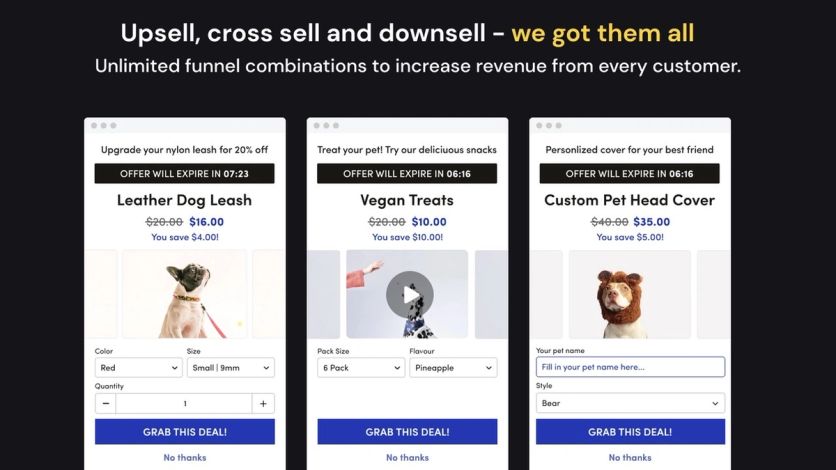
Honeycomb offers can upgrade an item, add a cross-sell, or collect a personalization field, each with a countdown timer and a “No thanks” exit
One-Click Post-Purchase Offers
After payment, accepted offers merge into the original order, so the customer doesn’t re-enter card details and the store fulfills a single order.
Split Tests on Every Plan
Native A/B tests compare offers and funnels, free plan included. An autopilot mode picks products from the cart contents when you don’t want to set rules.
Thank-You Page Offers Added to the Original Order
Funnels can also run on the thank-you page, where an accepted offer either creates a new order or is added to the original one. If the shopper doesn’t pay for the added item within 10 minutes, the app changes the order back.
Honeycomb Support
Support runs through email and live chat; hours aren’t published. Some help links in the Shopify listing lead nowhere, though the help center itself still works and keeps a list of apps that conflict with its cart funnels.
Honeycomb Pricing
Free covers 100 funnel views a month with Honeycomb branding. Silver costs $54.99/mo for 2,000 views, Gold $109.99/mo for 5,000, and Platinum $169.99/mo for 10,000, each with a 7-day trial. An Unlimited plan runs $339.99/mo. Pricing follows views, not orders or upsell revenue.
Where Honeycomb Wins
Testing on a budget. Split tests and downsell paths on every plan let a small store test funnel logic that other apps charge more for.
Where Honeycomb Falls Short
Signs of slow upkeep. Only three reviews appeared in the past year, and the one critical review comes from a Polish store on the $340 plan in June 2026: “The app is full of bugs, and there is virtually no support when problems arise, even if you’re paying for the highest plan at $340 per month.” The app also lacks the Built for Shopify badge.
Views get expensive. A store with steady traffic outgrows 2,000 funnel views quickly, and 10,000 views cost $169.99 a month.
Compared to Maestra
Honeycomb’s funnels end at the thank-you page. Maestra continues after it with post-purchase cross-sell emails, and a Forward Deployed Marketer keeps the offers working when the theme or the app stack changes.
Which Shopify Upsell App Fits Your Store
Maestra is the best fit for mid-size and enterprise Shopify brands that want upsells on the site and in email to run from one customer profile, with a Forward Deployed Marketer choosing and testing the offers. Its published results are specific: a 38.7% AOV lift from one upsell bar at Enlightened Equipment, and 31.7% higher AOV on Svaha USA orders with a recommendation click.
The other eight each do one job well. Rebuy covers the most of the Shopify path in one app, ReConvert owns the pages after payment, Zipify OCU bills on upsell revenue, and Wiser is the cheapest way to start. Frequently Bought Together and Candy Rack focus on the product page and cart, Bold ties its fee to your Shopify plan, and Honeycomb builds split-tested funnels.
Before installing anything, model the bill at next year’s order volume and launch the first offer as an A/B test against a control group. Read reviews from the last year only: several apps here have changed their pricing models, so older reviews describe bills that no longer exist.
Book a Maestra demo to see upsells that share one customer profile with your email and messages.
Frequently Asked Questions
- Maestra, Rebuy, and ReConvert lead for different stores. Maestra fits mid-size and enterprise brands that want a marketer to design and test upsells on the site and in email – recommendations influence 8.9% of sales at Defense Mechanisms. Rebuy fits subscription brands that want one app from the cart to the page after payment. ReConvert fits stores focused on the pages after payment, with a free plan up to 50 orders.
- Most Shopify upsell apps cost $0–$50 a month for a small store. Wiser, ReConvert, Honeycomb, and Frequently Bought Together have free plans, Bold starts at $4.99, Zipify OCU at $9.95, and Rebuy at $25 per package. Bills grow with store orders, upsell revenue, or funnel views depending on the app, so price each one at next year’s volume.
On-site upsells on Maestra start at $2,815/month: the customer data platform ($1,300, with the first 100,000 active profiles, recommendations, and a Forward Deployed Marketer included) plus the onsite personalization module ($1,515). Billing is month-to-month. Selkirk Sport saves 15 hours a week of manual product curation with Maestra’s automated recommendations. - Most placements do; only offers inside checkout itself need Shopify Plus. Product-page, cart, one-click post-purchase, and thank-you-page offers work on regular plans, though thank-you and order status page apps work on Basic and higher plans. Post-purchase offers also depend on the payment method: buy-now-pay-later and most wallet payments skip the offer page, and a customer can accept at most three post-purchase offers per checkout.
- Yes, as long as each app owns a different placement. Conflicts often start when two apps compete for the cart drawer or cart page, and some vendors publish lists of apps their widgets can’t run alongside. In Maestra’s benchmarks, its widgets on standard templates added about 5–7% to mobile time to interactive, while a typical email platform plus a reviews or recommendations app added about 18%.
- Maestra goes furthest: its recommendations run in email, MMS, RCS, messengers, and push from the same customer profile as the site – Unidragon earns 7.4% of its revenue from one cross-sell email flow. Rebuy and Wiser add recommendation blocks to a separate email tool, ReConvert passes birthday data to one, and Bold sends a post-purchase email offer.