
15 Best Bundle Apps for Shopify in 2026 (Free & Paid)

Bundling pays off when it’s done right: in one A/B test, baby brand DockATot lifted average order value 55% and revenue per user 86% after adding a guided bundle builder (Swanky). But the 15 apps below take very different approaches – some create real Shopify products with clean SKUs, others apply discount logic at checkout.
This guide compares their ratings, pricing, and inventory handling, then shows you how to add bundles to your store.
Quick Verdict on the Best Bundle Apps for Shopify
The best bundle apps for Shopify in 2026 are Simple Bundles for fulfillment accuracy, Fast Bundle for storefront presentation, Kaching for quantity breaks, Bundler for budget-friendly mix-and-match, and Maestra for bundle promotions driven by real-time customer data.
Best for data-driven bundle promotions: Maestra – picks the products to pair for each shopper and promotes those bundles on your site, in email and SMS, and across every other channel
Best for 3PL fulfillment and inventory accuracy: Simple Bundles – real Shopify products that break down into component SKUs for fulfillment, reporting, and VAT
Best for visual bundles on product pages: Fast Bundle – six bundle types with ready-made templates and AI frequently-bought-together suggestions on paid plans
Best for volume discounts and quantity breaks: Kaching Bundles – quantity breaks, BOGO, and Buy X Get Y deals with built-in A/B testing
Best for budget-friendly mix-and-match bundles: Bundler – mix-and-match from $9.99/mo, on top of a free plan with no order or revenue cap
Best for free native fixed bundles: Shopify Bundles – fixed bundles and multipacks built in the Shopify admin at no cost
Content:
What Shopify Bundles Are and Why They Matter
Shopify bundles are product groupings that let customers buy two or more items together, usually at a discount. Merchants use bundle apps to combine products into fixed sets, mix-and-match boxes, or quantity breaks, increasing average order value while keeping inventory in sync between each bundle and its component products.
Bundle apps support several combination types. Fixed bundles pair predetermined products, like a skincare set with cleanser and toner. Mix-and-match bundles let customers build their own combinations from a curated selection, such as choosing three t-shirts from a collection. Quantity breaks reward customers for buying more of the same item with tiered discounts.
Bundles solve three business problems at once.
They raise average order value. A customer sees a bundle priced at $75 instead of buying individual items worth $90, and the perceived value drives a bigger cart.
They move inventory strategically. Pairing slow-moving products with bestsellers clears stock while protecting margin – useful for seasonal items and end-of-life products.
They simplify shopping. A customer looking for camping gear appreciates a tent bundle with stakes and rain cover instead of hunting for each component separately.
The catch is inventory. Without the right app, bundled stock desyncs from component stock, and you oversell. The best bundle apps for Shopify sync stock levels between bundles and individual products, prevent overselling, and keep reporting clean.
The Best Shopify Bundle Apps at a Glance
App | Rating | Pricing | Best For |
|---|---|---|---|
Maestra | From $2,000/mo | Data-driven bundle promotions across your site, email, SMS, and every other channel | |
Simple Bundles & Kits | Free plan, from $14/mo | 3PL fulfillment and inventory accuracy | |
Fast Bundle | From $19/mo | Visual bundles on product pages with AI recommendations | |
Kaching Bundles | From $14.99/mo | Volume discounts and quantity breaks | |
FoxSell Bundle Builder | Free up to $1K, from $49/mo | Native bundle products with infinite variants | |
ProfitKoala | From $12.99/mo | Limited-time promotional offers | |
Vitals | $29.99/mo + usage fees | All-in-one marketing suite (40+ tools) | |
BOGOS | Free plan, from $29.99/mo | Free gifts and BOGO deals | |
Bundler | Free plan, from $9.99/mo | Budget-friendly mix-and-match with POS | |
Profit Pumper | Free up to $300, from $9.99/mo | First-time bundle setups | |
Shopify Bundles | Free | Basic fixed bundles at zero cost | |
Revy | Free up to $100, from $9.99/mo | Stackable discounts on a budget | |
Rapi | Free up to $100, from $15/mo | Wide bundle variety with upsells | |
Hulk Product Options | From $10/mo | Product customization and option-based kits | |
Zoorix | Free plan, from $7.99/mo | Tiered pricing with AI recommendations |
Ratings and pricing were checked on the Shopify App Store in October 2026. Ratings above 4.8 stars signal strong user satisfaction. Free plans work well for testing, but paid tiers unlock the features you’ll need to scale.
Maestra – Best for Data-Driven Bundle Promotions
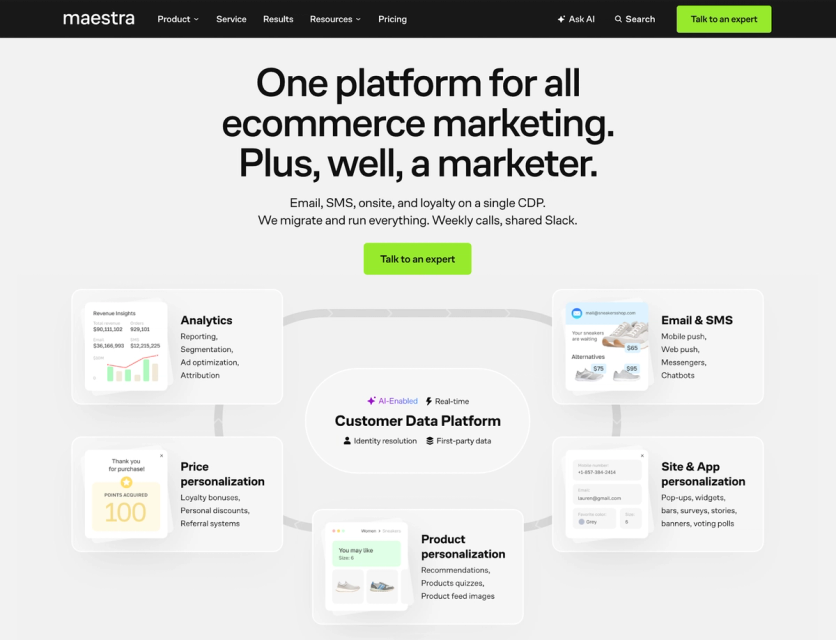
Maestra decides which products to pair for each shopper and promotes those bundles on your site, in email and SMS, and across every other channel. Most apps on this list build bundles as storefront widgets; Maestra is one platform for the whole customer lifecycle, so the same shopper data powers your recommendations, promotions, and loyalty rewards.
Bundle Types
Maestra doesn’t create fixed or mix-and-match bundle SKUs. Instead, it supports bundle-style selling three ways: frequently-bought-together recommendations from 14 ready-to-use recommendation engines (including “often purchased with items in product list”), promotions scoped to specific SKUs or categories (like 10% off add-ons right at checkout), and loyalty mechanics – points, tiers, referrals, and custom reward structures.
Key Features
The platform centers on a real-time customer data platform that unifies behavior from every touchpoint into a single profile. A drag-and-drop email builder, omnichannel flow automation, and on-site personalization tools (popups, quizzes, upsell bars) let you promote bundle offers through targeted campaigns. Recommendations embed anywhere – product pages, cart, email, SMS – and automatically filter to in-stock, size-matched, and region-specific items.
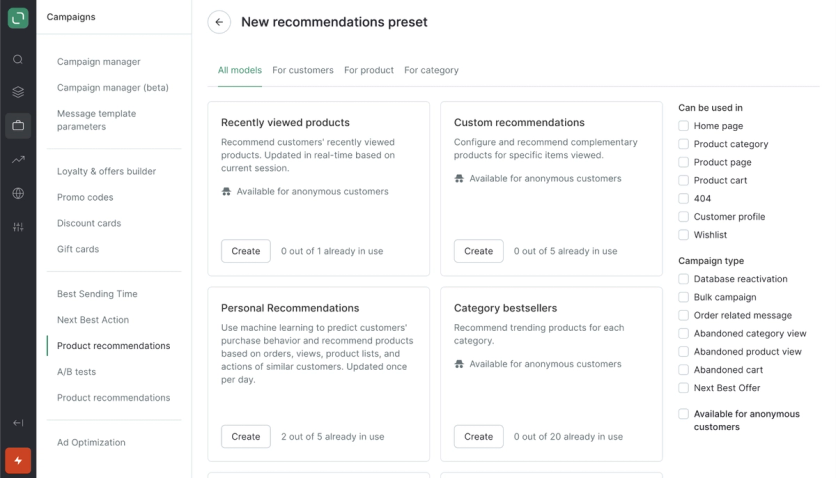
Choosing a model for a new recommendations preset in Maestra, with filters for where it can run, from product pages and the cart to abandoned-cart messages
Real Bundle Results From Maestra Clients
Maestra’s bundle mechanics are live in production stores, with revenue numbers to show:
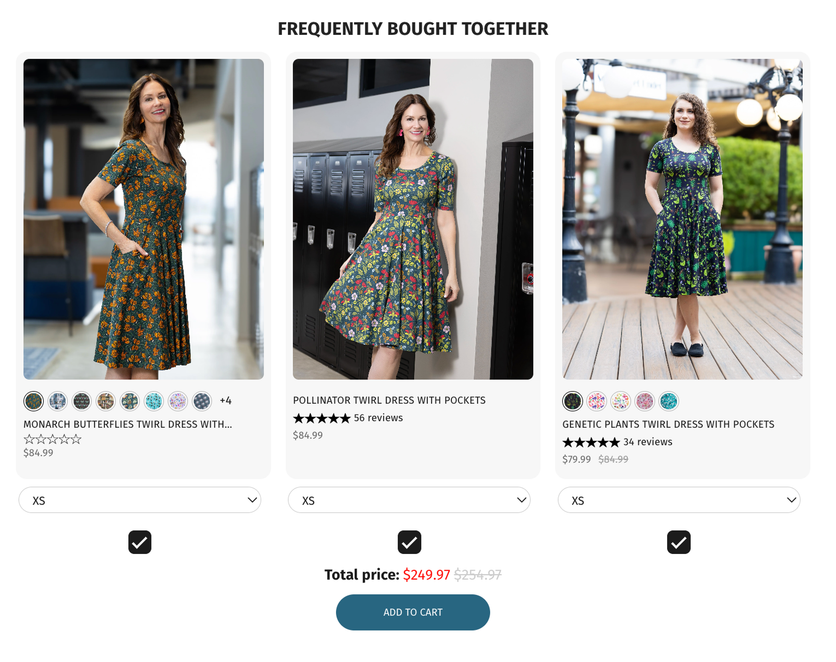
- Svaha USA runs Frequently Bought Together as a three-product bundle at a discount, with one-click add-all. Recommendations assist 11.2% of Svaha’s total revenue, and orders with a recommendation click carry 31.7% higher AOV.
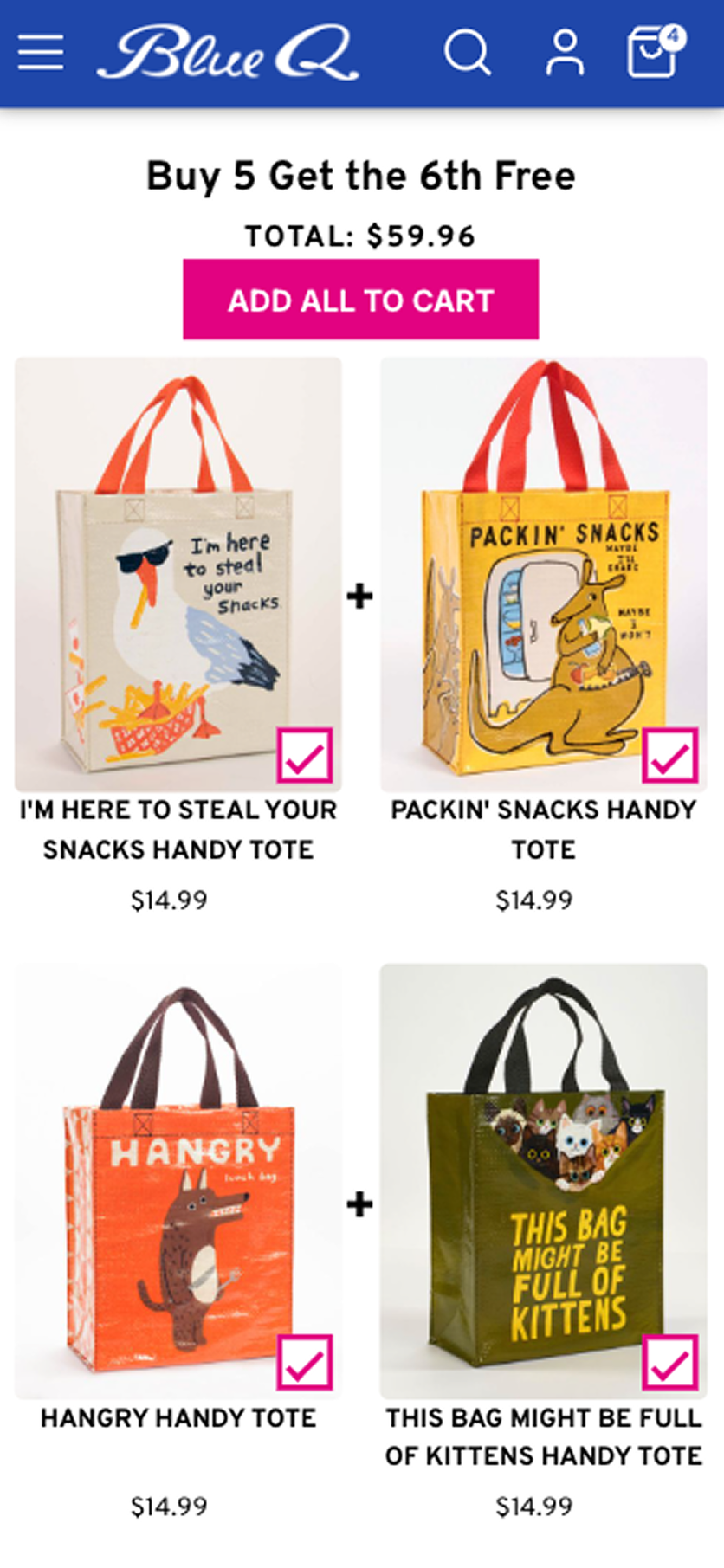
- Blue Q puts “Often Bought With” bundles right on the product page – their strongest-performing recommendation mechanic, accounting for 40% of all recommendation-influenced revenue. Shoppers who engage with recommendations have 28.7% higher AOV.
- Unidragon generates 7.4% of its revenue with a personalized cross-sell email flow that introduces customers to categories they haven’t bought from yet.
Inventory Management
Maestra installs through a free Shopify app or a JavaScript snippet, with no developer work. Its recommendations respect real-time stock, but it’s not a bundle SKU manager – pair it with a dedicated bundle builder or Shopify’s native bundles if you need component-level fulfillment.
Customization Options
Behavioral targeting, exit-intent triggers, A/B testing, and frequency controls for every campaign. Promotion rules go down to individual SKUs and categories, so you can build tiered incentives and personalized offers based on cart size and product mix.
Support
Each subscription includes a dedicated Forward Deployed Marketer who works like a member of your team: they shape the strategy, build the flows, and handle fewer than 15 accounts. You meet weekly and share a Slack channel, and live chat answers in about 5 minutes.
Pricing
Maestra starts at $2,000 a month, which covers the customer data platform, unlimited email, and the first 100,000 active profiles (Maestra pricing). Personalization, recommendations, loyalty, and SMS are flat monthly modules on top, with SMS messages also billed per send. There’s no annual contract or setup fee, and migration is included.
Pros and Cons
Pros: One platform replaces separate email, loyalty, personalization, and recommendation tools; a dedicated Forward Deployed Marketer shapes the strategy and builds the flows; installs via a free Shopify app with zero code.
Cons: Built for mid-market and enterprise brands; not a dedicated bundle builder.
Simple Bundles – Best for 3PL Fulfillment and Inventory Accuracy
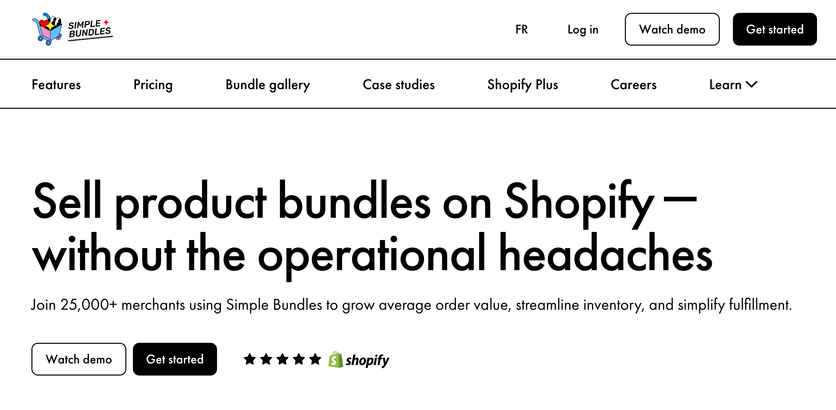
Simple Bundles & Kits (by Freshly Commerce) is built for merchants who need operational accuracy in bundle fulfillment. The app handles the backend complexity of bundling while keeping order processing clean, with a 4.9-star rating across 803 reviews.
Bundle Types
The app offers three builders. The Simple Bundles builder handles fixed bundles, kits, and multipacks with standard product variants. The Infinite Options builder goes past Shopify’s cap of 2,048 variants and three options per product, with dropdowns or swatches for each choice. The Build Your Own Bundle builder enables mix-and-match selections where customers browse a product grid and build custom boxes with tiered discounts.
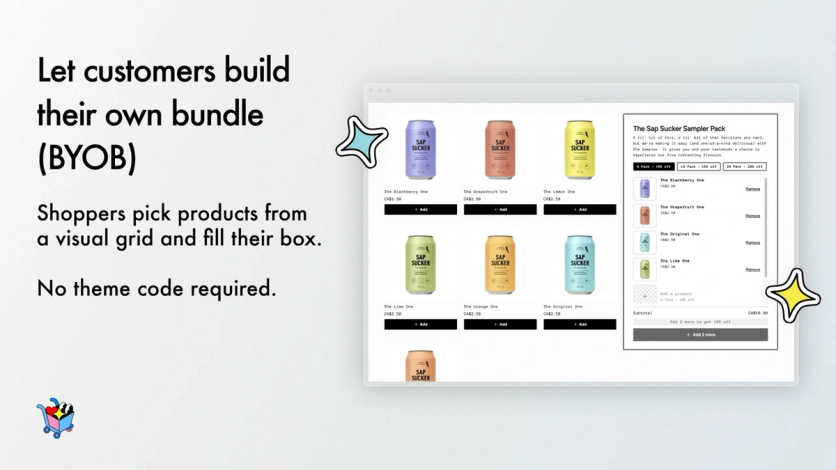
Simple Bundles’ Build Your Own Bundle grid, where shoppers pick products to fill a custom box
Key Features
Bundle contents display at checkout without order editing, using Shopify Functions. Dynamic pricing applies different prices to each product within a bundle. Bundle Magic AI analyzes order history to suggest high-performing product combinations. The system breaks bundles into individual SKUs for accurate reporting and VAT calculations.
Inventory Management
Live inventory sync operates at the SKU level. Stock levels adjust for each component when a bundle sells. For the Simple Bundle type, a location-based check confirms every component is stocked at the same fulfillment location before the bundle shows as available; Infinite Options and Build Your Own bundles pool stock across locations and re-check it at checkout.
Customization Options
Higher tiers add custom bundle order metafields, advanced order processing rules, and Shopify Flow integration. The Simple Bundle type uses your theme’s own product page and variant pickers, while Infinite Options and Build Your Own bundles come with their own style settings.
Support
Reviews praise the support team’s responsiveness, including weekend availability. Higher-tier plans include technical support and theme customization help.
Pricing
Plan | Monthly Cost | Key Additions |
|---|---|---|
Free | $0 | 3 bundles, 50 monthly orders |
Basic | From $14 | Unlimited bundles, bulk import |
Grow & Advanced | From $39 | Custom metafields, priority support |
Plus | From $149 | Headless support, 24/7 priority |
Annual billing saves 17%. Prices rise with your store’s average monthly orders – all orders, not only bundle orders – so Basic runs $14–$24 a month and Plus $149–$349 (Simple Bundles pricing).
Pros and Cons
Pros: SKU-level breakdown built for fulfillment, smooth ERP and 3PL integration, works past Shopify’s variant limits, responsive support.
Cons: Advanced features take time to learn, some users report theme compatibility issues, focuses on backend logic over frontend styling.
Fast Bundle – Best for Visual Bundles on Product Pages
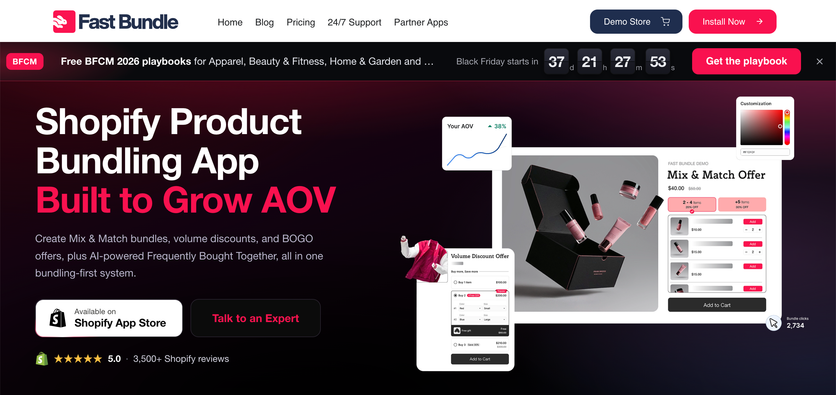
Fast Bundle holds a 5.0-star rating from 3,501 reviews. The app takes a conversion-focused approach with pre-built visual templates rather than backend inventory workflows.
Bundle Types
Fast Bundle offers six bundle types: fixed bundles, mix-and-match, volume discounts, Buy X Get Y, add-ons, and frequently bought together. AI-powered frequently-bought-together suggestions draw on your past orders and start on the Standard plans; the free plan covers development stores and eligible merchants up to $500 in monthly bundle sales.
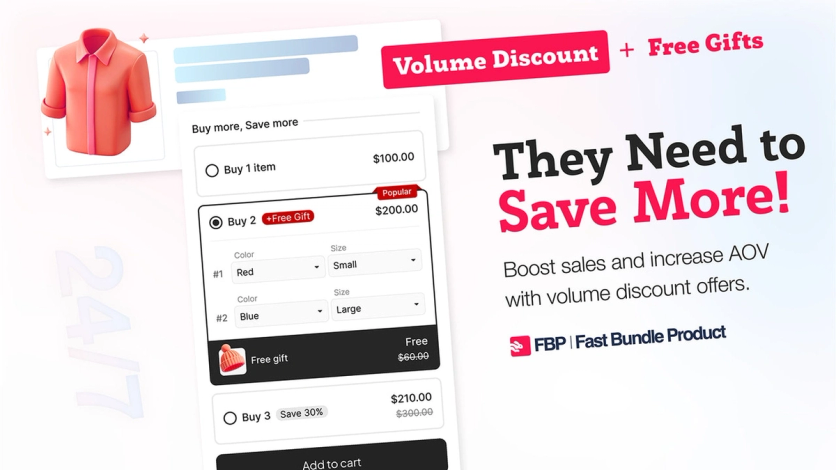
A Fast Bundle volume discount offer with tiered prices for one, two, or three items and a free gift on the two-item tier
Key Features
Bundle as Product turns fixed and mix-and-match bundles into standalone listings, and a bundle builder page lets shoppers pick items inside a bundle. From the Standard plans up, Fast Bundle connects to subscription apps and translates storefront bundle text into any language; the admin itself comes in 10 languages.
Inventory Management
Fast Bundle builds bundles three ways. The Single type creates a real Shopify product with its own tracked stock, while the Multi and Cart Transform types sit on a placeholder product and sell through the online store only. In all three, component SKUs are deducted once an order is paid; POS support starts on the Enterprise plan.
Customization Options
The design editor controls backgrounds, borders, button colors, and fonts. Custom CSS and JavaScript fields handle modifications beyond the standard options.
Support
Support operates 24/7 across all tiers, with faster response commitments on higher plans.
Pricing
Plan | Monthly Bundle Revenue | Monthly Cost |
|---|---|---|
Free | Development stores | $0 |
Standard 1K | Up to $1,000 | $19 |
Standard 3K | Up to $3,000 | $49 |
Standard 10K | Up to $10,000 | $139 |
Enterprise | Unlimited | $299 |
Pricing scales with monthly revenue generated through bundle sales. All paid tiers include a 7-day free trial; annual billing saves up to 21%. Enterprise ($299/mo, no revenue cap) is listed on Fast Bundle’s site (Fast Bundle pricing).
Pros and Cons
Pros: Quick setup with ready-made templates, near-perfect App Store rating, AI-driven product suggestions, 24/7 support in English.
Cons: Placeholder-product bundle types work in the online store only, POS needs the Enterprise plan, revenue-based tiers get expensive as bundle sales grow.
Kaching Bundles – Best for Volume Discounts and Quantity Breaks
Kaching Bundles stands out with a 5.0-star rating across 6,151 reviews – one of the largest review bases in the category. The app operates as a frontend promotional tool rather than a bundle inventory system.
Bundle Types
The platform handles volume discounts, BOGO deals, Buy X Get Y promotions, and mix-and-match bundles. Customers select different variants while qualifying for discounts.
Key Features
Built-in A/B testing helps optimize bundle performance. The analytics dashboard tracks the additional revenue each bundle generates. Progressive Gifts unlock a free gift or free shipping as shoppers move up to larger bundle tiers. Automatic widget injection displays bundles on product pages without theme editing.
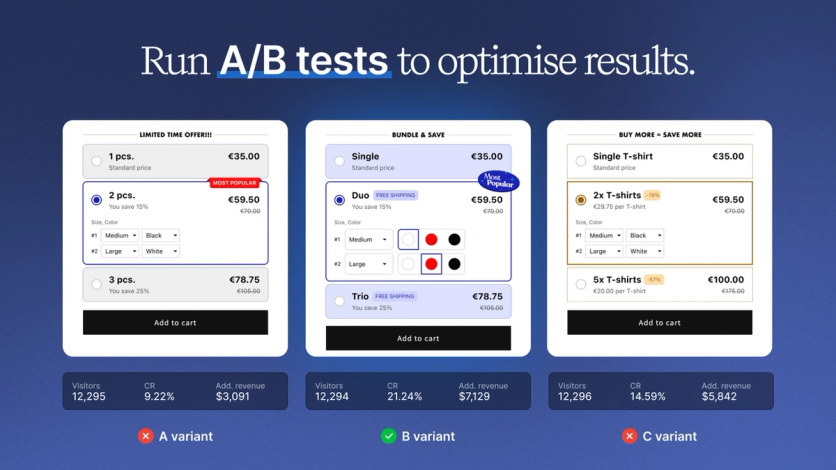
Kaching’s A/B test of three bundle widget variants, with visitors, conversion rate, and added revenue for each
Inventory Management
Kaching applies discount logic at checkout rather than creating standalone bundle SKUs. Bundles exist as pricing overlays on component products.
Customization Options
Default dropdowns can be replaced with image swatches, color swatches, or custom graphics. Swatch size and shape adjust to match brand esthetics.
Support
24/7 live technical support operates across all tiers.
Pricing
Plan | Additional Revenue Cap | Monthly Cost |
|---|---|---|
Starter | Up to $1,000 | $14.99 |
Scale | Up to $5,000 | $29.99 |
Pro | Up to $10,000 | $59.99 |
Growth | Up to $20,000 | $99 |
Advanced | Up to $30,000 | $149 |
Elite | Up to $50,000 | $199 |
Enterprise | $50,000+ | $299 |
Free for development stores only; paid plans include a 7-day trial. Pricing scales with the additional revenue bundles generate: the App Store lists the first three tiers, and Kaching’s site adds four more, up to $299/mo (Kaching pricing).
Pros and Cons
Pros: Massive review base signals reliability, revenue-based pricing aligns costs with performance, setup requires no coding.
Cons: No free plan for live stores, revenue caps force tier upgrades as sales grow, bundles aren’t real Shopify products for operational workflows.
FoxSell Bundle Builder – Best for Native Bundle Products
FoxSell Bundle Builder holds a 5.0-star rating across 98 reviews and stores bundles in Shopify’s native metafields and metaobjects, which stay in your store even if you uninstall the app.
Bundle Types
FoxSell covers fixed bundles of up to 30 products, multi-variant bundles (fixed bundles with options, capped at Shopify’s 2,048 variants), mix-and-match with no variant limit, and volume bundles with quantity breaks. Templates added in July 2026 include guided-step and tiered bundle builders.
Key Features
Fixed bundles become actual Shopify products. Checkout lists each bundle item as a separate line, and an optional packing-slip template groups those items under their bundle for fulfillment. Analytics track bundle performance, revenue splits, and individual SKU data.
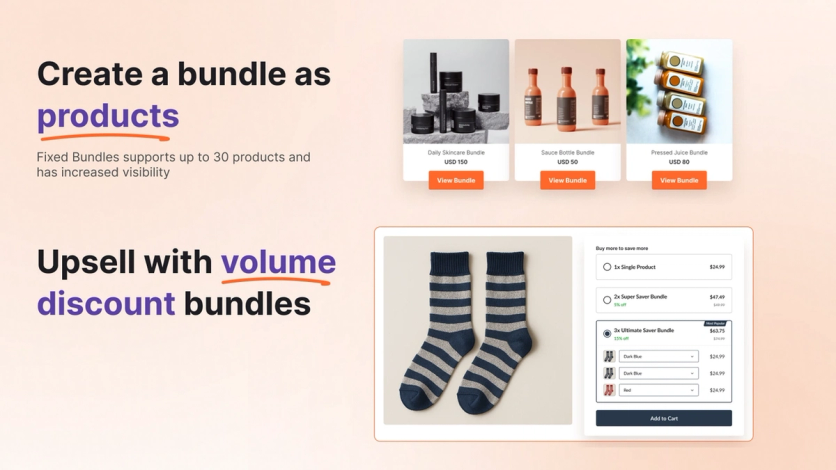
FoxSell fixed bundles created as Shopify products, next to a volume discount bundle on a product page
Inventory Management
Automated inventory sync operates at the component level. Stock updates happen in real time as bundles sell, preventing overselling across channels. Individual SKUs pass through to order details, which keeps third-party logistics providers happy.
Customization Options
Merchants control bundle pricing, compare-at pricing, and product status like any Shopify product. Theme customizations come with the Scale plan, and Growth adds store customization and custom bundle templates.
Support
Pro includes standard support, Scale and above add priority technical support, Growth brings a dedicated account manager, and Enterprise gets a dedicated Slack channel.
Pricing
Plan | Monthly Bundle Sales Cap | Monthly Cost |
|---|---|---|
Starter | Up to $1,000 | Free |
Pro | Up to $5,000 | $49 |
Scale | Up to $15,000 | $149 |
Growth | Up to $25,000 | $249 |
Enterprise | Above $25,000 | Custom |
Paid plans include 14-day trials and 17% savings on annual billing.
Pros and Cons
Pros: Infinite variant capability bypasses Shopify limits, native product integration for familiar management, works smoothly with 3PLs.
Cons: Learning curve for advanced features, can’t sell bundles with Shopify subscriptions, small review base compared to competitors.
ProfitKoala – Best for Limited-Time Promotional Offers
With a 4.9-star rating from 813 reviews, ProfitKoala’s Koala Bundles app takes a promotional approach focused on average order value rather than product-native bundle SKUs. The discount-driven architecture suits marketing-heavy stores running limited-time offers.
Bundle Types
Six offer types – quantity breaks and tiered discounts, volume discount bundles, mix-and-match bundles, product bundles, related products, and one-click post-purchase offers – all through discount logic applied at checkout.
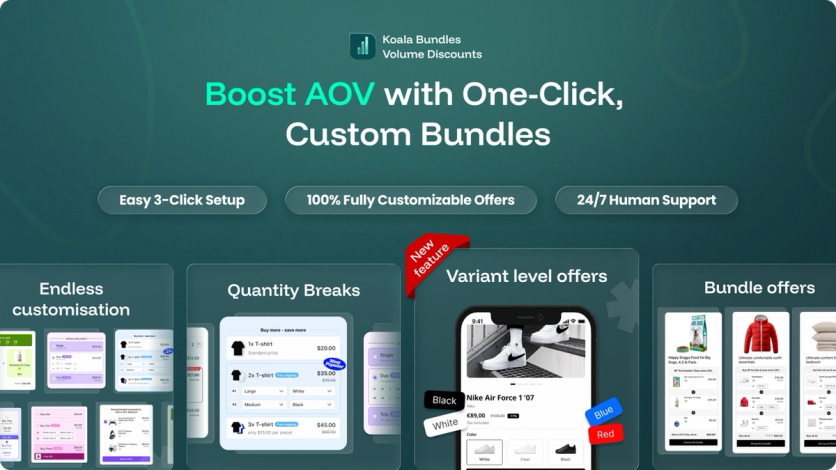
ProfitKoala offer formats, including quantity breaks, variant-level offers, and bundle offers
Key Features
Three core strategies raise AOV: quantity breaks motivate customers to buy more of the same product, cross-sell bundles pair complementary items, and post-purchase upsells appear right after checkout with one-click acceptance. Announcement bars, countdown timers, and tiered pricing displays round out the toolkit.
Inventory Management
Component inventory tracks through discounted line items without distinct bundle SKUs. Setup is simple, but fulfillment teams get less operational clarity than with product-native architectures.
Customization Options
Pre-built design templates integrate with modern themes. Offers can target specific customer segments and apply to collections, product tags, individual products or variants, or the whole catalog.
Support
Live chat support gets consistent praise in reviews for speed and step-by-step guidance.
Pricing
Plan | Bundle Revenue Cap | Monthly Cost |
|---|---|---|
Free | Development stores | $0 |
Kickstart | Up to $1,000 | $12.99 |
Scale Koala | Up to $5,000 | $19.99 |
Unlimited | Unlimited | $59.99 |
Paid plans include a 14-day free trial; the listing marks the Kickstart and Unlimited prices as discounts for first-time users.
Pros and Cons
Pros: Fast setup lifts AOV quickly, user-friendly interface, combines several promotional tools in one app, responsive support.
Cons: Revenue-based pricing grows with your sales, bundles aren’t actual Shopify products and POS isn’t among its listed integrations, launched in 2024 so the track record is short.
Vitals – Best All-in-One Suite With Bundles
Vitals is a conversion optimization platform that includes product bundles among 40+ integrated tools. With a 4.9-star rating from 2,968 reviews, this all-in-one suite replaces several single-purpose apps: Vitals says most of its reviews mention deleting five or six other apps (Vitals).
Bundle Types
Fixed bundles, mix-and-match bundles, upsell bundles, and frequently-bought-together recommendations.
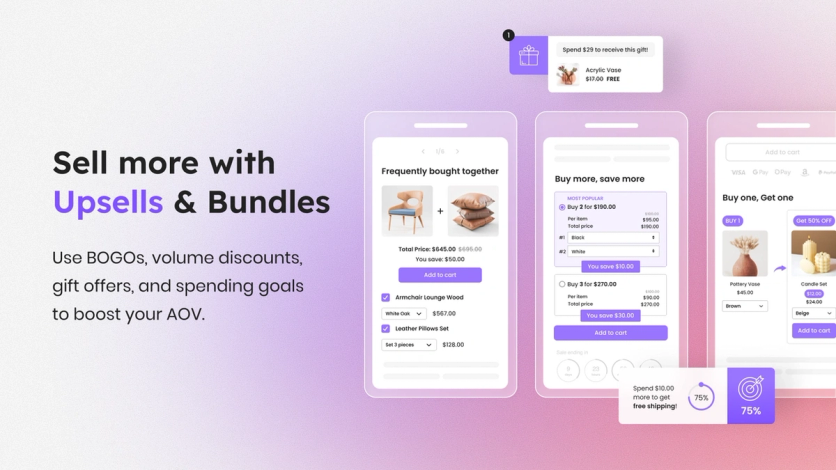
Vitals upsell and bundle widgets: frequently bought together, buy more save more, and buy one get one
Key Features
Beyond bundling, Vitals provides volume discounts, product reviews, visitor recordings, email marketing, back-in-stock alerts, and AI marketing tools. One dashboard replaces managing multiple app subscriptions.
Inventory Management
Bundles operate through discount logic applied to component products rather than distinct bundle SKUs. Inventory tracks through line-item discounts instead of native product structures.
Customization Options
The Preferences panel controls storefront color themes, add-to-cart redirect behavior, and custom CSS/JavaScript injection. Individual widget styling adjusts through the Vitals UI without theme file modifications.
Support
Customer support gets consistent praise for responsiveness and handles configuration changes when authorized.
Pricing
One plan costs $29.99 a month with a 7-day free trial and all 40+ tools included. Usage fees kick in once you pass the included volumes, such as $1,000 in monthly Vitals-attributed sales or 1,000 recorded page views (Vitals pricing).
Pros and Cons
Pros: Replaces multiple app costs, fast page performance, easy-to-use interface, 24/7 support.
Cons: Overkill for stores that only need bundles, simpler bundle functionality than specialist apps, 40+ features can feel overwhelming.
BOGOS – Best for Free Gifts and BOGO Deals
BOGOS has served 95,000+ brands as a promotion-first platform that handles bundles alongside BOGO deals, free gifts, and volume discounts. It holds a 5.0-star rating across 4,436 reviews and combines every major promotion type in one dashboard.
Bundle Types
The Bundle Product Page creates a dedicated page where customers build custom packs through step-by-step product selection. Mix-and-match bundles let shoppers choose products, variants, and quantities per item, unlocking discounts at specific pack sizes – think shoe packs where customers select 2 or 4 pairs, or tea samplers with flavor and quantity controls.
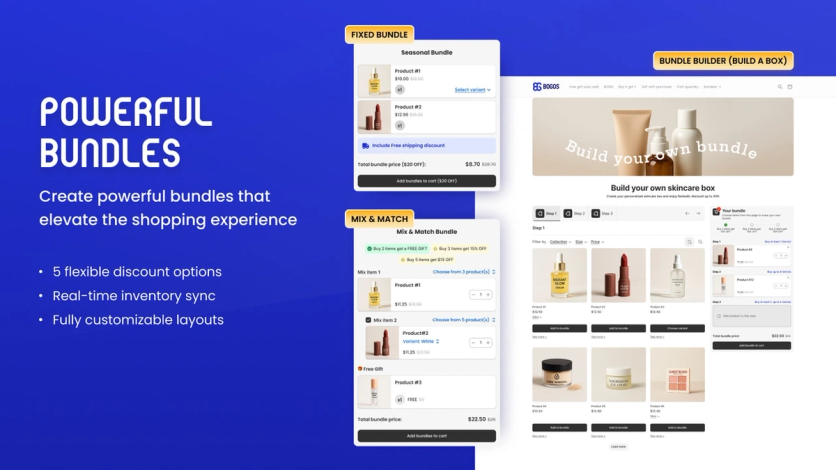
BOGOS fixed bundle, mix-and-match bundle, and build-a-box bundle page
Key Features
Step-by-step product selection guides customers through bundle building with progress tracking that updates instantly. Widgets on child product pages drive traffic back to bundle pages. The system supports tiered discounts with progress bars, multiple discount tiers, and free shipping triggers.
Inventory Management
Every bundle sale deducts stock from each component product in real time, keeping Shopify inventory in sync.
Customization Options
Full control over colors, button text, and layout, plus custom CSS/JS and 150+ language auto-translation.
Support
24/6 live chat support operates within the app.
Pricing
Plan | Monthly Orders | Cost |
|---|---|---|
Free | 30 orders (lifetime) | $0 |
Basic (Basic Shopify) | 300 orders | $29.99 |
Grow (Grow Shopify) | 600 orders | $49.99 |
Advanced (Advanced Shopify) | 1,000 orders | $69.99 |
Plus (Shopify Plus) | 2,000 orders | $109.99 |
Paid plans include a 7-day trial; annual billing saves 20%. Each order past a plan’s allowance costs $0.05 (BOGOS pricing).
Pros and Cons
Pros: Replaces multiple promotion apps, mix-and-match on a dedicated bundle page, deep targeting rules, 11+ years on the App Store.
Cons: Feature depth creates a learning curve, per-order fees once you pass a plan’s allowance, free plan is capped at 30 orders total.
Bundler – Best for Budget-Friendly Mix-and-Match Bundles
Bundler serves as an affordable entry point into product bundling, holding a 4.9-star rating across 2,708 reviews. Its free plan is the only one among the third-party apps here with no order or revenue cap.
Bundle Types
Five distinct architectures: classic bundles pair predetermined products, mix-and-match bundles let customers build combinations from curated selections, volume discounts apply tiered pricing for bulk buying, sectioned mix-and-match requires selections from multiple product categories, and tiered mix-and-match shows customers how many more items unlock additional discounts.
Key Features
Flexible discount structures include percentage discounts, fixed amounts, fixed bundle prices, and product-specific discounts. Landing pages generate for each bundle. Shortcodes display bundle widgets anywhere in your store. Shopify POS integration extends bundle discounts to physical locations.
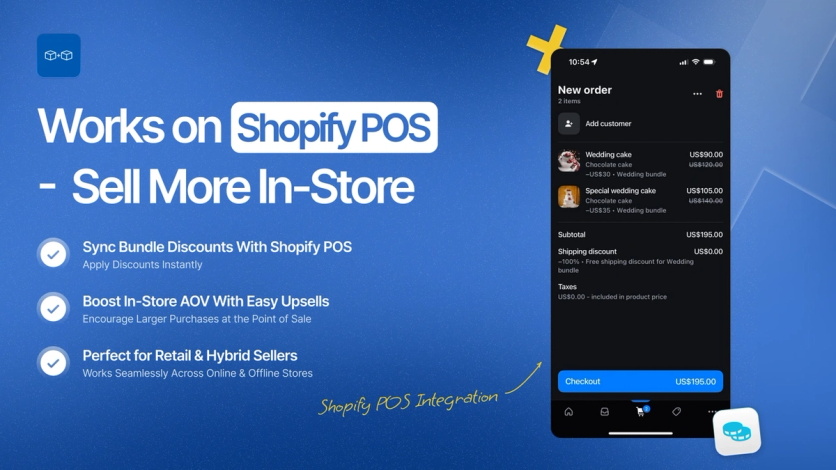
Bundler discounts applied to a Shopify POS order
Inventory Management
Component-level inventory tracking deducts stock for each product within a bundle as sales occur.
Customization Options
Widget colors and other display settings adjust to your theme without code, and custom CSS and HTML cover deeper changes.
Support
The Ljubljana-based team has 7+ years of experience with Shopify apps, and reviewers single out its fast, hands-on help with setup and layout.
Pricing
Plan | Monthly Cost | Key Features |
|---|---|---|
Free | $0 | Unlimited orders and revenue, volume discounts, POS |
Premium | $9.99 | Mix & match, landing pages, free shipping |
Executive | $19.99 | Analytics, revenue tracking, performance graphs |
Paid plans include a 7-day trial.
Pros and Cons
Pros: Free plan with no order or revenue limits, affordable paid tiers, subscription compatibility supports recurring revenue models, POS support on every plan.
Cons: Mix-and-match needs the paid Premium plan, analytics are locked behind the highest plan.
Profit Pumper – Best for First-Time Bundle Setups
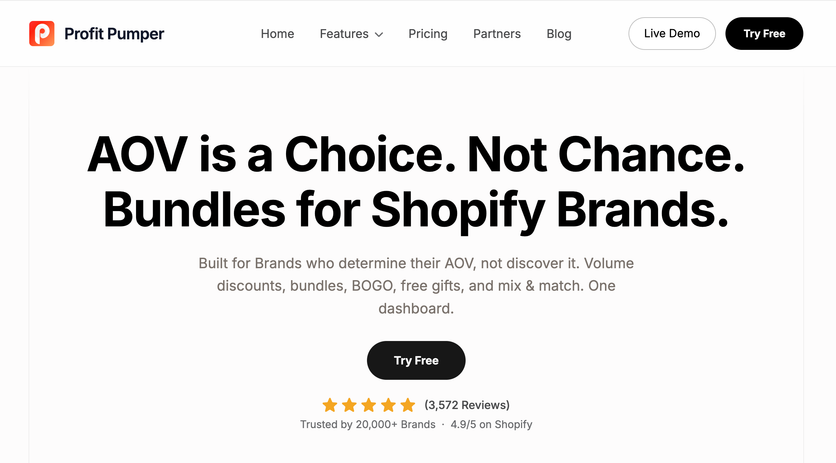
Profit Pumper’s Pumper Bundles app targets stores testing volume discounts and promotional bundling for the first time. The app has a 4.9-star rating from 3,528 reviews and a conversion-first architecture built on discount logic rather than standalone bundle products.
Bundle Types
Pumper handles tiered volume discounts, fixed product bundles, BOGO and Buy X Get Y deals, free gifts that unlock at a spend or quantity threshold, and mix-and-match sets shoppers assemble themselves.
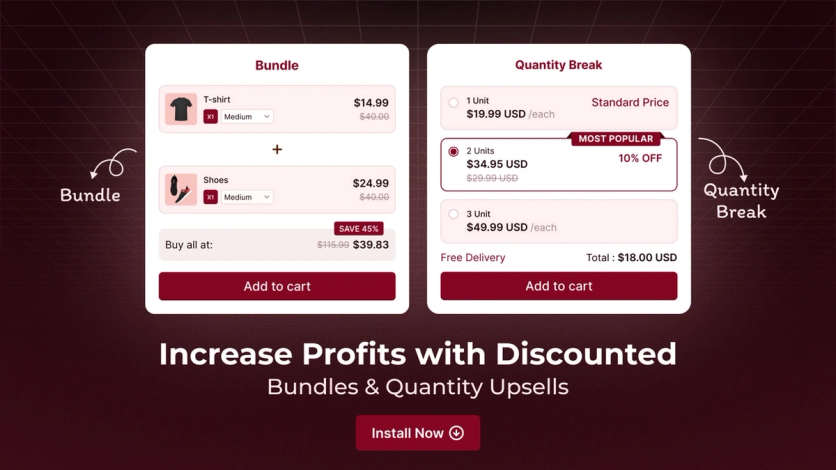
Pumper bundle and quantity break widgets on a product page
Key Features
Pumper’s dashboard shows how AOV moved once each offer went live and how much revenue each offer type brought in. Discounts can be set per unit, as a percentage, or as a flat amount. The vendor says brands running structured offers commonly see a 20–30% AOV lift in the first two weeks (Pumper) – a vendor benchmark, not independent data.
Inventory Management
Component inventory deducts as bundles sell, through discount-based logic applied at checkout.
Customization Options
From one dashboard you set the widget’s fonts, colors, and spacing to match your brand, with no custom CSS. Pumper lists support for 150+ themes, cart drawers, GemPages, and PageFly.
Support
Chat support operates 24/7 on all tiers.
Pricing
Plan | Bundle Revenue Cap | Monthly Cost |
|---|---|---|
Free | Up to $300 | $0 |
Starter | Up to $1,000 | $9.99 |
Growth | Up to $5,000 | $29.99 |
Unlimited | Unlimited | $49.99 |
Paid plans include a 7-day free trial, and annual billing saves 21–25%.
Pros and Cons
Pros: Free until bundles generate $300 in revenue, beginner-friendly setup, modern widget design.
Cons: Fewer bundle types than specialist tools, revenue caps push upgrades as sales grow, bundles aren’t real Shopify products.
Shopify Bundles – Best for Free Native Fixed Bundles
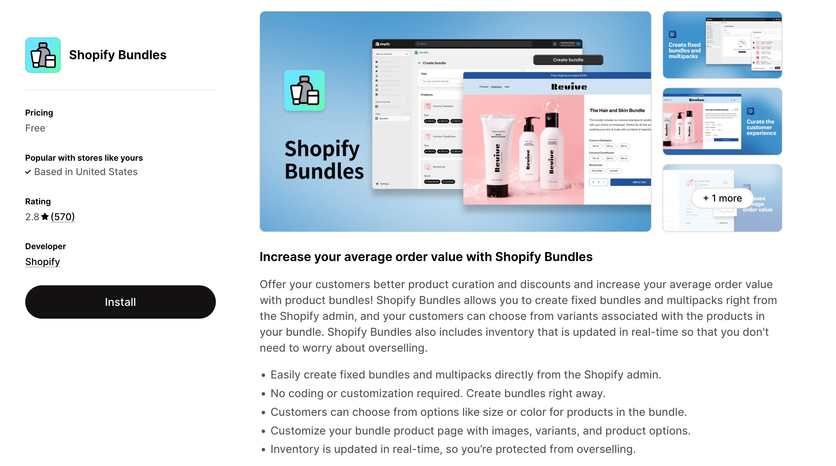
Shopify’s native Bundles app is the zero-cost option for merchants who need simple bundling without monthly subscriptions. The free tool handles straightforward scenarios directly in the Shopify admin – and its 2.9-star rating across 570 reviews reflects its limits as much as its price.
Bundle Types
Two structures: fixed bundles that combine different products and multipacks that bundle identical items. Fixed bundles hold up to 30 components, and each bundle allows at most three options and 100 variants (Shopify Help Center).
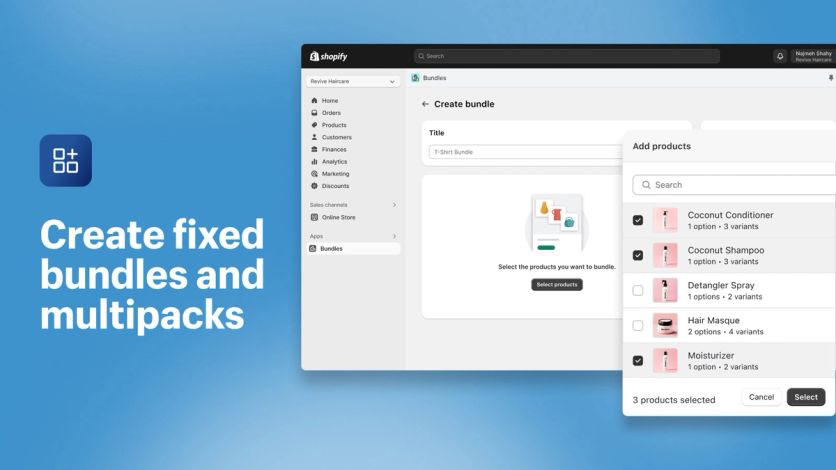
Creating a fixed bundle in the Shopify admin with the native Bundles app
Key Features
Real-time inventory tracking, combined product options where matching values merge into single selectors, and built-in analytics showing bundle sales, orders, and top performers. Bundles appear as standalone products in your admin.
Inventory Management
Component inventory deducts automatically when bundles sell, and stock availability reflects the component with the lowest inventory. The catch: bundles track overall stock, not per-location inventory (Shopify Help Center), so multi-location merchants lose visibility.
Customization Options
Standard product page editing controls title, pricing, description, and media. Bundles can sit in collections like any product, but channel support is narrower: Shopify lists the Online Store, headless storefronts, Shop, and POS (Shopify developer docs).
Support
Native Shopify support handles questions through standard channels.
Pricing
Free, with no subscription fees, revenue sharing, or hidden costs. Available on all Shopify plans.
Pros and Cons
Pros: Zero cost, native integration, automatic real-time inventory sync.
Cons: No mix-and-match support, manual bundle creation only, no per-location inventory tracking, the lowest rating on this list by a wide margin.
Revy – Best for Stackable Discounts on a Budget
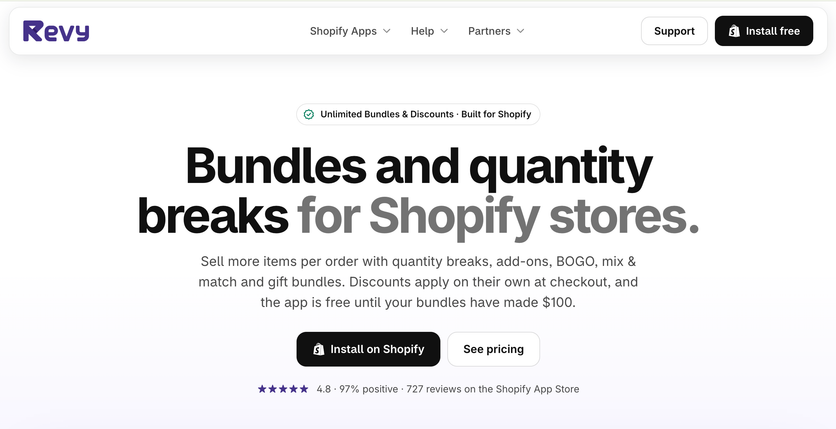
Revy’s Unlimited Bundles & Discounts app layers promotional logic onto existing products rather than creating standalone bundle SKUs. Launched in 2018, it’s one of the longest-running apps in the category and holds a 4.8-star rating across 727 reviews.
Bundle Types
Standard bundles combine different products with discounts. Quantity breaks apply tiered pricing by volume. Mix-and-match bundles let customers build custom combinations, and BOGO and Buy X Get Y offers cover buy-one-get-one deals and free gifts. Collection-based bundles enable selection from entire product collections rather than curated lists.
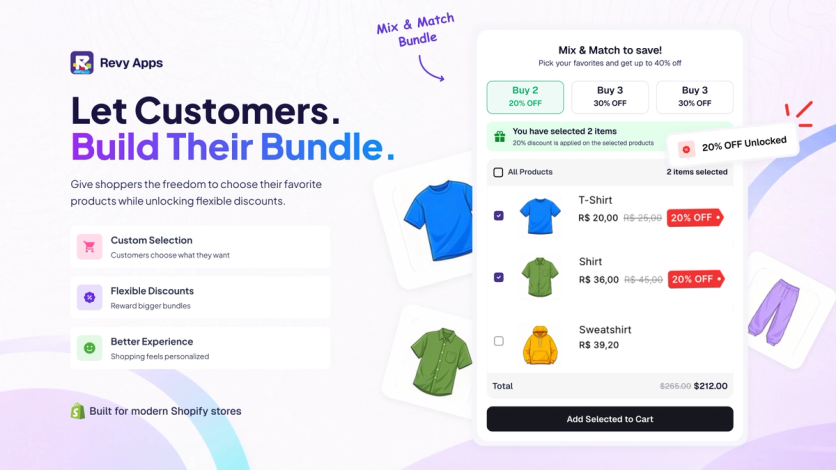
A Revy mix-and-match bundle where the discount grows from 20% to 30% as shoppers add items
Key Features
Stackable discounts combine multiple bundle types without manual code entry. The system supports Shopify POS, multi-currency through Shopify Markets, and discount application at checkout, and offers can run for a limited time.
Inventory Management
Component inventory tracks at the variant level, though bundles exist as promotional groupings rather than separate SKUs.
Customization Options
A live editor with preview lets you personalize bundle appearance before publishing.
Support
Live chat support operates across all plan tiers.
Pricing
Plan | Monthly Bundle Revenue Cap | Cost |
|---|---|---|
Free | Up to $100 | $0 |
Starter (1k) | Up to $1,000 | $9.99 |
Growth (10k) | Up to $10,000 | $29.99 |
Unlimited | No cap | $49.99 |
All paid plans include 7-day free trials.
Pros and Cons
Pros: Low flat ceiling on pricing, on the App Store since 2018, discount stacking without manual work.
Cons: Revenue caps push upgrades as bundle sales grow; stores still on checkout.liquid, or using Global-e or Licensify, can’t apply the bundle discount (Revy Help Center).
Rapi – Best for Bundle Type Variety
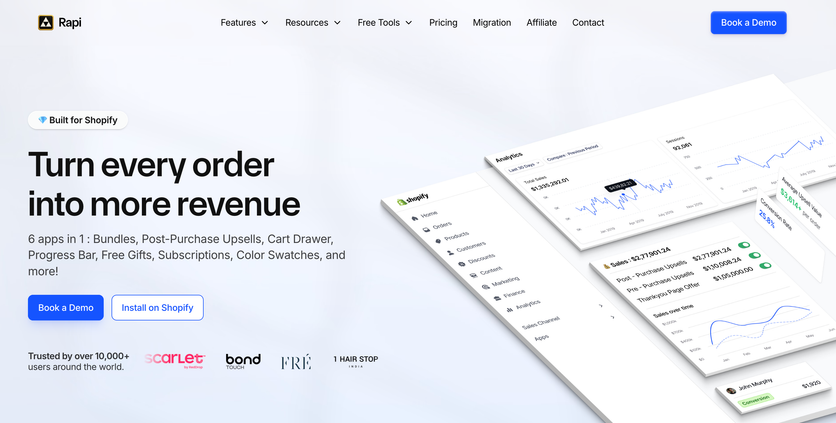
Rapi, listed on the App Store as Rapid Bundles & Upsell app, holds a 5.0-star rating across nearly 1,600 reviews. The app combines extensive bundle variety with upselling capabilities in one platform.
Bundle Types
The system supports fixed bundles, multipacks, mix-and-match, variant bundles, infinite option bundles, build-a-box, gift boxes, mystery boxes, sample packs, subscription boxes, wholesale bundles, upsell and cross-sell bundles, and frequently-bought-together.
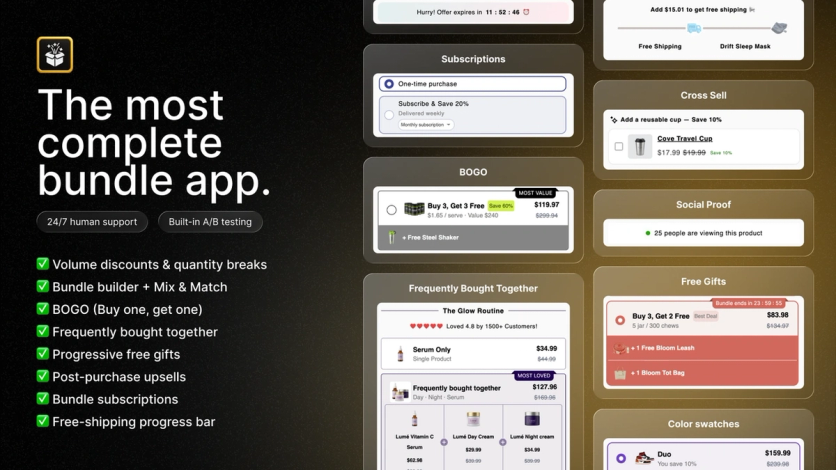
Rapi offer widgets for subscriptions, BOGO, frequently bought together, cross-sell, free gifts, and color swatches
Key Features
A/B testing optimizes bundle performance. Unlimited bundles, a translation-friendly interface, post-purchase upsells, and an AI bundle builder streamline operations. The platform integrates with GemPages, PageFly, and EComposer.
Inventory Management
Component inventory tracks through bundle sales, though the app leans toward promotional functionality over operational SKU management.
Customization Options
Color swatches, custom CSS, multi-language support, progress bars, Thank You page banners, one-click post-purchase upsells, and add-on checkboxes on offers.
Support
24/7 chat and email support operates across paid tiers. Reviews praise response speed and problem-solving.
Pricing
Plan | Revenue Cap | Monthly Cost |
|---|---|---|
Forever Free | Up to $100 | $0 |
Starter | Up to $1,000 | $15 |
Pro | Up to $10,000 | $29 |
Elite | No cap | $59 |
Paid plans include a 7-day free trial, and annual billing cuts about a third off the monthly price.
Pros and Cons
Pros: Forever-free plan to start, one of the widest bundle-type lists on the App Store, one-click post-purchase upsells even on the free plan.
Cons: Revenue-based caps require upgrades, promotional architecture over operational focus.
Hulk Product Options – Best for Option-Based Customization
Hulk Product Options approaches bundling from a different angle. With a 4.8-star rating across 1,210 reviews, it focuses on product customization and options rather than traditional bundle SKUs.
Bundle Types
This isn’t a bundle app in the conventional sense – it enables bundle-like functionality through option cross-selling. Product options link to additional products, which suits customizable gift boxes: customers select contents through dropdowns and checkboxes rather than pre-packaged bundles.
Key Features
The Advanced plan offers 20 option types, from color swatches and file uploads to date fields (the Basic plan includes 10). Conditional logic shows or hides options based on previous selections, and multi-currency support works through Shopify Markets. The Enterprise plan adds formula-based pricing, a Google Font picker, and Klaviyo and Mailchimp integrations.
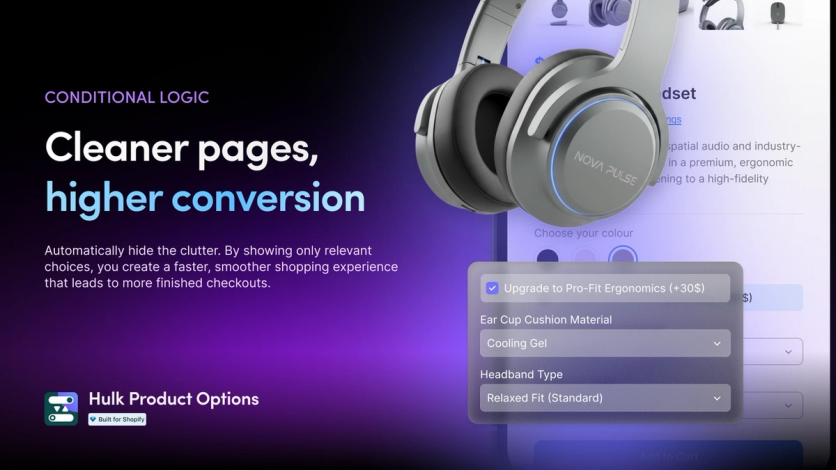
Hulk Product Options conditional logic showing only the relevant options on a product page
Inventory Management
The Enterprise plan adds SKU and inventory management in the app dashboard, with a separate SKU for each option value.
Customization Options
Custom JavaScript and CSS support advanced personalization. On the Advanced plan and up, bulk import and export of options and option sets speeds setup across large catalogs.
Support
HulkApps advertises 24/7 human support on every plan.
Pricing
Plan | Monthly Cost | Key Features |
|---|---|---|
Basic | $10 | 10 option types, price add-ons |
Advanced | $20 | 20 option types, conditional logic |
Enterprise | $49.90 | SKU management, formula pricing, POS |
Free plan for development stores only; paid plans include a 7-day trial, and annual billing costs $100, $200, or $449 a year.
Pros and Cons
Pros: Deep customization capabilities, formula-based pricing automation, POS compatibility on the Enterprise tier.
Cons: Not designed for traditional bundling, formula pricing and SKU tracking need the $49.90 Enterprise plan, steep learning curve for complex configurations.
Zoorix – Best for AI Cross-Sell With Tiered Pricing
Zoorix positions itself around AI-driven product recommendations combined with tiered pricing logic. The app holds a 4.9-star rating across 388 reviews and focuses on volume discounts and cross-selling rather than bundle inventory management.
Bundle Types
Fixed bundles, mix-and-match bundles, variant bundles, upsell and cross-sell bundles, frequently-bought-together recommendations, and related products – for both digital and physical goods.
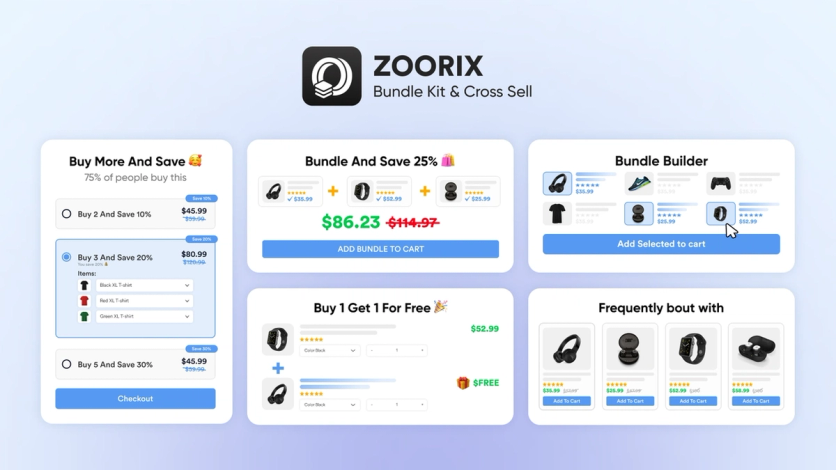
Zoorix widgets for quantity breaks, bundle discounts, a bundle builder, BOGO, and frequently bought together
Key Features
Pairings come from AI-powered or manual rules. Volume discounts and quantity breaks apply tiered pricing at product and variant levels, and a native cart drawer adds upsell slots before checkout, alongside BOGO offers, bulk discounts, and free shipping thresholds.
Inventory Management
Component inventory tracks through discount logic applied at checkout, without distinct bundle SKUs.
Customization Options
Integrations with PageFly and GemPages extend customization. Multi-currency and multi-language optimization works across Shopify’s latest themes.
Support
Merchants praise the support team for responsiveness and hands-on assistance.
Pricing
Plan | Revenue Through Zoorix | Monthly Cost |
|---|---|---|
Forever Free | Up to $100 | $0 |
Basic | $100–$200 | $7.99 |
Growth | $200–$400 | $14.99 |
Premium | $400–$800 | $29.99 |
The free plan includes all features with app branding; paid plans remove it and carry a 30-day trial. Bands count only revenue generated through Zoorix, and higher tiers run up to $499.99 a month for $100K+ (Zoorix pricing).
Pros and Cons
Pros: Revenue-based pricing aligns costs with performance, AI recommendations reduce manual curation, genuinely free plan with all features.
Cons: Bundles apply as cart discounts rather than separate products, no POS support listed, revenue-based tiers climb as sales through Zoorix grow.
How to Add Bundles on Shopify
Here’s how to create a bundle on Shopify, start to finish:
- Pick the bundle type that matches your goal – a fixed set, a mix-and-match box, or a quantity break.
- Install a bundle app from the Shopify App Store, or use Shopify’s free native Bundles app for fixed bundles.
- Select complementary products, starting with items that already appear together in your order history. Configure quantities and enable variant selection where it applies.
- Set the discount: 10–20% off the combined price if your margins are 50% or higher, 5–10% if they’re thinner.
- Set visibility rules (specific collections or store-wide), review the pricing calculations, and publish. Then watch how AOV responds.
Each step has nuance worth getting right – here’s the detail:
Match the Bundle Type to Your Goal
Pure bundles sell products as sets only – this maximizes AOV but limits flexibility. Mixed bundles offer items individually or packaged, giving customers choice while incentivizing larger purchases. Price bundles deliver perceived value through discounted combinations.
Start with your order history. Products that customers already buy together – especially in orders above your average order value – are natural pairing candidates and the foundation of data-driven bundle creation.
Price Bundles to Protect Margins
Shopify’s own guidance ties the discount to your margins: brands with average margins of 50% or higher can take 10–20% off the combined price, while businesses with thinner margins should stay between 5% and 10% (Shopify).
Display individual item prices next to the bundle price so the savings register immediately. Frame savings in dollar terms when the absolute amount hits harder than the percentage.
The upside is real. Beyond DockATot’s 55% AOV lift, bundles make up more than 80% of HiSmile’s orders, and its average cart size grew 4x (Shopify case study). Rhode’s monthly online revenue from kits and sets rose from $948K to $2.53M between January and July 2025 (Particl estimate).
Present Bundles Where Shoppers Decide
Place bundles on product pages as frequently-bought-together widgets or above add-to-cart buttons as tiered discount tables. Create dedicated bundle product listings for starter kits and discovery sets. Use imagery that shows all components together, clear savings messaging, and countdown timers for limited offers.
Which Bundle App Fits Your Store
Choosing the best bundle app for Shopify comes down to your operations and budget. Simple Bundles wins on 3PL fulfillment accuracy, Fast Bundle on visual presentation, Kaching and Pumper on volume discounts, Bundler on free-plan generosity. Maestra fits brands that want bundle promotions running on unified customer data – recommendations, email, SMS, and loyalty in one platform.
Don’t try to implement everything at once. Start with one bundle type that matches your inventory and customer behavior, test your pricing against your margins, and watch how AOV responds. Scale from there.
Key Takeaways
- Choose bundle apps by architecture first. Apps like Simple Bundles and FoxSell create real Shopify products with component SKUs – better for 3PL fulfillment. Apps like Kaching, Pumper, and ProfitKoala apply discount logic at checkout – faster to launch for promotions.
- Build bundles from your order history. Products that already appear together in orders above your average order value are the strongest pairing candidates.
- Price bundles by margin, not by habit. Shopify’s guidance: discount bundles 10–20% off the combined price if your margins are 50% or higher, and 5–10% if they’re thinner.
- Show the savings. Display individual item prices next to the bundle price, and frame the discount in dollars when the absolute amount is more persuasive than the percentage.
- Watch total cost of ownership. Revenue-capped plans (Kaching, Pumper, Zoorix, Rapi) get more expensive as bundles succeed; flat-priced apps like Bundler and Hulk Product Options keep costs predictable.
FAQs
- The best Shopify bundle app depends on how you operate. Simple Bundles is the strongest pick for stores with 3PL fulfillment that need SKU-level accuracy. Fast Bundle wins on storefront presentation, Bundler’s free plan has no order or revenue cap, and Kaching leads on quantity breaks. If you want bundles picked for each shopper and promoted across your site, email, SMS, and every other channel, that’s Maestra: Svaha USA runs a three-product Frequently Bought Together bundle, and recommendations assist 11.2% of its total revenue.
- Install a bundle app, or Shopify’s free native Bundles app for fixed bundles, and pick two or more complementary products. Then set the bundle discount and publish it to your product pages or a dedicated bundle page. Most apps on this list handle the setup in minutes without code. Start with products that already appear together in your order history – Maestra finds those pairs automatically and shows them as “Often Bought With” blocks, which account for 40% of recommendation-influenced revenue at Blue Q.
- Most paid Shopify bundle apps start under $30 a month. Many tie the price to the bundle revenue they generate, so the bill grows with your sales – Kaching runs from $14.99 to $299 a month across seven tiers. Bundler and Hulk Product Options charge flat fees, and Shopify’s native Bundles app is free. Maestra is priced as a platform rather than a bundle add-on, from $2,000/mo for the customer data platform and unlimited email (Maestra pricing). UAG runs email, SMS, recommendations, and loyalty in Maestra and cut its marketing stack costs by 64%, about $100,000 a year.
- Rapi and ProfitKoala combine bundles with one-click post-purchase upsells. Vitals packs bundles and upsell widgets into its suite of 40+ tools. For upsells based on what each shopper has browsed and bought rather than fixed rules, Maestra runs cross-sell and upsell recommendations on product pages and in the cart, email, SMS, and every other channel. Unidragon’s personalized cross-sell email flow brings in 7.4% of its revenue.
- Apps like Simple Bundles and FoxSell create actual Shopify products with component SKUs that break down at checkout. That gives fulfillment teams and 3PL integrations operational clarity. Apps like Kaching, Pumper, and ProfitKoala use frontend widgets that apply discount logic without separate bundle SKUs. The first approach wins on inventory accuracy; the second wins on setup speed for promotional campaigns. Maestra works on a different layer: it picks which products belong together for each shopper and runs alongside either type. JOLYN’s recommendations match swimwear sets by color and material, skip sizes that are out of stock, and influence 7% of its sales.
- Tie the bundle discount to your margins. Shopify recommends 10–20% off the combined retail price for brands with average margins of 50% or higher, and 5–10% for thinner margins (Shopify). Show both individual and bundle prices so customers instantly see the savings, and test whether a dollar amount beats a percentage. Nat’v Basics A/B-tested its welcome pop-up in Maestra: $15 off lifted conversion 24% over 12% off, and $10 off converted as well as $15 for a third less discount.