
Transactional vs. Marketing Emails: How Shopify Brands Decide Whether One Platform Can Send Both

If your Shopify store has a marketing platform connected, you already send transactional and marketing emails from two systems. Shopify sends order confirmations and shipping updates from its own servers. The marketing platform takes over only newsletters, campaigns and flows.
Moving order emails to the same platform sounds easy: one sending domain, one place to check deliverability. It goes wrong when the platform can’t track each item in an order or sends a cart discount to someone who checked out an hour ago. In those cases, order emails belong in a dedicated transactional service.
The five checks below show which setup fits your store.
TL;DR: Where Shopify order emails should go out from
Keep them on Shopify while order volume is small and nobody needs delivery reports for receipts.
Move them to a dedicated transactional service when your marketing platform doesn’t send transactional email, can’t track each item in an order, or lets a frequency cap hold back receipts.
Send them from your marketing platform when it passes five checks: your own authenticated domain, delivery to customers who unsubscribed, a status for each item in an order, daily limits that never hold back receipts, and deliverability reports by mailbox provider.
Content:
Transactional Email vs. Marketing Email in a Real Shopify Store
Marketing emails, such as flows, newsletters and campaigns, go only to people who opted in, carry an unsubscribe link, and go out when the brand decides. Transactional emails follow different rules. They confirm something a customer did, like placing an order or resetting a password, so everyone who triggers one gets it, unsubscribing doesn’t stop it, and it goes out right away. Most Shopify transactional emails are about orders: confirmations, shipping updates and delivery notices.
Trashie, a Maestra client that sells recycling bags, sends both kinds. On the left is a holiday email the marketing team scheduled for the whole list. On the right is the order confirmation a customer gets right after checkout.
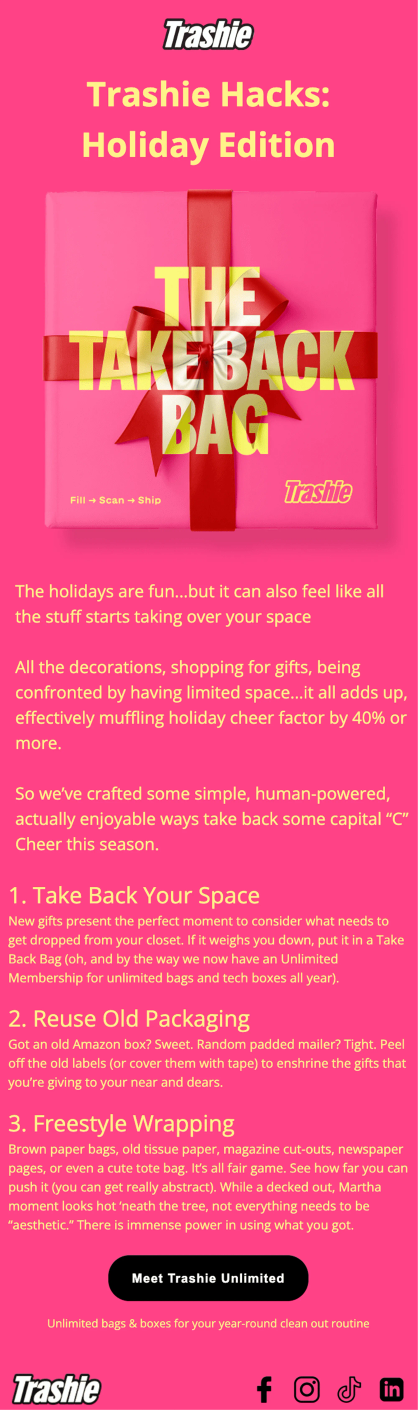
A marketing email goes out on a date the brand picks, and only to people who opted in
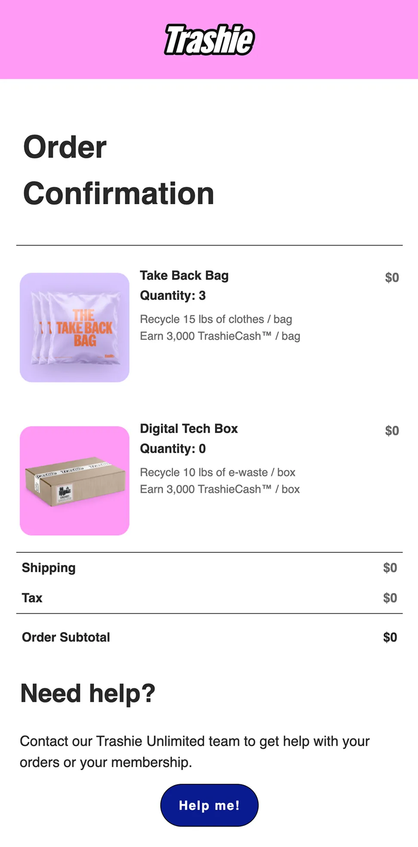
An order confirmation goes to every buyer right after checkout, whatever their marketing consent
The holiday email offers three tips and links to Trashie Unlimited, the brand’s membership. Nothing in it refers to a specific order, and no customer is waiting for it to arrive.
The order confirmation email lists the items, quantities, shipping, tax and subtotal, and ends with a help button. There’s no offer and no product recommendation in it, so everything in the email reports on the transaction.
Order confirmation | Marketing email | |
What starts it | The customer places an order | A marketer’s schedule, or a shopper’s behavior in the case of flows |
Who must receive it | The customer who ordered, whatever their marketing consent | People who opted in to marketing |
What it contains | The order and a way to get help | Offers, content, recommendations |
What a late or missing send costs | Customers contact support to ask whether the order went through | A missed visit or sale |
How often it goes out | Once per order event | As often as the brand’s frequency rules allow |
Shopify’s own order emails work fine while a store is small. As it grows, two systems mean two sets of templates, two places to check delivery and no shared limit on how many emails a customer gets in a day. That’s when brands start thinking about moving order emails into their marketing platform.
Five Checks Before One Platform Sends Transactional and Marketing Emails
Before you move order emails from Shopify into your marketing platform, check that it handles the differences between order emails and marketing emails. Five things decide it: the sending domain, delivery to customers who unsubscribed, a status for each item in an order, frequency caps and deliverability reports.
1. Emails go out from your own domain, signed with DKIM and DMARC
Mailbox providers decide where an email lands partly by the domain that signs it. Order emails and marketing emails should both carry the brand’s own domain, and they can go out from separate subdomains so one stream can’t hurt the other.
To send as a brand, Maestra asks the brand to publish a DKIM key and a DMARC record in its DNS, following the DKIM and DMARC setup guide.
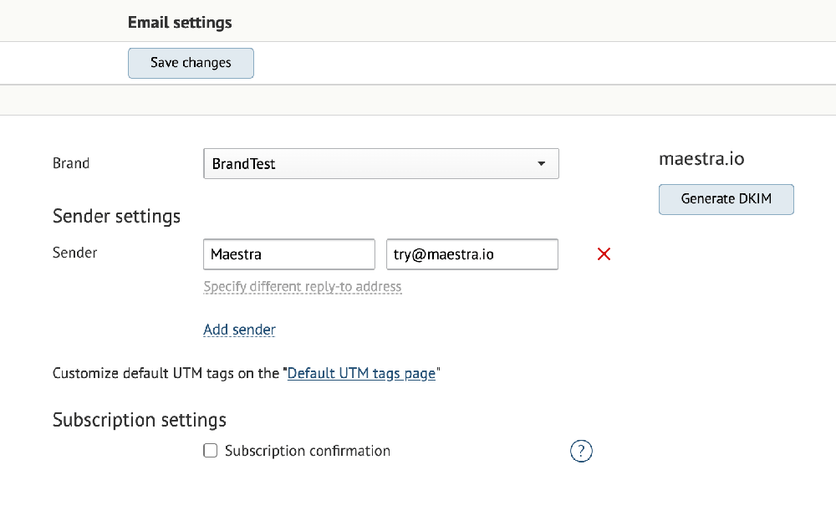
A DKIM key published in the brand’s own DNS lets mailbox providers confirm that the brand sent the email
After the brand publishes the DKIM record, receiving servers can verify that the brand’s domain signed the message. The headers of a Coolibar email sent through Maestra show the result: the sender is service@coolibar.com, SPF and DMARC pass, and DKIM passes with coolibar.com as the signing domain.
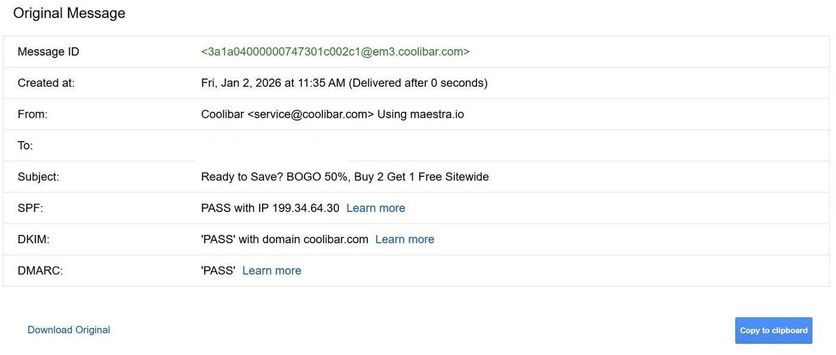
SPF, DKIM and DMARC pass for coolibar.com, so Gmail credits the brand’s own domain (recipient address removed)
The domain matters because mailbox providers score it. Yahoo rates each IP and DKIM domain separately and recommends separating email types by IP or by DKIM domain. In Maestra, every campaign, automated ones included, has its own sender, and each sending domain or subdomain gets its own DKIM and DMARC, so order emails can go out from orders.brand.com and marketing from news.brand.com. Maestra places each brand in one of three IP pools by its Email Health score, so your deliverability stays protected from other brands' sending mistakes.
Ask your vendor: can order emails and marketing email go out from different subdomains, each signed with its own DKIM, and how are sending IPs assigned?
2. Order confirmations reach customers who unsubscribed from marketing
A customer who unsubscribed from promotions last month still expects the receipt for today’s order. Maestra’s order confirmation flow handles this with a campaign profile set to Transactional, which makes the confirmation bypass subscription and marketing validity checks.
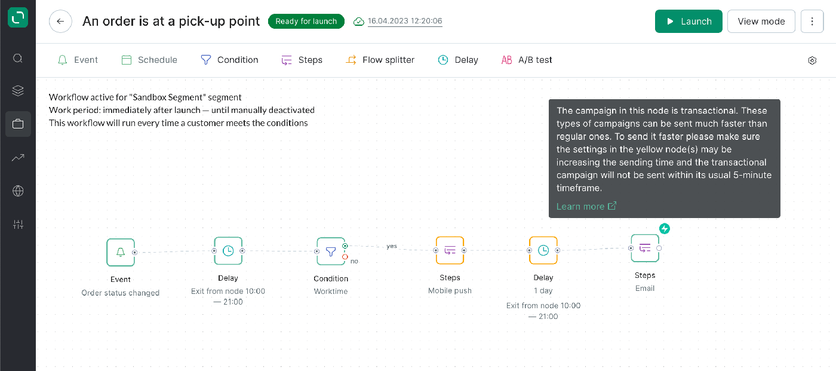
Campaigns marked as transactional in Maestra can send faster than regular marketing campaigns
Transactional campaigns in Maestra send faster than regular ones, so a receipt reaches the customer soon after the order. Any delay or condition placed before a transactional campaign in a flow pushes that send back. A cart reminder with a discount code can’t use the Transactional profile, because its content is marketing even though a shopper’s action triggers it.
Ask your vendor: if a customer unsubscribed from marketing yesterday, does their receipt still arrive, and which setting decides that?
3. Order emails show a separate status for each item
Orders often ship in parts: one item is in transit, another is delivered, a third is cancelled. An order status email has to report each item correctly, so the platform needs to store a status for every line in an order.
Selkirk, a pickleball brand that sells on Shopify, often ships one order in several parts. Maestra keeps a separate status on every line of such an order. In the example below, a paddle is in transit with USPS, three items are delivered by ground, and a free gift is paid but has no shipping method attached.

Each item in a Selkirk Sport order keeps its own status, so order emails can report on every item separately
An order status email for Selkirk’s split order has to tell the customer something different about each of the five items. If it announces that the whole order has shipped, it is wrong about four of them. Selkirk’s earlier marketing platform could not represent orders where items shipped separately or one item was cancelled, so the brand kept its order emails on Shopify.
Ask your vendor: can you send a real email from a live account for an order with one item shipped, one delivered and one cancelled?
4. Daily email limits hold back promotions but never receipts
A daily email limit keeps customers from getting too many promotions, but a receipt must never wait behind it. The platform has to count promotions toward the limit and let order emails through.
In Maestra, receipts go out through the Transactional profile, which skips subscription checks and doesn’t count toward Smart Send’s daily limits, so a cap never holds a receipt back. Marketing campaigns stay under those limits and can exclude recent buyers, for example anyone who ordered in the past 7 days.
Ask your vendor: are order emails exempt from daily caps, so a receipt is never held back, and can promotions skip anyone who ordered in the last few days?
5. Deliverability reports break results down by mailbox provider
Deliverability problems often start at one mailbox provider, such as Gmail or Yahoo, before they show up anywhere else. A report that splits results by provider catches them early.
Maestra’s Email Health report scores a brand’s sending and breaks results down by mailbox provider such as Gmail and Yahoo.
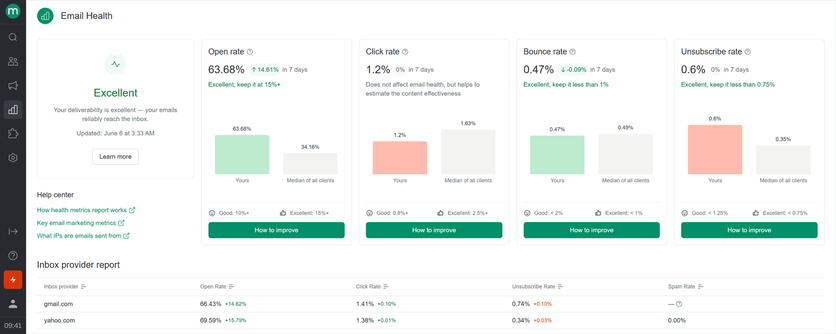
Scores by mailbox provider show a problem at one provider before it reaches the others
The Email Health report also links to a page explaining which IPs the emails are sent from.
Ask your vendor: can I see health per mailbox provider, with separate figures for bulk and automated sends, and how are sending IPs assigned?
A marketing platform that passes all five checks can take over order emails from Shopify without putting receipts or deliverability at risk. If it fails any of them, the next section covers when a separate transactional email service makes more sense.
When to Add a Transactional Email Service Next to Your Marketing Platform
Sending transactional and marketing emails from one platform doesn’t always make sense. A brand can be happy with its marketing platform in every other way, but the platform doesn’t send transactional email at all. Or the platform sends order emails with gaps: it can’t track each item in an order, or it lets a frequency cap hold back receipts. In both situations, order emails are better off on a separate service.
Shopify sends order notifications by default, and they work while order volume is small. They can go out from the brand’s authenticated domain and send a separate shipping confirmation for each fulfillment. Shopify shows whether each notification was sent, but its reports on opens, clicks and bounces cover only marketing campaigns. That setup gets harder to live with once shipping-notification tickets start piling up, because it shows little about why a receipt didn’t arrive.
A dedicated transactional email service like Mailtrap handles order emails with the delivery data Shopify’s notifications lack. Mailtrap sends through an API or an SMTP relay and sets up SPF, DKIM and DMARC automatically once the brand adds its DNS records. It keeps transactional and bulk traffic on isolated IP pools by default on every plan, so a bounce spike from a marketing campaign doesn’t touch the reputation behind order emails.
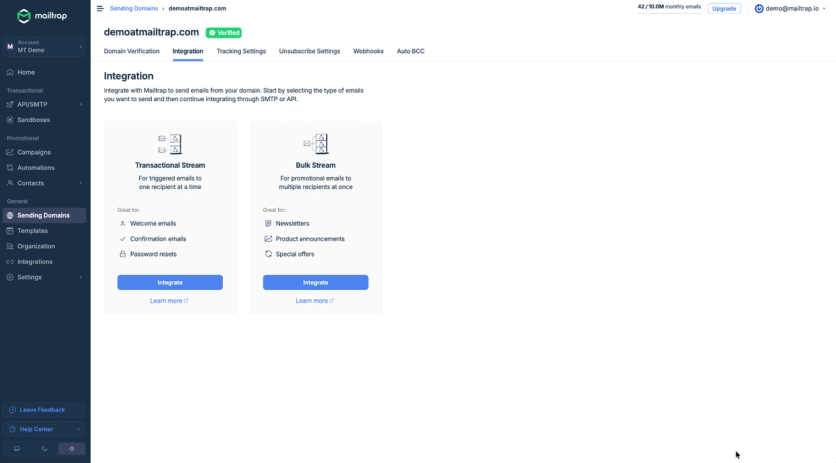
Separate Transactional and Bulk streams keep promotions from affecting receipt delivery
Mailtrap’s free plan covers 4,000 emails a month with a cap of 150 a day and no credit card, which suits a small store, and larger stores move to a paid plan. Because Mailtrap works through its API or SMTP, a developer or an automation tool connects the store’s order events to the send. That connection is the main extra work compared with a platform that already receives the order data.
Abandoned Cart Email Timing That Keeps Reminders Away From the Receipt
Wherever order emails go out from, the marketing platform has to learn about each purchase fast. Otherwise a shopper who buys right after abandoning a cart gets the receipt and, minutes later, a reminder with a discount on items they just bought at full price.
A reminder lands beside the receipt for one of two reasons: the purchase hasn’t reached the marketing platform yet, or the flow doesn’t check for a purchase before each reminder. In Maestra’s sample abandoned cart flow, every reminder after the first waits behind a “Made a purchase” check. The first email has none, so the purchase has to reach the platform before it goes out.
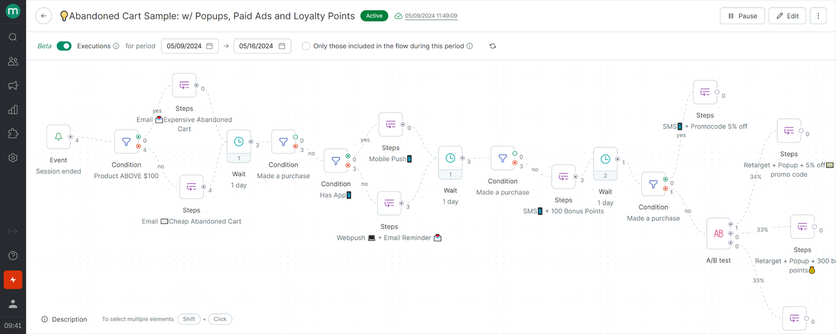
A purchase check before each reminder after the first keeps discounts away from people who already bought
- Check for a purchase before every reminder, not only the later ones, wherever your platform allows it.
- Set the first reminder’s delay longer than the lag between an order and its arrival in the marketing platform. Place a test order and time it. About one hour after abandonment is a typical first touch in abandoned cart recovery, and it leaves room for order data to arrive if your measured lag is a few minutes.
- Exclude recent buyers. Leave out anyone who bought in the past 7 days, and anyone who already received a message that day, from recovery messages. Apply a similar window to promotional campaigns.
- With two platforms, send the order event to the marketing platform as soon as the order is created, for example through a Shopify order webhook, and pause that customer’s flows on arrival.
- Count every email a customer receives in a day. Decide which kinds can be capped, and exempt receipts from every cap.
Marketing email falls into three types, and each one collides with a receipt in a different way.
Type | What it is | How it collides with the receipt | Rule to set |
Lifecycle | Email a platform sends because a person did something or reached a status: welcome, cart recovery, post-purchase, win-back | A welcome or post-purchase email triggered by the same purchase arrives with the receipt | Delay purchase-triggered flows a few minutes, so the receipt goes first |
Promotional campaign | A scheduled send to a segment, such as a holiday or sale email | A campaign goes out minutes after someone buys | Exclude recent purchasers from campaigns for a set period |
Newsletter | A recurring editorial email | Rarely collides, but adds to the day’s email count | Count it toward the daily limit |
What to do: before your next campaign, run the five steps above against a test order and confirm that the receipt arrives first and that no discounted reminder follows it.
Shopify Transactional and Marketing Emails in Four Rules
- A platform can send both transactional and marketing email when it passes five checks: own authenticated domain, delivery regardless of marketing consent, line-item accuracy, holding promotions back after an order without ever capping the receipt, and health reporting by mailbox provider.
- Order emails and marketing email follow different rules about who must receive them, what they contain and how often they go out, so each difference becomes a question for the vendor.
- Use one platform when it passes every check. Use two when the marketing platform does not send transactional email or fails the line-item or frequency checks, and send order emails from a dedicated transactional service such as Mailtrap.
- Collisions come from purchase data arriving late and from flows that skip the purchase check, so measure the lag and check for a purchase before each reminder.
Transactional vs. Marketing Emails FAQ
- Yes, when it passes five checks: it sends from your authenticated domain, delivers order emails regardless of marketing consent, tracks each line of an order, holds promotions back after an order without ever capping the receipt, and reports health by mailbox provider. Maestra, for example, sends order confirmations and order status emails as transactional campaigns next to marketing email. If a platform doesn’t send transactional email, or fails the line-item or frequency check, send order emails from a dedicated service.
- Yes, unless the order emails move to another platform. Shopify sends order notifications by default, and connecting a marketing platform moves the marketing email only. Selkirk moved its order emails from Shopify to Maestra.
- Speed depends on how quickly the platform receives the order. In Maestra, transactional campaigns send within 5 minutes after the platform receives the order data, and delays or conditions placed before the send can stretch that window.
- No. A cart reminder is marketing email even though a shopper’s action triggers it, because it exists to bring the shopper back to buy. Like the rest of abandoned cart recovery, it follows marketing rules, including consent and frequency limits.