
How to Diagnose and Fix Email Deliverability Problems

To check your email deliverability, start with three simple tests. First, send a test email to yourself on Gmail – check if it landed and how it looks. Second, use mail-tester.com to catch authentication errors and blocklist placement. Third, use seedlist tools like GlockApps or Emailconsul to see inbox vs. spam placement across providers. For ongoing monitoring, use your provider’s reporting – for example, Maestra offers an Email Health Report that tracks key deliverability metrics and provides improvement tips.
1. Self-Check via Gmail
- How the email displays in your inbox (Primary tab? Promotions? Spam?)
- Whether Gmail shows any warnings or errors in the message headers
- Whether authentication is passing (SPF / DKIM / DMARC)
To see the headers: open your email in Gmail, click the three dots menu, and select "Show original." Look for "PASS" next to SPF, DKIM, and DMARC. If any of them show "FAIL," that’s your first problem to fix. DMARC is the one most often missing: only 56% of senders have it set up.
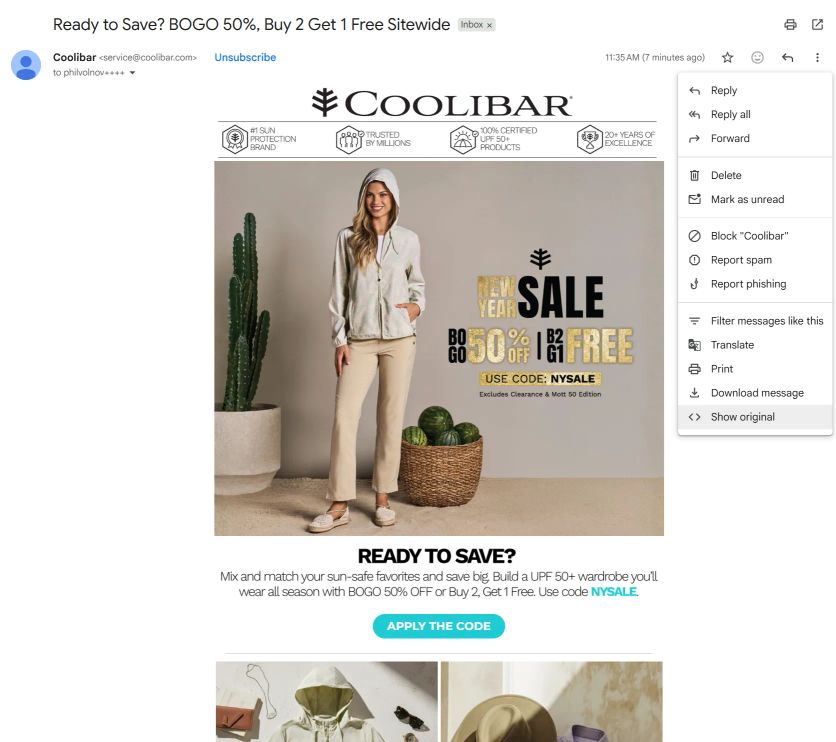
Let’s check an email from our client Coolibar, an apparel brand
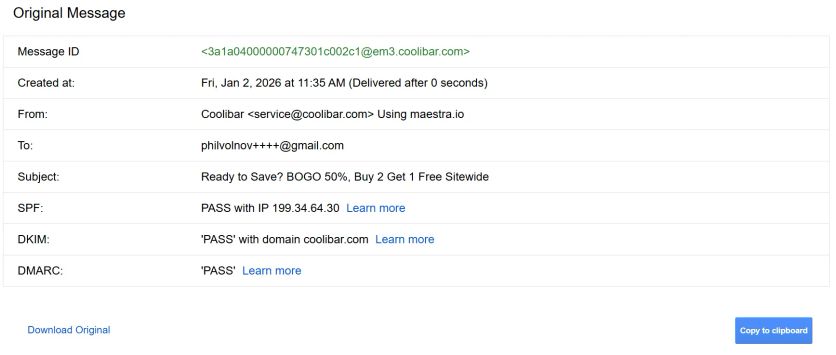
SPF, DKIM, and DMARC all passing
2. Check via Mail-Tester
Go to mail-tester.com, send an email to the address they give you, and check the report.
Mail-Tester catches major issues:
- Broken or missing authentication (SPF, DKIM, DMARC)
- Problems with your email template (missing unsubscribe link, spammy content)
- Domain or IP blocklist placement
If something critical is wrong, you’ll see it right away in the score and breakdown.
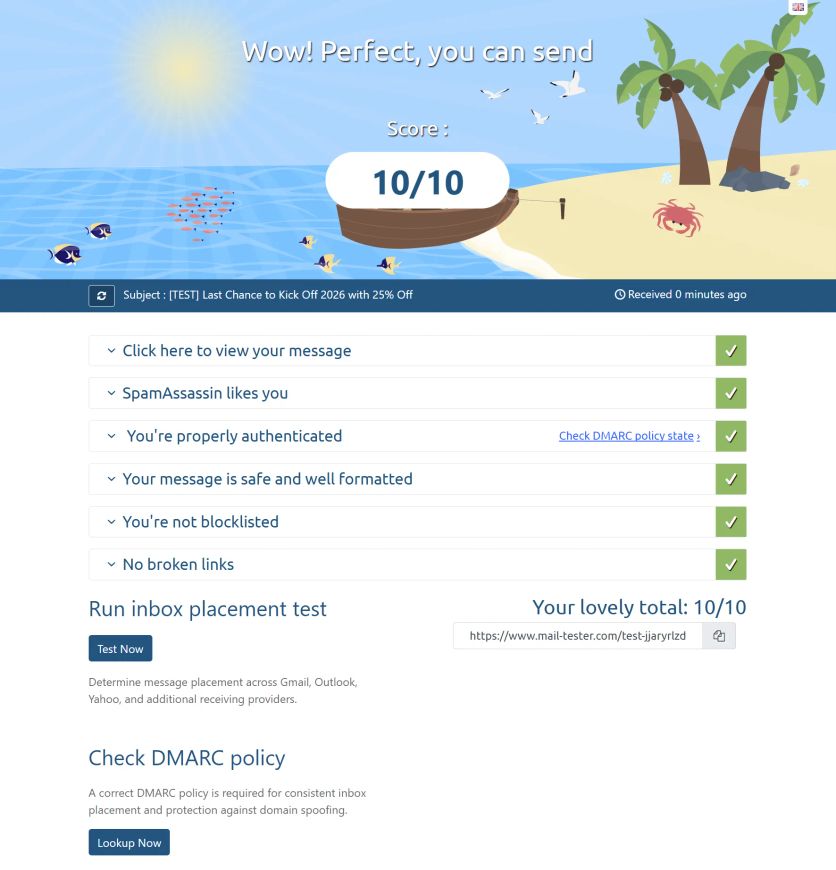
Deako, a lighting system brand and our client, gets 10/10 on Mail-Tester
3. Use Seedlist Testing Tools
For deeper testing, use seedlist services. These tools send your email to dozens or hundreds of test addresses across different providers and report back: inbox, spam, or missing.
This helps you catch partial spam placement – for example, your emails might land in the inbox on Yahoo but go to spam on Gmail. You won’t see that with a single test address.
Three tools worth trying:
- GlockApps
- Emailconsul – our team uses this one more often for its cleaner interface
- EasyDMARC – its email deliverability test checks authentication, domain reputation, and inbox placement signals in one pass
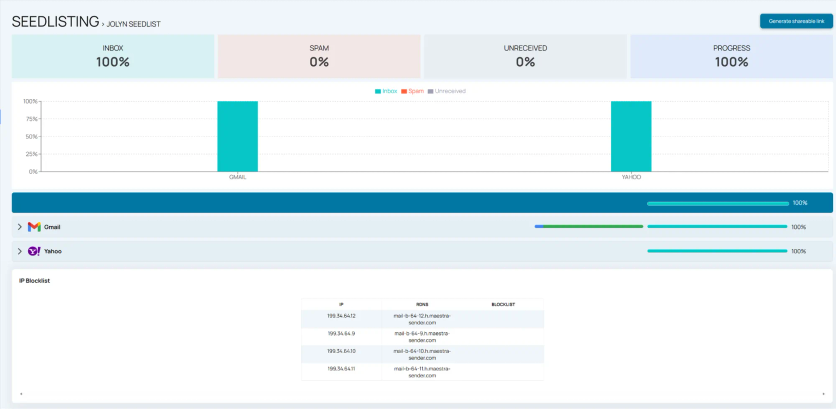
Seedlist testing results for Jolyn, a swimwear brand and our client
Deliverability Issues Maestra Recently Fixed for Clients
Here are a few recent examples from my work – maybe one of these sounds familiar:
Authentication Misconfiguration
One client suddenly couldn’t reach customers on a major regional email provider. Turned out, their SPF wasn’t passing.
Fix: Their SPF record had too many entries – there’s a hard limit of 10, and they’d accumulated services over time. We identified the issue, explained it, and guided them through consolidating their records.
Bot Registration Problem
A client’s bounce rate spiked with "non-existent address" errors.
Fix: We dug in and found bots were registering fake emails on their site. We flagged the pattern, showed them exactly which addresses were bouncing, and recommended anti-bot protection. Double opt-in also helps prevent this. Additionally, you can protect your sender reputation from bots by using a verification tool like Bouncer to clean your list of toxic addresses.
False Blocklist Placement
A European client got blocked by a regional provider – flagged as spam even though they were legitimate.
Fix: I reached out to the provider’s postmaster team with proof: GDPR compliance confirmation, authentication documentation, and an example email. They acknowledged the false positive and removed the block within 24 hours.
How to Ensure You Can Easily Solve Deliverability Issues
When choosing a provider, think about deliverability upfront. Look for clear analytics and hands-on support.
At Maestra, you can track everything yourself in the Email Health Report, which shows delivery rate, bounce rate, and spam complaints – compared against industry benchmarks.
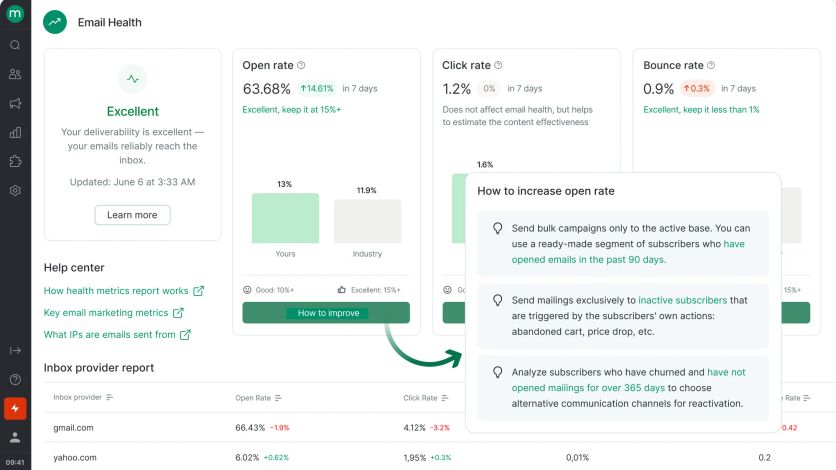
Every Maestra account comes with a dedicated Forward Deployed Marketer – a marketer from our team who works as part of yours. They handle deliverability setup during onboarding: configuring Postmaster and sender signatures (SPF, DKIM, DMARC), warming up your sending domains, and building targeted sending segments. After that, we keep monitoring your email health metrics and step in when something looks off.
Worth checking too, when metrics slip and the tests come back clean: whether any cold outreach is going out from this same domain. People who never opted in report spam at a rate no template fix can offset, and the damage lands on the reputation your campaigns and order emails share. That traffic needs its own domains and inboxes, and that’s a separate setup job with its own specialists such as ScaledMail.
Here’s a real example: Furniture Fair came to us with open rates stuck at 17% and serious deliverability problems. Their emails were landing in spam instead of the primary inbox.
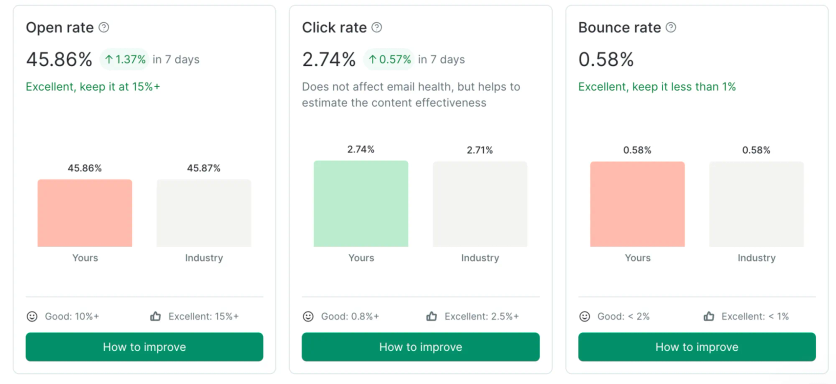
Our team fixed the deliverability issues, rebuilt their email templates, and launched new automated flows. Within four months, their open rates jumped from 17% to 46%, bounce rate dropped from 4% to 0.58%, and email now drives 11% of their total revenue.

P. S. It’s also a good idea to review your sending practices from time to time – even if your deliverability is stable. Here’s a good checklist: