13 Best Email and SMS Marketing Platforms for E-Commerce
Most e-commerce brands run email in one tool and SMS in another. Each tool keeps its own list and its own segments, and they sync on a delay. A customer opens the 6 pm email, buys, and at 6:10 still gets a text with the same discount, because the SMS tool has not heard about the order yet.
We compared 13 platforms that run both channels from one customer profile, so the purchase stops the text the moment it happens. For each one we looked at SMS coverage and per-message cost, whether email and SMS live in the same flow, segmentation depth, support, and what you actually pay.
Quick Verdict: Best Email and SMS Platform by Use Case
Maestra – best for brands that want a marketer running email, SMS, and beyond
Sender – best for small stores that want email and SMS in one visual flow on a free or low-cost plan
Retainful – best for small WooCommerce and Shopify stores that want cart recovery on a budget
Salesforce Marketing Cloud – best for enterprises already on Salesforce that run SMS through Mobile Studio inside Journey Builder
Constant Contact – best for small businesses adding SMS and social posting to a beginner-friendly email tool
Omnisend – best for small and mid-size Shopify stores that want pre-built email, SMS, and push workflows
CleverTap – best for app-first brands where SMS sits next to push and in-app messages
Sendlane – best for DTC brands with an in-house team that wants email and SMS in one flow builder
Klaviyo – best for self-serve Shopify brands that want native email and SMS without a dedicated manager
ActiveCampaign – best for teams that need email and SMS automation tied to a built-in CRM
Listrak – best for retailers that want managed email and SMS services with retail-specific playbooks
Drip – best for commerce brands that want SMS added to a visual email workflow builder
HubSpot Marketing Hub – best for companies that want email and SMS inside the same CRM as sales
Email and SMS Platform Comparison Table
| Platform | Email Editor | Segmentation | Email + SMS Flows | SMS Coverage and Cost | Support | Starting Price |
|---|---|---|---|---|---|---|
| Maestra | Drag-and-drop + HTML editor, advanced personalization, AMP support, code efficiency | Real-time CDP, granular targeting, nested segmentation, computed fields | Email, SMS, WhatsApp, and push in one flow; an order in any channel stops the rest in real time | Native SMS, MMS, and RCS; US SMS from $0.0035 per message plus carrier fees | Dedicated Forward Deployed Marketer for all tiers, free migration services, weekly calls | From $2,000/ month (CDP + unlimited email); modular – pay only for active profiles |
| Sender | Drag-and-drop + HTML, responsive templates, countdown timers, product blocks | Tags, filters, custom fields, behavior and activity-based segments | Email and SMS steps in one visual workflow | Native SMS, billed per message | 24/7 email & chat, dedicated success manager for higher tiers | Free for 2,500 subscribers; from $7/month |
| Retainful | Drag-and-drop editor with 150+ templates, product blocks, dynamic personalization | Behavior-based, purchase history, custom rules, pre-built segments | Email, SMS, and WhatsApp in 9+ pre-built workflows | Native SMS for the US and Canada, plus WhatsApp | Free onboarding, dedicated and fast support team | Free for 500 emails/month; from $14/month (1,000 contacts) |
| Salesforce Marketing Cloud | Content Builder with AI integration, complex dynamic content | CRM-based, complex rules, sales pipeline integration | Journey Builder orchestrates email and SMS | SMS via Mobile Studio, licensed separately | Varies by tier, often requires consultants | ~$1,500 –$3,250/ month (mid-tier) |
| Constant Contact | Drag-and-drop + HTML, 600+ templates, AI writing assistant, dynamic content (Premium), BrandKit | Engagement-based segments, ecommerce segmentation (Premium), web sign-up forms and landing pages | Email and SMS steps in one automation from the Standard plan | SMS from the Standard plan ($35/month), billed per message | Live phone and chat on all plans; live 1:1 onboarding; dedicated priority team (Premium) | From $12/month; nonprofits save up to 30% |
| Omnisend | Drag-and-drop email builder, Product Picker, product listing blocks, HTML block | AI Segment Builder, real-time dynamic segments, lifecycle stage targeting | Email, SMS, and web push in one workflow | Native SMS, per-message credits | Live chat and email, Help Center | Free for 250 contacts Standard from $16/month |
| CleverTap | Mobile-optimized, no-code interface | AI-driven behavioral analysis, event-based | Journeys across push, in-app, email, SMS, and WhatsApp | SMS alongside push and WhatsApp, billed per message | Tiered support, migration assistance | From $75/ month (5k MAUs) |
| Sendlane | Drag-and-drop + HTML, e-commerce templates | Behavioral targeting, purchase patterns | Email and SMS in one visual flow builder | Native SMS, cost scales with usage | High-touch, Strategic guidance, dedicated onboarding | Starts at 5,000 contacts |
| Klaviyo | Product-focused, dynamic content, drag-and-drop | Unified customer view, behavior-based | Email and SMS branches in one flow, split by consent | Native SMS and MMS in the US and Canada, plus the UK, Australia, and more; per-message credits | Tier-based, Limited for lower plans | Free to start; $20-30/month (500 contacts) |
| Active Campaign | Drag-and-drop + HTML editor with responsive templates and dynamic content blocks | Purchase history, website behavior, engagement metrics and custom fields | SMS steps inside email automations | Native SMS, billed as an add-on | Email, live chat, knowledge base and community forums | $29/month (1,000 contacts) |
| Listrak | Retail-focused editor with product integration and responsive design | RFM analysis, product preferences, lifecycle stage and inventory tracking | Email, SMS, and on-site in one journey | Native SMS, run with Listrak’s managed services | Personal account manager, 24/7 emergency support and expert guidance | ~$1,000/ month |
| Drip | Commerce-centric editor with product showcase blocks and dynamic content | Purchase patterns, product preferences, lifecycle stage and behavioral tags | SMS steps in the visual email workflow | Native SMS, per-message pricing | Email, live chat, knowledge base and webinars | $39/month (500 contacts) |
| HubSpot Marketing Hub | Drag-and-drop + HTML editor with responsive templates and CMS integration | Contact properties, website interactions, email engagement and form submissions | SMS actions inside CRM workflows | SMS add-on, billed per message | Support varies by plan with knowledge base, community and email/chat | $45/month (Starter) |
1. Maestra – Best for Brands That Want a Marketer Running Email, SMS, and Beyond
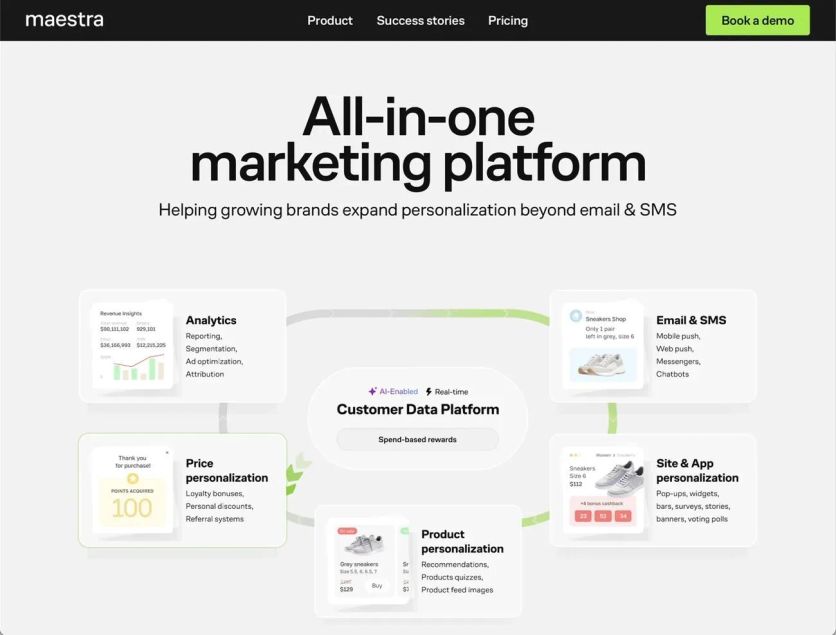
Maestra stands out in email marketing as an all-in-one marketing platform built for e-commerce brands that want to combine their marketing tech stack.
The platform brings together omnichannel marketing automation, strong customer data infrastructure, website and app personalization, product recommendations, and complete loyalty management in one solution. This helps brands avoid using multiple specialized tools.
Maestra Email Editor
The platform’s drag and drop email composer shines through its technical excellence. It uses lean code that prevents message clipping – a common problem with bigger emails. This smart coding helps emails look great on all devices and email clients.
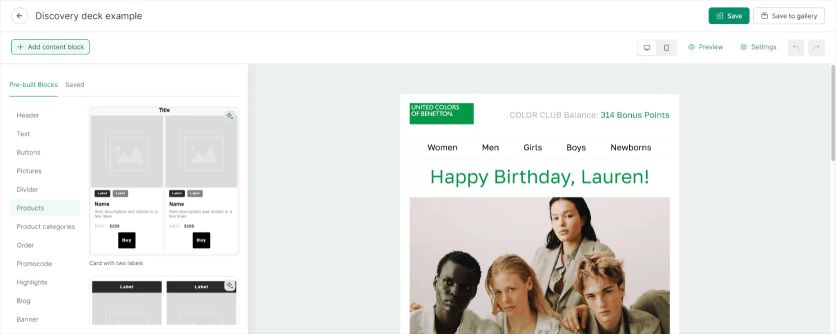
Maestra’s visual email composer
The editor lets marketers create dynamic content for specific customer groups using Maestra’s CDP data.Maestra stays ahead with modern email tech like AMP emails that add interactive elements right in the messages.
The platform also makes sure emails land in inboxes instead of spam folders. Marketing teams love this mix of creative freedom and solid performance.
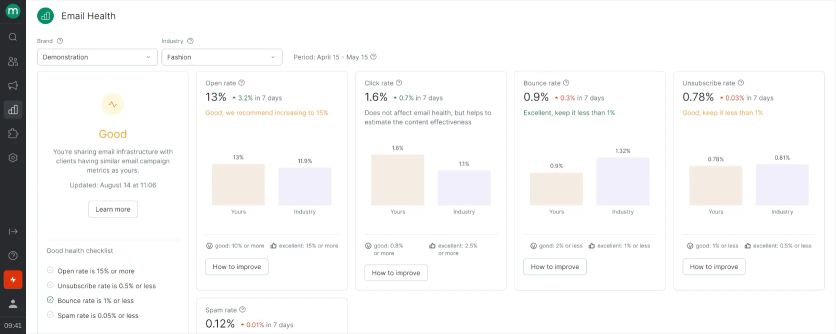
Maestra’s email health monitoring
Maestra Segmentation
Maestra’s real-time Customer Data Platform (CDP) sits at its heart. It creates complete customer profiles from both online and offline data.
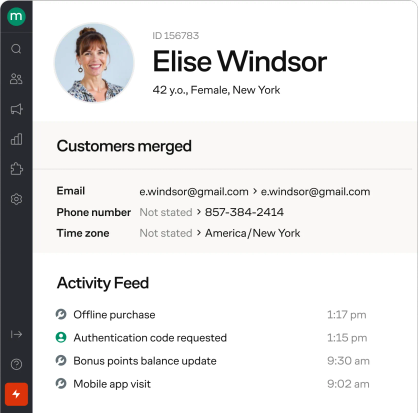
Customer profile in Maestra
Unlike simple segmentation tools, Maestra lets you target customers based on specific details – from single page visits to exact purchase history. Marketing teams can then run highly targeted campaigns based on exact customer actions and priorities.
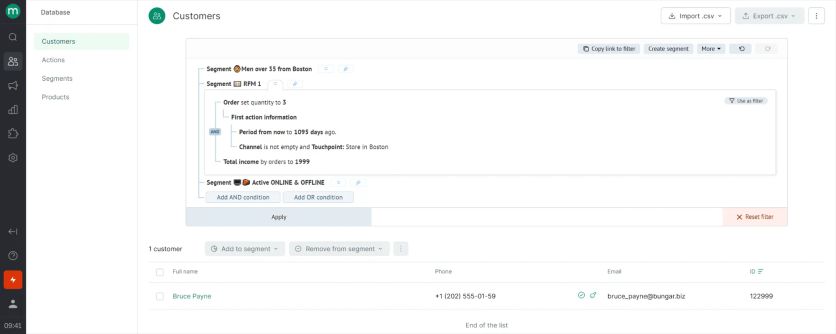
User segmentation in Maestra
The CDP handles complex data better than simpler platforms like Klaviyo. This makes it perfect for businesses that need advanced segmentation. Teams can create super-targeted campaigns that respond to customer actions right away, which leads to better customer experiences.
Maestra Automations
The platform does much more than just send email sequences. Marketers can coordinate full campaigns across email, SMS, web notifications, and mobile channels from one dashboard. A customer’s trip might start with an email, switch to an SMS if they don’t respond, and show them a custom banner when they visit the website again.
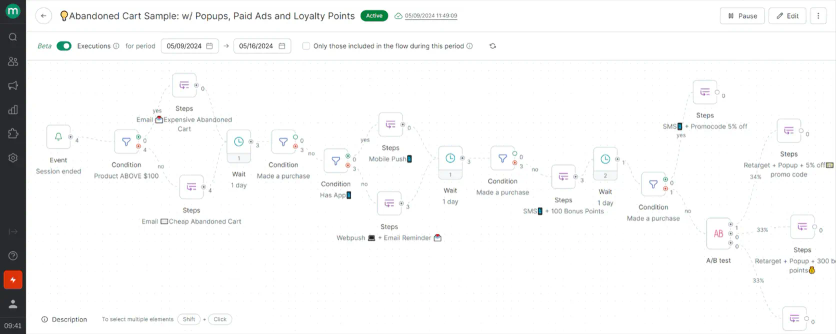
Maestra’s flow example: abandoned card flow with emails, mobile and web pushes, pop-ups, paid ads and loyalty points
These workflows react to what customers do in real-time rather than following a fixed schedule. This makes messages feel more natural and timely compared to basic drip campaigns that just follow a set timeline.
The platform also opens to AI assistants. Maestra’s MCP server links the account to Claude or ChatGPT, so a marketer can describe a change in chat: reword a campaign and reset its schedule, cut a new segment, sketch a multi-step automation with the conditions that route each customer, or pull the numbers on how any of it performed.
Maestra Extended Features
Maestra has features you’d usually need separate platforms for. A complete loyalty and rewards program lets brands give points, VIP status tiers, and referral rewards – all without extra loyalty software. Having everything in one system keeps customer data unified.
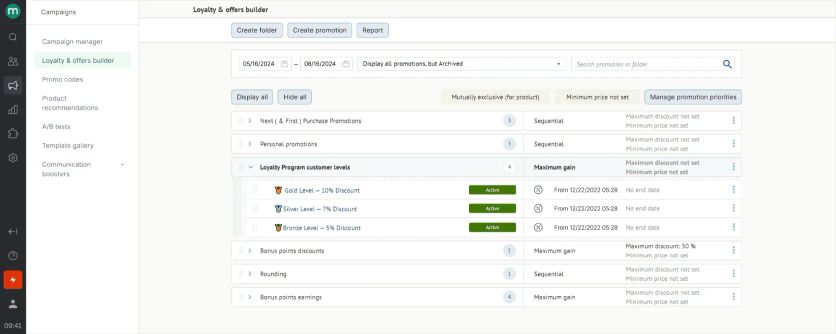
Maestra’s promotions rule engine
The platform also has tools for website personalization, including product suggestions and custom web content.
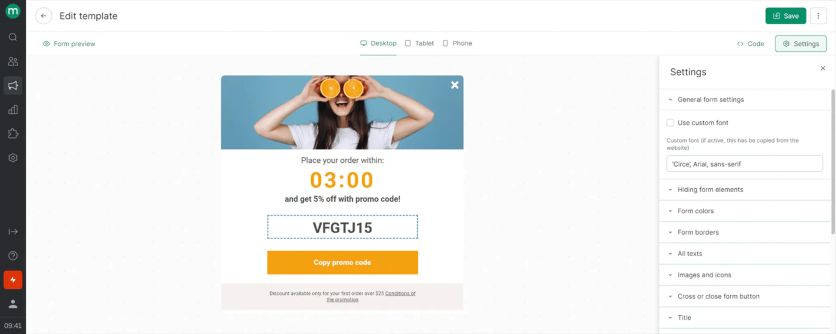
Maestra’s pop-up template editing
These built-in features remove the need for extra tools that would scatter customer data across different systems:
Real-time CDP: Built-in Customer Data Platform with AI-powered segmentation that unifies customer data from all touchpoints including email opens, call center calls, and offline purchases.
SMS Marketing: SMS, MMS, and RCS run from the same customer profile as email, so a cart-recovery flow can send the email first and the text only if the email goes unopened. US SMS costs from $0.0035 per message plus carrier fees. Selkirk Sport grew SMS revenue 149% year over year after moving email and SMS to Maestra from Bloomreach, and JOLYN lifted SMS revenue 52% after leaving Klaviyo.
Site Personalization: Real-time website personalization with pop-ups, quizzes, surveys, games, embedded blocks, stories, widgets, banners, and bars that adapt instantly to customer behavior.
Product Recommendations: AI-driven recommendation engine with 14 algorithms that personalizes product suggestions in real-time based on browsing history and customer preferences.
Loyalty Programs: Integrated loyalty system with real-time point tracking, bonus rewards, and automated incentives that respond to customer actions without third-party tools.
Mobile Push Notifications: SDK for mobile apps enables real-time push notifications and personalization directly integrated with customer data and behavior tracking.
Paid Media Optimization: Automated exclusion of recent buyers from paid campaigns and dynamic audience targeting based on real-time customer segments and behavior.
Maestra Support
Maestra takes a hands-on approach to customer support. Every client gets their own Forward Deployed Marketer, no matter which plan they choose. They are always in touch in a shared Slack channel and meet every week for a strategic session.
Moreover, Forward Deployed Marketer handles all the heavy lifting: migration and integration, rebuilding and improving flows, email design, and so on.
Growing brands find this personal guidance valuable when they need a strategic partner, not just software access. This advisory approach sets Maestra apart from platforms that just offer tech support.
Maestra Cost
Plans start at $2,000 monthly for the customer data platform plus unlimited email, with the first 100,000 active profiles included. This modular pricing often gives better value than competitors like Braze. You add monthly modules only for the channels you use and pay only for active profiles – storing dormant ones is free. Billing runs month-to-month, with no annual contract. When you count the separate tools Maestra replaces (loyalty software, personalization engines, etc.), many businesses actually save money. The SMS, MMS, and RCS module adds $250 per month on top of the CDP base, plus per-message fees. Most brands take it together with email, which puts the typical starting package at $2,250 per month.
2. Sender – Best for Small Stores Starting Email and SMS on a Budget
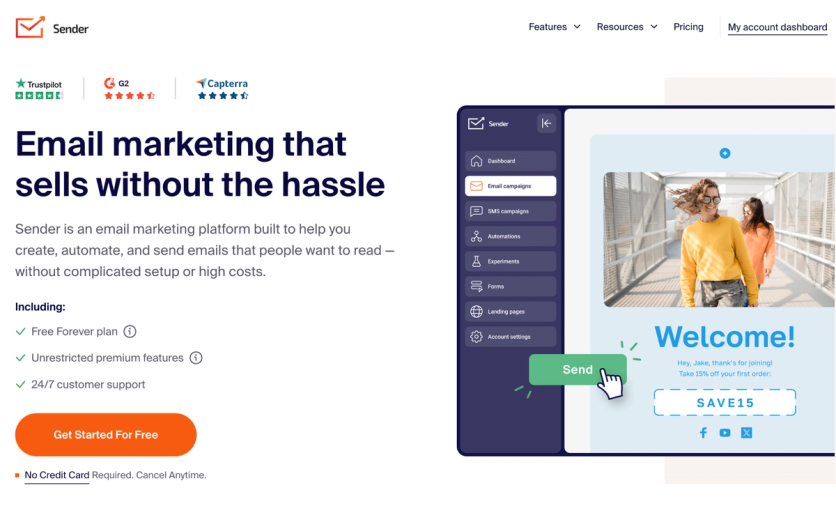
Sender is an email marketing platform built for small and growing businesses that want a balance of functionality and ease of use without the complexity of enterprise tools. The platform brings together newsletters, bulk emailing, automation, segmentation, transactional emails, and SMS marketing in a single interface, making it a practical choice for teams that want to consolidate their marketing without a steep learning curve. It’s a solid choice for small businesses and early-stage brands who haven’t yet reached the subscriber counts or cross-channel complexity that require a full-stack platform like Maestra.
Sender Email Editor
Sender’s drag-and-drop editor lets marketers create professional, responsive emails in minutes without any coding knowledge. The builder includes ready-made templates, product blocks that pull product data directly from a store URL, and liquid tags for dynamic personalization across subject lines, content, and product recommendations. The interface is designed for speed, making it easy for small teams to produce polished campaigns quickly.
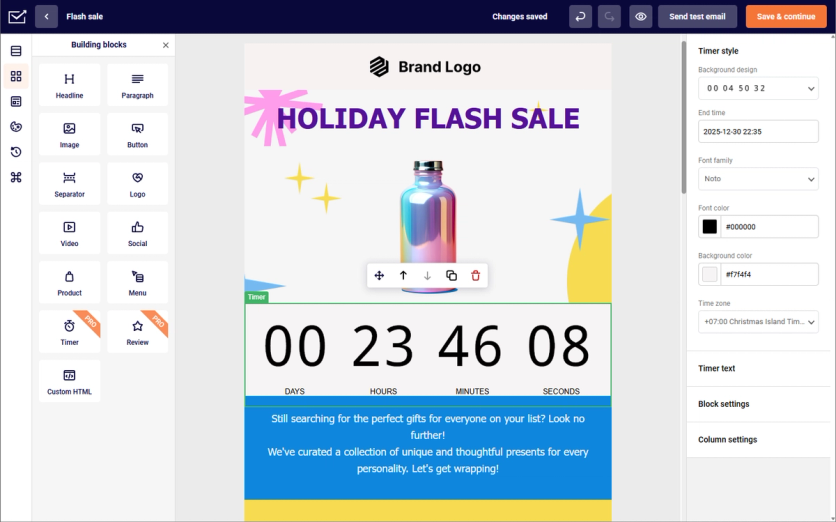
Sender’s editor
The editor handles both newsletter-style campaigns and transactional emails from the same workspace, removing the need to switch between tools. Responsive layouts ensure emails render correctly across all devices and email clients.
Sender Segmentation
Sender’s segmentation works through dynamic, rule-based segments that update automatically as subscriber data changes. Conditions can be built around custom contact fields, engagement activity such as opens and clicks, behavior, and location, letting teams target specific groups across email campaigns, SMS, and automation workflows.
Sender Automations
Sender’s visual automation builder makes it easy to design and launch workflows without technical expertise. Pre-built automation templates cover common sequences like welcome series, abandoned cart follow-ups, and post-purchase emails, letting teams get campaigns running quickly. Trigger-based logic fires messages based on events such as sign-ups, purchases, or specific user actions.
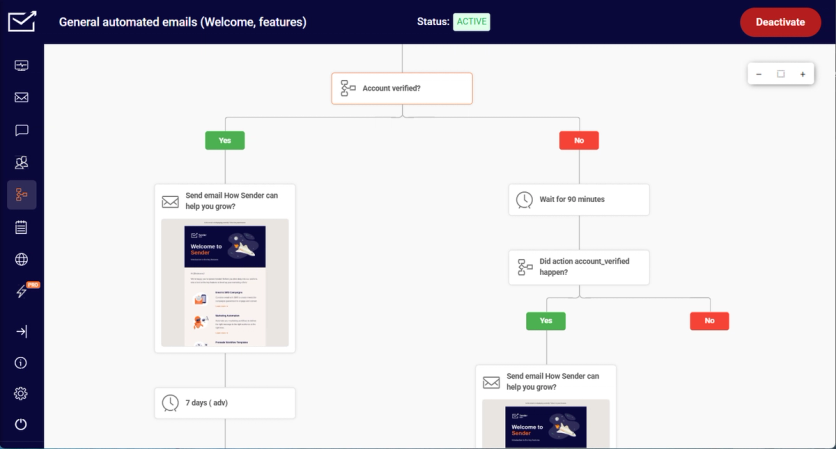
Sender’s workflow builder
The platform supports time delays and conditional logic for building more structured sequences. Multi-channel automation extends workflows beyond email into SMS, enabling teams to combine both channels in a single flow – for example, sending a text follow-up if a key email remains unopened after a set period.
Sender Extended Features
Sender includes several tools that expand its value beyond core email sending:
- SMS marketing integrated directly into email automation workflows for true multi-channel campaigns
- Popups, signup forms, and exit-intent forms for on-site list growth
- Landing page builder for creating high-converting pages without additional tools
- Transactional email support with high deliverability and built-in security protocols
These built-in features reduce reliance on separate point solutions and help small business teams manage more of their marketing from one dashboard.
Sender Support
Sender provides 24/7 email and live chat support on all plans. Access to a dedicated success manager is available on higher-tier plans. The platform also offers a help center, migration support, and training videos for teams that prefer self-service resources.
Sender Cost
Sender offers a Free Forever plan that supports up to 2,500 subscribers and 15,000 emails per month, including automation, segmentation, templates, landing pages, and popups – making it one of the more generous free tiers in the market. Paid plans start at $7 per month, scaling with subscriber count and email volume without contracts or setup fees.
Sender Pros and Cons
| Pros | Cons |
|---|---|
| Generous free plan with automation and segmentation included | Sender branding shown in free plan emails |
| Affordable paid tiers that scale without steep price jumps | No built-in CRM for sales pipeline management |
| Intuitive drag-and-drop editor with minimal learning curve | Advanced segmentation depth is lighter than enterprise CDP platforms |
| Native e-commerce integrations including Shopify and WooCommerce | Reporting and analytics are less advanced for funnel tracking |
| Multi-channel capability combining email and SMS |
3. Retainful – Best for Small WooCommerce and Shopify Stores on a Budget
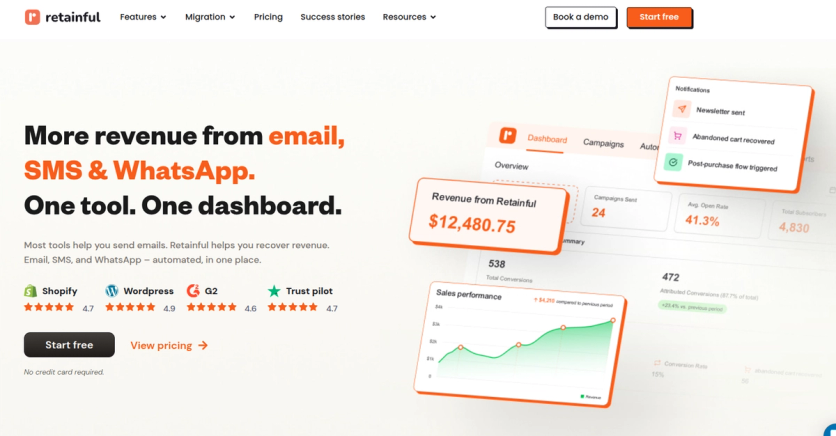
Retainful is an all-in-one email, SMS, and WhatsApp marketing platform built specifically for e-commerce. Developed by Flycart, it serves stores that want Klaviyo-style automation and cart recovery without the Klaviyo price tag. The platform is built specifically for WooCommerce and Shopify, integrating natively with your store to sync contacts, orders, products, and customer data automatically.
Retainful Email Editor
Retainful’s drag-and-drop editor is designed for speed and ecommerce-first sending. A library of 150+ templates and a visual editor means campaigns can be sent in minutes, not days. You can pull product blocks (images, pricing, inventory) directly from their connected store, personalize subject lines and body content with first name, last name, and custom fields, and surface product recommendations based on browsing and purchase history.
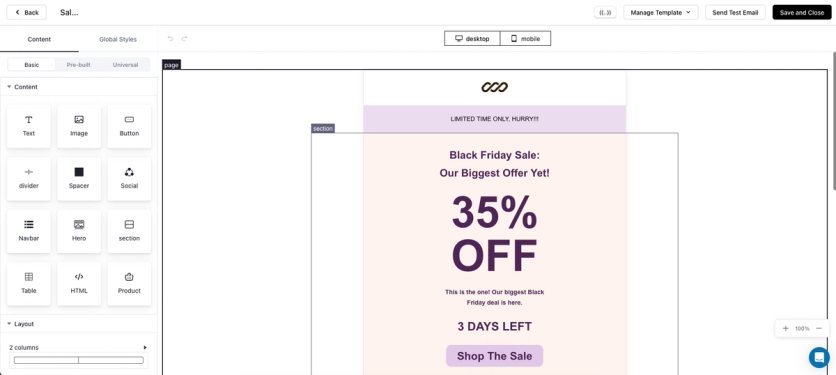
The editor handles both promotional newsletters and triggered automation emails from the same workspace, with responsive layouts that render reliably across devices.
Retainful Segmentation
Retainful’s segmentation is built around real ecommerce behavior. Marketers can target customers based on purchase history, browsing activity, signup source, custom fields, and engagement signals like opens and clicks.
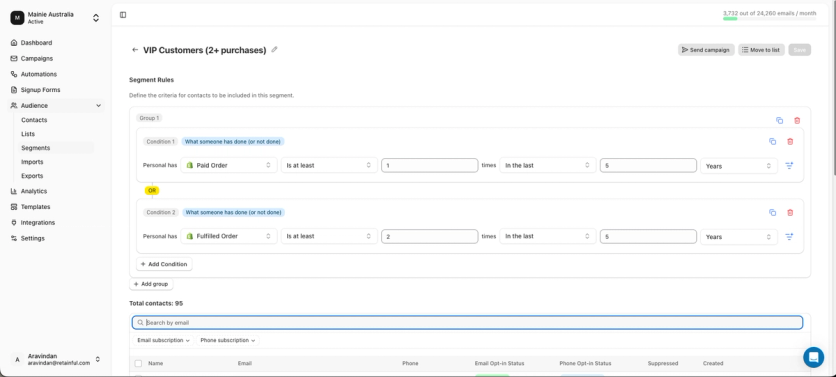
Pre-built segment rules cover common use cases (new subscribers, first-time buyers, repeat customers, lapsed shoppers), and custom rule builders let teams combine multiple conditions for more precise targeting.
Retainful Automations
Automations are the core of the platform. Retainful includes 9+ pre-built workflows – abandoned cart recovery, welcome series, post-purchase follow-ups, win-back campaigns, order confirmations, shipping updates, and more, all customizable.
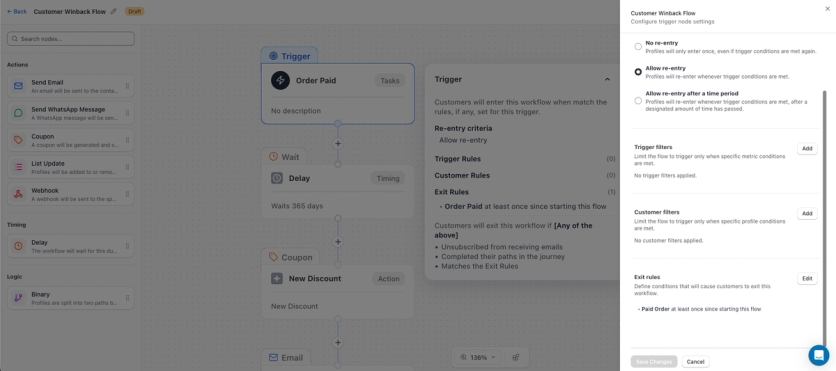
Workflows are built in a visual editor with triggers, conditions, time delays, and dynamic content.
Retainful Extended Features
Retainful goes beyond core email automation with several built-in tools that typically require separate apps elsewhere:
- WhatsApp marketing native to the platform alongside email and SMS – Retainful supports Email, SMS (USA and Canada), and WhatsApp marketing
- Signup forms and popups for on-site list growth, with targeting by page, behavior, and exit intent
- One-click cart recovery links that bring customers straight back to their cart to complete checkout
- Multi-store management – connect and manage multiple stores from one account, with centralized reporting across all of them
- Multi-lingual sending for international brands
- Free migration from Klaviyo, Mailchimp, or any other platform – handled by the Retainful team
Retainful Support
Support is one of Retainful’s biggest differentiators relative to its price point. Free onboarding, personalized consultations alongside fast, responsive day-to-day support.
Retainful Cost
Retainful’s pricing is built to grow with the store rather than punish list size. The Free plan is $0/month and includes 500 emails/month. The Pro plan starts at $14/month for 1,000 contacts with 10,000 emails/month and scales with contact count.
Retainful Pros and Cons
| Pros | Cons |
|---|---|
| Native email, SMS, and WhatsApp in a single platform | SMS coverage currently limited to the US and Canada |
| Built specifically for WooCommerce and Shopify with deep, automatic data sync | No built-in loyalty program or on-site personalization engine |
| Generous free plan and affordable paid tiers that scale predictably with list size | Younger brand with a smaller third-party integration ecosystem than Klaviyo |
| 9+ pre-built workflows and 150+ templates for fast time-to-launch | Reporting depth is lighter than enterprise CDP-based platforms |
4. Salesforce Marketing Cloud – Best for Enterprises Already on Salesforce
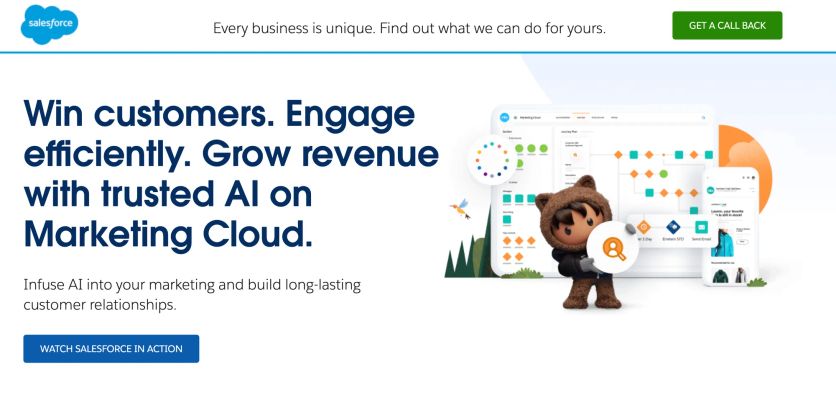
Salesforce Marketing Cloud (SFMC) stands as a major player in enterprise marketing. The platform comes with a complete suite of tools that blend smoothly with the broader Salesforce ecosystem. The platform evolved from ExactTarget and works best for organizations that already use Salesforce CRM, giving them unified customer data across sales and marketing.
Salesforce Marketing Cloud Email Editor
SFMC’s email creation tools match its enterprise-level status. The platform gives marketers the ability to create sophisticated email campaigns through Content Builder. This tool combines drag-and-drop features with code-level access. SFMC is different from simpler platforms because it lets users customize deeply and create complex dynamic content rules based on customer data in Salesforce CRM.
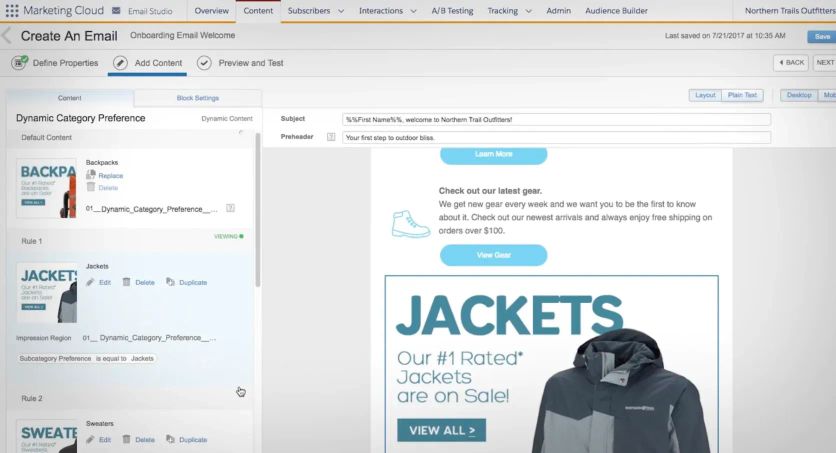
Salesforce Marketing Cloud’s email builder
The editor goes beyond simple personalization by using Einstein AI to recommend content and optimize send times.
The platform’s powerful features come with a trade-off – new users might need technical help for complex tasks because the interface isn’t as accessible as newer alternatives.
Salesforce Marketing Cloud Segmentation
SFMC’s connection with Salesforce CRM makes it exceptional at handling data. Marketers can utilize detailed customer profiles that include purchase history, support interactions, and sales touchpoints. The platform’s segmentation goes way beyond simple demographics or email engagement metrics.
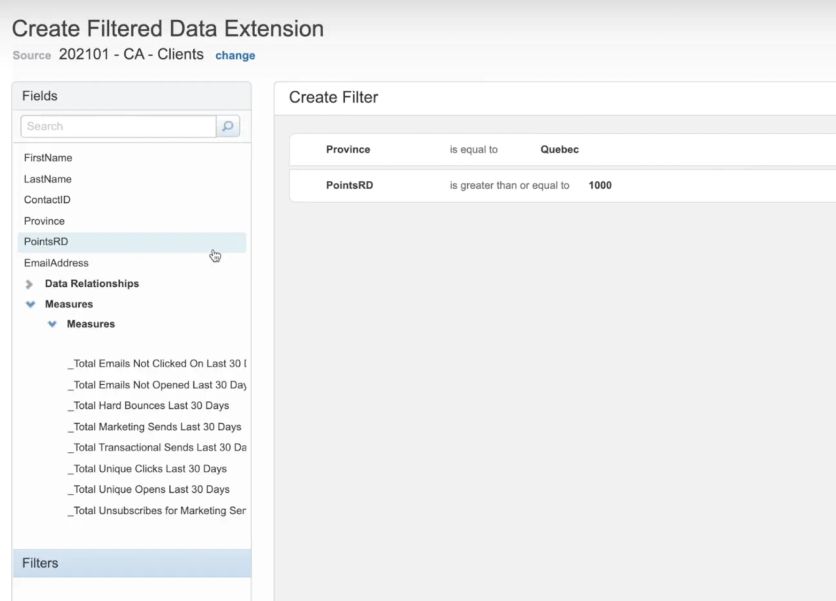
Salesforce Marketing Cloud: user segmentation
Users can directly use CRM objects in segmentation rules. This means campaigns can target customers based on their sales pipeline position or service history. A retail business could automatically identify high-value customers who recently had support issues and create specialized recovery campaigns – all without moving data between systems manually.
Salesforce Marketing Cloud Automations
Journey Builder powers SFMC’s automation features with a visual canvas for creating multi-step customer campaigns across channels. The tool handles complex decision splits, wait times, and cross-channel coordination better than basic automation tools.
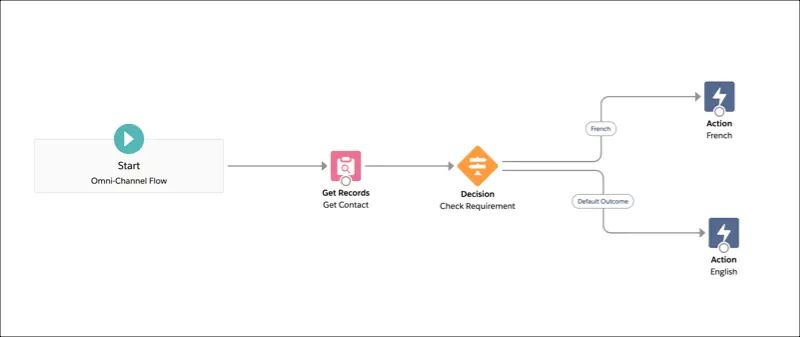
Salesforce Marketing Cloud flow builder
The platform excels at scheduled campaign journeys but works differently from Braze’s real-time, event-driven campaigns. SFMC works great for “batch and blast” campaigns while supporting triggered message sequences.
Einstein AI makes these journeys even better with predictive features like conversion likelihood scoring and abandonment predictions.
Salesforce Marketing Cloud Extended Features
SFMC’s broad ecosystem makes it stand out from focused platforms. The suite includes:
- Social media management
- Mobile push notification capabilities
- SMS marketing
- Advanced analytics and attribution modeling
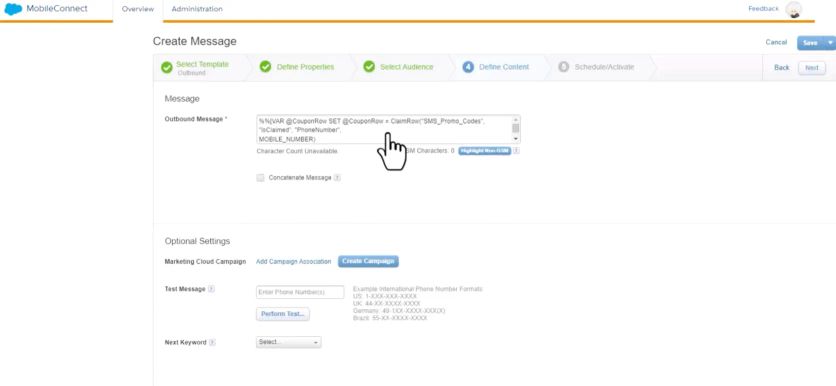
Creating a message in Salesforce Marketing Cloud
The Salesforce AppExchange offers many extensions for specific needs, from custom SMS integrations to analytics plugins. The platform comes ready with enterprise features like IP warming, distributed marketing for franchises, and compliance tools for regulated industries.
Salesforce Marketing Cloud Support
SFMC’s complexity means businesses often need specialized expertise – a key factor in total ownership cost. Many companies hire certified SFMC consultants or specialists to get the most value. Implementation takes longer and needs more resources than simpler alternatives.
Support options change based on contract level. Premium support packages give faster responses and dedicated technical resources. New implementations usually need professional services to ensure proper setup.
Salesforce Marketing Cloud Cost
SFMC’s premium pricing puts it squarely in the enterprise category. Mid-tier packages cost between $1,500 and $3,250 monthly. Full-featured setups cost even more.
The platform uses annual contracts instead of monthly subscriptions, with prices based on contacts, message volume, and active features.
SFMC costs about the same as alternatives like Braze for similar features. The real cost often ends up higher than just platform fees because of specialized staff needs and possible consulting expenses.
Salesforce Marketing Cloud Pros and Cons
Pros | Cons |
|---|---|
Seamless Salesforce CRM integration showing all customer interactions | Hard to learn and needs specialized expertise |
Large ecosystem with many extensions and integrations | Complex interface that’s less accessible than modern alternatives |
Powerful Journey Builder for complex multi-channel campaigns | High total cost including platform, personnel, and consulting |
Strong data handling and customization options | |
Enterprise-grade deliverability and compliance features |
5. Constant Contact – Best for Small Businesses Adding SMS and Social
Constant Contact is a multi-channel marketing platform built for small businesses, nonprofits, and local organizations that want email, SMS, and social media marketing managed from one place. The platform prioritizes accessibility and ease of use, making it a practical option for teams running marketing without dedicated technical resources.
Constant Contact Email Editor
Constant Contact’s drag-and-drop editor includes 600+ customizable templates and an AI writing assistant that generates campaign copy from simple prompts – useful for small teams producing campaigns without a dedicated copywriter. A built-in BrandKit applies brand colors, fonts, and logos automatically across campaigns, maintaining visual consistency without manual setup on each send.
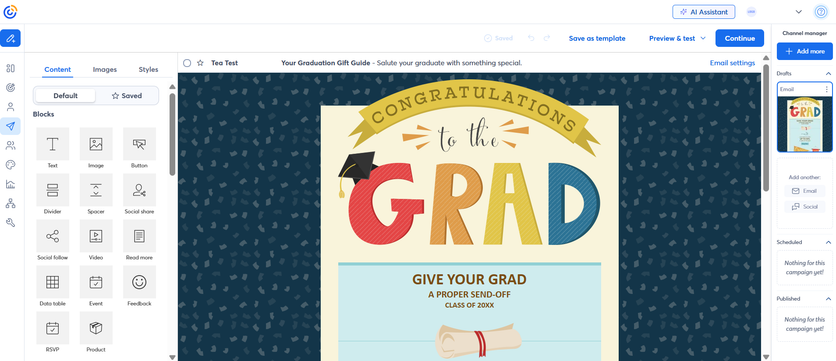
Premium plans support dynamic content blocks that display different content to different audience segments within a single email. The editor handles responsive layouts across devices and supports HTML editing for users who want more control. Templates span newsletters, promotions, events, and seasonal campaigns.
Constant Contact Segmentation
Constant Contact’s segmentation is built around contact engagement and custom attributes. Marketers can create segments based on email opens, clicks, and contact activity. Web sign-up forms and landing pages built within the platform capture lead data directly into segmented lists, keeping list growth and targeting in the same workflow.
Premium plans unlock ecommerce segmentation for merchants connected to Shopify or WooCommerce, enabling audience groups based on purchase history and buying behavior. These capabilities fall short of real-time CDP platforms but cover the core segmentation needs of most small businesses effectively.
Constant Contact Automations
Constant Contact’s automation templates cover welcome series, re-engagement campaigns, birthday and anniversary triggers, and ecommerce follow-ups for connected stores. Sequences can combine email and SMS steps within a single workflow, reaching customers across both channels without separate tooling (SMS currently available for US and Australia). Premium plans unlock custom automation paths and unlimited templates.
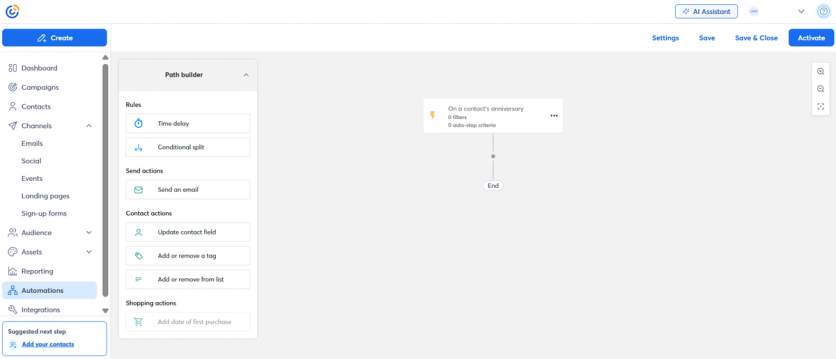
The builder requires no technical expertise to configure. Automation depth is lighter than dedicated e-commerce platforms, but it reliably handles standard lifecycle flows – list-triggered sends, timed sequences, and basic behavioral triggers – for small business needs.
Constant Contact Extended Features
Constant Contact includes several capabilities beyond core email:
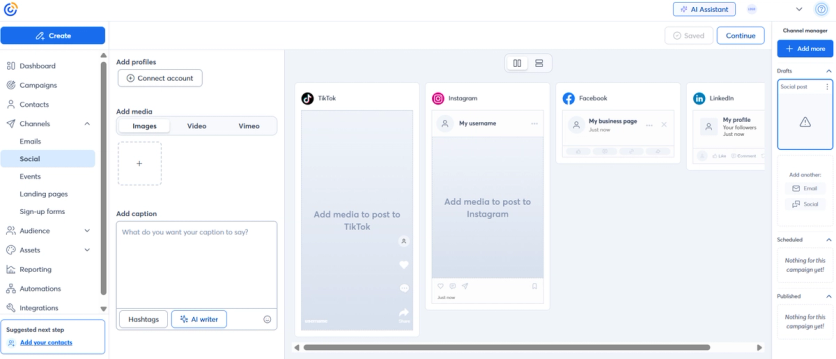
- Social media management: Schedule and publish to Facebook, Instagram, LinkedIn, and TikTok from the same dashboard as email and SMS – a feature few platforms in this comparison offer natively.
- Event marketing: Built-in registration and ticketing for organizations that run events, without needing a third-party platform.
- Canva design import: Assets designed in Canva can be imported directly into the email editor. Design happens in Canva; Constant Contact handles import, building, and sending.
- 300+ integrations: Including Shopify, WooCommerce, Salesforce, Eventbrite, and Zapier.
Constant Contact Support
Live phone and chat support with marketing experts is included on all paid plans – a meaningful differentiator in a market where many platforms restrict human support to higher tiers. All accounts include a live 1:1 onboarding session to get campaigns running quickly from day one. Premium plans access a dedicated priority support team. The platform publishes a 97% email deliverability rate on its pricing page, a level of transparency most competitors don’t offer.
Constant Contact Cost
Plans start at $12/month on the Lite tier, covering email marketing, social media posting, and basic automation. Standard starts at $35/month and adds automation templates, reporting, and SMS. Premium starts at $80/month and unlocks dynamic content, custom automations, ecommerce segmentation, and a dedicated support team. Pricing scales by contact count. Nonprofits save up to 30% on prepaid annual plans.
Constant Contact Pros and Cons
| Pros | Cons |
|---|---|
| Email, SMS, and social media management in one platform | Not a native e-commerce specialist; lacks deep Shopify data modeling |
| Beginner-friendly with a low learning curve | Automation less flexible than enterprise platforms for complex conditional flows |
| Live phone and chat support included on all paid plans | Revenue attribution requires integration setup |
| 97% deliverability rate published transparently | Real-time CDP capabilities not present |
| Built-in event marketing with registration and ticketing | Advanced segmentation and dynamic content limited to Premium plans |
| Canva design import for brand-consistent visuals | |
| Up to 30% nonprofit discount on prepaid plans |
6. Omnisend – Best for Small Shopify Stores With Pre-Built Flows
Omnisend is a marketing automation platform built for small to mid-sized e-commerce brands that want to run conversion-focused messaging without enterprise complexity. The platform combines email campaigns with SMS and web push notifications and uses store activity to keep messaging relevant throughout the customer lifecycle.
Omnisend Email Editor
Omnisend’s drag-and-drop editor is designed around commerce-centric blocks that help marketers build product-first campaigns quickly. Product feed integration supports shoppable layouts by pulling product information from a store catalog, which helps keep images, pricing, and details consistent across sends. This setup works well for promotional newsletters, product launches, and seasonal campaigns where speed matters.
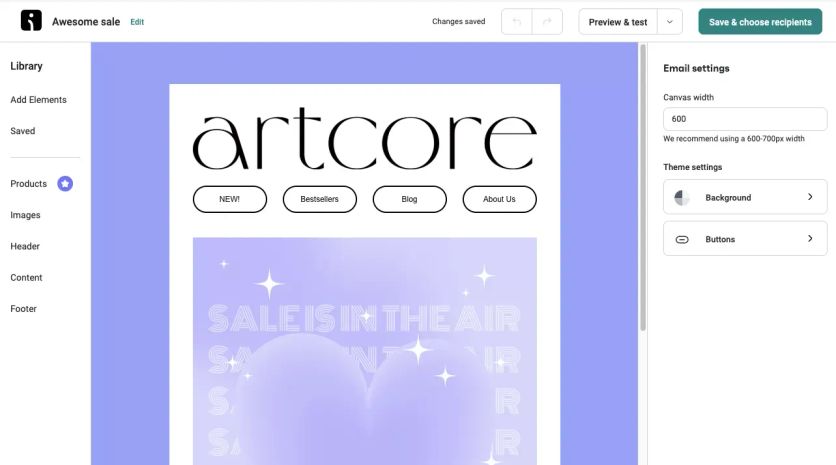
Omnisend’s editor
Omnisend Segmentation
Omnisend segmentation is built around shopping behavior and campaign engagement. Marketers can segment based on purchase history, engagement patterns, and lifecycle stage, then tailor messaging for new subscribers, first-time buyers, repeat customers, and lapsed shoppers. This behavior-led approach keeps campaigns aligned with what customers do, not just who they are.
Omnisend Automations
Omnisend focuses automations on core e-commerce conversion paths, including welcome sequences, cart recovery, browse follow-ups, and post-purchase messaging. The visual workflow builder supports multi-channel journeys, letting teams coordinate email with SMS or web push touchpoints and adjust follow-ups based on customer actions.
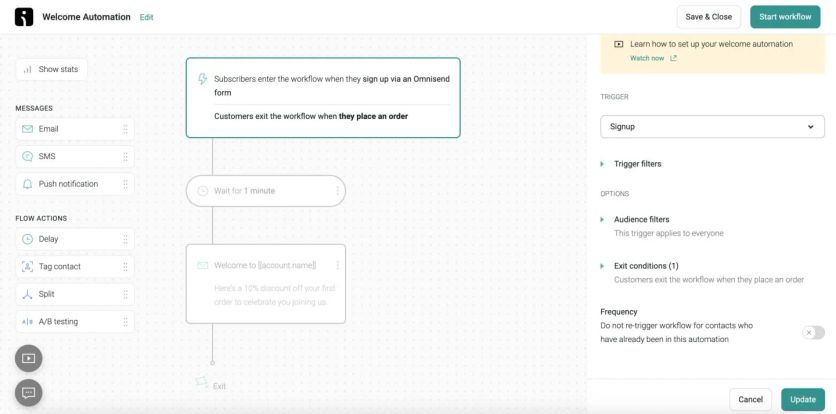
Omnisend’s workflow builder
Omnisend Extended Features
Omnisend includes several tools that go beyond core email automation:
- Pop-ups and forms that capture subscribers on-site
- Product suggestions that support more relevant cross-sell and upsell messaging
- Campaign Booster, which automates a follow-up send to increase reach from high-performing campaign
These features help teams grow lists, improve campaign performance, and keep merchandising consistent without adding extra tools.
Omnisend Support
Omnisend provides email support alongside a knowledge base and webinars. This mix works well for teams that prefer self-serve learning, with support available when they need help troubleshooting setup, campaigns, or automations.
Omnisend Cost
Omnisend offers a Free plan for up to 250 contacts. Paid plans start at $16/month on the Standard tier, with pricing scaling as contact lists and usage grow.
Omnisend Pros and Cons
| Pros | Cons |
|---|---|
| E-commerce-focused workflows built around conversion paths | Simpler segmentation than enterprise CDP platforms |
| Drag-and-drop editor with commerce-centric blocks and product feed integration | Personalization depth is lighter than enterprise suites |
| Multi-channel messaging across email, SMS, and web push | SMS feature set can feel limited vs dedicated SMS platforms |
| Built-in list growth tools like pop-ups and forms | Limited customization for very large organizations |
| Campaign Booster helps lift reach with minimal extra work |
7. CleverTap – Best for App-First Brands
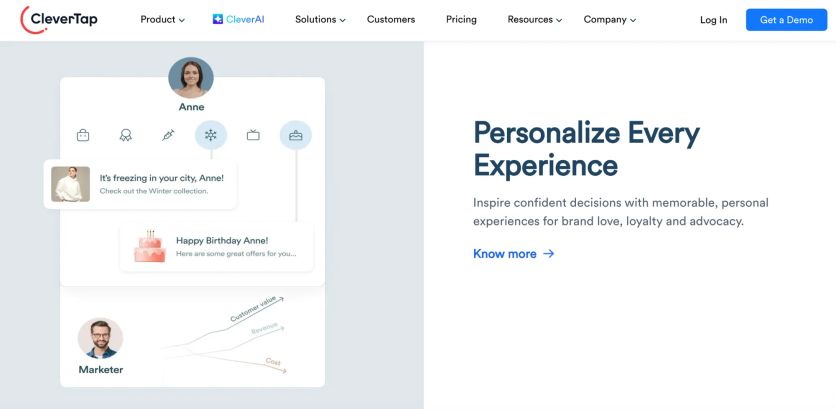
CleverTap is a customer engagement and retention platform that captures detailed behavioral data. The platform helps companies boost retention and lifetime value through sophisticated user event tracking and AI-driven campaign orchestration.
CleverTap Email Editor
Unlike platforms that focus mainly on email, CleverTap’s email editor is just one part of its broader mobile-centered engagement toolkit. The editor follows a simple approach that lets marketers create messages without technical knowledge. The platform’s mobile background ensures email templates work well on all devices.
The editor connects to CleverTap’s user behavior database and personalizes content based on detailed app interaction histories rather than just demographic data or simple email metrics.
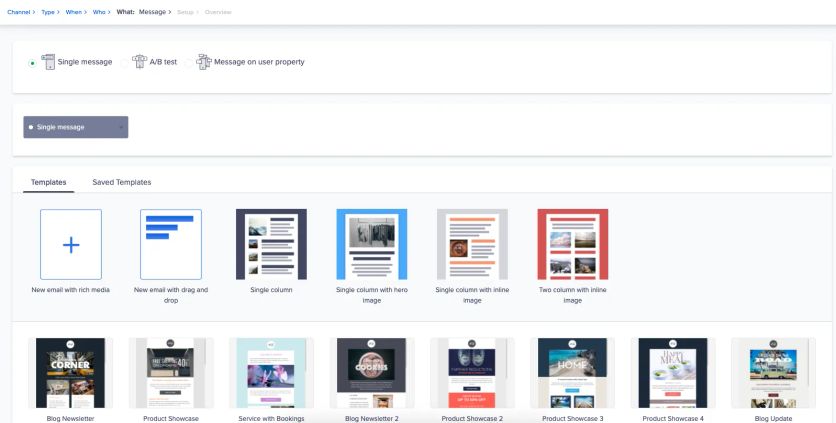
Creating an email with Clever.AI’s recommendations
CleverTap Segmentation
CleverTap’s advanced segmentation powered by Clever.AI technology stands at its core. The platform analyzes complex user behaviors to predict outcomes like churn probability and conversion likelihood.
TesseractDB sets CleverTap apart – a specialized big-data store that captures millions of individual user events. This technology lets marketers create segments based on specific app interactions instead of broad customer categories. Product teams find this detail valuable to understand precise user behavior patterns in mobile applications.
CleverTap Automations
The visual journey builder makes shared cross-channel campaign orchestration possible. Marketers can design sequences that start with an in-app message, send an email if unopened, and trigger a push notification based on user responses.
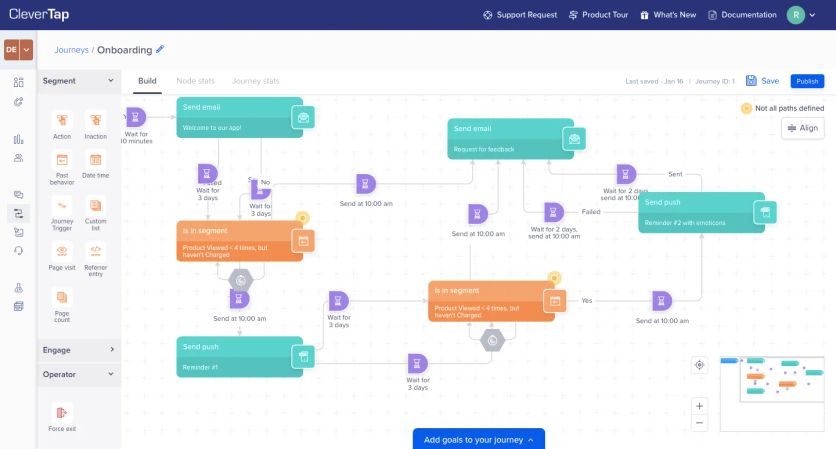
CleverTap’s flow builder
The platform now supports customer experiences across multiple touchpoints, building on its mobile-centric foundation. Marketing teams can implement complex behavioral triggers without much technical support through the easy-to-use automation interface.
CleverTap Extended Features
CleverTap has complete omnichannel capabilities. These span push notifications, in-app messages, email, SMS, web notifications, and WhatsApp integration.
The platform offers robust A/B testing tools that optimize campaigns through analytical insights. The AI engine analyzes user priorities and behaviors to suggest relevant products or content.
Mobile app developers get detailed analytics dashboards showing retention metrics, conversion funnels, and user engagement patterns.
CleverTap Support
The support structure balances enterprise solutions and simpler tools. Support tiers match pricing packages, and higher tiers get more individual attention. Teams can access complete documentation and an educational knowledge base for best practices.
CleverTap provides setup help during onboarding to ensure proper tracking and data flow configuration.
CleverTap Cost
The pricing follows a tiered structure. The Essentials plan starts at $75/month for up to 5,000 Monthly Active Users (MAUs). Prices increase with user counts, and higher tiers need custom quotes. Growing companies can start small and scale up as needed.
The pricing reflects the platform’s specialized nature between simple email tools and enterprise-level engagement platforms like Braze.
CleverTap Pros and Cons
| Pros | Cons |
|---|---|
| Powerful AI-driven segmentation and predictive modeling | Less focused on e-commerce than platforms like Maestra |
| Up-to-the-minute user behavior database handling millions of events | Complex analytics capabilities take time to master |
| Outstanding mobile app analytics and engagement capabilities | Web capabilities lag behind mobile features |
| Complete omnichannel reach including push, in-app, email, and SMS |
8. Sendlane – Best for DTC Brands With an In-House Email Team
Sendlane stands out as an email and SMS marketing platform that serves direct-to-consumer (DTC) brands with powerful capabilities and outstanding customer support. E-commerce businesses choose this platform because it provides hands-on guidance with strong marketing tools.
Sendlane Email Editor
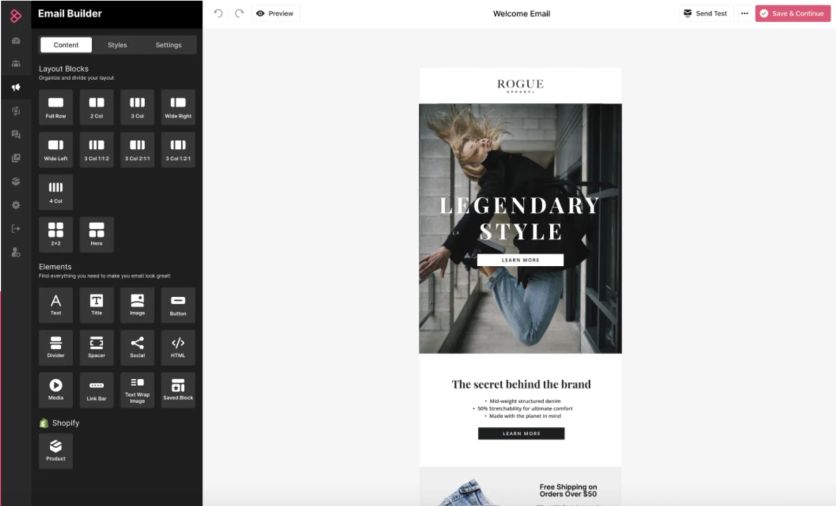
The email editor strikes a perfect balance between functionality and simplicity. Users can choose between drag-and-drop features and HTML customization options. E-commerce businesses will find responsive templates that showcase products and promotional content effectively.
The platform shows detailed ROI statistics for every email, which helps marketers track revenue from individual messages. DTC brands find this feature valuable for conversion tracking.
Sendlane Segmentation
The platform’s behavioral targeting works based on website activity, purchase history, and email engagement. Marketers can create segments that match specific customer experiences and purchase patterns. This feature lets them develop targeted campaigns for different groups like first-time buyers, repeat customers, or browse abandoners.
Segmentation leads to higher conversion rates and serves as the foundation of Sendlane’s e-commerce strategy.
Sendlane Automations
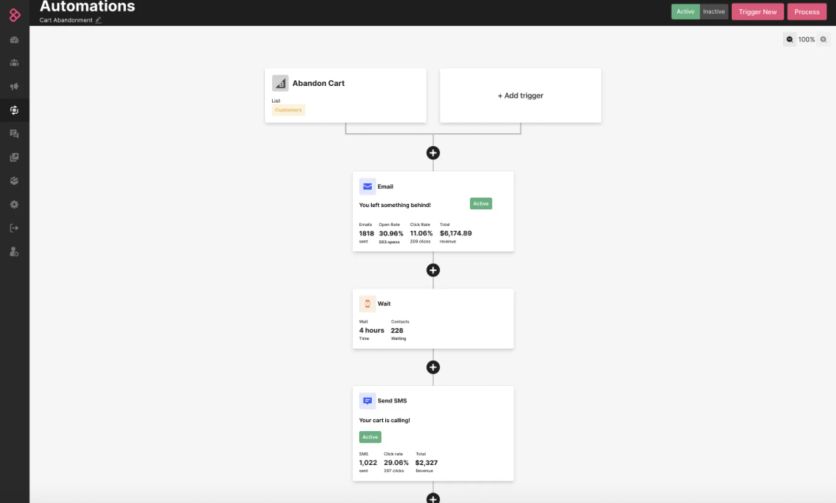
Automation workflows designed for e-commerce conversion and retention are at the heart of Sendlane’s offering. Users get pre-built flows for standard sequences such as abandoned carts and welcome series.
The platform supports complex event-based triggers too. Marketers can create automations based on specific customer actions without complex technical setup.
The visual flow builder makes campaign orchestration smooth across email and SMS channels.
Sendlane Extended Features
Sendlane goes beyond basic features. Its retargeting capabilities help brands connect with customers through multiple touchpoints.
Users can create landing pages and forms just like in more expensive platforms, making it a more detailed solution than basic email providers.
Sendlane Support
Customer support sets Sendlane apart from competitors. Each account gets dedicated onboarding help to set up properly and match strategy goals. Support teams provide more than technical help – they offer strategic advice to optimize campaigns and boost revenue.
Growing brands that need both powerful tools and expert guidance to maximize email marketing returns will find this approach valuable.
Sendlane Cost
The platform uses a contact-based pricing model starting at 5,000 contacts. While the entry point is higher than some competitors, each tier comes with unlimited emails. Costs increase with contact volume and SMS usage, which means businesses pay according to their growth. Small businesses might find it a substantial investment initially, but it becomes more affordable as customer lists grow.
Sendlane Pros and Cons
| Pros | Cons |
|---|---|
| Strong deliverability focus that ensures messages reach subscribers | Higher entry cost than basic email platforms |
| Simple event-based triggers that need minimal technical setup | Mobile app capabilities lag behind mobile-first platforms like CleverTap |
| Detailed revenue tracking for each email | Fewer built-in advanced features than all-in-one solutions like Maestra |
| Outstanding dedicated customer support with strategic guidance |
9. Klaviyo – Best for Self-Serve Email and SMS on Shopify
Klaviyo stands out as a specialized solution among email marketing platforms for e-commerce businesses of all sizes. This 5-year-old platform has gained popularity with direct-to-consumer brands by connecting commerce data to marketing campaigns.
Klaviyo Email Editor
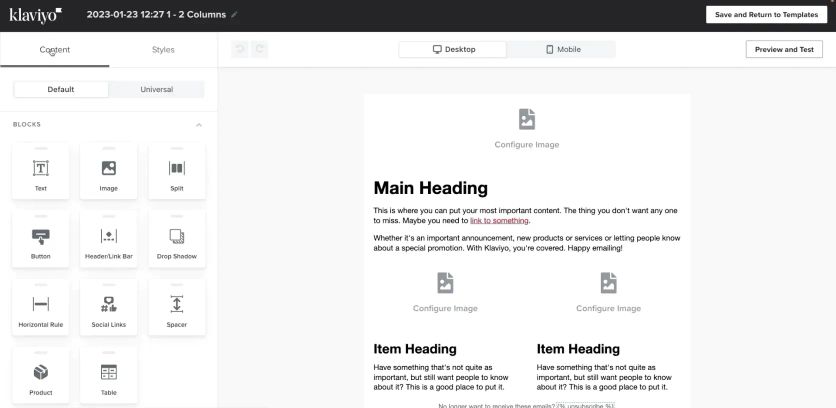
The platform’s email creation tools serve online retailers well. You’ll find drag-and-drop features and templates that showcase products effectively.
Klaviyo’s email composer
The editor shines when it displays dynamic product feeds and individual-specific recommendations based on shopping patterns. Marketers can show items that match past purchases or browsing history to boost conversion rates.
Both beginners and advanced users will appreciate the platform’s range from simple campaigns to complex dynamic content.
Klaviyo Segmentation
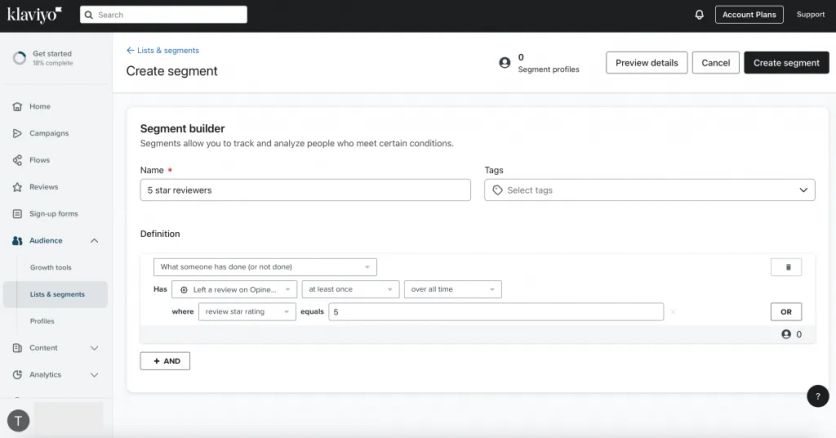
Klaviyo’s true power lies in its segmentation engine. The platform creates detailed targeting based on what customers buy, browse, and how they interact.
Creating a segment in Klaviyo
Unlike simple list tools, it builds a complete picture of each customer by tracking website visits, email engagement, and purchases. You can create specific groups like “bought Product A but not Product B” or “looked at category X three times without buying.” This focus on behavior makes messages more relevant than just using demographic data.
Klaviyo Automations
The platform’s pre-built automation flows help you run welcome series, abandoned cart reminders, and win-back campaigns. Its visual builder lets you create message sequences that work across email and SMS channels.
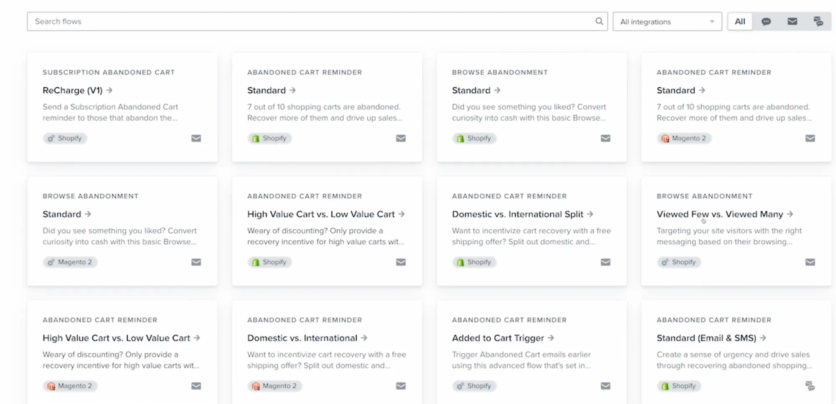
Flow templates in Klaviyo
Messages trigger based on customer actions, which drives sales effectively. Marketing teams don’t need technical skills to run sophisticated automation campaigns.
Klaviyo Extended Features
The platform blends SMS marketing with email capabilities for coordinated campaigns.
One-click connections to Shopify, Magento, and WooCommerce make data flow smooth without complex setup. You also get predictive analytics to spot high-value customers and prevent churn.
Klaviyo Support
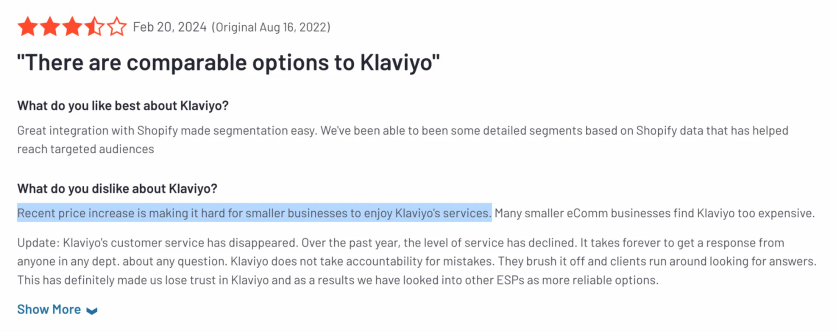
Each plan tier offers different support levels. The company changed its policy to give live chat only to higher-paying customers. Small clients now use email support or documentation. Users on basic plans report about slower responses during busy campaign periods.
Klaviyo Cost
New businesses can start with a free tier. Paid plans begin at $20-$30 monthly for 500 contacts and scale up with your subscriber count. No long-term contracts are needed. Large contact lists can make the service expensive, which affects ROI calculations as businesses grow.
Klaviyo Pros and Cons
Pros | Cons |
|---|---|
Quick integration with e-commerce platforms | Basic plans have limited support |
Strong behavior-based segmentation | Higher costs for larger lists |
Easy-to-use interface | No built-in loyalty program or web personalization |
Flexible pricing for growing businesses | Channel options limited to email and SMS |
10. ActiveCampaign – Best for Email and SMS Tied to a Built-In CRM
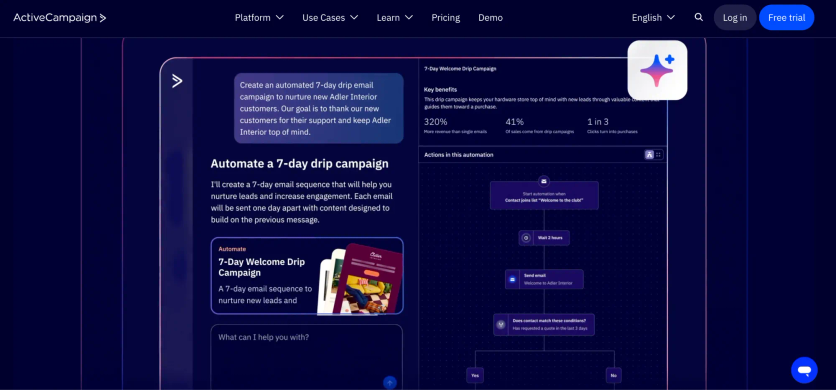
ActiveCampaign stands out among top email marketing platforms for e-commerce businesses that want to improve customer involvement and boost sales. The platform goes beyond simple email marketing with its detailed feature set and automation focus.
ActiveCampaign Email Editor
The platform offers a versatile email editor that combines functionality with simplicity. The drag-and-drop interface helps create responsive emails without coding knowledge. Advanced users can exercise more control through the HTML editor.
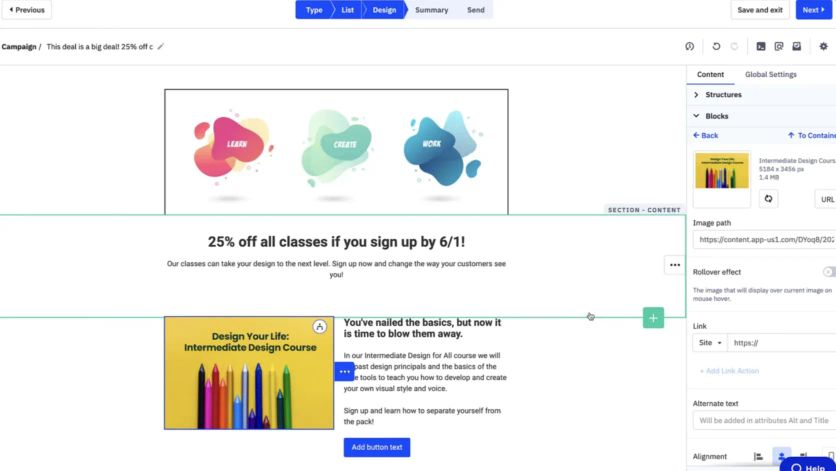
ActiveCampaign’s email composer
The editor has many pre-designed templates optimized for e-commerce. These include abandoned cart reminders, product recommendations, and seasonal promotions. The platform’s dynamic content blocks adjust automatically based on customer data. This feature enables individual-specific messaging at scale.
The platform sets itself apart from competitors by offering extensive design flexibility. Users retain full control while ensuring mobile responsiveness in all email creations.
ActiveCampaign Segmentation
The platform excels with its advanced segmentation capabilities. E-commerce businesses can create targeted customer segments based on several data points:
- Purchase history and buying patterns
- Website browsing behavior
- Email engagement metrics
- Custom fields and tags
- Geographic and demographic information
The segmentation engine updates lists dynamically as customer behaviors change. Merchants can move customers automatically between different segments based on their actions. This creates more relevant and timely communications.
The platform’s segmentation capabilities offer more detailed targeting compared to simple email marketing tools. This precision guides users toward higher conversion rates for e-commerce campaigns.
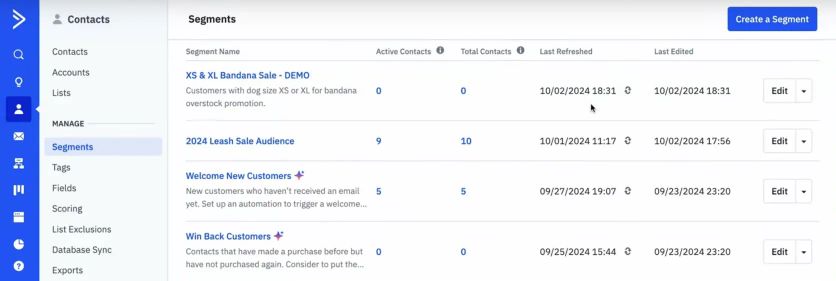
ActiveCampaign’s segments
ActiveCampaign Automations
The visual automation builder helps users create complex, multi-step customer experiences across channels.
E-commerce businesses can access several pre-built automation templates:
- Abandoned cart recovery sequences
- Post-purchase follow-ups and cross-sell opportunities
- Customer win-back campaigns for lapsed buyers
- Product review requests and loyalty program communications
Each automation supports conditional logic, action-based splits, and timing delays. Businesses can create individual-specific customer experiences that activate at the right moment.
The platform combines smoothly with your e-commerce system. Messages trigger based on specific product purchases, price changes, or inventory updates. This makes it valuable for online retailers.
ActiveCampaign Extended Features
The platform offers several features beyond core email marketing that add value for e-commerce businesses:
CRM Integration: The built-in CRM system tracks customer interactions across channels. Sales teams get valuable context for individual-specific follow-ups.
SMS Marketing: The platform supports SMS messaging alongside email. This creates coordinated multi-channel campaigns reaching customers on their preferred devices.
Predictive Sending: AI capabilities determine the best sending times for individual contacts based on past engagement.
ActiveCampaign support
The platform provides multi-tiered support options by plan level. All customers can access:
- Email support
- Live chat during business hours
- A detailed knowledge base
- Community forums
Higher-tier plans come with dedicated onboarding, priority support, and sometimes a dedicated account representative. Regular webinars and training sessions focus on e-commerce marketing strategies.
The support system works well for most mid-market e-commerce businesses, though it lacks the 24/7 support of some enterprise alternatives.
ActiveCampaign Cost
The platform uses a tiered pricing structure based on contact count and feature access. The pricing tiers include:
- Lite: Starting around $29/month for 1,000 contacts
- Plus: Starting around $49/month for 1,000 contacts
- Professional: Starting around $149/month for 1,000 contacts
- Enterprise: Custom pricing
The platform costs more than simple email marketing tools. However, its pricing remains competitive given its advanced automation capabilities and e-commerce-specific features.
ActiveCampaign pros and cons
| Pros | Cons |
|---|---|
| Advanced automation workflows perfect for e-commerce customer experiences | Takes more time to learn than simple email platforms |
| Precise segmentation for targeted campaigns | Higher costs as contact lists grow |
| Solid integration with major e-commerce platforms | Advanced features need higher-tier plans |
| Detailed reporting on campaign performance and ROI | No built-in loyalty program management |
| Combined email and SMS channel communications | Limited mobile app functionality compared to desktop |
| Flexible pricing that adapts to your business growth |
11. Listrak – Best for Retailers Wanting Managed Email and SMS
Listrak provides a complete solution that helps e-commerce businesses boost their email marketing strategies. This specialized platform combines powerful email features with advanced consumer insights to create personalized shopping experiences for online retailers.
Listrak Email Editor
Listrak’s email editor excels with its retailer-focused approach to content creation. Users get a simple drag-and-drop interface alongside HTML editing options that work well for marketers at all technical skill levels.
The editor comes with a rich library of e-commerce-specific templates that showcase products effectively. Dynamic product recommendation blocks update automatically based on customer’s priorities and shopping behavior. The editor supports responsive design elements that display emails correctly on all devices – a significant feature since mobile devices now account for over 60% of email opens.
Listrak’s editor sets itself apart through seamless product data integration. Merchants pull current inventory, pricing, and imagery directly from their e-commerce store into email templates. This ensures accurate and current product information in every campaign.
Listrak Segmentation
Listrak’s audience targeting capabilities shine with sophisticated segmentation tools built for retail operations. The system analyzes explicit data like purchase history and customer priorities along with implicit signals such as browsing behavior and email engagement to create specific customer segments.
The platform lets merchants segment based on:
- Purchase recency, frequency, and monetary value (RFM analysis)
- Product category affinities
- Lifecycle stage (new customer, repeat purchaser, at-risk)
- Email engagement metrics
- Geographic location and other demographic factors
Listrak Automation
Listrak’s automation capabilities focus on the e-commerce customer’s trip. The platform goes beyond standard triggered emails to enable complex automation workflows across different customer touchpoints.
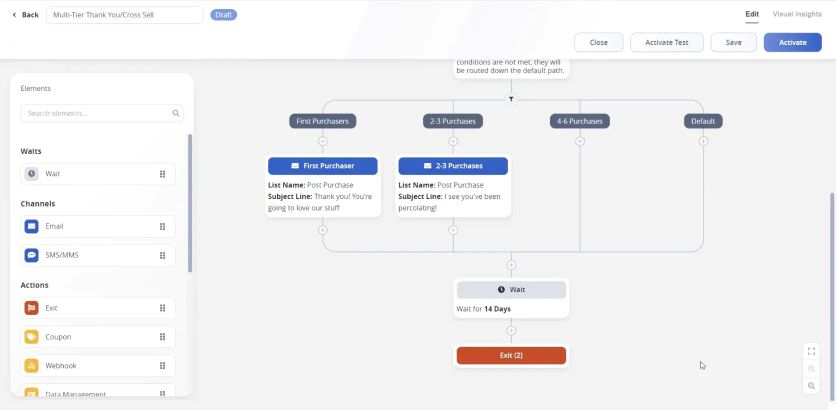
Listrack’s Journey Hub
The platform creates sophisticated, multi-step workflows for:
- Cart abandonment recovery sequences (with multiple touchpoints)
- Browse abandonmentr eminders
- Post-purchase follow-ups and replenishment reminders
- Customer reactivation campaigns for lapsed buyers
The automation engine responds to real-time behavior triggers instantly. The system sends personalized product recommendations when shoppers view specific categories but leave without purchasing.
Listrak Extended Features
Listrak’s value extends beyond core email functionality with several additional features for online retailers:
SMS Marketing Integration: The platform coordinates messaging across email and text channels from one interface. This multi-channel approach creates more complete customer engagement strategies.
Predictive Analytics: Machine learning algorithms analyze customer data to predict future behaviors. This helps merchants identify at-risk customers or high-value acquisition targets.
Cross-Channel Orchestration: The platform coordinates email campaigns, SMS messaging, and on-site personalization instead of focusing solely on email.
Listrak Support
Listrak stands out with its emphasis on customer support and strategic guidance. Each client works with a dedicated Strategic Account Manager who provides ongoing campaign optimization advice and industry best practices.
Support options include:
- Direct phone and email support
- 24/7 emergency assistance
- Regular account reviews and strategy sessions
- Extensive knowledge base and resource library
- Quarterly business reviews with performance analysis
Mid-sized retailers without large internal marketing teams benefit from this high-touch approach to client services. The support structure provides expertise alongside technological solutions.
Listrak Cost
Listrak uses a tiered pricing structure based on email volume and required features. While custom quotes determine specific pricing, typical entry points start at:
- Simple tier: Approximately $1,000/month (email marketing essentials)
- Advanced tier: $2,000-$3,000/month
- Enterprise tier: $+3,500 (full omnichannel capabilities with dedicated strategic services)
The platform positions itself as a premium solution compared to entry-level email platforms. Growing e-commerce businesses can access advanced features at these price points. Strategic services come included with the technology access, which sets it apart from competitors.
Listrak Pros and Cons
| Pros | Cons |
|---|---|
| Retail-specific features built exclusively for e-commerce use cases | Higher price point compared to simple email marketing solutions |
| Strong integration with major e-commerce platforms including Shopify, Magento, and WooCommerce | Less suitable for non-retail businesses |
| Unified email and SMS marketing from a single interface | Steeper learning curve for new users |
| High-touch strategic support model with dedicated account managers | Limited third-party integrations compared to some competitors |
| Advanced retail-specific analytics and reporting | Professional services might be needed for complex implementation |
| Robust product recommendation capabilities | Less developed mobile app capabilities than some alternatives |
12. Drip – Best for Adding SMS to a Visual Email Workflow
Drip has been a 10-year-old standout among email marketing platforms for e-commerce businesses. The platform excels at customer insights and creates customized shopping experiences. Drip’s architecture differs from general solutions because it caters to what online stores and direct-to-consumer brands need.
Drip Email Editor
The email editor strikes a perfect balance between features and ease of use with visual and code-based editing options. Merchants can create responsive emails through a user-friendly drag-and-drop interface without technical expertise. The editor stands out by focusing on commerce-centric elements rather than complex design features.
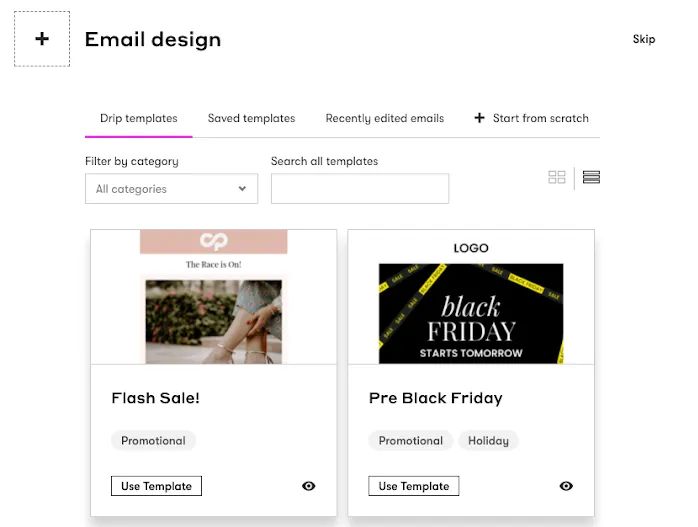
Drip’s email templates
The editor comes with dynamic content blocks made for product showcases, including:
- Customized product recommendation widgets
- Automated bestseller displays
- Recently viewed item sections
- Cross-sell and upsell blocks
Each content block pulls current product data, pricing, and inventory status from integrated e-commerce platforms automatically. This ensures emails always show accurate information without manual updates.
Drip Segmentation
The platform’s segmentation capabilities fit perfectly with e-commerce customer analysis. A specialized tagging system sorts customers based on their shopping behaviors and engagement patterns. These tags help create highly specific audience segments.
Drip sets itself apart by focusing on purchase intent signals and customer lifecycle positioning. The platform sorts customers automatically by:
- Purchase history and frequency patterns
- Product category affinities
- Browsing behavior and cart interactions
- Engagement level with previous campaigns
- Customer lifecycle stage (first-time visitor, repeat customer, at-risk)
The segmentation engine updates audience data as customer behaviors change throughout their shopping trip.
Drip Automation
The platform’s automation features revolve around e-commerce-specific workflows that guide customers through their buying trip. Marketers can build complex, multi-step campaigns on a visual canvas, triggered by specific customer actions.
The platform includes workflow templates for common e-commerce scenarios:
- Abandoned cart recovery sequences
- Browse abandonment follow-ups
- Post-purchase nurture series
- Product replenishment reminders
- Win-back campaigns for lapsed customers
Each automation uses conditional logic based on customer behavior to create customized experiences. The system lets you test different versions within workflows to improve performance over time.
Drip Extended Features
Drip offers several specialized features for e-commerce businesses beyond basic email marketing:
Visual Customer Timelines: Customer trips appear as visual representations that show interactions across channels and highlight key engagement moments.
SMS Integration: You can manage text message marketing from the same interface as email, which creates coordinated multi-channel communications.
Lead Scoring: The system scores contacts based on engagement and purchase likelihood to help identify high-value prospects.
Customized Product Recommendations: The recommendation engine studies purchase patterns to suggest relevant products in emails.
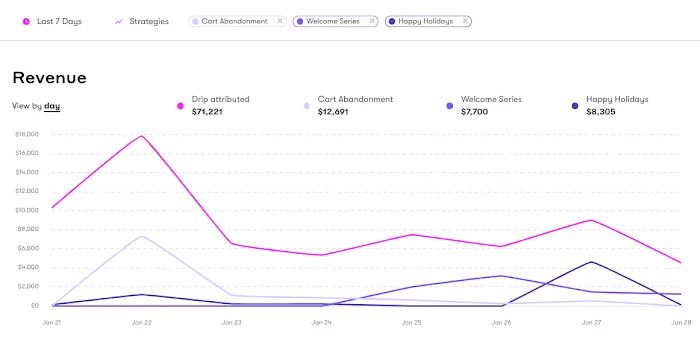
Drip’s email revenue dashboard
Drip Support
The platform offers multiple support channels:
- Email-based technical assistance
- Live chat during business hours
- A detailed knowledge base with tutorials and guides
- Regular webinars about e-commerce marketing strategies
Standard pricing tiers don’t include dedicated account managers, unlike some enterprise platforms. The platform focuses on self-service resources and community knowledge sharing. Their documentation has sections dedicated to e-commerce use cases and guides for major shopping platforms.
Drip Cost
The platform uses a subscriber-based pricing model, with costs based on contact list size:
- $39/month for up to 500 contacts
- $89/month for up to 2,500 contacts
- $154/month for up to 5,000 contacts
- Custom pricing for larger lists
All plan tiers give you access to every feature, with no restrictions at lower price points. This makes advanced features available to smaller merchants without enterprise-level budgets.
Drip Pros and Cons
13. HubSpot Marketing Hub – Best for Email and SMS Inside a Sales CRM
HubSpot Marketing Hub is a complete all-in-one marketing solution. Businesses use it to connect their email marketing with customer relationship management. This enterprise-grade platform does much more than just handle emails.
HubSpot Email Editor
The email editor balances ease of use with customization options. Users get a simple drag-and-drop interface plus HTML editing for tech-savvy folks. The editor comes with mobile-friendly templates that look great on any device.
The editor’s connection to HubSpot’s content management system makes it special. Marketing teams can:
- Turn blog posts into email campaigns quickly
- Create customized content based on contact details
- Share creative assets with everyone in the company
The editor needs more clicks to complete tasks than email-only platforms because it’s part of a bigger marketing package.
HubSpot Segmentation
HubSpot Marketing Hub makes powerful segmentation easy to use. The platform combines list-based systems with smart behavioral targeting. Teams can build segments using:
- Basic contact details (location, company size)
- Business-specific custom fields
- Website activity and page visits
- Email performance metrics
- Form completions and conversions
HubSpot excels at bringing data from different sources into one clear customer view. This makes segmentation better than standalone email tools. The system updates almost instantly, so targeted messages reach people at the right time.
HubSpot Automation
Automation shines as one of HubSpot’s best features. The workflow builder lets teams create multi-step sequences that start when customers take specific actions. HubSpot’s workflows coordinate actions across email, SMS, sales tasks, and CRM updates.
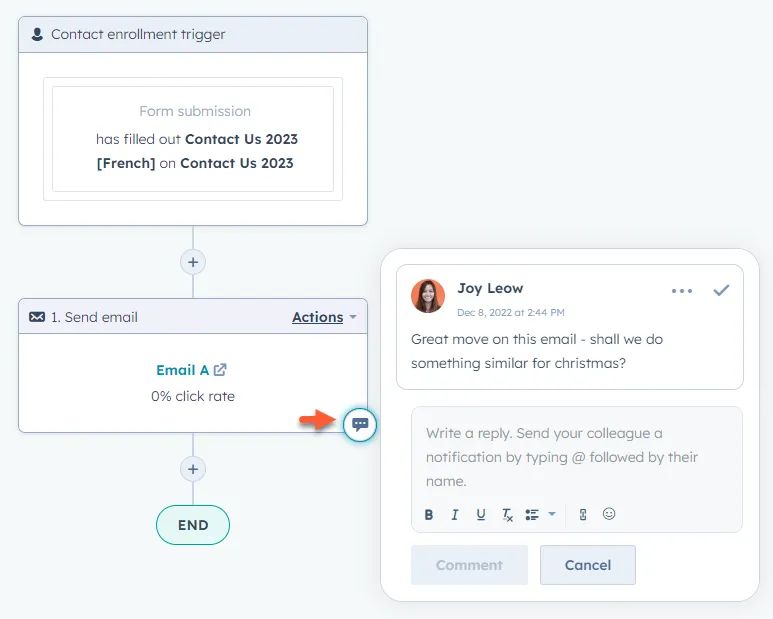
HubSpot’s flow builder
Teams get ready-made workflow templates for common needs like nurturing leads and welcoming customers. The automation system handles complex decision trees and timing delays, which creates sophisticated customer trips based on how people interact with your content.
HubSpot Additional Features
HubSpot Marketing Hub has several built-in tools that make it more valuable:
Landing Page Builder: Build and test pages that convert without needing developers.
CRM Integration: Direct connection to HubSpot’s CRM helps marketing and sales work together smoothly.
Social Media Management: Post and manage social content right from the main dashboard.
Content Management: Blog tools and SEO features help attract website visitors.
This complete package eliminates the need for multiple tools, though each part might not be as detailed as specialized solutions.
HubSpot Support
Support options vary by plan level. Every customer gets:
- Knowledge base access
- Community forums
- Email support
- Chat support during work hours
Professional and Enterprise customers get phone support with faster responses. Enterprise clients have dedicated technical support staff.
HubSpot’s support quality ranks high among users. The company provides extensive learning resources alongside direct help channels.
HubSpot Cost
The pricing structure has big jumps between levels:
- Starter: $45/month (basic marketing features)
- Professional: $800/month
- Enterprise: $3,600/month
Prices go up as your contact list grows. The big price differences reflect major feature upgrades between tiers. Many advanced tools are only available in higher-tier plans. Teams should carefully pick the features they really need.
HubSpot Pros and Cons
| Pros | Cons |
|---|---|
| Complete platform that connects marketing, sales and service | Big price jumps between tiers |
| Strong automation across multiple channels | Too much for teams that just need email |
| Great analytics and tracking | Advanced features cost more |
| Rich learning resources and community | Takes time to learn |
| Regular updates and new features | Not focused on e-commerce like some alternatives |
| Grows with your business | Works best when you use the whole system |
How to Choose an Email and SMS Platform for Your Store
Start with the channel question. If SMS is a real revenue channel for you, pick a platform where email and SMS read the same customer profile. That is what stops a text from following an email the customer already bought from. Every platform here can do it on paper; the demo test is placing an order right after the email and watching whether the text still fires.
Then check coverage and cost per message. Several tools text only the US and Canada. All of them bill SMS per message on top of the plan, so model your real monthly volume across platform fee, per-message rate, and carrier fees before comparing sticker prices.
Check deliverability as well. In GetOmnichannel’s test of 100,000 emails, Klaviyo placed 96.8% of messages in the inbox, ActiveCampaign 96.1%, and Omnisend 95.2%.
Decide who runs it. Klaviyo, Omnisend, Sender, and Retainful assume your team builds and maintains the flows. Salesforce Marketing Cloud and Listrak assume specialists or a services contract. Maestra assigns a Forward Deployed Marketer who migrates both channels and runs them with you on weekly calls and a shared Slack channel.
Finally, count what the platform replaces. Furniture Fair cut marketing costs 27% by replacing five tools with one, and Svaha USA grew total sales 26% after consolidating its stack. If a platform lets you drop a separate SMS tool, loyalty app, or popup builder, that saving belongs in the comparison.
Key Takeaways
Here are the essentials from comparing 13 email and SMS platforms for e-commerce:
• One profile for both channels beats two tools: brands that consolidated email and SMS, such as Furniture Fair and Selkirk Sport, report lower stack costs and higher channel revenue.
• SMS coverage decides the shortlist for international brands: several platforms text only the US and Canada.
• Every platform bills SMS per message on top of the plan, so compare the full monthly cost across platform fee and per-message rates.
• Support models differ more than features: self-serve tools leave flow building to your team, while Maestra assigns a Forward Deployed Marketer to run both channels.
• Maestra pricing is modular: from $2,000 per month for the customer data platform plus unlimited email, with the SMS, MMS, and RCS module at $250 per month plus per-message fees.
The most successful email marketing strategies combine the right platform capabilities with proper implementation and ongoing optimization. Consider your technical resources, growth trajectory, and budget constraints when making this critical decision that will impact your customer engagement for years to come. To help secure executive buy-in and board approval, you can build a high-impact deck using AI presentations for effective communication.
FAQs
- Maestra, Klaviyo, Omnisend, Sendlane, and Retainful all run email and SMS from one customer profile. Maestra is the only one where a Forward Deployed Marketer migrates and runs both channels for you, with WhatsApp, MMS, and RCS included. Klaviyo and Omnisend are the self-serve picks for Shopify, Sendlane suits DTC brands with an in-house team, Retainful is the budget option for small stores.
Three checks narrow the list:
• Most of your SMS list is outside the US? Confirm country coverage first. Several tools text only the US and Canada.
• Nobody on the team owns flows? Pick a platform that assigns you a named person.
• In every demo, place an order right after the email goes out and see whether the follow-up text still fires. - For e-commerce businesses, platforms like Maestra stand out. It offers seamless integration with major e-commerce platforms and powerful behavior-based segmentation. Maestra provides a comprehensive solution with built-in loyalty features and omnichannel capabilities, making it ideal for established brands.
- Growing brands need platforms that scale without forcing a re-migration. Klaviyo is the most common starting point but can become limiting and expensive as brands grow – multiple brands have documented switching away. Level Up Basketball achieved 4.5x revenue growth after adopting a more comprehensive platform. Enlightened Equipment saw +52.5% revenue and grew lead capture from 0.37% to 6.1% (a 20x increase) after switching. Magnum Bikes doubled online orders after switching from Klaviyo. Key criteria for growing brands: flexible pricing that scales with your list, managed migration support (2-8 weeks with providers like Maestra), and native integrations so you do not outgrow the platform.
- Entry plans run from free to about $45 per month: Sender, Retainful, Omnisend, Constant Contact, Klaviyo, ActiveCampaign, Drip, HubSpot. SMS usually sits on a higher tier and is always billed per message on top.
Mid-market and enterprise tools start higher: CleverTap from $75 per month, Listrak around $1,000, Salesforce Marketing Cloud roughly $1,500 to $3,250.
Maestra pricing starts at $2,000 per month for the customer data platform plus unlimited email. The SMS, MMS, and RCS module adds $250 per month plus per-message fees, so a typical email and SMS package starts at $2,250 with the first 100,000 active profiles included. The pricing page has a calculator for your profile count and channels. - Pricing models vary significantly. Some platforms like Maestra bill a monthly base plus modules and charge only for active profiles. Enterprise solutions like Salesforce Marketing Cloud typically have higher costs but offer extensive customization and integration capabilities.
- ROI varies by implementation quality, but documented benchmarks provide useful reference points. Furniture Fair reported 7,543% ROI from their email and SMS program. Blossom Flower achieved a 426% ROI on marketing automation. In terms of revenue attribution, strong email programs typically drive 10-20% of total ecommerce revenue. Flow-specific metrics also matter – Coolibar grew abandoned cart revenue by 3x and total email/SMS revenue by 33.6%. These results typically require 2-4 months to materialize after initial platform setup and optimization.
- Ask the vendor to show five things live in the product:
• Consent capture on signup forms with the required disclosure text, and a timestamped consent record on each profile.
• Quiet hours enforced automatically by the recipient’s local time, including the narrower windows some states set.
• STOP and HELP handled instantly and written to the same profile your email flows read.
• 10DLC or short-code registration done by the provider.
• Litigator screening, since TCPA suits are filed against the sender.
If any of the five is missing from the demo, treat it as missing from the product. - Evaluate four factors: sending capacity, automation depth, support model, and total cost of ownership. Sending capacity matters at scale – verify whether your platform can handle your volume without throttling (Maestra supports up to 2M emails per hour at 2M RPM capacity). Automation depth determines revenue from flows: Coolibar grew flow revenue by 62% after migrating to deeper lifecycle automations. For support, compare CSM-to-account ratios: white-glove providers assign 10-15 accounts per CSM, while self-service platforms may assign 60-100. Finally, calculate total stack cost – individual tools often appear cheaper until you add SMS, popups, and personalization separately.
- Several documented case studies show measurable gains from switching from Klaviyo to Maestra. Sena achieved 8.6x campaign revenue growth and 2.2x total revenue compared to Klaviyo. JOLYN saw +17% total revenue growth post-migration. G-Plans doubled customer LTV and described the switch as moving from “MS Paint to Photoshop.” Urban Armor Gear cut stack costs by 64%. However, switching is not always the right move – it depends on whether you have outgrown Klaviyo’s segmentation, personalization, or automation capabilities. Brands with simple email-only needs may find Klaviyo sufficient. Brands needing unified CDP, on-site personalization, loyalty, and deeper AI typically benefit from platforms like Maestra or Bloomreach.