
11 Best WooCommerce Email Marketing Platforms in 2026

Out of the box, WooCommerce only sends transactional emails – order confirmations, shipping updates, password resets. There’s no campaign builder, no segmentation, and no marketing automation. Those emails also go out through WordPress’s wp_mail() function on your host’s server, a common source of deliverability problems.
That gap is expensive. Email returns an average of $36 for every $1 spent, and automated emails drive 37% of all email-generated sales while making up just 2% of sends.
This guide compares the 11 best email marketing platforms for WooCommerce – from all-in-one systems with full WooCommerce email automation to a $159-a-year plugin. We checked every pricing page and feature claim against the vendors' live sites in July 2026. Let’s get into it.
Best WooCommerce Email Marketing Platforms by Category
The best email marketing platforms for WooCommerce in 2026 are Maestra (real-time personalization across every channel), Omnisend (omnichannel on a budget), Brevo (all-in-one email, SMS & WhatsApp), Klaviyo (WooCommerce’s official partner), and ActiveCampaign (advanced automation). MailerLite, Mailchimp, Drip, HubSpot, MailPoet, and AutomateWoo round out the list for simpler or more specialized setups.
Best for real-time personalization across every channel: Maestra – real-time flows and on-site content that adapt to each customer, driven by a live CDP.
Best for omnichannel marketing on a budget: Omnisend – email, SMS, and push in one workflow, with 24/7 support on every plan.
Best for a plug-and-play ecosystem: Klaviyo – WooCommerce’s official marketing partner with 350+ integrations.
Best for advanced automation: ActiveCampaign – 950+ automation recipes and the deepest workflow logic.
Best free plan: Brevo – up to 9,000 emails a month.
Best for simplicity: MailerLite – the easiest editor with top-tier deliverability.
Best for beginners: Mailchimp – guided setup and the largest education library.
Best for behavior-based campaigns: Drip – real-time behavioral segments and per-email revenue attribution.
Best with a built-in CRM: HubSpot – email marketing on top of a full customer database.
Best WordPress-native tool: MailPoet – newsletters and automations inside wp-admin.
Best WooCommerce-native workflows: AutomateWoo – flat-fee automation built by the Woo team.
Content:
WooCommerce Email Marketing Platforms Compared
| Platform | Best For | Key Features | G2 Rating | Paid Plans |
|---|---|---|---|---|
| Maestra | Real-time personalization across every channel | Real-time CDP, omnichannel flows, built-in loyalty, site personalization | 🟢 4.8/5 | From $2,000/mo (CDP + unlimited email; active profiles only) |
| Omnisend | Omnichannel marketing on a budget | Email, SMS & push in one workflow; 350+ templates; AI segments | 4.6/5 | From $16/mo (500 contacts) |
| Brevo | All-in-one marketing on a budget | Email, SMS, WhatsApp & free CRM; pay-per-email pricing | 4.5/5 | From $9/mo (500 contacts) |
| Klaviyo | Plug-and-play ecosystem | Predictive analytics, 60+ prebuilt flows, 350+ integrations | 4.6/5 | $60/mo (2,500 profiles) |
| ActiveCampaign | Advanced automation | 950+ automation recipes, WooCommerce Deep Data sync | 4.4/5 | From $15/mo (1,000 contacts, annual) |
| MailerLite | Simplicity | Three editor types, drag-and-drop simplicity, strong deliverability | 4.6/5 | From $12/mo |
| Mailchimp | Beginners | Intuit Assist AI tools, 300+ integrations, guided setup | 4.3/5 | From $13/mo (500 contacts) |
| Drip | Behavior-based campaigns | Behavior-based segments, revenue attribution, 50+ workflows | 4.4/5 | From $39/mo (2,500 contacts) |
| HubSpot | Built-in CRM | Full CRM, workflows from any CRM object, built-in ad tools | 4.5/5 | From $15/seat/mo (annual) |
| MailPoet | WordPress-native email | Runs inside WordPress, brands WooCommerce transactional emails | 🔴 4.2/5 | From $10/mo (500 subscribers) |
| AutomateWoo | WooCommerce-native workflows | Native WooCommerce workflows; subscriptions & bookings automation | – | $159/year, flat |
Maestra – Best for Real-Time Personalization Across Every Channel
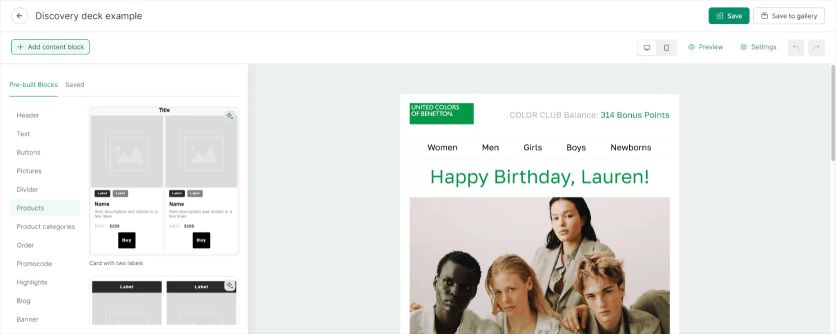
Maestra is an all-in-one marketing platform built for e-commerce brands that want to replace a stack of point tools with one system. It combines email and SMS, push, loyalty, and site personalization on top of a real-time customer data platform, and it integrates with WooCommerce alongside Shopify, BigCommerce, and Magento. Brands on Maestra report 5–15% incremental revenue, 5–15% higher website conversion rates, and ROI above 20x within months.
Best for: mid-size to enterprise WooCommerce stores that want automation and personalization to reach past email – across SMS, push, and the site itself – all reacting to live customer behavior.
Maestra Email Editor
The drag-and-drop composer generates lean code that keeps large emails from clipping in Gmail. Dynamic content blocks personalize each message with CDP data, and AMP for Email support adds interactive elements right inside the inbox.
Deliverability is handled proactively. Accounts get dedicated IPs and built-in email health monitoring, and Maestra’s Forward Deployed Marketers (marketers who work as part of your team) configure SPF, DKIM, and DMARC for you.
Maestra Segmentation
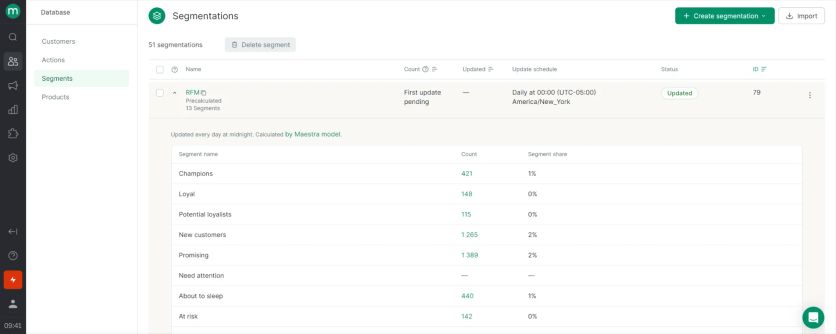
Maestra’s real-time CDP builds unified customer profiles from online and offline data. Segments support nesting and update the moment behavior changes – no overnight recalculation.
Targeting goes down to single page visits, exact purchase history, and product events like price drops or low stock. That depth is the platform’s core advantage over tools with list-based segmentation.
Calculated fields turn raw event data into something you can target on. A fashion store can compute each shopper’s favorite brand or preferred color from their browsing and purchase history, build a segment around it, and serve more of what that person actually buys.
Your Forward Deployed Marketer also sets up a library of ready-made segments – high-value customers, lapsed buyers, discount-driven shoppers, category enthusiasts – that you can drop into any campaign or flow without rebuilding the logic each time.
Maestra Automations
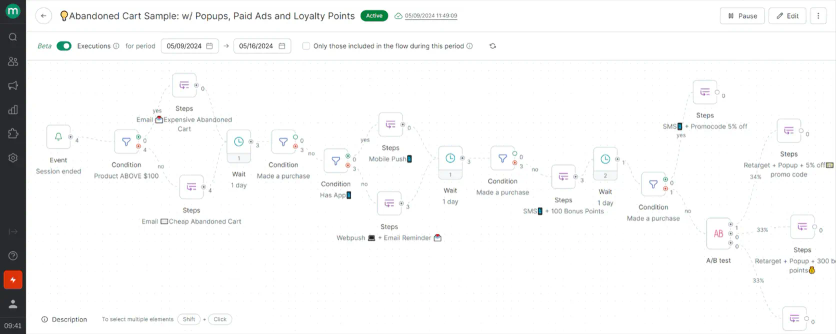
Flows coordinate email, SMS, web, and mobile push from one builder, and they respond to customer actions in real time rather than on fixed schedules. A journey can start with an email, switch to SMS for non-responders, and finish with a personalized banner on the customer’s next visit.
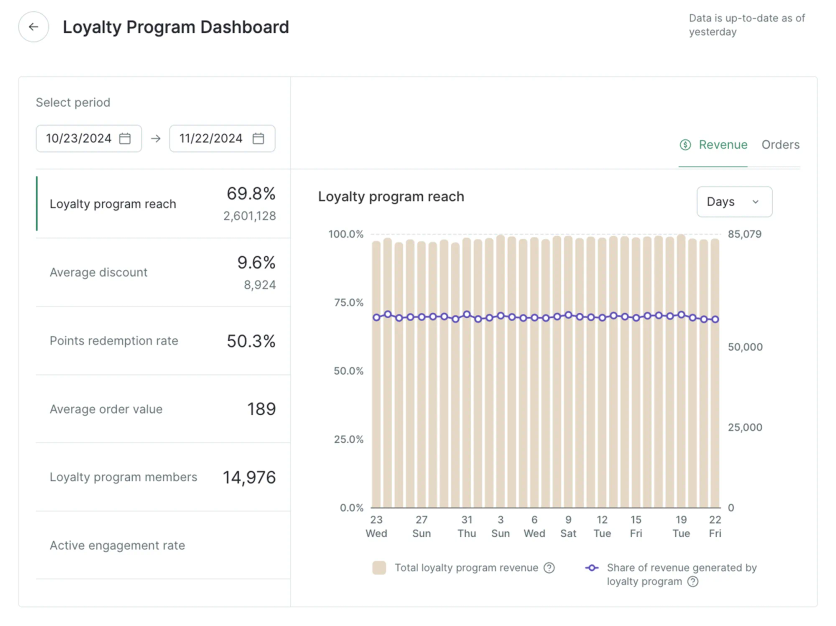
The platform also covers what usually requires separate tools: a built-in loyalty program with points, VIP tiers, and referral rewards, plus pop-ups, quizzes, and product recommendations powered by 14 AI algorithms.
Maestra Support
Every client gets a dedicated Forward Deployed Marketer, a shared Slack channel, and four strategy meetings a month. Forward Deployed Marketers handle migration, integration setup, flow rebuilding, and email design at no extra cost – an advisory model, not a ticket queue.
Furniture Fair, which runs email and SMS on Maestra, sums up the service model:
Maestra Pricing
Pricing starts at $2,000 per month for the customer data platform plus unlimited email, with the first 100,000 active profiles included. Maestra bills only active profiles – contacts who received a message, visited the site, or bought something that month – with unlimited email sends, month-to-month billing, and SMS from $0.0035 per message.
Pros and Cons of Maestra
| Pros | Cons |
|---|---|
| Real-time CDP with nested, instantly updating segments | Starting price is higher than entry-level tools |
| Unlimited email sends with no volume fees | No free plan or self-serve tier |
| Dedicated Forward Deployed Marketer, shared Slack channel, and hands-on service for every client | More platform than very small stores need |
| Built-in loyalty, pop-ups, and AI recommendations replace separate tools | |
| Proactive deliverability monitoring with dedicated IPs |
Omnisend – Best for E-commerce Email and SMS Marketing

Omnisend is an email and SMS marketing platform built specifically for e-commerce, with a native WooCommerce integration that connects store data directly to marketing workflows. Where generic email tools require third-party plugins or manual data syncing, Omnisend’s WooCommerce integration works out of the box, pulling in product, order, and customer data to power automation, segmentation, and personalization without custom development. It holds a 4.6/5 rating on G2 and scores 86/100 on EmailVendorSelection.
Best for: WooCommerce stores that need reliable, revenue-driven messaging at a predictable cost.
Omnisend Email Editor
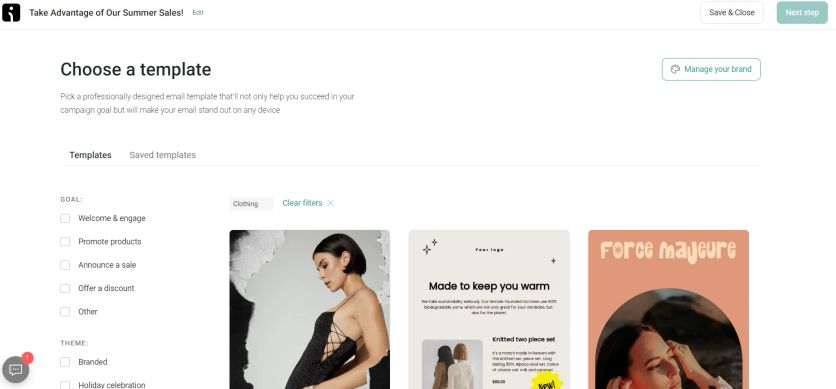
Omnisend’s native WooCommerce plugin syncs customers, orders, products, and browsing behavior automatically, with no third-party connectors or manual CSV imports required. Inside the drag-and-drop builder, about 350 mobile-responsive templates are geared toward product promotion, and a product picker pulls live WooCommerce products directly into campaigns with prices attached; the editor also generates unique discount codes that sync back to the store.
Universal layouts work as global components: edit one, and the change propagates to every campaign and flow that uses it.
Omnisend Segmentation
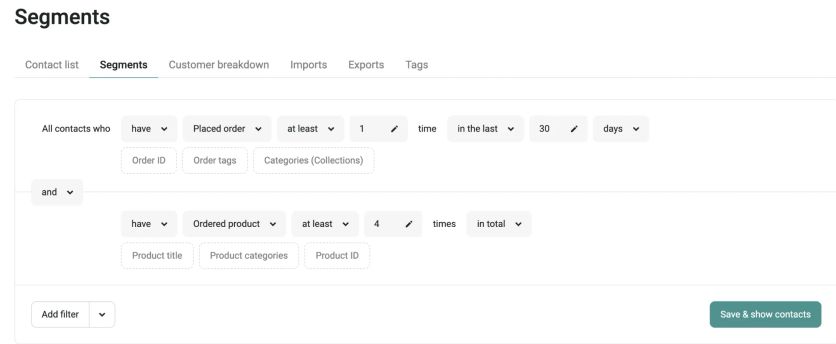
Segments are unlimited on every plan, built on purchase history, browsing behavior, lifecycle stage, campaign engagement, and custom properties. Dynamic segments update automatically as customer data changes, keeping targeting accurate without manual maintenance.
The AI Segment Builder turns plain-language prompts like “customers who ordered more than once” into segment rules, and segments sync to Facebook Custom Audiences and Google Customer Match for retargeting.
Omnisend Automations
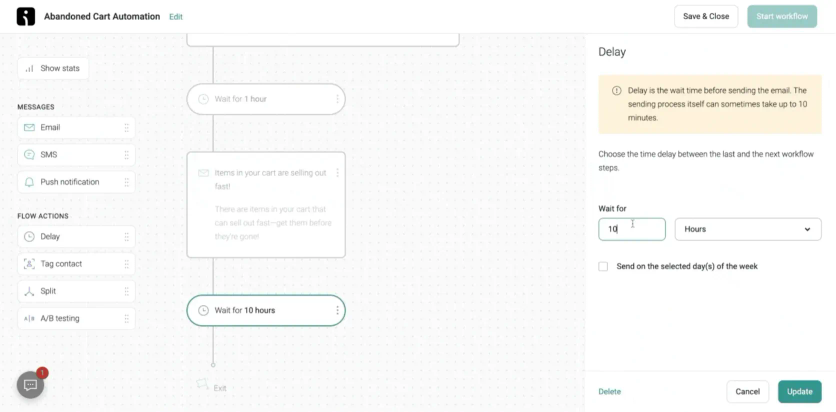
Pre-built workflows cover abandoned cart, welcome series, post-purchase, browse abandonment, and win-back campaigns, all triggered by WooCommerce store events, with branching logic and A/B splits in the same editor. Email, SMS, and push run inside a single automation sequence: a cart-abandonment flow can send an email first, then follow up with an SMS if there’s no conversion, all from one canvas without managing separate tools.
Campaign and automation reports include revenue attribution, showing which messages drove purchases. Sales dashboard tracks overall email and SMS-driven revenue over time.
Omnisend also provides on-site signup forms, popups, and landing pages for list growth, with targeting rules based on exit intent, page URL, and device type. Discount code delivery at signup is natively supported.
Omnisend Support
Omnisend offers 24/7 live chat and email support on every plan, including the free one, plus free migration. Stores spending $400+ a month get a dedicated Account Expert.
Omnisend Pricing
Omnisend’s free plan includes 250 contacts, 500 emails, and 60 SMS a month, with automation available from day one. Paid plans start at $16/month for 500 contacts and scale with list size, and stores migrating from Klaviyo can expect comparable functionality at up to 35% lower cost, with free migration completed in 5 days.
Pros and Cons of Omnisend
| Pros | Cons |
|---|---|
| Native WooCommerce integration with no third-party connectors needed | SMS costs billed separately and vary by country |
| Email and SMS managed in a single platform and automation canvas | Reporting depth is limited on lower-tier plans |
| Up to 35% less than Klaviyo, with free migration in 5 days | Less suited for non-e-commerce use cases |
| Pre-built e-commerce automation workflows ready to activate immediately | Lacks a built-in CRM for managing sales pipelines |
| Generous free plan with automation included |
Brevo – Best All-in-One Email Marketing for WooCommerce
Brevo serves 600,000+ businesses and bundles email, SMS, WhatsApp, and a free sales CRM into one dashboard. It was awarded the EVS best affordable email marketing tool award 2026.
Brevo is an all-in-one marketing platform with a native WooCommerce plugin that syncs contacts, orders, products, and categories in real time. It covers the full ecommerce marketing stack – email, SMS, and WhatsApp – from a single platform, without middleware or manual imports.
Best for: WooCommerce stores that want complete multichannel marketing at a fraction of the cost of Klaviyo.
Brevo Email Editor
The drag-and-drop builder ships with 40+ free templates and a brand library keeping logos, colors, and fonts consistent across campaigns. An AI assistant (Aura) helps with subject lines and content. All transactional emails are sent via Brevo’s SMTP relay for industry-leading deliverability.
Brevo Segmentation
Segments are built on purchase history, cart activity, product views, and email engagement. The Brevo tracker (installed via the plugin) fires real-time ecommerce events so segments stay current automatically. GDPR-compliant double opt-in is built in.
Brevo Automations
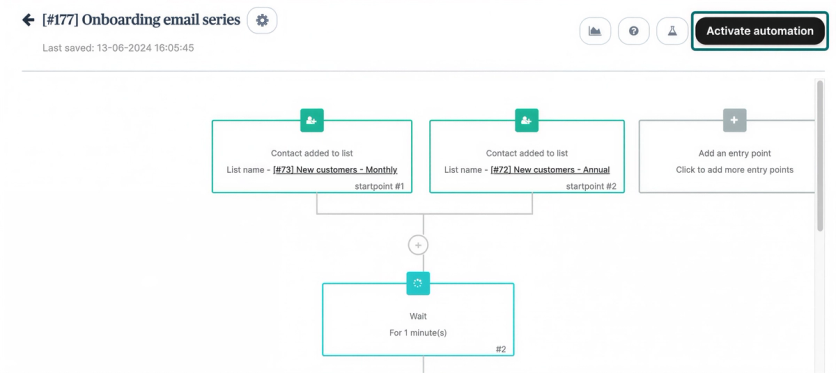
Pre-built workflows cover abandoned cart reminders, post-purchase follow-ups, win-back campaigns, and birthday emails. Email, SMS, and WhatsApp steps can all sit within a single automation sequence.
Brevo Support
Email support on all plans, live chat from paid tiers. Dedicated WooCommerce help center documentation. EU-based data centers for GDPR compliance.
Brevo Pricing
The WooCommerce plugin is free. Free plan: up to 9,000 emails/month. Paid plans start at $9/month for 500 contacts – significantly cheaper than Klaviyo at equivalent volumes.
Pros and Cons of Brevo
| Pros | Cons |
|---|---|
| Generous free plan for a WooCommerce email tool (9,000 emails/month) | Advanced ecommerce analytics on higher-tier plans only |
| Native real-time sync of contacts, orders, and products | Less ecommerce-specific brand recognition than Klaviyo |
| Email, SMS, and WhatsApp in one platform | |
| Priced well below Klaviyo at scale | |
| EVS score: 85 |
When to Choose Brevo
Choose Brevo if you want a full-featured WooCommerce marketing platform that covers email, SMS, and WhatsApp without the Klaviyo price tag. Especially strong for stores switching from Klaviyo or Mailchimp looking for better value.
Klaviyo – Best for a Plug-and-Play Ecosystem
Klaviyo is WooCommerce’s preferred marketing automation platform, serving 15,000+ WooCommerce brands. Klaviyo reports that customers using the WooCommerce integration drive a 46x average ROI.
Best for: growing DTC brands that want WooCommerce’s official marketing partner and its large plug-and-play integration ecosystem.
Klaviyo Email Editor
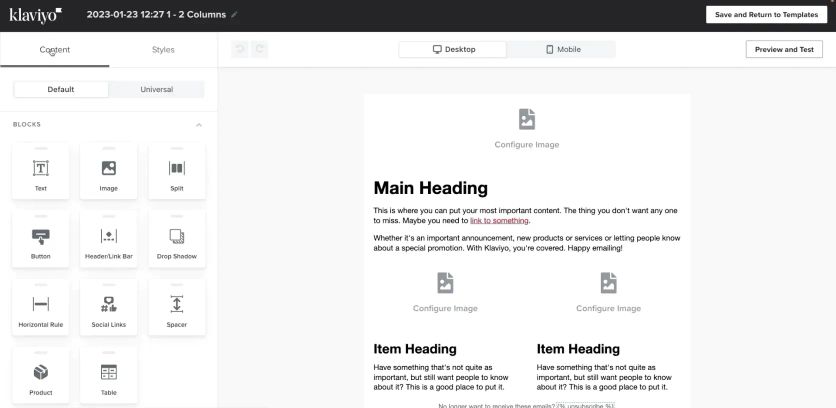
The drag-and-drop editor includes 150+ templates designed for e-commerce campaigns, plus an AI subject line generator. Universal content blocks keep design elements consistent across campaigns, and dynamic product feeds populate recommendations from each customer’s browsing and purchase history.
Klaviyo Segmentation
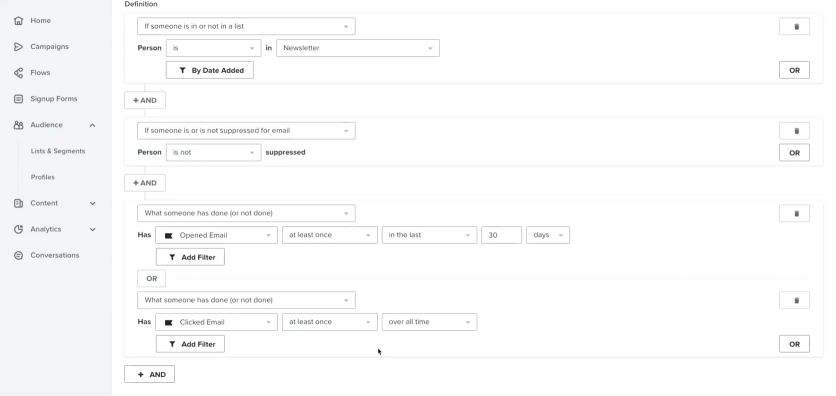
Segments can use nearly any data point – purchase history, product categories, engagement, average order value – with no look-back limits on historical data. Klaviyo AI builds segments from plain-language descriptions, and RFM analysis groups customers by buying patterns.
Predictive analytics set Klaviyo apart: the platform forecasts customer lifetime value, churn risk, and expected next order date for every profile.
Klaviyo Automations
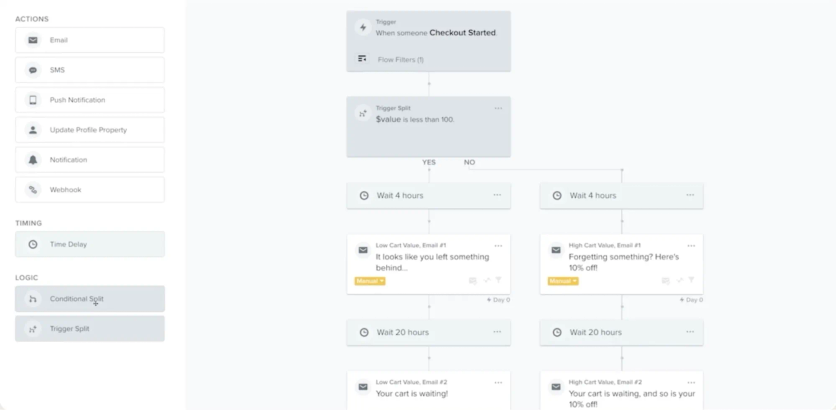
Klaviyo provides 60+ pre-built flows covering welcome series, abandoned cart, post-purchase, and win-back campaigns. Real-time WooCommerce sync captures Started Checkout, Added to Cart, and Placed Order events as flow triggers, and cart rebuild links restore abandoned carts even when customers return on a different device.
Klaviyo Support
Free accounts get email support for the first 60 days, then move to self-serve resources. Paid plans include 24/7 email support plus live chat on weekdays.
Klaviyo Pricing
The free plan covers 250 profiles with 500 email sends and 150 SMS credits a month. Paid pricing runs $60 per month at 2,500 profiles, $150 at 10,000, and $1,380 at 100,000.
Pros and Cons of Klaviyo
| Pros | Cons |
|---|---|
| WooCommerce’s official preferred marketing partner | Steep learning curve for new users |
| Predictive analytics for CLV, churn risk, and next order date | Costs escalate quickly as the list grows |
| No look-back limits on historical data | Support quality gets mixed reviews on G2 |
| 350+ integrations with real-time data sync |
ActiveCampaign – Best for Advanced Automation
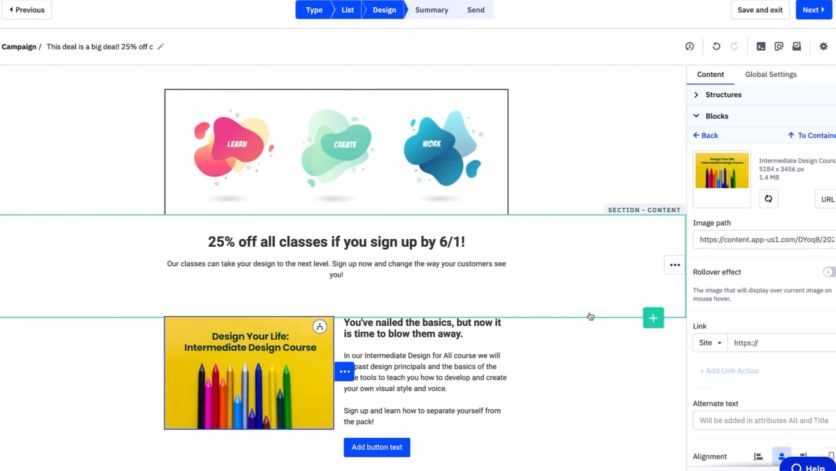
ActiveCampaign is the automation specialist of this list, rated 4.5/5 across 14,000+ reviews on G2. Its WooCommerce Deep Data integration syncs purchase history, abandoned carts, and the full product catalog into the platform.
Best for: WooCommerce stores that want the deepest workflow logic and are willing to invest time building it.
ActiveCampaign Email Editor
The drag-and-drop builder leans on Active Intelligence, which references your brand kit and top-performing campaigns to generate on-brand emails. Predictive content shows each contact the highest-converting variation, and the editor supports countdown timers, video, and product blocks without developer help.
ActiveCampaign Segmentation
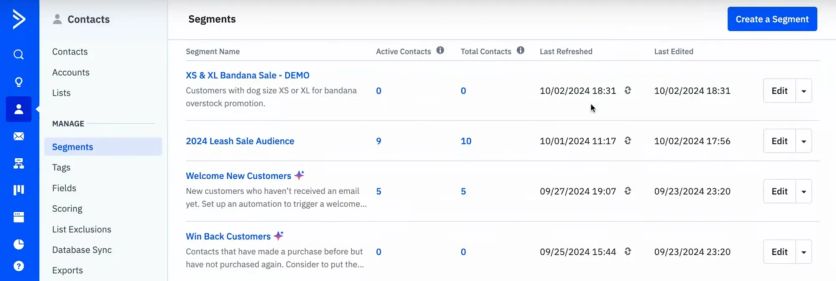
AI-Suggested Segments surface high-value audiences like likely repeat buyers and at-risk subscribers. The segment builder supports multi-tag conditions with “matches all/any/none” operators and time-window filters from “in the last X days” to “ever.”
ActiveCampaign Automations
This is the platform’s core strength: 950+ pre-built automation recipes and a flowchart builder that supports multiple entry triggers per automation. WooCommerce workflows can fire on Started Checkout, Added to Cart, Placed Order, and custom order statuses via Deep Data – note that Deep Data sync isn’t available on the Starter plan.
ActiveCampaign Support
Support runs through email and chat; there’s no free plan, only a 14-day trial.
ActiveCampaign Pricing
Starter costs $15 per month for 1,000 contacts on annual billing, with Plus at $49, Pro at $79, and Enterprise at $145. At 10,000 contacts, Starter runs about $149 per month, and pricing turns custom above 50,000 contacts.
Pros and Cons of ActiveCampaign
| Pros | Cons |
|---|---|
| 950+ automation recipes with a visual flowchart builder | No free plan |
| Deep Data integration syncing complete WooCommerce store data | Deep Data sync locked out of the Starter plan |
| 94.2% deliverability – #1 in EmailToolTester’s latest test | Editor occasionally misapplies formatting |
| Site tracking for behavior-based targeting | Reports lack visual polish |
| 1,000+ integrations |
MailerLite – Best for Simple Email Marketing
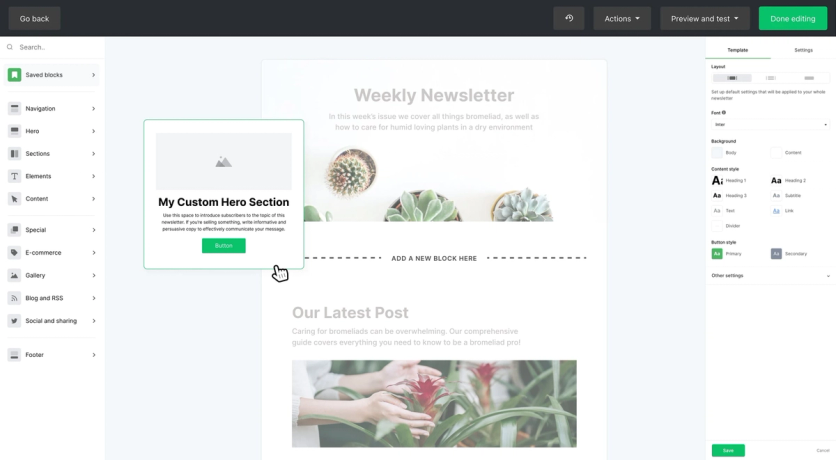
MailerLite has won EmailToolTester’s ease-of-use award every year from 2023 to 2026 and serves over a million creators and businesses. It strips email marketing down to the essentials – which is exactly the appeal.
Best for: small WooCommerce stores that want clean, simple email marketing without a learning curve.
MailerLite Email Editor
Three editors cover different skill levels: drag-and-drop, custom HTML, and a simple text editor. The drag-and-drop version includes 20+ pre-built modules – video blocks, product features, countdown timers, surveys – plus an AI writing assistant for headlines and full newsletters.
MailerLite Segmentation
A Segment Library offers ready-made audiences based on common goals, and criteria span location, behavior, sign-up source, engagement, and timezone. Behavioral segments trigger on actions like link clicks or purchases, and segments sync to Facebook Custom Audiences for retargeting.
MailerLite Automations
The visual builder supports multiple triggers, subscriber movement between groups, and A/B testing inside workflows. The WooCommerce plugin syncs customers and products automatically and covers abandoned cart emails and purchase tracking.
MailerLite Support
Paid plans get email support; 24/7 live chat is reserved for the Power plan.
MailerLite Pricing
The free plan covers 250 subscribers and 2,500 monthly emails with full editor access. Comfort starts at $12 per month and Power at $25 with unlimited emails; Enterprise handles lists over 200,000.
Pros and Cons of MailerLite
| Pros | Cons |
|---|---|
| Easiest interface in this comparison | No pre-designed templates on the free plan |
| 94.41% average deliverability – EmailToolTester’s Best of 5 award | Live chat only on the Power plan |
| Three editor types for different skill levels | Automation is shallower than ActiveCampaign or Klaviyo |
| Free plan includes automation |
Mailchimp – Best for Beginners
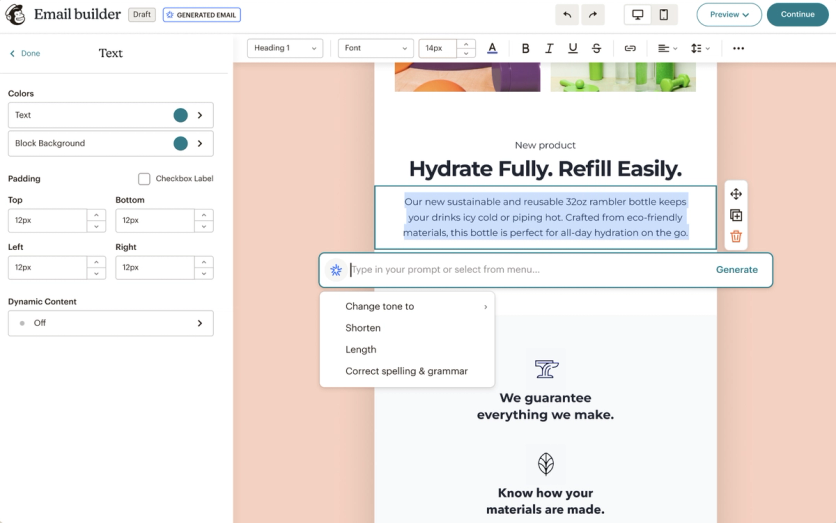
Mailchimp has been around for 25 years and remains one of the most widely adopted email tools, with 300+ integrations and a free, Mailchimp-built WooCommerce plugin that syncs purchase data automatically.
Best for: beginners who want guided setup, familiar tooling, and lots of learning material.
Mailchimp Email Editor
The drag-and-drop builder now runs on Intuit Assist AI tools – Email Content Generator, Creative Assistant, and Content Optimizer – which draft copy, adapt designs, and benchmark your content against top-performing campaigns. A Product Picker drops WooCommerce items into emails with details and pricing attached.
Mailchimp Segmentation
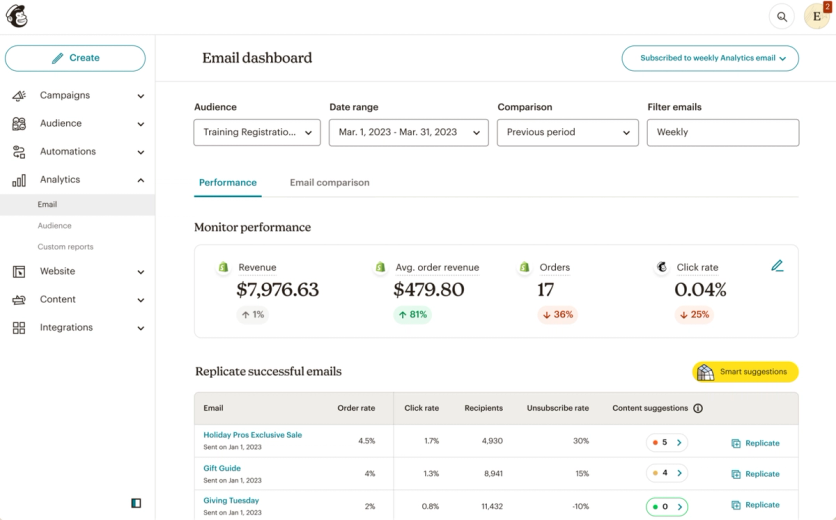
Predictive segmentation estimates customer lifetime value and purchase likelihood, and the audience dashboard makes segments visual enough to target in a few clicks.
Mailchimp Automations
Pre-built flows cover abandoned carts, product recommendations, welcome series, and post-purchase follow-ups. The Customer Journey Builder lays out workflows as flowcharts with triggers on opens, clicks, site visits, or purchases.
Mailchimp Support
Paid plans get 24/7 email and chat support; free accounts get email support for the first 30 days and Mailchimp branding on every send.
Mailchimp Pricing
Mind the free plan: Mailchimp cut it to 250 contacts and 500 monthly sends in January 2026 (down from 500 contacts and 1,000 sends). Paid tiers start at $13 per month for Essentials, $20 for Standard, and $350 for Premium.
Pros and Cons of Mailchimp
| Pros | Cons |
|---|---|
| Guided setup and the largest education library for beginners | Free plan cut sharply in 2026 (250 contacts, 500 sends) |
| 300+ third-party integrations | Costs escalate fast as lists grow |
| Intuit Assist AI content tools included | Advanced features gated to higher tiers |
| Native WooCommerce plugin maintained by Mailchimp |
Drip – Best for Behavior-Based Campaigns
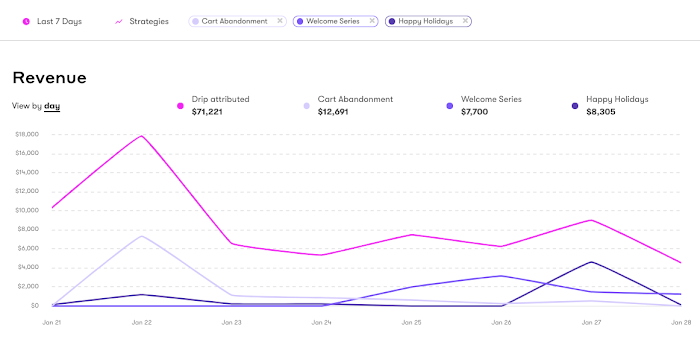
Drip has focused on e-commerce email automation since 2013, and everything in it is built around behavior triggers. The WooCommerce integration pulls purchase history, browsing behavior, cart events, and customer lifetime value into the platform.
Best for: stores that build campaigns around customer behavior and want revenue attribution for every email.
Drip Email Editor
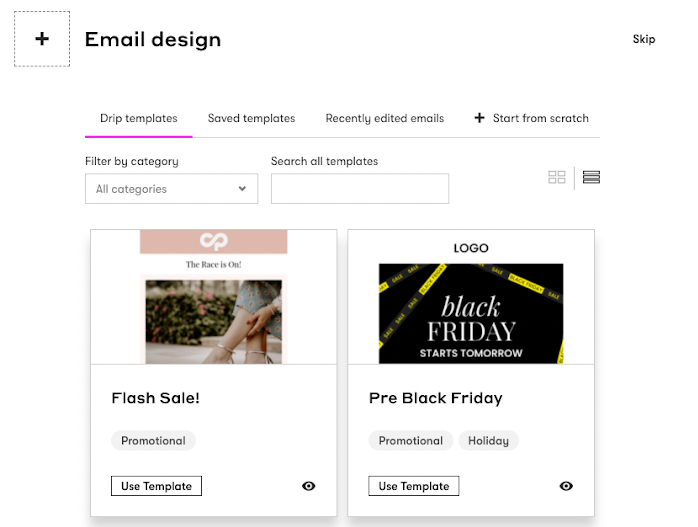
The drag-and-drop builder ships with 50+ themed templates that look noticeably more current than most competitors'. Brand elements like logos and colors apply across every template at once, and a plain-text mode covers lightweight, personal-looking sends. Preview before you hit send, though – reviewers report occasional rendering quirks (skewed images, alt text that doesn’t stick), so external inbox testing is a habit worth keeping.
Drip Segmentation
Segments update in real time – a customer moves between audiences within seconds of completing a purchase. The builder combines behavioral events, tags, custom fields, and store data, so you can stack dozens of conditions: shoppers who viewed a product several times without buying, lapsed high-spenders, or first-time buyers in a specific category. Tags and events fired from your store or workflows keep those audiences current on their own, and any segment can trigger or branch an automation.
Drip Automations
The visual workflow builder offers 50+ pre-built templates for welcome, abandoned cart, post-purchase, and win-back campaigns. Multi-branch workflows split on cart value or purchase history, and SMS steps slot into email workflows. Revenue attribution then ties every email to the dollars it generated.
Drip Support
Support is email-only until the $99-a-month tier (roughly 5,000+ contacts), where live chat opens up – there’s no phone support on any plan, and chat runs business days only (9–5 CT), which is awkward outside the US. Reviewers frequently flag slow, sometimes incomplete replies, so smaller stores lean on Drip’s documentation and knowledge base to self-serve.
Drip Pricing
Pricing starts at $39 per month for 2,500 contacts, reaches $154 at 10,000, and lands around $1,199 at 100,000. There’s no free plan, only a 14-day trial.
Pros and Cons of Drip
| Pros | Cons |
|---|---|
| Behavior-based segments that update in seconds | Billed for unsubscribed and inactive contacts – Drip counts anyone still “active” and prices you at your highest contact count of the month |
| Revenue attribution down to individual emails | Reviewers report silent price increases with no grandfathering |
| 150+ integrations | Analytics, broadcasts, and segment filters can lag up to a day, so you can’t react to a send in real time |
| Modern, well-designed templates | No phone support; live chat only from the $99/mo tier, with responses widely called slow |
HubSpot – Best for Email and CRM in One
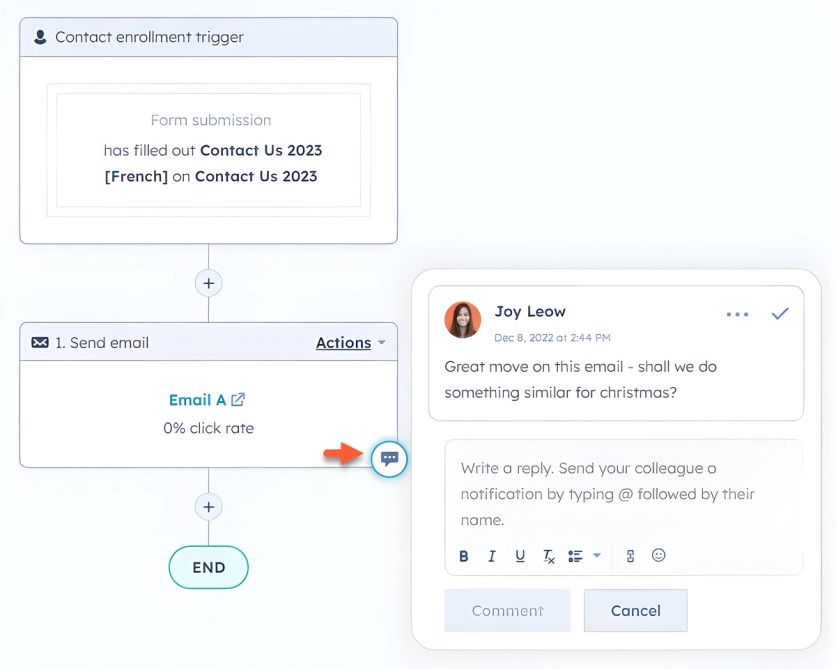
HubSpot puts email marketing inside a full CRM, so every campaign draws on the same customer records your sales and support teams use. WooCommerce connects through the MakeWebBetter plugin – built by a HubSpot Elite partner rather than HubSpot itself.
Best for: WooCommerce stores where marketing and sales need to share one customer database.
HubSpot Email Editor
The drag-and-drop builder includes 20+ templates and three email types: regular sends, automated sequences, and blog/RSS updates. Breeze AI generates subject lines, rewrites copy, and shifts tone from casual to professional inside the editor.
HubSpot Segmentation
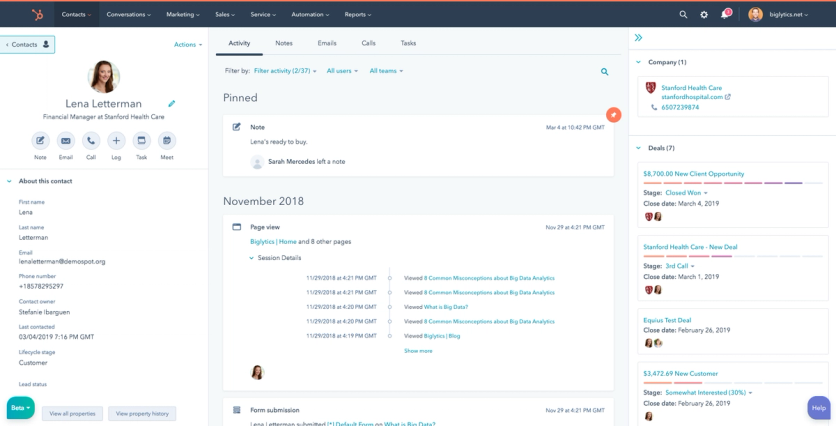
Dynamic lists segment contacts by lifecycle stage – subscriber, lead, MQL, customer, evangelist – plus engagement and any CRM property. The catch: granular segmentation and advanced workflows only open up on higher tiers.
HubSpot Automations
The visual workflow builder supports up to 20 parallel if/then branches and can trigger from any CRM object – a sales pipeline update or a support ticket can fire a marketing email instantly. Full marketing automation requires Marketing Hub Professional or higher.
HubSpot Support
Support scales sharply with plan tier. Free and Starter accounts lean on self-serve resources – HubSpot Academy courses and certifications, an extensive Knowledge Base, and an active community forum – with Starter adding in-app chat and email support. Phone support and callbacks from a support specialist only unlock at Professional and Enterprise. Enterprise accounts can layer on a beta Premium Support tier with a designated technical account manager, proactive health checks, and roughly one-hour response guarantees.
HubSpot Pricing
The free plan includes 2,000 marketing emails a month, but new free accounts are capped at 1,000 contacts. Starter runs from $15 per seat per month on annual billing; Professional jumps to $800 per month (3 seats, 2,000 contacts) plus a mandatory $3,000 onboarding fee, and Enterprise starts at $3,600 per month with $7,000 onboarding.
Pros and Cons of HubSpot
| Pros | Cons |
|---|---|
| Email marketing and CRM in one system | WooCommerce integration is third-party, not native |
| Workflows trigger from sales and support events, not just marketing | Steep cliff at Professional: $800/month plus $3,000 onboarding |
| Free tier to start with | Automation locked behind Professional |
| Full customer timeline on every contact | Heavier and more complex than dedicated email tools |
MailPoet – Best for WordPress-Native Email
MailPoet lives entirely inside WordPress. Its plugin – with 500,000+ active installations – manages subscribers, builds emails, and sends newsletters straight from wp-admin, so there’s no separate platform to log into and your subscriber data stays in your own WordPress database rather than a third-party cloud. Automattic acquired it in 2020 and folded it into the WooCommerce family alongside Jetpack, which is why it slots so cleanly into a WordPress stack.
Best for: store owners who want email inside WordPress and full ownership of their subscriber data.
MailPoet Email Editor
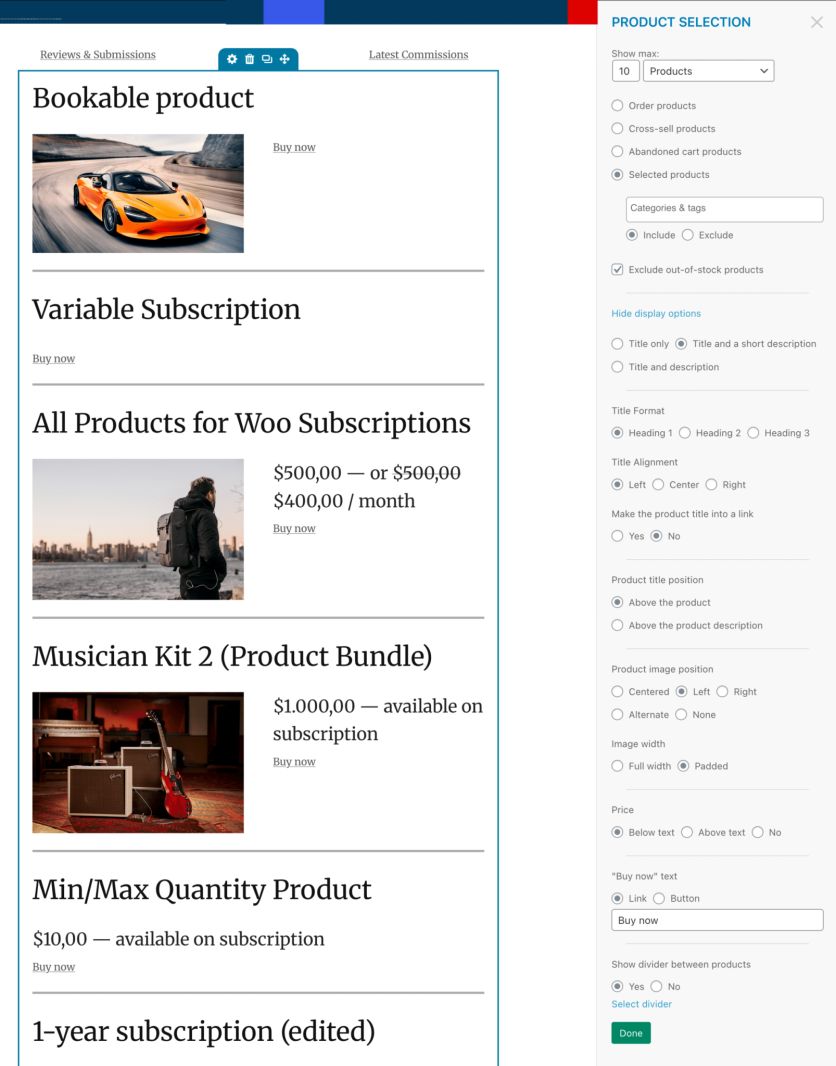
The drag-and-drop builder runs right inside the WordPress admin, with 50+ mobile-responsive templates and the same media library you already use for your site. You can drop your latest posts or WooCommerce products into an email as dynamic content, and Post Notification emails turn newly published WordPress content into newsletters automatically – handy for content-driven stores and blogs. Because it lives in WordPress, your site’s branding and media are right there, so emails match without extra setup.
MailPoet Segmentation
Segmentation draws on both email behavior and WooCommerce data: opens and clicks, specific products or categories purchased, order count, total spent, plus subscriber country, sign-up source, and custom fields. Segments are dynamic – a subscriber drops in or out automatically as their activity changes – so a “spent over $200” or “bought from a given category” audience stays current on its own. The catch: multi-condition segments that combine several of these rules are a paid-plan feature; the free tier keeps you to single-filter lists.
MailPoet Automations
Automations cover the core store lifecycle – welcome series, abandoned cart recovery, first-purchase follow-ups, and re-engagement for lapsed subscribers – set up in a simple visual editor. It’s deliberately lightweight, though: there’s no complex if/then branching or multi-path logic you’d get from ActiveCampaign or Maestra. Two WooCommerce-native perks stand out: MailPoet can restyle WooCommerce transactional emails (order confirmations, shipping notices) to match your brand, and it can trigger campaigns off order status and purchase history without a separate connector.
MailPoet Support
Support responses can take 24+ hours, with priority queues on paid plans.
MailPoet Pricing
The free tier covers 500 subscribers and 5,000 monthly emails through MailPoet’s sending service, which claims a 98.5% deliverability rate. Paid plans start at $10 per month at the 500-subscriber tier and scale with list size.
Pros and Cons of MailPoet
| Pros | Cons |
|---|---|
| Runs fully inside WordPress with database ownership | Automation depth is limited – no complex branching |
| Brands WooCommerce transactional emails | Support responses take 24+ hours |
| 98.5% deliverability via its sending service | Basic analytics |
| Cheap entry point at $10/month | Not a CRM |
AutomateWoo – Best for WooCommerce-Native Workflows
AutomateWoo is the WooCommerce team’s own marketing automation extension, sold on the official marketplace for a flat $159 per year. It runs entirely inside your WordPress admin – no external platform, no per-contact pricing.
Best for: stores that want native workflow automation without a monthly SaaS bill that grows with the list.
AutomateWoo Features
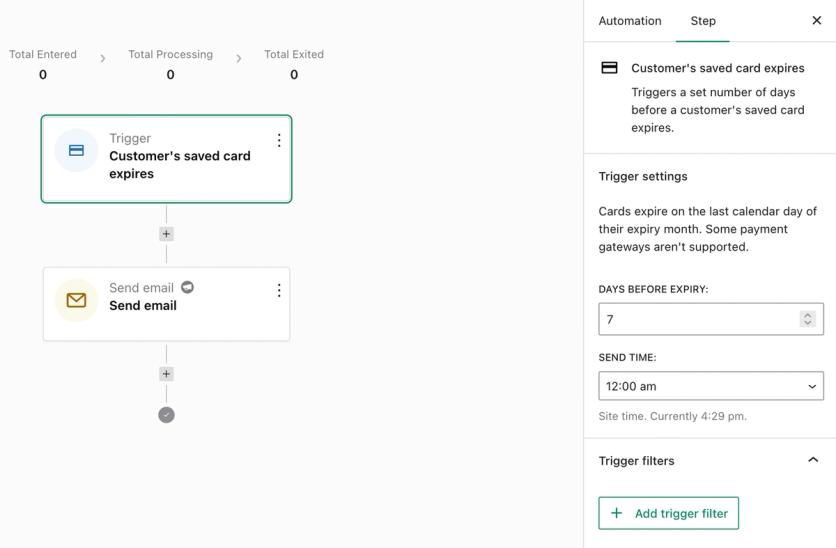
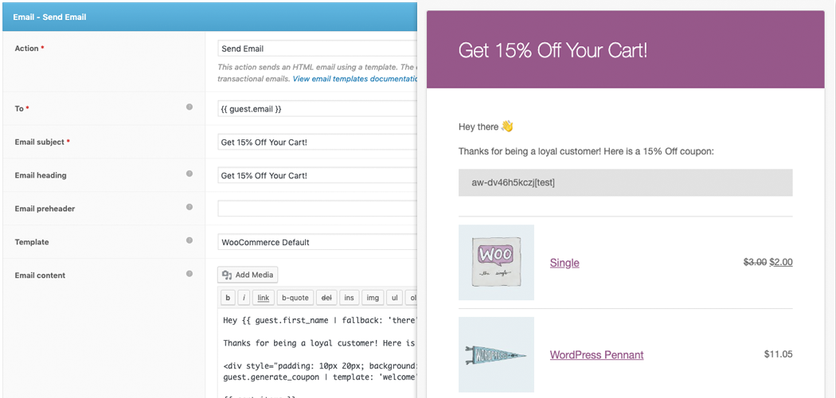
Workflows cover the core store lifecycle: abandoned cart recovery, follow-up emails, win-backs for inactive customers, review rewards, wishlist marketing, personalized coupons, card-expiry notices, and automatic VIP status. SMS notifications run through Twilio, and it automates WooCommerce Subscriptions and Bookings – something external platforms handle poorly.
AutomateWoo Limitations
There’s no drag-and-drop email designer – messages use your store’s WooCommerce transactional template. There’s also no built-in sending infrastructure (you’ll want an SMTP service for deliverability), no CDP, and only basic analytics. It’s a workflow engine on top of WooCommerce’s email system, not a full marketing platform.
AutomateWoo Support
Support now runs through Woo itself – AutomateWoo moved off its own site to the WooCommerce.com Marketplace, so Woo handles tickets through your WooCommerce.com account, backed by full product documentation. The annual license bundles a year of updates and support plus a 30-day money-back guarantee, but both lapse unless you renew. One limit worth knowing: support won’t write or debug custom code – for custom triggers or actions, they point you to WooCommerce developers for hire.
AutomateWoo Pricing
The $159-a-year license has no free version. Add-ons cost extra: Refer A Friend at $99 per year and Birthdays at $49 per year.
Pros and Cons of AutomateWoo
| Pros | Cons |
|---|---|
| Flat $159/year regardless of list size | No email template builder |
| Built and supported by the WooCommerce team | Needs a separate SMTP service for reliable delivery |
| Data stays on your own server | No CDP or advanced analytics |
| Automates WooCommerce Subscriptions and Bookings | Referral and birthday workflows are paid add-ons |
How to Choose an Email Marketing Platform for WooCommerce
Five factors separate a platform that pays for itself from one that becomes shelfware.
Native WooCommerce Integration
The integration should install in a few clicks and sync automatically – customers, orders, products, and events like Added to Cart, without manual imports. Real-time sync is what makes behavior-triggered campaigns possible; a platform that batches data overnight can’t send a cart reminder an hour after abandonment. It’s also worth favoring vendors that handle the migration for you: Maestra, for one, moves your existing data, connects the store, and rebuilds your flows as part of onboarding – so switching doesn’t mean wiring up the integration alone.
Automation Coverage
Shoppers abandon 70.22% of online carts on average, per Baymard Institute. Abandoned cart emails win a meaningful share back – across 143,000+ flows, 3.33% of recipients complete their purchase, generating $3.65 per recipient.
Post-purchase flows matter just as much: a first-time buyer has a 27% chance of coming back, rising to 49% after a second purchase and 62% after a third, per Smile.io. Welcome, abandoned cart, post-purchase, and win-back flows should all come pre-built.
The bigger mistake is judging flows off a feature list. Write down the automation you actually need first, then take a demo account or ask the salesperson to build one of your flows live while you watch – and time how long setup really takes. Depth varies wildly: on a basic tool an abandoned-cart flow is a single reminder email, while a deeper platform lets you branch on cart value, pull in every product the shopper viewed, layer in personalized recommendations and a tailored offer, and fall back to SMS or push if the email goes unread. Seeing that built in real time tells you far more than any checklist of flow names.
Email Design and Templates
Look for a drag-and-drop builder with mobile-responsive templates and dynamic product blocks that pull live prices from your catalog. If your team ships several campaigns a week, template quality directly limits output.
Pricing Model and Scalability
The pricing model matters far more as your list scales than it does on day one. Per-contact pricing (most tools here) charges for every subscriber whether you email them or not, so a large database full of dormant contacts quietly inflates the bill. Per-email pricing (Brevo) charges by send volume instead. Active-profile pricing (Maestra) bills only the profiles that actually engaged that month – opened, clicked, browsed, or bought – which is why it tends to win for big, mixed-engagement databases where a large slice of the list is dormant at any given time. Model your real trajectory, not today’s list: run the numbers where your base is heading – 50,000, 150,000, 500,000 contacts – because the platform that’s cheapest at 10,000 is often the most expensive at half a million.
Deliverability and Support
Deliverability varies more than vendors admit: in EmailToolTester’s independent tests, results ranged around a test-wide average of 83.1%, with ActiveCampaign and MailerLite consistently at the top. On support, check what your actual tier includes – several platforms reserve live chat or strategy help for higher plans.
Matching Your WooCommerce Store to the Right Email Marketing Platform
For WooCommerce stores that want automation and personalization that go past templated flows, Maestra is the platform we’d start with: real-time journeys across email, SMS, push, and the site – each message shaped by a live CDP – plus a dedicated Forward Deployed Marketer who handles migration and flow-building for you. Full-stack e-commerce consolidation instead of another point tool.
The budget path is real, too. Brevo and MailerLite offer working free plans, Omnisend covers omnichannel for under $60 a month, and AutomateWoo automates the basics for a flat $159 a year. Klaviyo and ActiveCampaign sit in between – powerful, but priced and built for teams ready to use the depth.
Shortlist two platforms and put them to work on the same task: ask each to connect your store and build your abandoned cart flow during the evaluation. On the bigger platforms you won’t be wiring it up yourself – their team sets it up for you in the demo, which is itself a preview of the onboarding you’d get as a customer. How that flow comes together, and what it recovers once it’s live, will tell you more than any feature grid.
FAQs
- The best email marketing platform for WooCommerce overall is Maestra, with unlimited email sends, a real-time customer data platform, and a dedicated success manager for every client. The right pick depends on your stage: Omnisend for omnichannel marketing on a budget, Klaviyo for its plug-and-play ecosystem, and Brevo for the best free plan.
- No. WooCommerce only sends transactional emails – order confirmations, shipping updates, password resets – through WordPress’s wp_mail() function. There’s no campaign builder, newsletter functionality, segmentation, or automation. For newsletters inside WordPress itself, MailPoet is the closest fit; for anything more, stores connect an external platform.
- Costs scale with list size. At 2,500 contacts, plans run from free to about $60 a month; at 10,000 contacts, expect roughly $130–$180 a month on mid-market platforms. AutomateWoo is the flat-fee outlier at $159 a year, and platforms like Maestra bill only for active profiles – the contacts who actually engage each month – rather than the whole list.
- WooCommerce can’t send abandoned cart emails natively – you need a connected platform. Maestra, Omnisend, Klaviyo, and Brevo all track WooCommerce cart events and ship pre-built abandoned cart flows, and AutomateWoo adds cart recovery inside wp-admin. It’s the highest-ROI automation to start with: about 3.33% of recipients complete their purchase, worth $3.65 per recipient on average.
- Yes – Klaviyo is WooCommerce’s preferred marketing automation partner, with an official plugin used by 15,000+ WooCommerce brands. It syncs Started Checkout, Added to Cart, and Placed Order events in real time. The free plan covers 250 profiles and 500 monthly sends; paid plans start at $60 a month for 2,500 profiles. Klaviyo’s per-profile pricing does climb steeply as your list grows, so scaling brands often move to a dedicated platform like Maestra, which bills only active profiles and includes hands-on migration – Urban Armor Gear cut its marketing-stack cost by roughly $100K a year after consolidating a Klaviyo-based stack onto Maestra.
- Yes – Mailchimp maintains a free official WooCommerce plugin that syncs customers and purchase data automatically for abandoned cart automation and purchase-based segments. Note the free plan was cut to 250 contacts and 500 monthly sends in January 2026, so most stores will need a paid tier from $13 a month.
- AutomateWoo is worth it for stores that want workflow automation – abandoned carts, win-backs, review requests, personalized coupons – for a flat $159 a year with no per-contact pricing. It’s not a full email platform: there’s no template designer, no built-in sending infrastructure, and no analytics suite, so pair it with an SMTP service or upgrade to a dedicated platform like Maestra as the list grows.