
9 Best Email Marketing Platforms for E-Commerce Brands

Most e-commerce brands start their email marketing journey with a simple tool – something that sends newsletters and maybe handles an abandoned cart sequence. It works fine until it doesn’t. The list grows. The team wants SMS. Someone asks about product recommendations. Another person needs pop-ups for lead capture. Before long, you’re running three or four platforms that don’t share data, each with its own billing, its own login, and its own definition of what a “contact” means.
The email marketing platform market doesn’t make the choice easier. Some tools specialize in automation depth but charge per contact with aggressive scaling. Others keep pricing low but lack the channels and personalization that growing e-commerce brands need. And then there are the enterprise suites that do everything – for six-figure annual contracts and multi-month implementations.
This guide breaks down nine email marketing platforms that consistently deliver results for e-commerce brands. We’ve analyzed each platform’s features, pricing, support quality, and real-world strengths and weaknesses – drawing on G2 reviews, official documentation, and hands-on experience – so you can find the one that actually fits your business.
Quick Verdict: Best Email Marketing Platforms by Category
Best for omnichannel e-commerce: Maestra – unified CDP with email, SMS, push, loyalty, and on-site personalization in one platform
Best for budget-conscious starters: Moosend – affordable automation with pre-built workflows and drag-and-drop editor
Best for SMBs and event-driven teams: Constant Contact – email, events, social, and SMS with built-in registration tools and beginner-friendly automation
Best for affordable scalable email automation with ecommerce workflows: GetResponse – unlimited emails, visual automation, abandoned cart recovery, and Price Drop campaigns
Best for Shopify and WooCommerce retention: Retainful – email, SMS, and WhatsApp automation with cart recovery, next-order coupons, and a free tier
Best for transactional + marketing in one: Brevo – email, SMS, and WhatsApp with a built-in CRM at accessible pricing
Best for advanced automation logic: ActiveCampaign – deep conditional workflows with CRM and lead scoring
Best for simplicity and speed: MailerLite – clean interface, fast setup, generous free tier for small lists
Best for CRM-driven marketing: HubSpot Marketing Hub – tight CRM integration for teams already in the HubSpot ecosystem
Common Email Marketing Platform Challenges
Before comparing individual platforms, it’s worth understanding the patterns that trip up e-commerce brands choosing email marketing software. These aren’t complaints about any single tool – they’re structural problems across the category, surfaced from G2, Capterra, and TrustPilot reviews.
Challenge | Description | What to Look For |
|---|---|---|
Channel Fragmentation | Most email platforms started with email and bolted on SMS, push, and web personalization later. The result: separate UIs, disconnected data, and workflows that can’t coordinate across channels. | Test cross-channel flows end-to-end. Can you trigger an SMS based on email behavior? Can you personalize your website based on email engagement? The flow builder tells you everything. |
Pricing That Scales Faster Than Revenue | Contact-based pricing looks affordable at 1,000 subscribers. At 50,000, the same platform can cost 10-20x more – and some charge for unsubscribed or inactive contacts. | Ask whether you pay for inactive contacts. Compare per-contact vs. volume-based models. Check if features are gated behind higher tiers. |
Automation Ceilings | Basic plans often limit automation to a handful of steps or triggers. Brands discover the ceiling right when their marketing gets sophisticated enough to need complex flows. | Check automation limits on the plan you’d actually buy – not just the enterprise tier. Look for unlimited workflow steps and branching logic. |
Data Silos Between Tools | When your CDP, email platform, loyalty tool, and personalization engine come from different vendors, customer data lives in fragments. Segments don’t sync in real time, and campaign attribution becomes guesswork. | Evaluate whether the platform has a built-in customer data layer or requires middleware to connect with other tools. Real-time profile updates matter more than batch syncing. |
Support Quality Gaps | Pre-sale promises rarely match post-sale support reality. Common complaints: first-line reps who can’t troubleshoot technical issues, slow response times, and account managers juggling 60+ accounts each. | Ask how many accounts each CSM handles. Check if premium support requires an additional fee. Look for guaranteed SLAs – not just “priority access.” |
Template & Deliverability Trade-offs | Platforms with hundreds of templates sometimes sacrifice deliverability – bloated HTML, slow load times, Gmail clipping. Platforms with high deliverability sometimes offer limited design flexibility. | Test email rendering across clients (Gmail, Apple Mail, Outlook). Check whether the platform monitors deliverability proactively or just provides open rate stats. |
Email Marketing Platforms at a Glance
Platform | Best For | Key Strengths | Pricing |
|---|---|---|---|
Maestra | Mid-size, enterprise, and rapidly scaling e-commerce brands | Drag-and-drop email builder with deliverability support, real-time CDP, omnichannel flows, built-in loyalty, dedicated Forward Deployed Marketer | From $2,000/mo (CDP + unlimited email); modular – pay only for active profiles |
Moosend | SMBs, eCommerce brands, SaaS, Publishers and marketers looking for affordable email marketing and automation | Variety of email and automation templates, no-code email editor, visual workflow builder, segmentation, AI writer | $9/month (unique subscriber-based) |
Constant Contact | SMBs, nonprofits, event organizers, and teams that need simple email marketing with built-in social and SMS tools | Event and RSVP tools, social and SMS campaigns, AI tools, reusable branded templates, beginner-friendly automation workflows | From $12/mo (Free trial available) |
GetResponse | Businesses and ecommerce teams that want affordable email marketing, automation, and revenue-focused lifecycle campaigns | Unlimited emails, visual automation, abandoned cart recovery, Price Drop campaigns, segmentation, ecommerce tracking, 99% deliverability, 150+ integrations | Free trial available; paid plans vary by region and list size; Enterprise custom pricing |
Retainful | Shopify and WooCommerce stores wanting email, SMS, and WhatsApp automation without enterprise pricing | Cart recovery across email, SMS, and WhatsApp, next-order coupons, unlimited automation workflows, 200+ templates, revenue attribution | Free plan available; from $14/mo (Pro) |
Brevo | Transactional emails and businesses with large lists | Volume-based pricing with unlimited contacts, SMTP relay, multi-channel campaigns | Free plan available; from $9/mo (Starter) |
ActiveCampaign | Advanced automation with CRM integration | 900+ workflow templates, deep conditional logic, 900+ integrations, predictive sending | From $15/mo (1,000 contacts) |
MailerLite | Beginners and small businesses | User-friendly interface, generous free plan, affordable scaling | Free plan (500 subscribers); from $10/mo |
HubSpot Marketing Hub | All-in-one marketing-sales alignment | Deep CRM integration, Breeze AI, 2,000+ app integrations | Free tools available; from $15/seat/mo (Starter) |
1. Maestra
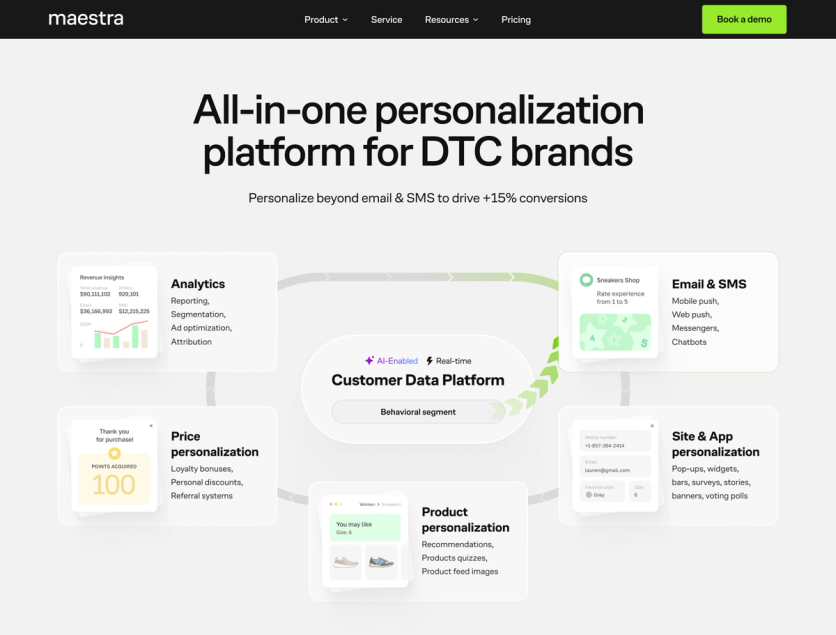
Best email marketing platform for e-commerce brands that want one platform to replace their entire marketing stack – with a dedicated team to help run it
Maestra is an all-in-one marketing platform built specifically for mid-market and enterprise e-commerce brands. Instead of stitching together an ESP, CDP, SMS provider, loyalty engine, and personalization platform – and then hoping they share data – Maestra consolidates everything into a single platform with white-glove service included for every account. The platform’s customer base includes JOLYN, Coolibar, Urban Armor Gear, Selkirk Sport, Enlightened Equipment, Magnum Bikes, and Furniture Fair.
Key Features
Email Marketing
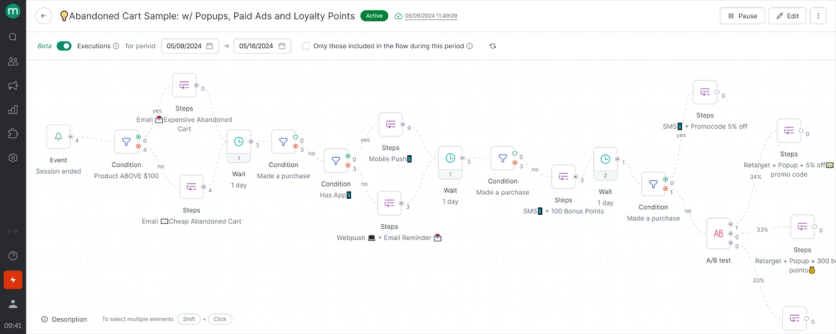
Maestra’s home-grown drag-and-drop email builder includes conditional content blocks that show different products, images, or copy to different segments – all within a single email template instead of creating duplicates. AI-generated text helps draft copy faster, and built-in product recommendation blocks pull personalized suggestions directly into the template without custom code.
Deliverability gets dedicated attention: dedicated IPs, a DMARC analyzer, email health monitoring, smart engagement segments that automatically skip inactive profiles, fake click filtering that catches bot clicks from spam filters, and a proprietary composer that produces smaller HTML files to bypass Gmail clipping. 4ocean reduced email file size by 30% compared to Klaviyo’s editor. Furniture Fair improved email open rates from 17% to 45.86% within four months with Maestra: the Forward Deployed Marketer team fixed authentication and content practices. Selkirk Sport had bounce rates above 1% with no diagnostics or fixes from Bloomreach; after switching to Maestra, the team gained full deliverability monitoring and achieved 55% email revenue growth year-over-year.
Optimal send time prediction analyzes when each individual subscriber engages and schedules messages for their personal peak attention window. Time zone-based sending ensures everyone receives the message at the same local time. Per-person sending limits cap the number of messages per day to prevent fatigue and spam complaints.
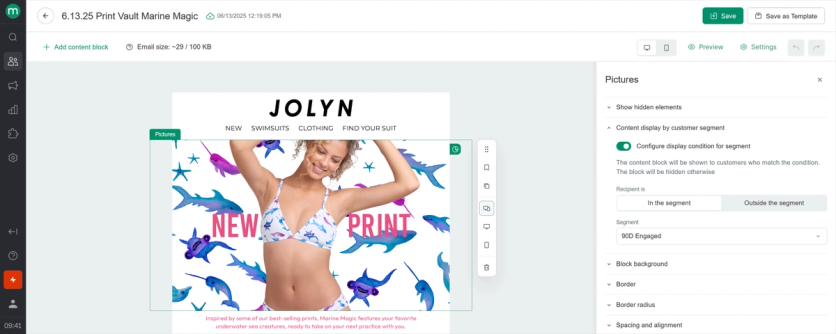
Omnichannel Flow Builder
The visual flow builder coordinates email, SMS, MMS, RCS, WhatsApp, web and mobile push notifications, on-site pop-ups, and paid media retargeting – all in one canvas. An abandoned cart journey, for example, can start with an email, escalate to an SMS if unopened, show a personalized pop-up on the next site visit, and retarget through Meta ads – all driven by one flow with real-time branching. Selkirk Sport achieved 149% SMS revenue growth year-over-year, the team launched context-aware cart recovery that tailored messaging by cart size and product type across email and SMS.
The builder also supports product-triggered automations that many platforms can’t replicate natively – like Price Drop Alerts, Back in Stock notifications, and Abandoned Collection flows. Coolibar grew campaign revenue by 33.6% and flow revenue by 62% year-over-year by launching exactly these types of automations that Klaviyo couldn’t support.
Sena saw 8.6x campaign revenue year-over-year after replacing Klaviyo – what previously required building six separate flow versions per campaign (one per language per channel) became a single unified journey with automatic language routing, where email, SMS, and push worked together with shared data instead of operating in silos.
Real-Time Customer Data Platform
Maestra’s CDP unifies customer data from all channels into a single profile that updates in under 300 milliseconds. For email marketing, this means every campaign is powered by the most current data – purchase history, browse behavior, loyalty tier, and engagement patterns are all available for segmentation at the moment you build an audience. No batch syncing, no stale lists. Cross-device recognition ties activity together so a customer who browses on mobile and opens an email on desktop is still one profile, not two. Built-in RFM segmentation automatically categorizes customers by recency, frequency, and monetary value – so targeting lapsed VIPs or first-time buyers doesn’t require manual analysis.
Selkirk Sport had been dealing with four duplicate profiles per customer in Bloomreach, which led to repeated messages and broken segmentation. After switching to Maestra’s unified CDP, all audience types – from D2C buyers to influencers and retail partners – lived in one clean database with no overlap. The platform supports databases up to 65M records with 150+ native integrations including Shopify, BigCommerce, WooCommerce, and Magento
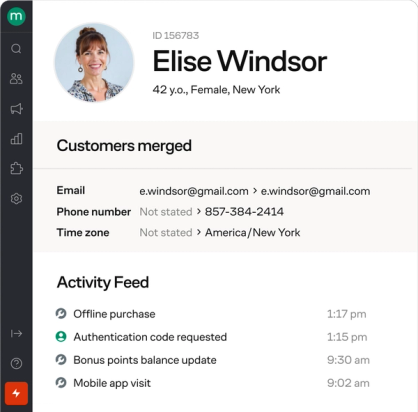
Customer profile in Maestra
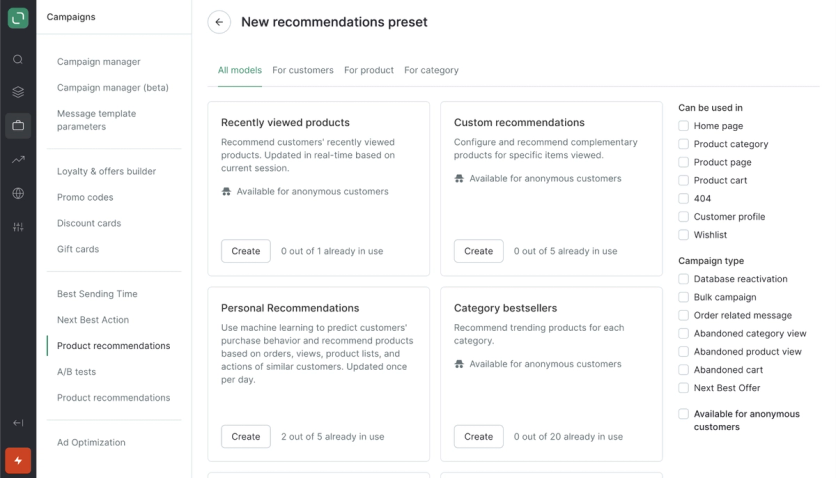
Product Recommendations
14 AI algorithms power personalized product recommendations that work inside emails, on the website, in push notifications, and in the mobile app. In email campaigns specifically, dynamic recommendation blocks pull the most relevant products for each subscriber at the moment of sending – not when the campaign was built. Inventory-aware logic avoids recommending out-of-stock items, and business rules let you fine-tune by color, price range, and category. The same real-time product data powers dynamic email content beyond recommendations: Furniture Fair uses dynamic product images that display current prices whenever a customer opens an email – even if the email was sent two weeks ago. JOLYN generates 7% of total sales through recommendation-driven campaigns – including in-email product blocks that show different items to each subscriber based on browse and purchase history.
Built-In Loyalty Program
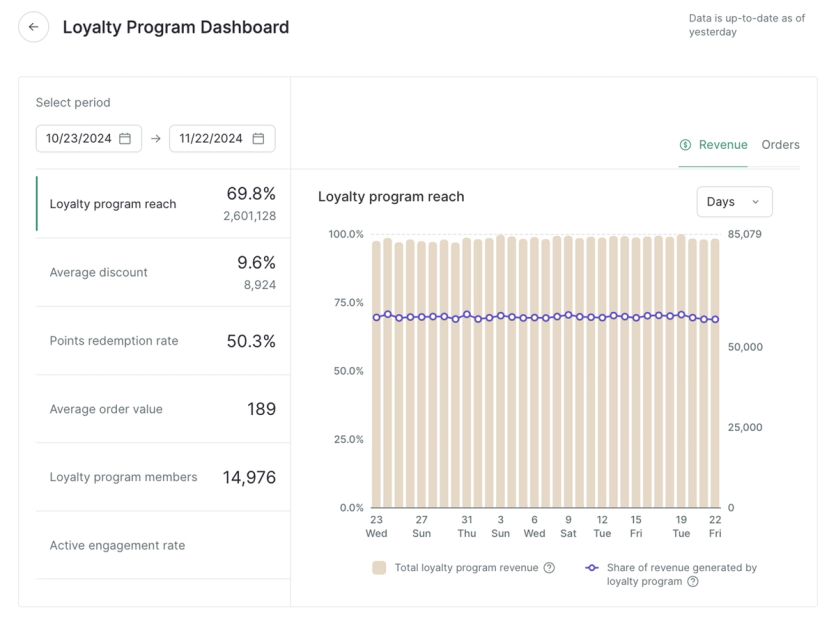
Maestra includes a full loyalty engine – points, tiers, referral programs, personal coupons, cashback, gamification – as a core part of the platform, not a third-party add-on. For email marketing, this means loyalty events trigger email campaigns automatically: a welcome to a new tier, a points expiration reminder, a personalized birthday offer. Emails can dynamically display each subscriber’s current points balance, tier status, and available rewards without any integration work – because loyalty data lives in the same system as the email platform, there’s no sync lag and no data mismatch. Promotions and coupon management are also built in: you can automatically issue a unique promo code to a lapsed customer or offer bonus points during a campaign, and A/B test promotional offers just like any other email element.
Urban Armor Gear’s loyalty program had been practically invisible when it ran on separate tools. After consolidating into Maestra, loyalty became a prominent part of every email, contributing to a 64% reduction in marketing stack costs.
Site Personalization
No-code pop-ups, quizzes, surveys, gamification widgets, banners, and embedded blocks – all with in-session behavioral targeting, exit-intent triggers, frequency control, cross-device recognition, and A/B testing. Prioritization rules determine which widget to show when multiple qualify, so visitors never see conflicting offers. For email list growth, Enlightened Equipment increased their lead capture rate from 0.37% to 6.1% by A/B testing pop-up offers – driving 20x growth in new subscribers within two months. Those new subscribers fed directly into automated email and SMS flows, contributing to the brand’s overall +22% revenue growth with zero extra budget.
Reporting & Analytics
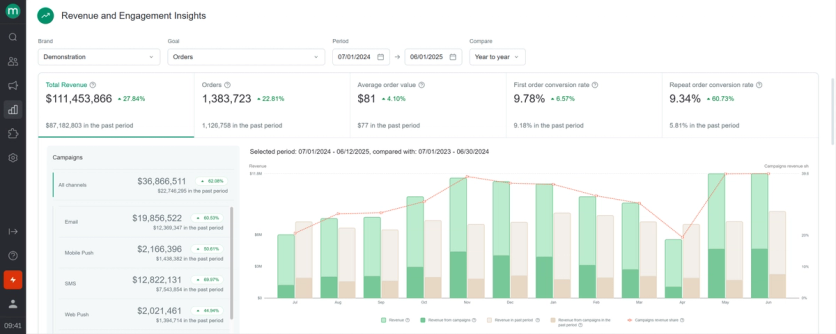
Full-funnel reporting with configurable attribution (Last Non-Direct Touch by default), email health monitoring with reputation tracking by provider and industry benchmarks, and A/B testing with control groups and incremental revenue impact. Campaign-level dashboards show revenue, orders, conversion, AOV, and repeat purchase metrics – all verifiable down to every individual order. Control group methodology measures true incremental lift from email programs, not just last-click attribution. Multi-brand reporting lets teams track performance across separate storefronts in one place, and raw data can be exported or streamed live to external BI tools.
Selkirk Sport’s team had been flying blind on Bloomreach – numbers didn’t align across dashboards and no metric could be trusted; after switching to Maestra, they gained clean, brand-specific reporting across Selkirk Sport, Selkirk TV, and their partner programs. The same real-time data that powers reporting also flows into email content: 4ocean uses Maestra to send personalized impact reports that calculate each contributor’s environmental impact in pounds at the moment of sending, with dynamically rendered progress bars and charts – a level of in-email reporting that was impossible on Klaviyo.
White-Glove Service
Every Maestra client gets a dedicated Forward Deployed Marketer (a marketer who works as part of your team) who handles only 10-15 accounts (industry average: 60-125). Forward Deployed Marketers handle migration, build campaigns, audit flows, design email templates, optimize deliverability, and run A/B tests. Communication happens through shared Slack or Microsoft Teams channels with a 5-minute SLA. JOLYN migrated from Klaviyo with the Forward Deployed Marketer handling the entire process – rebuilding flows, templates, and segments while the team continued running campaigns on the old platform until cutover.
Pricing
Maestra charges based on monthly active profiles only – a contact counts as “active” only if they placed an order, visited the site, received a message, clicked an email, or had a profile update that month. Inactive contacts don’t count toward billing.
With the unlimited email module, plans start at $2,000/month. The first 100,000 active profiles are included, and multi-brand support accommodates up to three brands under one account at no extra charge.
- All platform features included at every tier – no per-module charges
- Emails up to 10x active profile count and unlimited user seats
- Full onboarding and implementation included – no setup fees
- Month-to-month billing, no annual contracts required
Strengths
- All-in-one architecture – CDP, email, SMS, push, loyalty, site personalization, product recommendations, and analytics share the same data layer. No integrations to maintain, no data silos
- Deliverability infrastructure – dedicated IPs, DMARC analyzer, email health monitoring, and optimized HTML that avoids Gmail clipping
- Transparent pricing – monthly modules, pay only for active profiles, unlimited email sends, and no setup fees or annual contracts
Weaknesses
- Starting at $2,000/month, Maestra is priced for mid-market and enterprise e-commerce brands – not a fit for small businesses with basic email needs
- Primarily designed for e-commerce and DTC – may not be the ideal fit for B2B or SaaS, though some non-retail brands also use Maestra
- Smaller out-of-the-box template library than competitors offering hundreds, though clients receive custom-designed templates at no additional cost during onboarding
When to Choose Maestra
- You’re managing 3+ marketing tools and want to consolidate.
- Your email metrics have plateaued and you need deeper personalization.
- You want pricing that scales predictably.
- You need a partner, not just a platform.
2. Moosend
Best email marketing platform for growing businesses that want powerful features without enterprise pricing
Moosend is an email marketing and marketing automation platform designed for SMBs, eCommerce brands, and marketers who want advanced capabilities without the complexity or pricing of enterprise tools. Instead of using multiple platforms for email campaigns, automation, personalization and lead generation, Moosend brings these into a single, intuitive environment focused on speed, usability, and cost-efficiency.
The platform is used by a wide range of businesses – from eCommerce stores and agencies to SaaS teams and publishers – looking to scale their email marketing.
Key Features
Marketing Automation Builder
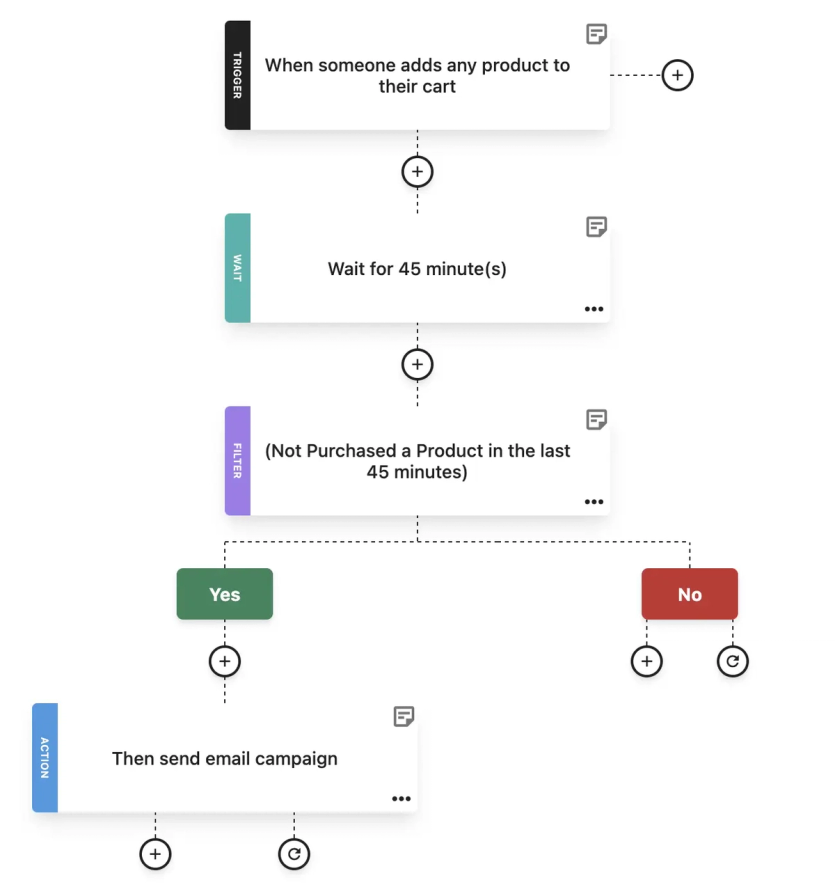
Moosend’s visual workflow builder allows marketers to create multi-step automations using behavioral triggers such as page visits, product views, or cart abandonment. Users can build branching logic with trigger-condition-action logic to support use cases like lead nurturing, re-engagement, and post-purchase follow-ups.
The platform also includes a library of pre-built automation templates (recipes) that help teams launch workflows faster, covering common scenarios like welcome series, abandoned cart recovery, and upsell/cross-sell campaigns.
Audience Segmentation and Personalization
Moosend offers flexible segmentation based on subscriber data, campaign activity, and custom fields. Marketers can create targeted segments using multiple criteria and refine them over time based on engagement and behavioral signals.
Personalization options include custom fields, conditional content blocks, and product recommendations for eCommerce use cases. This enables more targeted messaging without requiring extra tools and complex integrations.
Drag-and-Drop Email Editor
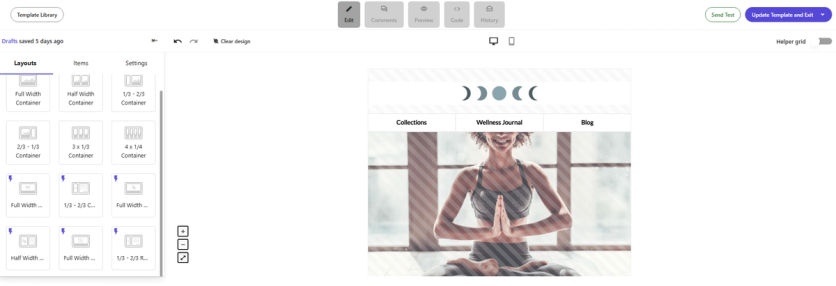
The no-code email editor includes a variety of responsive templates and customization options, allowing users to create professional campaigns without any HTML knowledge. Templates are designer-made and responsive and can be fully customized, saved, and reused across campaigns.
Moosend also includes an AI-powered writing assistant to help generate subject lines and email copy, brainstorm and perform checks, making it easier to move from idea to execution quickly.
Subscription Forms and Landing Pages
Regarding lead generation, the platform includes tools to create subscription forms and landing pages. Popups can be created in the drag-and-drop subscription form builder using a simple template and displayed based on conditions such as URL path, cookies, country, device type, and operating system. Landing pages can be built and customized using templates and the no-code landing page builder, with support for custom URLs and domains. An AI writer is also available within the platform to help generate and refine copy across forms and pages.
Reporting and Analytics
From opens and clicks to conversions and revenue tracking for eCommerce, Moosend gives you a clear view of how your campaigns perform. You can track how subscribers move from email to action and evaluate what’s actually driving results.
Click tracking and email heatmaps show how subscribers interact with your campaigns, making it easier to spot what grabs attention, what gets ignored, and where to optimize for stronger engagement. Finally, automation statistics add another layer to understand how workflows perform so you can refine timing, messaging, and targeting.
Pricing
Moosend follows a unique subscriber-based pricing model, with costs scaling based on the size of your contact list. This means that you get charged per subscriber, no matter how many lists they’re in. More specifically:
The platform offers a free 30-day trial that covers most features.
Paid plans start at $9/month, scaling with unique subscriber count.
Unlimited emails are included in all plans.
Core features such as automation, landing pages, and subscription forms are all included in the Pro plan.
For teams that want the Enterprise features without the high cost, Moosend+ offers additional capabilities such as Audience Discovery, transactional emails, or Custom Reports. You can choose the add-ons your business needs and build a customized plan. The price is custom.
For more advanced requirements, the Enterprise plan includes access to the platform’s full feature set in a single plan, along with additional capabilities for larger teams. The Enterprise plan also features custom pricing.
Strengths
Strong automation at an affordable price point – Moosend offers advanced automation capabilities at a fraction of the cost, making it ideal for growing teams.
User-friendly interface – The platform is designed for marketers, not developers, with an intuitive UI that reduces the learning curve and speeds up execution.
All-in-one platform – Email marketing, automation, forms, and basic landing pages are available in one tool, reducing the need for multiple ones in simpler setups.
Fast time-to-launch – Pre-built templates, automation recipes, and AI-assisted content creation help campaigns go live quickly.
Weaknesses
Limited omnichannel capabilities – Moosend focuses primarily on email marketing and automation, without native capabilities for channels such as SMS, push notifications, or broader omnichannel orchestration found in more advanced platforms.
Fewer native integrations compared to competitors – While it covers integrations with popular tools such as Woocommerce and Salesforce, you will need to integrate your marketing stack with Moosend using Zapier.
Compared to Maestra
Moosend delivers a polished email marketing experience at an accessible price point – its visual workflow builder, segmentation, and AI writing assistant give growing teams a genuinely capable toolkit starting at $9/month.
Where the gap widens is in what happens beyond the inbox: Moosend has no real-time CDP to unify customer data across channels, no native SMS or push notification support, limited product recommendations compared to Maestra’s 14 AI algorithms that work across site, email, and push, no loyalty program or referral system, and no on-site personalization to coordinate what visitors see with the emails they receive. Moosend’s automation builder handles email-centric flows well – welcome series, cart abandonment, re-engagement – but stays within the email channel. Maestra orchestrates those same triggers across email, SMS, push, popups, and paid media retargeting in a single flow, with every step informed by a real-time customer profile. Integrations are another consideration: Moosend relies on Zapier for many connections that Maestra handles natively through 150+ built-in integrations.
On the support side, Moosend offers live chat and email on its Pro plan, with a dedicated account manager reserved for Enterprise customers. Maestra includes a dedicated Forward Deployed Marketer on every plan – handling strategy, onboarding, flow building, and deliverability – with a shared Slack channel for direct access.
Moosend is a strong choice for teams that need reliable, affordable email marketing with solid automation; Maestra is the fit when email is one part of a broader retention strategy that spans every customer touchpoint.
3. Constant Contact
Best email marketing platform for SMBs, nonprofits, and businesses that need email, events, social, and SMS in one accessible platform.
Constant Contact is an email and digital marketing platform built mainly for small businesses, nonprofits, and event-driven organizations. Its value is not just in sending newsletters, but in giving small teams a straightforward way to manage customer communication across email, social posts, event registrations, landing pages, ads, and SMS without stitching together many different tools.
The platform is especially useful for businesses that rely on repeat engagement like community events, classes, appointments, fundraisers, seasonal promotions, local retail campaigns, and service-based customer updates. Constant Contact leans into usability, campaign creation, contact management, and practical promotional tools for teams that need to move quickly.
Key Features
Email Campaign Builder
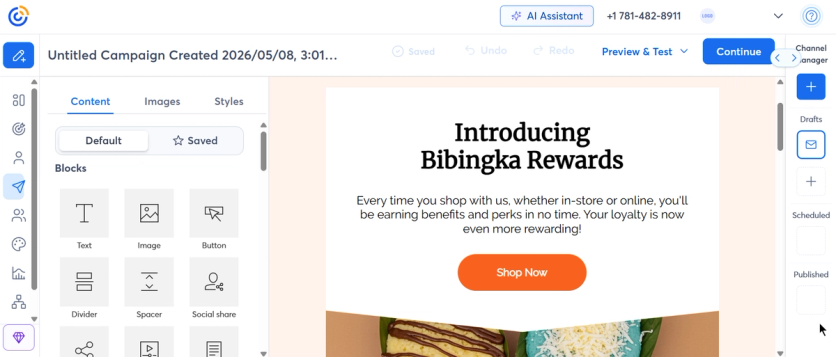
Constant Contact includes a drag-and-drop email editor with customizable templates, AI content recommendations, subject line tools, polls, surveys, and BrandKit, a built-in branding tool that automatically pulls elements like your logo, colors, fonts, and images from your website to help keep campaigns visually consistent. The platform is designed to help non-technical users create branded campaigns without building from scratch every time.
Its email tools are particularly suited to recurring campaigns such as newsletters, promotions, announcements, or customer follow-ups. Users can also access features like inbox preview as an add-on, helping teams check how campaigns appear before sending.
Event Marketing and Registration
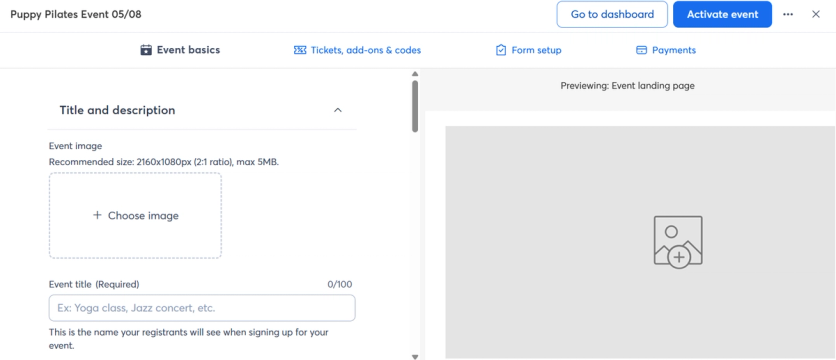
Event marketing is one of Constant Contact’s more distinctive strengths. The platform includes tools to create events, build registration forms, create tickets, add promo codes, manage payments, and track registrants from within the event dashboard.
This makes it a strong fit for organizations that run events like workshops, fundraisers, or webinars. Tickets can be free or paid, and they can also be adapted for use cases like volunteer registration and meal sign-ups.
Constant Contact also supports payment collection for events through options such as PayPal, credit card, Venmo, and Pay Later, depending on the setup.
Automation and AI Campaign Support
Constant Contact’s automation options depend heavily on the plan. Lite includes one automation template, Standard includes three automation templates, AI Campaign Builder, and automatic resend to non-openers, while Premium adds unlimited templates, custom automations, eCommerce automation templates, and auto-send welcome emails.
The platform’s Automation Path Builder can also support contact management actions, such as applying tags, updating contact information, and updating lists.
This gives smaller teams enough automation to cover common workflows such as welcome messages, birthday emails, follow-ups, eCommerce triggers, and re-engagement, without pushing them into a more complex automation environment.
Social Media and Ads
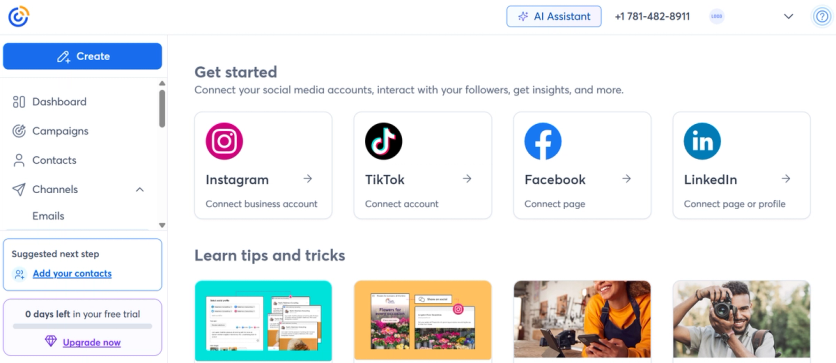
Constant Contact goes beyond email with built-in social media tools. Users can post to Facebook, Instagram, and LinkedIn, schedule posts in advance, access social reporting, and use a social media ads manager.
This is useful for small teams that want to promote a campaign across multiple channels without switching between separate tools for every post or ad. This ability to connect email and social activity in one place can reduce manual work and keep messaging more consistent.
The Premium plan also adds advertising-related features such as Facebook lookalike ad targeting, Google Ads Manager, and SEO recommendations.
SMS Marketing
Constant Contact also offers SMS marketing for US customers. The Premium plan includes 500 SMS messages per month, while Lite and Standard users can add SMS starting at $10/month for 1–500 messages.
SMS campaigns can be created and scheduled inside the platform, and users can use the AI Content Generator to help write text messages.
Contact Management and Segmentation
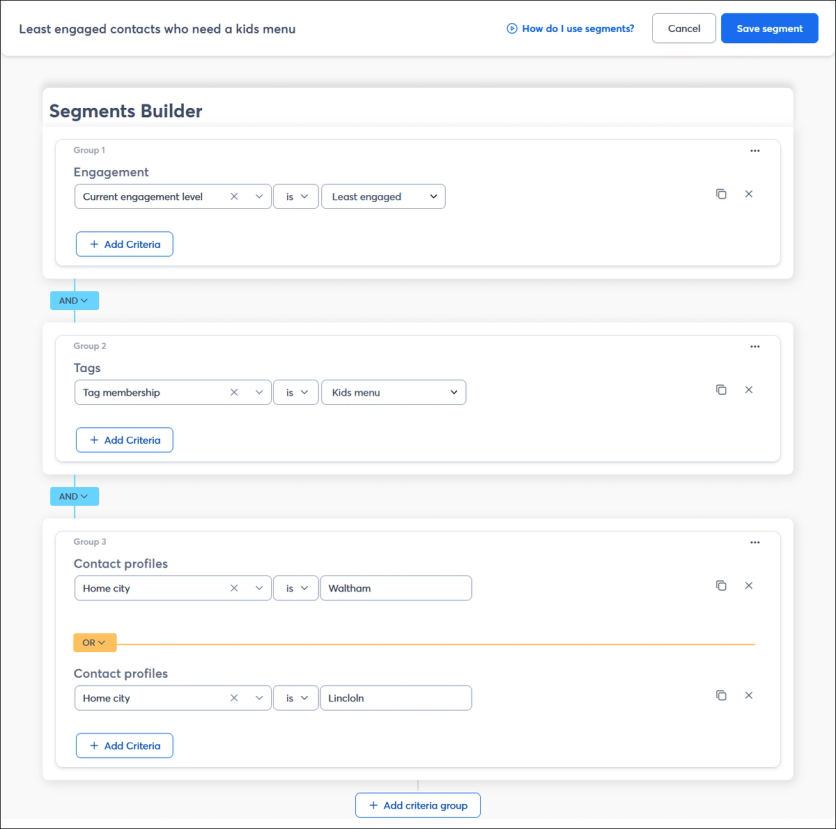
Constant Contact includes contact management, web sign-up forms, engagement-based segmentation, and eCommerce segmentation depending on the plan. The Lite plan includes one custom segment, Standard includes 10, and Premium includes unlimited custom segments.
The platform also supports personalization through dynamic content blocks, allowing users to show or hide content based on contact details such as city, state, job title, or custom fields.
For small businesses, this means campaigns can be adjusted for different audiences without creating entirely separate emails every time. A nonprofit could tailor content by donor type, a fitness studio could segment by class interest, and a local retailer could create different messages for new customers, repeat buyers, or event attendees.
Integrations
Constant Contact offers 300+ integrations, including Google, Microsoft, Facebook, Canva, LinkedIn, Vimeo, Zapier, Shopify, and Eventbrite.
The integration mix reflects the platform’s small-business focus, as eCommerce, design, social media, events, productivity, and contact capture are all part of the ecosystem. For teams running lean, this helps connect common tools without requiring a complex marketing operations setup.
Pricing
Constant Contact uses contact-based pricing across three main plans: Lite, Standard, and Premium. Prices start at:
- Lite: $12/month
- Standard: $35/month
- Premium: $80/month
The plan price is based on the number of contacts and monthly email sends, and overage fees may apply. Monthly email sends are limited to 10x the number of contacts on Lite, 12x on Standard, and 24x on Premium.
More specifically:
- Constant Contact offers a free trial (no credit card required).
- Lite includes drag-and-drop email editing, social posting, AI writing assistance, 300+ integrations, and a ready-to-go welcome automation flow.
- Standard adds email and social post scheduling, three automation flows, resend to non-openers, social advertising, and advanced reporting.
- Premium adds unlimited automation, unlimited custom segments, 500 text messages per month, lookalike ad targeting, and SEO recommendations.
Discounts are available for prepayment, and nonprofits can receive higher discounts for 6-month and annual plans. Constant Contact states that users can save 10% by paying for six months or 15% by paying for 12 months, while nonprofits can save 20% on six-month prepayment and 30% on 12-month prepayment.
Strengths
- Strong event marketing tools – Constant Contact stands out for businesses and nonprofits that need to promote events, manage registrations, create tickets, collect payments, and track attendee activity from one platform.
- Small-business-friendly campaign creation – The editor, templates, BrandKit, AI writing assistance, and campaign tools are built for users who need to launch polished campaigns without technical support.
- Email, social, events, and SMS in one platform – Constant Contact is useful for teams that want to coordinate basic multi-channel promotion without assembling a full marketing stack.
- Helpful for nonprofits and local organizations – Event tools, nonprofit prepay discounts, contact management, and community-oriented campaign features make it a practical option for organizations that rely on audience relationships rather than complex journeys.
- Accessible support and onboarding – Constant Contact lists phone support on every plan, onboarding assistance, tutorials, and written guides for new users.
Weaknesses
- Automation depth depends on the plan – Lite and Standard have limited automation compared with more advanced platforms. Custom automations and unlimited automation templates are reserved for Premium.
- Send limits can affect high-volume teams – Unlike platforms with unlimited email sends on paid plans, Constant Contact applies monthly send limits based on contact count, with overage fees possible.
- Built primarily for small-business marketing – Constant Contact works well for newsletters, promotions, and events, but teams managing complex multi-channel retention strategies may find the platform limiting.
- Some advanced features are locked behind higher-tier plans – Features such as unlimited automations, advanced segmentation, and expanded SMS capabilities require Premium plans.
- Template and workflow customization is more structured – The platform is designed for simplicity, but teams looking for deeper customization may find the environment somewhat restrictive.
Compared to Maestra
Constant Contact is a practical choice for small businesses, nonprofits, local organizations, and event-driven teams that need a familiar way to manage email campaigns, social posts, event registrations, basic automation, and SMS from one platform. Its strongest use cases are straightforward. The platform helps marketers promote an event, announce a seasonal offer, send a newsletter, collect registrations, follow up with contacts, or keep a local audience engaged.
The gap becomes clear when the marketing strategy depends on real-time customer data, advanced personalization, and coordinated retention across multiple touchpoints. Constant Contact can support email, social posting, events, ads, and SMS, but it is not designed as a full customer data and retention engine. It does not offer the same level of AI-driven product recommendations, loyalty functionality, referral marketing, or on-site personalization that Maestra brings into one platform.
Automation is another difference. Constant Contact’s automation is useful for welcome emails, resend-to-non-openers, eCommerce templates, and contact management actions, especially for small teams. Maestra goes further by allowing brands to build retention flows across email, SMS, push, popups, and paid media retargeting, with each step informed by a real-time customer profile.
Support and service also reflect different customer needs. Constant Contact offers phone support, onboarding assistance, tutorials, and guides, which works well for small businesses that need accessible help. Maestra includes a dedicated Forward Deployed Marketer on every plan, supporting strategy, onboarding, flow creation, deliverability, and ongoing optimization through a more hands-on model.
Overall, Constant Contact is a strong fit when the priority is easy campaign creation, event promotion, and practical small-business marketing. Maestra is the better fit when the business needs email to work as part of a broader retention system powered by unified customer data, advanced personalization, and coordinated omnichannel execution.
4. GetResponse
Best email marketing platform for businesses that want affordable email marketing, advanced automation, and ecommerce-focused lifecycle campaigns in one scalable platform.
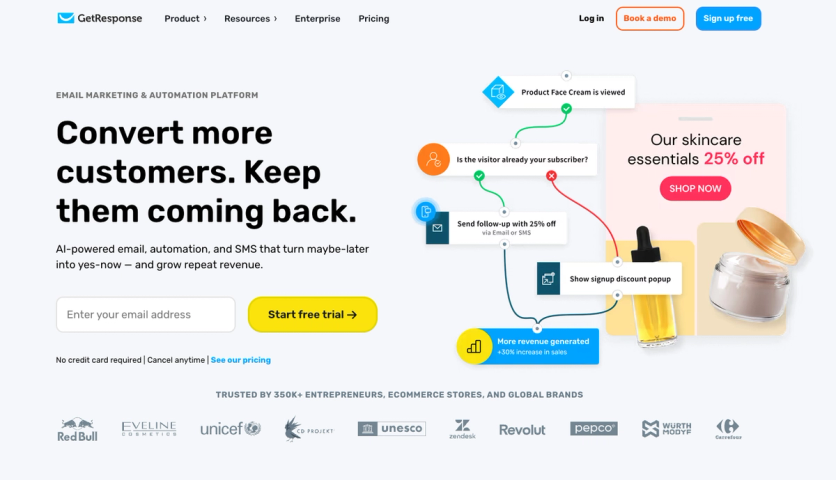
GetResponse is an email marketing and automation platform built for businesses that want to convert more customers, keep them engaged, and grow repeat revenue without stitching together too many separate tools. It combines email campaigns, visual automation, ecommerce workflows, SMS, web push, segmentation, popups, AI-assisted content creation, reporting, and revenue tracking in one platform.
The platform works for smaller teams getting started with email marketing, but it also supports larger and more advanced businesses through its Enterprise plan, premium support, dedicated infrastructure options, and ecommerce-focused automation capabilities. For ecommerce brands in particular, GetResponse is useful when email is not just a newsletter channel, but a revenue engine for abandoned cart recovery, repeat purchases, price drop alerts, reactivation, and customer lifecycle campaigns.
Key Features
Email Marketing
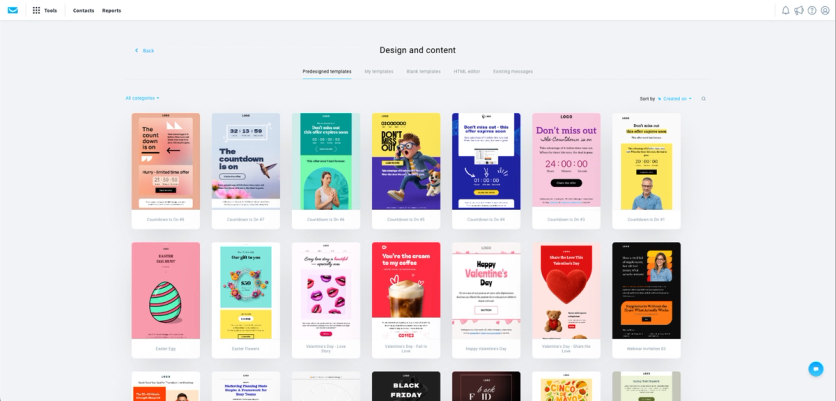
GetResponse includes a drag-and-drop email editor for building newsletters, promotional campaigns, lifecycle emails, and automated messages without coding. Users can work from predesigned templates, customize layouts, add product blocks, personalize content, and use AI tools to generate full-fledged emails in no time. Users can also use a built-in AI assistant to create the copy for emails and generate subject lines.
For ecommerce campaigns, GetResponse supports segmentation, product boxes, recommended products, promo codes, ecommerce tracking, click tracking, A/B testing, inbox preview, spam checks, Perfect Timing, and Time Travel sending. This gives marketers more control over both the creative side of email production and the performance side of campaign delivery.
Deliverability is also a major part of the platform’s positioning. GetResponse highlights a 99% deliverability rate, custom DKIM support, spam checks, and tools that help businesses maintain stronger sender reputation as authentication standards become more demanding.
Marketing Automation
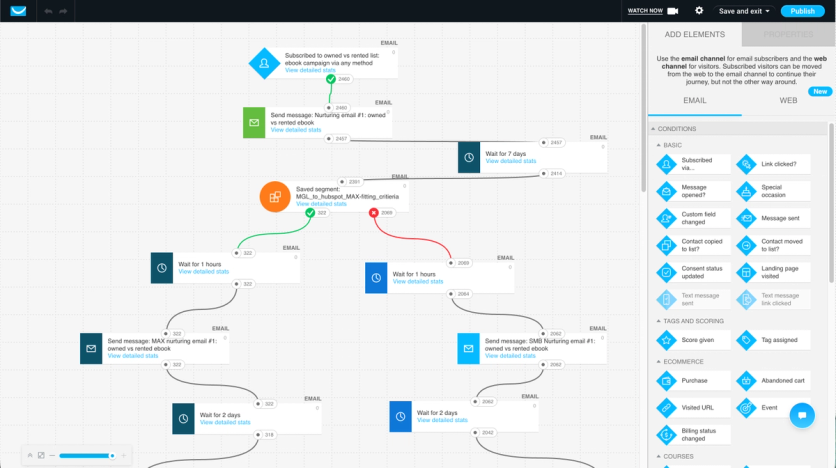
GetResponse’s visual automation builder lets marketers create workflows for welcome series, lead nurturing, abandoned cart recovery, post-purchase communication, re-engagement, scoring, tagging, and customer retention. Workflows can be built from scratch or launched using automation templates, which helps smaller teams move faster while still giving advanced users room to build more complex journeys.
Automation conditions can be based on contact behavior, email engagement, scoring, ecommerce activity, visited URLs, purchases, abandoned carts, and other lifecycle signals. This makes GetResponse especially useful for brands that want to move beyond one-off email blasts and build behavior-based customer journeys.
For ecommerce teams, automation can support common revenue workflows such as recovering abandoned carts, following up after purchase, promoting products based on customer behavior, and re-engaging inactive buyers.
Ecommerce Campaigns and Revenue Growth
GetResponse includes ecommerce-focused tools designed to help brands capture purchase intent and increase repeat revenue. Abandoned Cart campaigns help recover shoppers who leave products behind, while Price Drop campaigns can alert customers when products they viewed become cheaper. The platform also supports product recommendations, promo codes, revenue reports, ecommerce tracking, and integrations with major ecommerce platforms.
This makes it a stronger fit for online stores that want email and automation to contribute directly to sales, not just engagement metrics. Instead of only tracking opens and clicks, ecommerce marketers can connect campaigns and workflows to revenue, orders, and customer behavior.
GetResponse customer examples also show the platform’s ecommerce use cases in practice. Med&Beauty generated $43,000 in sales from 10 newsletters in five months, while Würth MODYF increased turnover by 72% using targeted marketing and automation. Eveline Cosmetics generated $13,000 in sales from a single campaign and used GetResponse automation and product recommendations to support ecommerce conversion.
Segmentation and Personalization
GetResponse offers advanced audience segmentation for targeting customers based on behavior, engagement, ecommerce data, tags, scoring, custom fields, and lifecycle stage. Marketers can use segments to personalize newsletters, trigger automations, recover abandoned carts, target first-time buyers, re-engage inactive contacts, or promote offers to customers with stronger purchase intent.
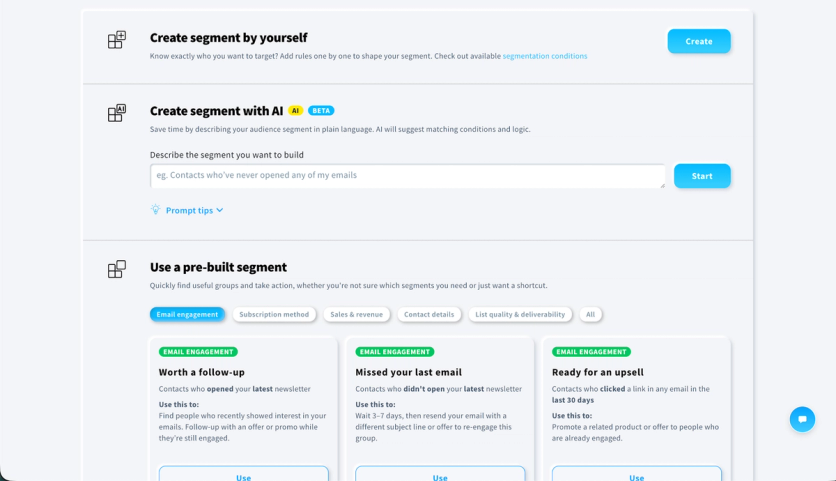
The platform also supports AI-assisted segmentation and predefined Sales & Revenue segments for ecommerce use cases such as abandoned carts, repeat purchasers, first-time buyers, and inactive buyers. This helps teams move from raw customer data to usable campaign audiences faster.
Reporting and Analytics
GetResponse gives marketers visibility into campaign performance through email reports, click tracking, ecommerce tracking, revenue reports, automation statistics, and campaign analytics. For ecommerce teams, the most important benefit is being able to connect marketing activity to revenue, especially across newsletters, autoresponders, and automation workflows.
The platform also includes tools such as Bot Detector and AI Insights to help marketers evaluate campaign performance more accurately and identify opportunities to improve subject lines, calls to action, timing, and audience targeting.
Pricing
GetResponse offers several plans depending on business size and feature needs.
The Starter plan is designed for businesses that need AI-powered email marketing, unlimited monthly email sends, signup forms, popups, landing pages, and basic automation.
The Marketer plan is positioned for marketers and ecommerce businesses that want unlimited automation workflows, advanced audience segmentation, abandoned cart recovery, promo codes, revenue reports, web push notifications, and ecommerce-focused features.
The Enterprise plan uses custom pricing and adds capabilities for larger teams, including premium support, dedicated sending infrastructure, SSO, SMS marketing, mobile push notifications, AI product recommendations, transactional emails, and unlimited users.
A 14-day free trial is available, and GetResponse does not require a credit card to start.
Strengths
- Strong value for email and automation at scale. GetResponse is positioned around unlimited emails and automation capabilities, making it attractive for teams that want advanced lifecycle marketing without quickly outgrowing their plan.
- Strong ecommerce automation. Abandoned cart recovery, Price Drop campaigns, product recommendations, promo codes, ecommerce tracking, revenue reports, and Sales & Revenue segments make it a practical option for online stores.
- Good fit for both SMBs and larger teams. Smaller businesses can start with email marketing and basic automation, while larger customers can use Enterprise features such as premium support, dedicated sending infrastructure, SSO, SMS, transactional email, and AI product recommendations.
- Deliverability and support. GetResponse highlights a 99% deliverability rate, 24/7 support, and a 5-star rated Customer Success Team, which is useful for teams that need reliability as email becomes a bigger revenue channel.
- Revenue-focused reporting. Ecommerce tracking, revenue attribution, automation statistics, and AI Insights help marketers understand which campaigns and workflows are actually contributing to sales.
Weaknesses
- Not as deeply omnichannel as enterprise CDP platforms. GetResponse includes email, SMS, web push, popups, ecommerce tools, and automation, but brands looking for a fully unified CDP, loyalty engine, and advanced on-site personalization layer may still need additional tools.
- Some advanced ecommerce and enterprise features sit on higher plans. Capabilities such as AI product recommendations, transactional emails, dedicated IP, SSO, and premium support are part of the Enterprise offering rather than entry-level plans.
- May be more than basic senders need. Businesses that only want occasional newsletters may not need the full automation, ecommerce, and segmentation depth that GetResponse provides.
Compared to Maestra
GetResponse is a strong choice for businesses that want a scalable email marketing and automation platform with ecommerce workflows, strong deliverability, revenue reporting, and accessible pricing. It gives teams the tools to send newsletters, automate customer journeys, recover abandoned carts, trigger ecommerce campaigns, segment audiences, and connect email activity to revenue.
Compared to Maestra, GetResponse is more accessible for smaller and mid-sized businesses that want powerful email and automation without starting at an enterprise-level monthly price. It also gives growing ecommerce teams a practical path from basic email marketing to more advanced lifecycle automation.
Maestra is more focused on mid-market and enterprise ecommerce brands that want to consolidate a broader retention stack into one platform, including real-time CDP, loyalty, on-site personalization, omnichannel orchestration, and white-glove service. GetResponse is the better fit when the priority is affordable, scalable email marketing and automation with strong ecommerce revenue features. Maestra is the better fit when a brand needs a fully managed, deeply unified retention platform across multiple customer touchpoints.
5. Retainful
Best email marketing platform for Shopify and WooCommerce stores that want email, SMS, and WhatsApp automation in one place without enterprise pricing.
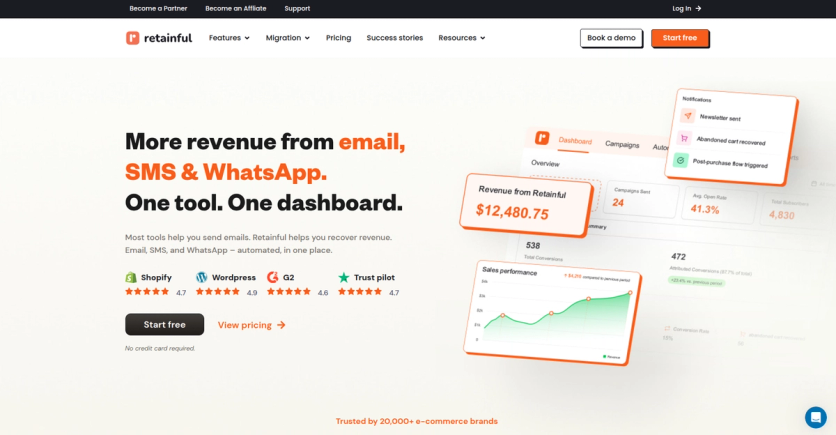
Retainful is an ecommerce marketing platform built for Shopify and WooCommerce stores that care about recovering abandoned carts and turning one-time buyers into repeat customers. Rather than paying for a separate cart-recovery app, a newsletter tool, and a popup builder, you get email, SMS, and WhatsApp automation in a single dashboard, priced for growing stores instead of enterprises.
The company says it’s used by more than 20,000 ecommerce brands. The platform leans into fast setup and pre-built flows so a small team can launch and recover revenue without a developer or an agency.
Key Features
Omnichannel Automation
Retainful runs cart recovery, welcome series, and win-back sequences across email, SMS, and WhatsApp from the same workflow, using pre-built flows that fire on their own. A single cart-recovery journey can send an email first, follow with a text, then a WhatsApp reminder, all set up once and left to run, instead of forcing you to rebuild the same sequence three times.
Email tends to be the workhorse in that mix, which fits the wider picture: email marketing returns roughly $36 for every $1 spent across industries. SMS earns its place for urgent reminders because around 90% of text messages are read within three minutes of delivery, which is hard to beat for cart reminders and flash sales.
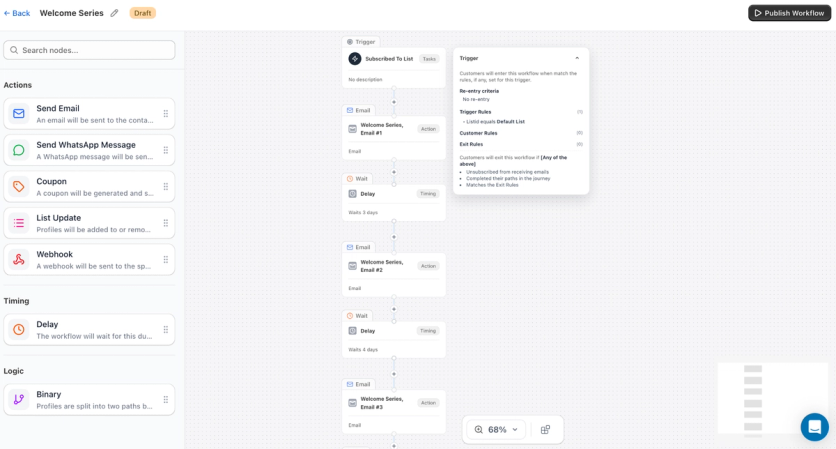
Cart Recovery and Coupon Codes
When a shopper leaves without buying, automated email, SMS, and WhatsApp flows go out to bring them back. You can attach a unique coupon code inside the flow to nudge the return, without generating codes by hand or worrying about coupon abuse.
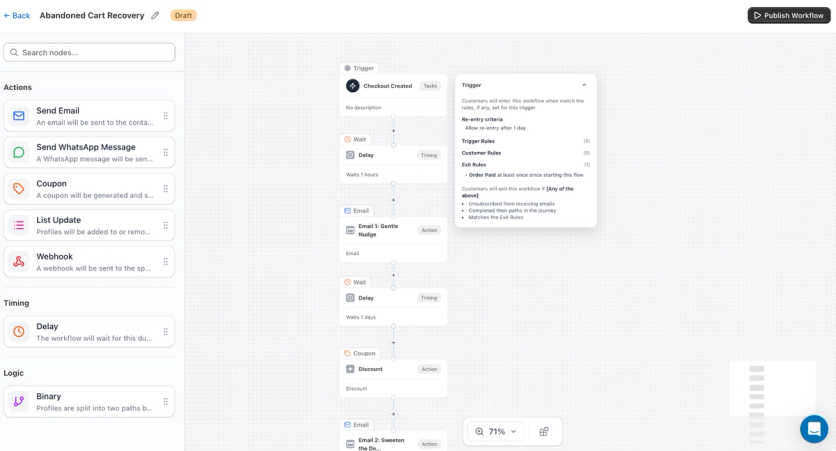
Next-order coupons dropped into post-purchase messages help push that first buyer toward a second order, so retention work doesn’t stop at the recovered cart.
Newsletters and Campaigns
You can send segmented newsletters and one-off campaigns to your full list in a few minutes, no developer or agency involved. Both the free and paid plans include unlimited email campaigns and a library of 200+ ready-made templates.
Popups and Signup Forms
Add-to-cart, exit-intent, welcome, and embedded forms collect emails and phone numbers before visitors leave. Plans come with unlimited signup forms and popups, plus more than 100 pre-built form designs to grow the list.
Segmentation
You can segment by purchase history, order value, and behavior so the right message reaches the right person instead of blasting the whole list with one campaign. Built-in segments cover cases like shoppers who added to cart but didn’t check out, your most engaged subscribers, and first-time buyers.
Analytics and Revenue Tracking
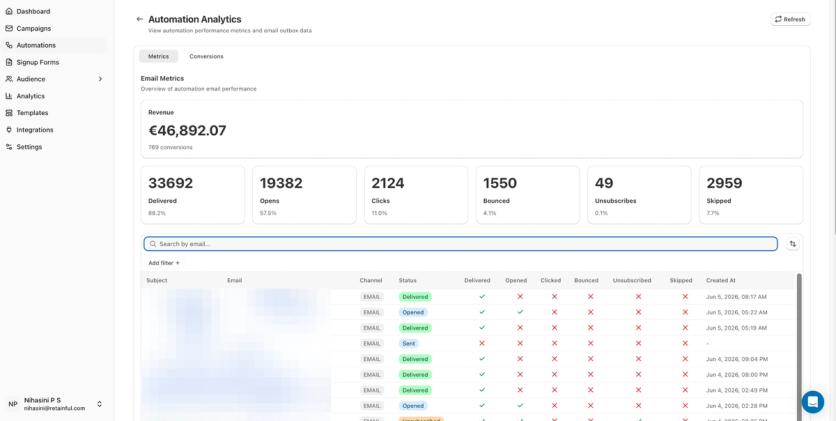
Reporting ties revenue to each flow, channel, and campaign, so you can see which automations actually make money rather than tracking opens for their own sake. Abandoned-cart tracking, cart activity, and conversion metrics are all in the dashboard.
Pricing
Retainful keeps a genuinely free tier and charges by email volume rather than piling on per-channel fees. Plans start at:
- Free: $0/month, all features included, capped at 500 emails per month.
- Pro: from $14/month for up to 1,000 contacts and 10,000 emails per month.
More specifically:
- Free includes all core features and lets you import as many contacts as you want; the only limit is the monthly send count.
- Pro pricing scales by contact count, adding about $4/month per extra 500 contacts, with unlimited automation workflows, popups, and forms included.
- SMS is free to use inside Retainful; you connect your own Twilio account and pay Twilio directly (currently USA and Canada only).
- WhatsApp works the same way through Meta, billed by Meta at standard rates with no markup from Retainful.
Both plans include onboarding help and a dedicated success manager, which is unusual at this price point.
Strengths
- Real three-channel coverage – email, SMS, and WhatsApp automation running from one dashboard, which is unusual at this price.
- Friendly pricing for smaller stores – a capable free plan and paid plans from $14/month, with onboarding and a success manager included.
- Built for ecommerce out of the box – native Shopify and WooCommerce support, cart recovery, next-order coupons, and revenue attribution.
- Quick to get going – Retainful says most stores can connect, import a list, and launch a first cart-recovery flow in about half an hour.
Weaknesses
- Tight free-plan ceiling – the 500-emails-a-month limit on the free tier gets tight fast once a list starts growing.
- Narrower scope than a full marketing stack – Retainful focuses on email, SMS, and WhatsApp retention, with no built-in CDP, loyalty program, on-site personalization, or AI product-recommendation engine.
- Built for small and mid-size ecommerce – the platform is aimed at growing stores rather than large, complex marketing operations.
- SMS coverage is US and Canada only – stores selling elsewhere lean on email and WhatsApp for messaging until that expands.
Compared to Maestra
Retainful does cart recovery and repeat-purchase automation well across email, SMS, and WhatsApp, at a price that’s tough to argue with: a free tier plus paid plans from $14/month make it a sensible pick for growing Shopify and WooCommerce stores.
The difference shows up in scope. Retainful doesn’t include a real-time CDP to unify customer data across channels, a loyalty engine to trigger tier-based sequences, on-site personalization, or AI product recommendations to tailor email content automatically. Its flows coordinate email, SMS, and WhatsApp; Maestra extends that same idea to push notifications, on-site popups, and paid-media retargeting in a single flow, with each step drawing on a live customer profile.
Service shape is also different. Retainful offers onboarding and a dedicated success manager on every plan, which is generous for the price. Maestra adds a hands-on Forward Deployed Marketer and a managed-services team that can help build flows, run experiments, and own day-to-day campaign work alongside an in-house team – useful once the strategy outgrows a single retention tool.
If you want affordable, focused retention messaging on the channels people actually open, Retainful is a strong fit. If you need email to act as one piece of a wider stack that also covers loyalty, personalization, and unified data, that’s where Maestra goes further.
6. Brevo
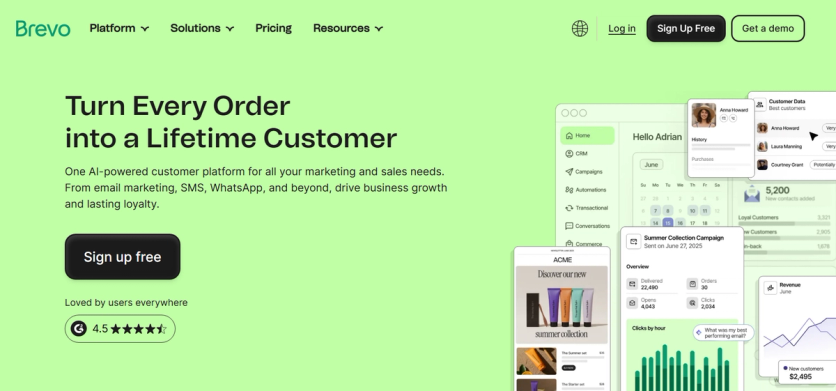
Best for transactional email delivery and businesses with large contact lists that send at moderate frequency
Brevo (formerly Sendinblue) serves over 500,000 active users and built its reputation around transactional email delivery. The platform’s SMTP relay service handles trigger-based and time-sensitive messages – password resets, purchase confirmations, shipping updates – that customers expect to receive instantly.
Key Features
Transactional Email Engine
Brevo’s SMTP relay delivers 50% of transactional emails within 1 second and 99.98% within 20 seconds. For e-commerce brands sending order confirmations, shipping updates, and password reset links, this delivery speed is critical.
Multi-Channel Campaigns
Email, SMS, WhatsApp messages, and web push notifications from one platform. The drag-and-drop editor includes an integrated image editor for cropping, resizing, and color adjustment without leaving the builder. Brand Library stores logos, colors, and fonts for consistent branding across templates.
Automation Builder
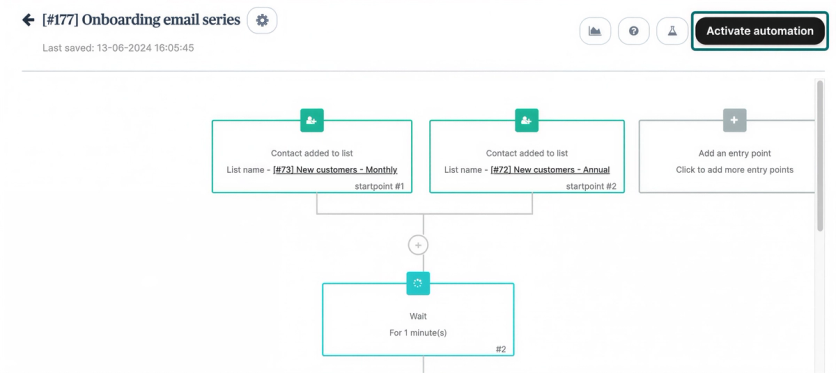
12 ready-made workflow templates for welcome sequences, abandoned cart emails, and product page follow-ups. Users can customize these or build custom workflows with if/else conditions and behavioral triggers.
Built-In CRM
A free Sales CRM for small teams with deal tracking, pipeline visualization, and sales automation. Integrations with Shopify and WooCommerce keep customer data synchronized.
Pricing
Brevo charges based on email volume rather than contact count – all plans support unlimited contacts.
- Free: 300 emails/day (up to 9,000/month), 100,000 contacts
- Starter: from $9/mo for 5,000 emails (Brevo branding included; removal costs $10.80/mo)
- Standard: from $18/mo – unlocks landing pages, A/B testing, advanced reporting, unlimited automation, and phone/live chat support
- Pay-as-you-go credits available for occasional senders (credits never expire)
Strengths
- Volume-based pricing benefits companies with large lists and moderate sending frequency – store 100,000 contacts without paying more
- Transactional email performance (50% within 1 second) rivals dedicated transactional providers
- Multi-channel capability across email, SMS, WhatsApp, and push in one platform
Weaknesses
- Template library contains only 40+ responsive designs – limited compared to competitors offering hundreds
- Deliverability rate averages around 87%, which trails industry leaders
- A/B testing and landing pages locked behind the Standard tier
- No in-house migration services for platform switches
Compared to Maestra
Brevo excels at transactional email delivery speed and genuinely budget-friendly pricing for businesses with large contact lists but moderate sending volumes. Where it falls short for e-commerce retention: Brevo has no real-time CDP to unify customer data for targeted email campaigns, no loyalty engine to trigger tier-based email sequences, no product recommendation algorithms to personalize email content dynamically, and no site personalization to coordinate the on-site experience with email messaging. Brevo’s 12 automation templates handle basic flows; Maestra’s flow builder coordinates email as the starting point of omnichannel journeys that span SMS, push, pop-ups, and paid ads – all driven by real-time customer profiles. Brevo is a strong choice for reliable email delivery at low cost; Maestra is the fit when you need email as part of a complete retention marketing stack.
7. ActiveCampaign
Best for advanced email automation workflows with built-in CRM integration at mid-range pricing
ActiveCampaign built its reputation on sophisticated automation workflows that handle complex customer journeys without requiring technical expertise. The automation builder features deep conditional logic with 900+ pre-built templates that businesses can customize.
Key Features
Visual Automation Builder
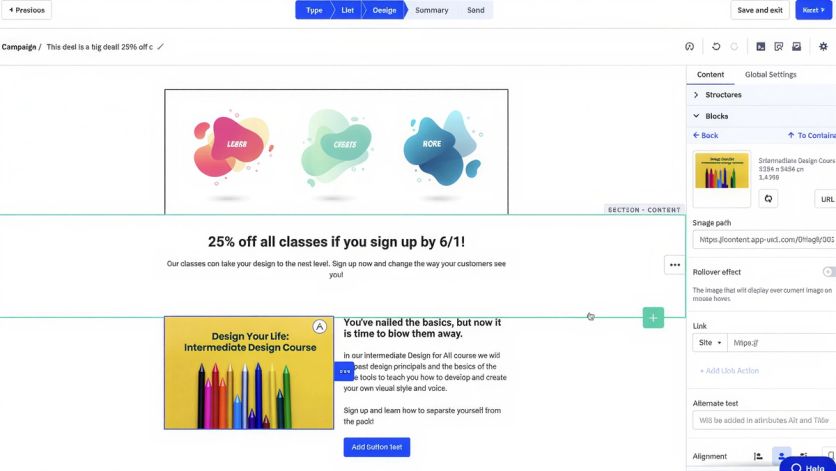
Marketers create flows triggered by form submissions, purchases, link clicks, date-based events, or conditions like lead score thresholds. Automations run continuously and respond to individual subscriber behavior rather than sending one-time broadcasts.
Segmentation & Lead Scoring
Tags applied based on contact actions – link clicks, website visits, purchases – combine with custom fields for segment creation. Site tracking monitors which products and content contacts engage with and feeds data into lead scoring, goal tracking, and advanced reporting.
CRM & Sales Pipeline
A built-in CRM with deal tracking, pipeline visualization, and sales automation. Native connections with Salesforce and Shopify keep customer data synchronized across marketing and sales.
Integration Ecosystem
900+ third-party integrations covering e-commerce, CRM, payment processing, and analytics platforms. Split testing and predictive optimization enable campaigns to self-optimize over time.
Pricing
ActiveCampaign charges based on contact count and plan tier. Pricing at 1,000 contacts (annual billing):
- Starter: $15/seat/mo (annual) or $20/seat/mo (monthly) – limits automations to 5 steps per workflow
- Plus: $49/mo – unlocks full automation with unlimited steps, landing pages, and 3 users
- Pro: $79/mo – adds predictive sending and advanced reporting
- Enterprise: $145/mo – custom reporting, dedicated account rep
Annual billing provides 20% discounts. Pricing scales significantly as lists grow – a 25,000-contact list on Plus costs $379/mo.
Strengths
- Deepest automation capabilities in this price range – 900+ templates with conditional logic that few platforms match under $100/mo
- High email deliverability rates, supported by list warming, cleansing tools, and spam testing features
- Free migration from any email marketing or CRM platform included with all plans
Weaknesses
- Starter plan’s 5-step automation limit restricts growing businesses
- Pricing increases faster than most competitors as contact lists grow
- 14-day trial is shorter than competitor offerings
- Since November 2025, new users are charged for all contacts including unsubscribed, bounced, and unconfirmed – inflating costs for brands with large lists
- Support prioritized for higher-tier plans; lower-tier users report slower response times
Compared to Maestra
ActiveCampaign offers the deepest automation builder in this price range – 900+ templates and conditional logic that few platforms match at this cost. The trade-off: it’s a marketing automation tool, not an e-commerce platform. ActiveCampaign can’t send an email with dynamic product recommendations pulled from real-time browse behavior, can’t trigger a loyalty tier upgrade email from its own loyalty engine (it doesn’t have one), and can’t personalize the website experience to match what a subscriber saw in their last email. For businesses that primarily need sophisticated email automation with CRM, ActiveCampaign delivers at a lower price point. For e-commerce brands that need email as part of a unified stack covering loyalty, product recommendations, site personalization, and CDP, Maestra covers the use cases ActiveCampaign can’t.
8. MailerLite
Best for beginners and small businesses starting with email marketing who need simplicity over depth
MailerLite has earned recognition for ease of use across major review platforms, with a commitment to simplicity that makes it ideal for beginners, small businesses, and solopreneurs. Over 1 million creators and businesses use MailerLite to grow their audiences.
Key Features
Drag-and-Drop Email Editor
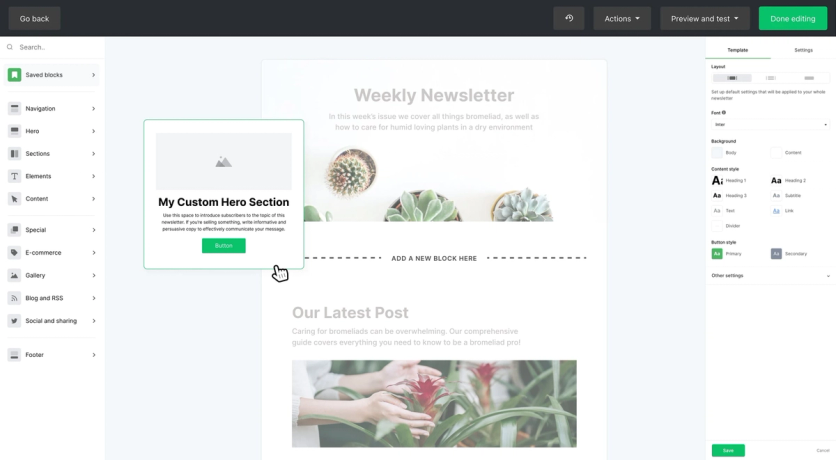
Campaign creation without coding knowledge. 60+ modern newsletter templates on paid plans, plus campaign types including regular broadcasts, A/B split tests, auto resend for non-openers, and RSS feeds.
Landing Pages & Website Builder
Free accounts receive 10 landing pages and one website; paid plans offer unlimited quantities. Signup forms, pop-ups, surveys, and email verification tools come standard. Users can sell digital products and paid newsletter subscriptions through Stripe integration.
Automation Workflows
Seven triggers – group joins, form completions, link clicks, field updates, anniversaries, dates, and segment joins. Advanced plans enable multiple triggers for complex workflows. The visual workflow builder displays automation logic clearly for non-technical users.
Email Verification & Deliverability
Email deliverability averages 89%. MailerLite maintains sender reputation through authentication tools and list management features.
Pricing
- Free: 500 subscribers with 12,000 monthly emails. Email support for the first 14 days
- Growing Business: from $10/mo for 500 subscribers with unlimited emails, three user seats, and 24/7 email support. Scales to $289/mo for 50,000 subscribers
- Advanced: from $20/mo for 500 subscribers – unlimited users, custom HTML editor, promotion pop-ups, multiple automation triggers, Facebook integration, and 24/7 live chat support
- Annual billing saves 10%
Strengths
- Shortest learning curve among email platforms – the interface is genuinely intuitive for non-technical users
- One of the most generous free plans available, with automation and landing pages included
- Affordable pricing that scales gradually with business growth
Weaknesses
- Account approval process can delay onboarding for new users
- Limited advanced features make it less suitable for enterprise operations
- No phone support at any tier
- Free plan reduction from 1,000 to 500 subscribers makes it less competitive for growing lists
Compared to Maestra
MailerLite and Maestra serve fundamentally different audiences. MailerLite is built for simplicity – beginners who need to send newsletters, build landing pages, and set up basic automations without a steep learning curve. It has 7 automation triggers; Maestra’s flow builder coordinates email as the first step in omnichannel journeys that adapt based on real-time CDP data across every channel. MailerLite can’t personalize email content with product recommendations, can’t trigger emails from loyalty events, and can’t attribute email revenue with configurable multi-touch models. If you’re just starting with email marketing, MailerLite is an excellent choice. If your e-commerce business needs email to drive retention, lifetime value, and cross-channel coordination, Maestra provides the depth MailerLite doesn’t offer.
9. HubSpot Marketing Hub
Best for teams wanting integrated marketing-sales-service alignment under one CRM – particularly B2B and service businesses
HubSpot has built its reputation on being the platform that marketing teams can actually use without filing engineering tickets. The Marketing Hub brings together email, forms, landing pages, workflows, and CRM into a single interface that prioritizes usability.
Key Features
All-in-One CRM Integration
HubSpot’s core advantage is that marketing, sales, and service tools share the same database. No sync issues, no data silos between teams. Contact-level visibility across every touchpoint.
Workflow Automation
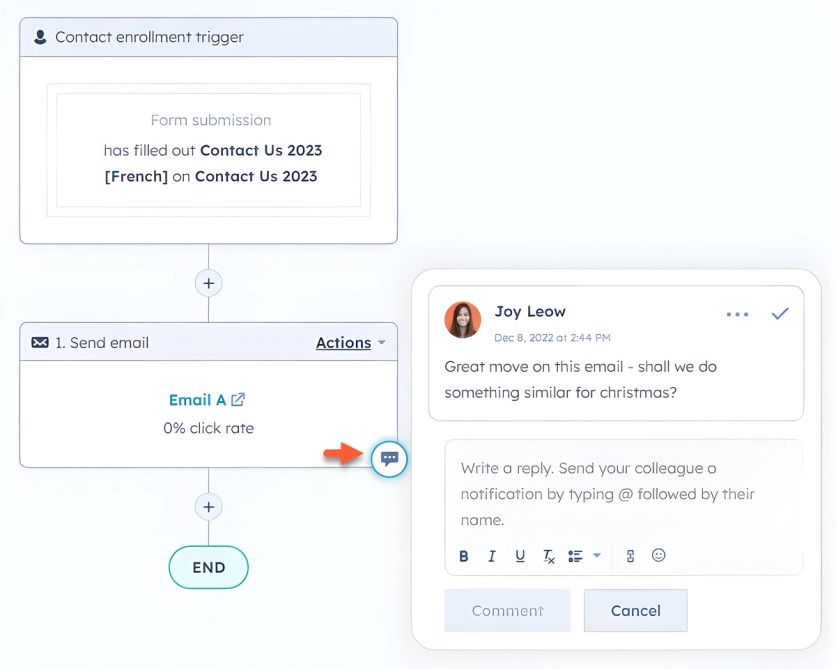
Visual workflow builder for lead nurturing, customer onboarding, internal notifications, and multi-step campaigns. Supports branching, delays, and conditional logic.
Breeze AI
HubSpot’s AI layer includes a Customer Agent, Data Agent, and Buyer Intent tools for lead scoring, content generation, and customer journey analysis.
Content Tools
Landing page builder, blog platform, social media management, ad management, and SEO tools – all built into the marketing hub. For teams that want everything in one place, it eliminates the need for separate content tools.
Pricing
HubSpot publishes transparent pricing:
- Free tools: 2,000 monthly email sends with HubSpot branding, forms, one automation, and simple reporting
- Starter: from $20/mo (1,000 contacts) – removes branding, adds email support
- Professional: $890/mo (2,000 contacts), $3,000 one-time onboarding fee
- Enterprise: $3,600/mo (10,000 contacts), $7,000 one-time onboarding fee
Additional contacts scale at $50/1,000 (Starter), $250/5,000 (Professional), $100/10,000 (Enterprise). All subscriptions require annual commitments.
Strengths
- Genuinely user-friendly – marketing teams can self-serve without technical training
- Tight integration between marketing, sales, and service eliminates cross-team data silos
- 2,000+ integrations in the HubSpot marketplace and extensive educational resources through HubSpot Academy
Weaknesses
- Professional and Enterprise plans cost more than most email marketing platforms – with onboarding fees adding $3,000-$7,000 upfront
- The gap between Starter ($20/mo) and Professional ($890/mo) is enormous – many critical email features require the jump
- Individual marketing tools are less specialized than dedicated platforms
- Free plan’s 2,000 monthly email limit restricts growth
Compared to Maestra
HubSpot is a generalist CRM platform – it connects marketing, sales, and service under one roof. That generalist approach means e-commerce email capabilities are thin: HubSpot can’t send emails with dynamic product recommendations powered by 14 AI algorithms, can’t trigger email campaigns from loyalty tier changes or points expirations, and can’t personalize website content to match what a subscriber received in their inbox. For B2B companies or service businesses that need sales pipeline alignment, HubSpot is the natural fit. For e-commerce brands focused on email-driven retention and revenue growth, Maestra covers loyalty, product recommendations, site personalization, and real-time CDP – while HubSpot’s Professional tier ($890/mo + $3,000 onboarding) approaches Maestra’s starting price without the e-commerce toolset.
Match the Platform to Your Email Program
Maestra stands out as the most complete single-platform solution for e-commerce email marketing – full-stack consolidation that replaces your ESP, CDP, loyalty vendor, personalization engine, and analytics tools with one platform and one price. Every email campaign is powered by the same real-time customer data that drives SMS, push, pop-ups, and paid ads – eliminating the data silos that make most email programs underperform.
That said, the right platform depends on your specific situation:
- Transactional email speed:
- Automation depth at mid-range pricing:
- Shopify-native e-commerce:
- Simplicity for beginners:
- Marketing-sales alignment:
- Budget-friendly automation:
The platforms that deliver real ROI are the ones that match your team’s capabilities, your tech stack, and your actual business model – not the ones with the longest feature list.
Explore Maestra’s platform or view published case studies to see results from brands that made the switch.
FAQ
- Maestra provides the most complete single-platform solution – real-time CDP, omnichannel flows, built-in loyalty programs, site personalization, and 14 product recommendation algorithms that work inside emails. Maestra client JOLYN saw +17% total revenue after switching from Klaviyo, and Maestra client Furniture Fair achieved 7,543% ROI. For smaller Shopify stores on a tighter budget, Omnisend offers strong e-commerce-specific features at accessible pricing.
- Maestra includes a full built-in loyalty engine – points, tiers, referral programs, gamification, and personal coupons – as part of every plan at no additional cost. Loyalty data feeds directly into the CDP and flow builder, so loyalty events trigger personalized email campaigns automatically. No other platform on this list includes built-in loyalty. HubSpot, ActiveCampaign, and others require integration with third-party loyalty providers like Yotpo or Smile.io, which means separate billing, separate data, and integration maintenance.
- MailerLite offers the most generous free plan with 500 subscribers and 12,000 monthly emails, including automation and landing pages. Omnisend’s free tier provides full feature access for 250 contacts. Brevo allows 300 emails/day to unlimited contacts. For brands that have outgrown free tiers, Maestra starts at $2,000/mo for the customer data platform plus unlimited email – the first 100,000 active profiles and a dedicated Forward Deployed Marketer are included, and you pay only for active profiles and the modules you use, so costs don’t creep as your list grows.
- ActiveCampaign leads in automation depth with 900+ pre-built workflow templates and deep conditional logic – the most sophisticated email automation builder in this price range. For e-commerce-specific automation, Omnisend offers pre-built workflows for cart abandonment, browse abandonment, and post-purchase sequences. Maestra takes a different approach: the flow builder combines email with every other channel in real-time, omnichannel journeys. An abandoned cart flow can start with email, escalate to SMS, trigger a personalized pop-up, and retarget through ads – all from one canvas, all powered by the same real-time customer data.
- Brevo specializes in handling both – delivering 50% of transactional emails within 1 second. Moosend offers transactional email as an add-on through Moosend+. Maestra handles both natively – marketing campaigns and trigger-based transactional messages flow through the same platform, tied to the same customer profiles, with the same deliverability infrastructure. Every transactional touchpoint feeds back into the CDP for smarter future email campaigns.
- Maestra typically implements in 2-8 weeks, with the dedicated Forward Deployed Marketer handling migration and setup at no additional cost – billing starts only after the account goes live. ActiveCampaign offers free migration from any email platform. MailerLite and Omnisend are self-service with quick setup (days to a week for basic configuration). HubSpot Professional requires a $3,000 onboarding fee with implementation typically taking 1-3 months. Brevo does not offer in-house migration services.