Best Customer Data Platform Tools That Drive E-commerce Sales
E-commerce brands are drowning in their own data.
You’ve got website clicks, purchase histories, support tickets, email opens, social media interactions – all scattered across different systems. Meanwhile, your customers expect Netflix-level personalization.
Here’s what we’ve learned: companies that can’t connect these dots are bleeding money. The right customer data platform for ecommerce fixes this – it pulls every signal into one profile your marketing can act on in real time, instead of a stack of tools that each see a fragment of the customer.
But here’s the problem: there are dozens of platforms claiming to solve your data mess. Some cost $150 a month. Others start at $5,000. Some work great for small Shopify stores. Others were built for enterprise teams with dedicated engineers.
We spent weeks analyzing the platforms that actually matter now. This guide breaks down each platform the same way: what it does well, how it connects to your existing tools, what kind of support you’ll get, what it costs, and where it falls short. No fluff, no vendor marketing speak.
Quick Verdict: Best CDP Tools for E-Commerce by Category
Best for omnichannel e-commerce with built-in CDP: Maestra – customer data feeds directly into email, SMS, push, loyalty, and personalization
Best for Salesforce-native data unification: Salesforce Data 360 (formerly Salesforce CDP) – customer profiles embedded in the Salesforce ecosystem
Best for real-time data routing: Segment – 400+ connectors with flexible identity resolution
Best for tag management and audience data: Tealium – server-side data collection with enterprise privacy controls
Best for marketer-friendly data activation: BlueConic – first-party data unification with no-code segment builder
Best for enterprise data orchestration: mParticle – real-time pipelines with identity resolution and privacy tools
Best for e-commerce email & SMS with built-in data: Klaviyo – profiles and segmentation natively tied to Shopify data
Best for CRM-driven marketing: HubSpot – unified contact database across marketing, sales, and service
Best for budget-friendly e-commerce marketing: Omnisend – email, SMS, and basic customer data at accessible pricing
Best for mobile-first engagement with real-time data: Braze – user profiles and messaging powered by streaming data
Comparison Table
We created this table to highlight the key differences – what each platform does best, its cost, and who should use it.
| CDP Solution | Key Features | Integrations | Support Options | Price Range | Best For |
|---|---|---|---|---|---|
| Maestra | Real-time CDP with advanced segmentation, omnichannel campaigns (email, SMS, push, messengers, paid media, offline), loyalty & personalization | E-commerce platforms, SMS providers, marketing and analytics, media, customer Support. Ready to build tailored API integrations at no extra cost | 24/7 dedicated support; shared Slack channel, regular calls: implementation services | From $2,000/month (CDP + email, first 100K active profiles) | D2C brands requiring advanced marketing capabilities |
| Salesforce Data 360 | Cross-cloud identity resolution, Einstein AI insights, journey orchestration | Native Salesforce ecosystem, AppExchange marketplace | Tiered support plans, extensive documentation | From $60K/year (Data 360 Starter) | Enterprise organizations already using Salesforce products |
| Segment | Event streaming, identity resolution, audience management | +700 pre-built connectors, developer-friendly tools | Standard and premium support tiers | Free plan; from $120/month (Team) | Technical teams needing flexible data infrastructure |
| Tealium | Real-time data collection, machine learning insights, event-triggered actions | +1,300 turnkey integrations, vendor-neutral approach | Phone, email, knowledge base | ~$50K+/year (custom) | Large enterprises with complex data governance needs |
| BlueConic | Unified profiles, lifecycle orchestration, consent management | 150+ connectors, open API | Online academy, customer success managers | Custom (~$100K+/year per estimates) | Mid-market companies focused on personalization |
| mParticle | Data planning tools, audience syncing, server-side collection | +300 integrations, SDKs for major platforms | Technical account managers, developer support | Custom (from ~$1K/month) | Mobile-first companies with complex customer journeys |
| Klaviyo | Email automation, predictive analytics, pre-built segments | 350+ pre-built integrations | Email, chat, priority support | From $20/month (email plans) | SMB e-commerce seeking accessible CDP capabilities |
| HubSpot | Unified CRM, marketing automation, behavioral tracking | Native HubSpot tools, marketplace apps | 24/7 chat, phone, community forums | From ~$20/month; Professional $800/month | Growing businesses with integrated marketing needs |
| Omnisend | E-commerce-specific workflows, campaign booster, product recos | Key e-commerce platforms | Live chat, email, knowledge base | From $16/month (Standard) | Small to mid-sized e-commerce businesses |
| Braze | Cross-channel messaging, Canvas Flow journeys, liquid personalization | Alloys partner network, API-first integrations | Technical support, success teams | Custom (~$30K–200K+/year per estimates) | Enterprise brands focused on engagement metrics |
Maestra
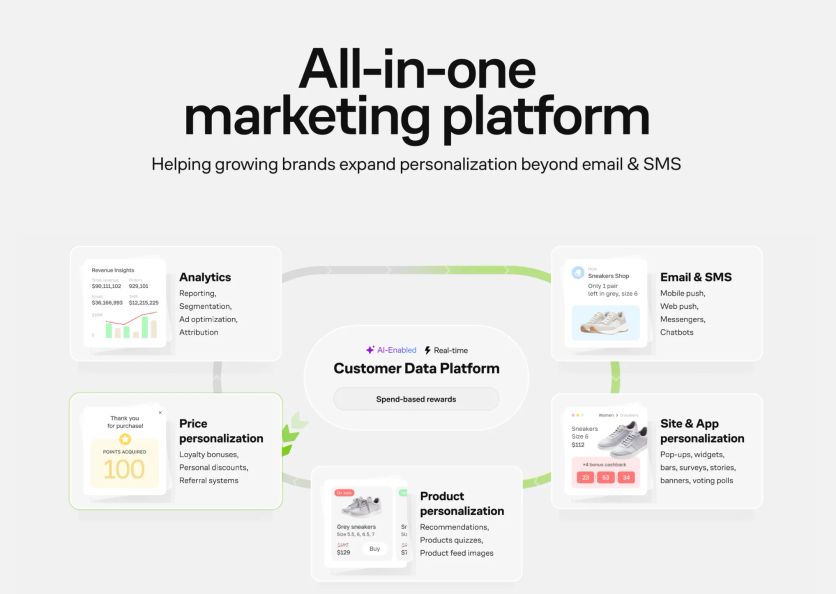
Maestra is an all-in-one marketing automation platform built specifically for rapidly scaling retail and e-commerce brands.
It combines a real-time Customer Data Platform (CDP) with multichannel campaign tools, loyalty management, personalization, and ad targeting in one system. At its core is a real-time CDP that unifies customer data across channels, enabling highly detailed customer profiles and segments.
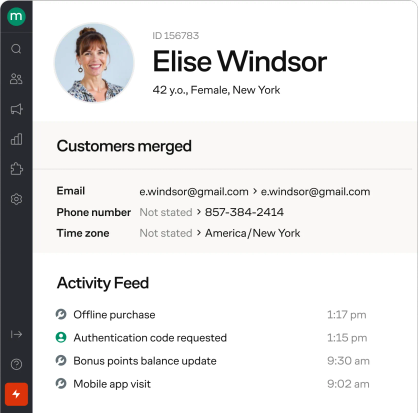
Customer profile in Maestra
Maestra’s omnichannel engine lets marketers orchestrate complex campaigns across email, SMS, web push, and mobile push based on real-time customer behavior. It also includes a built-in loyalty module to reward repeat customers and personalized web content tools (e.g. product recommendations, dynamic offers) to tailor the shopping experience for each visitor.
Maestra Features
AI-Powered Customer Data Platform: Unifies all customer data in real time, creating adaptive profiles. Supports identity resolution.
Omnichannel Flow Builder: Drag-and-drop tool to orchestrate seamless, adaptive journeys across email, SMS, push, pop-ups, ads, and more. Flows dynamically branch based on real-time behavior.
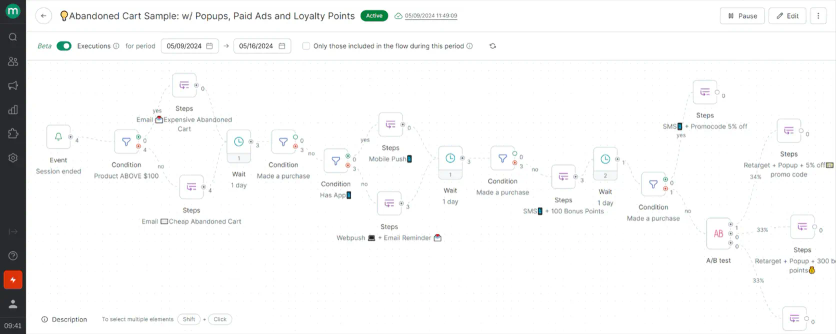
Maestra’s flow example: abandoned card flow with emails, mobile and web pushes, pop-ups, paid ads and loyalty points
Advanced Segmentation: Dynamic segmentation based on purchases, behavior, location, engagement, website/app activity, subscription sources. Supports nested logic, RFM scoring, computed fields.
Real-Time Website Personalization: Adapts in-page content based on clicks, purchase history, geolocation, promotions, loyalty status, etc. Includes pop-ups, quizzes, surveys, games, widgets, banners, embedded blocks, stories, and more.
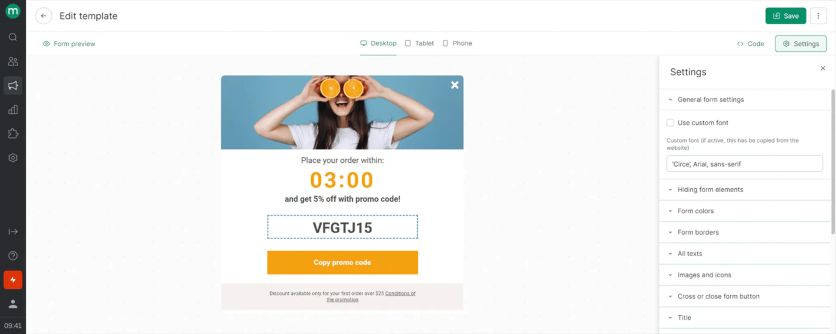
Maestra’s pop-up template editing
Product Recommendations: Embeds AI-driven product offers within messages and site content.
Loyalty, Referrals & Promotions: Built-in loyalty modules (points, VIP tiers, referrals) and personalized promotions.
Paid Media Optimization: Activates behavior-driven segments for ad targeting.
Maestra Integrations
Implementation depends on the difficulty of the IT infrastructure. For example, if you have a Shopify store, it’s a one-click pre-built integration. But for complex or custom systems, you can use an API.
Here’s the typical timeline:
- Standard migrations: 2–4 weeks
- Complex migrations: 4–6 weeks
- Full implementation including IP warming: 6–8 weeks
Maestra provides hands-on migration support, including data mapping, custom connector development, and technical troubleshooting to ensure your systems work together flawlessly.
One more thing to note: billing only starts once your migration is complete, so there’s no risk.
Maestra Support
Maestra delivers comprehensive, hands-on customer support that goes far beyond typical software assistance. Every customer gets a dedicated Forward Deployed Marketer who serves as your strategic partner from day one.
Your success team handles the heavy lifting – they’ll migrate your data, configure your marketing flows, and set up integrations with your existing tools. Rather than leaving you to figure things out alone, they provide ongoing guidance through bi-weekly strategy sessions to optimize your marketing performance.
Immediate help is always available through live chat (typically under 5 minutes) and Slack channel.
What sets Maestra apart is their proactive approach – they actively monitor your campaigns and reach out with optimization recommendations. This level of strategic partnership is typically reserved for enterprise clients, yet Maestra makes it standard for every customer regardless of size.
Maestra Cost
Maestra prices on active profiles rather than list size, starting at $2,000 per month for the real-time CDP and email, with the first 100,000 active profiles included – dormant profiles are stored free. SMS, on-site personalization, and loyalty are fixed monthly modules on top, and migration and implementation are included at no extra cost.
Everything is bundled in – email marketing, SMS campaigns, push notifications, loyalty programs, and the dedicated Forward Deployed Marketer service. Email sends are unlimited, and SMS messages cost just $0.0035 each, which is competitively priced. There are no surprise charges for API usage, data storage, or additional team members.
The pricing is completely transparent with no hidden fees or usage overages. You get full access to every module and feature regardless of how extensively you use them.
Plans are month-to-month with no cancellation penalties, so you can evaluate the ROI without long-term commitment risk. The pricing reflects their premium positioning: higher upfront cost but potentially lower total cost of ownership.
Maestra Pros and Cons
Based on the detailed comparison article, here’s a table with the short pros and cons of Maestra:
Pros | Cons |
|---|---|
| One platform – Email, SMS, push, loyalty, referrals, site personalization in one tool | Overkill for simple needs – Too comprehensive for basic email marketing requirements |
White-glove support – Dedicated Forward Deployed Marketer for all clients | |
Real-time CDP – Unified customer data across all channels and touchpoints | |
Advanced personalization – AI-driven product recommendations and dynamic content | |
True omnichannel automation – Seamless flows across email, SMS, web, mobile, ads | |
Built-in loyalty program – Native points, tiers, and rewards system included | |
Migration assistance – Help with setup, flows, and data migration included | |
Proactive campaign monitoring – Team suggests optimizations and improvements | |
No hidden fees – Transparent pricing with unlimited API calls and users | |
Month-to-month billing – No long-term contracts or cancellation penalties |
Salesforce Data 360
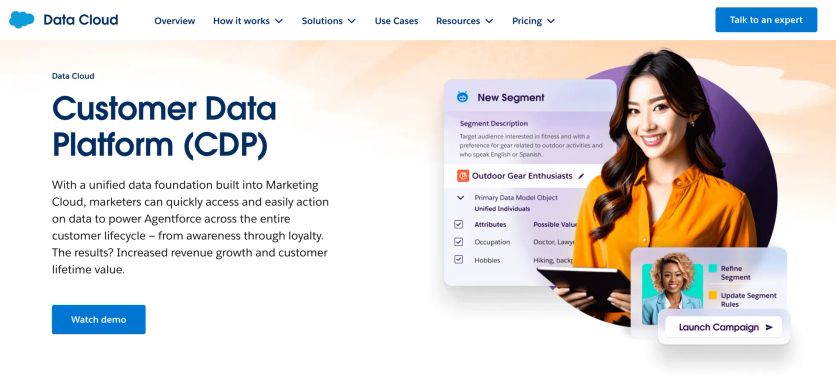
Salesforce Data 360 is an enterprise-grade customer data platform designed to unify customer data across every touchpoint. It enables businesses to create unified profiles, leverage AI-driven segmentation, and activate data seamlessly across marketing, sales, commerce, and service. Its deep integration with the Salesforce ecosystem makes it a natural choice for organizations already using Salesforce products.
Salesforce Features
Unified Customer Profiles: Merges data from CRM, web, mobile, email, and offline sources into a single customer view.
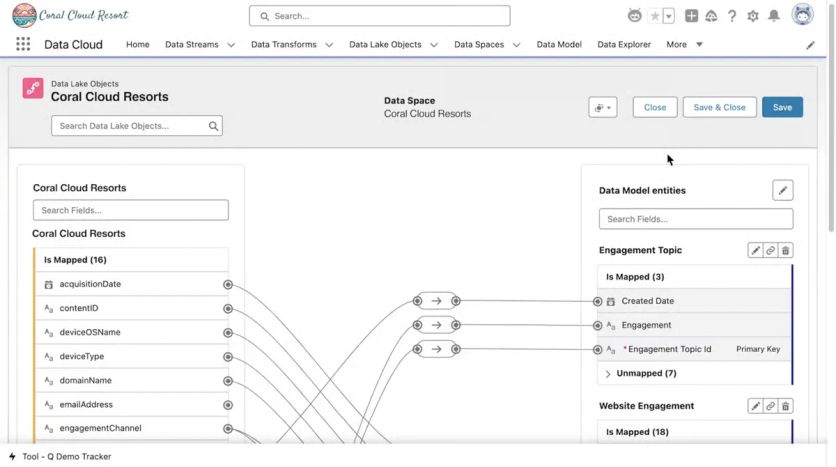
Identity Resolution: Matches and links customer records across channels.
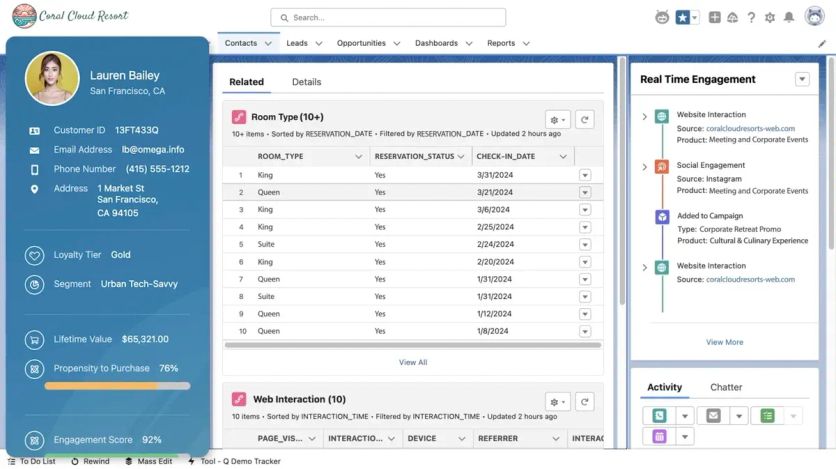
Real-Time Segmentation: Builds dynamic segments that update instantly as new data arrives.
AI & Predictive Insights: Salesforce Einstein provides predictive scoring and recommendations.
Compliance & Privacy: Built-in tools for GDPR/CCPA consent and governance.
Analytics Integration: Works with Tableau and Datorama for advanced reporting and visualization.
Salesforce Data 360 Integrations
Here’s the thing: it works beautifully with other Salesforce products. Beyond that, there are about 150 third-party connectors, which is decent but not spectacular. MuleSoft Anypoint Platform can handle custom integrations, but you’ll need dedicated developers for anything complex.
If you’re not already using Salesforce products, you’re essentially paying premium prices for integrations you could get elsewhere for less.
Salesforce Data 360 Support
Support varies dramatically by what you pay. Standard Support gets you 12/5 access. Premier Support gives you 24/7 coverage. Premier+ Support includes a dedicated technical account manager – which you’ll probably need because this platform is complex.
Trailhead provides free training, which is helpful since you’ll need it.
Salesforce Data 360 Cost
This is where things get expensive. Fast.
Basic implementation starts at $12,500 monthly. Enterprise deployments with advanced features hit $+30,000 per month. Annual commitments are standard. Implementation services add another $50,000 to $250,000 depending on complexity.
For smaller businesses, these numbers are prohibitive. For enterprises already paying Salesforce for multiple products, it might make financial sense.
Contracts are annual and pricing scales with data volumes and features.
Salesforce Data 360 Pros and Cons
| Pros | Cons |
|---|---|
| Deep integration with Salesforce ecosystem, ensuring seamless data flow across sales, service, and marketing. | Very high cost; annual contracts often reach six figures, limiting accessibility for SMBs. |
| Robust AI and predictive analytics with Salesforce Einstein. | Steep learning curve and complex implementation requiring dedicated resources. |
| Enterprise scalability, real-time responsiveness, and privacy compliance built in. | Some gaps in ad platform insights and requires reliance on other Salesforce tools for campaign execution. |
| Large marketplace (AppExchange) and ongoing product innovation. |
Segment
Developers love Segment because it treats data like code.
Segment, part of Twilio, is a leading Customer Data Platform (CDP) that focuses on collecting, unifying, and routing customer data across a company’s marketing and analytics stack. It specializes in event data tracking, enabling teams to capture user interactions from websites, apps, and other touchpoints, and distribute that data to hundreds of downstream tools.
Segment is widely used by e-commerce, SaaS, and digital-first companies that need a reliable data infrastructure.
Segment Features
- Event Tracking & Connections: Collects user events once and distributes them to multiple tools simultaneously.
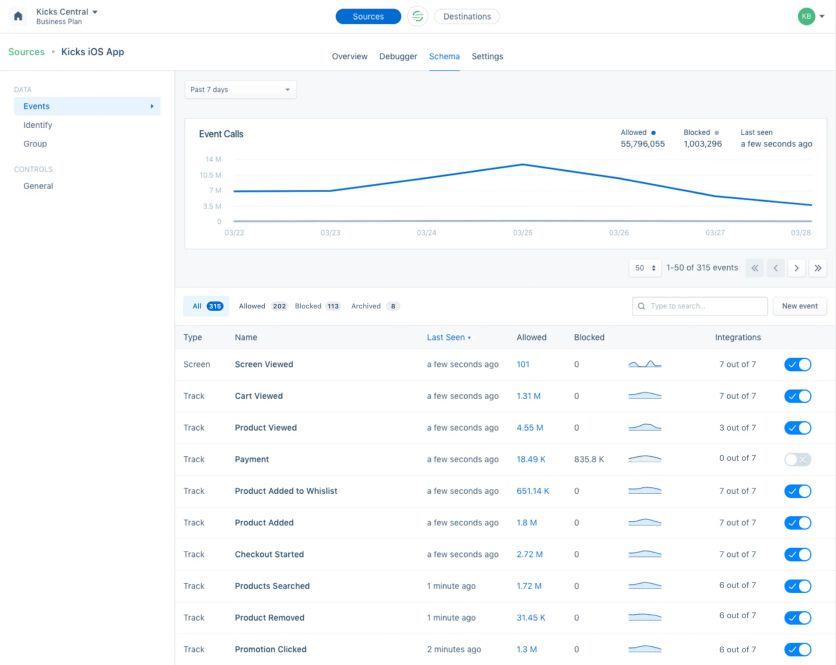
Events monitoring in Segment
- Identity Resolution: Merges data into unified profiles using deterministic and heuristic matching.
- Protocols & Governance: Enforces data schemas to maintain clean, consistent event tracking.
- Audience Building: Creates real-time audiences based on traits and behaviors for targeting.
- Warehouse Sync: Sends event data to warehouses like Snowflake, Redshift, and BigQuery.
- Twilio Engage: Adds marketing automation features like campaign orchestration and direct messaging.
Segment Integrations
Over 300 destinations connect directly to Segment’s platform. That includes every analytics tool, email provider, and advertising platform you’ve heard of. The developer-friendly architecture includes SDKs for JavaScript, iOS, Android, and server-side languages – so your developers can implement tracking exactly how they want it.
Need something custom? Their Function API lets you build proprietary connections.
Segment Support
Standard support gets you email help and documentation access. Premium support adds dedicated technical account managers who actually understand how APIs work. Their developer community is active – you’ll find code examples and troubleshooting help from other technical teams.
The documentation is thorough. Implementation guides, best practices, troubleshooting resources. It’s written by developers for developers.
Segment Costs
Pricing starts around $1,000 monthly for basic setups. Enterprise implementations with advanced features can hit $+10,000 monthly. Cost depends on how many users you’re tracking, data volume, and which features you need.
They offer free developer accounts for testing, but these come with serious limitations on data volume and destinations.
Segment Pros and Cons
| Pros | Cons |
|---|---|
| Huge library of +300 integrations, making it easy to connect tools without custom engineering. | Can become expensive as tracked users and event volumes increase. |
| Centralized, clean customer data improves accuracy across analytics and marketing systems. | Requires developer resources to set up and maintain data tracking correctly. |
| Offers real-time streaming and flexible warehouse sync. | Limited campaign management tools compared to full marketing automation platforms. |
| Strong governance features (Protocols) help maintain high data quality. | Some integrations may have limitations in supported fields or depth. |
Tealium AudienceStream
Tealium is what happens when enterprise software engineers build a customer data platform. It’s vendor-neutral, data-governance-obsessed, and comes with more integration options than you’ll ever need. If your company has a Chief Data Officer and compliance committees, Tealium makes sense. If you’re running a scrappy D2C brand, it’ll probably overwhelm you.
Tealium Features
- Real-Time Profiles: Visitor stitching creates unified profiles across devices.
- Event-Stream Processing: Instantly processes data from web, mobile, IoT, and other sources.
- Audience Segmentation: Flexible, real-time audience definitions with custom attributes and badges.
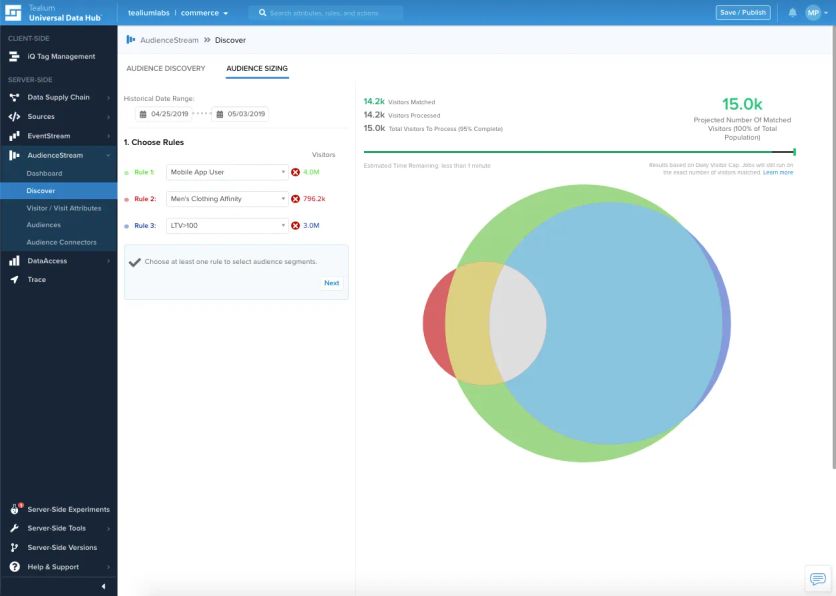
Audience analysis in Tealium
- Data Governance: Built-in consent management and compliance for GDPR/CCPA.
- Predict ML: Machine learning add-on for predictive insights (likelihood to purchase or churn).
Tealium Integrations
Here’s where Tealium gets ridiculous: 1,300 turnkey integrations. That’s not a typo. They connect to practically every marketing tool, analytics platform, and customer experience system that exists. The vendor-neutral approach means they don’t play favorites – if it has an API, Tealium probably connects to it.
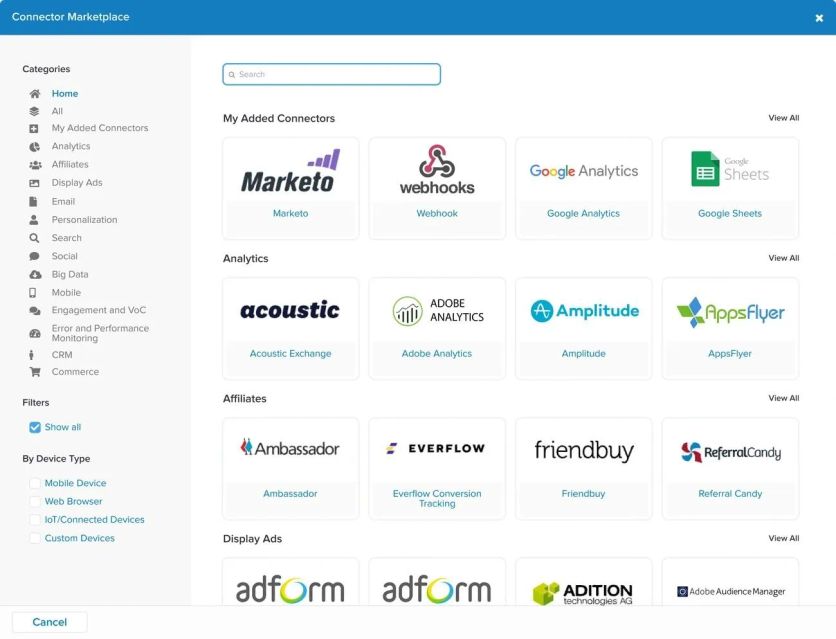
Custom integrations are possible through their API layer, though you’ll want actual developers for that work.
Tealium Support
Phone and email support with response times that scale based on how urgent your problem is.
Their knowledge base is thorough – maybe too thorough if you prefer simple answers. They offer certification programs for admins and developers, which you’ll probably need given the platform’s complexity.
Tealium Cost
$6,000 to $15,000 monthly, depending on data volume and features.
Enterprise packages with advanced identity resolution and custom machine learning models cost more. Annual contracts are standard, usually bundled with implementation services that can stretch into six figures.
Tealium Pros and Cons
| Pros | Cons |
|---|---|
| Real-time data processing and segmentation. | High complexity with steep learning curve. |
| Extremely broad integration ecosystem (1,300). | Enterprise-level pricing, often cost-prohibitive for SMBs. |
| Strong governance and compliance capabilities. | Resource-intensive implementation. |
| Predictive ML insights for targeting. |
BlueConic
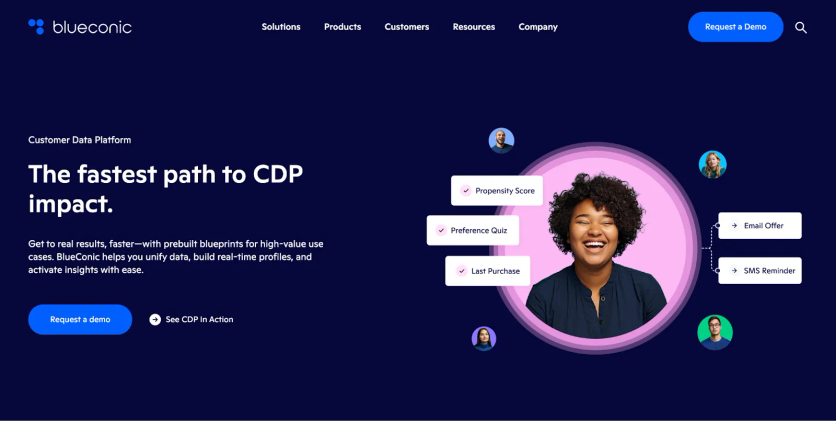
BlueConic built a CDP that doesn’t require a computer science degree to operate.
Most platforms force you to pick a side. Either you get basic tools that work but don’t do much, or you get enterprise monsters that require six months of setup and a dedicated team. BlueConic sits right in the sweet spot for growing businesses that need real personalization without the complexity.
BlueConic Features
- Unified Profiles: Consolidates demographics, behaviors, and transactions into one record.
- Real-Time Segmentation: Highly flexible, instantly updated customer segments.
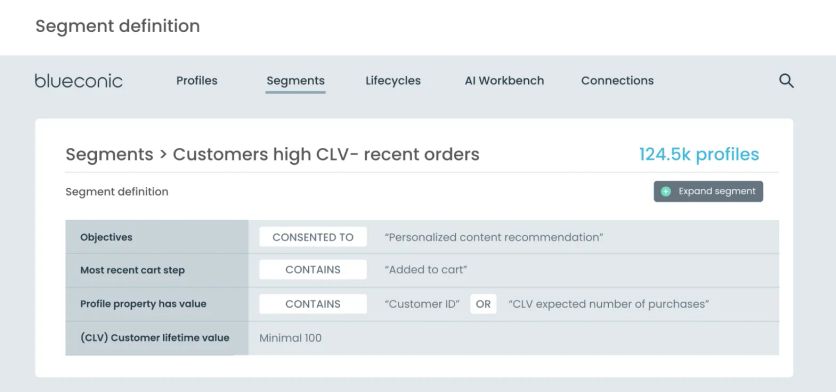
Blueconic’s segmentation
- Website Personalization: On-site dialogs, popups, and dynamic content based on segments.
- AI Workbench: Allows advanced analysis and predictive modeling using Python scripts.
- Journey Orchestration: Triggers messaging and audience sync across marketing channels.
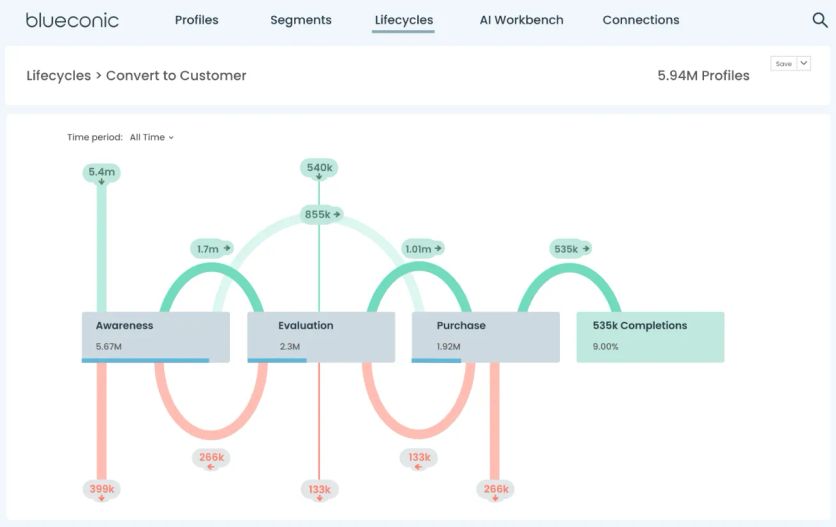
Customer lifecycle overview in Blueconic
BlueConic Integrations
The platform connects with +100 marketing technologies, e-commerce platforms, and analytics tools through pre-built plugins. The open API handles custom connections when you need something specific. Implementation usually takes 4-8 weeks, depending on how messy your existing data situation is.
BlueConic Support
Each client gets assigned customer success managers who actually stick around and help you succeed. There’s also an online academy with training materials and implementation guides. Technical support comes through email, chat, and scheduled consultations when you need to talk through something complex.
BlueConic Cost
Pricing runs $3,000 to $10,000 monthly based on how many profiles you’re managing and which features you need. The entry level ($3,000/month) covers profile management and basic segmentation. Custom enterprise pricing kicks in once you hit 5 million customer profiles.
BlueConic Pros and Cons
| Pros | Cons |
|---|---|
| Intuitive, marketer-friendly UI. | Premium pricing oriented to larger organizations. |
| Real-time segmentation and on-site personalization. | Limitations in complex logic. |
| Broad integrations with marketing and analytics tools. | Primarily cloud/digital data focus, less robust for offline-heavy use cases. |
| Highly responsive and supportive team. |
mParticle
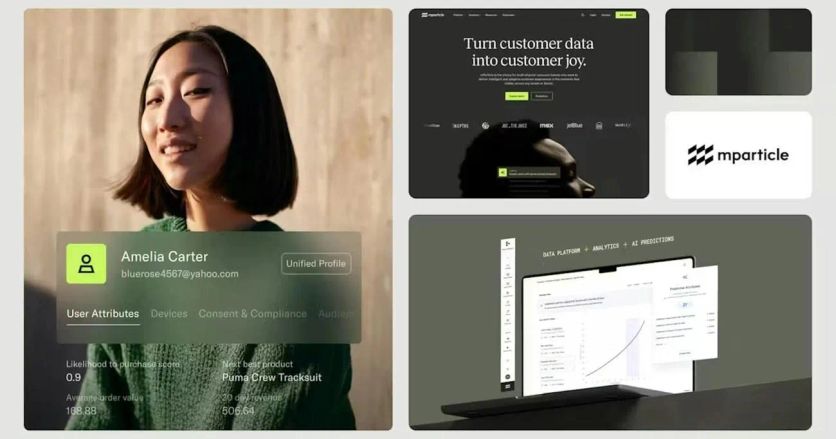
If your business lives on mobile, mParticle gets it.
mParticle is a real-time customer data platform designed to unify, manage, and activate customer data across multiple systems. Known for its enterprise scalability and strong mobile-first capabilities, it helps brands centralize customer events and attributes, creating a reliable foundation for personalized marketing and analytics.
mParticle Features
- Data Pipeline: Collects data from web, mobile, and server sources with SDKs.
- Audience Builder: Real-time, dynamic segmentation and predictive audiences.
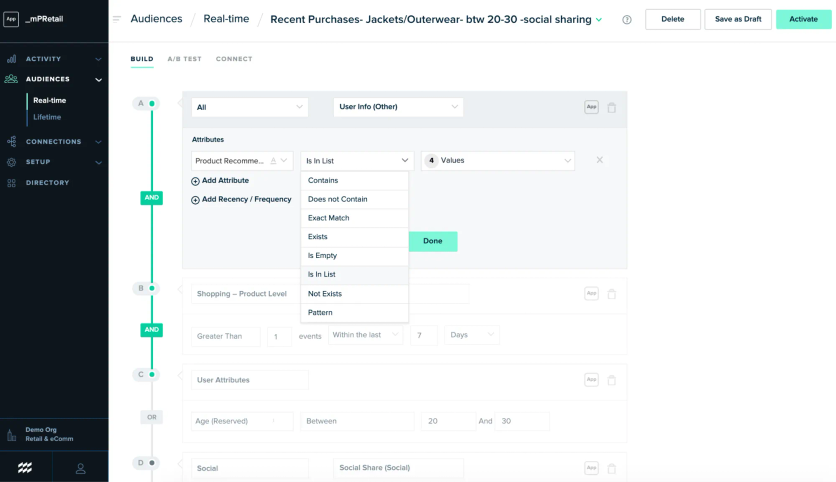
Creating a real-time audience in mParticle
- Identity Resolution: Connects user data across devices and sessions.
- Data Quality & Governance: Tools for schema enforcement, filtering, and privacy compliance.
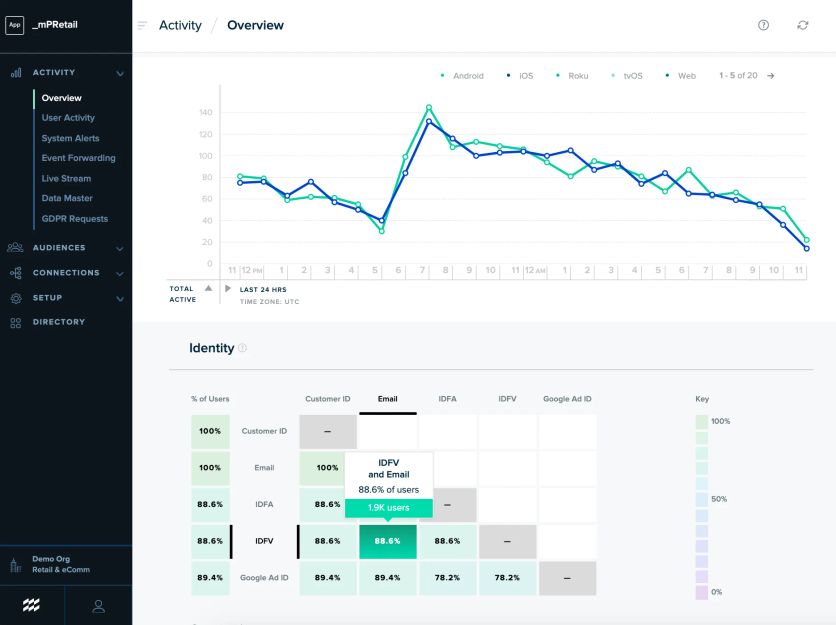
Audience overview in mPractice
mParticle Integrations
mParticle offers hundreds of integrations across analytics platforms, CRMs, mobile attribution, data warehouses, and messaging tools.
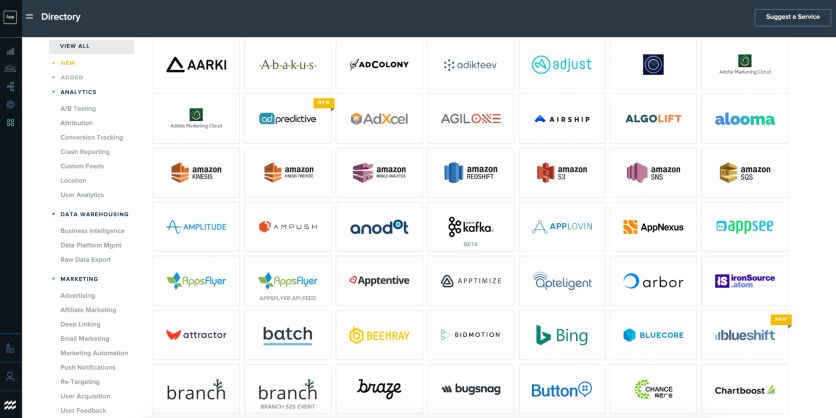
mParticle’s pre-built integrations
What sets mParticle apart is the quality of their mobile SDKs. Their iOS and Android libraries are built by people who actually understand mobile development constraints.
The server-to-server API opens up custom integration possibilities for businesses with unique tech stacks. But you’ll need developers who know what they’re doing.
mParticle Support
Enterprise accounts get a dedicated technical account manager, which matters more than it sounds. These aren’t sales reps – they’re technical people who understand your implementation challenges. Developer support includes actual engineers who can troubleshoot integration issues in real-time.
The documentation is thorough, though it assumes you have technical expertise. Marketing teams without developer support will struggle.
mParticle Cost
$5,000 to $15,000 monthly puts mParticle solidly in enterprise territory. Pricing depends on data volume and how many features you activate. There’s no entry-level tier, so smaller businesses are effectively priced out.
mParticle Pros and Cons
| Pros | Cons |
|---|---|
| Enterprise-grade scalability and compliance. | High cost with no transparent pricing. |
| Strong mobile-first data collection. | Requires significant developer resources to implement. |
| Robust integrations across martech and data stacks. | Not a campaign execution platform (data-only). |
| Excellent developer tools and technical documentation | |
| Real-time segmentation and predictive audiences. |
Klaviyo
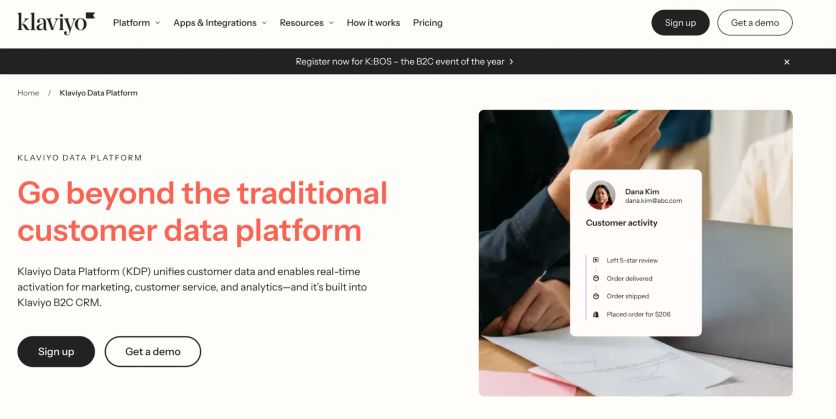
Most small e-commerce teams don’t have a data engineer on staff. That’s the reality Klaviyo was built for. While enterprise platforms assume you’ve got technical resources to burn, Klaviyo starts with a different question: What if you just want your customer data to work without hiring a team of developers?
Klaviyo Features
- Email & SMS Campaigns: Automation for welcome flows, cart abandonment, win-backs, and post-purchase sequences.
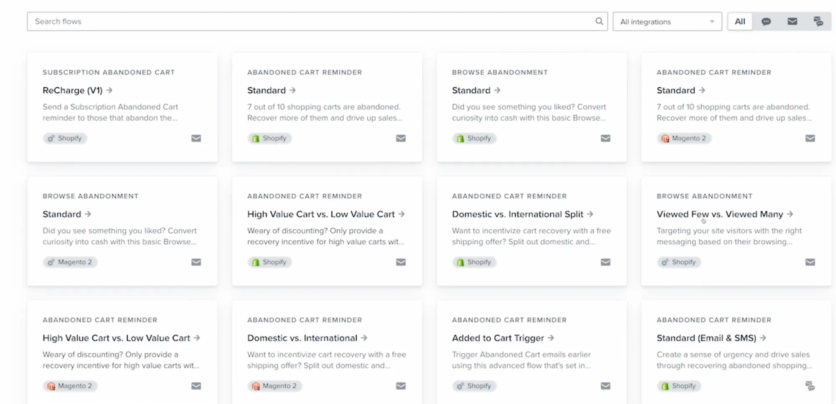
Flow templates in Klaviyo
- Segmentation: Dynamic segments based on purchase behavior, browsing, and engagement.
- Predictive Analytics: Built-in CLV prediction and product recommendations.
- Templates & Builder: Drag-and-drop editor with ready-to-use templates.
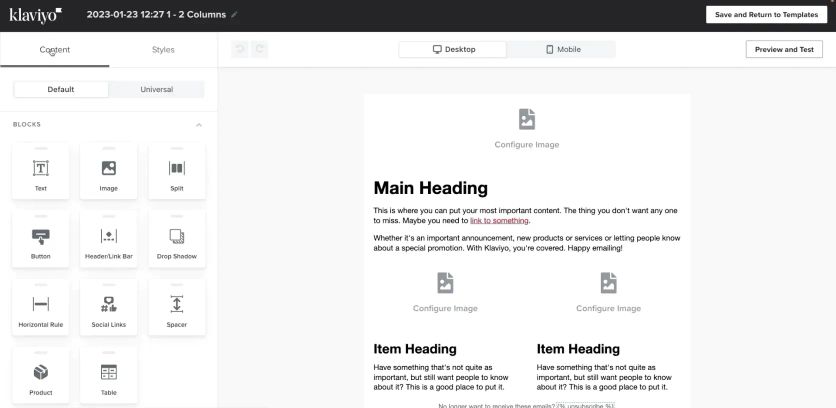
Klaviyo’s email composer
- Reporting: Benchmarks and revenue attribution dashboards.
Klaviyo Integrations
Klaviyo connects directly to Shopify, Magento, BigCommerce, and WooCommerce without requiring developer work. Most integrations happen through simple API keys rather than complex setups. The platform also links to advertising tools, loyalty programs, and customer support systems.
Setup typically takes hours, not weeks.
Klaviyo Support
Email and chat support come standard, with faster response times for higher-tier accounts. Klaviyo Academy offers free training that’s genuinely helpful – they teach strategy, not just how to click buttons. The knowledge base covers both technical implementation and marketing tactics.
Klaviyo Cost
Pricing starts at $150 monthly and scales with your contact database. A store with 10,000 contacts pays around $500 monthly. That’s a fraction of what you’d spend on enterprise platforms, though you’re giving up advanced features to get that price point.
Klaviyo Pros and Cons
Pros | Cons |
|---|---|
Built specifically for e-commerce use cases. | Costs rise quickly as lists scale. |
Effective email automation out of the box | Support can be slower on lower tiers. |
Setup requires zero technical expertise | Limited channels beyond email/SMS/push. |
Pricing that makes sense for growing businesses | Segmentation is limited. |
HubSpot
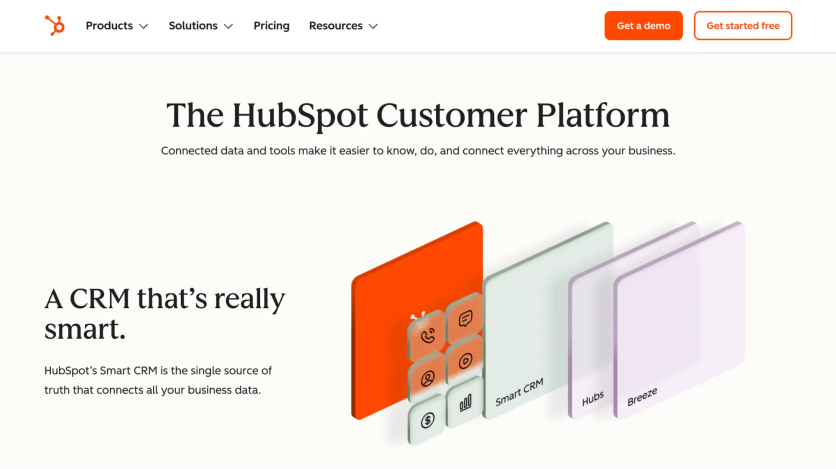
Most businesses hate dealing with multiple software vendors. You’ve got your email tool talking to your CRM, your CRM talking to your e-commerce platform, and somewhere in the middle, customer data gets lost. HubSpot bet their entire business on solving this problem by building everything under one roof.
HubSpot Features
- Workflow Automation: Visual builder for multi-step, conditional nurturing sequences.
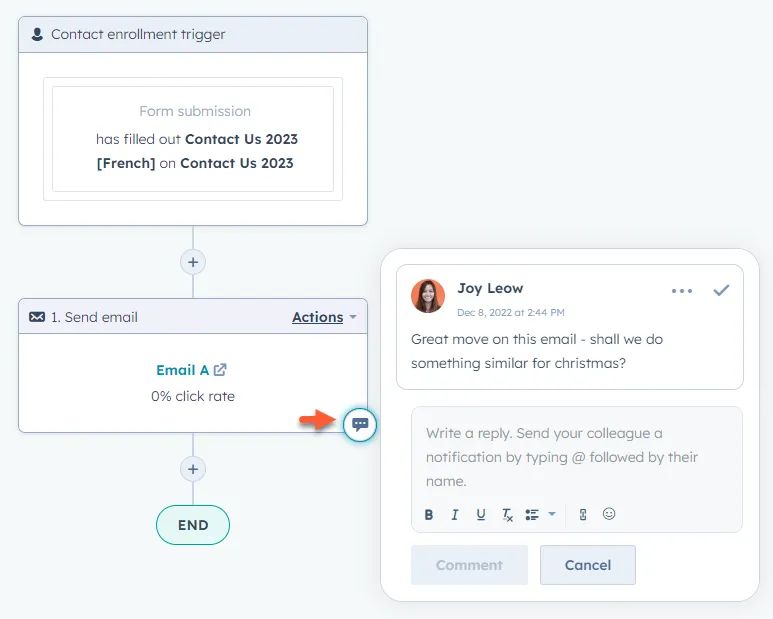
HubSpot’s flow builder
- Email & Landing Pages: Drag-and-drop tools with dynamic personalization.
- CRM Integration: Unified contact profiles with marketing, sales, and service history.
- Content Tools: Blog, SEO, and social media scheduling built in.
- Analytics & Reporting: End-to-end funnel and revenue attribution reports.
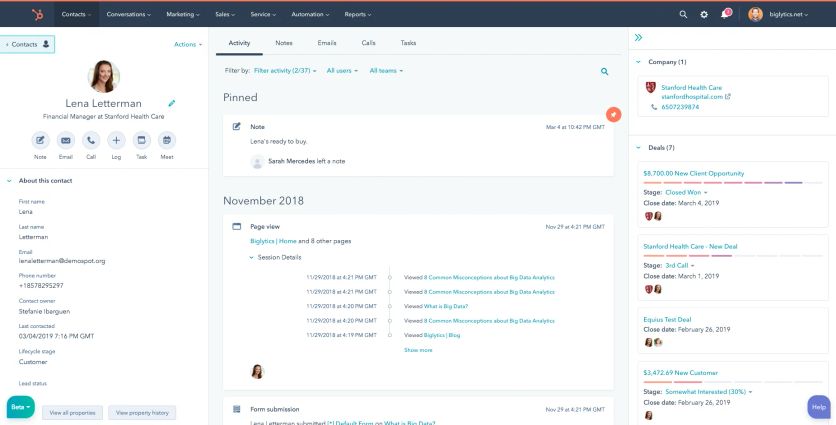
Customer’s record in Hubspot
HubSpot Integrations
Here’s where the all-in-one approach pays off. Since HubSpot built their marketing, sales, and service tools together, they actually talk to each other. No weird data sync issues. No missing customer information when someone moves from marketing to sales.
The marketplace has hundreds of third-party connections for e-commerce platforms, social media tools, and analytics services. Most integrations take minutes to set up through simple API keys – no developer needed.
HubSpot Support
24/7 chat and phone support across all paid plans. The community forums are surprisingly active, and the knowledge base has implementation guides for pretty much everything. They also offer paid consulting if you need extra help.
HubSpot Cost
$800 monthly gets you started. $1,600 monthly (Professional tier) includes most of the customer data platform features that mid-sized e-commerce businesses actually need. Enterprise plans run $+3,600 monthly.
No long-term contracts required, which is refreshing.
HubSpot Pros and Cons
Pros | Cons |
|---|---|
All-in-one solution with CRM and marketing in one. | Costs increase steeply at higher tiers and with contact list growth. |
User-friendly with a strong support ecosystem. | Limited flexibility for very complex, custom setups. |
Strong inbound and content marketing features. | Less specialized for e-commerce use cases. |
Excellent analytics and attribution. | Some advanced features gated behind Enterprise plan. |
Omnisend
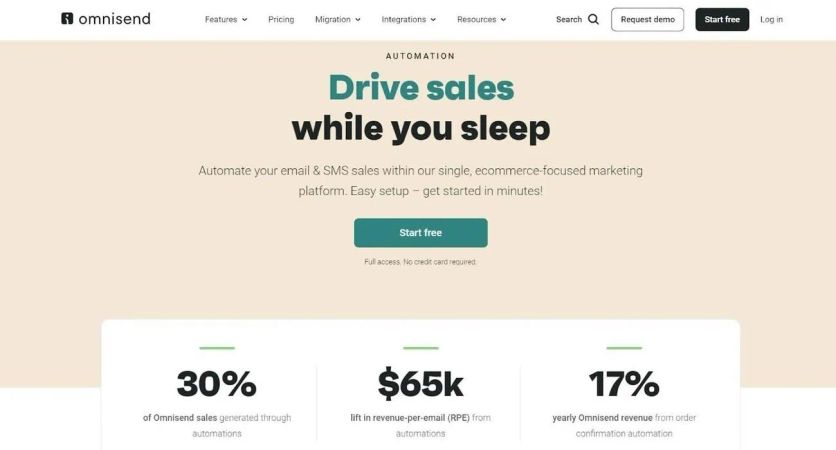
If you’re running a smaller e-commerce business and don’t have a team of engineers, Omnisend gets it. This platform strips away the complexity and focuses on one thing: helping you sell more stuff through better marketing automation with customer data platform capabilities.
Omnisend Features
- Email Marketing: Drag-and-drop builder with e-commerce-specific templates.
- Automation Workflows: Pre-built flows for cart abandonment, welcome, and post-purchase.
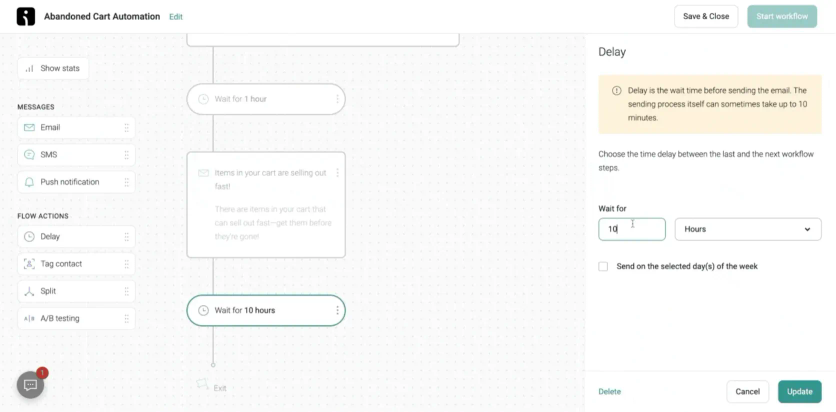
Omnisend’s prebuild abandoned cart automation
- Omnichannel Campaigns: Coordinate email, SMS, and push notifications.
- Product Picker & Coupons: Easily embed products and discount codes in campaigns.
- A/B Testing & Analytics: Performance tracking with revenue attribution.
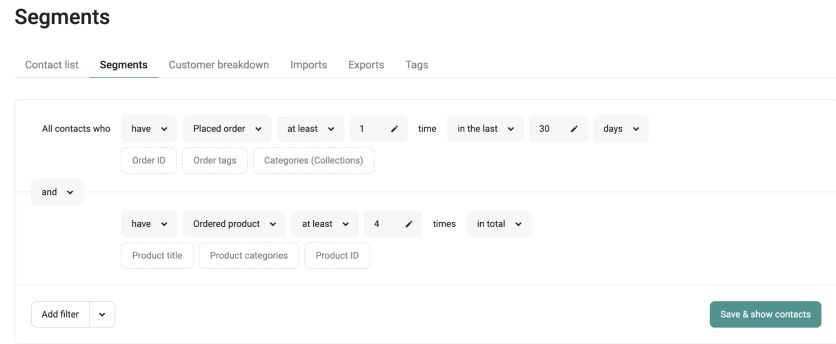
Omnisend’s segment builder
Omnisend Integrations
Omnisend plays nicely with Shopify, WooCommerce, and BigCommerce. Setup takes maybe 20 minutes if you’re not particularly tech-savvy. It pulls in your order data, customer information, and product catalog without much fuss. You can also connect payment processors and shipping tools to get fuller customer profiles.
Omnisend Support
You get live chat, email support, and a knowledge base that doesn’t assume you have a computer science degree. The response times are decent, though not enterprise-level fast.
Omnisend Cost
This is where Omnisend shines. Basic email automation starts at $60 monthly. A store with 10,000 customers typically pays around $350 per month for the full package. That’s less than most businesses spend on coffee.
Omnisend Pros and Cons
| Pros | Cons |
|---|---|
| Built specifically for e-commerce marketing. | Free plan limited and branded. |
| Combines email, SMS, and push into one tool. | Standard plan limits email sends (12× list size). |
| Affordable pricing compared to similar tools. | Advanced segmentation and analytics less robust than enterprise CDPs. |
| Quick setup with pre-built automation templates. | Reporting is basic – you get the essentials, not much more |
| Support can be slower during peak times. |
Braze
If you’re a massive brand with a massive budget and massive ambitions for customer messaging, Braze might be your platform. But let’s be clear: this isn’t for everyone.
Braze Features
- Canvas Journey Builder: Visual tool to design adaptive, multi-channel customer journeys.
- Real-Time Triggering: Campaigns fire instantly based on live user actions or events.
- Cross-Channel Messaging: Supports push notifications, in-app messages, email, SMS, and webhooks.
- Dynamic Personalization: Liquid templates enable tailored content down to individual behaviors.
- AI & Optimization: Includes send-time optimization, channel optimization, and multivariate testing.
- Currents Data Streaming: Real-time data export to warehouses for analytics and BI.
Braze Integrations
Braze offers about 50 direct integrations – fewer than some competitors, but they focus on quality over quantity. Their API ecosystem handles most custom connections, though you’ll need developers who know what they’re doing. Implementation typically takes 4-8 weeks, assuming you have the technical resources to handle it.
Braze Support
You get dedicated customer success managers and technical support teams. Response times depend on what you’re paying, but at these price points, support is generally solid. The challenge isn’t getting help – it’s that the platform is complex enough that you’ll need it regularly.
Braze Cost
We’re talking $8,000 to $20,000 monthly. Custom enterprise packages can go higher. This pricing reflects Braze’s enterprise positioning, but it also means smaller businesses need not apply.
Braze Pros and Cons
Pros | Cons |
|---|---|
Powerful real-time engagement across multiple channels. | Very high cost; not viable for SMBs. |
Excellent for mobile-first brands with strong app presence. | Complex onboarding requiring significant developer resources. |
Robust personalization and AI optimization features. | Can be overwhelming for smaller teams with limited resources. |
Strong support and frequent feature innovation. | Overkill for simple email/SMS needs. |
The Bottom Line
Here’s what you need to know: every e-commerce business needs a customer data platform now. Not next year, not when you hit $10M in revenue – now.
But here’s the thing: the “perfect” platform doesn’t exist. Each one on this list has trade-offs. Tealium has every integration under the sun, but good luck getting it set up without a dedicated data team. HubSpot keeps things simple, but you’ll hit limitations as you scale.
Your decision comes down to three questions:
- What’s broken right now? If you can’t connect email clicks to purchases, start there. If you’re sending the same email to everyone, focus on segmentation. Pick the platform that fixes your biggest pain point first.
- What resources do you actually have? Don’t buy an enterprise platform if you don’t have enterprise resources. A simple tool that gets used beats a sophisticated tool that sits idle.
- Where will you be in two years? Your needs will change. Pick something that can grow with you, but don’t overbuy for a future that might not happen.
Pick a platform, implement it properly, and start collecting better data.
Key Takeaways
Customer data platforms have become essential for e-commerce success, with the right CDP implementation increasing conversion rates by 30% and customer lifetime value by 25%.
• Choose based on business size and technical resources: Maestra leads with omnichannel capabilities and personalization for D2C brands, while Klaviyo and Omnisend serve smaller businesses with accessible pricing and humble needs.
• Enterprise solutions require significant investment: Salesforce Data 360 and Tealium offer robust features but demand substantial budgets and technical expertise.
• Integration capabilities vary dramatically: Tealium offers +1,300 connectors for complex enterprises, while Segment provides +300 destinations with developer-friendly tools for technical teams.
• Mobile-first businesses need specialized platforms: mParticle excels at cross-device customer journeys, while Braze focuses on sophisticated engagement messaging for enterprise brands.
The key to CDP success lies in matching platform capabilities to your specific business needs, technical resources, and growth trajectory rather than choosing the most feature-rich option available.
FAQs
- A customer data platform is a software that collects and unifies customer data from multiple sources to create a single, comprehensive view of each customer. For e-commerce, CDPs are crucial as they enable personalized marketing, improve customer experiences, and drive sales by providing actionable insights based on unified customer data.
- While CRMs primarily focus on managing customer interactions and sales processes, CDPs go further by integrating data from multiple sources (including CRMs) to create a more complete customer profile. CDPs offer real-time data processing, advanced segmentation capabilities, and often include AI-powered analytics that CRMs typically don’t provide.
- Key factors to consider include your business size, technical resources, existing technology stack, budget, and specific needs like mobile optimization or AI capabilities. Also, consider the CDP’s integration options, ease of use, scalability, and support services. It’s important to align the CDP’s features with your current and future business goals.
- Key analytics features to evaluate include real-time event processing speed, segmentation depth, and attribution modeling. Processing latency varies significantly across platforms: some batch data hourly, while real-time CDPs like Maestra process events in under 300ms. Look for platforms that support databases ranging from 30K to 65M+ records without performance degradation.
- The leading CDP platforms for ecommerce include Segment (strong developer ecosystem), Bloomreach (search and merchandising focus), and Maestra (unified CDP with built-in execution channels). The best fit depends on your stack complexity: brands consolidating multiple tools often see the largest gains. For example, Urban Armor Gear reduced stack costs by 64% (~$100K/year in savings) after replacing Klaviyo, Yotpo, and Frosmo with a single unified platform, while PuffCuff cut marketing costs by 73.6% by consolidating two Klaviyo accounts and Attentive into one CDP.
- CDP costs vary widely based on the provider and your business needs. Entry-level solutions for small businesses can start around $150-$800 per month, while mid-market options range from $3,000-$10,000 monthly. Enterprise-grade CDPs can cost $12,500-$30,000 or more per month. Additional costs may include implementation services and staff training.
- Implementation time varies depending on the complexity of your existing systems and the chosen CDP. Simple setups might take a few weeks, while complex enterprise implementations can take 2-3 months. As for results, some businesses see improvements in marketing efficiency and customer engagement within weeks, but significant impacts on metrics like conversion rates and customer lifetime value typically emerge over several months of use.