
The 8 Best Magento Email Marketing Tools in 2026

Email marketing returns an average of $36 for every $1 spent – more than any other channel – and 50% of consumers made a purchase directly from an email in the past year. For a Magento store, the platform behind those emails determines how much of that revenue you actually capture.
The catch: “Magento integration” means very different things across vendors. Some platforms sync your entire order history and product catalog automatically; others just add contacts to a list and leave the rest to you.
We compared 8 Magento email marketing tools on email editor capabilities, segmentation, automation depth, customer support, and real cost – based on official pricing pages and product documentation, checked in July 2026.
Quick Verdict on Magento Email Marketing Tools
The best Magento email marketing tools in 2026 are Maestra, Omnisend, Brevo, Klaviyo, Dotdigital, ActiveCampaign, Mailchimp, GetResponse, Moosend, and Drip. The right pick depends on list size, automation needs, and budget – Maestra leads for mid-size and enterprise brands that want a real-time CDP and omnichannel flows on top of email.
Best for revenue attribution: Drip – ties every email and workflow to the orders it generates
Best for budget stores: Moosend – unlimited sends from $9/mo
Best for webinars alongside email: GetResponse – webinars for up to 100 attendees included
Best for beginners: Mailchimp – unlimited landing pages and a familiar editor
Best for automation depth: ActiveCampaign – 950+ prebuilt recipes
Best for enterprise Magento data sync: Dotdigital – pulls all historic data automatically
Best for multichannel on a budget: Brevo – email, SMS, and WhatsApp from $9/mo
Best for free-plan value: Omnisend – full features and 24/7 support on the free tier
Best for data-driven email and SMS: Klaviyo – segmentation and reporting built on first-party customer data
Best for e-commerce personalization at scale: Maestra – real-time CDP, omnichannel flows, and hands-on service
Content:
Magento Email Marketing Tools at a Glance
| Tool | Best for | Standout Features | Support | Starting Price |
|---|---|---|---|---|
| Maestra | E-commerce personalization at scale | Real-time CDP, omnichannel flows, built-in loyalty, unlimited email sends | Dedicated Forward Deployed Marketer on every plan, ~5-min response | From $2,000/mo (CDP + unlimited email) |
| Omnisend | Free-plan value | Email + SMS + push in one workflow, AI segment builder | 24/7 chat and email on all plans | From $16/mo (500 contacts) |
| Brevo | Best value for Magento | Multi-channel incl. WhatsApp, 100-condition segments | Email all plans; phone on Pro+ | From $9/mo (5K emails) |
| Klaviyo | Data-driven email and SMS | Predictive analytics, 350+ integrations, dynamic product feeds | Email and chat; free plan 60 days only | From $20/mo (500 contacts) |
| Dotdigital | Enterprise Magento data sync | Auto-sync of historic Magento data, RFM/eRFM, AI agents | 24/7 phone and chat, sub-minute response | From $500/mo |
| ActiveCampaign | Automation depth | 950+ automation recipes, 1,000+ integrations | Chat and email, extended weekday hours | From $19/mo (1K contacts) |
| Mailchimp | Beginners | Unlimited landing pages, predictive analytics | 24/7 chat from Essentials | From $13/mo (500 contacts) |
| Drip | Revenue attribution | Revenue attribution, behavior-based automation | Weekday email; chat from $99/mo | From $39/mo (2,500 contacts) |
1. Maestra – Best for E-Commerce Personalization at Scale
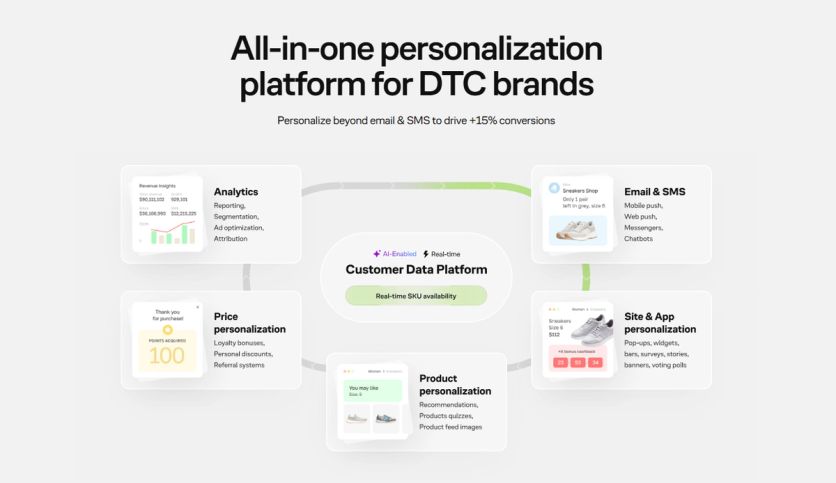
Maestra is an all-in-one marketing personalization platform built for mid-size, enterprise, and rapidly scaling ecommerce brands running on Magento, Shopify, BigCommerce, WooCommerce, or custom platforms. The platform combines a real-time CDP, email, SMS, web and mobile push, paid media, on-site personalization, product recommendations, and built-in loyalty in one system.
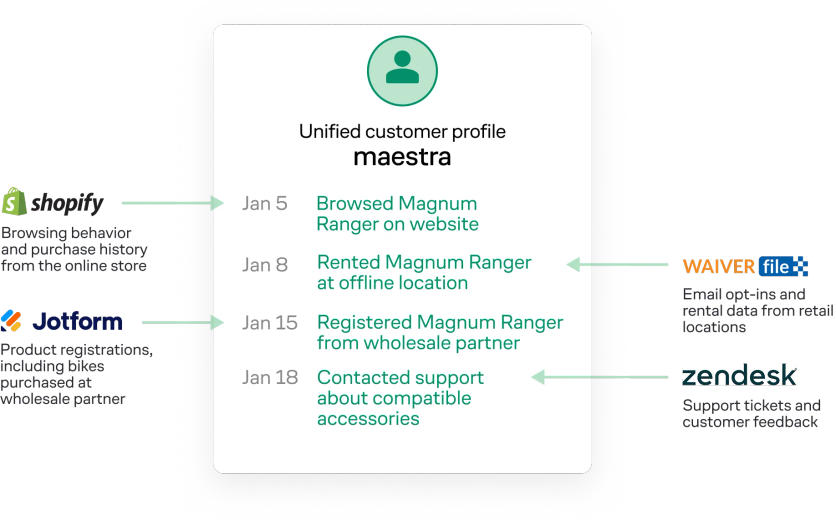
A real unified customer profile in Maestra – Magnum Bikes brings website, retail, rentals, and support activity onto one real-time timeline
Maestra Features
Email Editor
The drag-and-drop email composer keeps email weight lean, which prevents message clipping in Gmail – a common problem with heavier emails. Messages render correctly across devices and email clients. The editor supports dynamic content blocks powered by Maestra’s real-time CDP, so marketers can personalize messages for specific customer segments without developers. That lean code has a real payoff: after switching from Klaviyo, ocean-cleanup brand 4ocean cut its email size by 30% and solved Gmail clipping on its heaviest campaigns.
Segmentation and Targeting
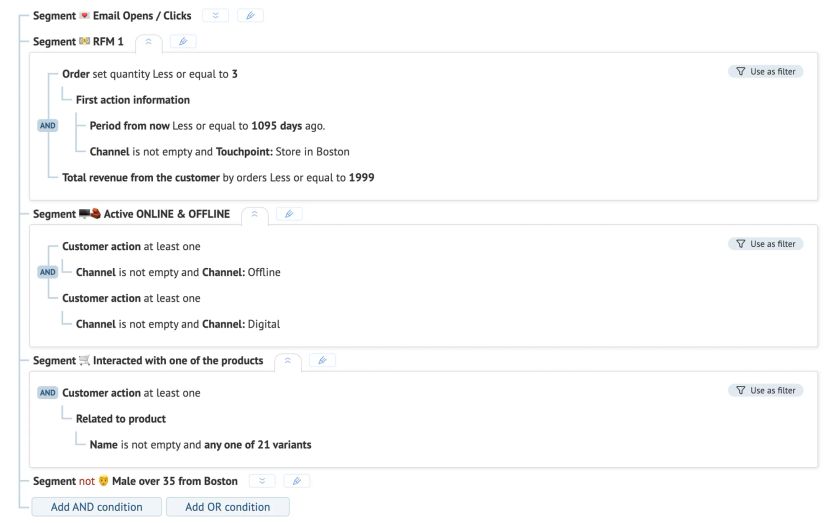
Maestra’s CDP unifies customer data from online and offline sources into actionable segments. Segmentation tools include nested segments, calculated and custom fields, real-time segments, scheduled batch segments, and static lists. Marketers can build segments on clicks, browsing history, purchase patterns, geolocation, engagement levels, and loyalty status. RFM (Recency, Frequency, Monetary) segmentation groups customers into categories like Champions, Hibernating, and Loyal automatically.
Email Marketing Automations
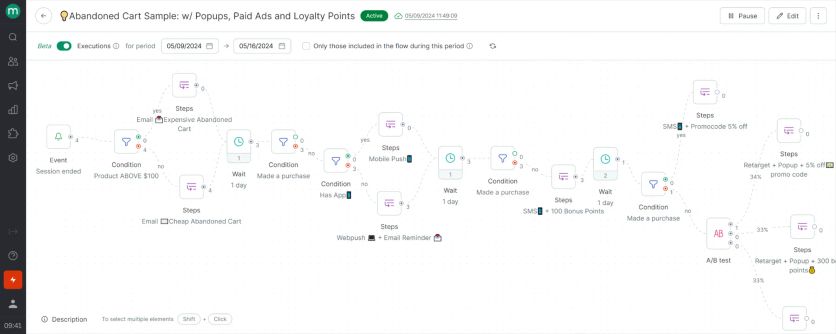
The omnichannel journey builder creates adaptive workflows that span email, SMS, MMS, RCS, site, app, messengers, push notifications, chatbots, and paid media. Flows branch on customer behavior in real time rather than following fixed schedules. A journey might start with an email, switch to SMS if the customer doesn’t respond, and display a custom banner when they revisit the website.
Additional Features
Maestra has built-in loyalty with points, discounts, VIP tiers, and referrals. Product recommendations come from 14 ready-to-use recommendation engines powered by the real-time CDP, using full-funnel data – browsing, demographics, and purchases. Because the recommendation engines and the email channel run on the same platform, the personalized picks a shopper sees on your site drop straight into their emails, and those personalized blocks reliably lift campaign revenue over static product grids.
On-site personalization includes pop-ups, quizzes, surveys, games, embedded blocks, stories, widgets, and banners that adapt to visitor behavior instantly. It works hand in hand with email. A shopper who receives a promo code in an email arrives on your site and sees that same code highlighted in a banner – a reminder that the offer is live right now, reinforced across both channels instead of buried in an inbox.
Behavior-driven segments also feed paid media, which closes the gap when email alone stops landing. When a customer goes quiet and stops opening your messages, Maestra can move them into a paid-media audience and reach them with ads on Meta or Google instead, then pull them back into the email flow once they re-engage.
Maestra Customer Support
Every Maestra client gets a dedicated Forward Deployed Marketer (a marketer who works as part of your team), regardless of plan. The Forward Deployed Marketer handles migration, integration setup, flow building, segment configuration, and ongoing optimization, working hands-on through a shared Slack channel and regular strategy calls. Live chat responses average under 5 minutes.
Maestra Pricing
Maestra runs on month-to-month billing and starts at $2,000/month – the real-time CDP plus unlimited email sends, with the first 100,000 active customer profiles included. Pricing is modular, so you add only the channels you use, like SMS, onsite personalization, or loyalty. You pay only for active profiles, too – dormant contacts are stored free – with no setup or onboarding fees, no annual lock-in, and migration included. You can build your own estimate on the Maestra pricing page.
Maestra Pros and Cons
Pros:
- Real-time CDP with deep segmentation
- Dedicated Forward Deployed Marketer on every plan
- All-in-one platform replaces several separate tools
- Unlimited emails, unlimited user seats
Cons:
- Higher entry price than simple email platforms
- No self-service sign-up
When to Choose Maestra
Choose Maestra if you’re a mid-size or enterprise DTC brand running personalization across 50,000-plus customers and you want a real-time CDP, email, SMS, push, on-site personalization, and loyalty in one platform – with a dedicated Forward Deployed Marketer doing the build work for you. It’s more than an early-stage store needs, but for brands replacing four or five separate tools, the math works.
2. Omnisend – Best for Affordable E-commerce Email and SMS

Omnisend is an email and SMS marketing platform built specifically for ecommerce, with a Magento integration that connects store data directly to your marketing workflows. Where generic email tools require heavy configuration or third-party connectors to support online retail use cases, Omnisend syncs customer, order, and product data automatically – enabling automation, segmentation, and personalization without custom development.
Omnisend Features
Email Editor
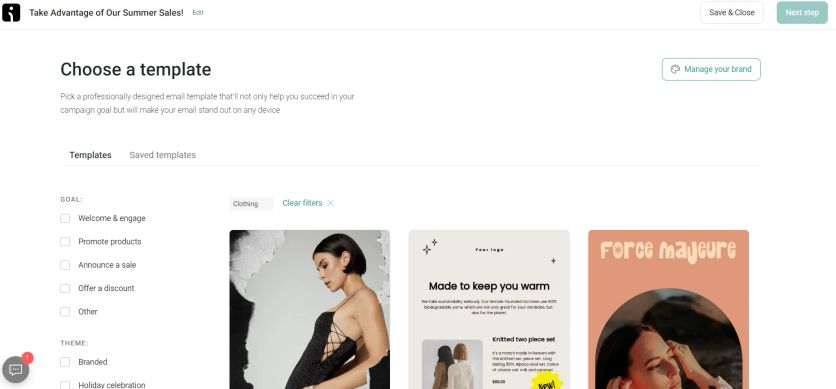
The drag-and-drop builder offers around 350 mobile-first templates, and a product picker pulls live Magento products – images, prices, and links – straight into campaigns without leaving the editor. Conditional content blocks show different content on mobile versus desktop, and AI text assistance helps with copy.
Segmentation and Targeting
Segments build on purchase history, browsing behavior, lifecycle stage, campaign engagement, and custom properties. One-time segments serve individual campaigns, while dynamic segments update automatically as customer data changes, so targeting stays accurate without manual maintenance.
Email Marketing Automations
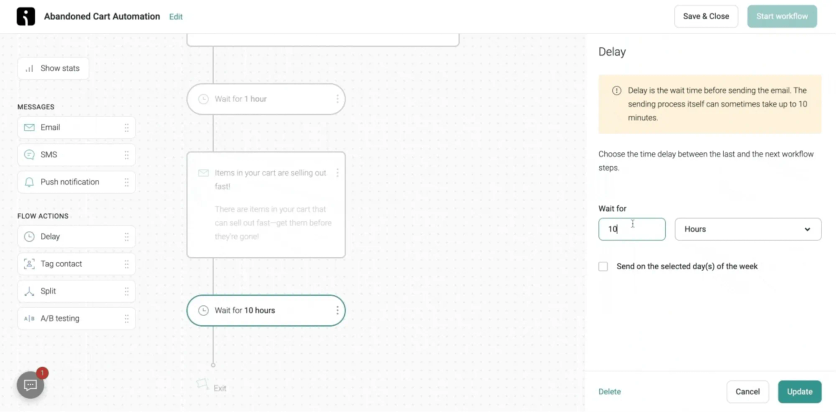
Pre-built workflows cover abandoned cart, welcome series, post-purchase, browse abandonment, and win-back campaigns, all triggered by Magento store events, with branching logic and A/B splits in the same editor. Email and SMS run inside one automation sequence too: a cart abandonment flow can send an email first, then follow up with an SMS if there’s no conversion from one canvas, without managing separate tools.
Additional Features
On-site signup forms, popups, and landing pages grow your list, with targeting rules based on exit intent, page URL, and device type, plus native discount-code delivery at signup. Campaign and automation reports include revenue attribution showing which messages drove purchases, and a sales dashboard tracks email- and SMS-driven revenue over time.
Omnisend Customer Support
24/7 email and live chat support operates on all plans, with average response times around 4 minutes. Accounts spending $400/mo or more get a dedicated Account Expert.
Omnisend Pricing
Omnisend’s free plan includes 250 contacts, 500 emails per month, and 60 SMS, with automation features accessible from day one. Paid plans start at $16/month for 500 contacts and scale with list size. Stores migrating from Klaviyo can expect comparable functionality at up to 35% lower cost, with free migration completed in about 5 days.
Omnisend Pros and Cons
Pros:
- Native Magento integration with automatic data sync, no third-party connectors needed
- Email and SMS managed in a single platform and automation canvas
- Up to 35% less than Klaviyo, with free migration in about 5 days
- Pre-built e-commerce automation workflows ready to activate immediately
- Generous free plan with automation included
- G2 rating 4.6/5; Email Vendor Selection score 86/100
Cons:
- Less suited for non-ecommerce use cases like SaaS, B2B, or services
- SMS costs are billed separately and vary by country
- Reporting depth is limited on lower-tier plans
- No built-in CRM for managing sales pipelines
When to Choose Omnisend
Choose Omnisend if you primarily sell online and want reliable, revenue-driving email and SMS at a predictable cost – it excels at driving repeat purchases and recovering lost revenue through ecommerce automation tied to your Magento data. Maestra covers a broader surface, including loyalty programs, in-store interactions, and a real-time CDP that Omnisend doesn’t offer, so for complex programs across online and offline touchpoints, Maestra goes further.
3. Brevo – Best Value Email Marketing for Magento / Adobe Commerce
Brevo connects to Magento via a native plugin available in the Magento Marketplace. It syncs customer data, orders, product catalogs, and behavioral events in real time – no manual imports, no middleware. It’s best for Magento merchants wanting enterprise-grade automation at SMB pricing, and multi-store or multilingual setups across EU markets.
Brevo Features
Email Editor
The drag-and-drop builder covers both marketing campaigns and transactional emails (order confirmations, shipping updates) via Brevo SMTP. 40+ templates and a brand library ensure visual consistency. Transactional templates can be personalized with Magento data attributes.
Segmentation and Targeting
Segments update dynamically based on Magento events: purchases, cart abandonment, product views, and customer group (B2B vs. B2C, retail vs. wholesale). Multi-store setups can separate and target audiences across multiple store views from a single Brevo account.
Email Marketing Automations
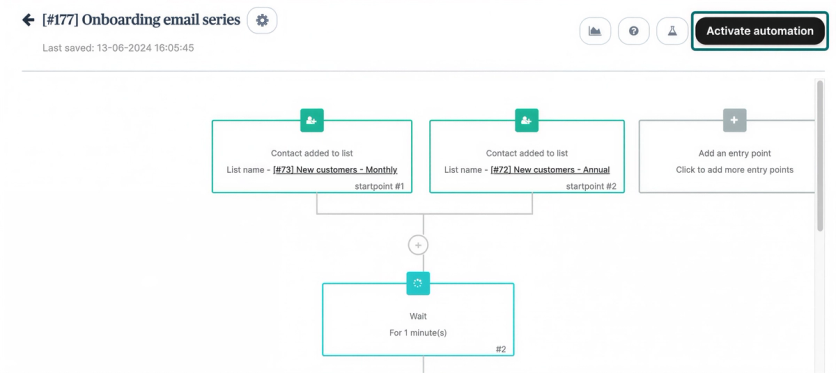
50+ pre-built workflows cover the full Magento lifecycle: abandoned cart recovery, order confirmations, post-purchase review requests, loyalty invitations, win-back, and cross-sell/upsell sequences. Email and SMS steps run within a single canvas.
Brevo Customer Support
Email support on all plans; live chat from paid tiers. EU data centers for GDPR compliance. Enterprise accounts get a dedicated customer success manager.
Brevo Pricing
Free plan (up to 9,000 emails/month). Paid plans from $9/month. Substantially more affordable than Klaviyo or ActiveCampaign at equivalent contact volumes.
Brevo Pros and Cons
Pros:
- Native Magento plugin with real-time data sync
- Multi-store and multilingual support
- Email, SMS, WhatsApp from one platform
- GDPR-compliant, EU data centers
Cons:
- Some advanced B2B commerce features require custom setup
- Lower brand recognition in the Magento ecosystem vs. Klaviyo
When to Choose Brevo
Choose Brevo if you’re a Magento merchant wanting to consolidate email, SMS, and transactional messaging in one platform at a competitive price. Particularly strong for multi-store European merchants needing built-in GDPR compliance.
4. Klaviyo – Best for Data-Driven Email and SMS
Klaviyo specializes in email marketing for ecommerce businesses, with deep integrations for Magento and most major ecommerce platforms. By Klaviyo’s own numbers, Magento brands on the platform achieve more than a 100x average ROI.
Klaviyo Features
Email Editor
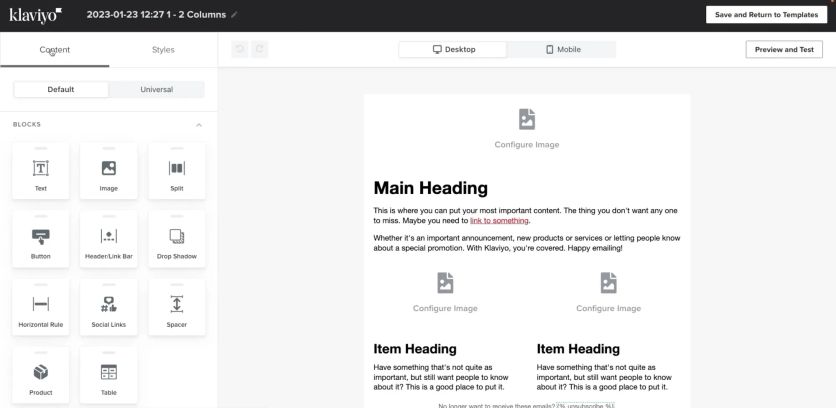
The drag-and-drop builder ships with 160+ customizable templates designed around CTA placement and email length. Content blocks can modify templates or build custom emails from scratch, including recommended product feeds (manual or dynamic) and product reviews. A personalization button inserts customer names, locations, and other profile data. Dynamic content can show or hide based on profile data and events in both emails and forms.
Segmentation and Targeting
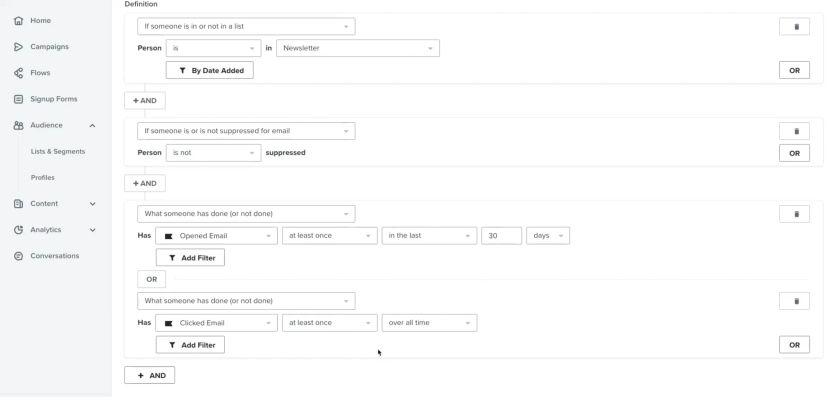
Contacts organize into multiple lists with unlimited conditions per segment. You can filter active versus suppressed contacts and tag manually or automatically. Segments AI translates plain-language descriptions into built segments within seconds. Predictive analytics generates future predictions: next order date, customer lifetime value, spending potential, churn risk, and predictive demographics.
Email Marketing Automations
The flow library includes 60+ pre-built automations: abandoned cart reminders, welcome emails, birthday messages, replenishment reminders, and sunset flows for inactive subscribers. Pre-built abandoned cart flows come with 4-hour delays and dynamic content blocks showing product images, titles, quantities, and prices.
Additional Features
AI tools generate email text and subject lines, and predictive AI forecasts next order dates. The platform offers 350+ integrations with ecommerce platforms, shipping solutions, loyalty programs, and helpdesk tools. Form builders include 70 templates with A/B testing and conversion features like review displays and spin-the-wheel incentives. Deliverability tooling enforces SPF, DKIM, and DMARC through branded domain authentication. There is no dedicated landing page builder.
Klaviyo Customer Support
Email and live chat support respond within a couple of hours. Free plan users get 60 days of support access.
Klaviyo Pricing
Free plan available (up to 250 contacts, 500 monthly sends). Email plans from $20/mo (500 contacts, 5,000 emails). Email + SMS from $35/mo with 1,250 SMS credits. Pricing scales with active profiles: about $100/mo at 5,000 contacts and $150/mo at 10,000.
Klaviyo Pros and Cons
Pros:
- AI tools predict customer behavior and generate content
- 350+ integrations with ecommerce platforms and marketing tools
- Dynamic product feeds personalize email content per customer
- Built-in CRM centralizes customer data
- Integrated SMS runs from the same platform
Cons:
- No dedicated landing page builder
- Free plan support limited to 60 days
When to Choose Klaviyo
Choose Klaviyo if email and SMS are your core channels and you want deep segmentation, predictive analytics, and one of the largest integration catalogs in the category, on a platform that scales from a free plan to enterprise. Budget for costs that climb as your contact count grows.
5. Dotdigital – Best for Enterprise Magento Data Sync
Dotdigital is a cross-channel marketing automation platform with deep Adobe Commerce and Magento integration that syncs historic ecommerce data automatically on connection. More than 4,000 brands in 150 countries use the platform.
Dotdigital Features
Email Editor
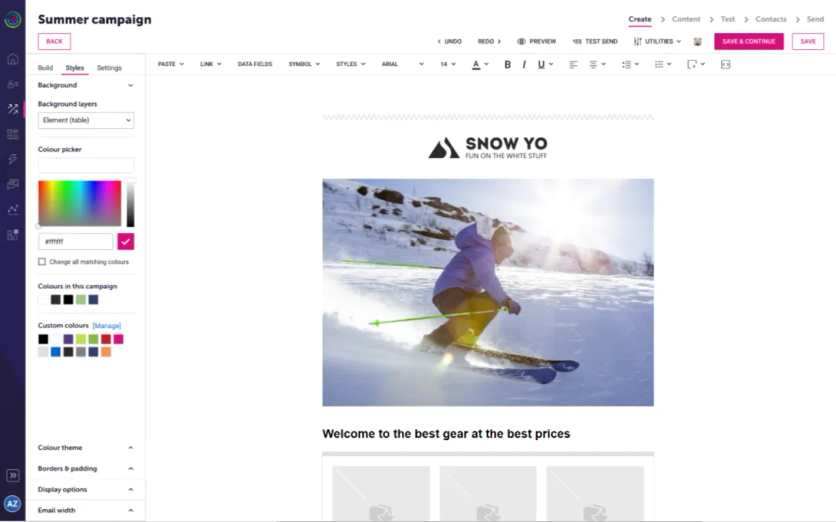
EasyEditor builds campaigns without code. The toolbar adapts to selected content – text formatting for text blocks, image tools for visuals. Content blocks include text, images, buttons, columns, and spacers. A built-in image editor modifies visuals in place, and AI translation converts campaign content into multiple languages at full-campaign or block level.
Segmentation and Targeting
The segment builder supports up to 1,000 segments with 30 rules each, updating on contact behavior, data fields, list membership, and purchase history. RFM analysis sorts customers into personas like Champions and Loyal, while eRFM adds engagement data to track purchase intent. Geographic queries create location-based segments with map views. The Segment Agent builds audiences from plain-English descriptions.
Email Marketing Automations
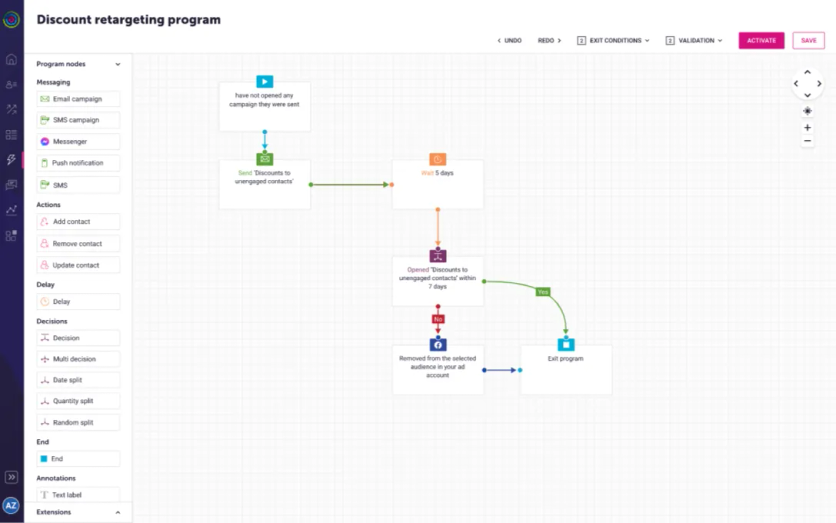
The program builder constructs workflows from nodes for actions, delays, decisions, and endpoints. Pre-built templates cover welcome series, abandoned carts, browse triggers, birthday reminders, post-purchase follow-ups, and win-back campaigns. Programs support cross-channel sequences across email, SMS, push, and chat.
Additional Features
WinstonAI generates subject lines and email copy in the editor, and the Content Agent refines messaging in brand voice. Dotdigital supports transactional email for Magento stores with SMTP delivery.
Dotdigital Customer Support
Phone support operates 24/7 with roughly 20-second average response times; live chat answers within a minute. Dedicated Customer Success Managers depend on package level.
Dotdigital Pricing
Dotdigital doesn’t publish tiered pricing. Plans are quote-based and start at around $500/month, with the final cost depending on your contact volume, the channels you enable (email, SMS, push, chat), and any add-on modules. Expect a custom quote after a sales conversation.
Dotdigital Pros and Cons
Pros:
- Deep Magento integration syncs all historic data automatically
- AI agents build segments and content from conversational prompts
- 24/7 support with sub-minute response times
Cons:
- Steep learning curve
- Higher starting price than entry-level platforms
When to Choose Dotdigital
Choose Dotdigital if you’re an enterprise Adobe Commerce or Magento brand that wants historic store data synced automatically and 24/7 support with sub-minute response. Be ready for a learning curve and a $500/mo starting price.
6. ActiveCampaign – Best for Automation Depth
ActiveCampaign connects to Magento through a plugin in the Magento Marketplace. The one-way sync adds contacts to lists when they register or update profiles, and carries contact data, customer records, order information, and abandoned cart data without manual work.
ActiveCampaign Features
Email Editor
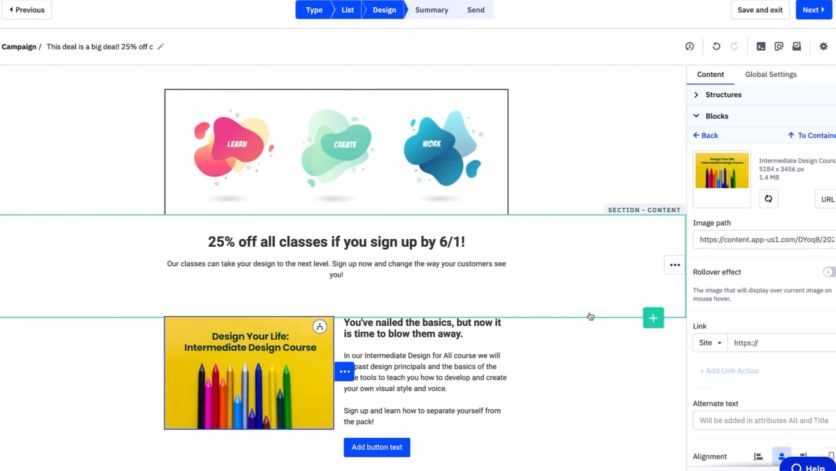
The Email Designer builds on Structures and Blocks. Structures are drag-and-drop containers holding 1–4 content areas; Blocks cover image, text, button, spacer, video, social, banner, timer, menu, and HTML. The platform provides 250+ pre-designed templates, Brand Kit colors in the color picker, and mobile-specific formatting for headers, buttons, and margins.
Segmentation and Targeting
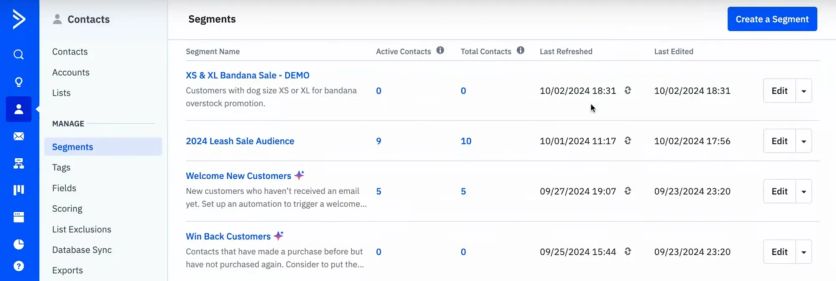
The segment builder creates dynamic audiences from behavioral data, demographics, and custom fields. AI-Suggested Segments translate plain-language descriptions into built segments. The platform tracks website visits, email engagement, purchase history, and form submissions for condition-based targeting, and segments update as contacts act.
Email Marketing Automations
ActiveCampaign offers 950+ prebuilt automation recipes with conditional-branching logic. Triggers include form submissions, purchases, link clicks, birthdays, and lead-score thresholds. Automations support if/then statements, delays, and goal tracking across the whole lifecycle.
Additional Features
The CRM add-on ties deal management to email data, enabling automated pipeline progression and 1:1 sales emails. AI scores deals and leads to flag high-conversion opportunities. The platform supports SMS, landing pages, site tracking, and 1,000+ native integrations.
ActiveCampaign Customer Support
Chat operates Monday – Friday 3am–11pm CT and Sunday 6pm–11pm CT. Email support and a Help Center provide self-service articles in six languages. Professional plans include one-on-one training.
ActiveCampaign Pricing
From $19/mo (1,000 contacts, Starter). Plus from $59/mo, Professional from $99/mo, Enterprise from $179/mo (monthly billing; annual billing runs lower). The CRM Pipelines add-on costs $68/mo; Sales Engagement runs $111/mo.
ActiveCampaign Pros and Cons
Pros:
- Deep automation with 950+ recipes and conditional logic
- AI lead scoring and predictive analytics
- 1,000+ native integrations for complex stacks
Cons:
- Steep learning curve for beginners
- Pricing climbs quickly as contacts grow
- Charges for unsubscribed and bounced contacts
When to Choose ActiveCampaign
Choose ActiveCampaign if automation depth is your priority and you want conditional-branching workflows, AI lead scoring, and over a thousand integrations. Keep an eye on how pricing scales as your contacts and add-ons grow.
7. Mailchimp – Best for Beginners
Mailchimp has operated for over 22 years and sends hundreds of millions of emails daily. A free plugin handles the Magento integration, syncing customers and order information for campaigns built on purchase data.
Mailchimp Features
Email Editor
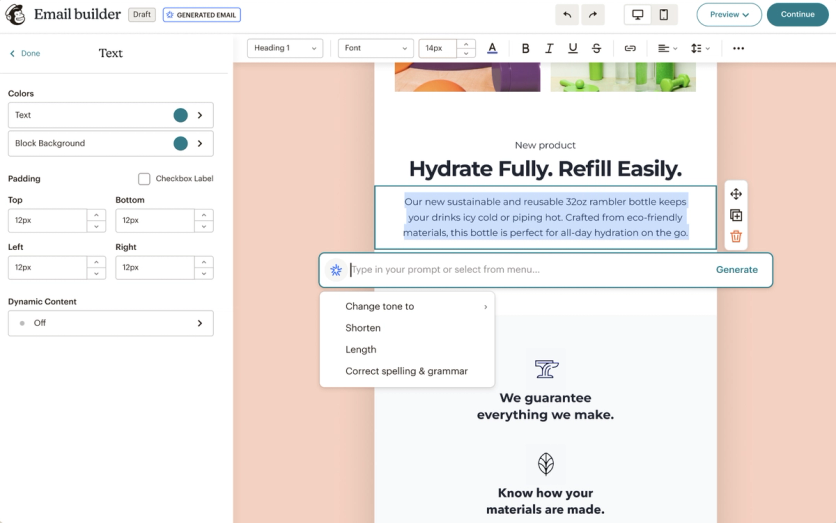
Two builders exist: Legacy and New. Both offer drag-and-drop content blocks for images, columns, social buttons, and ecommerce elements like product recommendations and surveys. The platform offers 130+ pre-built templates; Standard subscribers and above can import custom HTML.
Segmentation and Targeting
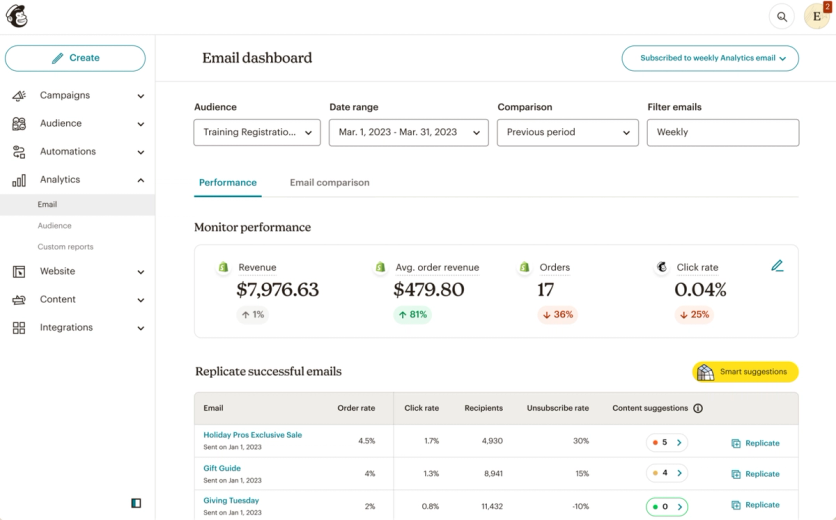
Segments combine up to 10 conditions using contact data, purchase behavior, email engagement, and website activity. Tags label audiences for organization. Predictive analytics estimates future buying behavior and customer lifetime value.
Email Marketing Automations
Automation flows build multi-step workflows with triggers, actions, and conditional splits. Pre-built templates cover welcome series, abandoned carts, and post-purchase sequences. Free and Pay-as-you-go plans have no automation.
Additional Features
All plans include unlimited landing pages, even Free. The platform has 350+ integrations, AI content generation, and Facebook/Instagram ad creation. A Square partnership enables direct product sales from landing pages.
Mailchimp Customer Support
Free plans get email support for the first 30 days only. Essentials and Standard include 24/7 email and chat. Premium adds phone support during business hours.
Mailchimp Pricing
Free plan available (250 contacts, 500 monthly sends). Essentials from $13/mo (500 contacts). Standard from $20/mo. Premium from $350/mo (10,000 contacts). Mailchimp charges for unsubscribed contacts.
Mailchimp Pros and Cons
Pros:
- Unlimited landing pages on all tiers
- 350+ third-party integrations
- AI-powered predictive analytics
Cons:
- Charges for unsubscribed and duplicate contacts
- Free plan very limited after repeated reductions
- No automation on the free tier
When to Choose Mailchimp
Choose Mailchimp if you’re newer to email marketing and want a familiar editor, unlimited landing pages, and a large template and integration library. Its contact-counting and lack of automation on the free tier make it less economical as you scale.
8. Drip – Best for Revenue Attribution
Drip specializes in ecommerce email marketing with native integrations for Shopify, WooCommerce, BigCommerce, and Magento. The platform centers on behavior-based automation and revenue attribution for online stores.
Drip Features
Email Editor
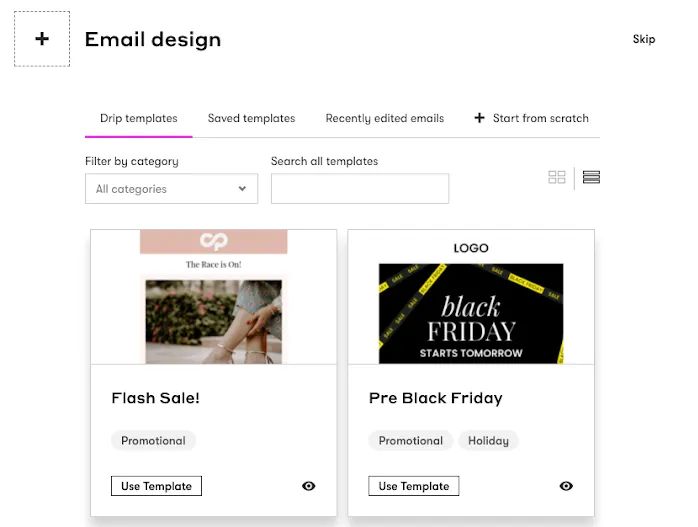
The drag-and-drop interface arranges content blocks without code. Drip offers 50+ themed templates for different use cases and industries, plus reusable content blocks like headers and footers. Customization covers colors, fonts, spacing, and content.
Segmentation and Targeting
Tag-based segmentation builds audiences around customer actions, purchases, browsing patterns, and engagement levels. Dynamic segments update as behavior changes. Drip’s own Marketing Automation Report found merchants using segments earn five times more revenue than merchants who don’t.
Email Marketing Automations
The visual workflow builder provides 50+ pre-built templates, including welcome series, cart abandonment, post-purchase sequences, and win-back campaigns. Triggers fire on link clicks, page views, tag changes, and purchase events.
Additional Features
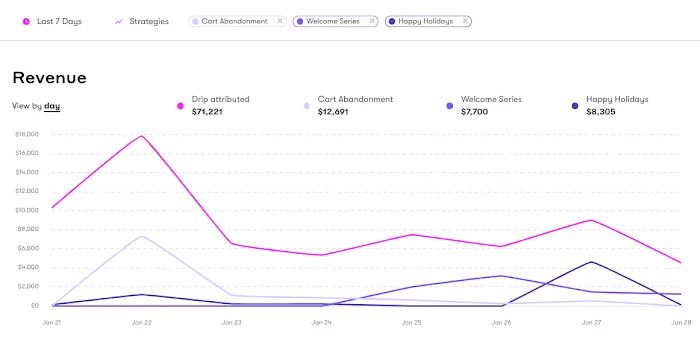
Revenue attribution connects specific emails and workflows to the orders they generate. Onsite campaigns include pop-ups and forms with targeting rules. The platform supports 150+ integrations.
Drip Customer Support
Email support operates Monday – Friday, 9am–5pm CT. Live chat requires plans of $99/mo or higher.
Drip Pricing
From $39/mo (2,500 contacts); $89/mo at 5,000 contacts, $154/mo at 10,000. A 14-day free trial requires no credit card. Note that Drip doesn’t show pricing to all visitors, so these figures come from third-party pricing overviews – check Drip’s website for current rates.
Drip Pros and Cons
Pros:
- Behavior-based automation with 50+ workflow templates
- Dynamic segmentation updates immediately
- Revenue attribution ties emails to sales
Cons:
- Email support on weekdays only
- Live chat restricted to higher tiers
- Steeper learning curve for advanced features
When to Choose Drip
Choose Drip if revenue attribution matters and you want to tie every email and workflow to the orders it drives, backed by behavior-based automation. The limits are weekday-only email support and live chat gated behind higher-tier plans.
Choosing the Right Email Marketing Tool for Magento
- Match features to your scale. Budget-conscious stores can start at $9/mo with Moosend or Brevo, while enterprise brands get more from advanced CDP capabilities and dedicated support from Maestra or Dotdigital.
- Check the depth of the Magento integration. Platforms with native connections sync customer data, order history, and product catalogs automatically – the foundation for segmentation without manual exports.
- Weigh automation against your team’s capacity. AI-generated segments, predictive analytics, and pre-built workflows save hours, but only if your team will actually use them.
- Test before committing. Most platforms offer free trials or free plans. Hands-on testing shows which interface and workflow fit your team’s real needs.
Maestra and Dotdigital lead for enterprise Magento brands that need dedicated support and CDP-grade segmentation, while budget-conscious stores find solid options from $9/mo. Klaviyo excels at predictive analytics, Omnisend provides exceptional free-plan value, and ActiveCampaign brings the deepest automation library with 950+ recipes. Test your shortlist through free trials before committing – hands-on experience shows which platform fits your team faster than any comparison table.
FAQs
- Email marketing delivers an average return of $36 for every $1 spent – higher than any other channel, and closer to $45 in retail and ecommerce. On top of that, 50% of consumers made a purchase directly from an email in the past year, which makes email one of the most cost-effective channels available to a Magento store.
- Moosend and Brevo offer the most affordable entry points at $9 per month. Omnisend and Brevo also provide capable free plans that include automation and segmentation, which makes them strong choices for startups and small stores.
- If your customer data lives in Magento rather than in marketing lists, a native integration saves real work: platforms like Maestra, Klaviyo, and Dotdigital sync customers, orders, and catalogs automatically, eliminate manual exports, and keep segments updated in real time.
- Enterprise platforms like Maestra and Dotdigital provide dedicated Customer Success Managers, real-time customer data platforms (CDPs), advanced segmentation with unlimited conditions, and fast support. Budget options cover core email features but typically limit automation complexity, segmentation conditions, and support availability.
- It’s technically possible, but most modern platforms are designed as all-in-one solutions to avoid data fragmentation and sync issues. A single platform that integrates directly with Magento keeps customer data consistent, eliminates duplicate work, and provides unified reporting.