
10 Best Emarsys Alternatives in 2026 (Compared & Ranked)

If you’re reading this, chances are Emarsys isn’t quite working for you anymore. Maybe the SAP integrations are draining resources. Maybe onboarding felt cookie-cutter. Or maybe features you were promised during sales never arrived.
You’re not alone. Since the SAP acquisition – made official in February 2026, when Emarsys was renamed SAP Engagement Cloud – the platform has been shifting toward enterprise SAP customers, leaving everyone else to navigate friction and limitations.
Below, we break down the 10 best Emarsys alternatives – whether you need easier implementation, more transparent pricing, or a platform that doesn’t depend on SAP infrastructure.
Let’s get into it.
Quick Verdict on the Best Emarsys Alternatives
The best Emarsys alternatives in 2026 are Maestra, Braze, Salesforce Marketing Cloud, Adobe Experience Cloud, Bloomreach, Klaviyo, Iterable, MoEngage, Dotdigital, and Omnisend. For mid-market and enterprise e-commerce brands, Maestra is the strongest all-around pick: a real-time CDP, email, SMS, push, loyalty, and personalization in one platform – without SAP lock-in.
Best for mobile-first engagement: Braze – real-time push, in-app, and messaging for app-driven brands
Best for Salesforce-native teams: Salesforce Marketing Cloud – cross-channel journeys integrated with Salesforce CRM
Best for Adobe ecosystem: Adobe Experience Cloud – enterprise marketing, analytics, and content for Adobe teams
Best for e-commerce search + engagement: Bloomreach – product discovery and personalization with marketing automation
Best for self-serve email & SMS: Klaviyo – quick Shopify integration without Emarsys’s enterprise onboarding
Best for flexible cross-channel campaigns: Iterable – modern architecture with strong mobile and API capabilities
Best for insights-led mobile engagement: MoEngage – AI-driven analytics and campaigns for mobile-first brands
Best for mid-market email automation: Dotdigital – email and SMS with e-commerce integrations at mid-market pricing
Best for budget-friendly Shopify marketing: Omnisend – email, SMS, and push with a generous free tier
Content:
Common Emarsys Pain Points (and Quick Fixes)
Emarsys is robust, but it isn’t perfect – far from it. For all its capabilities, many businesses eventually bump into frustrations that have them eyeing alternatives. We analyzed reviews across G2, Capterra, TrustRadius, and Gartner Peer Insights to surface the most common frustrations with Emarsys.
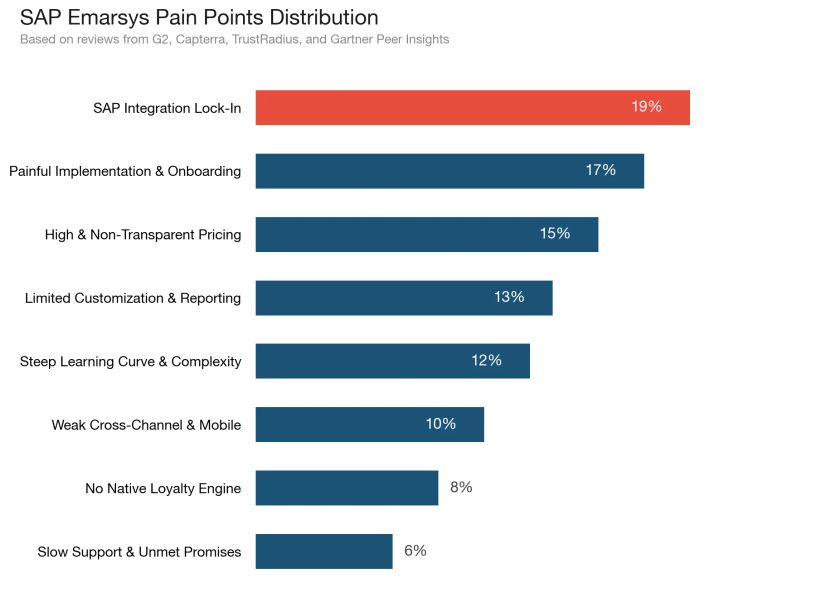
Before you start evaluating alternatives, it’s worth exploring a few quick fixes that might resolve your biggest pain points with Emarsys – sometimes a platform switch isn’t necessary if the right adjustments are in place.
| Pain Point | Description | Possible Solutions |
|---|---|---|
| SAP Integration Lock-In | Heavy dependency on SAP ecosystem since acquisition; friction for non-SAP platforms; product roadmap increasingly SAP-centric | Evaluate whether SAP Commerce is on your roadmap |
| Painful Implementation & Onboarding | Implementation teams lack expertise; same agenda for every customer; external consulting often required; product catalog requires specific CSV format | Hire an experienced Emarsys implementation partner |
| High & Non-Transparent Pricing | Enterprise-level pricing not suited for mid-market; promised features not delivered for contracted amount; hidden implementation and consulting costs | Get feature commitments in writing before signing |
| Limited Customization & Reporting | UI sometimes frustrating; reporting only fair; not all data exports to BigQuery; no customizable attribution models | Build custom reports using exported data in a BI tool |
| Steep Learning Curve & Complexity | Steep power-user learning curve; overwhelming options; significant training investment required; non-technical marketers struggle | Invest in Emarsys Academy certifications |
| Weak Cross-Channel & Mobile | Campaign execution across channels remains cumbersome; limited on-site personalization; advanced customization requires developers | Use Web Extend for basic on-site personalization |
| Loyalty Costs Extra | Native loyalty is a paid add-on rather than part of the core platform | Budget for the Emarsys Loyalty add-on or integrate a third-party tool |
| Slow Support & Unmet Promises | Inconsistent support quality; promises during sales not delivered; resolution times for complex issues lengthy | Document all pre-sale promises and include in contract |
Why (or When) to Consider Emarsys Alternatives
Emarsys is a powerful choice for businesses with large catalogs and databases, and for many it does the job. But as your brand evolves, you might crave more flexibility, a better cost-value balance, or capabilities Emarsys lacks. Maybe you’re a rapidly growing e-commerce startup that’s outgrown entry-level tools but find Emarsys too pricey. Or perhaps you’re an enterprise finding that real-time in-app engagement or more modern personalization features are missing.
The reality is that marketing technology hasn’t stood still – new platforms are offering simpler setup, deeper web and in-app personalization, additional channels, and steadier support than what you might get with Emarsys.
As brands focus on creating truly connected customer journeys, adaptability and value for money become essential. If Emarsys’s costs or constraints are holding you back, it might be time to explore an alternative that fits your needs better.
The Best Emarsys Alternatives at a Glance
| Tool | Best For | Key Features | Price Range | G2 Rating |
|---|---|---|---|---|
| Maestra | Full-funnel marketing for ambitious e-commerce brands | • Real-time CDP for behavior-driven segmentation • Hyper-personalized omnichannel flows • Built-in loyalty program and promotions engine • Real-time site personalization • Dedicated Forward Deployed Marketer | From $2,000/mo (CDP + unlimited email); modular – pay only for the channels you use and only for active profiles | 4.8/5 |
| Braze | Mobile-centric engagement for digital product brands | • In-app messaging and push notifications • Real-time event triggering • Flexible API & data integrations • Personalization with Liquid templating • Comprehensive journey orchestration (Canvas) | Custom pricing (usage-based) | 4.5/5 |
| Salesforce Marketing Cloud | Enterprise CRM-integrated marketing | • Email, SMS, social, and ads in one suite • Journey Builder for multi-step campaigns • Deep Salesforce CRM and Commerce integration • Einstein AI for send-time and product recommendations • Extensive partner ecosystem | Custom pricing (enterprise) | 4.0/5 |
| Adobe Experience Cloud (Campaign) | Data-rich campaigns for large enterprises | • Cross-channel campaign management (email, SMS, direct mail) • Integration with Adobe Analytics & Experience Platform • Advanced segmentation and audience management • Personalization with Adobe Target integration • Robust reporting and attribution | Custom pricing (enterprise) | 4.0/5 |
| Bloomreach (Exponea) | AI-driven personalization for retail | • Unified CDP with real-time single customer view • AI recommendations and predictions • Multi-channel automation flows • Built-in web personalization tools • Strong e-commerce data integration | Custom pricing | 4.6/5 |
| Klaviyo | Email/SMS marketing for SMB and DTC e-commerce | • Pre-built e-commerce automations (cart abandonment, etc.) • Deep Shopify & platform integrations • Powerful segmentation by purchase behavior • Email and SMS in one platform • Easy-to-use drag-and-drop editor | Free plan; paid from ~$20/month (scales with contacts) | 4.6/5 |
| Iterable | Cross-channel campaigns for growth-focused teams | • Drag-and-drop journey builder • Email, push, SMS, and in-app messaging • Flexible data feeds and APIs for personalization • Experimentation and A/B testing tools • Dynamic segmentation updates in real-time | Custom pricing (usage-based; typically mid five figures annually) | 4.4/5 |
| MoEngage | Multi-channel engagement with a mobile focus | • Strong mobile push and in-app messaging • Email, SMS, and web push capabilities • AI-driven segmentation and predictions • Journey orchestration with advanced triggers • Analytics for user behavior and funnels | Custom pricing | 4.5/5 |
| Dotdigital | Simplified automation for mid-market commerce | • Email marketing with drag-and-drop automation • SMS and WhatsApp channels • Built-in e-commerce connectors (Magento, etc.) • RFM segmentation and product recommendations • Lead scoring and web behavior tracking | From ~$150/month (no free plan) | 4.4/5 |
| Omnisend | Omnichannel marketing for small e-commerce brands | • Email & SMS campaigns with templates • Ready-made workflows for cart recovery, welcome series • Pop-ups and forms for captureIntegration with Shopify, BigCommerce, etc. • Performance dashboards and metrics | Free plan available; Pro from $59/month | 4.6/5 |
Tool #1: Maestra – Best for Omnichannel E-Commerce
Maestra is an all-in-one omnichannel marketing platform built for e-commerce brands ready to leave the patchwork of point solutions behind.
With unified customer data, omnichannel automation flows, advanced segmentation, real-time personalization, and a built-in loyalty engine, Maestra doesn’t just help you keep up – it helps you lead. It’s designed to make complex marketing feel simple, so you can focus on strategy rather than stitching tools together.
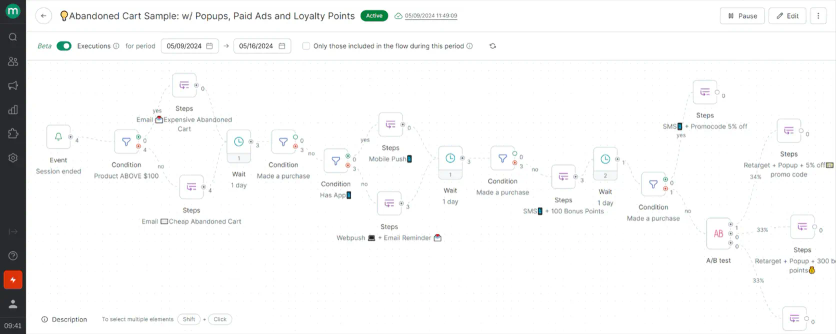
Maestra’s flow example: abandoned card flow with emails, mobile and web pushes, pop-ups, paid ads and loyalty points
In practice, Maestra enables you to connect every customer touchpoint – from email and SMS to on-site content and push notifications – into one seamless journey. The result is a platform that offers the breadth of capabilities of an enterprise suite, but with the usability and agility that modern marketing teams crave.
Key Features
- Real-Time CDP & Segmentation: Maestra’s Customer Data Platform updates profiles and segments instantly with every click, purchase, or view. Build precise segments (e.g., “VIPs in NYC browsing shoes last 24 hours”) and target them immediately. AI powers dynamic segmentation and predictive scores.
- Omnichannel Journey Orchestration: Design real-time, behavior-driven customer journeys across email, SMS, push, and web using a drag-and-drop builder. Workflows adapt dynamically (e.g., shifting a customer to a post-purchase flow) and ensure coordinated, relevant messaging across channels.
- Personalization & Recommendations: Maestra’s algorithms deliver tailored product recommendations, dynamic content (images, offers, subject lines), and optimized send times.
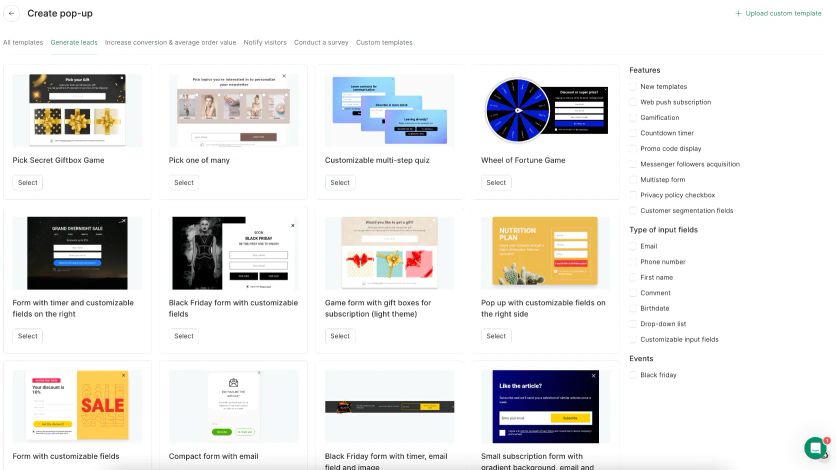
Maestra’s pop-up creation page
- Loyalty & Promotions Engine: Maestra’s built-in loyalty module supports point-based programs, VIP tiers, and referrals. Automate loyalty rewards or unique coupons tied to campaigns. Manage promotions like coupons and discounts natively.
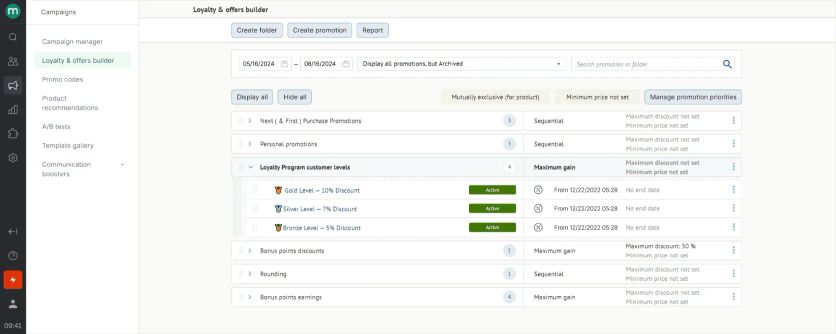
Maestra’s promotions rule engine
- Dedicated Forward Deployed Marketer: Every client gets a Forward Deployed Marketer (a marketer who works as part of your team) to assist with onboarding, data migration, campaign setup, and ongoing strategy. This high-touch support acts like an expert marketing ops extension for your team.
Strengths
Maestra’s biggest strength? Making every customer interaction feel personal. It’s not about just hitting “send” on campaigns – it’s about hitting the mark with each customer.
With drag-and-drop simplicity and hyper-focused, nested segmentation, Maestra gives you the toolkit to craft campaigns that don’t just broadcast, but truly resonate and convert.
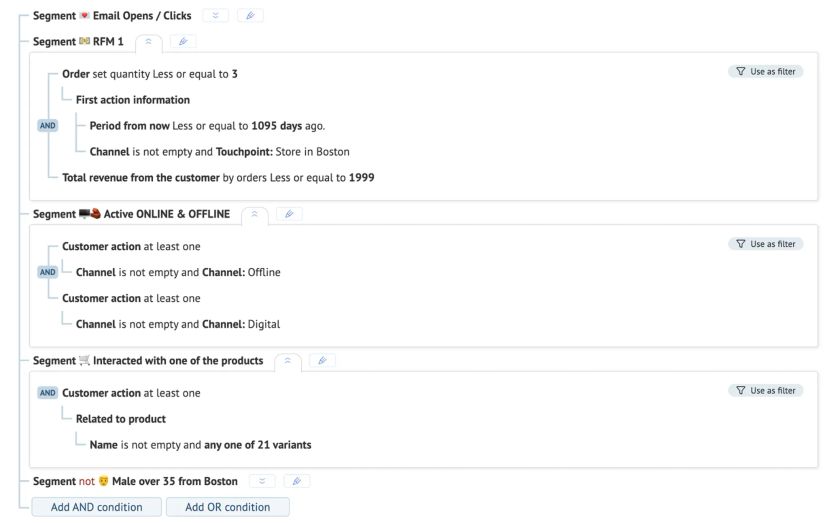
Nested segmentation in Maestra
The platform excels at real-time triggers and dynamic content: for instance, you can set up a flow to send a price-drop email the moment an item in a customer’s wishlist goes on sale, or trigger a push notification if a shopper’s size is back in stock. Every message is timely and contextually relevant.
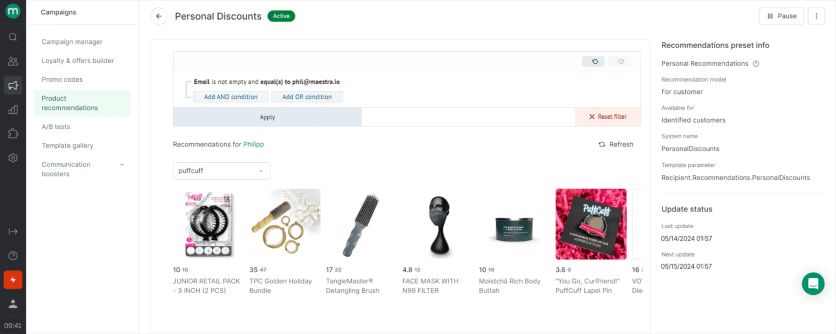
Personal product recommendations in Maestra
The devil is in the details, and that’s where Maestra shines. Real-time product events like “low stock in your size” or “price dropped on an item you viewed” ensure your outreach hits when the iron is hot. The dynamic email composer is another highlight – it keeps emails personalized and visually polished without running into clunky code or the dreaded Gmail clipping, even when you pack in content.
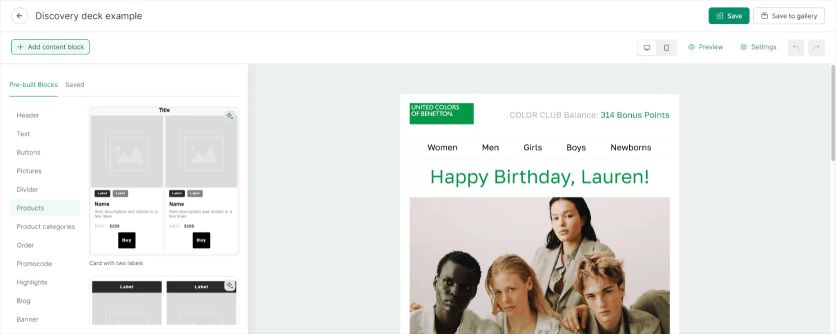
Maestra’s visual email composer
Weaknesses
When it comes to drawbacks, Maestra doesn’t give you much to gripe about in functionality. Its pricing does start at $2,000/month, which means it’s aimed at rapidly scaling, mid-market, and enterprise brands more than micro-businesses. There’s no free plan, so smaller teams on tight budgets might find this a barrier.
However, the cost reflects the value – it’s not just software; it’s effectively a full-service solution. Maestra assigns each client a Dedicated Forward Deployed Marketer to handle onboarding, migrations, and ongoing strategy, so the investment feels more like adding a partner than just a tool.
Another area to note: while Maestra includes robust tools to incentivize reviews and put social proof to work, it doesn’t have native modules for curating and displaying user-generated content like a dedicated reviews platform would. You won’t find an Instagram gallery widget or built-in UGC showcase here. That said, Maestra’s focus is on collecting and using feedback (via loyalty points for reviews, etc.) rather than publishing it – you can always pipe reviews into your site via another app if needed.
In short, any feature gaps are more than covered by integrations and Maestra’s relentless focus on driving revenue.
Compared to Emarsys
Emarsys and Maestra both aim to be omnichannel marketing hubs, but their approach and feel are different.
Emarsys offers a lot of out-of-the-box campaigns and has a strong email heritage, but it can feel rigid and complex as you try to push into real-time and on-site personalization.
Maestra was built with real-time engagement at its core. That means no waiting on overnight data syncs or struggling with static segments – Maestra’s CDP updates customer data instantly, so your campaigns react in the moment.
While Emarsys is certainly powerful, it sometimes requires workarounds or additional tools for things like advanced web personalization or truly granular triggers. Maestra eliminates that patchwork. Everything – email, SMS, site content, push, loyalty rewards, even ad audiences – lives in one system that’s designed to play nicely together. The result: where Emarsys might have you piecing together a puzzle (and occasionally hitting its limits on mobile-app interactivity or real-time triggers), Maestra delivers a cohesive canvas for all your marketing.
Plus, Maestra’s hands-on support means you won’t be left hanging when you need help; many brands find Emarsys’s support a bit impersonal or slow by comparison.
In essence, if Emarsys is the toolkit you mold to your needs, Maestra is the ready-to-go engine tuned for e-commerce growth out of the gate.
When to Switch to Maestra from Emarsys
Your brand isn’t on SAP and the integration friction is wasting resources
Furniture Fair replaced five separate marketing tools (including their previous ESP) with Maestra and achieved 7,543% marketing ROI, doubled their email open rates to 45.8%, and attributed 11% of total revenue to email and SMS – all within 4 months. When your marketing platform works natively with your e-commerce stack instead of fighting it, the results compound.
You want loyalty built into your platform, not bolted on
Urban Armor Gear consolidated Klaviyo, Yotpo Loyalty, and Frosmo into Maestra – achieving a 64% cost reduction while gaining a native loyalty engine that feeds directly into email, SMS, and on-site personalization. Emarsys sells loyalty as a paid add-on and Klaviyo leans on third-party apps; Maestra’s loyalty is a native module inside the same platform.
Emarsys’s support isn’t delivering on what was promised during sales
G-Plans doubled their customer lifetime value after switching to Maestra from Klaviyo. A key factor: Maestra’s Forward Deployed Marketer team actively builds and optimizes campaigns alongside the brand – contrasting with the hands-off approach and unfulfilled promises multiple Emarsys users report.
Pricing
Maestra’s pricing starts at $2,000/month for the CDP plus unlimited email – the most common starting package, with the first 100,000 active profiles included. You pay only for active profiles, so dormant contacts are stored free. From there you add modules for the channels you need, like SMS, onsite personalization, loyalty, or mobile push. There are no setup or onboarding fees, and every plan comes with a dedicated Forward Deployed Marketer.
Tool #2: Braze – Best for Mobile-First Engagement
Braze is a customer engagement platform renowned for its mobile prowess. If your brand lives on smartphone screens – think mobile apps, in-app purchases, push notifications – Braze likely crossed your radar.
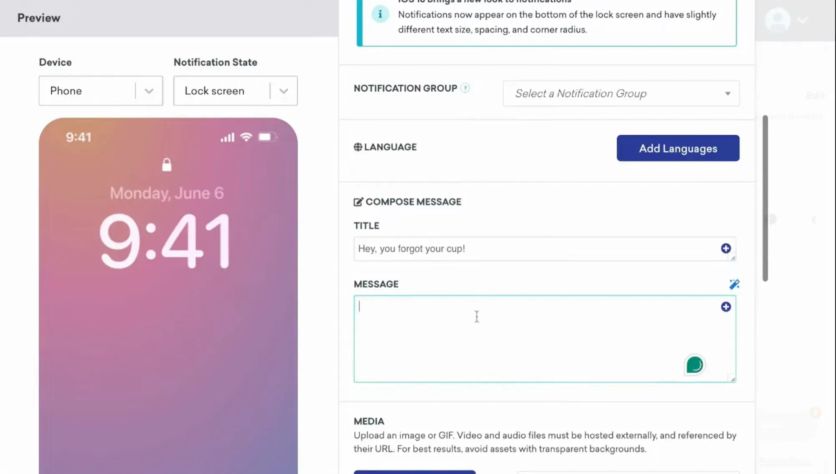
It enables companies to create real-time, cross-channel messaging experiences, with a particular strength in push notifications, in-app messages, and rich mobile content. That’s not to say Braze is only for apps; it also handles email, SMS, and even webhooks to other services. However, its DNA is very much mobile-first.
Digital product companies, like those in fintech, gaming, or on-demand services, often gravitate to Braze for its developer-friendly flexibility and the ability to respond to user actions in milliseconds. Braze’s campaign builder (called Canvas) lets you orchestrate multi-step journeys triggered by events (e.g., user completed a level in a game, or added an item to cart in an app) and segment users based on behaviors.
In summary, Braze is all about real-time, personalized messaging at scale, especially in the context of modern app-driven customer journeys.
Key Features
- In-app messaging and push notifications: Braze excels at reaching users on mobile devices with contextual messages (e.g., pop-ups inside your app, or push alerts to their phone). You can include rich media, buttons, and even in-app surveys.
- Real-time event triggering: The platform processes streams of user events (like app actions or website clicks) and can trigger campaigns instantly based on those. This event-based architecture is great for things like sending a message right when a user does a specific action.
- Journey orchestration (Canvas): A visual builder to create flows that might start on one channel and continue on another. For example, send a push notification, then an email backup, then schedule an in-app message if neither are engaged with.
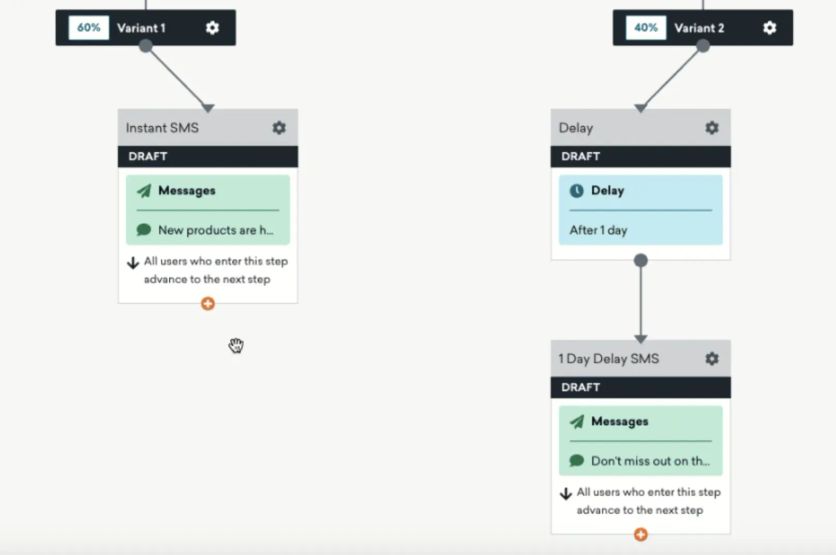
Braze’s Canvas tool
- Personalization and Liquid templating: Braze allows dynamic content in messages using Liquid, so you can insert user-specific details, product info, or recommendations on the fly.
- Data integration and API focus: There are robust APIs and SDKs to get your application data into Braze. It also integrates with data warehouses and streaming platforms, appealing to teams with significant engineering resources.
Strengths
Braze’s strength lies in its real-time, multi-channel muscle, particularly on mobile channels. Few platforms match how quickly Braze can react to user behaviors. For example, if a customer adds an item to their cart in your app but doesn’t check out, Braze can ping them with a push notification offer a minute later. It’s excellent for app retention campaigns, onboarding sequences, and any scenario where timing is critical.
The platform is also highly flexible: technical teams love the extensive APIs and customization – you’re rarely limited by the UI because you can code around things if needed.
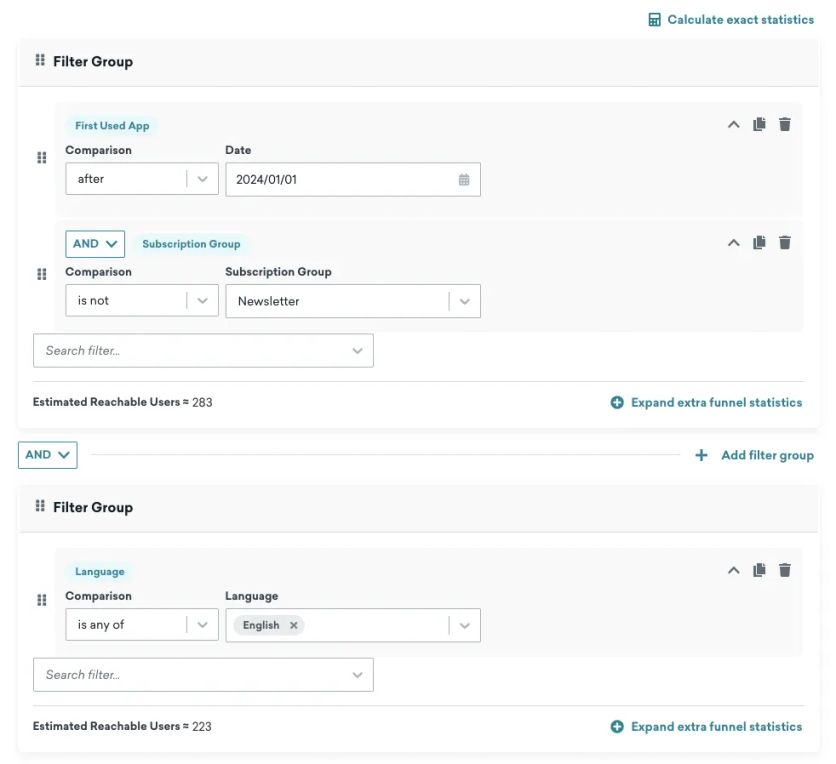
Creating a segment in Braze
In terms of analytics, Braze provides solid reports and even allows you to perform in-line experiments (A/B tests) within your messaging flows to optimize content and timing.
Weaknesses
On the flip side, all that power can demand more resources. Braze isn’t the simplest tool for a non-technical marketer to pick up and run with. Implementing Braze often requires developer time to instrument your app or website with the Braze SDK and events. If you’re mostly doing email marketing with some basic automation, Braze will be overkill (and likely overpriced) for your needs.
Its pricing is custom and based on monthly active users and message volumes – it tends to be expensive as you scale up, comparable to Emarsys in the higher tiers. Another weakness: Braze doesn’t include some out-of-the-box e-commerce niceties like product feed integrations or loyalty management; those you’d have to build or integrate yourself.
In short, Braze is a powerhouse for fast-moving, event-driven marketing, but you’ll want to have the team and budget to fully utilize it.
Compared to Emarsys
Braze and Emarsys often appeal to different crowds. Emarsys is beloved by e-commerce marketers for its out-of-the-box campaigns and deep email expertise, whereas Braze wins over product and growth teams that live in the app/mobile ecosystem.
Compared to Emarsys, Braze offers far more sophisticated in-app and push notification capabilities – Emarsys’ mobile engagement features are present but not nearly as advanced or real-time as Braze’s. If your priority is engaging users in-app or via instant triggers (like a FinTech sending fraud alerts or a media app nudging article reads), Braze has the edge.
However, Emarsys comes with many pre-built e-commerce integrations and templates; Braze would require more custom setup to achieve the same, say, complex email promotion based on purchase history. Emarsys also offers loyalty (as a paid add-on) and product recommendation features, which Braze lacks natively.
Essentially, Emarsys is a marketer’s toolkit, while Braze is more of a developer’s canvas for customer engagement. Companies that need speed and granularity (e.g., “send this message exactly 5 minutes after X action”) might lean Braze, whereas those needing a turnkey marketing solution might favor Emarsys.
Compared to Maestra
Braze excels in mobile engagement, but Maestra takes that engagement and ties it into your entire customer journey.
Where Braze might send a perfectly-timed push notification, Maestra ensures that push is part of a bigger omnichannel story. Braze sticks to messaging channels, but Maestra brings in on-site personalization, built-in loyalty rewards, and even email-to-store interactions into one system.
Think of it this way: Braze can trigger a message when a user does something, but Maestra can not only trigger a message, it can also change the content on your website for that user, adjust their loyalty points, and sync the offer to your Facebook Ads – all simultaneously thanks to its real-time CDP.
Braze requires more engineering to implement advanced use cases, while Maestra gives marketers similar real-time capabilities out-of-the-box with a more user-friendly interface.
Also, Braze doesn’t come with a dedicated success manager unless you’re a very large client; Maestra includes that support for all customers, guiding strategy and execution.
In short, if Braze is a powerful engine, Maestra is a fully-loaded vehicle – it has the engine plus all the other components you need to drive growth, with guidance along the way.
Pricing
Braze doesn’t publish pricing. Contracts are custom, based on monthly active users and message volume, and typically land in the enterprise range – comparable to Emarsys at higher tiers.
Tool #3: Salesforce Marketing Cloud – Best for Salesforce-Native Teams
Salesforce Marketing Cloud (SFMC) is the 800-pound gorilla of marketing suites in the enterprise world. Part of the broader Salesforce ecosystem, SFMC is built for large companies that want end-to-end marketing capabilities tightly integrated with their CRM and sales data. In late 2025, Salesforce rebranded the suite as Agentforce Marketing – the same product, repackaged AI-first.
It’s actually a collection of studios and builders – Email Studio, Mobile Studio, Journey Builder, Advertising Studio, and more – that together cover email, SMS, push, ads, social listening, and even site personalization (with Interaction Studio).
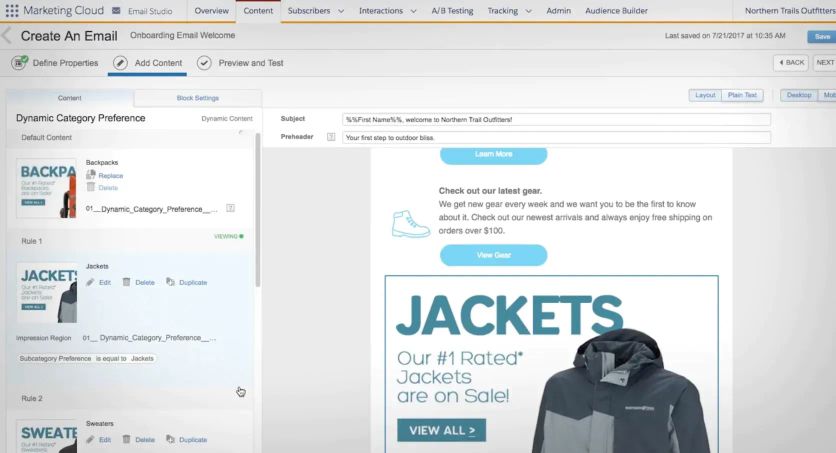
Salesforce Marketing Cloud’s email builder
For a retail marketing leader, SFMC offers virtually every tool you could ask for, plus the ability to tap into your customer 360 data from Salesforce CRM, Commerce Cloud, or Service Cloud. The promise is a unified view of the customer across marketing and sales touchpoints. Many big retailers and consumer brands use SFMC for its scalability (think millions of emails per day) and the comfort of having a single vendor for multi-channel needs.
If you have a huge database and complex segmentation or compliance requirements, SFMC likely has a feature or module to handle it.
Key Features
- Multi-channel Campaign Management: SFMC’s Email Studio and Mobile Studio handle broadcast and automated messaging across email, SMS, and push. You also have Social Studio for social media management and Advertising Studio for managing Facebook/Google ads audiences using your CRM data.
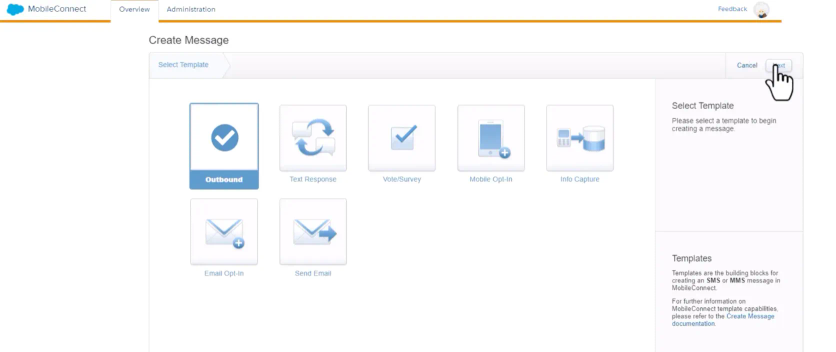
SMS templates in Salesforce Marketing Cloud
- Journey Builder: A sophisticated drag-and-drop journey orchestration tool for mapping out customer journeys with decision splits, waits, and triggers. Similar concept to Emarsys’s automation, but built to integrate with any Salesforce data or external API calls for more complex logic.
- Personalization and AI (Einstein): Salesforce’s Einstein AI is embedded to optimize send times, subject lines, and even generate predictive scores (e.g., likelihood to open or convert). Interaction Studio (now Salesforce Personalization) extends into web and app personalization, using machine learning to tailor content in real-time.
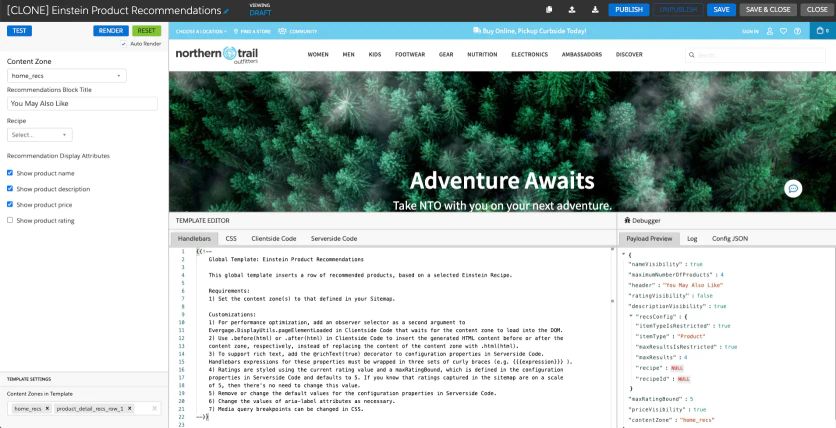
Salesforce Marketing Cloud’s Einstein product recommendations setup
- Salesforce Integration: Native connection to Salesforce CRM data – you can use customer attributes or behaviors from the sales side (like a store purchase or a customer service call) directly in marketing segmentation and vice versa. This is a huge draw for brands already on Salesforce.
- Enterprise-scale Tools: Things like advanced reporting, analytics dashboards, role-based access control, compliance configurations (CAN-SPAM, GDPR tools), and an ecosystem of third-party add-ons from the Salesforce AppExchange.
Strengths
SFMC’s strength is its breadth and depth. There’s hardly a marketing scenario it can’t cover. Want to run a global email campaign segmented by loyalty tier, then push those segments to Facebook Ads, then follow up with SMS reminders, all while sales reps get notified in CRM? It can do that. It’s highly flexible and extremely powerful when fully implemented.
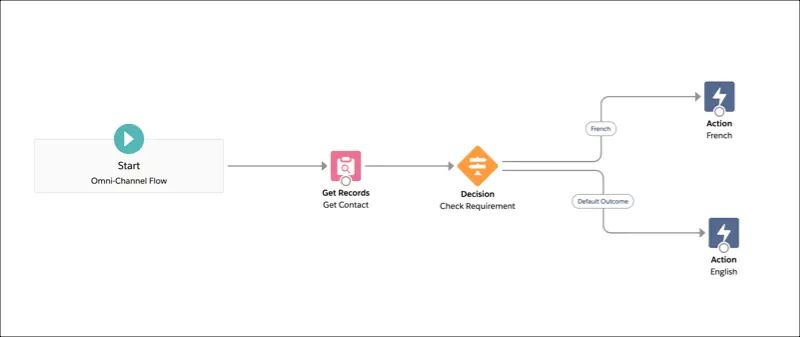
Salesforce Marketing Cloud flow builder
For organizations with multiple divisions or brands, SFMC supports multi-brand management and partitioning of data nicely.
Another plus: the Salesforce universe of consultants and partners is vast – you won’t struggle to find resources to help implement or optimize it (for a price).
Weaknesses
On the downside, SFMC can be dauntingly complex. The learning curve is steep, and it often requires a dedicated team (or certified SFMC specialists) to manage. Unlike more modern platforms, the UI can feel a bit dated and fragmented across its studios. Simply put, it’s not very DIY-friendly for smaller marketing teams.
Cost is another weakness: SFMC is one of the most expensive options on the market, with pricing scaling up dramatically as your contact counts and add-on modules grow. It often involves multi-year contracts.
Additionally, being so comprehensive means it’s not the most nimble – adapting to new trends or executing a quick campaign can feel like overkill if the system isn’t finely tuned to your needs. Over-implementation (“using a sledgehammer to crack a nut”) is a common critique – some SFMC customers end up only using 50% of its capabilities, making ROI a concern.
Compared to Emarsys
Emarsys and Salesforce Marketing Cloud target a similar enterprise segment, but with different philosophies.
Emarsys is purpose-built for marketers – it aims to be ready to use with relatively shorter onboarding, pre-built e-commerce connectors, and easy UI for common tasks.
SFMC, conversely, is an enterprise platform that can be molded to just about any use case, but requires you to do more of that molding.
If Emarsys is a pre-furnished apartment, SFMC is a mansion you furnish yourself.
In terms of capabilities, SFMC has an even broader channel scope (e.g., it has native social media management and listening, which Emarsys doesn’t). It also benefits from direct Salesforce CRM connectivity, whereas Emarsys would need integration work to sync CRM data.
On the other hand, many marketers find Emarsys’s day-to-day interface more approachable – SFMC’s Email Studio, for instance, might feel clunkier than Emarsys’s email editor for someone who just wants to build campaigns quickly.
Also, Emarsys includes some features by default (like product recommendations AI or loyalty) that in SFMC might require extra modules or custom development.
In summary, if you’re a Salesforce-centric company and have the resources, SFMC offers a more expansive toolkit than Emarsys. But if you want faster time-to-value and less IT dependency, Emarsys can be a friendlier choice.
Compared to Maestra
Salesforce Marketing Cloud is like a mega-department store of marketing tools, whereas Maestra is a curated boutique. Maestra focuses on giving you exactly what a modern e-commerce marketer needs – nothing less, but also nothing overly extra – within a unified, cohesive interface.
SFMC might require stitching together Email Studio, Mobile Studio, and maybe an add-on for personalization; Maestra delivers email, SMS, push, site personalization, loyalty, all inherently connected through one CDP. This means in Maestra, your data flows in real time between channels with no extra integration work – a stark contrast to SFMC, where getting, say, your web personalization to use the latest email engagement data might involve some legwork.
Another big difference: ease and support. Maestra comes with dedicated support to help strategize and execute, whereas SFMC often relies on your in-house team or external consultants to figure things out.
Finally, on cost, Maestra’s modular pricing can be more predictable, since you pay only for the channels you use and only for active profiles, while SFMC’s costs (plus required admin overhead) can escalate.
Pricing
Salesforce doesn’t publish Marketing Cloud pricing for most editions. Expect custom enterprise quotes that scale with contact counts and add-on studios, often with multi-year contracts and real admin overhead on top.
Tool #4: Adobe Experience Cloud (Adobe Campaign) – Best for the Adobe Ecosystem
Adobe Experience Cloud, specifically Adobe Campaign, is another heavyweight contender in enterprise marketing automation.
Adobe Campaign today centers on Campaign v8 (Managed Cloud) – Campaign Standard is being retired in 2026 – but the purpose is the same: managing personalized campaigns across email, SMS, direct mail, and more, with strong data management at the core.
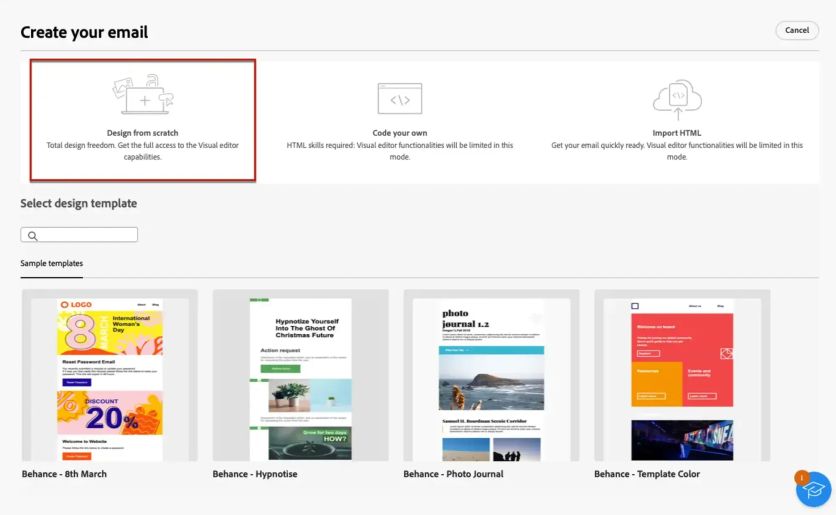
Email templates in Adobe Campaign
Companies often choose Adobe when they already use other Adobe products like Analytics, Target, or Experience Platform and want tight integration. Adobe’s strength historically has been in complex campaign workflows and targeting – it evolved from Neolane, a database marketing tool, so it’s very good at handling large datasets and intricate segmentation rules. Retailers with millions of customers and many sub-segments (e.g., across product categories or regions) appreciate the control Adobe Campaign offers.
Additionally, Adobe Experience Cloud has other pieces (like Journey Optimizer, Real-Time CDP, Marketo for B2B, etc.), which together can form a comprehensive marketing tech stack.
In essence, Adobe’s solution is ideal for brands that consider data as gold and want a platform that can put that data to work for both batch campaigns and one-to-one messages.
Key Features
- Cross-Channel Orchestration: Adobe Campaign allows you to design campaigns that include email, SMS, push notifications, and even offline channels like direct mail. You can schedule and trigger messages based on time or events, similar to Emarsys’s automation but often with even more customization in logic.
- Advanced Segmentation and Targeting: Because it’s tied to Adobe’s data platform, you can define very granular audience segments. Complex query builder capabilities let you filter on behaviors, transactions, and virtually any data attribute. Adobe Campaign Classic, for instance, gives SQL-level control for segmenting if needed.
- Adobe Experience Integration: If you use Adobe Analytics for site data or Adobe Target for on-site personalization/testing, Adobe Campaign can natively utilize those insights. For example, you could create an email segment of users who saw a certain product on the website yesterday according to Adobe Analytics.
- Personalization and Templates: Adobe Campaign supports personalization through a scripting language and offers robust email template management. It might not be as AI-driven out-of-the-box as Emarsys, but if you have Adobe’s Sensei AI in other modules, you can incorporate predictive content or offers.
- Deliverability and Sending Power: Adobe’s platform is built to send high volumes (like millions of emails or texts) and provides tools to manage deliverability (IP warming, feedback loops, etc.). Large retail sends like Black Friday promotions are a non-issue at scale.
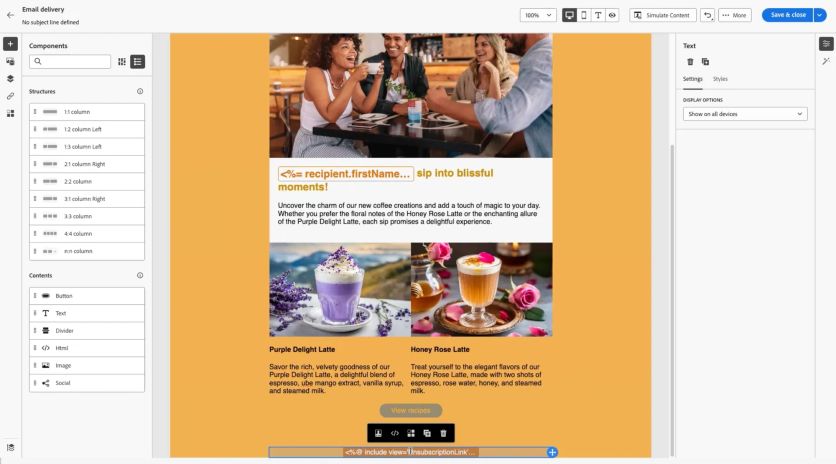
Adobe Campaign’s email editor
Strengths
Adobe’s marketing suite is extremely powerful and flexible. One major strength is data handling – if you have a complex data model or multiple data sources, Adobe Campaign can unify and use them effectively. It’s often praised for being able to implement very custom campaign logic that other platforms might not support.
Also, the integration with the rest of Adobe Experience Cloud can create a closed loop from insight to action: data comes in via Analytics, campaigns go out via Campaign, site content changes via Target, and all is tied together. For organizations invested in Adobe, this is a coherent vision. Another strength is Adobe’s longevity and enterprise support; it’s a tried-and-tested solution with enterprise-grade security and global support teams.
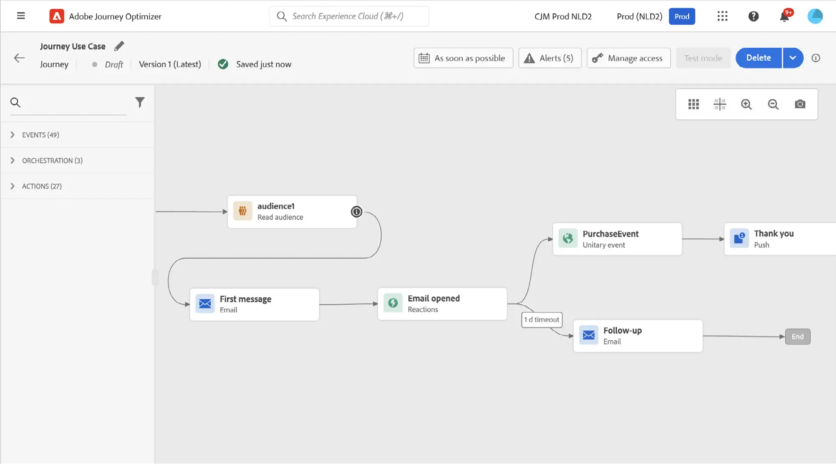
Building a customer journey in Adobe Journey Optimizer
Weaknesses
However, weaknesses abound for the unprepared. Adobe Campaign, especially the Classic version, has a steep learning curve. Users often describe the UI as not very intuitive and the implementation as technical.
Cost is high as well, as Adobe’s pricing is enterprise-oriented and modular (each component might cost extra). Additionally, while Adobe excels in traditional campaign channels, it was a bit slower to evolve in areas like mobile app push or certain real-time use cases (Adobe has been catching up with newer offerings like Journey Optimizer). So if you want bleeding-edge features without adding more Adobe modules, you might find Campaign on its own somewhat dated in approach.
Compared to Emarsys
Emarsys and Adobe Campaign share similar goals – omnichannel marketing automation – but cater to different mindsets. Emarsys prides itself on marketer-friendliness and quick deployment, whereas Adobe is about ultimate control for those willing to handle complexity.
Feature-wise, Adobe Campaign can match or exceed Emarsys in traditional channels (email, SMS) and data segmentation. In fact, Adobe might handle extremely large datasets more gracefully if you’ve got Adobe’s Real-Time CDP feeding it.
On the flip side, Emarsys comes with more baked-in e-commerce intelligence (like plug-and-play product recommendations or AI-driven personalization out of the box). Adobe expects you to integrate or configure those with other Adobe tools, whereas Emarsys might have a wizard.
Also, Emarsys’s interface is web-based and relatively straightforward compared to Adobe’s thick-client (for Classic) or less mature web UI (for Standard). Many mid-tier retail brands that find Adobe too complex end up preferring Emarsys for its balance of power and usability.
In short: Adobe is ideal if you need extreme customization and already use Adobe’s stack, while Emarsys wins for speed to market and ease of use.
Compared to Maestra
Maestra and Adobe Campaign are quite different in philosophy. Maestra aims to be ready-to-go for commerce marketers, with real-time capabilities built-in and a unified UI. Adobe is more of a build-your-own toolkit that can be tailored to any scenario with enough work.
Compared to Maestra, Adobe Campaign can feel siloed – it’s great at blasting out campaigns, but it isn’t inherently tied into on-site experiences or loyalty unless you integrate Adobe’s other products (which add complexity and cost). Maestra includes those natively, so your email, SMS, site personalization, and loyalty rewards all speak to each other without additional integration.
That means, for example, in Maestra you could have a campaign that instantly changes a homepage banner when a VIP customer clicks an email. Doing that with Adobe would likely involve connecting Campaign with Adobe Target and ensuring data flows properly in between.
Additionally, speed and agility tilt toward Maestra: launching a new campaign or adapting a strategy can be done by a marketer directly in Maestra’s interface. In Adobe, you might need to rope in technical resources to adjust workflows or data queries.
Lastly, Maestra’s hands-on service focus versus Adobe’s self-service/consultant model is a big differentiator. Maestra will hold your hand to achieve outcomes; Adobe will give you the tools and it’s largely on you to drive results (unless you pay for Adobe consulting).
For a marketing leader, Maestra can mean faster execution and innovation, whereas Adobe can mean ultimate capability if you have the team to harness it.
Pricing
Adobe Campaign pricing is custom and enterprise-oriented, sold in modules – each additional Experience Cloud component (Analytics, Target, Journey Optimizer) adds to the total.
Tool #5: Bloomreach Engagement (Exponea) – Best for E-Commerce Search and Engagement
Bloomreach Engagement, formerly known as Exponea before being acquired by Bloomreach, is a customer data platform combined with marketing automation, tailored largely to e-commerce and retail. If you haven’t heard of it, Exponea was a rising star out of Europe that made a name for itself by blending a real-time CDP, analytics, and omnichannel campaign tool into one.
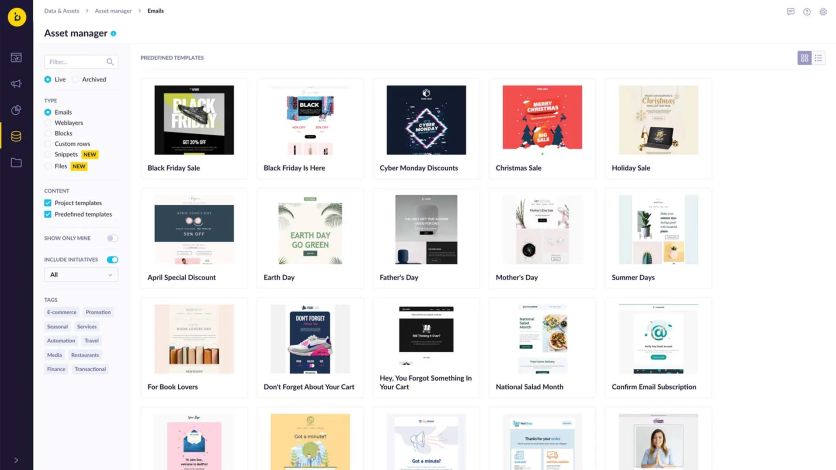
Pre-made email templates in Bloomreach’s asset manager
Now under Bloomreach, it’s positioned as the Engagement module alongside Bloomreach’s discovery and content solutions. The core idea: like Emarsys, it gives marketers the ability to execute personalized campaigns across email, mobile, web, and more, all driven by a unified customer profile.
Bloomreach Engagement is big on AI and predictive analytics – for example, predicting customer lifetime value or likely next purchase – and making those insights actionable in campaigns. It’s particularly popular with brands that have a data-driven culture because it provides a lot of flexibility in building custom segments, metrics, and even running experiments.
Use cases often include advanced personalization on websites (product recommendations, tailored content) combined with triggered messaging (emails, SMS) based on user behavior.
Key Features
- Unified Customer Data Platform: Bloomreach Engagement pulls in data from online and offline sources (website events, transactions, point-of-sale, etc.) to build a comprehensive view of each customer. It updates profiles in real time, which powers timely campaigns.
- Omnichannel Orchestration: It supports email campaigns, SMS, push notifications, web layers/pop-ups, and even web personalization. You can create automation flows that utilize these channels, similar to Emarsys Automation Center or Maestra’s flows.
- AI-Powered Recommendations and Predictions: The platform has built-in machine learning models for things like product recommendations, churn likelihood, customer segment clustering, etc. Marketers can use these out of the box or tweak them. For instance, showing each shopper the products they’re most likely to buy next, across email and website.
- Analytics and A/B Testing: One standout feature from the Exponea days is robust analytics – you can slice and dice customer data and campaign results, build custom reports, and run A/B tests or control groups to measure lift. It’s more analytics-oriented than many marketing platforms.
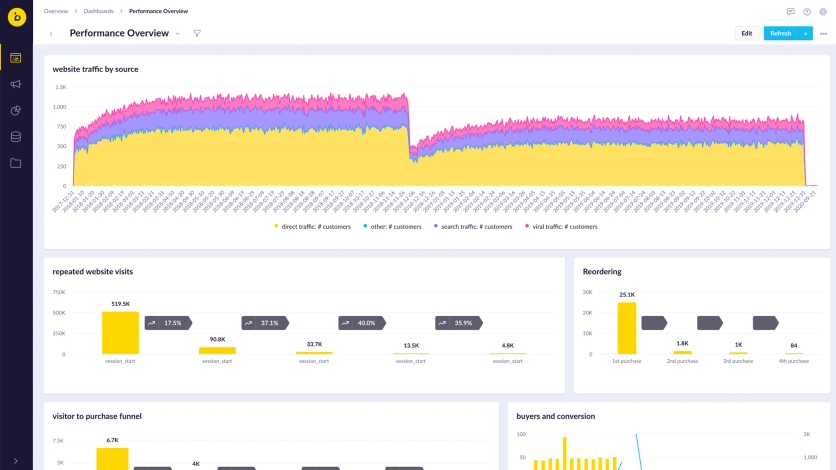
Bloomreach’s Performance Overview dashboard
- Web Personalization: Bloomreach Engagement can directly personalize content on your site (e.g., change banners, show targeted pop-ups, recommend products) using the customer data and AI decisions. This is an area where not all Emarsys competitors have equal strength.
Strengths
Bloomreach Engagement’s strength is in its data-centric approach. It’s very adept at handling complex data and turning it into marketing action. Brands that use it well can achieve highly personalized experiences – for example, an email campaign where every customer gets a completely unique set of product offers based on their browsing history and predictive scores. The real-time aspect is a big plus: data streams in and triggers can fire within seconds.
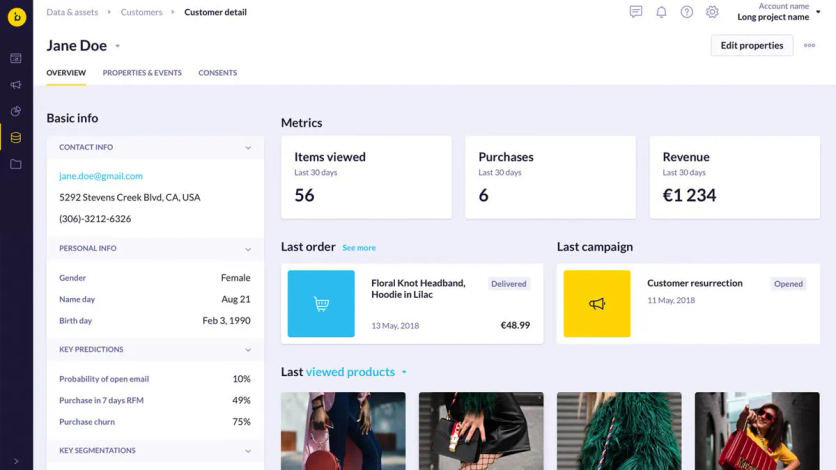
Customer’s profile in Bloomreach
Another strength is its flexibility – you’re not confined to rigid templates. If you want to create a custom funnel or a niche segment (like “customers who viewed at least 3 leather jacket products and have an LTV > $500”), it’s doable without external tools.
Also, Bloomreach (Exponea) has been praised for its services and support; they often work closely with clients to achieve results, acting almost as an extension of your team in some cases.
Weaknesses
On the flip side, with great flexibility comes complexity. The platform has a lot of levers and can be overwhelming initially. While it’s friendlier than Adobe or Salesforce in setup, it still may require a few technically savvy users or a solutions team to implement tracking and custom models. The interface, while powerful, might not be as slick or simplified as newer tools – there’s a lot of data and options to navigate.
In terms of cost, Bloomreach Engagement is generally in the upper mid-market to enterprise range (custom pricing). It may be more cost-effective than Salesforce or Adobe for some, but it’s certainly not a bargain tool for a tiny startup.
Additionally, because it tries to do both CDP and marketing execution, some users might find one side of that equation slightly less deep than specialist tools (e.g., its email designer might not have as many pre-built fancy templates as a dedicated ESP, or its CDP might not match a standalone CDP in every feature).
Overall, its weaknesses are few for the right client, but small teams might under-utilize its power and find it complex.
Compared to Emarsys
Bloomreach Engagement (Exponea) and Emarsys are often compared head-to-head, as both target e-commerce marketers who want personalization and omnichannel. Feature-wise, there’s a lot of overlap. Both have real-time CDP elements, both do email, SMS, web personalization, etc.
One difference: Bloomreach tends to emphasize its AI-driven decisions and open analytics a bit more, whereas Emarsys emphasizes its pre-built marketing tactics and ease of campaign setup. Emarsys might get you launched faster with a library of pre-made campaigns, while Bloomreach might require more configuration but gives more freedom to tailor and analyze.
Also, Emarsys offers a loyalty module as a paid add-on, while Bloomreach does not have a built-in loyalty program feature (you’d integrate your own or use Bloomreach mainly for marketing around loyalty data).
In terms of use, Emarsys can be a bit more “marketer-friendly” in everyday use (with its straightforward UI for common tasks), whereas Bloomreach appeals to those who want to get hands-on with data science and testing.
If you have a data team that loves diving into numbers, they might prefer Bloomreach; if you want your marketing managers to autonomously launch campaigns quickly, Emarsys might feel smoother.
Compared to Maestra
Maestra and Bloomreach Engagement share a vision of unifying data with action, but they execute it a bit differently.
Maestra provides an all-in-one solution with an emphasis on out-of-the-box usability – it has the CDP, channels, and even loyalty built in, with a strong guided approach (through its Forward Deployed Marketers) to use them. Bloomreach provides an incredibly powerful engine for those who want to tinker under the hood.
Compared to Maestra, Bloomreach (Exponea) might offer more in terms of custom analytics and AI modeling options – if you want to design a very custom prediction model, you might lean on Bloomreach’s tools. However, Maestra offers pre-configured intelligence (like its real-time triggers and segmentation for e-commerce scenarios) that achieves similar outcomes without the need for a data scientist on your team.
Pricing
Bloomreach Engagement uses custom pricing in the upper mid-market to enterprise range. Quotes depend on contact volume and channels – rarely a bargain for small teams, but often below Salesforce or Adobe.
Tool #6: Klaviyo – Best for Self-Serve Email and SMS
Klaviyo has made a name for itself as the go-to marketing automation platform for small and mid-sized e-commerce businesses, particularly those in the direct-to-consumer (DTC) space. If you’ve run a Shopify store, odds are you’ve encountered Klaviyo. It’s an email and SMS marketing platform that’s built specifically for e-commerce.
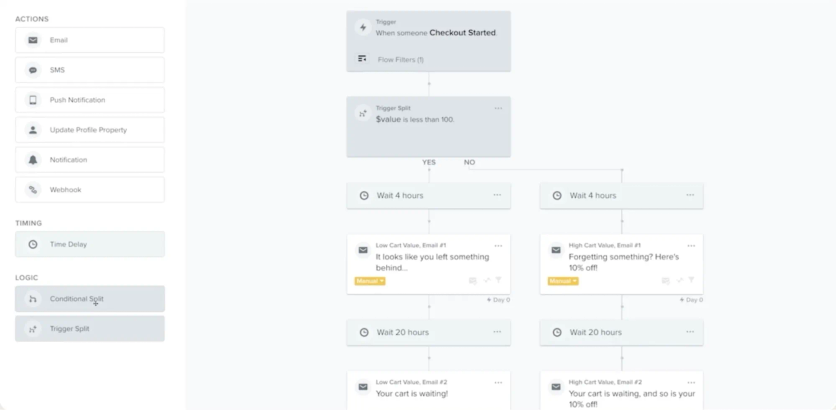
Klaviyo’s flow builder
While Emarsys and others aim at mid-to-large enterprises, Klaviyo focuses on democratizing powerful email/SMS automation for merchants of all sizes. Out of the box, it comes with deep integrations to store platforms like Shopify, Magento, WooCommerce, BigCommerce and instantly pulls in customer and order data. The result is you can set up targeted campaigns (like win-back flows, cart recovery, post-purchase series) with minimal fuss.
Klaviyo’s claim to fame is that it gives smaller teams sophisticated segmentation and automation capabilities without needing a tech department. Over the years, they’ve expanded into SMS, native mobile push notifications, and reviews, to broaden the omnichannel story for their users.
Key Features
- Pre-built E-commerce Automations: Klaviyo provides a library of best-practice flows (abandoned cart emails, welcome series, browse abandonment, birthday rewards, etc.). These are easy to activate and customize, giving even novice marketers a quick start with effective campaigns.
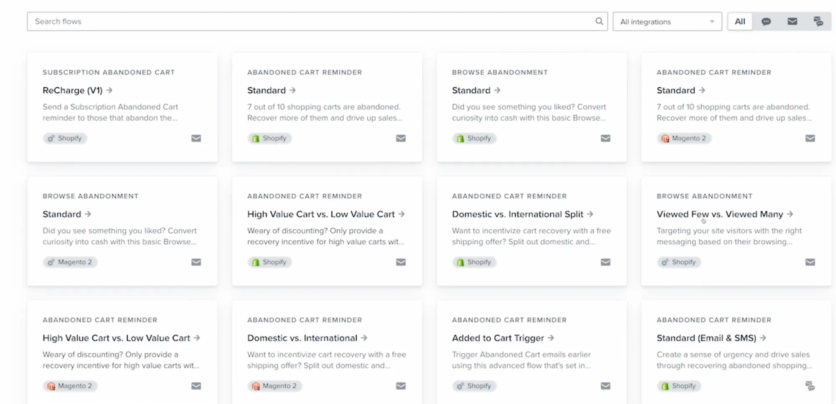
Flow templates in Klaviyo
- Deep E-commerce Data Integration: Once connected to your store, Klaviyo automatically tracks customer behaviors like product views, added to cart, past purchases, total spent, etc. This data is readily available for building segments (e.g., customers who bought shoes but not socks, or VIPs who spent $+500).
- Email & SMS in One Platform: Users can manage both email newsletters/campaigns and text message campaigns from Klaviyo, using a unified profile for each customer to ensure messaging is coordinated. (SMS is an add-on but integrates seamlessly).
- Segmentation and Personalization: Klaviyo’s segment builder is very intuitive, letting you stack rules (properties or behaviors) to carve out precise audiences. Personalizing emails with things like first name or product recommendations is straightforward, using data from the store.
- Analytics and Benchmarks: Klaviyo offers revenue attribution analytics, so you can see how much money each campaign or flow generated. It also provides benchmark reports comparing your metrics to similar businesses, which is helpful for context.
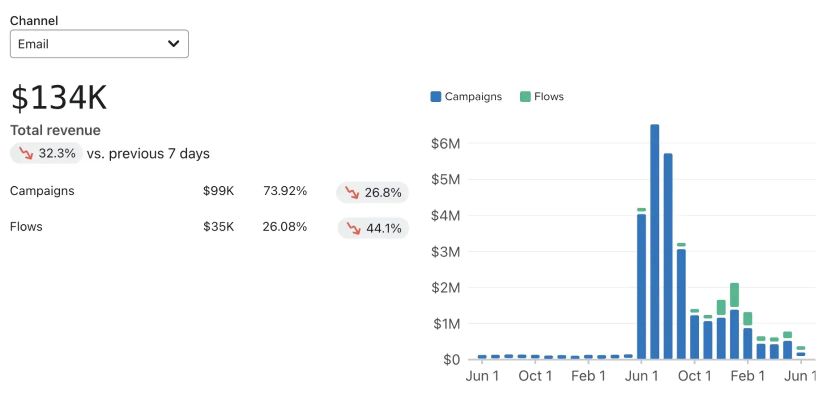
Fragment of Klaviyo’s business review dashboard
Strengths
Klaviyo’s biggest strength is usability for e-commerce marketing. It’s often praised for how quickly a user can get meaningful campaigns running. The integration to e-commerce platforms means no manual data import – your catalog and customer info are right there. The templates and flows reduce the need for strategy guesswork; many businesses literally plug in Klaviyo and recover abandoned carts within a day.
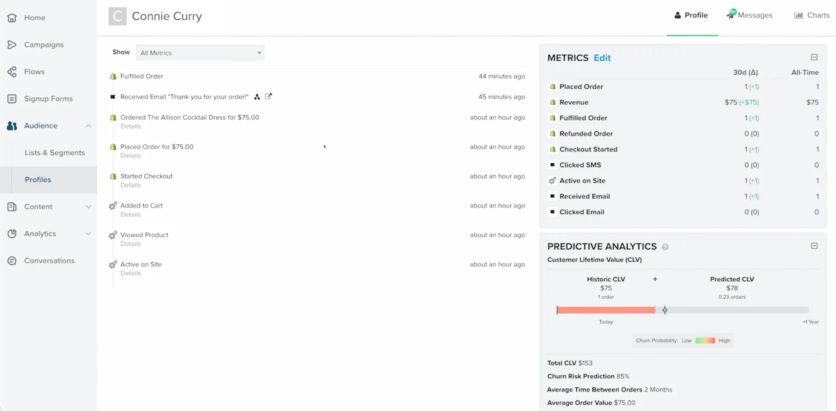
Customer profile in Klaviyo
Also, Klaviyo’s pricing model (based on contact count, with a free tier up to a certain limit) makes it accessible – you can start free and it scales as your business grows.
Another strength is the community and resources; because it’s widely used, there are tons of guides, playbooks, and even pre-built templates shared among marketers.
Weaknesses
However, Klaviyo is not an enterprise tool, and that shows in some limitations. It primarily handles email, SMS, and mobile push – for anything beyond basic pop-ups and forms, like on-site personalization or a built-in loyalty program, Klaviyo alone might fall short.
It’s also not as “real-time” in the sense of event processing as some other tools; while it’s real-time for things like trigger flows, it doesn’t have the ultra-fast CDP capabilities of a Braze or Maestra for on-site changes in the moment.
Customization can be limited – for example, while you can personalize content, you can’t build extremely complex multi-dimensional segments as easily as in a CDP-based platform.
In terms of analytics, it’s strong for revenue attribution but not a full BI tool (some larger users export data to warehouses for deeper analysis).
Lastly, as businesses grow very large (say into millions of contacts), Klaviyo’s costs can ramp up significantly, and some find they need more robust multi-channel capabilities, prompting a move upmarket.
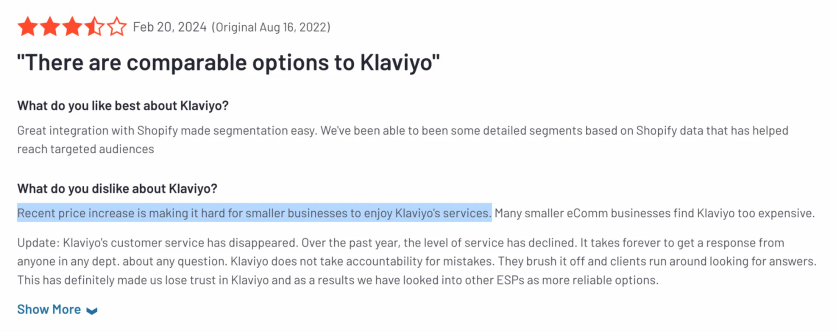
Compared to Emarsys
Klaviyo and Emarsys often target different market segments. Emarsys is an enterprise-grade solution with a broad channel set and advanced features, whereas Klaviyo is more of an SMB/mid-market specialist in email/SMS. For a marketing leader at a large retail brand, Klaviyo may feel too simplistic or limited.
Emarsys offers channels like web personalization, more AI-driven features, and can handle enormous databases with complex structures (plus it has the backing of SAP and integration into larger systems). That said, many up-and-coming DTC brands or smaller retailers choose Klaviyo specifically because Emarsys feels too complex or costly for their stage.
One key difference is onboarding speed: Klaviyo can be self-serve and you can see ROI within days, whereas Emarsys might involve weeks of implementation.
In terms of capabilities, Emarsys will outshine Klaviyo in areas like AI-based recommendations, truly omnichannel journey design, and maybe deliverability infrastructure for huge sends. But if your needs are primarily great email and text automation tied to your e-comm store, Klaviyo might actually cover all bases at a fraction of the Emarsys cost.
We can summarize: Emarsys is a Ferrari, Klaviyo is a dependable sedan – they’ll both get you to your destination, but with different levels of power and luxury, suited to different budgets.
Compared to Maestra
Maestra and Klaviyo share the goal of empowering marketers to drive revenue, but Maestra plays in a higher league of capabilities. Klaviyo wins on simplicity – a small team can use it with little training. However, Maestra provides an entire growth engine that includes many things Klaviyo doesn’t: a real-time CDP, on-site content personalization, built-in loyalty and referral mechanics, and more channels under one roof.
Compared to Maestra, Klaviyo is limited to communication channels (email/SMS) and relies on third-party apps for anything else (like loyalty or advanced pop-ups). For example, while Klaviyo can email customers who abandoned carts, Maestra can email, text, show a personalized homepage banner, and even adjust a loyalty offer concurrently for that abandoning customer.
Maestra’s ability to act instantly on data (within sessions, across channels) is a big differentiator – Klaviyo operates on a more traditional “send an email X minutes after event” model. Additionally, Maestra’s support and strategic guidance out of the box is something Klaviyo doesn’t provide at the same level (Klaviyo has support and some account management for large customers, but many SMBs are on their own or working with agencies).
One might say Klaviyo is fantastic when you’re starting out and need quick wins in email marketing. As you grow and require more sophistication – true omnichannel engagement and personalization beyond just email – that’s where a platform like Maestra becomes the better choice. In fact, many brands graduate from Klaviyo to Maestra once their data and marketing complexity outpace what Klaviyo can comfortably handle.
Simply put, Klaviyo covers the basics brilliantly, but Maestra covers the entire customer journey, brilliantly.
Pricing
Klaviyo offers a free plan for up to 250 contacts. Paid email plans start at $20/month for 500 profiles, email plus SMS from $35/month, and costs scale with list size – around $720/month at 50,000 profiles.
Tool #7: Iterable – Best for Flexible Cross-Channel Campaigns
Iterable is a growth marketing platform that, like Braze, was born in the digital product era but is equally comfortable with email as it is with mobile channels. It’s used by many B2C companies (including retail, subscription services, fintech, etc.) to manage customer communications across email, push, SMS, in-app, and more.
Iterable’s philosophy is to provide a flexible, marketer-friendly platform that still satisfies the needs of product and engineering teams. It offers a clean, modern interface with a visual journey builder (called Workflow Studio) and is known for its ability to ingest and use a variety of customer data.
Iterable doesn’t come with e-commerce-specific features per se (it’s industry-agnostic), but it’s quite adept at personalization and experimentation. One notable aspect is Iterable’s focus on harmonizing messaging – ensuring, for example, that if a user performs an action, they don’t get irrelevant messages that were queued for them. In other words, it aims to be intelligent about the customer’s context.
Key Features
- Multi-Channel Campaigns: Create campaigns that span email, SMS, push notifications, in-app messages, web push, and even direct mail (via partners). All orchestrated in a single workflow if needed.
- Workflow Studio: A drag-and-drop journey builder where you can set up triggers, branching logic, time delays, and channel sends. It’s comparable to Emarsys Automation Center or SFMC Journey Builder, allowing complex, branching customer journeys.
- Data Flexibility: Iterable can take in customer data from many sources via APIs, CSV uploads, or their catalog feature (which stores metadata like product catalogs or content feeds). This means campaigns can utilize up-to-date info, like an inventory status or user preferences, quite easily.
- Personalization and Templates: Iterable supports handlebars (a templating language) for dynamic content, and you can create templates that pull in data fields, event data, etc. It also has a built-in experimentation framework for A/B testing different content or timing within workflows.
- Integrations and Webhooks: It integrates with various other tools (like attribution tools, analytics, data warehouses) and can send or receive webhooks, making it fit nicely in a modern data stack.
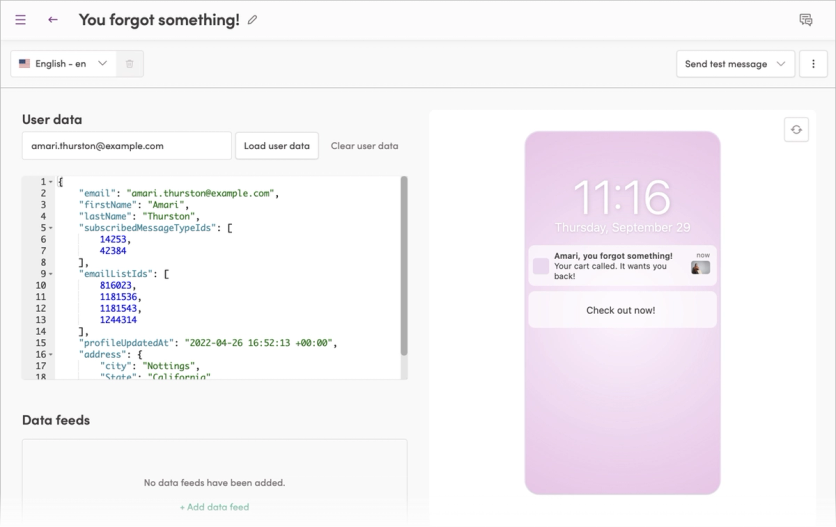
Iterable’s push notification editor
Strengths
Iterable’s strengths lie in its balance of power and usability. Users often find it’s easier to use than heavy enterprise tools (the UI is modern and not as clunky) yet it can handle pretty advanced use cases. It’s very strong for any company that has both marketing and product teams collaborating on user engagement, since it speaks both languages to a degree.
Also, Iterable’s segmentation is real-time – as events come in, users can enter or exit workflows – which is crucial for timely messaging. Its customer support and community are also frequently praised; despite being a high-end platform, they maintain a customer-centric approach and extensive documentation.
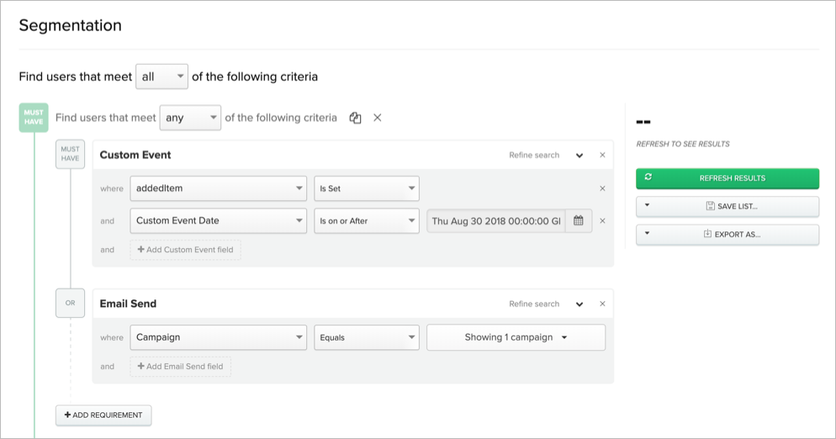
User segmentation in Iterable
Weaknesses
On the downside, Iterable isn’t the cheapest; it’s usually positioned for mid-size and larger companies (often quoted in tens of thousands of dollars per year to start).
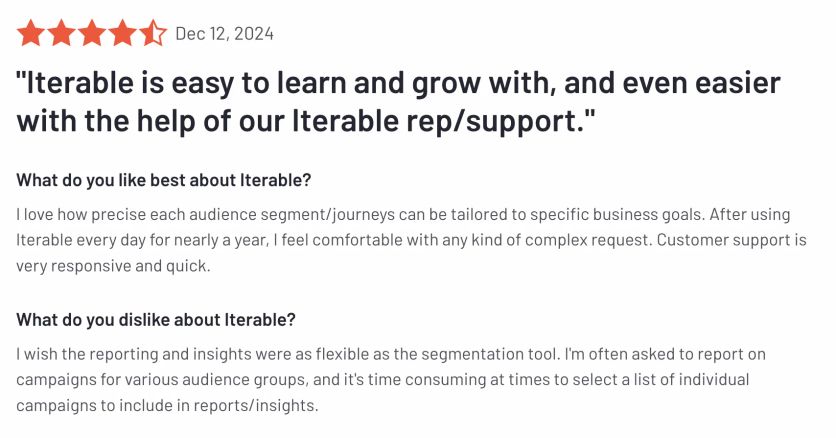
For e-commerce specifically, Iterable may lack some built-in features like a product recommendation engine or loyalty program (you’d have to integrate those).
Essentially, it’s a robust blank slate for cross-channel marketing, but you won’t find pre-canned “recipes” in the same way an Emarsys or Klaviyo might have. Another weakness is that if you need extremely detailed analytics or BI, you might have to export data to a warehouse – Iterable has decent reporting, but it’s not as analytics-focused as something like Bloomreach (Exponea).
Compared to Emarsys
Iterable vs Emarsys is interesting because they come from different backgrounds. Emarsys from the email/e-comm world, Iterable from the startup/app world. Both now overlap in offering cross-channel messaging.
Iterable provides a more open and flexible canvas – it’s great if your team wants to design custom journeys and integrate various data sources easily. Emarsys provides more marketing guidance and out-of-the-box tools (like those Tactics, built-in AI for recommendations, etc.).
If you have an e-commerce site, Emarsys might instantly give you things like product recommendation blocks based on its AI, whereas with Iterable you’d feed in your own recommendations or integrate a service.
On the other hand, if you have a mobile app or a non-traditional business model, Iterable might accommodate that more readily (Emarsys has mobile push, but Iterable’s history with apps is longer).
In terms of day-to-day use, marketers might find Iterable’s interface a bit more intuitive and modern. Emarsys can do a lot, but some find its UI not as slick.
Also, Emarsys has its customer data platform, but Iterable’s approach of connecting to your data warehouse or allowing flexible data ingestion could be more appealing if you already have a rich data environment.
Cost-wise, they likely end up in a similar ballpark for a mid-market company. So it might come down to: Need speed and e-comm specific features? Emarsys. Need flexibility and a product-friendly approach? Iterable.
Compared to Maestra
When comparing Iterable to Maestra, think platform versus service-enhanced platform. Iterable gives you a powerful platform and expects you to run with it. Maestra gives you a similarly powerful platform plus strategic services and more out-of-the-box e-commerce capabilities.
Maestra includes a loyalty engine and promotion tools; with Iterable you’d integrate loyalty data from elsewhere.
Another distinction: real-time site personalization – Maestra can directly personalize on-site content through its platform, which Iterable does not do (you’d need something like Optimizely or your own solution for on-site changes).
In terms of ease, Maestra is likely easier for a lean marketing team because of its concierge onboarding and guidance provided by dedicated Forward Deployed Marketer.
Iterable is certainly user-friendly, but you’ll be configuring things yourself or with your team, which could be a pro or con depending on your preference. For many growing brands, it might come down to resources: if you have a capable team that just needs a good tool, Iterable is excellent. If you want a more guided, all-in-one growth solution with dedicated support, Maestra is extremely attractive.
Also, from a cost perspective, Maestra’s modular pricing can be simpler than Iterable’s usage-based contracts, which climb as you send more messages – Maestra bills by the channels you use and your active profiles, and email sends are unlimited. Ultimately, Maestra emphasizes driving results with hands-on partnership, whereas Iterable emphasizes giving teams the keys to drive themselves with a very solid car.
Pricing
Iterable doesn’t publish pricing. Contracts are custom and usage-based (monthly active users), with entry points typically in the mid five figures annually for smaller deployments.
Tool #8: MoEngage – Best for Insights-Led Mobile Engagement
MoEngage is a customer engagement platform with a strong mobile heritage, much like Braze and Iterable. It gained a lot of traction in Asia and India and is now global, serving many app-first companies as well as e-commerce and fintech. MoEngage’s sweet spot is mobile app engagement and analytics combined with cross-channel messaging.
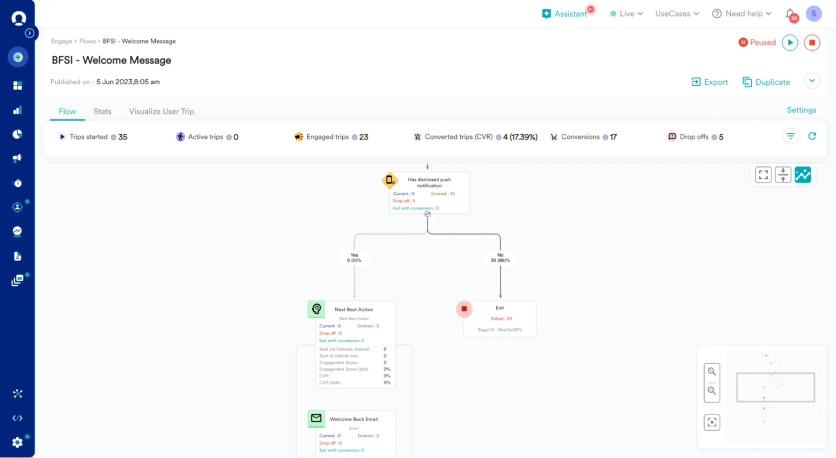
MoEngage’s flow builder
Think of it as a platform that started with push notifications and in-app messages, then expanded to also handle email, SMS, web push, and even on-site pop-ups. For brands with a significant mobile app user base, MoEngage provides an integrated way to keep those users engaged with personalized content, while also reaching them on other channels when needed.
It includes an “Insights” module to analyze user behavior (sort of built-in product analytics light) and a “Flows” engine to create journeys. They also have invested in AI, offering recommendations and predictive segmentation (like who’s likely to churn).
Key Features
- Push Notifications & In-App Messaging: Rich push notification capabilities (images, carousel, action buttons) and in-app messaging widgets to guide or inform users within the app. Great for app onboarding, feature announcements, etc.
- Omnichannel Flows: MoEngage allows you to set up flows that can switch between channels. For example, try a push notification, then fall back to email if not engaged. Supported channels include push, email, SMS, web push, on-site messages, and connectors to others.
- AI-Powered Segmentation: MoEngage offers “Sherpa” (their AI) which can do things like predict who is likely to uninstall an app or who might purchase, etc. You can then target those segments accordingly. It also optimizes send times and has multi-armed bandit testing for messages (to auto-pick winning variants).
- Analytics & Insights: There’s a built-in analytics dashboard to track funnels, retention, and trends in user behavior. This helps marketers understand the impact of campaigns on user actions (e.g., did push notifications increase 7-day retention?).
- Personalization: You can personalize messages with user attributes and past behavior. While not as deep into product recommendations as some, it does allow dynamic content insertion (like last viewed items if you pass that data in).
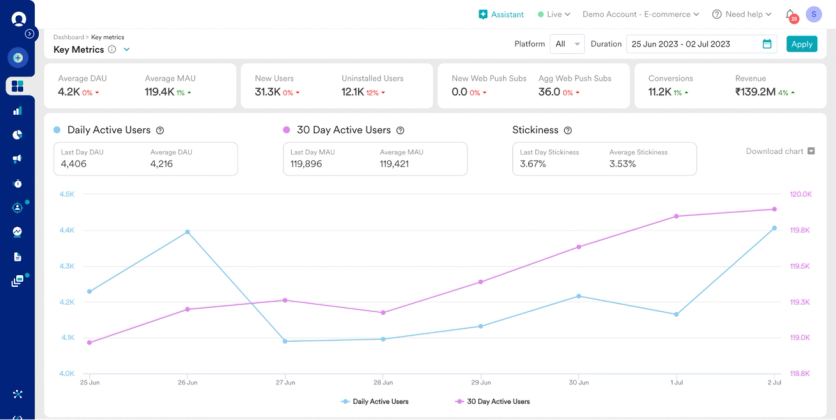
MoEngage’s reporting
Strengths
MoEngage’s strength is definitely in mobile engagement. Companies with millions of app users can rely on MoEngage to deliver billions of push messages reliably. The platform is reasonably intuitive, and they’ve made strides in providing pre-built segments and templates (especially catering to industries like e-commerce, media, etc.).
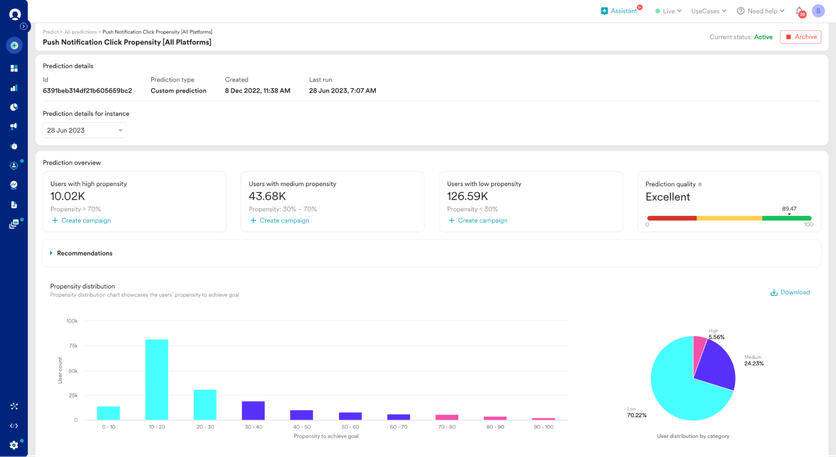
MoEngage’s push notification click propensity
Also, MoEngage tends to be more cost-effective than some Western competitors for the feature set, which has made it popular in emerging markets and now increasingly elsewhere. Another strength is their customer support – MoEngage often gets good reviews for being responsive and open to product feedback. They also integrate with a lot of other tools (Mixpanel, Segment, etc.), which is useful.
Weaknesses
On the downside, MoEngage historically wasn’t as strong in email as platforms that started in email. They’ve improved, but if a brand’s primary channel is email marketing, there might be minor feature gaps or deliverability nuances compared to something like Emarsys or SFMC which have long email legacies.
The UI, while good, might not be as polished as Braze for complex logic building. Additionally, while MoEngage has some on-site capabilities, it’s not as focused on web personalization as some others (it’s mainly pop-ups or web push).
It’s primarily a campaign tool, so deep attribution analytics or very complex segmentation might not be as advanced as a dedicated CDP’s.
In summary, MoEngage is a jack-of-many-trades with an edge in mobile, but if you need the absolute best in a specific area (be it email design, or heavy data science integration), you might find small shortcomings.
Compared to Emarsys
Emarsys vs MoEngage comes down to email+retail focus vs mobile+product focus historically. Emarsys offers a broader solution for retail including loyalty and ads and such, whereas MoEngage is laser-focused on digital customer engagement.
If a retail brand’s strategy is heavily email and loyalty driven, Emarsys covers more of that natively. But if a brand has a popular mobile app and wants to amp up app engagement, MoEngage can bring a lot of value with its in-app and push expertise.
MoEngage is often praised for ease of use once set up, whereas Emarsys might require more upfront configuration for the mobile side (since Emarsys’s mobile capabilities are add-ons and not as battle-tested).
Cost-wise, MoEngage might come in lower, which could attract those who find Emarsys too pricey.
However, Emarsys might reduce the need for additional tools (like separate analytics or loyalty systems) which MoEngage would integrate rather than replace.
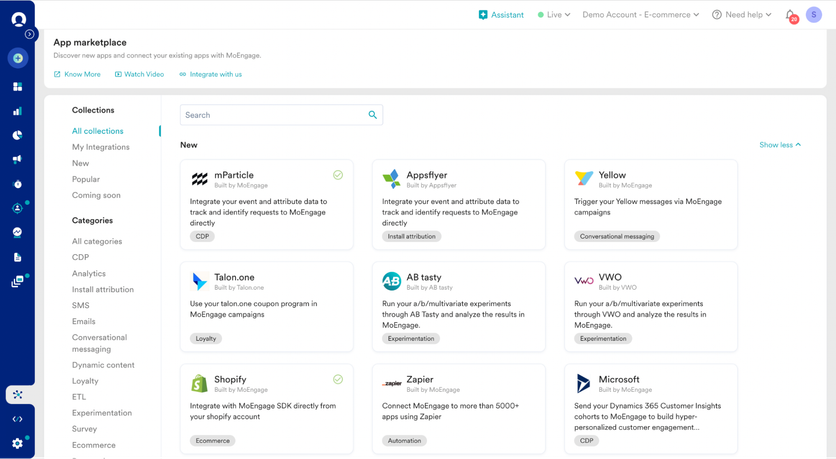
MoEngage’s App Marketplace
Geographically, if you operate in regions with certain messaging channels (like WhatsApp, etc.), MoEngage has strong support for those and emerging channels.
All in all, Emarsys is the established omnichannel marketing suite, MoEngage is the upstart mobile-savvy platform. Many mid-sized companies could consider MoEngage as a more agile alternative if they don’t require the full heft of Emarsys’s features.
Compared to Maestra
Comparing MoEngage to Maestra, the key difference is breadth and integration. MoEngage offers many channels, but Maestra knits more of the commerce-specific functionality around those channels (like product catalog intelligence, loyalty, etc. as recurring themes). Maestra is built to be a one-stop shop for a retail marketer: it has the real-time site personalization that MoEngage lacks, and a built-in promotions engine.
Also, real-time data use: Maestra’s CDP can trigger things in-session on the website or coordinate with inventory changes natively. With MoEngage, real-time triggers are usually user-driven (like user did X), not as much system-driven events like “item stock changed” unless you custom wire those in.
For a brand with both a website and app presence, Maestra ensures consistency of personalization across both – for instance, someone browses on the site and then goes to the app, Maestra would update offers in real-time. MoEngage might not link web and app experience as tightly unless you’ve instrumented everything meticulously.
One more point: service and strategy. Maestra includes dedicated success managers who guide strategy. MoEngage offers customer support and some customer success, but it’s generally more of a self-serve platform in comparison. If you have a lean team and want more strategic partnership, Maestra shines there.
Pricing
MoEngage uses custom pricing based on monthly active users and channels. It generally comes in below Braze and Emarsys for a similar feature set, which is part of its appeal.
Tool #9: Dotdigital – Best for Mid-Market Email Automation
Dotdigital (dotdigital Engagement Cloud) is a platform that might not be as hyped in conversations as some others, but it has a steady following, especially among mid-market e-commerce and B2C brands. Formerly known as dotMailer, it originated as an email marketing platform and evolved into a cross-channel automation solution.
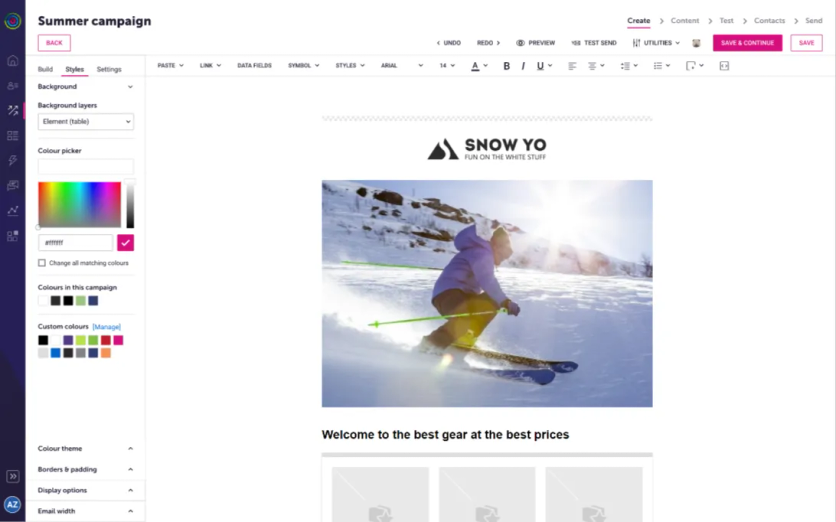
Dotdigital’s visual email composer
Dotdigital’s strength is in ease-of-use and strong e-commerce platform integrations, notably with Magento/Adobe Commerce (they have a very tight connector), Shopify, and others. Many retailers in the UK and globally have used Dotdigital to step up from basic ESPs when they need more automation like triggered emails, simple personalization, and SMS integration, but perhaps don’t need the complexity or cost of enterprise solutions.
Think of Dotdigital as a “comfort upgrade” for an e-commerce team that has outgrown basic email tools but still wants something straightforward. It covers email, SMS, live chat, and social retargeting (through integrations) – not the full breadth of some larger suites, but enough for a solid omnichannel marketing approach.
Key Features
- Drag-and-Drop Automation Builder: Similar to others, Dotdigital has a visual automation canvas to create customer journeys (they call them Programs). For example, post-purchase drip campaigns or re-engagement campaigns can be built easily using triggers and delays.
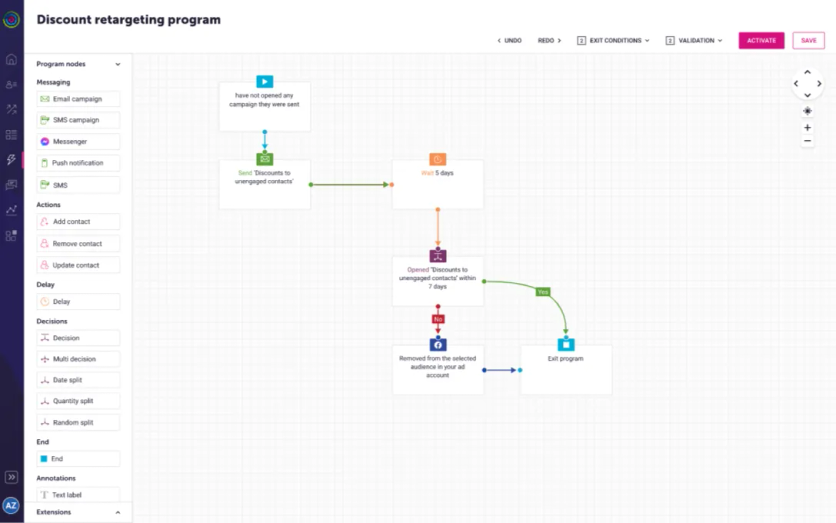
Dotdigital’s automation builder
- E-commerce Data Integrations: Dotdigital brings in order data, product catalogs, browsing behavior (if you add tracking code) from platforms like Magento, Shopify, etc. This allows segmenting and triggering based on that data, like cart abandonment emails, product replenishment reminders, etc.
- Email Marketing & SMS: It has a good email design tool (with a lot of templates) and robust sending infrastructure. SMS can be sent via the same interface (using their SMS add-on services or integrations). Contacts are unified so you can coordinate email/SMS.
- Lead Capture and Surveys: Dotdigital includes tools for creating pop-ups, forms, and even NPS or survey emails which some others might need an integration for. This is helpful for growing your list and gathering zero-party data (preferences, feedback) directly into the platform.
- Reporting & ROI Tracking: It provides standard campaign metrics and also ROI tracking if you feed purchase data back in. There’s also lead scoring and engagement scoring for contacts, which can be useful in prioritizing who to target.
Strengths
Dotdigital’s strengths are its simplicity and e-commerce alignment. Users often commend how quickly non-technical marketers can adopt it. The learning curve is gentle compared to something like Salesforce or Adobe.
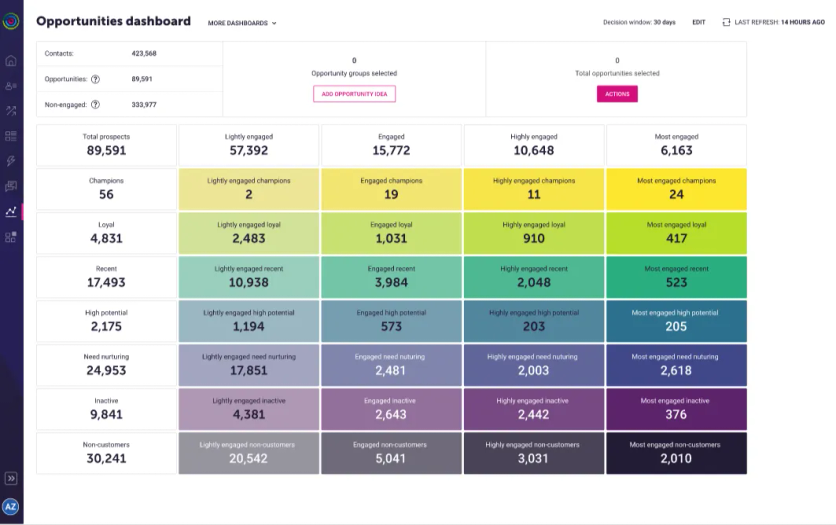
Dotdigital’s opportunities dashboard
Also, the Magento integration in particular is a highlight; Dotdigital was essentially the default advanced ESP for Magento for a long time (and still often recommended for Adobe Commerce users) because it syncs data and segments very smoothly. The platform provides a reliable, stable environment – one could call it no-frills, but that’s exactly what some teams want: all the key tools, clearly laid out, without too much “extra.”
Another strength is that Dotdigital has good customer support and account management, especially for mid-sized clients that might feel ignored by bigger vendors.
Weaknesses
On the weakness side, Dotdigital might be too simple or limited for some. It doesn’t have the super advanced AI personalization features that Emarsys, Bloomreach, or Maestra tout.
For example, product recommendations in Dotdigital lean on simpler rules and algorithms than the deep-learning models Emarsys, Bloomreach, or Maestra tout. Mobile push is available if you embed Dotdigital’s app SDK, but the platform’s center of gravity remains email, SMS, and web channels.
If your marketing strategy grows in sophistication (real-time triggers across channels, complex multi-branch journeys, etc.), you might start to feel Dotdigital’s constraints. Also, their analytics, while solid for marketing performance, isn’t as deep as what a full CDP or analytics tool might offer – you might export data out if you need more custom analysis.
In terms of user interface, while easy, it might sometimes feel a bit dated compared to the slick new SaaS UIs, but that’s subjective.
Compared to Emarsys
Emarsys vs Dotdigital is a case of enterprise-grade vs mid-market focus. Emarsys offers more channels (like native ads, on-site personalization, loyalty, etc.) and more advanced capabilities out-of-the-box (AI, etc.). Dotdigital offers the core channels (email/SMS) and just enough personalization for many mid-sized retailers.
One key difference: Emarsys often requires more implementation effort (because it has more features to configure), whereas Dotdigital’s integration is usually plug-and-play especially if you’re on a platform it supports well. If a brand finds Emarsys too feature-heavy or too expensive, Dotdigital can be an attractive alternative that covers the essentials without breaking the bank.
On the other hand, if you’ve maxed out what Dotdigital can do (e.g., you want to do sophisticated multi-channel campaigns or advanced segmentation beyond its scope), Emarsys might be a logical upgrade. Emarsys also has more global presence and might suit a company that needs multi-language, multi-region support at scale.
In summary: Emarsys is like a high-performance sports car that needs a skilled driver, Dotdigital is a reliable sedan that anyone can drive. They’ll both get you to the finish line of improved customer engagement; it’s a matter of scale and requirements.
Compared to Maestra
Dotdigital and Maestra share an ethos of being user-friendly, but Maestra pushes into territory Dotdigital doesn’t. Maestra provides an integrated experience that includes on-site personalization and a loyalty program, which Dotdigital lacks. So, if using Dotdigital, you might need additional tools for web personalization or loyalty, whereas Maestra has those built-in and connected to the messaging.
Maestra’s real-time CDP vs Dotdigital’s more periodic data sync is another differentiator; Maestra can react to customer behavior immediately (say, price drop triggers), while Dotdigital’s triggers often depend on data that’s synced or actions taken within emails.
Moreover, Maestra’s advanced features like AI product recommendations, dynamic content based on in-session behavior, etc., are beyond Dotdigital’s scope.
In terms of support, both pride themselves on being marketer-friendly, but Maestra’s model of a dedicated success manager means very proactive help in growing your strategy, whereas Dotdigital might be more on-demand support.
If a brand is currently on Dotdigital and finds they need more real-time marketing muscle or want to consolidate their tech stack (to avoid separate apps for popups, recommendations, etc.), Maestra is a compelling step up. Conversely, if someone is intimidated by enterprise tools, Dotdigital is a nice stepping stone – but Maestra has managed to pack enterprise power in a user-friendly package, so it can often be adopted just as easily.
Pricing
Dotdigital starts at around $150/month for up to 5,000 contacts, with usage-based tiers above that. There’s no free plan, but entry pricing sits well below enterprise suites.
Tool #10: Omnisend – Best for Budget-Friendly Shopify Marketing
Omnisend is a marketing automation platform built especially for e-commerce, targeting the small and medium business segment (including many Shopify and WooCommerce stores). If Klaviyo is the heavyweight in that arena, Omnisend is a popular lightweight contender – it offers a lot of similar email and SMS functionality and is known for its affordability and ease.
Omnisend’s focus is giving growing brands an omnichannel marketing tool that goes beyond just email without the complexity of enterprise systems. It emphasizes simplicity, pre-built workflows, and a quick setup.
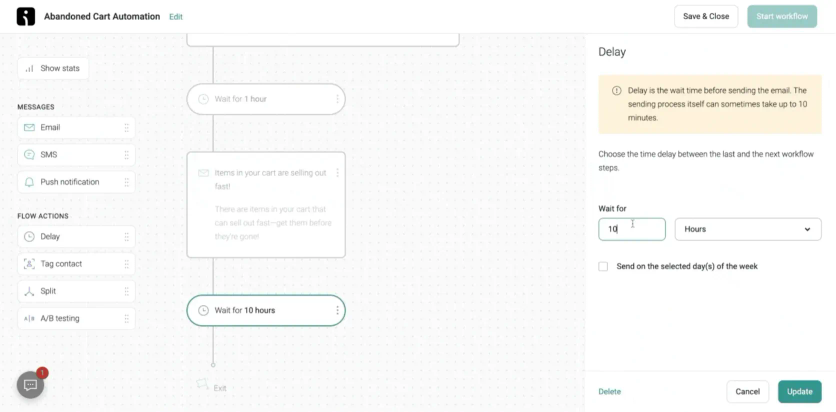
Omnisend’s pre-built abandoned cart automation
Many small shop owners or lean marketing teams choose Omnisend as an upgrade from basic newsletter tools when they want to add automation like cart recovery, welcome series, and start doing SMS or push, all without a steep learning curve or cost.
Key Features
- Email & SMS Campaigns: Omnisend lets you design nice-looking emails with a drag-and-drop editor and also set up SMS campaigns. It keeps these channels together for a unified contact view. They also support push notifications and some Google ad integrations, albeit in simpler form.
- Pre-built Automation Workflows: Much like Klaviyo, Omnisend offers ready-made automation templates (for cart abandonment, welcome series, order confirmations, etc.). These can literally be turned on with minimal tweaks, which is great for non-experts.
- Forms and Pop-ups: It has built-in forms, pop-ups, and landing pages to capture new subscribers, with a variety of templates for things like exit-intent pop-ups, discount sign-ups, etc.
- Segmentation: Omnisend provides segmentation based on shopping behavior and email engagement (e.g., customers who spent over X, or haven’t purchased in 6 months). It’s not super advanced, but enough for targeted sends like VIP offers or reactivation campaigns.
- Analytics & Reporting: You get basic campaign stats, sales tracking from campaigns, and even a nice dashboard that shows sales from automation vs campaigns, etc. It’s geared to show how your marketing efforts drive revenue (important for small biz to justify the spend).
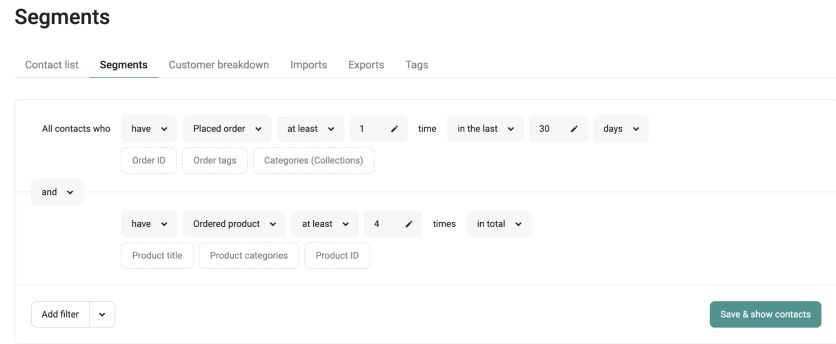
Omnisend’s segment builder
Strengths
Omnisend’s strengths are affordability and user-friendliness. It has a free tier and very cost-effective paid plans (starting around $16/month for the standard plan), which undercuts many competitors while still offering multi-channel features. This makes it accessible to businesses that can’t invest in pricier tools.
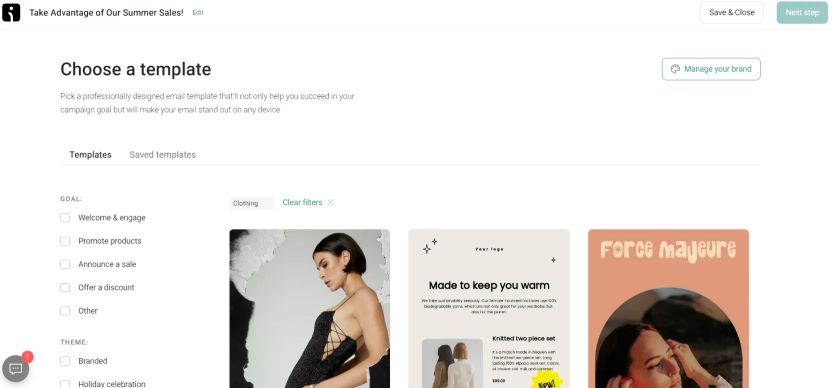
Omnisend’s email templates
Implementation is a breeze; connect your store, choose some workflows, tweak copy, and you’re basically set. The platform is not cluttered with excess features – it’s streamlined for the key tasks of sending emails, texts, and automating a handful of crucial flows.
Another plus: support is often praised, and since they cater to smaller clients, they’re used to guiding first-timers.
Weaknesses
However, the simplicity comes with limitations. Omnisend is not intended for large complex operations. If you have hundreds of thousands of contacts and need intricate segmentation or multi-stage journeys beyond the basics, you might find Omnisend lacking.
Its email designer, while good, might not have all the advanced bells and whistles, and its template selection is somewhat more limited (though perfectly fine for most small brands).
Channel-wise, it’s primarily email and SMS – yes, there’s web push and perhaps integrations to things like Facebook Custom Audiences, but it doesn’t have in-app messaging or a loyalty system or advanced on-site personalization.
In essence, it’s a focused tool and doesn’t try to be a CDP or an expansive suite. Also, as a brand grows, they might outpace Omnisend’s capabilities and want to graduate to a platform with more analytics, more dynamic content options, etc. But for what it is aimed at, Omnisend is quite robust.
Compared to Emarsys
Emarsys versus Omnisend is like comparing a professional chef’s kitchen to a nice home kitchen setup. Emarsys has everything a large operation could need (but requires the expertise to use), whereas Omnisend covers the essentials in a very accessible way, but isn’t built for massive scale or ultra-fine control.
For a marketing leader at a big retailer, Omnisend would likely feel underpowered – it doesn’t have the advanced campaign management, AI, or the scalability that Emarsys offers. But for a smaller brand or boutique, Emarsys might be overkill both in complexity and cost, making Omnisend a practical alternative to get many of the same jobs done (sending emails/texts that convert sales) in a much simpler fashion.
Emarsys also covers channels like on-site personalization and has a deeper CRM angle, which Omnisend does not. The choice here is usually obvious by company size: enterprise or high-growth mid-market = Emarsys; SMB or startup = Omnisend.
Compared to Maestra
When comparing Omnisend to Maestra, it’s largely about scale and depth.
Maestra is designed to give rapidly scaling and mid-large brands a unified platform to drive sophisticated, personalized campaigns across every channel, with a strong service component. Omnisend is designed to give small brands an easy way to do effective email and SMS marketing with minimal fuss.
If you put them side by side feature-wise, Maestra will have a lot more: real-time triggers, site personalization, advanced segmentation logic, loyalty, AI optimization, etc. Omnisend sticks to the fundamental features that most small stores need: send good emails/texts at the right time.
For example, imagine wanting to run a complex win-back campaign that checks if a user has engaged on site, and if not, downgrades their VIP tier and sends different offers accordingly – Maestra could automate all of that integrated with loyalty status; Omnisend would require manual work or simply can’t manage loyalty tiers since it doesn’t have that concept.
On the flip side, if you just need to recover abandoned carts and send a monthly newsletter, Omnisend will do it at a fraction of Maestra’s price, and Maestra’s extra features might go unused in that scenario.
Pricing
Omnisend has a free plan for small lists. The Standard plan starts at $16/month, and Pro – which now includes SMS – starts at $59/month with SMS credits matching your subscription price.
How to Choose the Best Emarsys Alternative for Your Brand
As we’ve seen, there’s no one-size-fits-all answer – the “best” Emarsys alternative depends on your business size, channels, and marketing priorities. Start by assessing what really matters for your strategy:
- Budget and Resources: If you’re a lean team or an SMB, a tool like Omnisend or Klaviyo can deliver solid results without enterprise complexity. Larger teams with bigger databases may justify investing in platforms like Braze or Salesforce that offer more power (but require more resources to manage). Maestra strikes a middle ground by offering enterprise-grade features with guided support, which can be ideal for growing brands that need sophistication without hiring a huge tech team.
- Key Channels and Use Cases: Is your business heavily app-based? A platform like Braze or MoEngage (mobile-first focus) might serve you well. Running a robust loyalty program? Consider Maestra which has built-in loyalty management. Primarily an e-commerce email/SMS operation? Klaviyo or Dotdigital could cover your needs, though Maestra would enable you to expand into more omnichannel personalization as you grow.
- Desired Level of Personalization: Almost all these alternatives can send an email or text blast – the differentiation is how finely they let you tailor and trigger messages. If you want cutting-edge AI-driven personalization and real-time site changes, look at Maestra or Bloomreach Engagement which emphasize those capabilities. If you just need basic segmentation and some dynamic content, simpler platforms will suffice.
- Integration with Your Stack: Consider what systems you need to connect. For example, if you’re deep into Salesforce’s ecosystem, Marketing Cloud might integrate most naturally. If you rely on Shopify plus a few apps, Klaviyo or Omnisend plug in seamlessly. Maestra offers a comprehensive suite so you rely less on multiple integrations, but it still plays well with e-commerce platforms and other tools via APIs.
- Support and Guidance: Finally, evaluate how much help you want. Some companies prefer a do-it-yourself platform (and perhaps they have in-house specialists). Others might value a partner-like approach. Maestra’s dedicated Forward Deployed Marketer model means you get a lot of hand-holding and strategic input – great if you want to accelerate results and not spend months figuring out a new system. Larger vendors also offer support, but it might come at extra cost or be less personalized.
In making your decision, take advantage of demos and trials. See the platform in action with your own scenarios. Engage stakeholders from marketing, IT, and even customer support to gather a 360-degree perspective – switching marketing platforms is a significant move, so you want buy-in that the new solution addresses pain points without introducing new ones.
Above all, keep the focus on your customer. The right platform should help you know your customers better and engage them in ways that feel timely and relevant. Whether that’s through tighter loyalty loops, smarter mobile outreach, or hyper-personalized web experiences, the end goal is to build stronger relationships that drive revenue.
The Bottom Line on Emarsys Alternatives
Every tool on this list has its strengths, but remember, the platform is only as effective as the strategy behind it. Whichever alternative you choose, invest time in mapping out your customer journeys and the messages that matter at each step. That’s where the real ROI lives.
If you’re looking for a solution that checks all the boxes – comprehensive features, ease of use, and a partnership approach to ensure your success – Maestra stands out as a top choice. It’s not just about switching software; it’s about upgrading what your marketing can do. And with Maestra’s all-in-one capabilities and white-glove support, you’ll be well-equipped to turn your customer data into delightful, revenue-driving experiences.
Take the next step: Book a demo with Maestra and see how a unified, intelligent platform can transform your brand’s customer engagement. Your new marketing strategy could start here – and we think you’ll wonder how you ever managed without it. Good luck, and happy marketing!
FAQ
- Omnisend and Klaviyo both offer free tiers suitable for smaller e-commerce brands. For brands ready to invest in growth, Maestra starts at $2,000/month for the CDP plus unlimited email, with a dedicated Forward Deployed Marketer included and additional modules like loyalty and personalization available as you grow – Enlightened Equipment achieved 22% revenue growth within 2 months, demonstrating how the investment pays for itself.
- Maestra is one of the only marketing platforms with a fully native loyalty suite: points, tiers, referrals, and behavior-based promotions. This is a significant advantage over Emarsys (where loyalty is a paid add-on), Braze, Klaviyo, and Iterable (all requiring third-party integrations). Urban Armor Gear consolidated their separate loyalty tool into Maestra and saved approximately $100K annually.
- Migration complexity depends on data volume and customization depth. Emarsys’s CSV-based data format can actually simplify export. Maestra handles the entire migration as part of onboarding – no setup fees, no onboarding fees. Sena completed a full migration to Maestra in 2 weeks, including multi-region data unification, with Maestra’s team doing the heavy lifting.
- Maestra supports multiple brands and languages with automatic routing – Sena unified US and EU operations into a single account with 5-language email support, achieving 8.6x campaign revenue growth.
- Not necessarily. Maestra’s dedicated Forward Deployed Marketer team rebuilds all your flows or builds new custom flows tailored to your brand’s specific needs – often delivering more sophisticated automation than Emarsys’s generic playbooks. For example, for Coolibar, their Forward Deployed Marketer launched Price Drop Alert and Abandoned Collection View flows that contributed to +33.6% campaign revenue growth.
- Emarsys support quality is inconsistent, with multiple users reporting that pre-sale promises weren’t met. Maestra takes a different approach entirely: every client gets a dedicated Forward Deployed Marketer with weekly strategy calls and 5-minute response times – a hands-on partnership that contrasts with Emarsys’s account management model.