8 Best Product Recommendation Engines & Tools [2026]
Product recommendations drive up to 31% of e-commerce revenue – but most recommendation tools work in isolation. They suggest “you may also like” on a product page, and that’s it. The recommendation doesn’t carry over to email, popups, or the homepage. So your customer sees one thing on-site and something completely unrelated in their inbox.
This guide compares 8 product recommendation tools on algorithm quality, cross-channel reach, setup effort, and pricing. Each gets a plain verdict – so you can find the one that fits how your store works.
Quick Verdict: Best Product Recommendation Tools by Category
The best product recommendation engines are Maestra, Dynamic Yield, Algolia Recommend, Nosto, and Clerk.io, with SAP Engagement Cloud, Claspo, and Wisepops covering narrower needs. The full comparison – by approach, pricing, and best fit – is below.
Best for omnichannel personalization: Maestra – recommendations across site, email, SMS, and push, included in the CDP base ($1,300/mo)
Best for no-code popups: Claspo – product rec popups with a free tier
Best for enterprise experimentation: Dynamic Yield – deep-learning recommendations inside an A/B-testing suite (quote-only)
Best for developer teams on Algolia search: Algolia Recommend – per-request pricing, 5,000 free requests a month
Best for cookieless AI: Clerk.io – no training period, priced per product (7-day free trial)
Best for SAP ecosystem retailers: SAP Engagement Cloud (ex-Emarsys) – Predict engine across email, web, and mobile (quote-only)
Best for visual merchandising: Nosto – 20+ self-learning algorithms with merchandising rules (quote-only)
Best for on-site engagement: Wisepops – Shopify-only recommendations in popups and embeds (from $299/mo self-serve)
How to Choose a Product Recommendation Engine
Choosing the right product recommendation tool needs careful thought about several factors that affect how well it works for your business.
Step 1: Define Your Business Objectives
Start by establishing specific, measurable goals for your recommendation system. Are you primarily looking to increase average order value by 15-25%, boost conversion rates by 10-30%, or move slow-selling inventory that’s been stagnant for over 90 days? Document these objectives with target metrics and timelines. For example, “Increase cross-sell revenue by 20% within six months” or “Increase AOV by 15% in a month.” Clear goals will guide every subsequent decision and help you evaluate ROI accurately.
Step 2: Assess Your Data Infrastructure and Volume
Evaluate your current data ecosystem before selecting any tool. Catalog what customer data you collect: browsing patterns, purchase history, search queries, demographic information, and product interaction data. High-performing recommendation engines require significant volume of transactions and product interactions to generate meaningful insights.
Step 3: Match Tool Complexity to Your Business Scale
Choose a solution that aligns with your operational complexity and growth trajectory. Enterprise retailers with +10,000 SKUs and multi-million dollar revenues need product recommendation engines that handle real-time personalization across multiple touchpoints. Mid-market businesses ($1M-$10M revenue) usually consider tools that balance functionality with ease of implementation. Small businesses benefit from plug-and-play solutions like built-in Shopify features.
Step 4: Evaluate Integration Capabilities
Audit your existing technology stack and map out required integrations before making any commitments. Your recommendation tool must connect seamlessly with your e-commerce platform, email marketing system, CRM, and analytics tools. Request detailed integration documentation and ask vendors about API limitations, data sync frequency, and any middleware requirements. Poor integrations create data silos that undermine recommendation accuracy.
Step 5: Test Performance and Load Times
Implement a technical evaluation focusing on speed and reliability. Request a demo environment where you can test recommendation load times with your actual product catalog size. Recommendations must appear within 200 milliseconds to avoid impacting user experience – anything over 2 seconds significantly increases bounce rates. Test the system during peak traffic periods and verify it can handle your maximum concurrent users without degrading performance.
Step 6: Examine Analytics and Testing Capabilities
Prioritize platforms that offer comprehensive measurement and optimization tools. Essential analytics include conversion rates from recommended products, revenue attribution, click-through rates on recommendations, and impact on average order value. The platform should support A/B testing functionality, allowing you to compare different recommendation algorithms, placement strategies, and display formats. Look for tools that provide cohort analysis to track long-term customer behavior changes.
Step 7: Optimize Your Product Catalog Structure
Prepare your product data for maximum recommendation effectiveness before implementation. Ensure your catalog includes detailed attributes: categories, subcategories, price ranges, seasonal indicators, and cross-sell compatibility. Products should have consistent tagging for color, size, material, and use cases. The more granular your product classification, the more precise your recommendations become. Plan to spend 2-4 weeks cleaning and structuring your catalog data.
Step 8: Select Industry-Specific Features
Choose functionality that matches your product type and customer shopping behavior. Fashion retailers need visual similarity algorithms and outfit completion suggestions. Electronics stores require compatibility-based recommendations and technical specification matching. Beauty brands should prioritize ingredient-based filtering. Ensure the tool’s core algorithms align with how your customers naturally discover and evaluate products.
Step 9: Calculate Total Cost of Ownership
Analyze pricing models beyond the base subscription fee to understand true costs. Some providers charge per recommendation view (typically $0.01-$0.05), others bill based on generated revenue (1-3% commission), and many offer fixed monthly rates ($100-$+5,000 depending on features). Factor in implementation costs, additional integration fees, and required staff training time. Industry benchmarks suggest aiming for a 20-30x return on investment within the first year of implementation.
Step 10: Configure Business Rules and Customization
Establish the balance between algorithmic automation and manual control that fits your merchandising strategy. Define rules for promoting high-margin products, featuring new arrivals, clearing seasonal inventory, and avoiding out-of-stock recommendations. Set up exclusion rules to prevent suggesting competing products or inappropriate cross-sells. Plan customization for different customer segments, seasonal campaigns, and promotional periods. The most effective implementations combine machine learning insights with strategic business logic to drive both customer satisfaction and profitability.
Comparison Table of Product Recommendation Tools
Tool | Best For | Starting Price | Recommendation Approach | Marketer Included | Beyond Product Recommendations |
|---|---|---|---|---|---|
Maestra | Omnichannel personalization | From $1,300/month (CDP base; recommendations included) | AI engine on a real-time CDP: 14 algorithms, product-picking quizzes, bundles, upsell bar | Yes – a Forward Deployed Marketer in every plan | Email, SMS, loyalty, site personalization, mobile push |
Claspo | Product recommendations widgets | Free, $29/month | No-code popup builder, strong targeting capabilities, ready-made templates, lightweight scripts | No | Lead capture, exit intent, and gamified popups, built-in A/B testing |
Dynamic Yield | Enterprise experimentation | Quote-only (annual contracts) | Hybrid: rule-based strategies plus AdaptML deep learning (NextML, AffinityML, VisualML) | No (Professional Services, paid) | A/B testing, dynamic content, email personalization |
Algolia Recommend | Developer teams on Algolia search | Free up to 5,000 requests/mo; then $0.60 per 1,000 | Hybrid: collaborative filtering plus content and image similarity, retrained daily | No | Site search, trending facets |
Clerk.io | Cookieless AI | Usage-based per product; 7-day free trial | AI, cookieless, no training period; 9 prebuilt logics | No (setup session free, extra work €99/hr) | Search, email, chat, audiences |
SAP Engagement Cloud | SAP ecosystem retailers | Quote-only | ML «Predict» engine: affinity scoring per contact | No | Omnichannel campaigns, customer intelligence |
Nosto | Visual merchandising | Quote-only (platform fee + volume fee) | 20+ self-learning algorithms with boost/bury merchandising rules | No (Customer Success on Professional and Enterprise) | Search, content personalization, A/B testing |
Wisepops | On-site engagement | From $299/mo self-serve (Shopify); $499/mo with a strategist | Collaborative filtering, Shopify catalog only; 6 strategies | Strategist on the $499 plan | Popups, bars, embeds, on-site feed |
Maestra – Best for omnichannel personalization
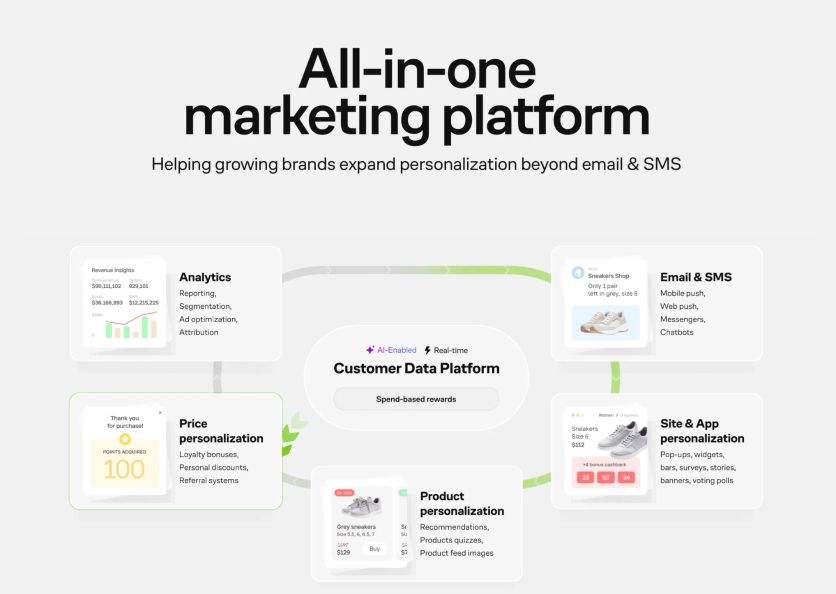
Maestra is a complete marketing platform built for DTC brands that want to boost conversions through tailored recommendations. The platform combines customer data, site personalization, and AI-powered product suggestions into one system, unlike basic recommendation engines.
Maestra Features
Maestra’s product recommendation engine works through a sophisticated Customer Data Platform (CDP) that brings together data from multiple sources. In fact, one client combined website interactions, mobile app activity, and offline store purchases to build complete customer profiles for better recommendations.
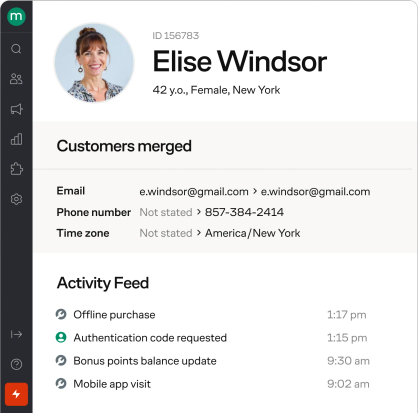
Customer profile in Maestra
This approach lets marketers create tailored recommendations based on the customer’s full experience rather than single touchpoints. Maestra offers a wide range of ready-to-use recommendation engines:
- Recently browsed products
- Products similar to recently browsed products
- Bestsellers
- Category bestsellers
- Bestsellers from previously viewed categories
- Post-purchase cross-sell
- Custom post-purchase recommendations
- Personal recommendations
- Event-based personal recommendations
- Related products
- Often purchased with Items in product list
- Similar products
- Similar products to product list recommendations
You can also create custom recommendations rules tailored to your business needs.
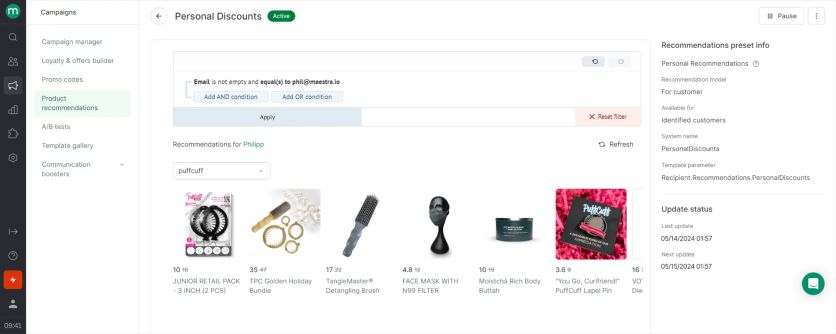
Personal product recommendations in Maestra
The platform’s AI-powered system places product suggestions at key site locations. The quality of recommendations improves as Maestra uses various data signals:
- Ratings and reviews
- Promotional details
- Product attributes like color, size, and type
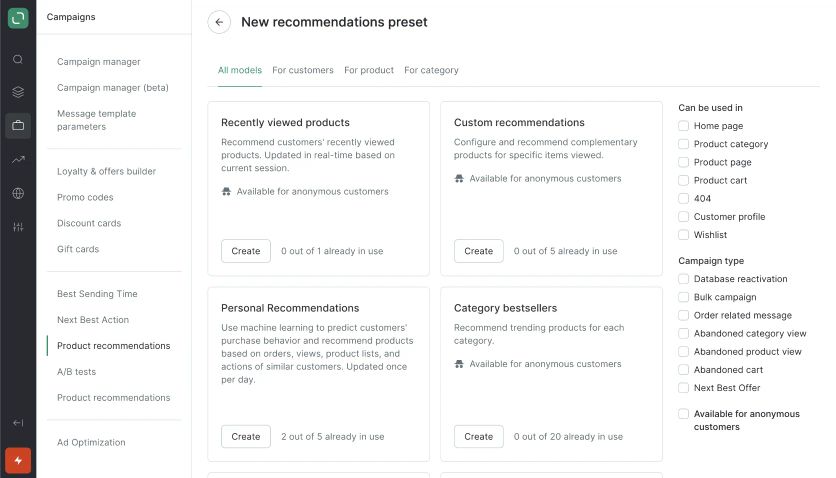
Maestra’s product recommendation presets
Beyond standard recommendations, Maestra has specialized product quizzes that help customers find items matching their priorities and needs. Speaking about results, it helped Blossom Flower Delivery increase website conversion by 14%.
Retailers worried about inventory management will find Maestra’s specialized upsell features valuable. For example, an upsell bar showed a 38% AOV increase by smartly encouraging customers to add items to their cart.
The engine also handles catalogs that trip up standalone tools. Svaha USA switched from Rebuy – the most common tool brands leave for Rebuy alternatives – because every color of a dress is a separate Shopify product, and the old widget filled every slot with the same dress. Maestra’s variant-aware widgets now assist 11.2% of Svaha’s revenue, and those orders carry 32% higher AOV than the rest.

If a customer has only three items worth $82 in their cart, the up-sell bar suggests adding $12 more to qualify for free shipping
Maestra Pricing Plans
Maestra’s pricing is modular and month-to-month, with no long-term commitments. The base is the Customer Data Platform at $1,300/month, and the product recommendation engine is part of it – not a paid add-on. Channels like unlimited email ($700/month) are monthly modules on top, so a CDP-plus-email setup starts at $2,000/month. There are no setup or onboarding fees; migration and implementation are included. You can build your own estimate on the Maestra pricing page.
The CDP base includes:
- Real-time customer data processing and segmentation
- The product recommendation engine with 14 AI algorithms
- Full-funnel reporting and analytics
- Ad audience sync
- A dedicated Forward Deployed Marketer
- The first 100,000 active profiles – storing dormant profiles is free
Request a Maestra Demo to review how this pricing structure fits your business needs.
Maestra Support
Maestra makes white-glove service central to its offering. Clients get complete support throughout the implementation process, including:
- Full data and flow migration assistance
- Campaign asset transfer from previous platforms
- Third-party tool integration
- Email, site, and feed design implementation
- Deliverability setup
- Flow and segment configuration
- A/B testing implementation
Each client works with their own Forward Deployed Marketer (a marketer who works as part of your team) who handles the integration setup and runs the recommendation program after launch.
Maestra Pros and Cons
Pros | Cons |
|---|---|
All-in-one platform that combines a CDP, site personalization, and AI product recommendations in one system | Monthly investment is substantial and geared to growing DTC brands rather than very small or early-stage stores |
Omnichannel recommendations across email, SMS, web, and app from a single unified customer profile | All-in-one scope is more than teams looking only for a standalone recommendation widget need |
Wide range of ready-to-use recommendation engines, plus custom rules for your business needs | The full feature set takes time to roll out completely, though the dedicated marketer handles the setup |
Product quizzes and smart upsell tools drive measurable gains (a 38% AOV increase, a 14% conversion lift for Blossom Flower Delivery) | |
Dedicated Forward Deployed Marketer and white-glove onboarding, with migration and implementation at no extra cost |
Claspo – Best for no-code popups

Claspo is a no-code popup builder that helps businesses capture leads, reduce friction, guide visitors toward featured or high-margin products, and lift conversions at key decision moments across the site. It’s built around behavior-based popups that respond to real-time user intent, while staying lightweight and not dragging down page speed.
Claspo Features
Claspo goes beyond basic popups and recommendation widgets by combining flexible display logic, ready-made templates, and advanced targeting in one lightweight platform. It’s built for marketers who want precise control over when and how messages appear without relying on developers.
- Popup Builder: Create exit-intent popups, welcome offers, discount banners, lead capture forms, social proof notifications, and floating widgets using a visual, no-code editor.
- Advanced Targeting and Triggers: Show popups based on exit intent, scroll depth, time on page, referral source, device type, traffic channel, or user behavior.
- Template Library: Launch campaigns faster with pre-built templates for lead generation, promotions, announcements, and ecommerce use cases.
- Smart Personalization: Tailor messages using page context, visitor behavior, and audience segments to keep popups relevant rather than intrusive.
- A/B Testing: Test popup designs, copy, and triggers to identify the highest-converting variant and optimize performance over time.
- Integrations: Connect Claspo with email marketing platforms, CRMs, and automation tools to sync leads and trigger follow-up workflows.

Claspo Pricing Plans
The Free plan includes everything you need to launch and manage on-site campaigns fast. It provides full access to Claspo’s popup features, which makes it ideal for early-stage projects and large-scale testing.Paid plans scale based on your monthly pageviews and start at $29/month, unlocking higher traffic limits, the full platform experience, and removal of Claspo branding.
Claspo Support
Claspo provides onboarding resources, a knowledge base with step-by-step guides, and responsive customer support to help users launch and optimize campaigns efficiently.
Claspo Pros and Cons
| Pros | Cons |
|---|---|
| No-code builder with strong targeting capabilities | Focused on on-site widgets rather than full automation |
| Ready-made templates for fast campaign launch | Design flexibility may depend on selected templates |
| Lightweight scripts that don’t impact site speed | |
| Built-in A/B testing for conversion optimization | |
| Suitable for ecommerce and content-driven websites |
Dynamic Yield – Best for enterprise experimentation
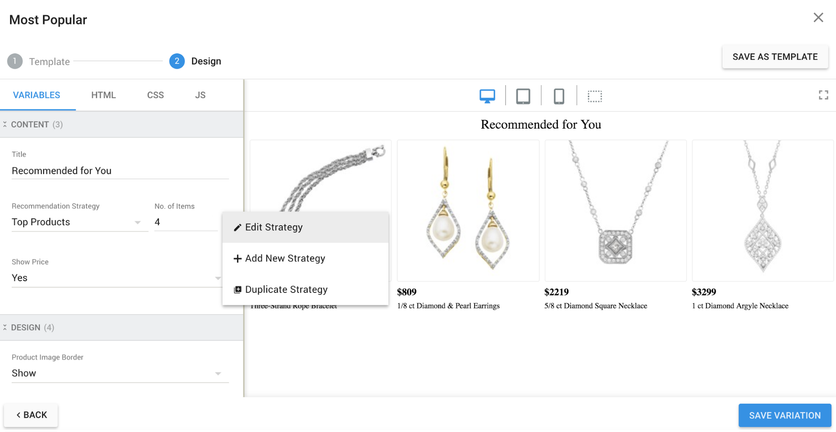
Dynamic Yield’s widget editor: strategy, item count, and layout are set per placement
Dynamic Yield, owned by Mastercard since 2022, is a personalization and A/B-testing platform where product recommendations are one module among several. It suits large retailers that want recommendations, dynamic content, and experiments managed in one place, with a vendor services team doing part of the work.
Dynamic Yield Features
Recommendations run on two layers. Classic strategies – Most Popular, Viewed Together, Purchased Together, Similarity, User Affinity – are rule-based and refresh daily. The AdaptML package adds deep learning: NextML predicts the next purchase, AffinityML scores each shopper’s affinities with a recurrent neural network, and VisualML finds visually similar items. Recommendations serve on the website, in native apps through the Experience API, and in email, where they render at open time with any ESP.
The catch is the implementation. A standard Shopify store installs the app and a theme block, but headless stores need developers to implement scripts and events, and checkout personalization goes through a Professional Services build. Every recommendation campaign lives inside the experimentation framework, so a team that only wants «customers also bought» on product pages pays for an A/B-testing suite it may not use.
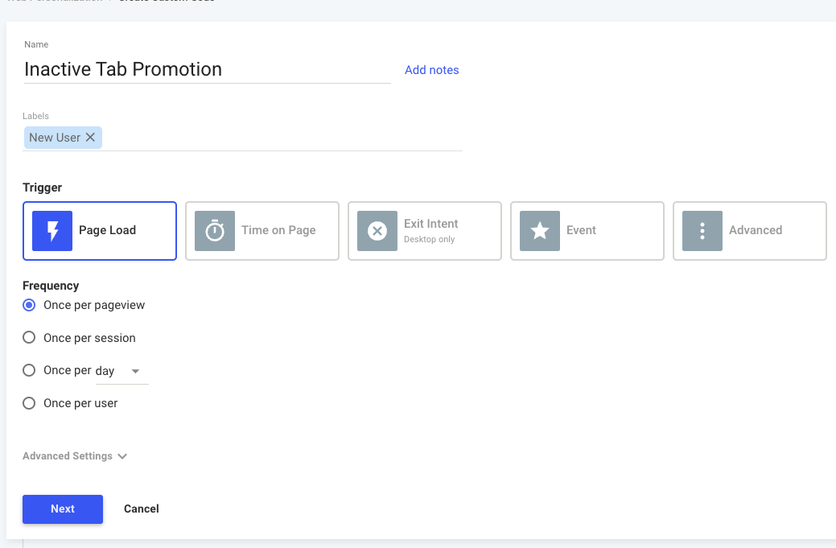
Campaign triggers in Dynamic Yield: page load, time on page, exit intent, or a custom event
Dynamic Yield Pricing Plans
Pricing is quote-only, and the Shopify listing states that an account «is not free of charge». Contracts are enterprise-sized: Vendr’s marketplace data puts the median at about $101,000 a year, paid annually or quarterly up front. There is no self-serve plan and no published trial. Brands priced out usually look at Dynamic Yield alternatives first.
Dynamic Yield Support
Onboarding, checkout extensions, and campaign reviews route through Dynamic Yield’s Professional Services and a technical account manager; whether that is bundled or billed depends on the contract. Trustpilot has only two reviews, both from testing users rather than recommendation buyers: «Great tool for Ab Testing and for Dynamic Content!»
Dynamic Yield Pros and Cons
Pros | Cons |
|---|---|
Deep-learning recommendations and A/B testing in one platform | Quote-only, enterprise-level contracts paid up front |
Email recommendations rendered at open time, with any ESP | Headless and checkout setups need developers or paid Professional Services |
Shopify Plus certified, Salesforce Commerce Cloud and commercetools connectors | Recommendations are tied to the experimentation framework, more than a merchandiser may need |
More than 400 brands, mostly mid-size to large retailers | No self-serve plan or published trial |
Algolia Recommend – Best for developer teams on Algolia search
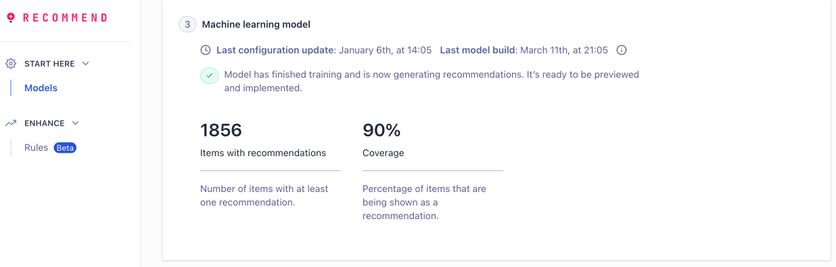
An Algolia Recommend model after training: items covered and the share of the catalog with recommendations
Algolia Recommend is the recommendation add-on to Algolia’s search platform. It fits stores that already run Algolia search and have a developer on hand: the models are strong and the entry price is close to zero, but every placement is built with code.
Algolia Recommend Features
Each model is trained separately and retrained once a day. Frequently Bought Together and Related Items learn from click and conversion events (collaborative filtering) and from catalog attributes, Trending Items from recent conversions, and Looking Similar from product images, which needs no events at all. Up to 30 items come back per request, and recommendations serve through InstantSearch widgets on the site or through the REST API in a native app or backend.
The catch is data and effort. Related Items needs 10,000 events before it trains and Frequently Bought Together needs 1,000, so a thin-traffic store starts on image similarity alone. Setup means an Algolia index, event tracking on product and checkout pages, and widget integration – marketer-only setup isn’t an option. Email isn’t a channel: recommendations live on site, in app, and in search.
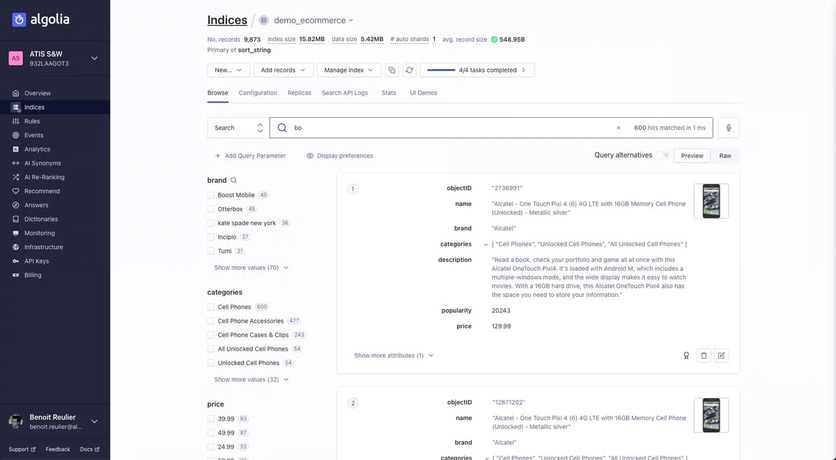
Algolia’s index browser, where the catalog that feeds Recommend lives
Algolia Recommend Pricing Plans
The free tier includes 5,000 recommendation requests a month with no credit card. Grow plans include 10,000 requests, then $0.60 per additional 1,000 on top of search request and record fees. Elevate plans are negotiated with volume discounts. Self-serve billing is monthly pay-as-you-go.
Algolia Recommend Support
Self-serve plans come with documentation and community support; a named contact comes only with Elevate and Enterprise contracts. Trustpilot reviews cover Algolia as a whole, and billing is the recurring complaint: «They keep stealing money from my account and when you email them they will not respond.»
Algolia Recommend Pros and Cons
Pros | Cons |
|---|---|
Free up to 5,000 requests a month, then per-request pricing | Developer required for index, events, and widgets |
Five models including image-based Looking Similar | Models need 1,000–10,000 events before they train |
Native Shopify, BigCommerce, Magento 2, and Salesforce Commerce Cloud integrations | No email recommendations |
Recommend Analytics per model (clicks, conversions, revenue) | Costs stack with search requests and records at scale |
Clerk.io – Best for cookieless AI
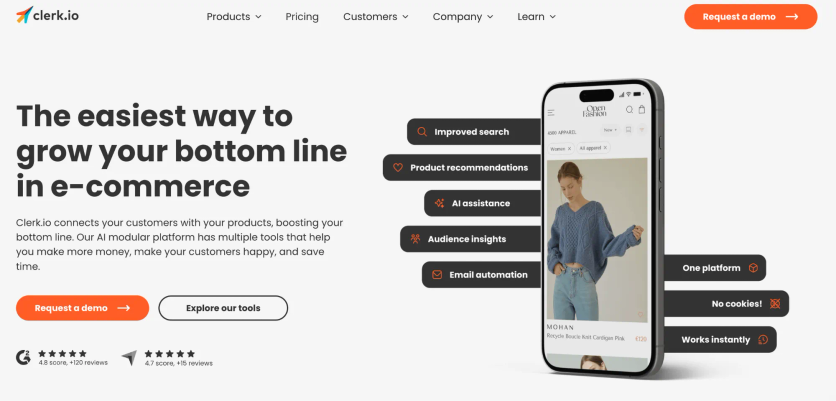
Clerk.io helps e-commerce businesses connect customers with products through AI-driven personalization. The product recommendation engine lifts shopping experiences by analyzing customer behavior and priorities to deliver tailored suggestions that increase conversion rates.
Clerk.io Features
The platform’s recommendation system uses over 20 different recommendation logics to help shoppers find what they need. Here are the main recommendation types:
- Best Sellers – Shows items that sell most consistently over time
- Hot Products – Emphasizes items gaining popularity
- Visitor Recommendations – Displays relevant items based on click history
- Best Alternatives – Shows similar products when items are viewed
- Most Sold With – Boosts sales by grouping commonly purchased items together
The platform starts working right after installation without any learning period. It makes use of existing buyer history and advanced AI algorithms to optimize store performance. The platform has dynamic filters that automatically show relevant product attributes, which helps customers refine search results quickly.
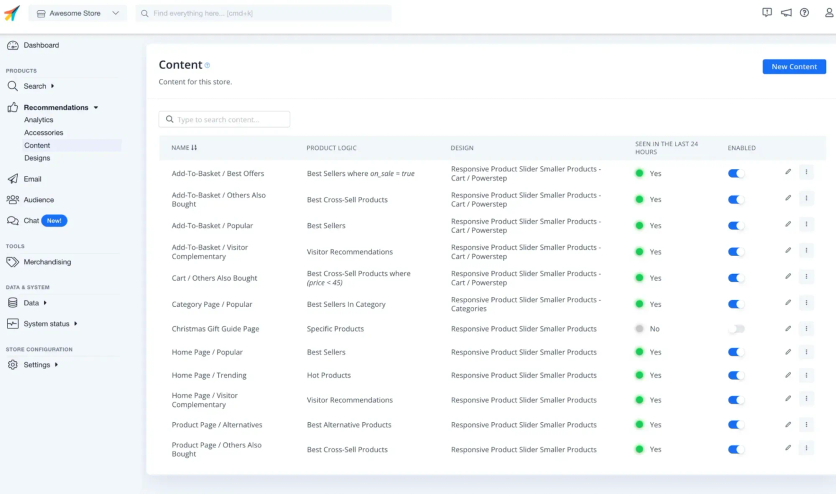
Pricing Plans
Clerk.io prices each product separately – Search, Recommendations, Chat, Email, Audience – and the recommendations fee scales with monthly recommendation requests, from 100,000 up. Prices come out of the calculator on Clerk’s pricing page, with monthly, quarterly, half-year, or annual terms and discounts for longer commitments. There is no implementation fee, a 7-day free trial needs no card, and extra setup work bills at €99 an hour.
Clerk.io Support
Every plan includes chat and email support on Danish business hours, plus a free setup session; enterprise contracts add custom SLAs. Reviewers on Trustpilot rate the team highly – «The customer service at Clerk is on another level» – but the billing start date is a sore point. One merchant whose onboarding ran late wrote: «Despite this, we were charged from day one.»
Clerk.io Pros and Cons
Pros | Cons |
|---|---|
Detailed cookieless platform ensuring GDPR compliance | Costs can add up as usage grows |
Proven results (like 35.4% increase in order value) across client stores | Some users report integration issues with platforms like Magento |
Strong search functionality that customers mention often | |
Quick setup with immediate results |
SAP Engagement Cloud (ex-Emarsys) – Best for SAP ecosystem retailers

SAP Engagement Cloud, formerly SAP Emarsys, stands out with its detailed omnichannel approach to product recommendations. The platform’s machine learning-based “Predict” engine serves mid-to-large enterprises that want sophisticated personalization for their customer touchpoints.
Emarsys Features
The platform’s AI-powered recommendation engine sits at its core. It personalizes product suggestions through email, web, mobile, and SMS channels. Customer data from multiple sources merges into single profiles. This helps businesses learn about customer behavior patterns and create more relevant recommendations.
The platform has several recommendation options like Mail Personal and Abandoned Cart. These merge smoothly into email campaigns through their Visual Content Editor (VCE). The system goes beyond simple recommendations with:
- Smart Insight – a customer intelligence tool that gives useful information based on historical data and predictive analytics
- Visual customer journey builder with an accessible interface to create multi-channel campaigns
- Live content personalization based on user behavior and priorities
The company launched its AI Product Finder, which helps marketers search product catalogs and add suitable products to campaigns quickly.

Recommendations analytics in SAP Emarsys
Emarsys Pricing Plans
Pricing is quote-only and depends on database size, modules, and setup complexity; there is no public price list and no free trial. Expect an enterprise contract rather than a monthly plan.
Emarsys Support
Support follows SAP’s cloud tiers, with onboarding through SAP’s resource center and paid Professional Services for migration and managed campaigns. Reviews are thin and mixed: a 2022 Trustpilot reviewer wrote «They have some good software and the service to be fair is OK», while a 2026 one called it «the worst ESP tool ever created». Decide for yourself whether a three-review sample is evidence.
Emarsys Pros and Cons
Pros | Cons |
|---|---|
Better personalization through unified customer profiles and advanced data collection | The interface can be challenging for new users to navigate |
Omnichannel marketing capabilities in one platform for email, SMS, social, and web | Fewer customization options than some competitors |
AI-powered automation with predictive analytics optimizes campaign timing | Analytics and reporting tools need more depth compared to specialized solutions |
Visual drag-and-drop campaign builder needs minimal technical skills | Third-party software integration isn’t always reliable |
Regular updates bring new marketing optimization features | Users without technical expertise find automation setup complex |
Nosto – Best for visual merchandising
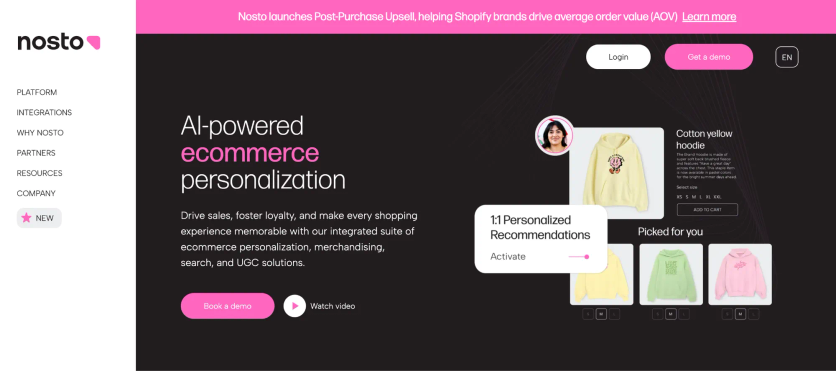
Nosto utilizes predictive AI technology to create tailored shopping experiences through live product recommendations. This ecommerce personalization tool analyzes customer behavior patterns and automatically suggests relevant products throughout the buyer’s experience.
Nosto Features
The platform provides complete customization options for recommendation types. Merchants can create cross-selling blocks, personal recommendations, and “purchased together” listings.

Nosto’s recommendation engines
Nosto has boosted its capabilities with Visual AI that identifies and recommends products based on visual similarities. The system recognizes attributes like color and style. Merchants can now show visually similar items when desired products are out of stock, which helps reduce bounce rates.
Nosto’s merchandising rules give retailers granular control. They can boost or bury specific products in recommendation placements based on attributes like category, brand, size, price, and performance metrics. The engine runs more than 20 self-learning algorithms, from bestsellers to browsing-history and cross-sell blocks.
Nosto Pricing Plans
Nosto doesn’t publish prices. Each contract combines a base platform fee, a volume fee calculated from your store’s revenue and traffic, the modules you pick, and a support level. There is no self-service trial; qualified merchants get a structured proof of concept instead.
Nosto Support
Every customer gets the help center and Nosto’s AI agent; priority support and a dedicated customer success contact come with Professional and Enterprise tiers, with a published first response of two business hours for urgent tickets. Trustpilot has only three reviews, all one-star; one merchant wrote: «Incredibly expensive for what it is, and I’m not convinced that they actually have any staff working for them.»
Nosto Pros and Cons
Pros | Cons |
|---|---|
Automated merchandising reduces time spent on product recommendations | Setup might require in-house technical expertise |
Store-wide personalization capabilities beyond simple recommendations | New users often find the dashboard overwhelming |
Visual merchandiser tools need minimal technical expertise | Small stores might struggle with the pricing structure |
Perfect for ever-changing brands that need expandable solutions | Additional support is needed for custom features |
Wisepops – Best for on-site engagement

Wisepops helps with onsite interaction through AI-powered product recommendations on multiple channels. This Shopify tool helps businesses boost their sales with customized product suggestions.
Wisepops Features
The platform provides six recommendation strategies that match different stages of the buying process. The system has best sellers, trending items, upsell suggestions, cross-sell recommendations, customized picks, and products viewed recently.
These options work through three main formats: popups for contextual recommendations, embeds that blend into store pages, and an onsite feed that suggests products based on browsing behavior. The platform’s machine learning algorithm looks at billions of data points to make better recommendations.
The engine uses collaborative filtering on your Shopify catalog and works only on Shopify; Wisepops itself recommends it for stores with at least 50 SKUs and 20,000 monthly visitors.

Wisepops’s product recommendation engines
Wisepops Pricing Plans
Wisepops moved to pageview-based pricing in June 2026. Self-serve Shopify plans start at $299 a month for up to 500,000 pageviews; the plan with a dedicated strategist, a site audit, and monthly business reviews starts at $499 a month, and annual billing adds two months free. There is a 14-day trial and no free plan.
Wisepops Support
The $499 plan comes with a senior strategist: an intro call, an audit within seven days, and a business review at month three, then monthly. Self-serve plans get live chat and email in English and French, with no strategist. Trustpilot reviewers praise the targeting – «wisepops has the most robust target capabilities, allowing me to target based on URL path» – and one long-time user noted «It hasn’t really changed in the last years and becomes more and more outdated I’d say.»
Wisepops Pros and Cons
| Pros | Cons |
|---|---|
| Works right away with autonomous AI | Works only with Shopify stores (Magento support coming soon) |
| No developer needed for Shopify integration | No free plan available (14-day trial only) |
| Full CRO toolkit with testing capabilities | Entry price jumped to $299/mo in 2026 |
Which Recommendation Engine Fits Your Catalog
Pick by catalog shape and team first, price second. A catalog with many variants or frequent stock changes needs an engine that reads variants and stock – Maestra, Nosto, Clerk.io, and Dynamic Yield do; popup templates don’t. A store with a developer and Algolia search already in place can add Algolia Recommend for almost nothing. A store whose only priority is a popup with four bestsellers can stay on Claspo or Wisepops.
Then look at where the recommendations have to show up. Only Maestra, SAP Engagement Cloud, and Dynamic Yield carry the same recommendation logic into email; Clerk.io covers site and email; Algolia Recommend, Nosto, Claspo, and Wisepops stop at the site. At Selkirk Sport, moving curation to Maestra’s engine freed 15 hours of manual work a week because the same in-stock picks feed both the website and the emails.
Last, price the whole stack, not the widget. Maestra includes recommendations in the $1,300/month CDP base along with a Forward Deployed Marketer who runs the program; Dynamic Yield, Nosto, and SAP Engagement Cloud sell enterprise contracts where services are extra. Request a Maestra demo to see the engine on your own catalog.
Key Takeaways
• Match the tool to the catalog: variant-heavy or fast-moving catalogs need a learning engine (Maestra, Nosto, Clerk.io, Dynamic Yield), not popup templates
• Count the channels: only Maestra, SAP Engagement Cloud, and Dynamic Yield carry recommendations into email; Algolia Recommend, Claspo, and Wisepops stay on site
• Price the stack: Maestra bundles recommendations and a Forward Deployed Marketer into the $1,300/month CDP base; Dynamic Yield, Nosto, and SAP sell quote-only enterprise contracts; Algolia starts free, Claspo and Wisepops are priced by pageviews
• Check the data minimums: Algolia’s models need 1,000–10,000 events, Wisepops wants 50+ SKUs and 20,000 visitors a month, Clerk.io and Maestra start without a training period
• Published results come from engines, not widgets: 11.2% of revenue assisted at Svaha USA, 7% at JOLYN, 15% conversion growth at Enlightened Equipment
FAQs
- Pricing varies widely. Algolia Recommend is free up to 5,000 requests a month; Claspo and Wisepops charge by pageviews, from free and from $299/month respectively; Clerk.io prices per product on usage. Nosto, Dynamic Yield, and SAP Engagement Cloud are quote-only enterprise contracts. Maestra includes product recommendations in its CDP base ($1,300/month), so there is no separate fee for the engine.
- Key factors to consider include your business size and needs, integration capabilities with your existing tech stack, data processing capabilities, pricing structure, and the level of support provided. It’s also important to evaluate the tool’s ability to deliver measurable results and ROI.
- AI and machine learning technologies analyze vast amounts of customer data, including browsing history, purchase patterns, and behavior, to deliver highly relevant and personalized product suggestions in real-time. This leads to improved customer experiences and higher conversion rates.
- Both channels drive measurable revenue, but they serve different stages of the customer journey. On-site recommendations influence active shoppers in real-time, while email recommendations re-engage customers who have left the site, bringing them back with personalized product suggestions.
- Businesses implementing product recommendation tools can expect significant improvements in key metrics. For example, some tools have documented a 15% increase in conversion rates, a 35.4% increase in average order value, and ROI exceeding 20x within months of implementation.
- Yes, platform-agnostic recommendation engines like Maestra, Bloomreach, and Nosto support multiple ecommerce backends. This matters for brands operating multiple storefronts or planning replatforming. Maestra maintains +150 native integrations across ecommerce platforms, ESPs, ad networks, and data tools. The advantage of a platform-agnostic approach is consistent recommendation logic and customer data across storefronts.
- A small catalog doesn’t need an enterprise engine. If the store runs Algolia search and has a developer, Algolia Recommend adds recommendations for free up to 5,000 requests a month. If it needs recommendations in email and popups as well as on site, Maestra includes the engine in its $1,300/month CDP base and the Forward Deployed Marketer sets the widgets up. Wisepops works too, but only on Shopify and only on site.
- Usually not. Shopify’s built-in Search & Discovery and most ESPs’ «recommended products» blocks cover bestsellers and «also bought». A standalone engine earns its place when the catalog has variants or stock changes the built-in logic mishandles, or when the same recommendations have to appear in email, SMS, and popups. Maestra, SAP Engagement Cloud, and Dynamic Yield do that; Algolia Recommend and Nosto improve the site only.
- Both, in layers. A learning engine (Maestra, Nosto, Clerk.io, Algolia Recommend) decides which products to show each shopper; merchandising rules decide what never shows – out-of-stock items, low-margin lines, competing bundles. Pure rules, like Claspo’s popup templates, work for a handful of hero products but don’t adapt to the shopper. Maestra and Nosto let you set rules on top of the model; Algolia Recommend needs code for the same effect.