
11 Best Omnichannel Platforms for Growing Sales (2026)

Choosing the right omnichannel software that matches your business needs can be tricky. The best solutions in the market now combine key features like unified customer data management, AI-driven individual-specific experiences, and live engagement across multiple communication channels.
We’ve looked at 11 top omnichannel platforms. Our analysis covers their features, pricing, and support options to help you pick the right one for your business. Each platform has its own strengths when it comes to creating uninterrupted customer experiences at every touchpoint.
Quick Verdict on the Best Omnichannel Platforms
The best omnichannel platforms for e-commerce in 2026 are Maestra, HubSpot, Klaviyo, and Omnisend. Maestra leads for mid-size and enterprise brands that need a real-time CDP, email, SMS, push, loyalty, and site personalization in one system; the other ten fit narrower needs, from CRM-driven inbound marketing to budget Shopify automation.
Best for e-commerce personalization: Maestra – real-time CDP with email, SMS, push, loyalty, and on-site personalization
Best for CRM-driven inbound marketing: HubSpot – marketing, sales, and service unified in one ecosystem
Best for abandoned cart recovery: Retainful – automated recovery emails and next-order coupons for Shopify and WooCommerce
Best for AI-driven retention and interactive email: Netcore – omnichannel journeys across email, SMS, WhatsApp, RCS, and push with interactive AMP email
Best for transactional + marketing in one: Brevo – email, SMS, WhatsApp, and CRM at accessible pricing
Best for email with landing pages: GetResponse – email automation, landing pages, and webinars in one tool
Best for data-driven email & SMS: Klaviyo – Shopify-native segmentation and pre-built e-commerce flows
Best for budget-friendly Shopify marketing: Omnisend – email, SMS, and push with a generous free tier
Best for SMB automation with CRM: ActiveCampaign – deep conditional logic with built-in sales CRM
Best for affordable email automation: Moosend – drag-and-drop workflows at entry-level pricing
Best for Nordic retail: Voyado – unified CRM and marketing built for Scandinavian retail chains
Content:
Comparison Table
Platform | Best for | Key Features | Support Options |
Maestra | Direct-to-consumer brands | – Real-time CDP with advanced filters for deep segmentation | – White-glove service included |
HubSpot | Organizations seeking unified CRM | – Omnichannel help desk (email, live chat, WhatsApp, Facebook Messenger) | – Email, in-app chat, phone support |
Retainful | Direct-to-consumer & Enterprise Ecommerce | – Recover abandoned carts via Email, SMS & WhatsApp | – Free migration from Klaviyo or Mailchimp |
Netcore | Mid-market and large B2C brands | – Omnichannel journey builder (email, SMS, WhatsApp, RCS, push) | – 24/7 technical support |
Brevo | Small to medium businesses | – Email marketing with drag-and-drop editor & AI content generation | – Email support (all plans) |
GetResponse | Marketing beginners | – Modern email templates with WYSIWYG editor | – 24/7 email support (English) |
Klaviyo | E-commerce businesses | – Multi-channel (email, SMS/MMS, RCS, WhatsApp, push) | – 24/7 email support |
Omnisend | E-commerce retailers | – Visual automation editor (drag-and-drop) | – 24/7 customer service (all plans including free) |
ActiveCampaign | Businesses needing marketing automation | – AI-powered multi-step automation | – Chat and ticket support (all plans) |
Moosend | Budget-conscious businesses | – Pre-built automation templates (recipes) | – Email support (all plans) |
Voyado | Retail businesses | – Native CRM integration | – Email, phone, chat |
Maestra – Best for E-Commerce Personalization
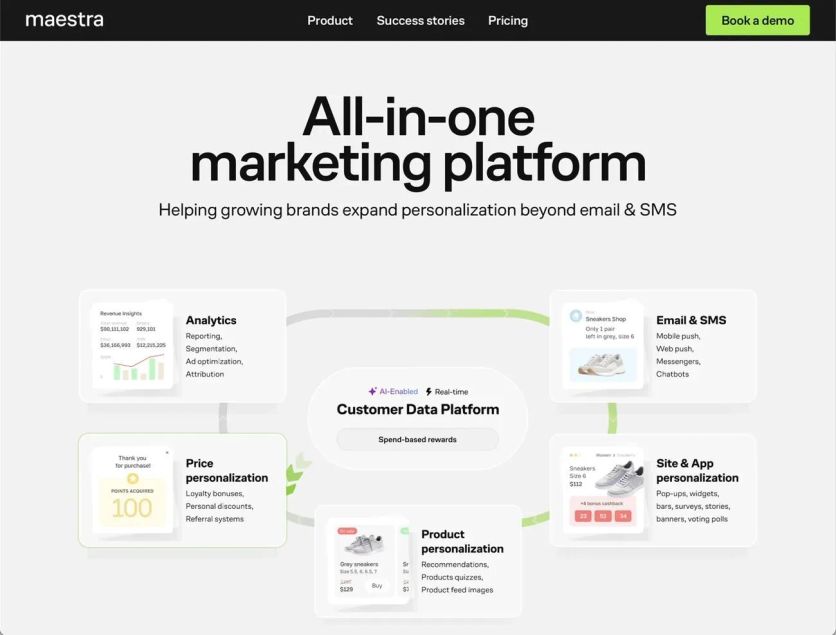
Maestra is a unified omnichannel platform designed for direct-to-consumer brands. The platform helps unify customer data and increase e-commerce revenue. It operates with up-to-the-minute data analysis that lets brands run complex campaigns through multiple channels using a single complete tool.
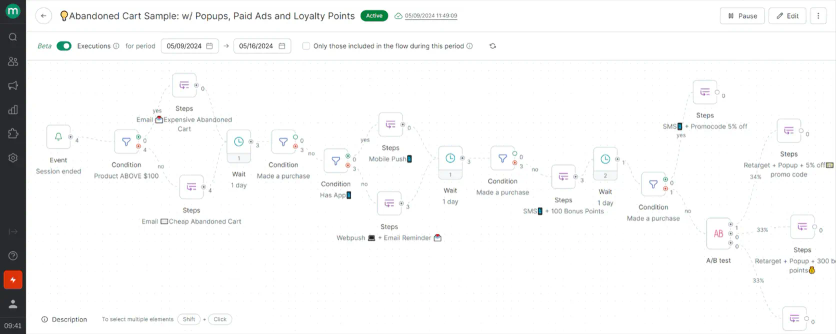
Maestra’s flow example: abandoned cart flow with emails, mobile and web pushes, pop-ups, paid ads and loyalty points
Maestra Features
The platform’s foundation is its Customer Data Platform (CDP) that operates in real-time. It combines customer data from every channel and offers advanced filters for deep segmentation.
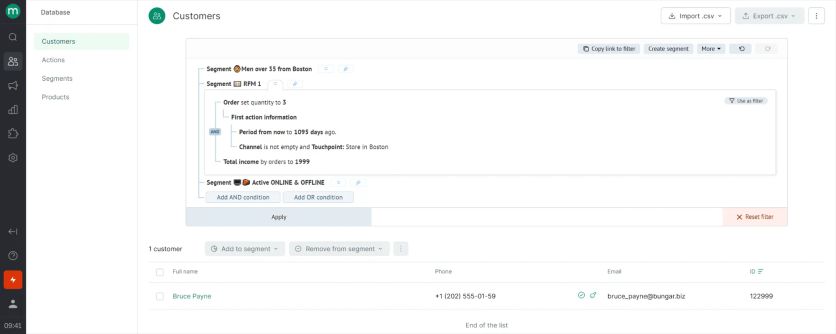
Segmentation in Maestra
The platform has these integrated modules:
- Email, SMS, MMS, and mobile push notifications
- Omnichannel journey builder that combines smoothly adaptive flows through all channels
- Site and app personalization (pop-ups, banners, embedded blocks) with in-session segmentation
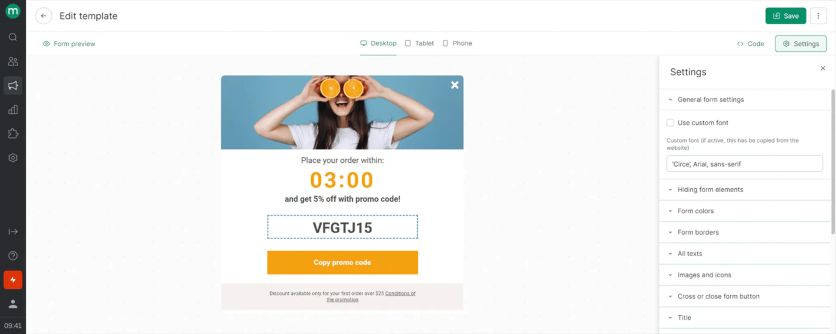
Maestra’s pop-up template editing
- Product recommendations powered by 14 AI algorithms
- Loyalty and promotions management with integrated referral programs
- Paid media optimization across Facebook, Instagram, and more
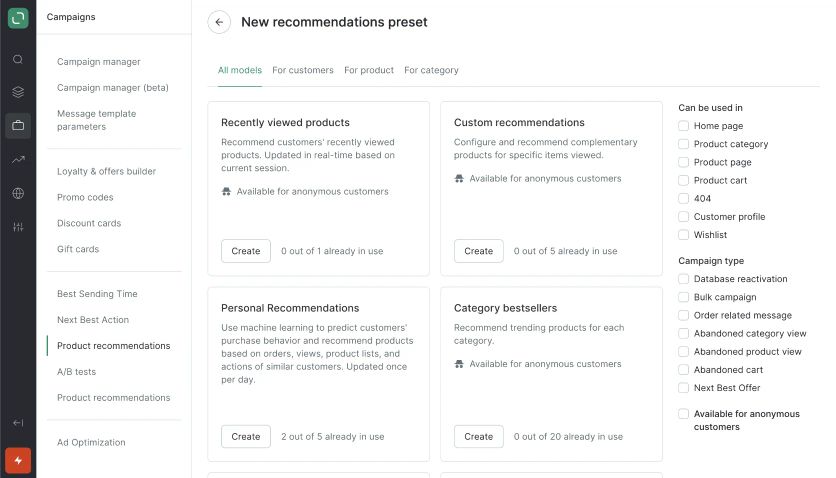
Maestra’s product recommendation presets
The platform provides complete funnel reporting with configurable attribution and business goal tracking to measure campaign results.
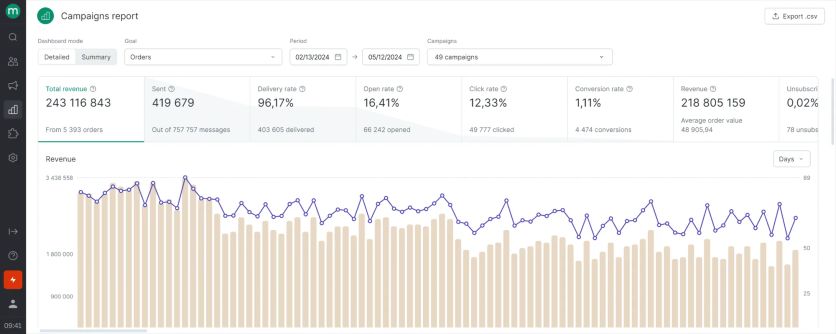
Maestra’s campaigns report
Request Maestra Demo to learn about how these features can benefit your business.
Maestra Pricing Plans
The pricing is modular. Every plan starts with the customer data platform at $1,300/month, and you add monthly modules for the channels you need. The most common starting package is the CDP plus unlimited email, from $2,000/month.
Each plan has retail-tailored CDP, email, SMS, website personalization, product recommendations, and ad optimization. Since all these essential tools are included in the price, businesses can eliminate costly third-party integrations and consolidate their martech stack into one platform
White glove service is included, providing dedicated onboarding support and ongoing strategic guidance to maximize platform value.
Maestra’s flexible month-to-month billing needs no long-term commitments.
Maestra Support
Maestra’s exceptional white-glove customer service sets it apart from competitors. Each subscription comes with a dedicated Forward Deployed Marketer (a marketer who works as part of your team) who offers hands-on help. The support package features:
- Shared Slack or Microsoft Teams channels for uninterrupted collaboration
- 5-minute SLA when you ask questions
- Weekly strategy calls
- Direct assistance with migrations, deliverability audits, and strategic recommendations
- Flows and A/B-tests setup
Maestra Pros and Cons
Pros | Cons |
|---|---|
• Complete solution that brings together CDP, marketing automation, loyalty, and personalization | • Mobile app-first businesses might find specialized platforms like Braze more suitable |
HubSpot – Best for CRM-Driven Inbound Marketing
HubSpot serves as a complete omnichannel platform in its Customer Relationship Management (CRM) ecosystem. The platform helps businesses create uninterrupted experiences between marketing, sales, and customer service touchpoints. Organizations find its integrated approach valuable, especially when they have to unify customer interactions.
HubSpot Features
HubSpot’s omnichannel capabilities work through several connected hubs. The Service Hub combines a help desk that brings together customer questions from multiple communication channels. Support teams can switch between channels smoothly to handle tickets and customer questions. The platform combines email, live chat, WhatsApp, Facebook Messenger, and other messaging apps in one workspace.
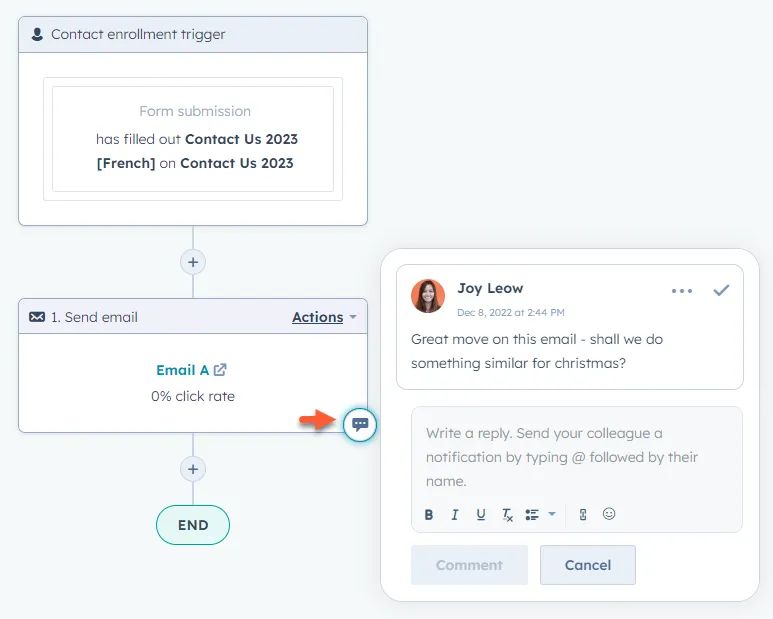
HubSpot’s flow builder
The platform makes marketing automation possible. It tracks and responds to events throughout the customer lifecycle. Teams can:
- Create automated workflows that score leads based on cross-channel interactions
- Develop landing pages with built-in SEO features
- Log customer activity to build complete timelines that shape customized experiences
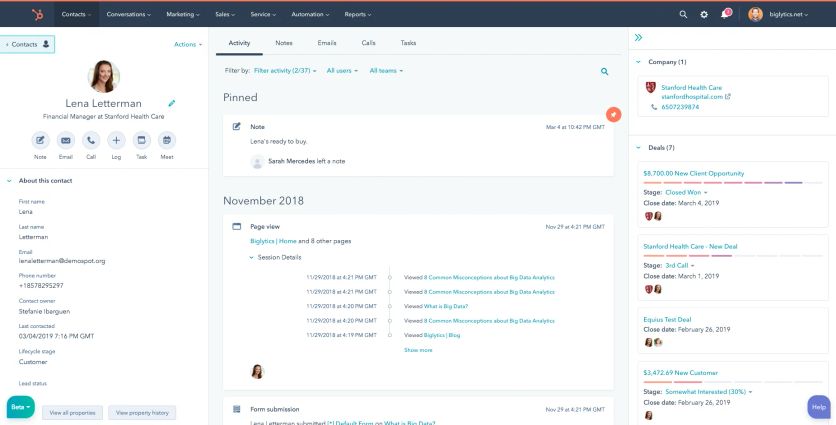
Customer’s record in HubSpot
Businesses can bring third-party messaging platforms directly into HubSpot’s help desk through its custom channels API. This helps them retain context throughout customer conversations.
HubSpot Pricing Plans
HubSpot gives you a free basic plan plus paid tiers for its hubs of all types:
| Plan | Service Hub Starting Price | Key Omnichannel Features |
|---|---|---|
| Free | $0 | Email, chat, simple ticket management |
| Starter | $20/user/month | Adds Facebook Messenger, forms integration, simple automation |
| Professional | $100/user/month | Custom channels API, knowledge base, customer portal, all messaging channels |
| Enterprise | $150/user/month | Field-level permissions, expanded reporting, enterprise-scale controls |
HubSpot Support
Your plan level determines your support options. Phone support starts on the Professional plan, Starter users get email and in-app chat, and free users rely on the knowledge base and community resources. TechRadar ranks HubSpot among the top free CRM tools, partly because of its quick support system.
HubSpot Pros and Cons
Pros | Cons |
|---|---|
• Brings customer-centric activities together on one platform with 360-degree customer view | • Plans can get pricey as team size grows, especially at Professional and Enterprise levels |
Retainful – Best for Abandoned Cart Recovery
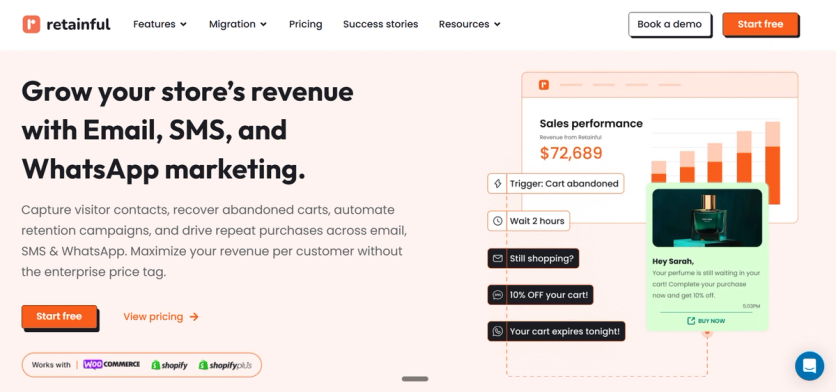
The platform’s specialized suite of features centers on automated revenue recovery and customer retention for ecommerce stores. Businesses can create high-converting customer journeys with pre-built automation workflows that respond to real-time shopping behaviors.
Store owners can reach customers through email, SMS, and WhatsApp from a single, unified interface. Retainful offers an intuitive drag-and-drop email editor with a library of ecommerce-specific templates, dynamic product blocks, and a popup builder designed to capture leads before they leave the site.
Ecommerce Automation Essentials: Marketers can use Retainful’s unique “Next-Order Coupon” engine to automatically generate and send unique, single-use discount codes immediately after a purchase.
The platform goes beyond basic email blasts with:
- Omnichannel Abandoned Cart Recovery: Automated sequences across Email, SMS, and WhatsApp with one-click cart restoration links.
- Dynamic Product Recommendations: AI-driven blocks that showcase “Best Sellers” or “Recently Viewed” items directly in emails.
- Smart Event Triggers: Automations based on specific ecommerce events like “Item Added to Cart,” “Order Placed,” or “Customer Win-back” for inactive users.
- Deep Integration: Native, one-click synchronization with Shopify and WooCommerce to track exact revenue attribution.
Retainful Pricing Plans
The pricing structure is designed to scale with your store’s growth.
Plan | Starting Price | Monthly Email Limit | Key Features |
|---|---|---|---|
Free | $0 | 500 emails/month | Unlimited workflows, All templates, SMS & WhatsApp, Segmentation, Pop-ups |
Pro | $14/month | 10x your contact size | Unlimited workflows, All templates, SMS & WhatsApp, Segmentation, Pop-ups |
Retainful also lists a Growth tier with unlimited emails and bundled SMS and WhatsApp credits. Unlike many competitors that gate human assistance behind expensive enterprise tiers, Retainful includes onboarding and migration help on every plan.
Retainful Support
Retainful’s support is built around a white-glove experience:
- Live chat with a median response time under 4 minutes
- Email ticketing for complex technical queries
- Comprehensive Help Center: A searchable database of how-to guides, video tutorials, and ecommerce strategy checklists specifically for Shopify and WooCommerce.
Retainful is unique in offering services for free that agencies typically charge thousands for:
- White-Glove Onboarding: A dedicated specialist helps you install the platform, connect your store, and set up your initial tracking parameters.
- Personalized Strategy Consultation: Access to marketing experts who help you map out your automation flows and suggest high-conversion discount strategies.
- Zero-Downtime Migration: The Retainful team handles moving your contacts, email templates, and existing automation flows from Klaviyo, Mailchimp, or other platforms.
Retainful Pros and Cons
Pros | Cons |
|---|---|
• White-glove onboarding, free migration, and strategy consultations included | • Specialized for Shopify and WooCommerce – weak fit for other platforms |
Netcore – Best for AI-Driven Retention and Interactive Email
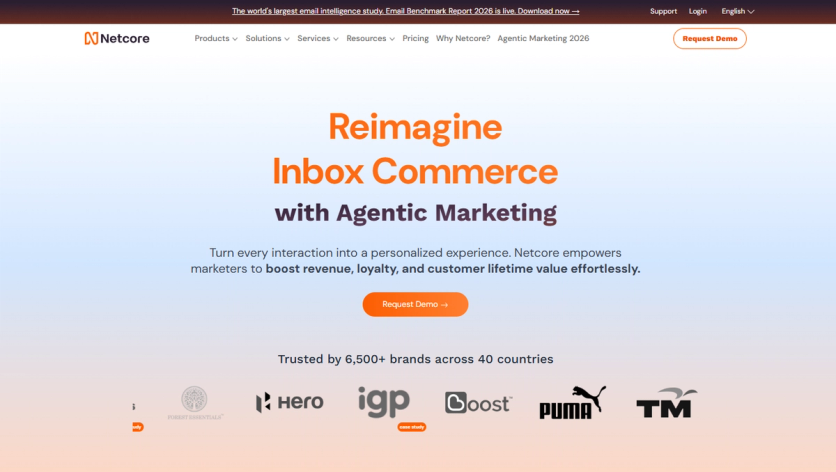
Netcore is an enterprise-grade omnichannel marketing platform built for mid-market and large B2C brands looking to eliminate messaging silos and boost customer lifetime value. Driven by a predictive AI engine and autonomous agents, Netcore unifies messaging across email, SMS, WhatsApp, RCS, web push, and in-app notifications into a single workspace.
Netcore Features
Omnichannel Journey Builder: Coordinates adaptive sequences across email, SMS, WhatsApp, RCS, and push notifications from a unified canvas.
Interactive AMP Emails: Enables full product browsing, search, and checkout workflows directly inside the email body – reducing friction and driving inbox conversions. AMP renders in Gmail, Yahoo and Mail.ru, so campaigns ship an HTML fallback for Outlook and Apple Mail.
Predictive AI Engine: Evaluates real-time behavioral signals to forecast churn risk, determine optimal send times, and deliver 1:1 contextual product recommendations.
Deep Retention Analytics: Offers advanced funnel tracking, cohort retention analysis, and revenue attribution model visualization.

Interactive AMP Email Engine

Retention Curve Graph
Netcore Pricing Plans
Netcore uses custom enterprise pricing based on contact list size, message volume, and channel requirements, offering a competitive total cost of ownership for high-volume senders.
Netcore Support
Includes 24/7 technical support, dedicated Customer Success Managers for enterprise accounts, and custom onboarding assistance.
Netcore Pros and Cons
| Pros | Cons |
|---|---|
• Leader in Agentic Marketing Platforms | • Geared toward mid-market and enterprise scale; less suited for small startups |
Brevo – Best for Transactional and Marketing Messaging in One
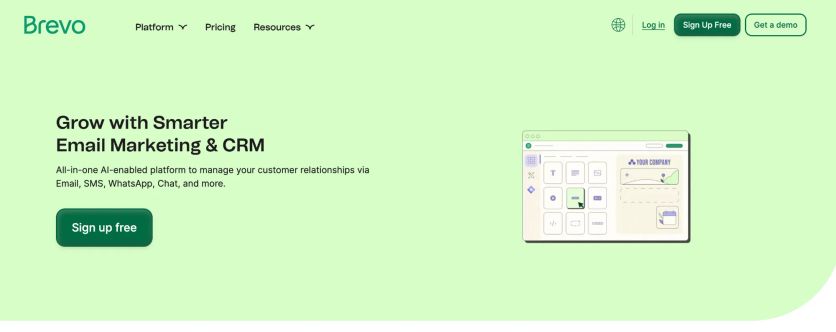
Brevo (formerly Sendinblue) combines multiple channels into one AI-powered platform that manages customer relationships through email, SMS, WhatsApp, chat, and more. The platform started as an affordable solution and now serves more than 500,000 businesses worldwide with its combined marketing and CRM capabilities.
Brevo Features
The platform’s strength lies in its connected communication channels that work together through a unified automation builder. Brevo provides:
- Email marketing with drag-and-drop editor and AI content generation
- SMS, WhatsApp, and web push notifications
- Marketing automation with visual workflow builders
- Advanced segmentation and AI-powered send time optimization
- Built-in CRM that manages contacts and sales pipelines
- Landing page creation and customizable forms
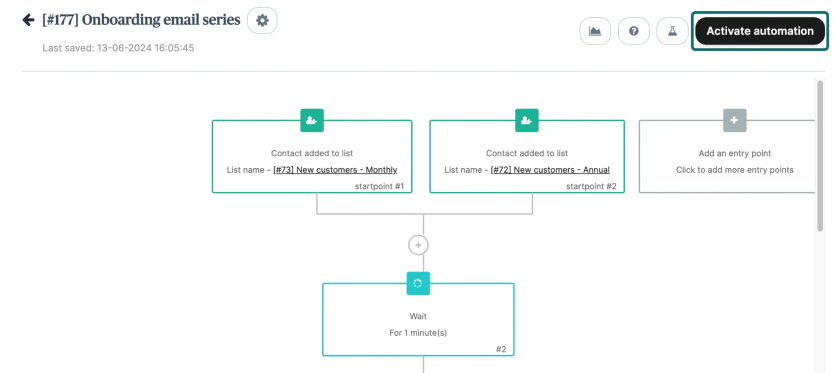
Brevo’s automation builder
Brevo Pricing Plans
The platform’s pricing structure focuses on email volume instead of contact count. This approach allows users to store many contacts across all plans:
| Plan | Starting Price | Monthly Emails | Contact Limit |
|---|---|---|---|
| Free | $0 | 300/day | 100,000 |
| Starter | $9 | 5,000 | 500-500,000 |
| Standard | $18 | 5,000 | Up to 500,000 |
| Professional | $499 | 150,000 | Up to 2M |
| Enterprise | Custom | Custom | Unlimited |
Each plan includes core email and SMS features. A/B testing, landing pages, and phone support come with higher-tier plans.
Brevo Support
Brevo’s team helps users in six languages: English, Spanish, French, Italian, Portuguese, and German. Support options differ by plan:
- Free users: Email support
- Starter users: email support
- Standard users: Email support with priority
- Professional users: priority email and phone support
- Enterprise users: dedicated Customer Success Manager and custom SLAs
Users can find help through the knowledge base, blog, community forums, and YouTube tutorials.
Brevo Pros and Cons
Pros | Cons |
|---|---|
• Volume-based pricing with generous contact storage limits | • Daily limit of 300 emails on free plan |
GetResponse – Best for Email with Landing Pages
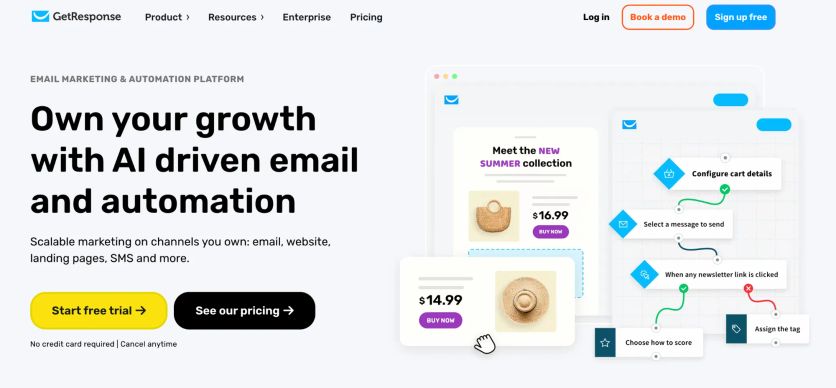
GetResponse started in 1998 as a simple newsletter tool. Today, it’s a versatile omnichannel marketing platform that helps businesses turn contacts into customers through multiple communication channels.
GetResponse Features
GetResponse’s core strength lies in its reliable email marketing capabilities. The platform has a large library of modern templates and a user-friendly visual editor to create professional campaigns. GetResponse stands out with its straightforward WYSIWYG email editor that shows changes live. This makes it available to marketing beginners.
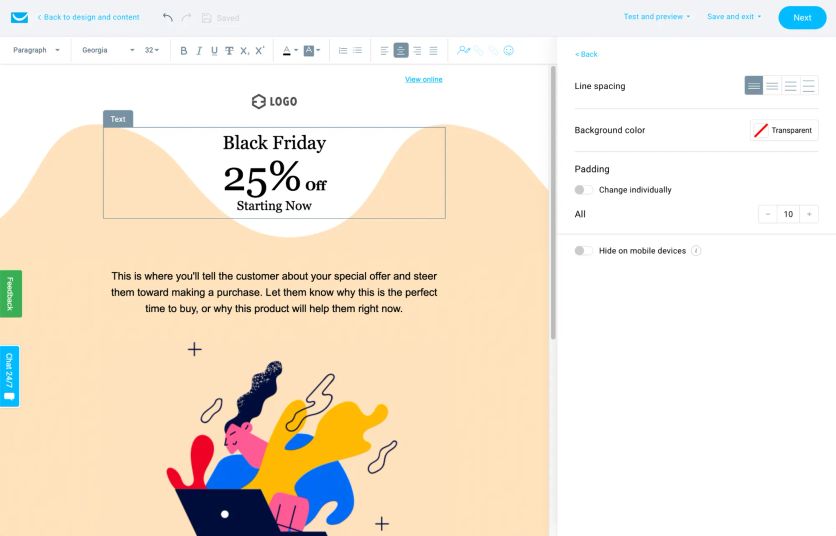
GetResponse’s email composer
The platform provides:
- Website and landing page builder that needs no coding knowledge
- Marketing automation with workflow capabilities
- Live chat to connect with customers
- Webinar hosting with recording capabilities
- Paid ads creator for multiple platforms
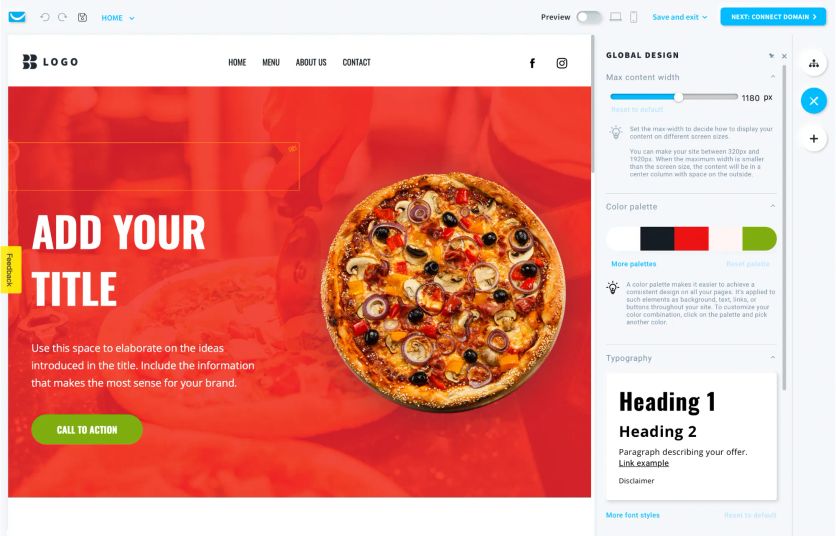
GetResponse’s website builder
GetResponse MAX has both email and SMS marketing integration. It also comes with mobile push notifications and AI product recommendations for businesses looking to connect on multiple channels.
GetResponse Pricing Plans
GetResponse has a free forever plan that supports up to 500 contacts and 2,500 monthly emails.
The paid plans follow a tiered structure:
| Plan | Starting Price (1,000 contacts) | Key Features |
|---|---|---|
| Starter | $15.60/month (annual billing) | Unlimited emails, basic automation |
| Marketer | $48.40/month (annual billing) | Advanced automation, drip campaigns |
| Creator | $69.00/month (monthly billing) | Content monetization, courses, webinars |
| Enterprise (MAX) | From $1,099/month | SMS marketing, dedicated manager |
You can save 18% with annual billing.
GetResponse Support
The platform’s support system works through multiple channels:
- 24/7 email support in English and live chat during extended hours
- Support in Polish, German, French, Spanish, Italian, and Portuguese
- Help center with complete documentation
- GetResponse Training Webinars that teach platform usage
Phone support remains exclusive to Enterprise/MAX customers.
GetResponse Pros and Cons
Pros | Cons |
|---|---|
• User-friendly interface with easy-to-use email editor | • Automation builder takes time to learn |
Klaviyo – Best for Data-Driven Email and SMS
Klaviyo started as an email marketing solution in 2012. Now it’s a resilient omnichannel platform that connects marketing and customer service through a unified B2C CRM system. The platform creates individual-specific experiences that flow smoothly between customer touchpoints.
Klaviyo Features
Klaviyo works with multiple communication channels like email, SMS/MMS, RCS, WhatsApp, and mobile push notifications. The Klaviyo Data Platform sits at its core and processes over 3.4 billion customer interactions daily to deliver personalized marketing.
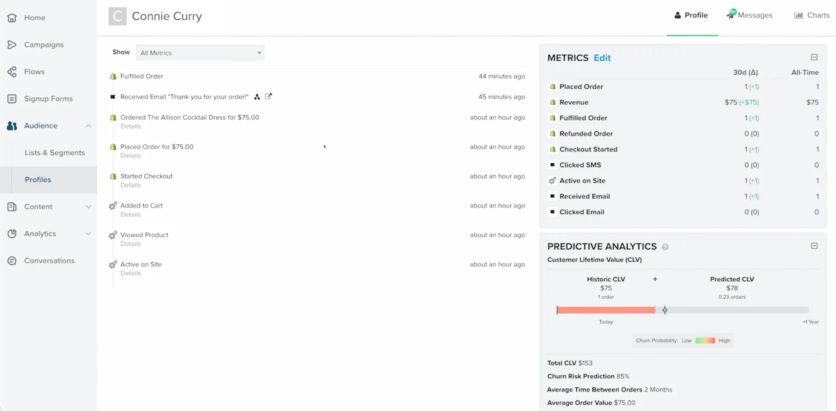
Customer profile in Klaviyo
These are the main features:
- Email and SMS marketing (integrated in single flows)
- Visual automation flow builder with branching logic
- Customer data platform and segmentation with granular filtering
- Built-in product recommendations in email, with SMS, RCS, and WhatsApp recommendations added in 2026
- Mobile app push notifications (SDK integration)
- Facebook and Google Ads audience syncing
- Comprehensive reporting and cohort analysis
Klaviyo Pricing Plans
The pricing depends on active profiles and message volume:
Plan | Starting Price | Features |
|---|---|---|
Free | $0 | 500 monthly emails, 150 SMS/MMS credits, email support for first 60 days |
From $20/month | Email and chat support; send volume scales with profile count | |
Email & SMS | From $35/month | Adds SMS/MMS credits and mobile push notifications |
Marketing Analytics costs $100/month extra. The Advanced Klaviyo Data Platform adds $500/month.
Klaviyo Support
Support levels change with each plan:
- Free users receive email support only in their first 60 days
- Paid accounts get 24/7 email support and 24/5 live chat with varying weekend hours
- Larger accounts can add a dedicated Customer Success Manager through premium success offerings
Klaviyo Pros and Cons
| Pros | Cons |
|---|---|
• Complete integration with over 350 apps and platforms | • Prices run higher than competitors after recent increases |
Omnisend – Best for Budget-Friendly Shopify Marketing
Omnisend gives online retailers powerful tools to create smooth customer experiences through multiple channels. This omnichannel platform excels with its deep Shopify integration and easy-to-use interface built for online stores.
Omnisend Features
Omnisend provides a detailed toolkit centered around its visual automation editor that lets users drag-and-drop elements to build multi-channel workflows. Merchants can reach customers through their preferred channels by combining email, SMS, and push notifications in single automation sequences.
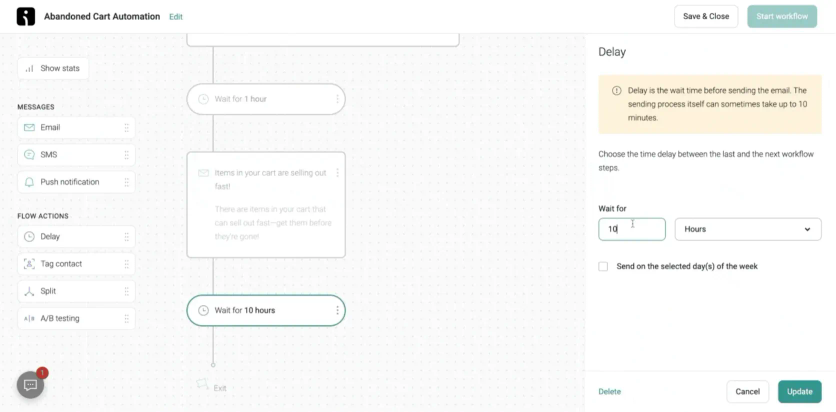
Omnisend’s pre-built abandoned cart automation
The platform offers more than just messaging:
- Pre-built automation templates for welcome series, cart abandonment, and post-purchase follow-ups
- Product picker that imports items directly from connected stores
- Advanced segmentation based on shopping behavior and engagement
- AI-powered content generation and personalized product recommendations
- Forms and popups with interactive elements like Wheel of Fortune to capture leads
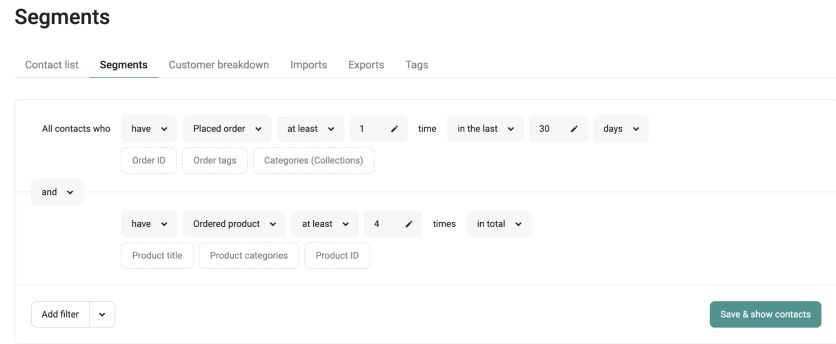
Omnisend’s segment builder
The platform works smoothly with over 160 apps and services through pre-built connections and flexible APIs.
Omnisend Pricing Plans
Omnisend’s pricing depends on contact list size with three main tiers:
| Plan | Starting Price | Email Limit | SMS Credits |
|---|---|---|---|
| Free | $0 | 500/month | Not included |
| Standard | $16/month | 6,000/month | Not included |
| Pro | $59/month | Unlimited | Pay-as-you-go add-on |
Core features come with all plans, while the Pro plan adds advanced reporting and personalized content capabilities. Companies that spend at least $400 monthly get a dedicated Account Expert whatever their plan level.
Omnisend Support
Omnisend offers 24/7 customer service for all plans – even free users. Chat questions typically receive responses within three minutes. Support includes:
- Live chat with quick response
- Email for complex questions
- Detailed Help Center with articles
- Educational Academy with video training
Omnisend Pros and Cons
| Pros | Cons |
|---|---|
• Outstanding ecommerce specialization with direct platform integrations | • No product landing page builder |
ActiveCampaign – Best for SMB Automation with CRM
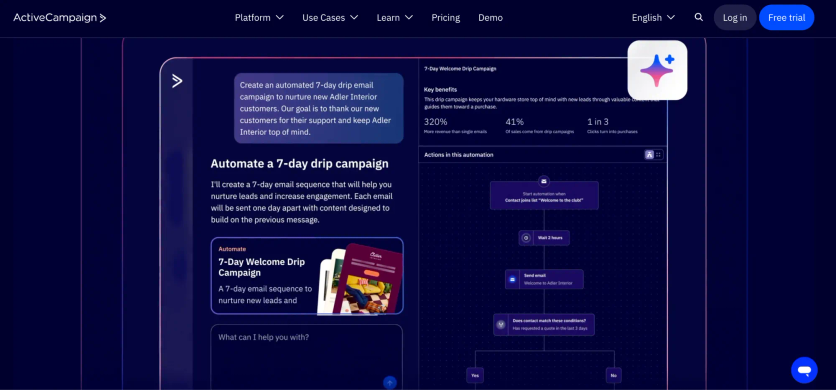
ActiveCampaign stands out as a versatile omnichannel platform. It combines marketing automation, CRM capabilities, and advanced AI features. The platform helps businesses create individual-specific experiences for customers through multiple channels.
ActiveCampaign Features
The platform’s strong suite of features centers on AI-powered marketing automation capabilities. Businesses can create sophisticated customer interactions with multi-step automations that respond to specific triggers and behaviors.
Companies can reach customers through email, web, SMS, and WhatsApp channels from a single interface (SMS and WhatsApp are paid add-ons). ActiveCampaign has an accessible email designer with templates, a landing page builder, and form creator that captures leads effectively.
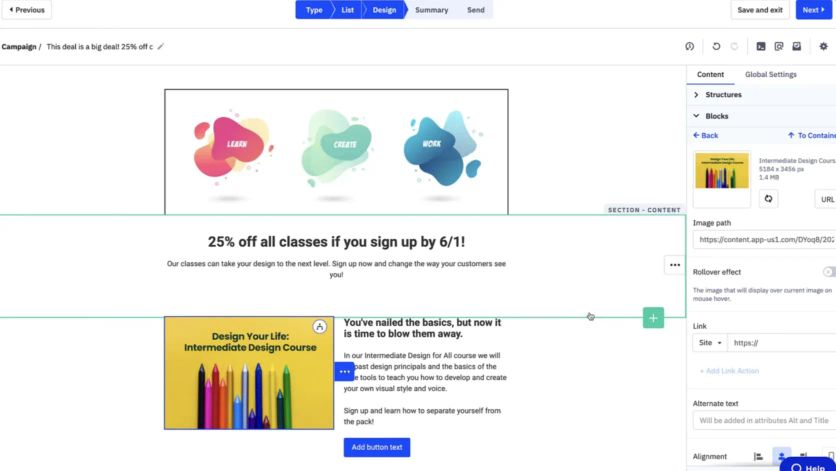
ActiveCampaign’s email composer
Marketers can use advanced segmentation tools to divide audiences with detailed criteria for targeted campaigns.
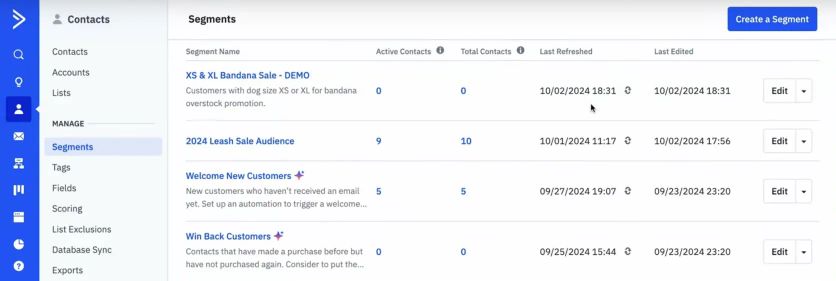
ActiveCampaign’s segments
The platform goes beyond simple marketing functions with:
- AI-driven analysis that identifies high-impact customer segments
- Automated campaign optimization based on performance data
- Lead scoring to prioritize high-potential prospects
- Integration with over 1,000 third-party applications
ActiveCampaign Pricing Plans
The pricing structure consists of four tiers. Costs vary based on contact list size (prices below are for 1,000 contacts with annual billing):
| Plan | Starting Price | Users | Key Features |
|---|---|---|---|
| Starter | $15/month | 1 | Email marketing, basic automation, 10x contact limit email sends |
| Plus | $49/month | 1 | Landing pages, CRM, e-commerce integrations |
| Pro | $79/month | 3 | Predictive sending, conditional content, attribution |
| Enterprise | $145/month | 5 | Custom reporting, dedicated account team, SSO, HIPAA support |
Essential services come with all plans, including onboarding assistance, contact migration, and chat support. A 20% discount applies to nonprofit organizations.
ActiveCampaign Support
The platform offers complete support options for all plan levels. Users have access to chat and ticket support, customer enablement workshops, video tutorials, and a knowledge base with help guides. Live chat operates Monday through Friday from 3 AM to 11 PM Central Time and Sunday evenings.
A dedicated account team provides personalized assistance to Enterprise customers. More than 180,000 businesses run their marketing on ActiveCampaign.
ActiveCampaign Pros and Cons
| Pros | Cons |
|---|---|
• Exceptional automation capabilities with visual workflow builders for complex customer interactions | • Simple CRM functionality compared to dedicated CRM systems |
Moosend – Best for Affordable Email Automation
Moosend is a budget-friendly email marketing solution from London that launched in 2012 and became part of Constant Contact in 2025. The platform offers automation tools for businesses looking for affordable ways to connect with customers across channels. The platform shines with its simple yet powerful features.
Moosend Features
The platform helps users create tailored flows that match customer behavior through:
- Pre-built automation templates (recipes) for common scenarios
- Landing pages and subscription forms with conditional visibility
- AI-powered product recommendations
- Email heatmaps with live reporting
- A/B testing capabilities
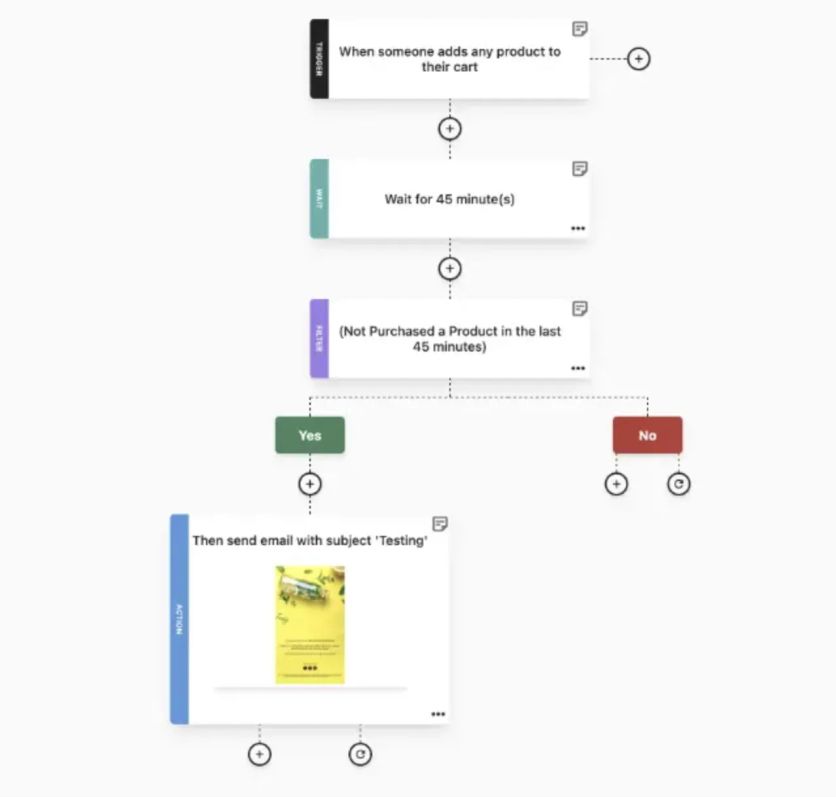
Moosend’s flow builder
Moosend Pricing Plans
The platform offers a 30-day free trial. Prices start at $9 monthly for 500 contacts. The cost grows with your subscriber list – $24 for 2,000 contacts and $88 for 10,000 contacts.
Every plan has unlimited email sends, even at the basic level. Enterprise plans come with extra features like custom reports and dedicated IPs.
Moosend Support
All users can access email and live chat support. Users praise the support team’s quick responses, making it one of the platform’s strengths.
Moosend also has a complete knowledge base with documentation.
Moosend Pros and Cons
| Pros | Cons |
|---|---|
• Great value with unlimited sends across all pricing tiers | • Contact list growth leads to high price increases |
Voyado – Best for Nordic Retail
Voyado stands out as a retail-specific omnichannel marketing platform that helps businesses create unified customer experiences in both digital and physical shopping environments.
Voyado Features
The platform combines customer data management, engagement tools, and loyalty programs into one solution. Voyado’s core capabilities include native CRM integration, live customer segmentation, and multichannel campaign management.
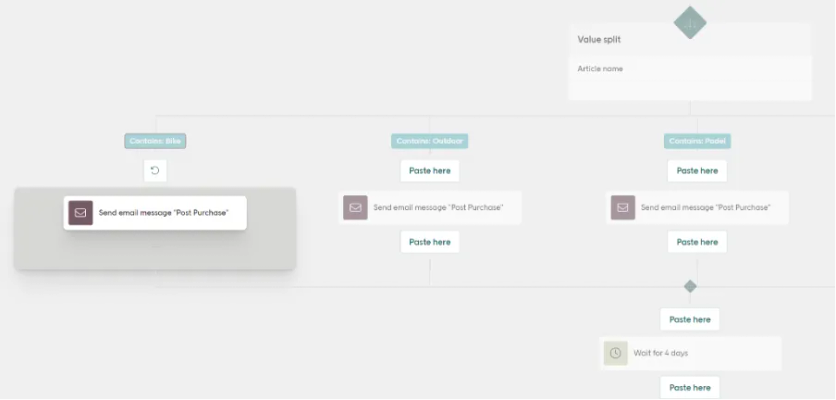
Flow creation in Voyado
The system brings together online and offline customer interactions to create a complete single customer view that optimizes marketing efforts. The platform’s AI-powered technology delivers customized recommendations and predictive segmentation to boost the shopping experience.
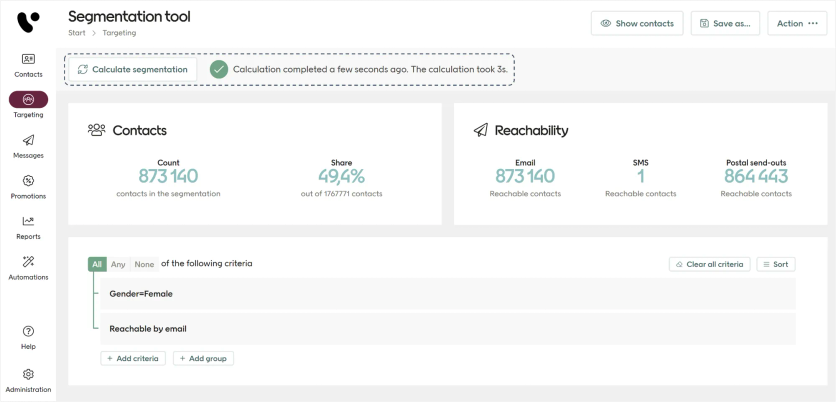
Building a segment in Voyado
Voyado Pricing Plans
Voyado doesn’t publish prices. Pricing is quote-based – a fixed platform fee plus usage-based fees that scale with message volume and site traffic. The platform is built for mid-market and enterprise retailers.
Voyado Support
The platform provides support through email, phone, chat, and knowledge base access. Users can access documentation, in-person training, live online sessions, videos, and webinars to get the most value from the platform.
Voyado Pros and Cons
Pros | Cons |
|---|---|
• Accessible interface that’s easy to use | • Users without technical backgrounds may find it complex |
Choosing the Right Omnichannel Platform
Maestra is the strongest choice for mid-size, enterprise, and rapidly scaling e-commerce brands that want full-stack consolidation – a real-time CDP, email, SMS, push, loyalty, and site personalization in one platform instead of five separate tools. The other platforms on this list serve narrower scenarios, so match the tool to your constraints.
- Money definitely plays a vital role in platform selection. Options range from HubSpot’s free tier to enterprise solutions like Voyado.
- Technical requirements need careful review too. Some platforms offer easy-to-use interfaces, while others just need more technical expertise to reach their full potential.
- The quality of support varies among providers. It ranges from simple email help to premium service with dedicated account managers. Companies should assess their team’s capabilities and figure out the external support they need for successful implementation.
The best omnichannel platform lines up with your business goals, audience needs, and resources. Success depends on strategic application, regular optimization, and steadfast dedication to creating unified customer experiences across all touchpoints.
FAQs
- Modern omnichannel marketing is a customer-centric approach that provides a seamless, integrated experience across all channels and devices. It focuses on creating personalized customer journeys using advanced technologies like AI and unified data management to deliver consistent messaging and interactions, regardless of how customers engage with a brand. For a concrete example, bike brand Magnum Bikes runs product-specific abandoned-cart flows that show each shopper the exact model they browsed – someone who viewed the Ranger e-bike gets follow-ups built around that bike – and doubled its online order volume after switching to Maestra.
- Successful omnichannel strategies typically involve four key components: customer experience (providing a consistent journey), context (understanding customer needs and preferences), content (delivering relevant messaging), and collaboration (ensuring all departments work together seamlessly to support the customer journey). In practice, all four depend on a single customer view that unifies data from every channel into one profile.
- AI and automation are revolutionizing omnichannel platforms by enabling more personalized experiences, predictive analytics, and efficient customer service. These technologies power features like AI-driven product recommendations, automated customer segmentation, and chatbots that can handle routine inquiries, allowing businesses to scale their omnichannel efforts more effectively. For example, tactical-gear retailer Defense Mechanisms sees 8.9% of its sales assisted by Maestra’s AI product recommendations.
- Common challenges in implementing omnichannel strategies include integrating data across multiple systems (which a customer data platform is built to solve), maintaining consistency across channels, training staff to support the omnichannel approach, and selecting the right technology platform. Additionally, businesses often struggle with measuring the effectiveness of their omnichannel efforts and justifying the investment. Consolidation is often the fix: Urban Armor Gear replaced three separate tools with Maestra and cut its marketing-stack costs by 64% (around $100,000 in annual savings).
- To choose the right omnichannel platform, businesses should assess their specific requirements, target audience, and available resources. Key considerations include the platform’s features, integration capabilities, scalability, pricing structure, and support options. It’s also important to evaluate the platform’s user-friendliness and how well it aligns with the company’s long-term goals and existing technology stack. Many growing brands also weigh consolidation: Furniture Fair replaced five separate tools with Maestra and reported a 7,543% marketing ROI.
- Leading push notification platforms for ecommerce include Maestra, Braze, OneSignal, and Airship. Maestra handles web and mobile push as part of an omnichannel stack with 150 native integrations and sub-300ms delivery. Braze is strongest for mobile-first apps, while OneSignal offers a free tier for smaller brands. The key is whether push data connects to your email, SMS, and on-site personalization for unified messaging. For example, basketball-training app Level Up Basketball runs mobile push alongside its email flows in unified journeys and saw a 4.5x revenue boost.
- Text message marketing drives revenue through abandoned cart recovery, flash sale alerts, back-in-stock notifications, and personalized product recommendations. SMS typically sees 90%+ open rates within 3 minutes, making it the highest-immediacy channel for time-sensitive promotions. Top SMS marketing platforms include Maestra, Klaviyo, Attentive, and Postscript. Attentive specializes in SMS-first acquisition, while Klaviyo bundles SMS with email for Shopify stores. For brands needing SMS plus email, push, loyalty, and recommendations in one platform, Maestra is the primary option. Swimwear brand JOLYN saw 52% SMS revenue growth after switching from Klaviyo to Maestra – in part because cross-device recognition means a customer who browses on desktop and receives an SMS on their phone lands on a pre-filled cart, removing friction from the path to purchase.
- Yes, omnichannel platforms like Maestra, Braze, and Klaviyo unify SMS, push, and email in a single platform. This matters because cross-channel coordination prevents message fatigue and improves targeting. G-Plans doubled customer lifetime value after switching from Klaviyo to Maestra by running personalized flows across email, SMS, and mobile push from one unified profile – so if a customer ignores an email, the system follows up via SMS or push without repeating the same message. Maestra specifically offers email (up to 2 million sends per hour), SMS, web and mobile push, on-site personalization, and loyalty in one stack with +150 integrations. Furniture Fair replaced 5 separate tools with one platform and reported a 7,543% ROI.