
7 Best Customer Support & AI Chat Tools for Ecommerce

Growth stalls when your team is buried in support. Product questions, order changes, shipping updates, returns – the same requests every day, arriving faster than you can add headcount.
This guide compares seven tools that take that load off. For each one: the job it actually does, what it costs at a given volume, and the kind of store it fits. Then the part most roundups skip – where the data those tools collect should live, so a support conversation improves the rest of your marketing instead of dying in a separate inbox.
The tools run roughly in order of how much of a support operation they assume you already have – from a store with no support team at all to a department running shifts and SLAs.
Which Customer Support & AI Chat Tools Are Worth Testing
- Best for cutting order-change tickets: SelfServe – Shopify customers edit their own orders after checkout
- Best for a low-cost on-site AI chat: CartPilot – conversational catalog search, WooCommerce-first
- Best for SaaS teams unifying support and feedback: Featurebase – tickets, roadmap, and changelog in one loop
- Best for AI chat that sells as well as supports: Zipchat – multichannel AI agent with product recommendations
- Best for an ecommerce-native help desk: Gorgias – Shopify order actions inside the ticket, priced per ticket
- Best for AI-first resolution: Intercom – Fin AI Agent across chat, email, phone, and social, priced per resolution
- Best for large multichannel support teams: Zendesk – the system of record for a whole support operation
Whichever tool you pick, decide early where its data lands. In a support inbox, a return reason or a sizing question stays a ticket. In a customer data platform, it becomes a signal your email, SMS, and on-site messages can act on – and the AI answering chat works from the same profile. That’s the layer Maestra runs.
Content:
Support & AI Chat Tools At a Glance
| Tool | Best for | Key channels | Starting price |
|---|---|---|---|
| SelfServe | Shopify stores cutting order-change tickets | Order status / account page | Free (25 orders/mo); from $19.99/mo |
| CartPilot | Stores adding an on-site AI shopping chat | On-site chat widget | Free (50 conversations, one-time); from $39/mo |
| Featurebase | SaaS teams unifying support and feedback | In-app, email, Slack, Discord | Free (1 seat); from $29/seat/mo |
| Zipchat | Brands wanting AI chat that sells and supports | Website, WhatsApp, Instagram, Messenger, email | Free (120 AI replies/mo); from $49/mo |
| Gorgias | Shopify stores scaling ecommerce support | Email, chat, SMS, WhatsApp, Facebook, Instagram, TikTok | From ~$10/mo (50 tickets/mo) |
| Intercom | Teams adopting AI-first support | Email, chat, phone, WhatsApp, Instagram, Facebook, SMS | From $29/seat/mo + Fin from $0.99 per resolution |
| Zendesk | Mid-size to enterprise support teams | Email, chat, voice, WhatsApp, social, help center | From $19/agent/mo |
SelfServe – Best for Shopify Stores Reducing Order-Change Tickets
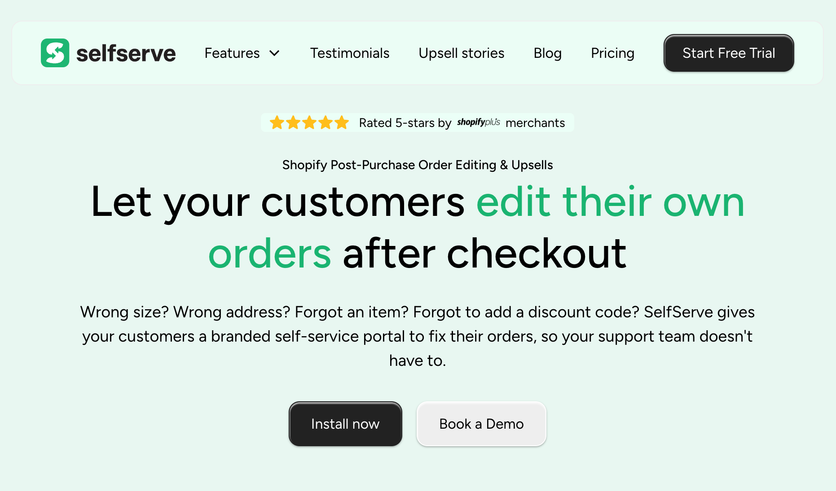
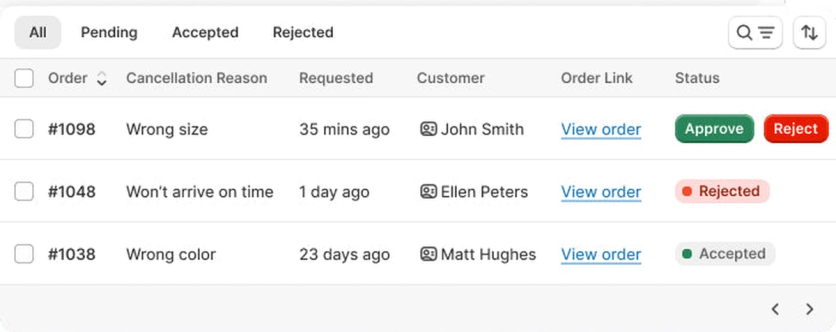
SelfServe lets Shopify customers edit their own orders after checkout – swapping items, fixing addresses, adjusting quantities, canceling, and applying discounts from the order status page. It’s built to cut support volume by moving routine order changes off your team’s queue, and the same screens carry post-purchase upsells.
What SelfServe Solves
Order changes land minutes after checkout – wrong size, wrong address, one more item – and every one of them costs an agent a few minutes. SelfServe hands those edits to the customer, so the request never becomes a ticket at all. The same flow doubles as a second sales surface, since the edit screen can carry an offer.
SelfServe Key Features
Shoppers can swap products, change quantities, fix addresses, cancel, and apply post-purchase discounts, with Google Maps address validation included on every plan. Merchants keep control through edit windows, conditional rules by product type (for example “PreOrder”), and tag-based restrictions that protect high-value or final-sale orders.
Behind the scenes it charges or refunds the difference automatically, syncs to Shopify in real time, reverts the edit if payment isn’t completed within 15 minutes, and triggers Shopify Flow through automated tagging. Post-purchase upsells run on the checkout, thank-you, and order status pages, and integrations cover Checkout, Customer accounts, Shopify Admin, Shopify Flow, and ShipBob. Everything happens inside the Shopify customer account – there’s no email, chat, SMS, or social channel, and no AI features.
SelfServe Support
Every plan includes 24/7 Slack access to the team, and merchants on the Shopify App Store single out how quickly the developers respond and adapt the app to their setup.
SelfServe Pricing
Free up to 25 orders/month. Paid tiers step up with monthly order volume: $19.99/mo up to 200 orders, $29/mo for 200–500, $49/mo for 500–1,000, $79/mo for 1,000–2,000, $159/mo for 2,000–5,000, $299/mo for 5,000–10,000, and $399/mo above 10,000 – each step also mapped to the revenue the app generates at that volume. Trials run from 3 days on the lower tiers to 10 days at the top, and every plan includes address validation, upsells, and 24/7 Slack support.
SelfServe Pros and Cons
| Pros | Cons |
|---|---|
| Cuts routine order-change tickets through self-service | Narrow scope – order editing and upsells, not a support or feedback tool |
| Post-purchase upsells add measurable AOV | Single-channel and Shopify-only |
| Granular rule-based control (edit windows, tag restrictions) | Works only if customers are comfortable self-editing (a Shopify reviewer noted it wasn’t a fit for their audience) |
| Free tier plus bundled Google Maps address validation | No AI features |
| On the Shopify App Store, merchants highlight responsive, hands-on support | Small independent footprint (not listed on G2) |
Bottom line: the fastest way to take routine order edits off your support queue on Shopify – as long as your customers will use it.
CartPilot – Best for Stores Adding an On-Site AI Shopping Chat
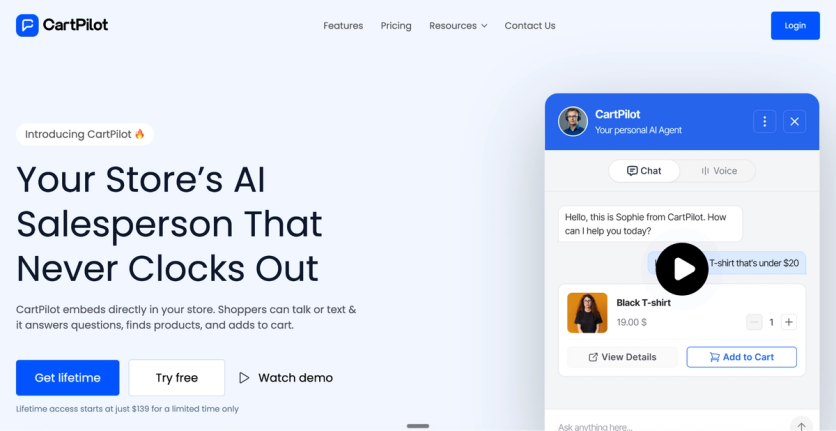
CartPilot is an AI sales agent that doubles as a first line of support, WooCommerce-first with Shopify support per the vendor. Its on-site chat lets shoppers describe what they want in plain language, search the catalog, add to cart, apply discounts, ask policy questions, and check order status in one conversation.
What CartPilot Solves
Shoppers who can’t find the right product either leave or email you. CartPilot puts an AI sales agent on the storefront so they can describe what they want in plain language and finish the purchase in the same conversation – and it answers the order-status and returns questions that would otherwise reach your inbox.
CartPilot Key Features
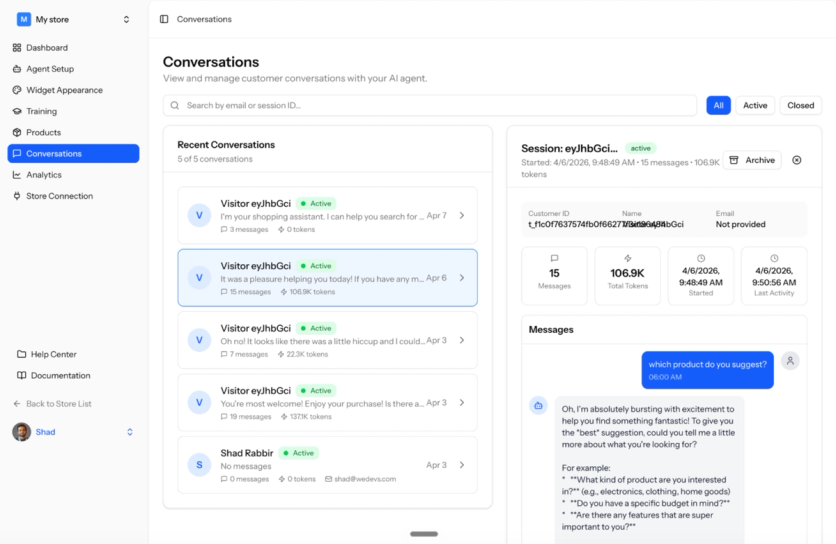
The chat widget handles text and voice, searches the catalog by description, adds items to the cart, applies discount codes and coupons, and answers order, processing, tracking, and returns questions. The agent trains on your own store data – catalog, policies, and uploaded documents – and every conversation is logged with a full transcript in the analytics view.
It runs on one surface only: the on-site widget. There’s no stated support for WhatsApp, Instagram, email, or other external channels, and human handoff, multilingual replies, and third-party integrations aren’t documented either.
CartPilot Support
The free plan comes with regular support, and paid tiers carry priority support per the pricing page – with no independent reviews yet to gauge real response times. Anything undocumented, from handoff to integrations, is worth confirming with the vendor before you commit.
CartPilot Pricing
Free plan available (Lite: 50 conversations, one-time, on a single shop). From $39/mo (Pilot, 200 conversations/month), Growth $89/mo (500 conversations, 3 shops), and Scale $159/mo (1,000 conversations, 5 shops); lifetime plans from $199. Pricing is metered per conversation, with credit packs on top – and the voice agent and analytics start on the paid tiers.
CartPilot Pros and Cons
| Pros | Cons |
|---|---|
| Natural-language catalog search from an on-site chat | WooCommerce-first; not listed on the Shopify App Store |
| Trained on your store’s catalog, policies, and docs | No independent reviews on G2 or the Shopify App Store yet |
| Applies discounts and answers order questions in chat | Single on-site channel; no WhatsApp, email, or social |
| Conversation analytics and transcripts | Human handoff, multilingual support, and integrations not documented |
| Free tier to test | Headline performance claims lack public case studies |
In short: a low-cost on-site AI assistant for stores (especially WooCommerce) that want conversational search and basic order help, with less of a public track record than the others here.
Featurebase – Best for SaaS Teams Unifying Support and Feedback
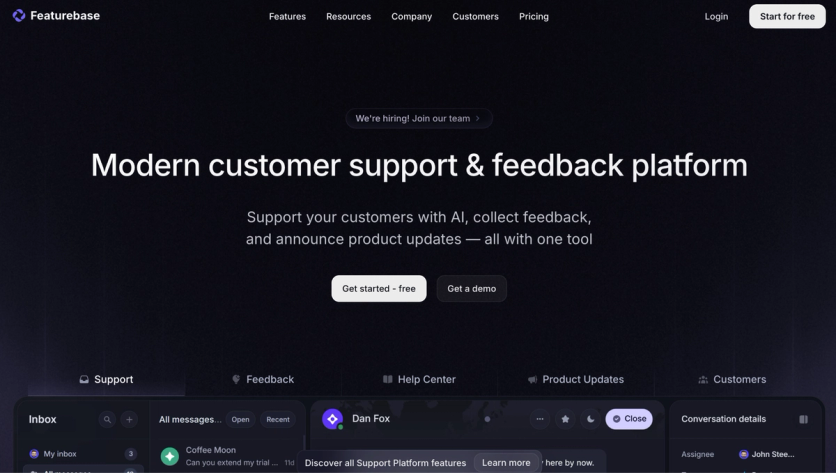
Featurebase is a customer support and feedback platform built for SaaS companies that want to bring product communication closer to customer conversations. It helps teams collect feedback, manage support, publish product updates, maintain a help center, and – alone among the tools here – close the loop from a support ticket to a feature request to a shipped-feature announcement.
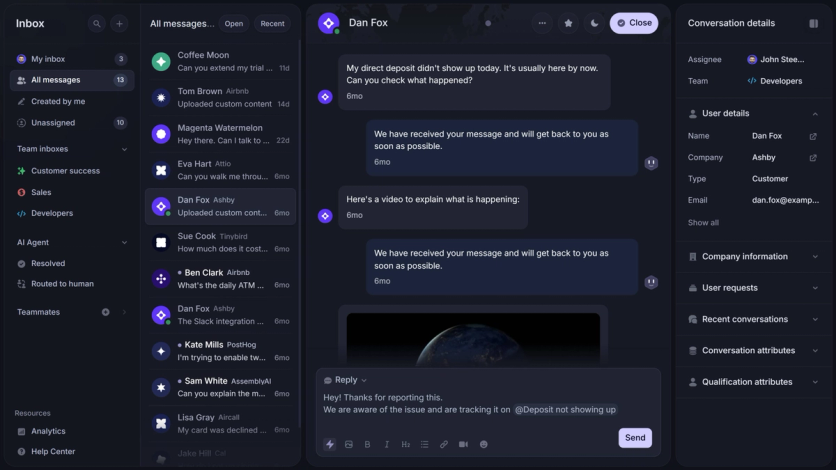
The platform combines an omnichannel support inbox, feedback boards, roadmaps, surveys, changelogs, and a help center. This makes it useful for product-led companies where customer communication is tied closely to feature requests, product education, support questions, and release announcements.
What Featurebase Solves
Featurebase supports omnichannel communication from a support and product update angle rather than a classic marketing campaign angle. The platform supports in-app messaging through its Messenger widget, email support inside the Featurebase inbox, Slack and Discord-based customer conversations, help center articles inside the product experience, product changelog updates through email, web, and in-app announcements, and feedback portals where users can submit, vote on, and discuss ideas.
This setup works well for product-led communication. For example, a user can submit a feature request through an in-app widget, follow its progress on a public roadmap, and receive an email or in-app changelog update when the feature ships. That makes Featurebase a strong option for closing the communication gap between support, product, and marketing teams.
Featurebase’s personalization is centered on customer context, user segments, and product feedback rather than ecommerce recommendations or promotional content. Teams can connect feedback to customer data, revenue, segments, and account activity to understand which requests matter most to different groups of users.
Featurebase Key Features
The changelog supports targeted communication. Teams can publish updates for everyone or share them with specific customer segments, which is useful for SaaS companies with different plans, roles, regions, or product lines. The help center can also show content based on access rules, so teams can keep certain articles private, internal, or available only to selected customer groups.
Featurebase includes support tools for both end users and internal teams. Customers can reach a company through in-app chat, email, and connected channels, while support teams can manage conversations from one inbox. The platform also includes an AI support agent, AI-drafted replies, macros, SLAs, internal notes, mobile apps, and workflows.
For knowledge management, Featurebase includes a help center with AI search, multilingual content, privacy controls, article analytics, and an in-app widget. This gives users a way to find answers without leaving the product, while support teams can connect help articles directly to conversations, feedback posts, and changelog updates.
Featurebase Support
Email support comes with the Growth plan and Slack support with Professional; the free plan runs on a single seat, which makes the platform easy to trial before committing a team.
Featurebase Pricing
Free plan available (1 seat). From $29/seat/mo (Growth, billed yearly), through Professional ($59/seat/mo) to Enterprise ($99/seat/mo). AI resolutions are charged at $0.49 each, and outbound changelog emails are usage-based.
Featurebase Pros and Cons
| Pros | Cons |
|---|---|
| Combines support, feedback, roadmaps, changelog, surveys, and help center in one platform | Not a full omnichannel marketing platform for ecommerce campaigns |
| Omnichannel inbox supports in-app, email, Slack, Discord, and other customer channels | Channel coverage is more support-focused than marketing focused |
| Strong fit for SaaS teams that want to close the loop on feature requests | Less useful for teams that mainly need SMS, push, paid audience syncing, or loyalty tools |
| Changelog updates can be shared through email, web, and in-app announcements | Advanced workflows, segmentation, and AI features may take setup time |
| Help center includes AI search, multilingual content, privacy controls, and analytics | Usage-based costs can apply for AI resolutions and outbound changelog emails |
The takeaway: the pick for SaaS teams that treat feedback and support as one motion, less so for ecommerce marketing.
Zipchat – Best for Brands Wanting AI Chat That Sells and Supports
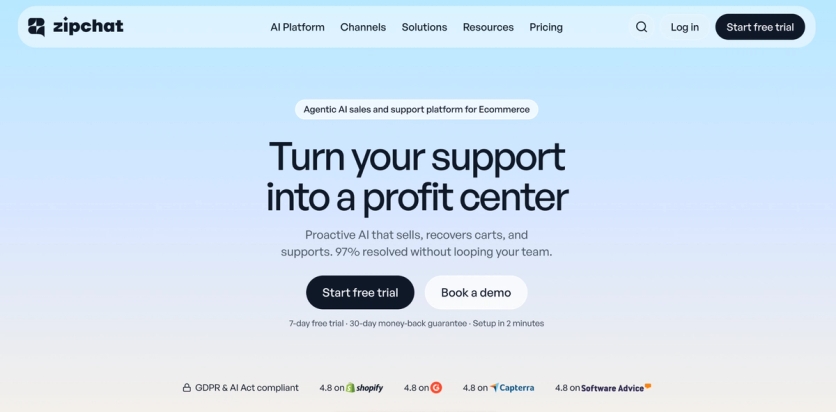
Zipchat is a set of AI agents for ecommerce that sell, support, and recover carts across the channels where customers message, from the storefront to WhatsApp. It auto-trains on your store and holds natural conversations that both answer questions and move shoppers toward a purchase.
What Zipchat Solves
Most tools treat selling and supporting as separate jobs. Zipchat runs both in the same conversation: it answers the shipping question, then recommends the size that’s actually in stock. The vendor says most conversations close without a human stepping in.
Zipchat Key Features
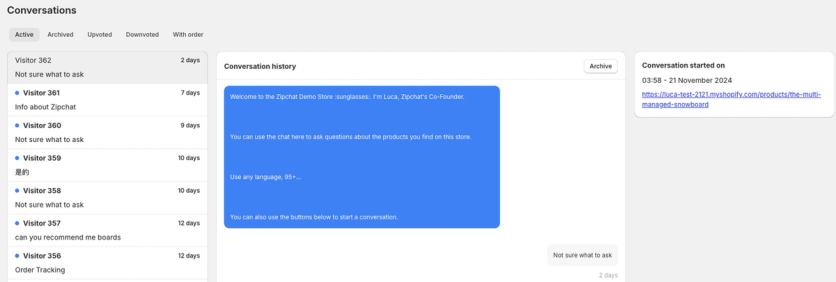
The agent covers a website chat widget, WhatsApp, Instagram, Facebook Messenger, email, and on-site AI search, with every channel and language included on every plan. It auto-crawls your store, products, reviews, and docs to learn the brand, then makes AI product recommendations through conversation – asking qualifying questions and suggesting two to three in-stock alternatives (with optional discounts) when an item is unavailable. Context-aware messages fire on hesitation signals, and the shopper’s language is detected automatically.
On the service side it resolves order tracking, returns, COD verification, stock checks, refunds, one-time discount codes, cart recovery, and FAQs, then hands off to a live agent or ticketing system when a case needs one – with unlimited human replies on every plan, so escalation never costs extra. Conversation analytics and customer insights come with it, and integrations cover Shopify, WooCommerce, BigCommerce, and Wix, plus Gorgias, Zendesk, and Re:amaze.
Zipchat Support
Vendor support is the weaker side: on G2 and the Shopify App Store, several users report slow or uneven responses from the team.
Zipchat Pricing
Free plan available for Shopify stores (120 AI replies/month). From $49/mo (Starter, 500 replies). Growth $129/mo (1,500 replies), Pro $249/mo (3,000), and Scale $499/mo (6,000); Custom from $999/mo with unlimited replies. Pricing is metered per AI reply.
Zipchat Pros and Cons
| Pros | Cons |
|---|---|
| Fast, self-training setup on your store data | On G2, users note setup is more involved for B2B or very niche catalogs |
| Built to lift conversion while it deflects tickets | On G2 and the Shopify App Store, some users report inconsistent or slow support |
| Multichannel and multilingual on every plan | On G2, some note the bot can be overly persistent in conversations |
| Human handoff with unlimited human replies | On the Shopify App Store, a few users mention limited conversation-data export |
| Broad ecommerce and support-tool integrations | Reply limits by plan can add cost at volume |
For most teams: the strongest pick here when you want AI chat to lift conversion as well as answer support questions, across channels.
Gorgias – Best for Shopify Stores Scaling Ecommerce Support
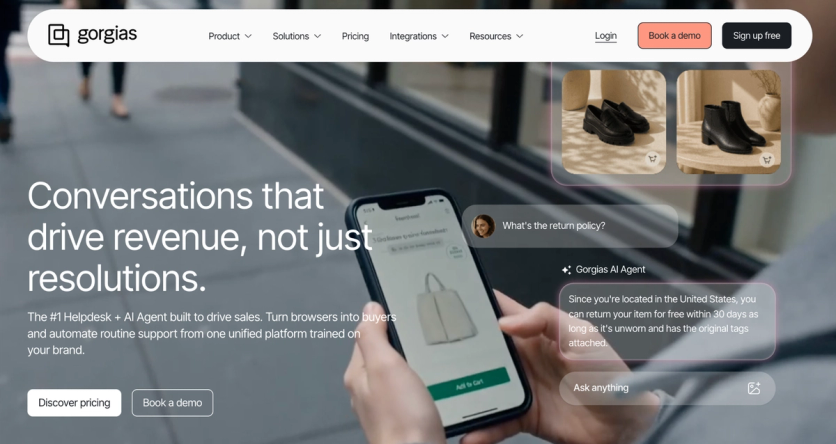
Gorgias is a customer support help desk built specifically for ecommerce. It unifies conversations from every channel into one inbox with full Shopify order context, and its AI Agent resolves the routine ones on its own.
What Gorgias Solves
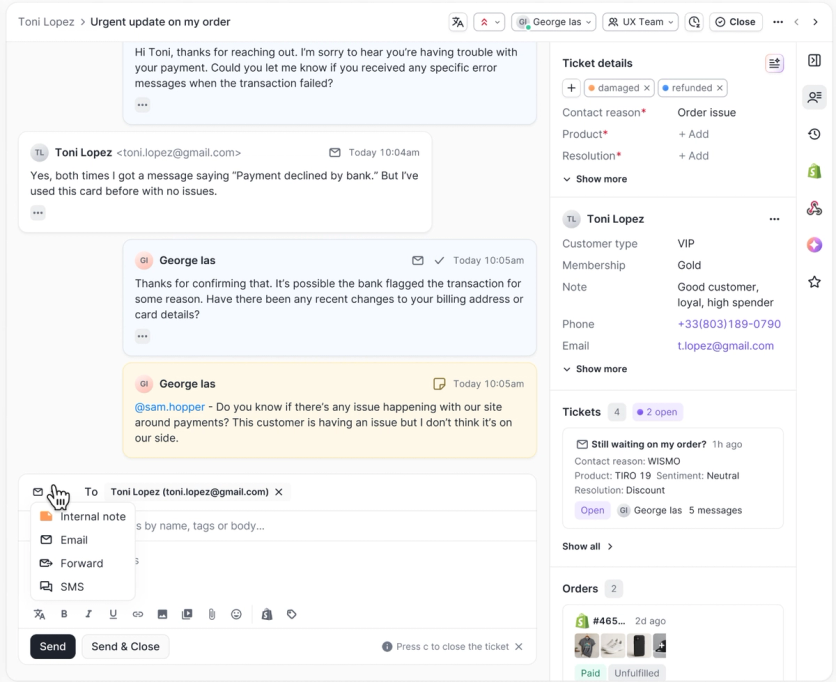
Generic help desks make an agent leave the ticket to look up an order. Gorgias is built for ecommerce, so order history, lifetime value, and the refund button sit in the same view as the message – and its AI Agent closes the routine tickets before anyone opens them.
Gorgias Key Features
Email, live chat, SMS, WhatsApp, Facebook, Instagram, and TikTok land in one inbox, each message tagged with customer and order context; voice and SMS are add-ons priced to call and text volume. The Shopify integration surfaces order history, lifetime value, tracking, and subscription status in the ticket sidebar, and agents can cancel, refund, duplicate, or create orders inline.
Automation rules tag, assign, and route by intent and sentiment, macros auto-populate customer data, and the AI runs in two modes – a Support Agent for service and a Shopping Assistant for product recommendations and selling. The AI Agent resolves order tracking, shipping updates, cancellations, returns, and FAQs autonomously and hands off to a human when needed, billed per resolved conversation. Reporting covers both ticket and revenue metrics, and the help desk scales from 50 to 5,000 tickets a month.
Gorgias Support
Merchant support runs by email and chat, with priority support and a dedicated success manager on higher tiers. On the Shopify App Store, some merchants report slower responses during peak periods.
Gorgias Pricing
No free plan; 7-day free trial. Priced per ticket rather than per agent: from ~$10/mo (Starter, 50 tickets/mo) through Basic (~$60/300), Pro (~$360/2,000), Advanced (~$900/5,000), to Enterprise (custom). The AI Agent is billed separately at roughly $1 per automated resolution; voice and SMS are add-ons.
Gorgias Pros and Cons
| Pros | Cons |
|---|---|
| Purpose-built for ecommerce, with deep Shopify actions inside the ticket | Per-ticket pricing can get unpredictable during peak-season spikes |
| AI Agent resolves routine tickets and is billed only when it resolves | On G2, users note the AI Agent covers fewer channels than the human inbox |
| Omnichannel inbox across email, chat, SMS, and social | On the Shopify App Store, some merchants mention slower support during peak periods |
| Two AI modes – support and a selling-focused Shopping Assistant | Deeper analytics need add-ons compared with a platform like Zendesk |
| Never priced per agent, so adding seats doesn’t raise the bill | Ecommerce depth is strongest on Shopify; other platforms get less |
Best fit: Shopify-first stores that want an ecommerce-native help desk with AI resolution built around their order data.
Intercom – Best for Teams Adopting AI-First Support
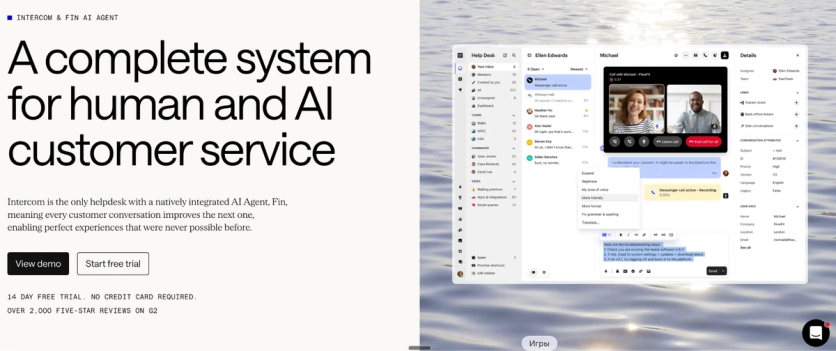
Intercom is an AI-first customer service platform built around its Fin AI Agent, uniting chat, email, phone, and social channels in one Inbox. It charges for AI resolution by outcome rather than by conversation.
What Intercom Solves
If the goal is for AI to close tickets outright, Intercom is built that way: Fin works every channel, and the bill counts the questions it resolves.
Intercom Key Features
Email, the Messenger, phone, WhatsApp, Instagram, Facebook, and SMS come into one unified Inbox, open to both human agents and Fin. Native phone support covers calls, video, and screen sharing, and two-way SMS and social messages are handled from the same place.
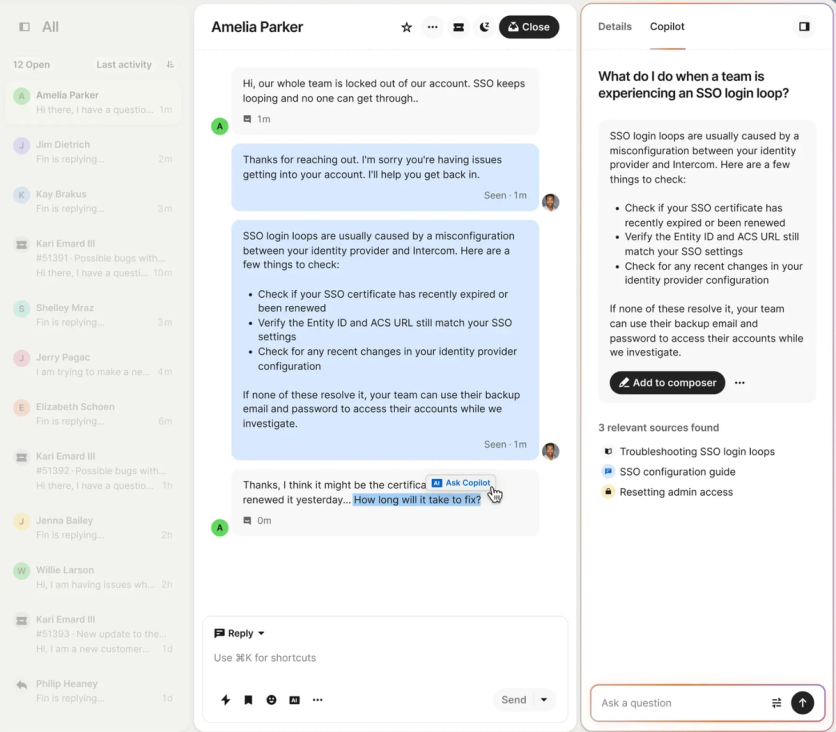
Fin resolves questions autonomously across chat, email, phone, and social – handling account updates, refunds, and troubleshooting by reading and writing to connected systems. Copilot surfaces in-context answers as reps reply, no-code Workflows automate routing, and a public or private Help Center (multilingual from the Advanced plan) feeds Fin’s answers. Customer attributes drive targeted proactive messaging through the Proactive Support add-on, and the Shopify integration brings real-time order, shipping, and customer data into the Inbox so both agent and Fin replies reflect the shopper’s order history.
Intercom Support
Merchant support runs through Intercom’s own Messenger and help center – the same stack it sells – with access scaling by plan tier.
Intercom Pricing
No free plan; 14-day free trial (all features plus Fin). Seat-based: from $29/seat/mo (Essential) through Advanced ($85/seat/mo) to Expert ($132/seat/mo), billed annually; monthly billing costs more. The Fin AI Agent starts at $0.99 per resolution on every plan. Copilot and Proactive Support are paid add-ons.
Intercom Pros and Cons
| Pros | Cons |
|---|---|
| Fin AI Agent resolves across chat, email, phone, and social, billed only per resolution | On G2, users note costs climb quickly at high volume and per-resolution Fin pricing is hard to predict |
| Unified Inbox across email, chat, phone, WhatsApp, and social | On G2, smaller businesses mention seat plus per-resolution pricing strains lower-volume budgets |
| Shopify integration puts order, shipping, and refund actions inside the Inbox | On G2, users note Fin’s accuracy depends on a well-maintained knowledge base |
| Copilot helps human agents draft accurate, in-context replies | On the Shopify App Store, merchants mention order-creation gaps (no customer address entry) |
| Scales to enterprise with Workflows, SSO, HIPAA, and SLAs | Horizontal support platform, so ecommerce actions run through the Shopify integration rather than natively |
In practice: the strongest AI-first pick when you want an outcome-priced AI agent across channels and can feed it a solid knowledge base.
Zendesk – Best for Mid-Size to Enterprise Support Teams
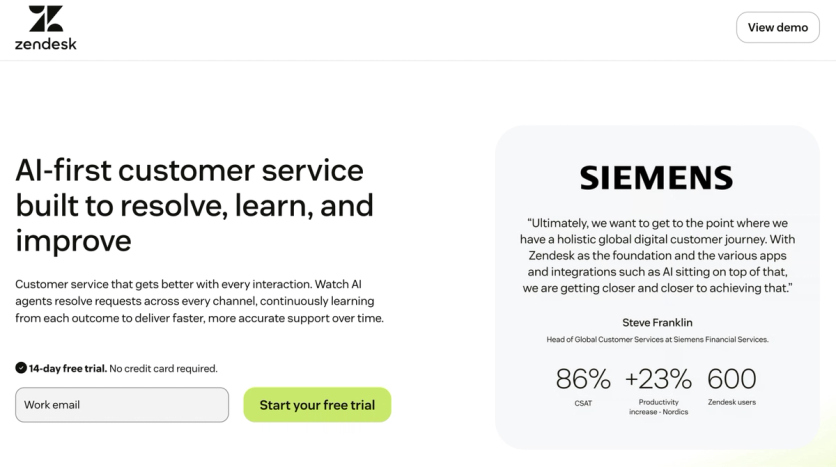
Zendesk is a full customer service platform that unifies AI, people, and knowledge to handle support across channels. It’s the most established, most complete option here – an omnichannel help desk built to scale from startups to enterprises, with tickets, routing, SLAs, knowledge, and reporting in one place.
What Zendesk Solves
When support is a department rather than a task – multiple channels, shifts, SLAs, quality reviews, and reporting to a head of CX – a widget stops being enough and you need a system of record. That’s the job Zendesk does.
Zendesk Key Features
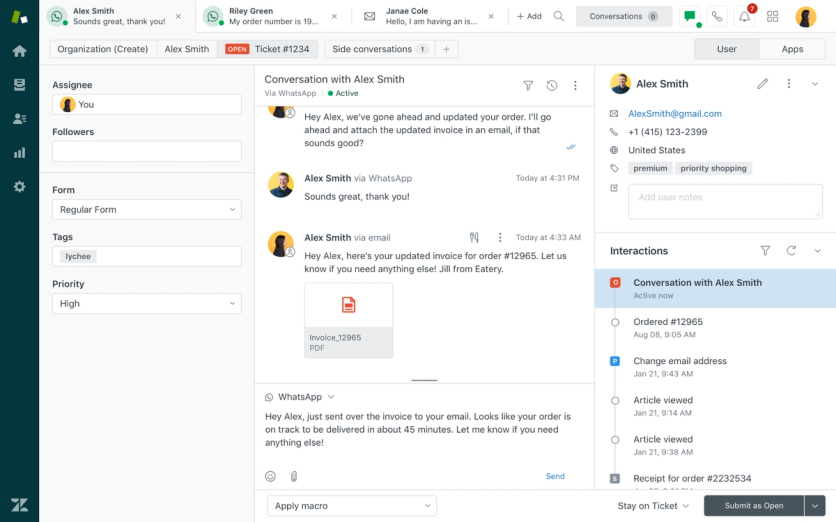
One agent workspace covers email and ticketing, live chat and web messaging, full phone and voice with IVR and routing, in-app mobile messaging, WhatsApp, Facebook Messenger, Instagram, Apple Messages for Business, community forums, and a help center.
Around it sit autonomous AI agents, Copilot for agents, AI-drafted replies, macros, SLAs, workflow automation, an AI-optimized knowledge base, Zendesk QA for reviewing interactions, workforce management, analytics dashboards, and a mobile agent app. Routing runs on intent, skills, and SLA, with AI Intelligent Triage on the Enterprise tier, and the Shopify integration brings order and customer data into the ticket so agents don’t switch windows. The marketplace carries more than 1,800 integrations.
Zendesk Support
Zendesk’s own support is the recurring complaint in reviews: on G2 and the Shopify App Store, users describe slow responses and a steep learning curve during setup, with configuration often needing a specialist.
Zendesk Pricing
No free plan; 14-day free trial. From $19/agent/mo (Support Team, billed annually). Suite plans run from $55/agent/mo (Suite Team) to Suite Professional ($115/agent/mo), with Suite Enterprise quote-based. Telephony comes with Suite plans; an advanced Contact Center add-on runs $83/agent/mo.
Zendesk Pros and Cons
| Pros | Cons |
|---|---|
| Omnichannel support in one workspace | On G2 and the Shopify App Store, users flag it as expensive, with per-agent fees and add-ons |
| Strong automation, macros, and AI agents | On G2, users note a steep learning curve and setup complexity |
| Deep reporting and analytics | On G2, some cite customization limits on forms, workflows, and roles |
| 1,800+ integrations, plus Shopify order data in-ticket | On the Shopify App Store, merchants describe the app as clunky and behind on AI |
| Mature and proven at scale | On G2 and the Shopify App Store, some report slow customer support |
Where it lands: the right choice for larger, multichannel support operations – likely more than a small store needs, at a price to match.
Where the Data From These Tools Should Live – Maestra
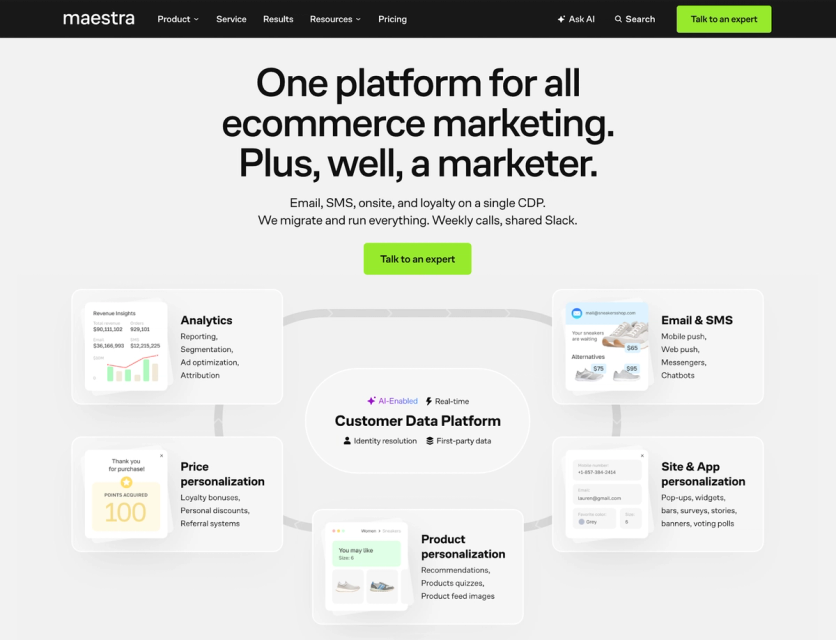
Maestra is a personalization platform for mid-size, enterprise, and rapidly scaling ecommerce brands. It sits under support or chat tools, holding the customer data they generate, with chat, email, SMS, on-site personalization, and built-in loyalty running on the same profile.
What Maestra Solves
A help desk closes the conversation, Maestra keeps the customer it was about. The ticket about a late delivery, the return reason, the sizing question a chatbot answered – each one says something about that shopper, and in a support inbox that signal stops there. Maestra is where it lands: a real-time CDP that merges orders, behavior, and channel history into one profile, with support systems integrated so every inquiry, complaint, and resolution lives there too. The tools above keep their jobs – and your email, SMS, and chat can account for open tickets and past issues instead of talking past them.
Maestra Key Features
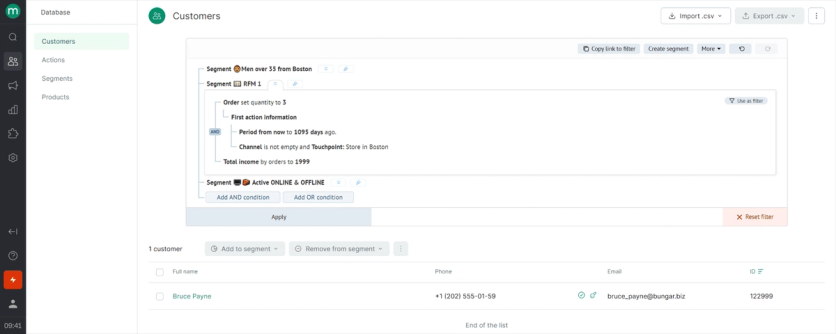
With that profile in place, every channel can act on it from the same platform: chatbots and conversations in WhatsApp and other messengers, next to email, SMS, and mobile push, with messages cascading in a single flow so a customer who misses an email gets a WhatsApp follow-up automatically. On-site pop-ups and banners, 14 ready-to-use recommendation engines across web, email, and messages, and RFM-based segmentation all read the same data – so a chat reflects what a shopper has browsed, bought, or been sent, without a separate sync.
Maestra Support
Every subscription includes a dedicated forward-deployed marketer who handles migration, integration setup, flows, segments, and ongoing optimization.
Maestra Pricing
No free plan or trial. From $2,000/mo for the real-time CDP and email, with the first 100,000 active profiles included, billed month-to-month; migration and implementation are included and billing starts only after go-live. Additional modules – SMS, on-site personalization, loyalty – are added as flat monthly fees. Custom volume pricing for larger brands, and the full module breakdown sits on Maestra’s pricing page.
Maestra Pros and Cons
| Pros | Cons |
|---|---|
| Chat and messaging run inside one platform with CDP, email, SMS, personalization, and built-in loyalty | Not a standalone help desk – ticketing still needs a dedicated tool alongside it |
| Real-time CDP unifies customer data so every channel works from one profile | Built for mid-size to enterprise and scaling brands, not the smallest stores |
| Chatbots plus WhatsApp and other messengers, configured to the brand’s channels | No free plan or self-serve trial |
| A forward-deployed marketer sets it up and runs it; migration included at no cost | More to set up than a single-purpose chat widget (the forward-deployed marketer offsets this) |
| Replaces several point tools – CDP, ESP, recommendations, loyalty, on-site – in one stack | Chat is part of a bigger platform, so it’s overkill if a widget is all you need |
When it fits: choose Maestra when you want chat, customer data, and marketing on one platform rather than a standalone chat widget.
How to Choose the Right Customer Support Tool
Start with the job, not the feature list.
- Order-change tickets are your biggest queue? SelfServe deflects them at the source on Shopify.
- Want conversational help on the storefront? CartPilot is the cheap WooCommerce-first start; Zipchat adds channels, languages, and a public track record.
- Ship a product alongside the store? Featurebase merges support with feedback and release notes.
- Need a help desk built on order data? Gorgias is ecommerce-native and priced per ticket.
- Want AI to close tickets outright? Intercom’s Fin bills per resolution across every channel.
- Running support as a department? Zendesk is the system of record.
Then check two things. Your platform, since Shopify-native depth (SelfServe, Gorgias), WooCommerce-first builds (CartPilot), and platform-agnostic tools (Zendesk, Intercom) diverge sharply. And the pricing model – per order, per conversation, per ticket, per seat, or per AI resolution – because each one scales differently as you grow.
The tool will likely change before your data model does, so settle where the data lives first. That part is Maestra’s job.
FAQs
- A support tool (help desk) runs the full workflow – tickets, routing, SLAs, knowledge base, and reporting across channels. An AI chat agent sits on your storefront or in messaging apps and resolves common questions in real time. Use a help desk like Zendesk or Gorgias when agents handle volume across email, chat, and voice; use an AI agent like Zipchat, CartPilot, or Intercom’s Fin to deflect repetitive questions before they reach a person. Most growing teams run both – AI on the first line, a help desk underneath.
- Yes – that’s their core job. Zipchat and CartPilot connect to your store data to answer order-tracking, returns, stock, and product-fit questions inside the conversation, then hand off to a human when a case needs one. Coverage differs by tool, so before you commit, confirm three things: your platform (Shopify or WooCommerce), your channels (website, WhatsApp, social), and whether human escalation is included.
- Not entirely. AI agents resolve a large share of routine questions and keep them off your queue, but complex, high-volume, or multichannel support still needs a help desk like Zendesk underneath for ticketing, SLAs, and reporting. The common setup pairs both: AI handles the first line, the help desk handles everything that escalates.
- It depends on the job costing you the most time. To cut order-change emails, SelfServe installs natively on Shopify and starts free. For an AI agent that answers product and order questions across channels, Zipchat has a free tier. Gorgias (ecommerce-native, per ticket) and Zendesk scale furthest, both priced and built for larger, multichannel teams. Start with your biggest single pain, then add tools as volume grows.
- Most install directly from the Shopify App Store and read your order and customer data. SelfServe edits orders natively inside Shopify, Zipchat answers from your catalog and order data, and Gorgias, Zendesk, and Intercom surface order context inside the ticket. CartPilot is WooCommerce-first, with Shopify support per the vendor. Confirm the depth you need – order editing, order lookup, or full customer history – on each tool’s App Store listing.
By five different models, so match the model to how your usage actually grows:
- Per order – SelfServe (monthly order volume)
- Per conversation or AI reply – CartPilot, Zipchat
- Per ticket – Gorgias
- Per seat – Featurebase, Zendesk, Intercom
- Per AI resolution – Gorgias’s AI Agent (~$1), Intercom’s Fin (from $0.99), Featurebase’s Fibi ($0.49)
Bottom line: order-based pricing suits stores deflecting order edits, conversation-based suits AI chat volume, per-seat suits teams with dedicated support staff, and per-ticket or per-resolution models keep cost tied to what actually gets handled.
- In the same customer profile as everything else you know about that shopper. Support tools are built to close conversations; a return reason or a delivery complaint only changes behavior when your email, SMS, and on-site messages can read it. Maestra integrates support systems into a real-time CDP so each inquiry and resolution lands in one profile alongside orders, browsing, and loyalty status – Magnum Bikes runs Zendesk this way and grew online revenue 56.6% year over year after unifying data that had been split across online, retail, and rental systems.