How AD Mortgage Improves Email Deliverability to 99.7% with List Hygiene and Sender Reputation


Results
- 99.7%
email deliverability
- High
domain reputation – first time in company history
- −30%
list reduction with the same hard conversions
- 12+
months without a single spam blacklist incident
Testimonial

Email Deliverability Transformation
| Before | After |
| ❌ Three sending platforms kept active as insurance against deliverability dips | ✅ Consolidated onto one sending platform with consistent domain reputation |
| ❌ Tracking links and Return Path on generic ESP subdomains | ✅ Branded links and Return Path on AD’s own domain |
| ❌ 24,000 contacts including non-openers and bots dragging engagement down | ✅ 17,000 engaged, relevant contacts – same hard conversions, stronger engagement signals |
| ❌ Image-heavy templates with multiple CTAs and banner headers | ✅ Minimalist design built for inbox placement and corporate filters |
| ❌ Periodic spam blacklist incidents, unreliable deliverability | ✅ No blacklist hits in over a year, stable 99.7% deliverability |
If your email deliverability is slipping, use AD Mortgage’s fix list as a checklist. We break down each fix below – what the team did, and what to check in your own setup.
Commit to One Consistent Sending Pattern
❌ Problem: AD Mortgage’s domain reputation had been slipping for a while. The previous approach was defensive – survive blacklists, not prevent them. The team ran a three-platform sending stack – if one landed on a blacklist, they could shift volume to another.
The cost was daily: splitting the base three ways and sending the same email from each, just to keep them warm. The team had become hostage to its own fallback plan. Moreover, to inbox providers the whole setup was a red flag – three platforms on one domain isn’t how reputation recovers.
✅ Solution: The fix was to consolidate all marketing sends onto Maestra and rebuild the operation around consistency. One sender, one steady daily rhythm, one source of truth for deliverability data. With sending behavior stabilized, domain reputation started compounding in the right direction.
What to check in your own setup. Most teams don’t run a three-platform hedge like AD’s, but they still end up with fragmented sending – transactional from one tool, bulk from another, loyalty from a third, review requests from a fourth. It all goes out from the same domain, and inbox providers see scattered signals from one sender. To lift deliverability, consolidate as much as you can onto a single platform.
Configure Branded Links and Return Path
❌ Problem: Every email carries three domains – the one it’s sent from, the one its tracking links point to, and the one bounces return to. Most ESPs route tracked links through a generic subdomain like click.mail-esp.com and handle bounces on shared infrastructure.
AD Mortgage’s setup worked the same way – the sender line said AD Mortgage, but the plumbing said third party. Corporate spam filters weight domain coherence heavily, and they quietly penalize that kind of mismatch – every send loses a little ground with inbox providers.
✅ Solution: Maestra’s Forward Deployed Marketer configured branded links and Return Path on AD’s own domain. Tracked links now route through an AD subdomain, and bounces route through the same one. To the inbox provider, everything lines up.
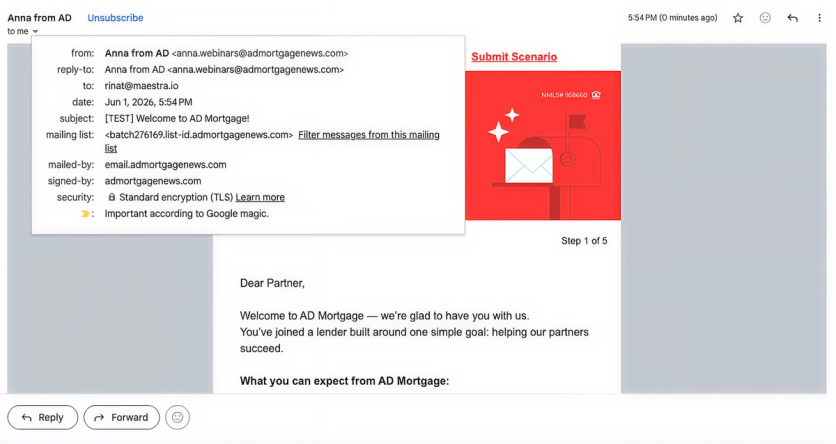
What to check in your own setup. Hover over a link in your last campaign. If the preview doesn’t match your sender domain, that’s worth fixing. Then check your Return Path – it should be a CNAME pointing at your own domain, not some shared ESP infrastructure.
Cut Your List Until Only Relevant Contacts Remain
❌ Problem: AD Mortgage’s list had grown to 24,000 contacts. Like any long-running list, it included a quieter side – a segment of contacts who’d opted in at some point and drifted out of engaging with sends.
Beyond that, two subtler problems: contacts who never opened anything, and contacts who opened everything and clicked 10+ times per email – bot behavior, not human interest. All of it signaled poor hygiene to inbox providers and kept deliverability stuck.
✅ Solution: The disengaged segment was removed from the list. Two filters were added to keep it healthy going forward. The first is a single button in Maestra – toggle it, and every campaign automatically excludes non-openers. The second targets a common bot-click pattern – contacts who click many times inside a single email.
The list went from 24,000 to just under 17,000, with hard conversions unchanged and deliverability moving from an inconsistent 96–97% to a stable 99.7%.
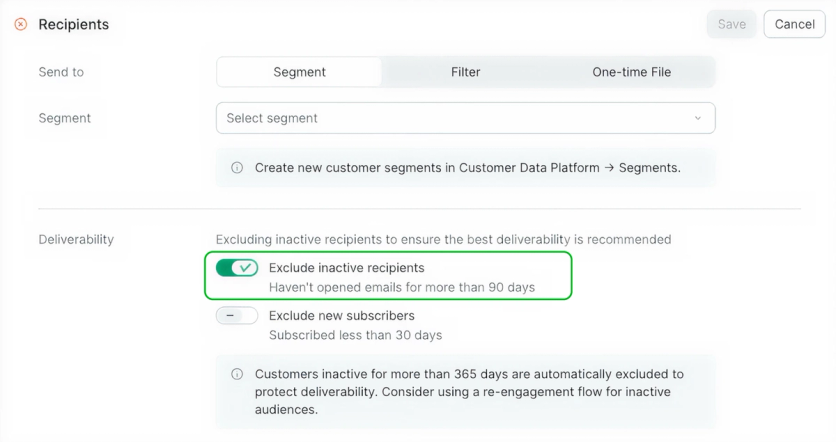
What to check in your own setup. Audit your list segments – the ones living there because someone opted in once are usually where deliverability slips. And don’t stop at non-openers: bot-clickers look fine in reports but do real damage. Cutting won’t cost you hard conversions, because those contacts weren’t converting anyway.
Add Spam Trap Filters Before They Sink Your Domain
❌ Problem: Most senders have no active defense against spam traps, AD Mortgage included. That matters because a spam trap is a decoy address hidden on purpose – and the tricky ones act like real subscribers, so they slip past regular list cleanup. Send to one and your domain reputation takes the hit. Most platforms don’t filter them out automatically.
✅ Solution: Maestra’s Forward Deployed Marketer set up a dedicated spam trap filter that excludes known trap addresses from every send. Since it was turned on, AD Mortgage has gone over 12 months without landing on a single spam blacklist, after years of periodic incidents.
What to check in your own setup. Ask your sending platform what protection they offer against spam traps. If the answer is “just keep your list clean,” that’s not enough. You want an active filter that catches known trap addresses before they enter your send queue.
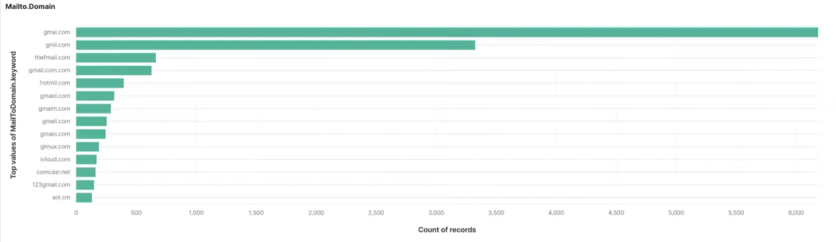
Examples of active spam traps from Maestra’s data – hidden addresses that quietly tank sender reputation when hit
Design Emails for the Inbox
❌ Problem: For AD Mortgage, template design mattered more than usual. A B2B audience on corporate domains means stricter filters. A reputation still rebuilding means no buffer for risk signals. In that combination, image-heavy templates, header banners, multiple CTAs, and link-heavy designs aren’t cosmetic – they decide whether an email lands in the inbox or in spam.
✅ Solution: AD rebuilt its templates around technical hygiene. No header banner. Minimal icons. Short copy. A single call-to-action. As few links as possible.

Before – image-heavy layout with multiple CTAs

After – clean text-first design with a single call-to-action
Before every send, the team now runs emails through a health-checker Mailtrap that flags image-to-text ratio, link count, and other signals inbox providers watch for.
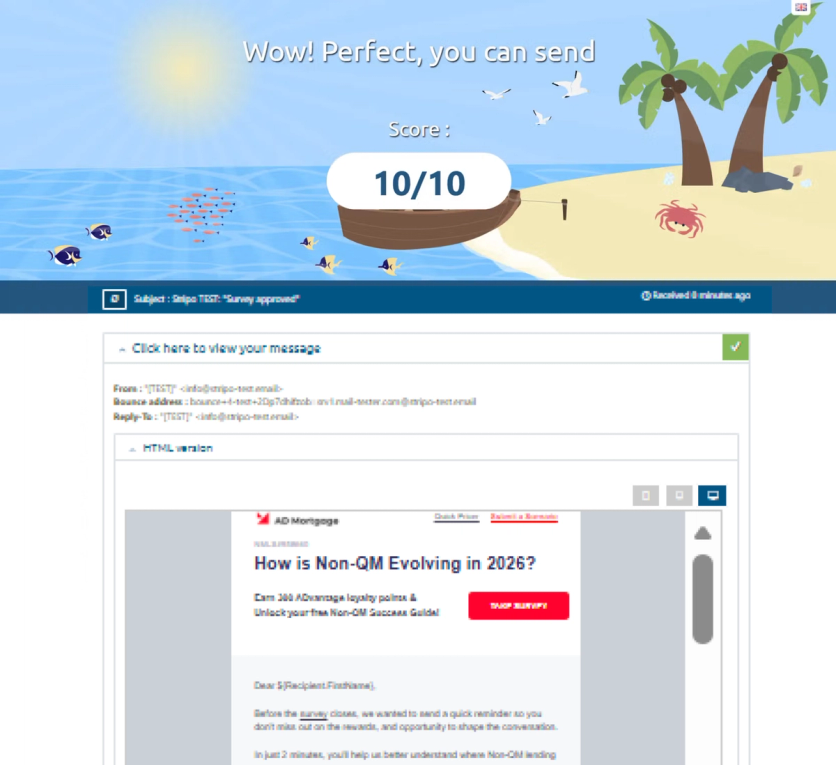
Content relevance is the other filter: every email either delivers something useful for a broker’s day, or doesn’t get sent.
What to check in your own setup. If deliverability is slipping, or your audience runs through strict spam filters – corporate inboxes, disengaged segments – it’s worth running your next email through a health-checker. It flags the same signals inbox providers watch: image-to-text ratio, link count, spam words.
And no matter the setup, ask yourself honestly: is this email worth someone’s time? If not, don’t send it.
The Bottom Line
Five changes took AD Mortgage from an inconsistent 96–97% deliverability to a stable 99.7%:
- consolidation onto one sending platform,
- branded links and Return Path on AD’s own domain,
- list hygiene with non-opener and bot-click filters (−30%),
- spam trap protection,
- templates rebuilt for inbox placement.
Each fix is small on its own; together they pushed domain reputation to High for the first time in the company’s history. Hard conversions held flat through the list cut, and the domain has gone over 12 months without a single blacklist hit – after years of periodic incidents.
For a B2B list on corporate email domains, where every percentage point is earned, not given, that’s a result worth building on.