
What Are Spam Traps And How To Avoid Them

Spam traps are email addresses used to catch senders who email people without permission – or who keep blasting stale lists. They damage your sender reputation, push legitimate emails to spam folders, and can get your domain blocklisted without warning. The tricky part: some advanced traps actually open your emails, so your open rate can look healthy while your reputation still tanks.
You fix spam traps by tightening your permission practices and list hygiene. Focus on double opt-in, engagement-based segmentation, and sunset policies for inactive subscribers.
Types of spam traps
| Type | What it is | How it gets on your list | What it signals |
|---|---|---|---|
| Pristine | Never belonged to a real person – created to catch bad senders | Buying lists, scraping, collecting emails without consent | Permission problem |
| Recycled | Old address that went inactive and was repurposed as a trap | Keeping old subscribers forever, no sunset policy | List hygiene problem |
| Typo | Address on a misspelled domain (gmai.com, hotmil.com) | Signup typos, no validation at capture | Missing confirmation step |
| Role / Admin | Addresses like postmaster@, abuse@ | Scraping, importing corporate directories | Harvested data |
| Behavioral | Addresses that open emails but never click, visit, or convert | Accumulated over time | List hygiene problem |
Note that dome advanced spam traps are designed to mimic human behavior – they open emails (or their tracking pixel loads automatically), but they never click or convert. These create the illusion of a healthy, engaged list while quietly damaging your reputation.
The key insight: Open rate alone doesn’t guarantee your list is healthy. If you’re seeing opens but no clicks, no site visits, and no conversions, that’s a signal to investigate audience quality – even when surface metrics look fine.
Active spam trap domains to watch
Trap operators never reveal which addresses are traps. But at Maestra, we track deliverability across our clients and monitor spam trap hits. We automatically block delivery to these addresses – but still log the attempt, so the signal about list hygiene issues gets recorded for troubleshooting.
Recently I analyzed our clientdata and found over 10,000 addresses with typo domains. Here are the most common ones:
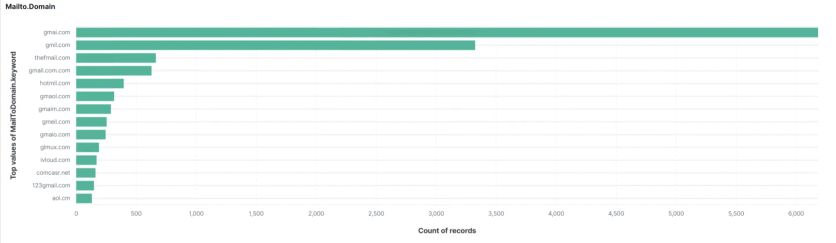
Active spam traps examples
Here’s the full list of the most common spam trap domains we’re seeing:
- gmai.com – 6,183 records
- gmil.com – +3,200 records
- thefmail.com – +500 records
- gmail.com.com – +300 records
- hotmil.com – +250 records
- gmaol.com – +200 records
- gmaim.com – +200 records
- gmeil.com – +200 records
- gmaio.com – +180 records
- glmux.com – +150 records
- ivloud.com – +120 records
- comcasr.net – +100 records
- 123gmail.com – +100 records
- aol.cm – 80 records
You can exclude emails with these domains from your sendings right now. But that’s not enough – you need to fix the underlying processes that let them onto your list in the first place.
How to spot hidden spam traps
If your sender reputation isn’t improving despite high open rates and you’re not doing anything obviously wrong, set up a filter for suspicious contacts:
- Opened more than 30 emails
- Never clicked a single link
- Never visited your site
- Never made a purchase
Contacts matching this pattern are either spam traps or "pseudo-active" mailboxes where the tracking pixel loads automatically but no real person exists. Removing or isolating this segment almost always improves deliverability. In Maestra, you can build this segment using CDP filters that combine email engagement data with website behavior and purchase history – all in one view.
How to avoid spam traps
Use double opt-in. Catches typos and verifies every address before you start sending.
Segment by engagement. Send campaigns to active subscribers (opened/clicked in the last 90 days). Suppress or re-engage the rest. Maestra’s CDP updates profiles in real time, so segments always reflect current behavior.
Run a sunset policy. Set up flows that send farewell emails to subscribers who haven’t engaged in 180 days. Unsubscribe non-responders automatically.
Never buy or scrape lists. High risk for pristine traps, usually violates ESP terms, and recipients didn’t consent anyway.
Validate at capture. Use form validation and bot protection (reCAPTCHA) to block junk addresses at signup.
Audit imports carefully. That "found leads" spreadsheet from years ago? Suppress it until you can prove consent.
Filter for fake engagement. Regularly check for contacts with high opens but zero clicks, site visits, or purchases. These are red flags.
Here’s a good checklist to review:
What to Do if You Have a High Spam Complaint Rate →
FAQ
- No direct notification exists. Watch for: sudden deliverability drops, rising spam complaints, unexplained blocklist appearances, or – the sneaky one – reputation declining while open rates stay high. Check the typo domains I shared above against your list. Also look for the behavioral pattern: contacts who open everything but never click or convert. Maestra's Email Health report lets you analyze deliverability across different providers – Gmail, Yahoo, Outlook – which often helps localize the problem.
- Rather than manual cleanups, set up an automated win-back flow. Send a re-engagement series to subscribers who haven't opened or clicked in 90-180 days. Make a compelling offer – like a significant discount – and personalize the email with recommendations or new items the customer might like. For example, our client – swimwear brand JOLYN – implemented an AI-powered winback flow. The AI identifies the right timing and discount for each customer – resulting in 9x higher winback conversion and 15% higher AOV. If customers still don't respond after the win-back series, automatically suppress them from future campaigns. This keeps your list healthy continuously without manual intervention.
- Your sunset policy timeline depends on your business model and typical purchase frequency. A travel affiliate might flag users inactive after 7-30 days, while a retail chain might wait 90-120 days. The key is testing. One grocery chain assumed customers would use promo codes within two days – but some shoppers only buy weekly, so the real reactivation window was one to two weeks. Use your purchase data to find the average interval, then build your sunset timeline around it.