
6 Best Popup Maker Plugins for Ecommerce That Actually Drive Conversions in 2026

Standalone popup plugins do one thing – capture an email before visitors bounce. But the conversion doesn’t end at the signup. The real question is whether your popup tool connects to the rest of your marketing: segmentation, follow-up flows, personalization on the next visit.
We compared 6 popup maker plugins for e-commerce on targeting, templates, integrations, and pricing. Each gets an honest verdict: who it’s built for, what it does well, and where it runs out of road.
Quick Verdict: Best Popup Maker Plugin by Category
Best overall for e-commerce: Maestra – popups plus full personalization stack (CDP, email, SMS, loyalty, site personalization)
Best free popup builder with gamification: Claspo – no-code editor with 1,000+ templates, spin-to-win wheels, and behavioral targeting starting at $0
Best AI-generated interactive popups: Embeddable – describe what you need in plain English and the AI builds quizzes, calculators, and multi-step popups
Best for AI-powered product discovery: Nosto – behavioral popups paired with personalized search, merchandising, and shoppable UGC
Best for Shopify-native targeting: Sleeknote – 100+ templates with cart-value and purchase-history triggers built for Shopify stores
Best budget WordPress opt-in plugin: Bloom – six form types and 100+ templates included in the $89/year Elegant Themes membership
Comparison Table of the Best Popup Maker Plugins (2026)
| Tool | Key Features | Support options | Starting Price | Integrations |
|---|---|---|---|---|
| Maestra Best for: • Scaling brands • Mid-market businesses • Enterprises | • In-session segmentation driven by the real-time CDP • Location-based targeting • No coding personalization • Customizable popup templates • Multiple popup formats • Drag-and-drop builder • AI-powered product recommendations • A/B testing with incremental revenue impact • Reporting with configurable attribution • Flexible flow builder • Built-in loyalty, promo, and referrals • SDK for quick mobile app integration • Unified platform with white-glove support | White-glove service for each client: • Dedicated Forward Deployed Marketer • Strategy roadmap • Integration and migration hands-on support • Segment, flow, and A/B test setup • Design assistance • Performance monitoring and optimization Support Channels: • Live chat (responses within 5 minutes) • Shared Slack/Teams channel • Weekly Zoom calls | From $2,815/month • CDP base + onsite personalization module • First 100,000 active profiles included; pay only for active profiles • No setup / onboarding fees • Unlimited API calls & users | Over 150 integrations, including • Shopify • BigCommerce • WooCommerce • Magento (Adobe Commerce) • Salesforce Commerce Cloud • WordPress |
| Claspo Best for ecommerce brands of all sizes that need a specialized popup app | • Advanced targeting • Gamified popups | • Live chat • Email support • Onboarding guidance | Free plan available Paid plans start from $29/month | • Shopify • WordPress • WooCommerce • BigCommerce |
| Embeddable Best for ecommerce brands that want interactive popups with quizzes, product finders, and gamified discounts | • AI-powered popup generation from text prompts • Interactive popup content (quizzes, calculators, forms) • Multi-step popups with conditional logic • Exit-intent, scroll, and time-delay triggers • Built-in A/B testing and analytics • White-label on paid plans | • Documentation • How-to guides • Email support | Free plan available Paid plans start from $25/month | • Shopify • WordPress • Webflow • Wix • Squarespace • Framer • Mailchimp • HubSpot • Klaviyo • Airtable • Google Sheets • Segment |
| Nosto Best for mid-sized brands that don’t need a CDP | • Popup triggers and scheduling • Popup targeting • HTML and CSS editor • Product recommendation popups • Dynamic popup placements •Promo popuрs with discount codes • Pop-up KPI tracking | • Multilingual support (French, Spanish, and German) • Live chat • Email Help Center • Developer documentation • Nosto Academy • Trainings and webinars • Check-ins with a CSM | Custom performance-based pricing | • Shopify • Salesforce Commerce Cloud • BigCommerce • Adobe Commerce |
| Sleeknote Best for online retailers and SMBs that need a standalone popup plugin for multiple websites | • Over 100 pre-designed templates • Unlimited campaigns • Unlimited domains | • Email Chat • Phone support • Dedicated success manager and onboarding team | $69.00/month | • Shopify • BigCommerce • Magento |
| Bloom Best for: • WordPress websites • Elegant Themes users • Small businesses | • 6 opt-in types • Over 100 templates • A/B testing • Detailed statistics dashboard • Forms, recommendations, sidebars, and game elements | • Knowledge base • Detailed tutorials • Feedback submission form • Email technical support •Documentation for setup and design • Premium support through the Divi Support Center | $89.00/year | WordPress |
Maestra
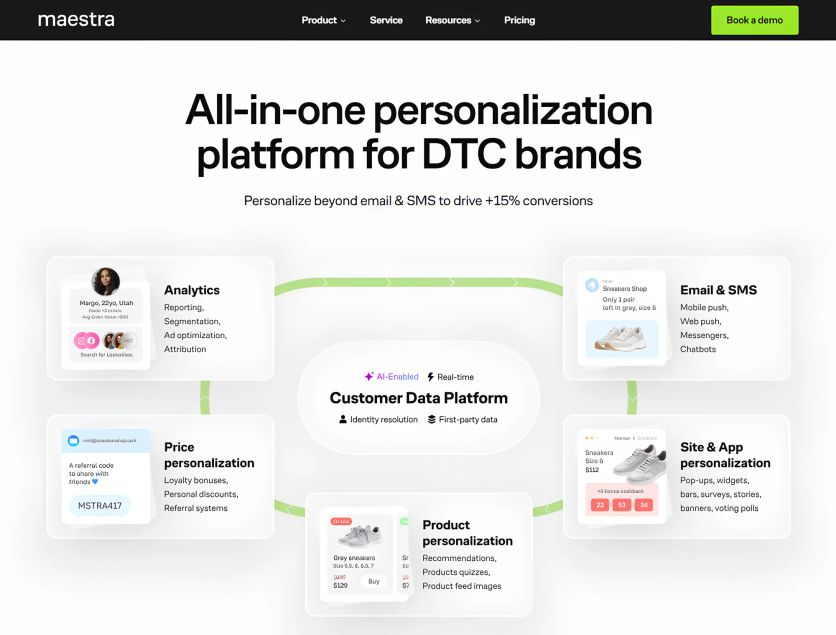
Maestra is a unified personalization platform that helps marketers create and fine-tune on-site content like popups, widgets, and banners in real time to increase customer engagement and conversions. It goes beyond standard popup tools and offers a comprehensive solution for the entire journey personalization. Maestra is built for ecommerce brands that need more than a popup maker plugin to deliver personalized customer experiences across site, app, and other touchpoints.
Maestra Features
Maestra features everything you’d expect from a specialized popup tool: wheels of fortune, countdown timers, secret boxes, sidebars, slide-ins, forms, and NPS. Users can leverage any on-site elements:
- Pop-ups
- Gamified forms
- Embedded blocks
- Widgets and banners
- Product recommendations
- Bundles
- Bars
- Stories
- Quizzes and games
- Surveys and polls
Maestra is driven by a real-time Customer Data Platform (CDP). It enables highly targeted interactions as well as truly relevant site content and offers that instantly adapt to each visitor with every click. Maestra’s interactive elements can be used in a mobile app to keep it in sync with the website.
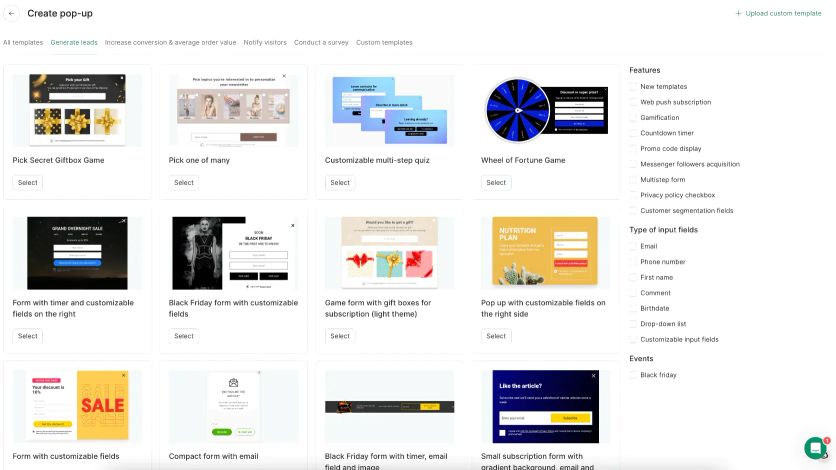
Maestra popup maker comes packed with powerful features:
- In-session segmentation: Show tailored popups, other content, and offers that become even more personalized with every customer action
- Frequency control: Manage how many popups or other elements surface in one session and how often they display to prevent visitor fatigue
- Laser-precise targeting: Set up which customer segments and when see the pop-up or other elements. Segment content down to city-level with Maestra region-targeted popups that can auto-localize by detecting a browser language and URL or location context – extremely helpful for international brands
- Prioritization: Set up which pages pop-ups and widgets appear on and rank them by importance – so visitors only see the most relevant message at the right time, instead of getting bombarded with multiple pop-ups in a row
- AI-powered site personalization: Target and adjust site and app content based on visitor behavior, location, and device
- Pre-made, fully customizable templates with gamification: Сountdown timers, cashback banners, announcement and upsell bars, exit-intent pop-ups, Spin-the-Wheel, cart add-ons, lead forms, product-picking quizzes, and more
- Drag-and-drop editor: Customize popups and widgets or create your own designs. Implement popups and banners in just a few minutes
- Hands-on support: Your dedicated Forward Deployed Marketer (a marketer who works as part of your team) sets up and designs site and app elements for you
- A/B testing: Run A/B tests and lock in the best performers
- Reporting: Track how pop-ups impact sign-ups, add-to-cart rate, conversions, and AOV
Beyond on-site personalization, Maestra unifies the most necessary marketing features for scaling:
- Real‑time CDP: Unified customer profiles, identity resolution, and product feeds
- Advanced segmentation: Nested logic, RFM analysis, calculated and custom fields
- Omnichannel flow builder: Website and app, email, SMS, MMS, RCS, push notifications, messengers, chatbots, paid media
- Product personalization: 14 AI-driven recommendation engines (such as Bestsellers, Similar-to-Viewed, Personalized Post-Purchase Picks, and more) and dynamic product-feed images
- Loyalty bonuses, personal discounts, and referral programs: Ready to use across all channels to boost average order value (AOV) and customer lifetime value (LTV)
- Built-in analytics: Full-funnel reporting, configurable attribution, email health monitoring, segmentation, and ad optimization
- White-glove service: Dedicated Forward Deployed Marketer for each user to ensure results and help brands get full value from the platform

Maestra Pop-up Examples
1. Product-discovery quiz for Blossom Flower Delivery to guide customers to personalized bouquet suggestions and collect preferences. A/B test showed a +14% increase in conversions and a $10,645 lift in additional revenue.
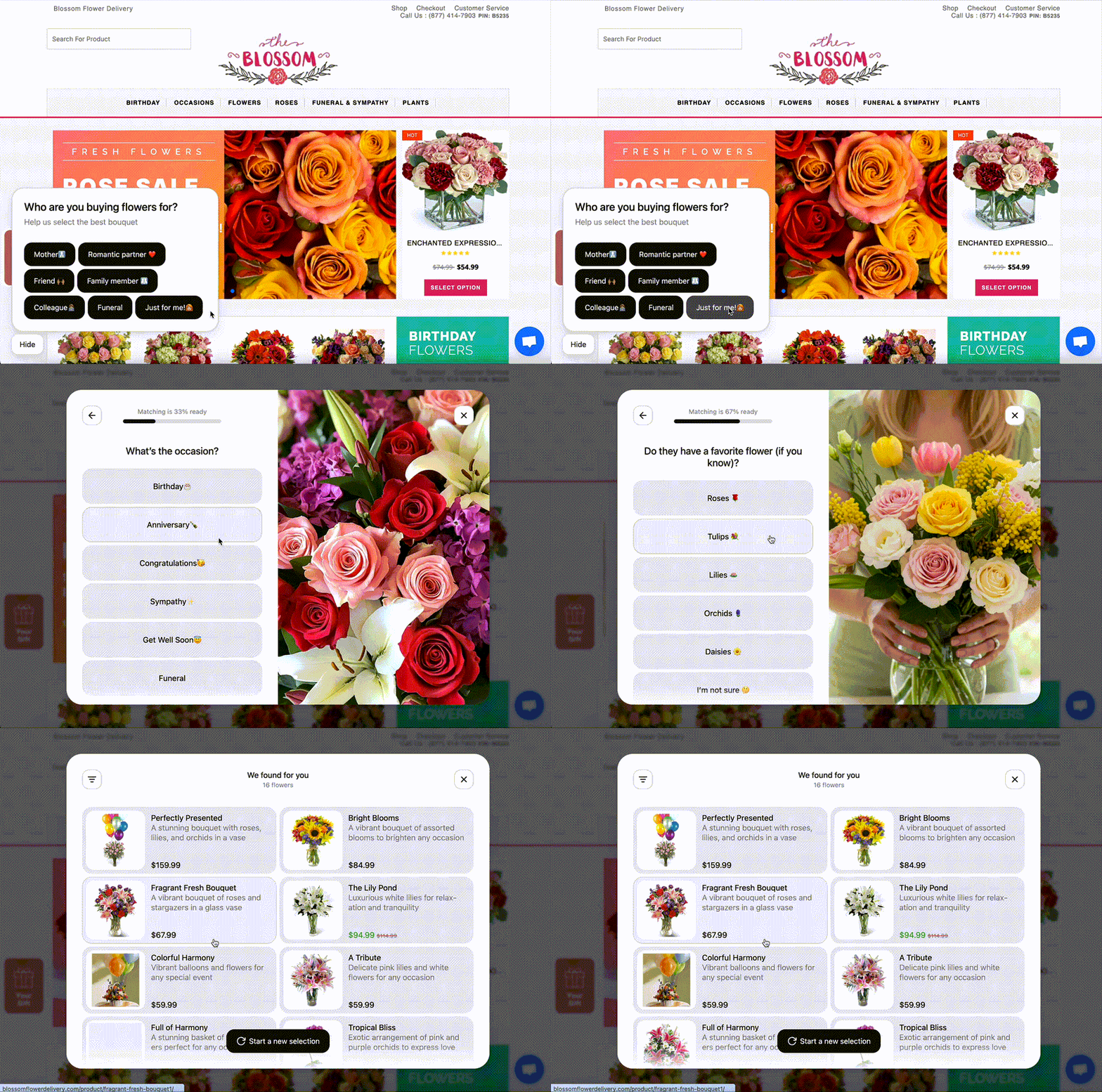
The Maestra product-picking quiz asks a few friendly questions like “Who’s it for?” and “What’s the occasion?” and then recommends a handful of good fits.
2. AI-powered pop-ups for JOLYN to display an offer at the best moment and keep the margins safe. Monocle AI analyzes each user’s real-time behavior to decide when to show a pop-up and what minimum discount is needed to convert – 10%, 15%, or no incentive. The pop-up also collects user preferences for future targeting. AI-driven pop-ups boosted the submission rate by 21% and revenue per website user by 26%.
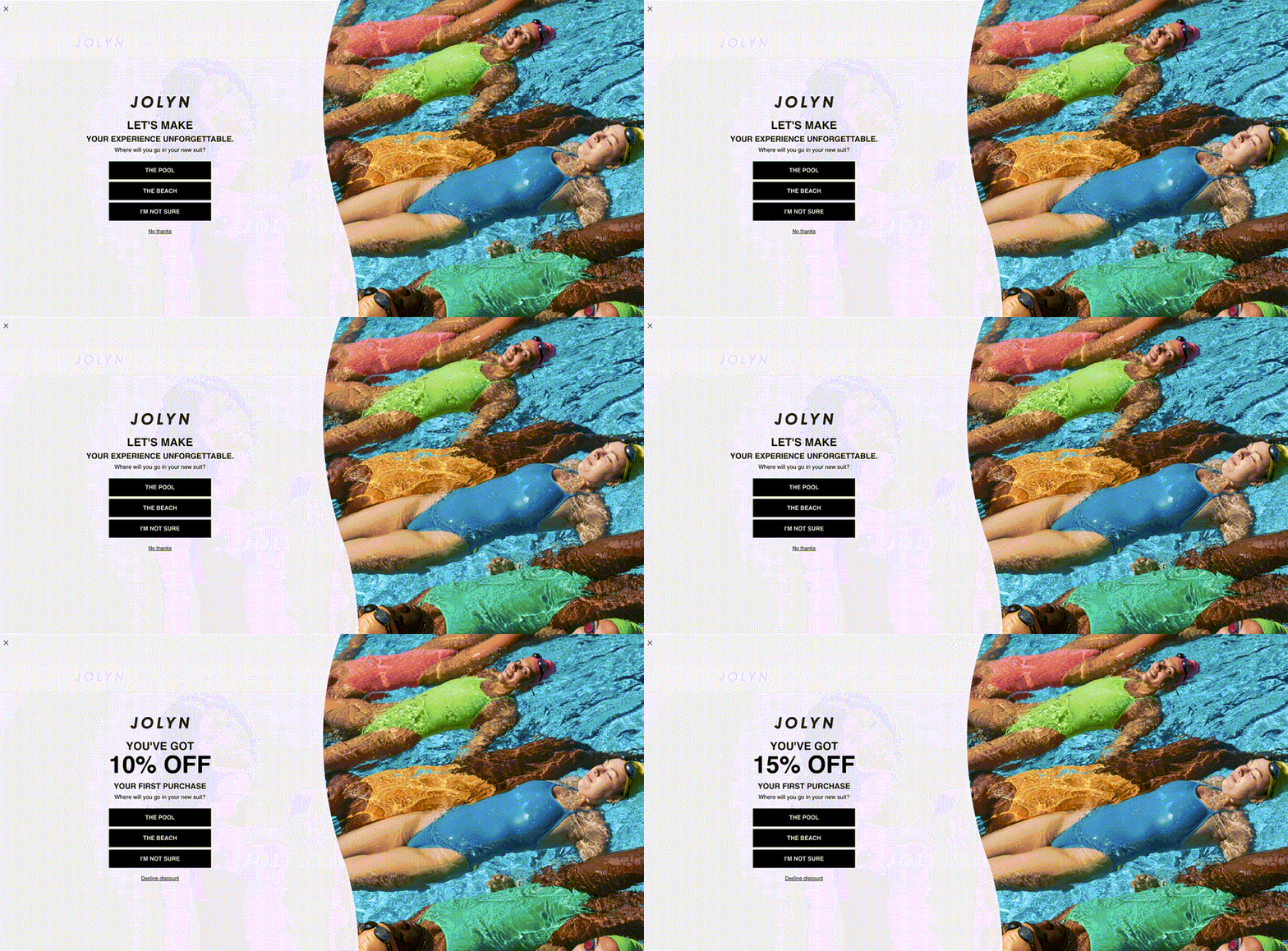
Maestra personalized pop-ups are optimized by Monocle AI
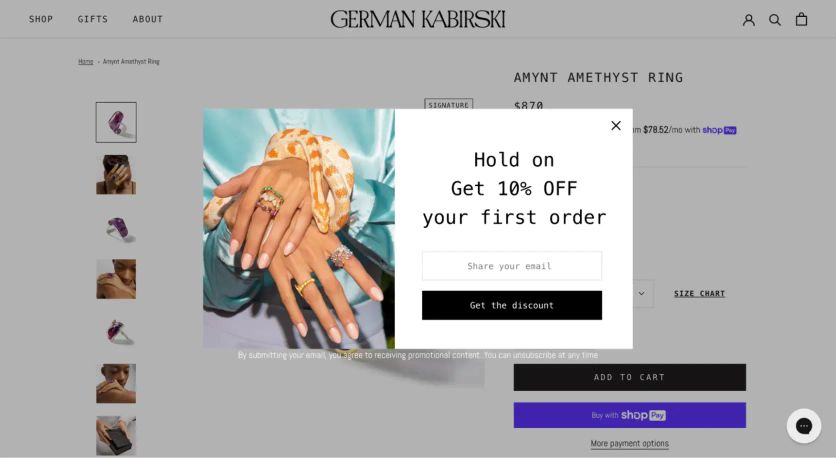
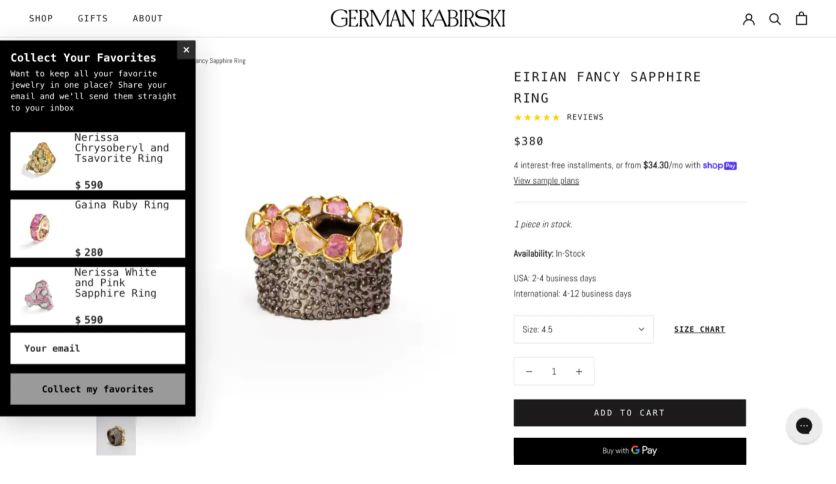
3. Exit-intent pop-up for PuffCuff and German Kabirski. When a visitor is about to leave the site, a pop-up captures their email by offering a discount.
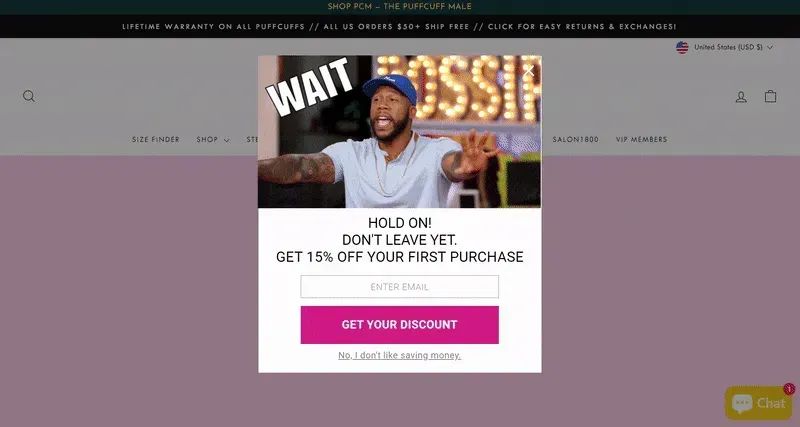
Maestra exit-intent pop-up converts 1.47% of departing visitors into leads for PuffCuff and 0.85% – for German Kabirski.
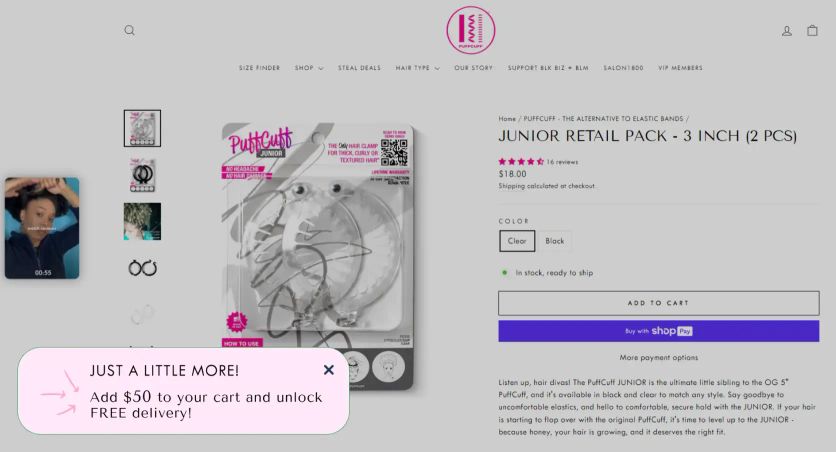
4. A pop-up growing AOV for PuffCuff displays if a shopper added products worth less than $50.
5. Pop-up with location detection for Sena, a cycling helmet brand that sells across the U.S. and Europe. Maestra instantly detects a visitor’s country based on their URL or browser settings, displays pop-ups in the visitor’s native language, and also routes them to the specific regional email list.
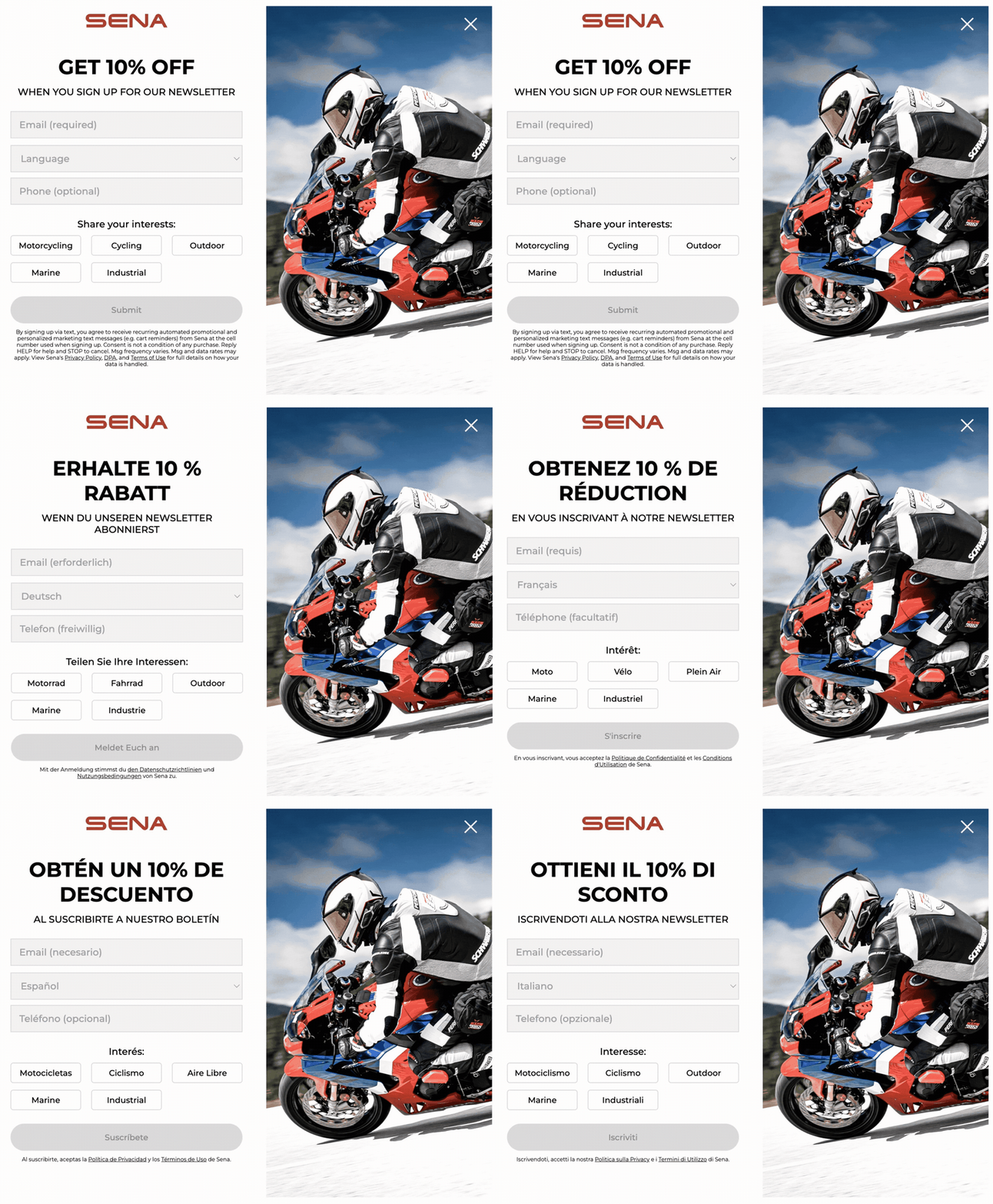
Maestra popup with location detection and auto-localization
6. Recently browsed widget for German Kabirski. It appears when a new visitor has viewed many jewelry pieces in one session and offers to save the browsing history. The widget converts 1.45% of viewers into email leads and feeds them into further Maestra flows.
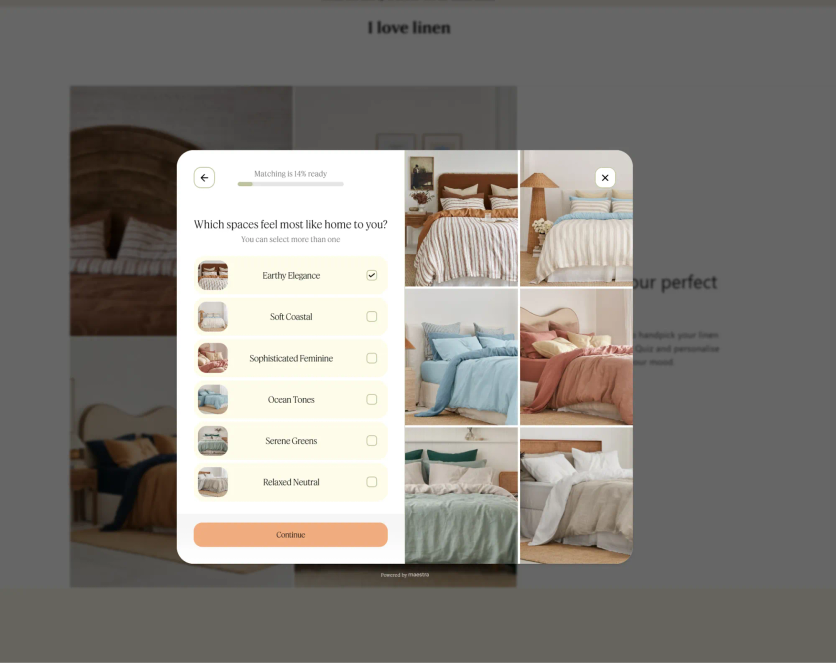
7. The product quiz for I Love Linen collected 4% of BFCM leads and helped the brand discover customer preferences.
8. Promo Code Pop-ups for Blossom Flower. The delivery set up lead capture pop-ups offering a $10 discount on the first order in exchange for an email address.
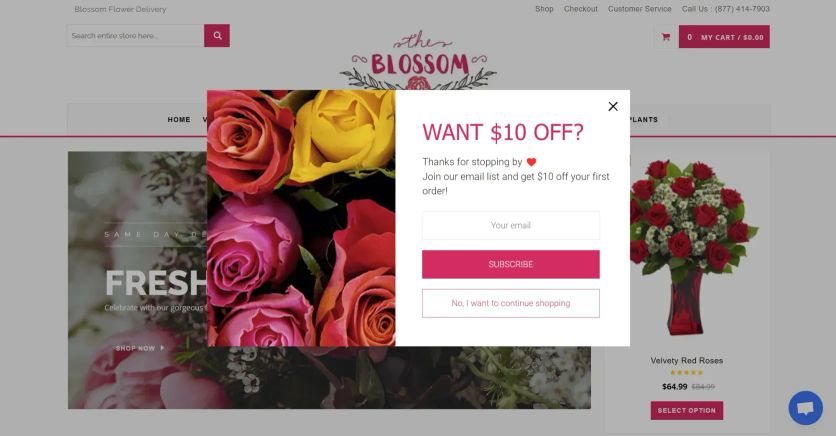
Discount lead form
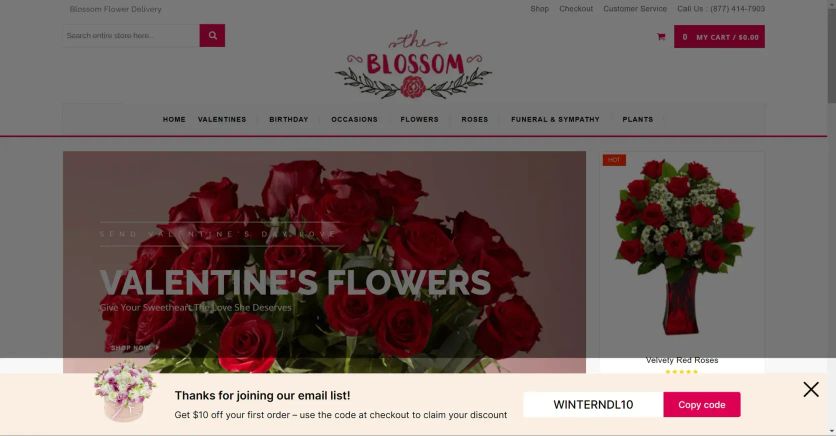
After submitting, the visitor sees a floating bar with their unique promo code so they can keep shopping. Over 29 days, these pop-ups collected 7,836 leads, with the desktop version achieving a 9.81% conversion rate. The combined website personalization efforts – including the pop-ups, social proof blocks (+34% revenue per session uplift), and a delivery countdown timer – generated 9% incremental revenue vs. a control group.
Maestra Support
Maestra’s customer support makes it stand out from other site and app personalization tools. Each client gets a dedicated Forward Deployed Marketer at no extra cost. The Forward Deployed Marketer delivers high-touch support via a shared Slack channel and weekly Zoom calls:
- All data, flows, and segments migration from previous tools
- Complete integration setup with existing tech stacks
- Marketing strategy development and optimization
- Automation and segment configuration
- Flow and campaign creation
- Design assistance for popups and other on-site blocks
- A/B testing execution
This hands-on approach helps clients get the most out of the platform.
Maestra Pricing
Maestra runs on a modular monthly subscription – you pay only for the modules you use. A popup and site-personalization setup starts at $2,815 per month, with the first 100,000 active profiles included. You’re billed for active profiles only, not by popup volume or list size. This makes Maestra an enterprise-level solution rather than a basic popup maker.
The customer data platform base already covers product recommendations, full-funnel reporting, and a dedicated Forward Deployed Marketer, so those aren’t upsells. Maestra doesn’t charge setup, onboarding, or other extra fees, and billing is month-to-month with no annual contract.
Maestra Pros and Cons
| Pros | Cons |
|---|---|
| Zero code needed, easy-to-use interface | Designed for a full-stack approach rather than a standalone popup tool |
| Dozens of pre-made, fully customizable popup templates, including gamified ones | No free plan available |
| Flexible content composer | No landing page builder |
| Centralized platform instead of separate tools | |
| Flexible segmentation and advanced targeting | |
| Geo-targeting | |
| Up-to-the-minute personalization powered by the real-time CDP for both sites and apps | |
| Dedicated Forward Deployed Marketer handling all setup, design, A/B tests, and optimization | |
| +150 plug-and-play integrations | |
| Advanced A/B testing with incremental revenue impact | |
| Detailed reporting with configurable attribution |
Claspo
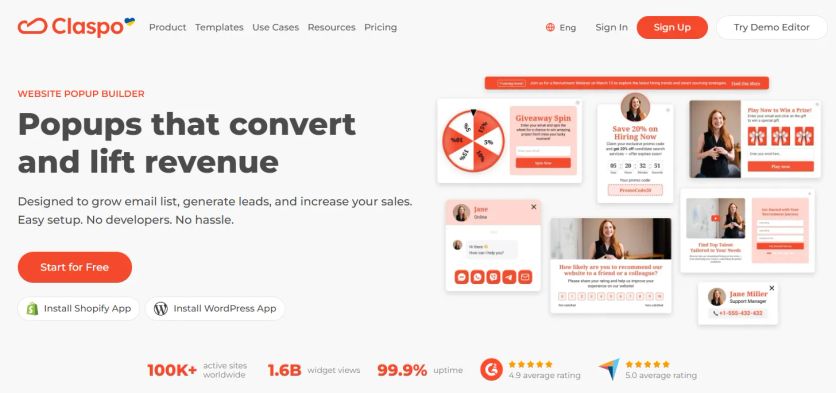
Claspo is a popup maker plugin designed for ecommerce brands that want measurable sales impact. It helps marketers build high-performing popups, widgets, embedded forms, and subscription templates for websites without code while maintaining full control over targeting, frequency, and personalization.
Unlike basic popup plugins, Claspo combines behavioral targeting, gamification, and flexible design options – including +40 countdown templates to ensure messages appear at the right moment in the buyer journey. Whether you’re recovering abandoned carts, promoting bundles, or collecting zero-party data, Claspo helps turn traffic into revenue.
Claspo Features
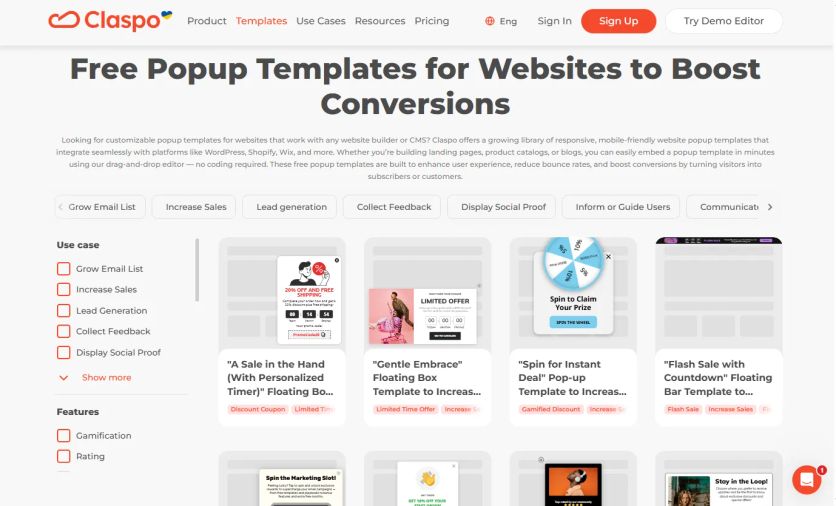
Claspo provides a wide range of on-site engagement elements tailored for ecommerce:
- Popups (exit-intent, timed, scroll-based, click-triggered)
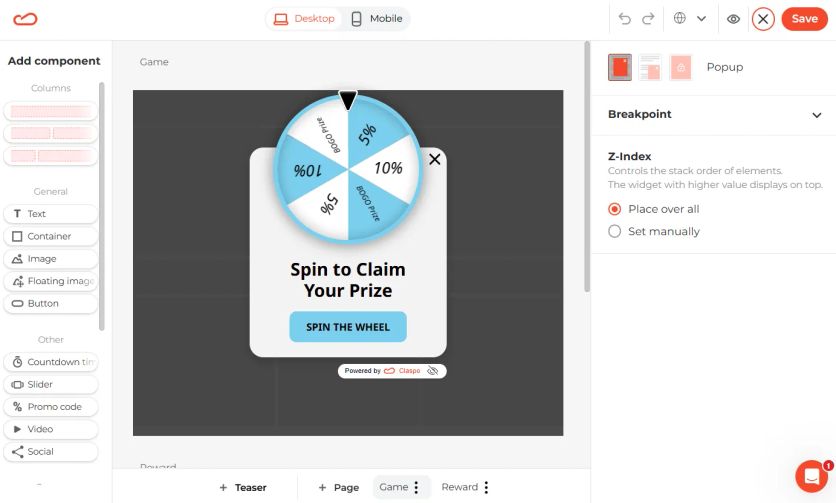
- Spin-to-win wheels and gamified forms
- Floating bars and announcement banners
- Embedded forms
- Countdown timers
- Cart upsell popups
- Multi-step forms
- Social proof notifications
Advanced Targeting & Personalization
- Behavioral targeting based on scroll depth, time on page, cart value, traffic source, and more
- Device, geo, and page-level targeting
- Frequency control to avoid popup fatigue
- Smart triggers like exit intent and cart value conditions
- Audience segmentation for personalized offers
Ecommerce Optimization
- Lead capture with multi-field forms for richer customer profiles
- A/B testing to optimize performance
- Real-time analytics dashboard
Design & Usability
- Drag-and-drop editor
- +1000 customizable templates
- Mobile-responsive designs
- No coding required
- Quick setup with ecommerce platforms
Claspo Popups Examples
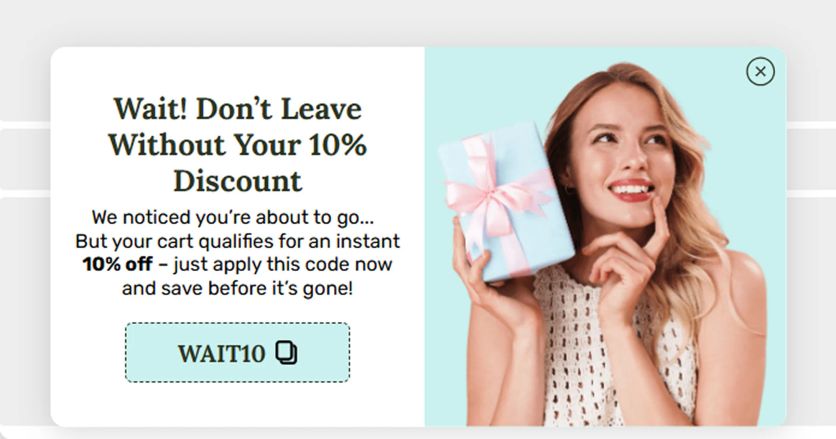
1. Exit-Intent Discount Popup. Capture abandoning visitors with a time-sensitive discount or free shipping offer.
2. Gamification. Increase email capture rates by offering interactive rewards and personalized discount codes.
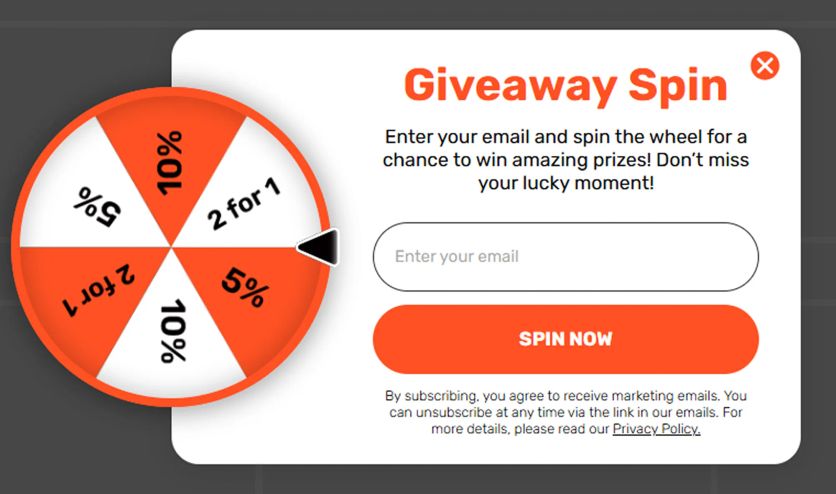
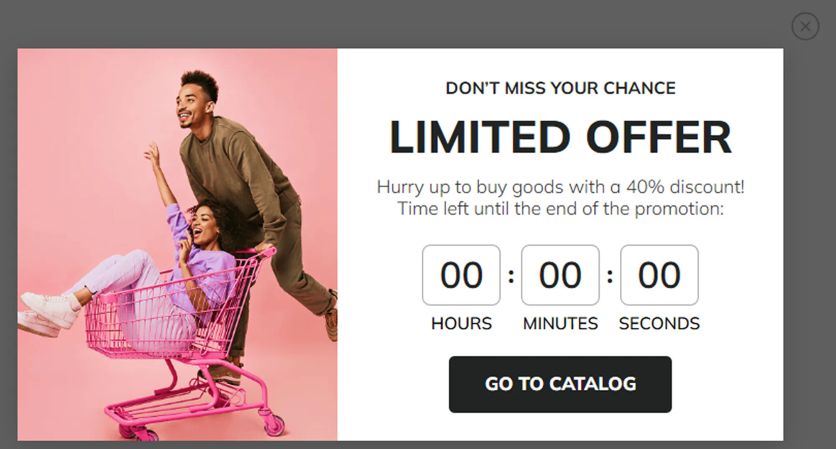
3. Countdown Flash Sale Banner. Drive urgency during seasonal promotions with dynamic countdown timers.
Claspo Support
Claspo provides responsive live chat and email support, along with onboarding assistance to help teams launch campaigns quickly. The platform is designed for self-service, making it easy for marketing teams to build and optimize popups independently without technical involvement.
Claspo Pricing
Claspo offers a free plan suitable for small websites and early-stage ecommerce brands.
Paid plans start from $29 per month, unlocking higher traffic limits. Pricing scales based on website traffic, making it flexible for growing stores.
Claspo Pros and Cons
| Pros | Cons |
|---|---|
| Free plan available | No built-in email marketing tool |
| Ecommerce-focused targeting | |
| Gamification features included | |
| Flexible A/B testing | |
| Large template library | |
| Easy drag-and-drop builder | |
| Fast performance and lightweight scripts |
Embeddable
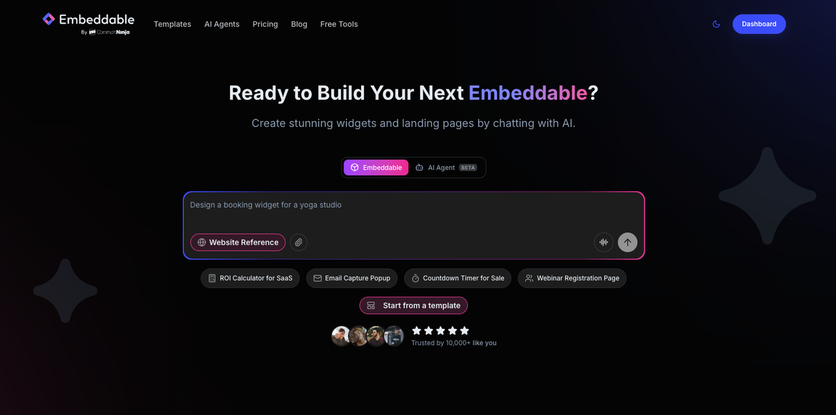
Embeddable is a no-code platform for building interactive popups and embeddable widgets that go beyond standard email capture. While most popup tools focus on opt-in forms and discount offers, Embeddable lets brands drop full interactive experiences into a popup – product recommendation quizzes, ROI calculators, multi-step lead forms, and gamified discount reveals like scratch cards. The platform is built for ecommerce teams that want popups to qualify visitors and collect zero-party data, not just gather email addresses.
The AI-assisted builder sets Embeddable apart from template-first tools. Marketers describe what they need in plain English – for example, an exit-intent popup with a product quiz and a 15% discount – and the AI generates a working popup that can be refined visually. This removes the typical gap between what a template offers and what the brand actually needs.
Embeddable Features
Embeddable focuses on interactive, conversion-oriented popup formats rather than a broad personalization suite:
- AI-powered generation: Describe the popup you need in plain text, and the AI builds a production-ready version – including layout, copy, and logic – ready to customize in the visual editor
- Interactive popup content: Embed quizzes, product finders, calculators, multi-step forms, and gamified elements (scratch cards, spin-the-wheel) directly inside the popup rather than linking out to a separate page
- Multi-step logic with branching: Build popups with conditional paths so visitors see different follow-up screens based on their answers – useful for product recommendation flows and lead qualification
- Trigger options: Exit intent, scroll depth, time delay, page-level targeting, and independent mobile/desktop rules
- Design customization: Full control over brand colors, fonts, layouts, and animations. No Embeddable watermark on paid plans
- A/B testing: Test popup variants and track performance with built-in analytics for impressions, conversions, and engagement
- Real-time editing: Update copy, design, and logic with live preview – changes reflect instantly without republishing
Embeddable Popup Examples
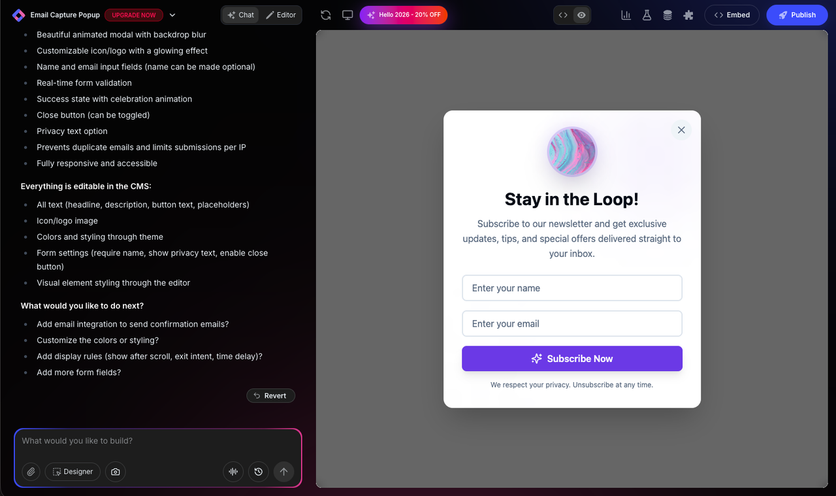
1. Email Capture Popup. AI-generated newsletter subscription popup with name and email fields, animated icon, and a privacy notice. The AI builder produces the layout, copy, and form logic from a single text prompt – ready to customize in the visual editor.
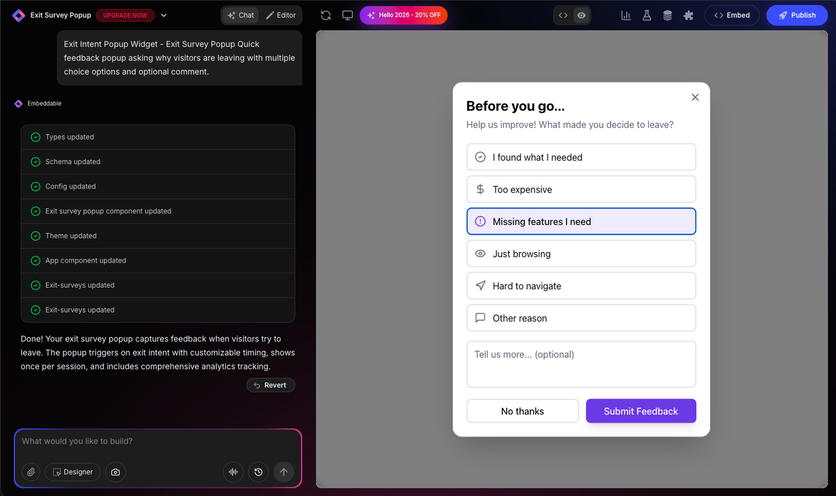
2. Exit Survey Popup. Exit-intent feedback popup asking visitors why they are leaving, with multiple-choice options and an optional comment field. Triggers on exit intent, displays once per session, and includes built-in analytics tracking.
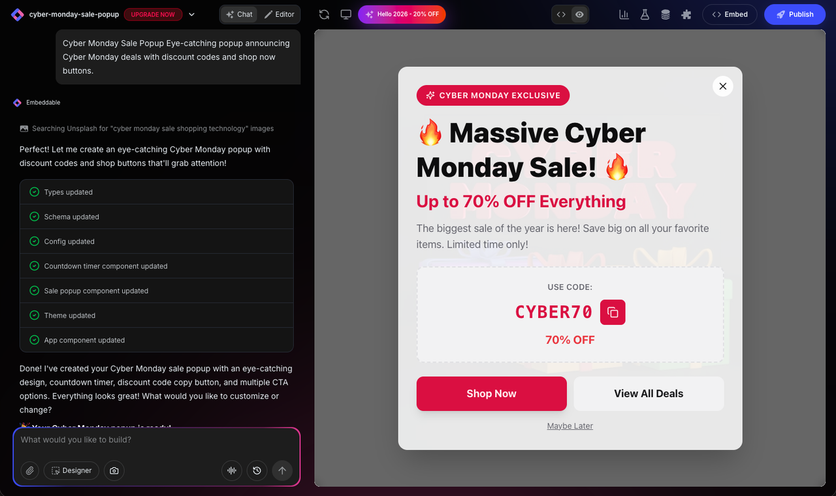
3. Promotional Sale Popup. Cyber Monday sale popup with a discount code, copy-to-clipboard button, and multiple CTAs. The AI generated the design, countdown timer component, and discount code block from a text description.
Embeddable Support
Embeddable provides documentation with getting-started guides and step-by-step how-to tutorials covering popup creation, design customization, and deployment. Support is available via email. The platform is designed for self-service use and does not offer live chat, phone support, or dedicated account management.
Embeddable Pricing
Embeddable offers a free plan with 200 pageviews per month, 100 submissions, and basic A/B testing – though it includes an Embeddable watermark. Paid plans start at $25 per month, which removes the watermark and unlocks unlimited pageviews and 5,000 submissions. Annual billing reduces all plan prices by 30%. All plans include AI message tokens for the popup generator, with one-time top-up purchases available at $12 per pack.
Embeddable Pros and Cons
| Pros | Cons |
|---|---|
| AI generates popups from plain-text descriptions | No ecommerce-specific targeting (cart value, purchase history, product categories) |
| Interactive content inside popups: quizzes, calculators, product finders | Free plan limited to 200 pageviews/month with watermark |
| Multi-step conditional logic for lead qualification | Submission and integration token limits on all plans |
| Free plan available | |
| No per-impression or per-view fees on paid plans | |
| Works across Shopify, WordPress, Webflow, Wix, and custom sites | |
| White-label option on paid plans |
Nosto
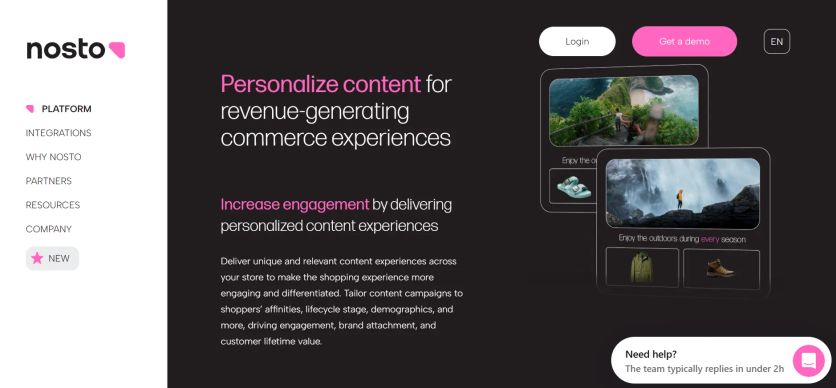
Nosto is an AI-powered Commerce Experience Platform that helps e-commerce brands personalize on-site content like pop-ups, banners, product recommendations, bundles, and category pages, while the broader platform covers product discovery, search, merchandising, and triggered emails like abandoned cart and order follow-up. Its Content Experience Cloud focuses specifically on site personalization and behavioral pop-ups.
Nosto Features
Nosto’s engine is powered by AI, which uses customer, product, and content data to deliver personalized experiences. The platform’s Content Experience Cloud includes a content personalization module, behavioral popups, shoppable UGC, A/B testing, and optimization.
Nosto’s pop-ups module focuses on delivering timely, behavior-driven messages to capture attention and push shoppers toward action. Key pop-up capabilities include:
- Triggers and scheduling: Campaigns appear based on time/day, on-page events, page attributes, device type, and visitor behavior
- Segment targeting: Specific visitor groups can be targeted with pop-ups based on lifecycle stages, affinities, traffic sources, and more
- HTML and CSS editor: Template gallery helps marketers make custom pop-ups
- Recommendations: Product recommendation popups allow marketers to welcome back past visitors with the last product they viewed
- Dynamic placements: Inject content campaigns anywhere across the store and set visibility conditions based on page type, URL, or product attributes such as brand and availability
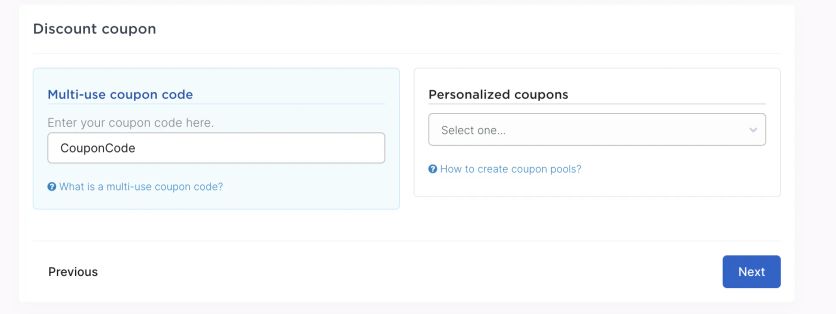
- Discount codes: Promo codes can be added to any popup campaign
- Detailed analytics: Pop-up KPI tracking with revenue attribution
Beyond on-site content, Nosto offers additional personalization modules:
- Personalized search: AI-powered search that adapts results based on individual shopper behavior
- Category merchandising: Automated product sorting within category pages using merchandising rules and AI
- Post-purchase upsell: Targeted upsell offers after checkout (Shopify-specific)
- Personalized Emails: Behavior-triggered emails with personalized product content
- Shoppable UGC: User-generated content integration from Instagram and TikTok, tagged with products
- Business intelligence: Analytics, audience insights, and UGC monitoring
- Experience AI: Includes Predictive AI, Semantic AI, Visual AI, and Generative AI for automated personalization at scale
Nosto Support
Nosto offers support via live chat and email as well as regular check-ins with a CSM. Users can also get access to the Help Center, developer documentation, and Nosto Academy. The platform also provides training through live CXP training sessions and webinars. Nosto’s multilingual team provides support in English, French, Spanish, and German.
Nosto Pricing
Nosto uses a modular, performance-based pricing model. Clients pay a flat license fee based on their revenue, then add individual product modules at costs that scale with business size. Specific pricing is not published on the website – brands need to contact Nosto for a custom quote.
Nosto Pros and Cons
| Pros | Cons |
|---|---|
| AI-powered personalization engine | Pricing is not transparent and requires a custom quote |
| Pop-ups with advanced triggers, scheduling, and prioritization | Can become expensive as revenue grows due to performance-based pricing |
| Broad site personalization: banners, copy, menus, layouts, and more | Some users report a learning curve for advanced analytics features |
| Built-in A/B testing for all content and pop-up campaigns | Pop-up builder relies on the HTML/CSS editor for advanced customization that is less intuitive than drag-and-drop |
| Embedded product recommendations within pop-ups | No built-in email (newsletters) and SMS marketing or loyalty program; requires third-party tools |
| Native integrations with Shopify, Shopify Plus, Salesforce Commerce Cloud, Adobe Commerce, and BigCommerce | No real-time CDP data; engine focuses on commerce data rather than unified customer profiles |
| Shoppable UGC from Instagram and TikTok | |
| Detailed analytics with revenue attribution | |
| Multilingual support |
Sleeknote
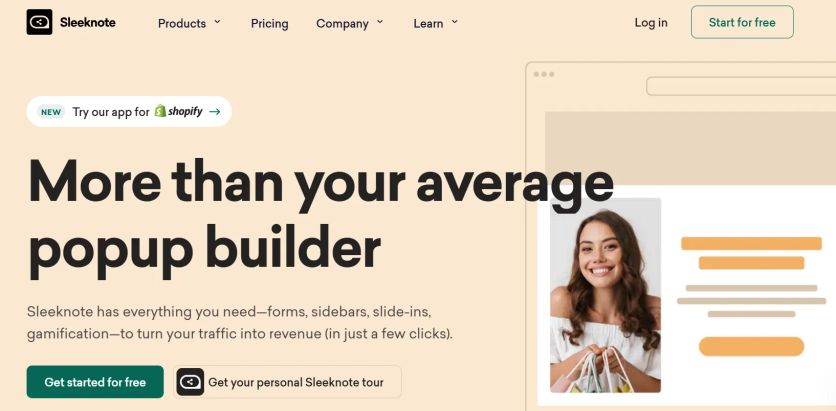
Sleeknote delivers website personalization through dynamic merge tags that insert live data into popup campaigns. The platform pulls details like visitor country, date, cart brand names, and browsing behavior. This creates messages that feel individually tailored rather than generic. SiteData integration makes this personalization possible and connects the popup tool with data layers. This gives access to deeper visitor information beyond standard demographics.
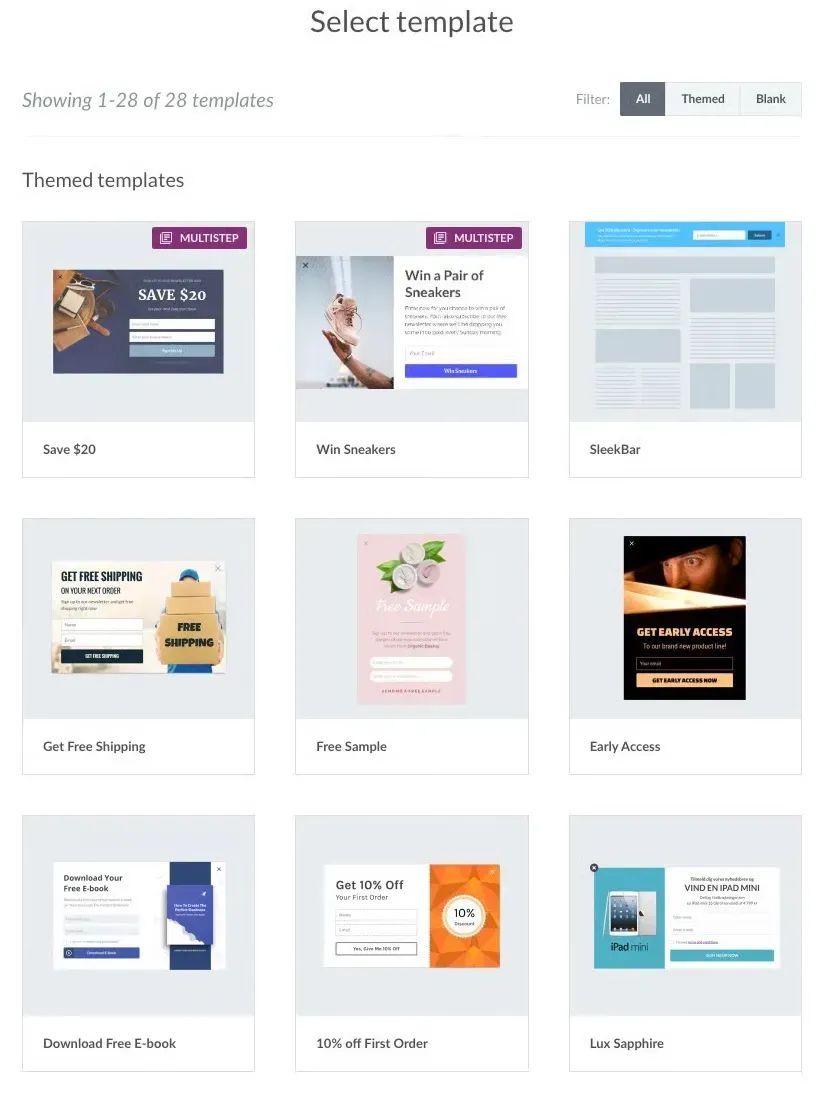
The drag-and-drop builder works with over 100 templates pre-designed for email capture, cart recovery, product recommendations, and visitor guidance. Multistep forms collect both email addresses and phone numbers in sequence. They capture the first input even if visitors abandon the second step. Zero-party data collection through quizzes and surveys gathers information customers share voluntarily. This enables better email personalization. Gamification options include spin-to-win wheels and scratch cards that involve shoppers beyond static forms. Shopify-specific targeting uses real-time store data for campaigns based on cart contents, product categories, and purchase history.
Sleeknote Features
The drag-and-drop builder works with over 100 templates pre-designed for email capture, cart recovery, product recommendations, and visitor guidance. Multistep forms collect both email addresses and phone numbers in sequence. They capture the first input even if visitors abandon the second step. Zero-party data collection through quizzes and surveys gathers information customers share voluntarily. This enables better email personalization. Gamification options include spin-to-win wheels and scratch cards that involve shoppers beyond static forms. Shopify-specific targeting uses real-time store data for campaigns based on cart contents, product categories, and purchase history.
Sleeknote Support
Support options include phone, chat, and email. Clients receive assistance from dedicated success managers and onboarding teams with creating custom popups matching store themes.
Sleeknote Pricing
Sleeknote 14-day free trial requires no credit card. The pricing is based on monthly visitors:
- $69 per month for up to 25,000 monthly visitors
- $83 per month for up to 50,000 monthly visitors
Annual subscriptions can save up to 20%.
Sleeknote Pros and Cons
| Pros | Cons |
|---|---|
| Easy-to-use composer, no coding required | Visitor-based pricing gets expensive as traffic grows |
| Over 100 pre-made templates that are easy to customize | Costs more than other similar plugins |
| Advanced targeting | |
| Unlimited campaigns and domains on all plans | |
| Free trial for 14 days | |
| A dedicated success manager helps implement the app |
Bloom
Bloom is a WordPress pop-up plugin that helps sites grow their subscriber lists. It’s a part of the Elegant Themes ecosystem built specifically for opt-in and lead generation.
Bloom Features
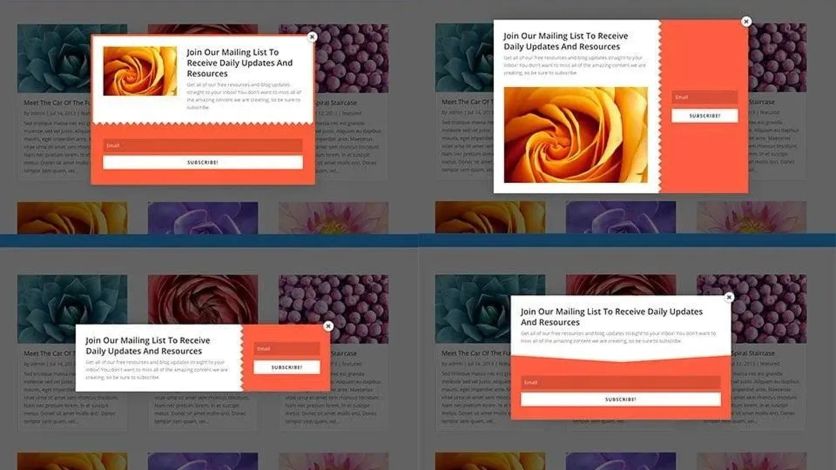
As a popup plugin for WordPress, Bloom excels at creating eye-catching lead capture and opt-in forms thanks to its rich template library and customization options. Marketers can pick a lead form from over 100 pre-designed templates and customize it to fit the brand design. An easy-to-use settings panel lets users adjust colors, borders, edges, image placement, and text elements without any coding knowledge.
The plugin lets ecommerce brands capture visitor emails through six different form types:
- Automatic Pop-Up – Lightboxpop-ups triggered by user interactions that cannot be ignored, making them highly effective at collecting leads
- Automatic Fly-In – Smaller forms that slide from the bottom corners, offering less intrusive alternatives to full popups
- Inline Forms – Embeddable forms placed within specific content areas using shortcodes
- Below Content – Forms automatically displayed after posts or pages, perfect for capturing engaged readers
- Widget Area – Forms added to any widget-ready area such as sidebars or footers
- Locked Content – Premium content gating requiring email subscription for access
The plugin gives users several trigger options to fine-tune form timing. You can set timed delays, scroll depth triggers, post-comment displays, post-purchase shows, and even detect user inactivity. The only missing piece is exit-intent technology.
Bloom connects smoothly with 19 major email marketing services, including ActiveCampaign, Mailchimp, and GetResponse.
Bloom Pricing
You can only get Bloom as part of the Elegant Themes membership packages. The pricing is simple:
- Yearly License: $89 per year for one year of support and updates
- Lifetime License: $249 one-time payment for all Elegant Themes products with lifetime support and updates
Each plan provides you with access to all Elegant Themes products: Bloom, Divi Theme, Divi Page Builder, Extra Magazine Theme, and Monarch Social Sharing Plugin.
Bloom Support
Bloom users get support through several Elegant Themes channels:
- Knowledge base with detailed guides and solutions to common questions
- Feedback submission form to report bugs or suggest features
- Technical support via email for urgent issues
- 24/7 premium support team through the Divi Support Center
- Detailed documentation about setup, design, and display settings
New users will find step-by-step tutorials that explain form creation, email marketing service connections, and display setting optimization.
Bloom Pros and Cons
| Pros | Cons |
|---|---|
| Quick form creation with template-based design | No drag-and-drop builder – just template modifications |
| Built-in A/B testing helps boost conversion rates | Template customization options lag behind standalone popup builders |
| Great for WordPress site owners using Divi | Lacks exit intent |
| Six display types for flexible implementation | Only available with Elegant Themes membership |
| Over 100 templates you can customize | Fewer integrations than other popup maker plugins |
| Forms work perfectly on mobile devices | Only for email list building |
| WordPress-focused approach to popup creation |
How to Choose a Popup Builder for Your Online Store
Think Over Your Primary Goals
Different objectives need distinct popup capabilities. Email capture works with simple forms and exit-intent triggers, whereas cart recovery demands Shopify or WooCommerce integration with cart-value targeting. Product recommendation campaigns rely on AI algorithms that analyze browsing patterns and purchase history. Stores focused on reducing cart abandonment should prioritize exit-intent popups with numeric discounts, which generate 27% more clicks than emotional messaging.
Beyond individual use cases, consider the bigger picture: 71% of consumers expect personalized interactions, and 76% get frustrated when brands fail to deliver. If your goal is long-term growth rather than a quick email grab, look for a tool that can support personalized, multi-format campaigns – not just a single popup type.
Assess Targeting and Personalization Features
Targeting operates across five layers: trigger (exit intent, scroll depth, time delay), page targeting (specific URLs), audience (new versus returning visitors), frequency (display intervals), and advanced filters (device type, traffic source). Visitors with 5+ page views demonstrate the highest purchase intent and deserve tailored messaging.
The depth of personalization a tool offers directly impacts results. Personalized popups convert at 5.75% – well above the typical 3–4% average. Look for dynamic content that pulls from customer data to adjust images, copy, and offers in real time. Pair that with smart timing: timer-based triggers at 5–6 seconds outperform both immediate and scroll-based displays, and gamified popups convert at roughly 13% – but only when frequency control and prioritization prevent visitor fatigue.
Prioritize Location-Based Targeting
One of the most overlooked reasons shoppers bounce is uncertainty: unclear shipping costs, unfamiliar currencies, irrelevant promotions. Baymard Institute data shows that 48% of shoppers abandon checkout because of unexpected extra costs like shipping or fees. A geo-targeted popup that greets a German visitor with local delivery terms or shows a Canadian shopper prices in CAD addresses these doubts before they become deal-breakers.
When evaluating tools, check how granular the location targeting is – country, region, or city level – and whether the platform can auto-detect location from IP, URL, or browser language. The best setups also auto-localize popup language and route leads to the correct regional email list, which saves significant manual work for brands selling across borders.
Collect Customer Preferences with Zero-Party Data
With third-party cookies phasing out and privacy regulations tightening, the brands that win are the ones collecting preferences directly from shoppers. Quizzes, polls, and preference-selection popups give visitors a reason to share their interests willingly – and the payoff is significant: conversational popups that collect preferences and recommend products average a 15.2% conversion rate.
Look for tools where this data doesn’t dead-end. The real value comes when quiz answers and preference selections feed into segmentation, email flows, and product recommendations – so a shopper who shares their taste in a popup sees that reflected across every future touchpoint, not just the form they filled out.
Check Integration Capabilities
Strong ecosystem connections keep workflows efficient. Verify compatibility with your email marketing service, CRM, and ecommerce platform. Form builder integrations allow embedding Gravity Forms, WPForms, or Contact Form 7 directly inside popups. WordPress users should confirm block editor support to access theme patterns and third-party blocks.
For brands with larger stacks, look for native integrations with CDPs and omnichannel flow builders – so popup data flows into segmentation and automation without manual exports or third-party connectors.
Assess Mobile Optimization
Mobile popups need 90–95% screen width with a maximum of 400px to prevent overflow. Touch targets require 44px minimum spacing to prevent accidental taps. Position critical elements within the bottom two-thirds where thumbs naturally reach. Load times must stay under 1.5 seconds with images below 50KB. This matters: mobile popups outperform desktop by 42% in engagement, but only when they’re designed for the device.
Review Pricing and Scalability
Free plugins suit simple needs but lack advanced targeting and integrations. Premium options provide exit intent, A/B testing, and dedicated support. Plans scale by monthly pageviews or visitor counts – watch for traffic-based pricing that spikes as your store grows. Annual subscriptions often include two free months.
Consider what’s included beyond the popup builder itself. Some tools charge extra for gamification or A/B testing, others bundle everything into a flat fee. The right choice depends on your traffic, tech stack, and how deeply you want to personalize.
Key Takeaways
- Generic “subscribe for updates” popups no longer cut it. McKinsey’s research is clear: over seven in ten shoppers now expect brands to personalize their experience – and most feel frustrated when that doesn’t happen. For ecommerce, this means every popup should feel like a conversation, not an interruption.
- Region-based targeting removes friction before it starts. Nearly half of all cart abandonments trace back to unexpected shipping costs or fees. A popup that instantly shows local delivery terms, native-language copy, or the right currency resolves doubts before they become deal-breakers. Maestra’s auto-localization stands out here: it detects a visitor’s country from their URL or browser settings, displays the popup in the matching language, and routes leads to the correct regional list – no manual geo-rules required.
- Zero-party data is the new competitive edge. With third-party cookies disappearing, quizzes and preference-collection popups let shoppers share their interests willingly – and the results speak for themselves: OptiMonk reports a 15.2% average conversion rate for popup quizzes that recommend products based on answers. Several tools here support this format, but Maestra feeds those preferences directly into its CDP and omnichannel flows, so a quiz answer shapes not just the popup, but future emails, recommendations, and push notifications.
- Format matters, but timing matters more. Interactive elements like spin-the-wheel can push conversion rates to 13%, yet industry data consistently shows that a simple 5–6 second delay before display beats both instant and scroll-based triggers. Pair the right format with frequency control and prioritization to avoid popup fatigue
- No single tool fits everyone. Sleeknote and Claspo offer strong templates and targeting at accessible prices. Bloom suits WordPress sites in the Elegant Themes ecosystem. Nosto works for brands wanting AI-driven merchandising. And for scaling brands that need popups tied to a real-time CDP, omnichannel automation, and dedicated Forward Deployed Marketer support, Maestra offers the most comprehensive approach – at an enterprise price point.
FAQs
- The leading popup makers for ecommerce include Maestra (unified platform with real-time CDP-driven popups), Claspo (budget-friendly with gamification), Nosto (AI-powered personalization), Sleeknote (strong templates and dedicated support), and Bloom (WordPress-focused). The best choice depends on your stack and goals. Brands needing standalone popups at a low cost lean toward Claspo or Sleeknote. Brands wanting popups tied to segmentation, email flows, and product recommendations across channels typically choose platforms like Maestra or Nosto. For example, Enlightened Equipment grew lead capture from 0.37% to 6.1% – a 20x increase – after switching to Maestra, and Blossom Flower achieved a 6.72% lead conversion rate using Maestra’s gamified popup forms.
- Exit-intent popups work best when they combine behavioral triggers with personalized offers rather than showing the same discount to everyone. A few examples from Maestra’s clients: PuffCuff’s exit-intent popup converts 1.47% of departing visitors into leads, German Kabirski achieves 0.85% with a similar setup, JOLYN took this further with AI-powered popup optimization through Monocle AI, which analyzes each visitor’s real-time behavior to decide the minimum discount needed to convert – 10%, 15%, or none at all. This approach increased popup submission rates by 21% and revenue per website user by 26%. Look for tools that offer dynamic discount personalization rather than flat offers to protect margins.
- Evaluate five factors: targeting depth, integration with your existing stack, mobile optimization, analytics quality, and support model. Targeting should go beyond basic page-level rules – the best tools offer cart-value triggers, scroll depth, traffic source filtering, geo-targeting down to city level, and frequency control to prevent popup fatigue. Integration matters because popup data that dead-ends in a spreadsheet wastes its value: tools connected to a CDP or email platform let quiz answers and preferences flow into segmentation and automated campaigns. Blossom Flower’s combined personalization efforts – popups, social proof blocks (+34% revenue uplift), and countdown timers – generated 9% incremental revenue vs. a control group, which demonstrates the value of popups working as part of a connected system rather than in isolation.
- Region-based targeting is critical for brands selling across borders, since nearly half of cart abandonments trace back to unexpected shipping costs or unfamiliar currencies. Maestra auto-detects a visitor’s country from their URL or browser settings, displays the popup in the matching language, and routes leads to the correct regional email list – no manual geo-rules required. Sena, a cycling helmet brand operating across the U.S. and Europe, uses this approach: their sticky promotional banner reached 58,000 visitors during the Summer Sale with a 5% click-through rate, and their overall Memorial Day revenue grew 5.6x year-over-year. Nosto also offers location-based personalization, though it focuses primarily on product merchandising rather than popup-specific geo-targeting.
- Industry benchmarks for standard email capture popups sit around 2-4%, but well-optimized popups significantly outperform this. Enlightened Equipment achieved a 6.1% lead capture rate with Maestra’s targeted lead forms – over 200% above the typical average. Blossom Flower’s gamified popup (a secret gift box selection) hit 6.72%, and their desktop discount popup reached 9.81%. For product quizzes embedded as popups, I Love Linen saw a 22.6% email opt-in rate from quiz starters. The biggest factor is not the popup format itself but the targeting and timing: A/B testing by Blossom Flower showed that simply changing a mobile popup trigger from 30 seconds to 20 seconds tripled the lead capture rate from 0.26% to 0.81%.
- Yes – this is one of the biggest cost-saving opportunities. Platforms that combine popups with email, SMS, CDP, and personalization eliminate the need for separate popup tools entirely. Maestra client PuffCuff reduced marketing automation costs by 73.6% after consolidating two Klaviyo accounts and an Attentive account into Maestra, which included popups natively. Another Maestra client, Urban Armor Gear, saved approximately $100,000 per year by replacing Klaviyo, Yotpo, and Frosmo with Maestra. Furniture Fair replaced five separate tools – including Wisepops for popups and Optimizely – with Maestra and achieved a 7,543% ROI with 11% of total company revenue attributed to their consolidated email, SMS, and on-site personalization program running on Maestra.
- Lightweight popup scripts should add minimal page load time, but this varies significantly across tools. Standalone JavaScript-based plugins like Claspo are designed for fast loading. Heavier platforms that include AI personalization, product recommendations, and real-time CDP queries may add slightly more overhead, but modern implementations like Maestra use asynchronous loading and lazy rendering to stay under the 1.5-second threshold. The real performance concern is not the popup script itself but poorly optimized images inside popups – keep popup images under 50KB. WordPress users should note that Bloom, as a PHP-based plugin, loads differently than SaaS tools and may interact with caching plugins. Always test your Core Web Vitals score before and after installing any popup tool.
- The most important popup plugin features include customizable templates, advanced targeting options, device-specific optimization, A/B testing, and seamless integration with your email marketing and e-commerce platforms. Look for plugins that offer exit-intent technology, behavioral triggers, cart-value, page-level and region targeting, analytics to track conversion rates and revenue impact. Tools with prioritization and frequency control let e-commerce avoid intrusive and irrelevant pop-ups.
- Mobile optimization is essential, as pop-ups must display properly across all devices without disrupting the user experience. Look for a popup maker plugin with mobile responsiveness.
- AI-powered tools like Maestra offer advanced personalization capabilities, adapting content in real-time based on visitor behavior and data. Unlike traditional popup apps, they can provide more relevant and precisely targeted content, leading to higher engagement and conversion rates. Advanced targeting forms the life-blood of effective popup strategies.
- Mid-sized ecommerce brands and large enterprises tend to choose comprehensive personalization software like Maestra. Small businesses prefer to use a simple popup app.