10 Best Customer Segmentation Tools Compared: 2026 Guide
Your segmentation tool should make targeting easier – but if you’re wrestling with clunky filters, stale data, or segments that take hours to build, it’s doing the opposite. These are the most common frustrations we see across G2, Capterra, and Trustpilot reviews.
Below, we compare 10 customer segmentation tools side by side – with real pricing, G2 ratings, and a clear “best for” verdict for each, so you can pick the right tool without a month of demos.
Quick Verdict: Best Customer Segmentation Tools by Category
For online retail, the strongest picks are Maestra, Klaviyo, and Insider. Segment and Amplitude serve data and analytics teams more than marketers; MoEngage, Braze, and Iterable are optimized for mobile-first apps and enterprise messaging.
Best all-in-one for e-commerce: Maestra – real-time CDP with behavioral segmentation and omnichannel activation (G2: 4.8)
Best pure CDP: Segment (Twilio) – connect any data source to any tool (G2: 4.5)
Best for omnichannel retail: Bloomreach – CDP + AI content + marketing automation (G2: 4.6)
Best for mobile B2C lifecycle marketing: MoEngage – AI Segment Assist with natural language input (G2: 4.5)
Best for mobile-first brands: Braze – real-time event-stream segmentation (G2: 4.5)
Best for product analytics: Amplitude – behavioral cohorts at scale (G2: 4.5)
Best for e-commerce email/SMS: Klaviyo – real-time segments, Shopify-native (G2: 4.6)
Best for flexible journeys: Iterable – AI-optimized cross-channel automation (G2: 4.4)
Best for enterprise ecommerce AI personalization: Insider – predictive audiences across 9+ channels, highest G2 rating (4.8)
Content:
Pain Points With Customer Segmentation Tools
We’ve dug through popular segmentation tools reviews on G2, Capterra, and Trustpilot, and here are the biggest deal-breakers (that sales won’t tell you about):
Most common segmentation-tool drawbacks (total review-mention counts)
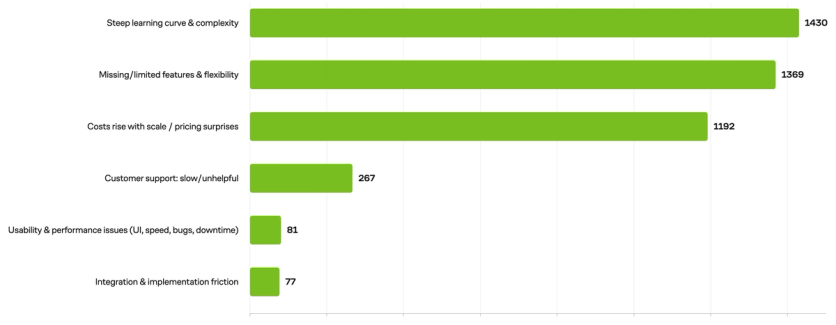
The top three complaints dominate by a wide margin: complexity and steep learning curves (1,430 mentions), missing or inflexible features (1,369), and pricing that escalates with scale (1,192). Support issues, performance gaps, and integration friction trail behind – but don’t underestimate them. These “smaller” problems often surface only after you’ve committed, making them harder to escape.
We’ve narrowed the field down to the top 8 customer segmentation tools and analyzed them through the lens of these exact pain points:
- Learning Curve: Platforms so complex you need a PhD just to send a targeted email.
- Workaround Trap: You find out six months in that the tool is missing one tiny, but crucial feature.
- Success Tax: Costs that skyrocket the moment your business actually starts growing.
- Support Ghosting: It’s all smiles during the sales demo, but once the contract is signed, getting a human to help you with a technical glitch becomes a struggle.
- Performance Gaps: Data lags that hinder real-time action and miss the moment of intent.
- Data Friction: Tools that don’t play nice with each other, creating silos where information goes to die.
Now you can compare them and find the one that fits your business best without blowing your budget or breaking your tech stack. Customer segmentation works best as part of a wider stack: email, SMS, and live chat carry the conversation, while knowledge base software handles the questions customers prefer to answer themselves.
Customer Segmentation Platforms Comparison
| Tool Name | Key Features | Price | Support Options | User Rating |
|---|---|---|---|---|
| Maestra | • Live CDP • Flexible segmentation (RFM, custom, nested segments, calculated fields) • Omnichannel messaging (email, SMS/MMS/RCS, web and mobile push) • Built-in website and app personalization (pop-ups, banners, widgets, embedded blocks) • AI-driven recommendations • Ready-to-use loyalty and referral programs • A/B testing with incremental revenue impact • Full-funnel analytics • White-glove, hands-on support • High scalability | CDP base from $1,300/month, first 100K active profiles included Most common package (CDP + unlimited email) – $2,000/month • Pay only for active profiles – dormant ones stored free • No onboarding or setup fees • Month-to-month billing, no long-term contract or cancellation penalties • Unlimited emails, API calls, and users | Dedicated Forward Deployed Marketer for each client: • Integration and migration support • Segment and flow setup • Performance monitoring • A/B testing Support Channels: • Weekly Zoom calls to shape strategy • Shared Slack/Teams channel • Live chat (responses within 5 minutes) | G2 4.8 |
| Segment | • Single API data collection • Identity resolution • Data governance • Historical data replay | Starts at $120/month for 10K MTUs Custom pricing for the Business plan users | • Account-based support with technical help via tickets | G2 4.5 |
| Bloomreach | • In-Memory Framework (IMF) • 17-channel personalization • AI-powered AutoSegments | Custom usage-based pricing Estimated from $4,000/month | • 120-second average response time • 24/7 Support with three technical tiers | G2 4.6 |
| MoEngage | • Merlin AI Segment Assist (natural language) • RFM + behavioral signals • Affinity modeling • Real-time triggers • 11+ channels | Custom (MTU-based); demo required | • Named CSM on enterprise plans • MoEngage Academy • Help Center + Developer Hub | G2 4.5 |
| Braze | • Real-time event-driven segmentation • Liquid templating for cross-channel personalization • Predictive Suite (churn, conversion likelihood) • Canvas Flow journey orchestration • Native email, push, in-app, SMS, content cards | Contact sales (typically $60K+/year, MAU-based) | Enterprise CSM Braze Bonfire community Braze Learning Hub and University Email support | G2 4.5 |
| Amplitude | • Behavioral analytics • Live custom properties computation • Automated cross-tool syncs | $49/month for up to 300K MTUs Custom pricing beyond this limit | • Academy/community for Simple • Online support for Plus/Growth plans • Assigned account manager for Enterprise plan | G2 4.5 |
| Klaviyo | • Immediate segmentation • +350 integrations • +60 automation workflows | Email starts at $20/month Email+SMS starts at $35/month Add-ons: Reviews – $25/month Marketing Analytics – $100/month Advanced Data Platform – $500/month | • 24/7 Email and 24/5 Live chat for paid plans • Klaviyo Academy resources | G2 4.6 |
| Iterable | • Unified customer profiles • Dynamic segments that recalculate as data updates • AI Brain for send-time and channel optimization • Drag-and-drop journey builder • Native email, SMS, push, in-app, web push, embedded | Contact sales (entry ~$30K–$50K/year, scales by contacts) | Mid-market and enterprise CSM Iterable Academy Email support Partner agency network | G2 4.4 |
| Insider | • Predictive audiences (churn, LTV, purchase probability) • Real-time behavioral targeting • 1:1 AI personalization • 9+ channels incl. WhatsApp & InStory | Custom (enterprise); demo required | • Named CSM from day one • Insider One Academy • Zendesk Help Center | G2 4.8 |
| Sender | • Dynamic, condition-based segments • Segmentation by ecommerce activity, custom fields, and engagement • Email and SMS in one workflow • Automation with custom events • Signup forms, popups, landing pages • Transactional email | Free plan (2,500 subscribers, 15,000 emails/month) Paid from $7/month (Standard) Professional from $14/month Enterprise: custom | • 24/7 live chat and email on all plans, including Free • Dedicated success manager and phone support on Enterprise • Help Center, guides, and training videos | G2 4.7 |
Maestra: Best for E-commerce Segmentation and Omnichannel Activation
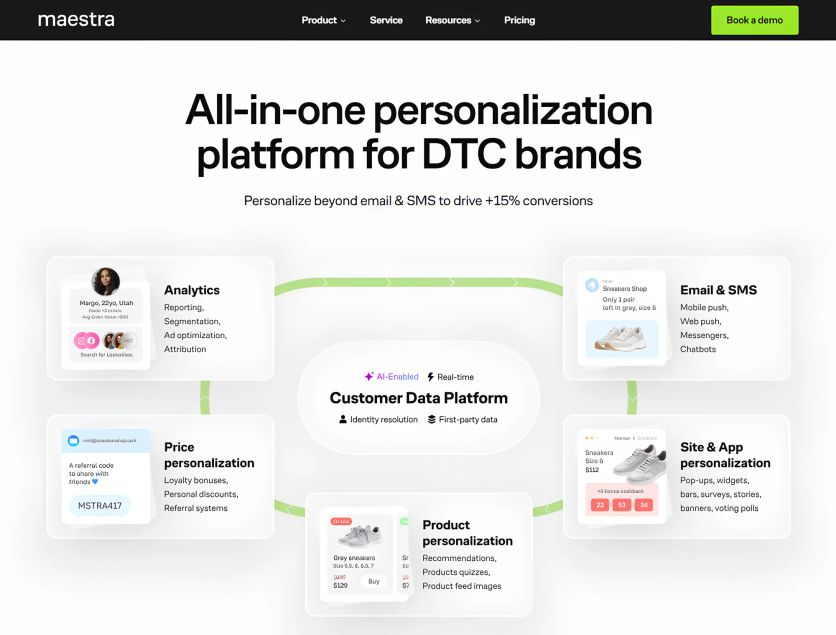
Maestra is a unified marketing personalization platform that provides advanced segmentation powered by its real-time customer data platform (CDP). It is designed to help e-commerce brands create personalized customer journeys and run complex campaigns across all channels: website, app, email, SMS, MMS, RCS, messengers, push notifications, chatbots, and paid media.
Maestra Features
Real-time CDP: Unifies customer data from both online and offline sources into actionable segments. The platform creates adaptive profiles, cleans and deduplicates data, supports identity resolution, and tracks the full journey (session, search, category, browsing, cart, and checkout). Maestra also monitors errors and sends you alerts. Blossom Flower Delivery used Maestra to unify fragmented data from multiple storage systems in the CDP. Centralized customer data helped the delivery service discover 200,000 “lost” clients.
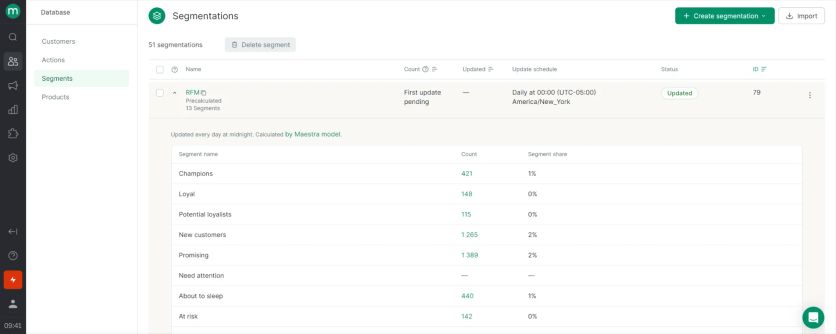
Sophisticated segmentation: Nested segments, calculated and custom fields, immediate segments, scheduled batch segments, and static lists. Marketers can build segments based on clicks, browsing and purchase history, geolocation, engagement, site and app activity, and loyalty status. Maestra’s RFM (Recency, Frequency, Monetary) segmentation automatically groups customers into categories like “Champions”, “Hibernating”, and “Loyal”.
On-site personalization: Thanks to real-time CDP, Maestra offers in-session segmentation. It means that the platform instantly adapts site and app content to each visitor to increase conversion rates and average order value (AOV). The platform offers smart product recommendations, pop-ups, quizzes, surveys, games, voting polls, widgets, banners, bars, embedded blocks, stories, and more. Maestra supports AI-driven prioritization and frequency control.
Blossom Flower Delivery added an interactive quiz to help customers discover the product and get bouquet recommendations. This personalization of the on-site experience lifted their conversion rates by 14%.
JOLYN, a swimwear brand, switched from Klaviyo to Maestra and added Monocle AI to display the most relevant personalized pop-ups at the right moment. This grew its pop-up submission rate by 21% and increased revenue per website user by 26%.

Omnichannel journey builder: Drag-and-drop tool to configure and orchestrate seamless, adaptive journeys across email, SMS, MMS, RCS, site, app, messengers, push, chatbots, paid media, and offline stores. Flows dynamically branch based on real-time customer behavior. Maestra also supports the next best action suggestions.
Coolibar, an UPF apparel brand, had outgrown Klaviyo and chose Maestra. After switching, they saw a 62% year-over-year increase in revenue from automated marketing journeys.
Product recommendations: Drive upsells, cross-sells, and downsells with AI algorithms. Maestra recommends the most relevant items within email, messages, and a website (homepage, categories and listing pages, product pages, shopping cart, 404, empty search). On-site recommendations update in session with every shopper action even for anonymous visitors. JOLYN drove 7% of its total sale by Maestra’s recommendation engine which matches products by color, size, and material and keeps suggestions consistent across all touchpoints.
Loyalty bonuses, referral programs, and promotions: Ready to use in every channel to maximize customer lifetime value (LTV). Built-in loyalty systems (points, discounts, VIP tiers, referrals, and other incentives) reward the right actions. Maestra also provides personalized promo codes, gift card management, and point of sale (POS) processing. Offers can gradually increase in real-time.
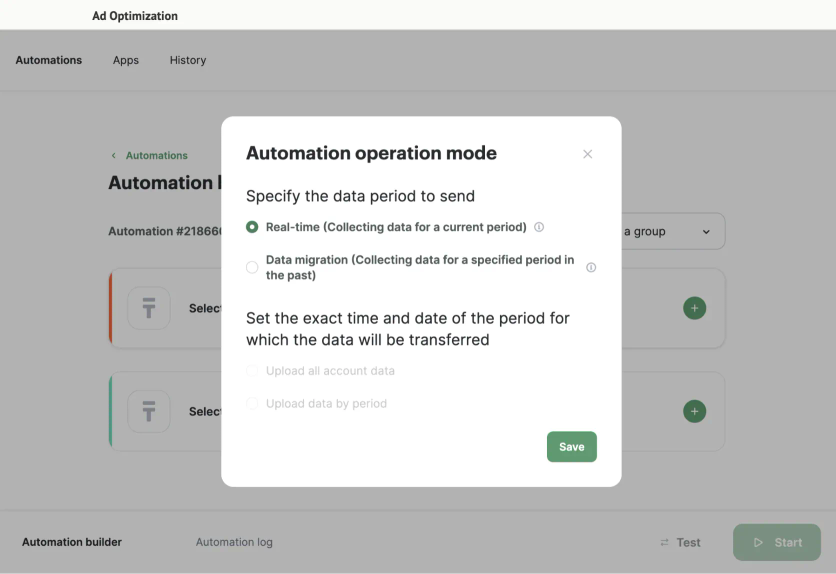
Paid media optimization: Marketers can activate behavior-driven segments for ad targeting, streamline ad spend, and improve performance with the real-time CDP-backed segmentation. Paid media are integrated into the customer journey. Maestra helped the hair care brand PuffCuff reduce Facebook Ads cost per order by 43.76% by using real-time segments to optimize their lookalike audience.
Scalability and enterprise-grade performance: Loads in milliseconds, delivers real-time recommendations and personalization, and supports everything from small sites to large-scale operations. Maestra is built to support large databases and high traffic environments. It works equally for teams of 1-3 or global organizations and handles databases from 30K to 65M. Maestra’s CDP core supports real-time customer profiles, more than 150 integrations, and seamless connection across your systems. For example, JOLYN – a competitive swimwear brand – consolidated all marketing channels into Maestra and achieved 22% repeat domestic revenue growth, running personalized campaigns across email, SMS, and web without adding headcount.
Comprehensive analytics unlocks actionable insights that simplify decision-making and optimize results. Maestra supports configurable attribution, business goal tracking, loyalty and campaign dashboards, list growth reporting, and flexible A/B testing.
White-glove service: Migration, integrations, and strategy optimization – everything is handled by your dedicated Forward Deployed Marketer who becomes your strategic partner from day one. Maestra Forward Deployed Marketers build segments, configure flows, and fine-tune targeting. They provide ongoing guidance through a shared Slack channel and weekly sessions in Zoom to optimize your marketing performance.

Maestra Pricing Plans
Maestra uses a modular monthly subscription. Every plan starts with the customer data platform, and you add monthly modules for the channels you use. There are no onboarding or setup fees and no long-term contracts.
The CDP base costs $1,300 per month and includes segmentation, product recommendations, full-funnel analytics, and the first 100,000 active profiles. You pay only for active profiles – storing dormant ones is free. Most brands add unlimited email for $700 per month, so the typical starting package starts at $2,000 per month. You can build your own estimate on the Maestra pricing page.
The Maestra subscription includes white-glove support – a dedicated Forward Deployed Marketer who helps with everything from building integrations to optimizing your strategy.
Email Vendor Selection tested the Maestra platform and concluded it offers good value for money. You can check out their comprehensive review:
Maestra Review 2026: The Best Ecommerce Marketing Platform
Maestra Support
White-glove Maestra service goes beyond basic software assistance. Each client works with their dedicated Forward Deployed Marketer who provides complete proactive hands-on support that features:
- Shared Slack or Teams channel
- Immediate help in a live chat (responding within 5 minutes)
- Full data and flow migration
- Setting up integrations with your tech stack
- Campaigns transfer from your existing platforms
- Strategy sessions every week (Zoom)
- Flows and automations building, including complex ones
- Segment configuration
- Email, site, and feed design implementation
- Deliverability setup
- A/B testing execution
- Performance monitoring with optimization suggestions
Standard migrations take 2–4 weeks, while complex ones need 4–6 weeks. Full implementation with IP warming might take 6–8 weeks. Billing begins after your migration is complete.
The Maestra team handles the heavy lifting during the entire migration, including data mapping and custom integrations via API and SDK. Businesses don’t need to allocate internal resources – Maestra takes care of everything at no extra cost, making the switch seamless.
Pain Points Check
| Pain Point | How Maestra Handles It |
|---|---|
| Learning Curve | Minimal – your dedicated Forward Deployed Marketer builds segments, flows, and automations for you. Weekly strategy calls and a shared Slack channel mean you’re never stuck figuring things out alone. |
| Workaround Trap | Full-featured platform: nested segments, calculated fields, RFM, omnichannel journeys, loyalty programs, on-site personalization, and paid media optimization all built in. |
| Success Tax | Modular pricing – the CDP base is $1,300/month, and you add monthly modules only for the channels you use. Billing counts active profiles only; dormant ones are stored free. Unlimited email sends, API calls, and users. No onboarding fees, no long-term contracts. |
| Support Ghosting | White-glove service: dedicated Forward Deployed Marketer, shared Slack/Teams channel, live chat with 5-minute response times, weekly Zoom calls. Support doesn’t disappear after the sale. |
| Performance Gaps | Real-time CDP with in-session personalization. Data updates instantly – no batch delays. |
| Data Friction | Over 150 integrations. Forward Deployed Marketer handles data migration and custom integrations via API/SDK at no extra cost. |
Maestra Pros and Cons
| Pros | Cons |
|---|---|
| Forward Deployed Marketer that does data migration, segment setup, and other heavy liftings | No free trial or plan |
| Advanced segmentation (nested segments, custom and computed fields, RFM) | Overkill for early-stage brands with small customer lists |
| Personalized customer journey and cross-channel communication | |
| In-session website personalization powered by the real-time CDP | |
| AI-driven product recommendations | |
| Paid media optimization (Facebook, Instagram, Google, LinkedIn, etc.) | |
| A/B testing with incremental revenue impact | |
| Detailed full-funnel reporting | |
| Over 150 integrations | |
| International standards of data protection – GDPR, HIPAA, CCPA, ISO |
Request a demo to try Maestra segmentation capabilities.
Segment (Twilio): Best for Pure CDP and Data Unification
Segment is a trailblazing customer data platform that combines data from websites, apps, and servers to build detailed customer profiles. The platform helps make customer data practical and ready to use across marketing tools.
Segment Features
The core product Connections gathers event data through a single API and routes it to over 700 pre-built integrations. Unify links identities across multiple touchpoints and creates customer profiles from web, mobile, and server interactions. The product Protocols maintains data quality with live validation. Twilio Engage lets marketers build dynamic audiences from live profiles and create cross-channel customer experiences. Segment stands out by knowing how to replay historical data into new analytics destinations, which lets companies add years of past data.
Segment Pricing Plans
The pricing structure depends on Monthly Tracked Users (MTUs).
Free plan: 1,000 MTUs, 500,000 Reverse ETL records, and 2 sources. Team plan: Starts at $120 monthly for 10,000 MTUs, 1 million Reverse ETL records, and unlimited sources. Business plan: Сustom pricing and volumes for larger enterprises.
The MTUs model runs smoothly day-to-day but risks big cost jumps from traffic spikes or unexpected events.
Segment Support
Users must log into their accounts and fill out a support questionnaire to get technical help. Support gets good ratings from users, but Segment doesn’t promise specific response times. Missing published turnaround times could create problems when users need quick solutions to urgent issues.
Pain Points Check
| Pain Point | How Segment Handles It |
|---|---|
| Learning Curve | User-friendly interface, but can be hard to master despite good documentation. Expect a ramp-up period for complex use cases. |
| Workaround Trap | Strong on data collection and identity resolution, but Reverse ETL lags behind specialized tools. Not a full marketing execution platform – you’ll need other tools for campaigns. |
| Success Tax | MTU-based pricing risks unexpected cost jumps from traffic spikes or seasonal surges. Free tier available (1,000 MTUs), Team starts at $120/month. |
| Support Ghosting | Support is ticket-based only. No published response time SLAs – could be an issue for urgent problems. |
| Performance Gaps | Reliable event collection, but it’s primarily an infrastructure tool. Real-time execution depends on connected downstream tools. |
| Data Friction | Excellent here: over 700 pre-built integrations and historical data replay into new destinations. |
Segment Pros and Cons
| Pros | Cons |
|---|---|
| User-friendly interface | MTU pricing model risks traffic spike costs |
| Reliable event collection infrastructure | Can be hard to master despite good documentation |
| Detailed identity resolution capabilities | Not fully zero-copy in all features |
| Strong management APIs and infrastructure as code | Reverse ETL capabilities probably lag behind specialized tools |
| Large catalog of pre-built integrations | Support is primarily via tickets |
Bloomreach Engagement: Best for Omnichannel Retail with Built-In CDP and AI
Bloomreach Engagement serves as an omnichannel marketing platform that unifies customer interactions through its integrated customer data engine. The platform combines customer data, automation, AI, and analytics.
Bloomreach Features
The platform’s strength comes from its In-Memory Framework (IMF). It stores working datasets in Random Access Memory (RAM) to deliver up-to-the-minute reporting and execution. Marketers can build consistent individualized experiences across channels with minimal IT support.
Users get detailed segmentation options to create segments from demographic attributes and behavioral event data. The AutoSegments feature uses Loomi AI to analyze customer interactions and creates segments based on product interests and high-value behaviors. Users define custom metrics and attributes from historical and current customer behavior without needing deep technical knowledge.
Bloomreach Pricing Plans
The platform has no open pricing. However, some sources point to a starting price of $4,000 per month, alongside variable upfront fees (Net Solutions).
Bloomreach uses a two-part subscription model with module and usage fees. Clients pay only for needed modules like email marketing, and costs decrease with higher usage volumes. The customer data engine, Bloomreach support, and Loomi AI capabilities come with all base plans.
Pricing adjusts to customer count, product catalog size, and event execution instead of fixed tiers. Standard annual subscriptions exist, and better rates become available with longer commitments.
Bloomreach Support
Bloomreach promises an average 2-minute support response time. The platform offers in-app support at three levels: first-line handles most requests, second-line tackles complex issues, and third-line developers work 24/7 on advanced technical problems. Some requests need paid consulting, such as custom code fixes or new integration setup.
The platform provides very detailed documentation, help guides, and learning resources like webinars.
Pain Points Check
| Pain Point | How Bloomreach Handles It |
|---|---|
| Learning Curve | Steep. UI requires substantial training, and advanced customization needs technical expertise. |
| Workaround Trap | Comprehensive feature set with AI-powered AutoSegments, 17-channel personalization, and content management. But search functionality lacks flexibility for specialized catalogs. |
| Success Tax | Opaque pricing – no public tiers. Estimated starting at $4,000/month with variable upfront fees. Annual contracts with better rates for longer commitments. |
| Support Ghosting | Fast response (2-minute average), 24/7 tiered support. However, custom code fixes and new integrations require paid consulting. |
| Performance Gaps | Strong here: In-Memory Framework (IMF) stores data in RAM for real-time reporting and execution. |
| Data Friction | Limited native integrations compared to competitors. Data preparation may require more upfront effort. |
Bloomreach Pros and Cons
| Pros | Cons |
|---|---|
| Real-time data processing with datasets stored in RAM | User interface may need substantial training |
| AI-powered customer segmentation with predictive modeling capabilities | Advanced customization requires technical expertise |
| Certified security practices (first GDPR-certified company with five ISO certifications) | Limited native integrations |
| Integrated platform combining content management, search, and merchandising | Search function lacks flexibility for specialized product catalogs |
| Bi-weekly app updates ensuring access to latest features | Original data preparation may demand more effort |
MoEngage: Best for Mobile-First Lifecycle Marketing Across Push, Email, and WhatsApp
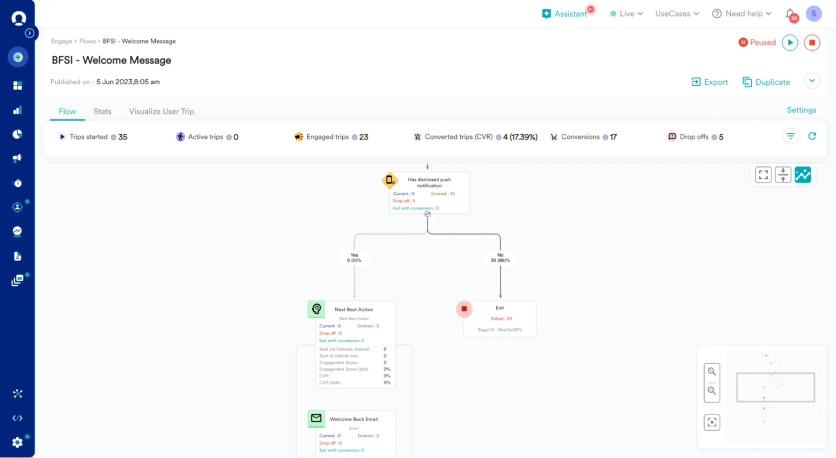
MoEngage is an AI-native customer engagement platform built for mobile-heavy B2C brands – Domino’s, Rappi, and Tokopedia among them. It orchestrates campaigns across push, email, SMS/RCS, in-app, WhatsApp, and web from one place. The standout segmentation feature is Merlin AI Segment Assist: describe your target audience in plain English – “customers who viewed shoes in the last 7 days but didn’t buy” – and MoEngage builds the live segment automatically, without manual filter setup.
MoEngage Features
MoEngage’s segmentation stack layers AI on top of behavioral and RFM data. The platform learns customer preferences over time – product categories, price bands, content types – through affinity modeling, without manual tagging. Segments update in real time as behavior changes, making it especially effective for high-frequency, mobile-driven engagement.
• Merlin AI Segment Assist – create segments via natural language prompts, no filter-building required
• RFM segmentation with behavioral signal layering beyond standard recency/frequency/monetary scoring
• Affinity modeling – learns customer preferences (categories, price points, content types) automatically over time
• Real-time behavioral triggers – segments refresh instantly as user behavior changes
• 11+ channels: push, email, SMS/RCS, in-app, WhatsApp, web, content cards, and more
MoEngage Pricing Plans
MoEngage does not publish pricing. Plans are based on Monthly Tracked Users (MTU) and channel mix – a demo is required for any quote. Third-party estimates suggest mid-market brands pay $20,000–$80,000 per year depending on user volume and active channels. There is no free tier; only a demo-led trial.
MoEngage Support
Enterprise accounts include a named Customer Success Manager and onboarding support. MoEngage Academy provides self-serve training. All plans have access to a Help Center and Developer Hub. Mid-tier customers report that support is primarily ticket-based – less hands-on than Maestra or Insider, but adequate for teams with internal technical resources.
Pain Points Check
| Pain Point | How MoEngage Handles It |
| Learning Curve | Moderate. Merlin AI lowers the barrier for segment creation, but full setup – SDKs, event tracking, journey orchestration – still requires developer involvement. |
| Workaround Trap | Low for mobile-first brands. Push, in-app, and WhatsApp are native. Email-only or Shopify-native workflows may require additional setup. |
| Success Tax | Yes – MTU pricing scales with audience size. Costs spike with strong user acquisition. Get a multi-tier quote before signing. |
| Support Ghosting | Strong on enterprise plans (CSM + MoEngage Academy). Mid-tier customers report slower ticket-based response times. |
| Performance Gaps | Strong real-time mobile event streaming. Some users report analytics dashboards lag slightly at very high data volumes. |
| Data Friction | 11+ native channels but CDP capabilities are lighter than Segment or Bloomreach. Works best when paired with existing data infrastructure. |
MoEngage Pros and Cons
| Pros | Cons |
| Merlin AI Segment Assist – describe audiences in plain language, no filter-building | Not Shopify-native – ecommerce integrations require setup |
| Real-time segmentation across 11+ channels including WhatsApp | No published pricing – demo required for any quote |
| RFM + affinity modeling without data science resources | CDP capabilities lighter than Segment or Bloomreach |
| Strong for mobile-app-heavy brands with push and in-app use cases | Mid-tier support is ticket-based, not CSM-led |
Insider: Best for AI Personalization Across Web, App, and Email
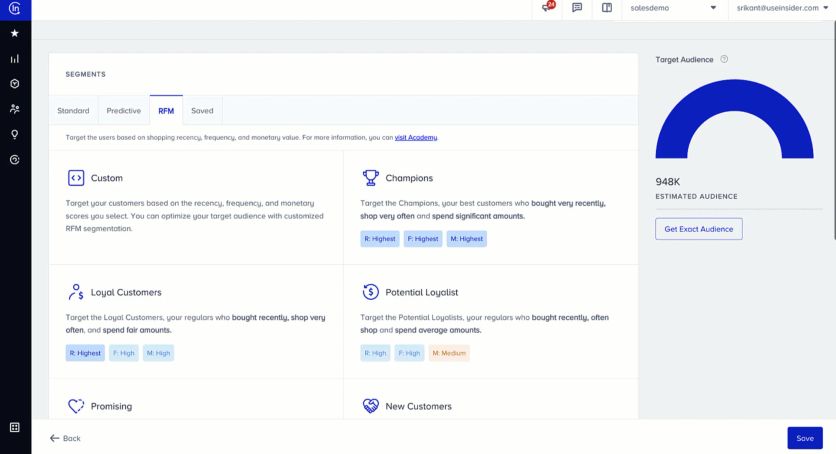
Insider is an AI-powered omnichannel marketing platform used by 1,500+ enterprise brands – Samsung, IKEA, L’Oréal, and Adidas among them. It combines a CDP with AI-driven segmentation and real-time personalization across 9+ channels: web, app, email, SMS, WhatsApp, web push, InStory, and conversational CX. The platform’s Architect tool uses predictive AI to suggest next-best audiences based on customer behavior and purchase probability. It holds the highest G2 rating (4.8) among all tools in this comparison.
Insider Features
Insider’s segmentation centers on predictive audiences built from ML models that score each customer on purchase probability, churn risk, and predicted lifetime value. Behavioral targeting updates segments in real time across touchpoints. On the web and app, Insider personalizes content, search results, and product recommendations for each visitor without requiring developer involvement – which makes it especially fast to activate for ecommerce teams.
• Predictive audience builder – segments based on purchase probability, churn risk, and predicted lifetime value
• Real-time behavioral targeting that updates segments as customers interact across channels
• 9+ native channels: web, app, email, SMS/RCS, WhatsApp, web push, InStory, and conversational CX
• CDP layer: unifies customer profiles across touchpoints with identity resolution and 100+ integrations
• 1:1 AI personalization on web and app without developer involvement – highest G2 rating: 4.8/5
Insider Pricing Plans
Insider does not publish pricing. Contracts are enterprise-level and customized by monthly active users and channel mix. Based on G2 reviewer reports, entry contracts typically start at $30,000–$60,000/year. A demo is required. No free tier or self-serve trial.
Insider Support
Insider assigns a named Customer Success Manager to all enterprise accounts from day one. Insider One Academy provides structured training. The Help Center is Zendesk-based. Multiple G2 reviewers specifically cite Insider’s support quality as a top differentiator – consistent hands-on CSM engagement puts it above MoEngage and Braze mid-tier plans.
Pain Points Check
| Pain Point | How Insider Handles It |
| Learning Curve | High initially – platform breadth across 9+ channels and AI journeys means onboarding takes 4–8 weeks. Dedicated CSM support mitigates this considerably. |
| Workaround Trap | Low. Platform breadth covers most mid-to-large ecommerce use cases natively. AI and channel depth rarely require workarounds. |
| Success Tax | Yes – enterprise pricing scales with user volume. Best for brands at meaningful scale ($10M+ revenue). Not cost-effective for small stores. |
| Support Ghosting | Strong. G2 reviewers consistently rate support as a top differentiator. Named CSM from day one across all plans. |
| Performance Gaps | Real-time event processing across all channels. Analytics dashboard has a learning curve but data accuracy is strong. |
| Data Friction | 100+ integrations via Integration Hub. CDP layer handles identity resolution across touchpoints. Complex initial setup, but CSM-led onboarding covers it. |
Insider Pros and Cons
| Pros | Cons |
| Highest G2 rating in this comparison (4.8/5) | Enterprise-only – entry contracts typically start at $30K+/year |
| AI personalization across 9+ channels from one platform | Onboarding takes 4–8 weeks due to platform breadth |
| Strongest support reputation: named CSM from day one across all plans | Not suited for small ecommerce stores or low-volume brands |
| Predictive audiences: churn risk, LTV, and purchase probability built-in | Analytics dashboard has a learning curve |
Braze: Best for Mobile-First Real-Time Event Segmentation
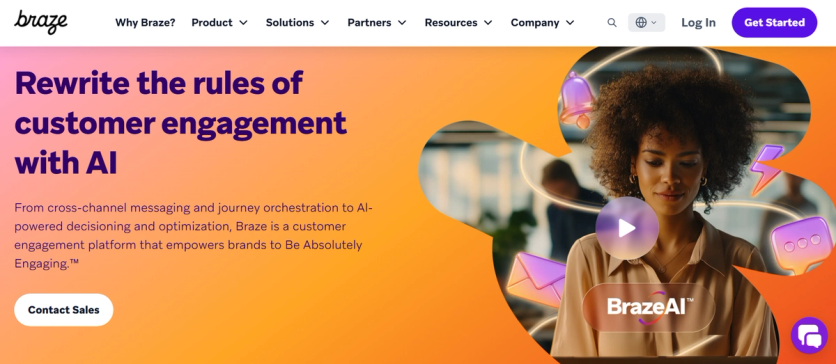
Braze is a customer engagement platform built for cross-channel orchestration. Brands like HBO Max, Headspace and Grubhub use it to coordinate email, push, in-app, SMS and content cards from one place. For segmentation specifically, Braze leans on real-time event streams – every app open, purchase or in-app action can update a segment within seconds, which is why mobile-first brands tend to gravitate toward it.
Braze Features
The segmentation engine works through a builder called Segment Insights. You combine custom attributes, behavioral events, location and engagement metrics, then layer in Liquid templating to personalize content within the same segment. The Predictive Suite adds churn risk and purchase likelihood as additional segmentation signals, though those features sit on higher-tier plans.
• Real-time segmentation driven by an event-streaming architecture
• Liquid templating for one-to-one personalization across channels
• Predictive Suite for churn and conversion likelihood
• Canvas Flow for journey orchestration with branching segments
• 200+ partner integrations through the Braze Alloys ecosystem
Braze Pricing Plans
Braze does not publish prices. Quotes are based on monthly active users (MAU) and channel mix. Third-party estimates put entry contracts in the $60K/year range, with mid-market deployments often landing between $90K and $200K annually. Onboarding and managed services are quoted separately.
Braze Support
Enterprise plans include a Customer Success Manager and access to Braze Bonfire, a private Slack community of 17,000+ practitioners. Lower tiers rely on email support, the Learning Hub and Braze University courses. Implementation typically requires a partner agency or in-house developer time – the platform expects technical maturity from day one.
Pain Points Check
| Pain Point | How Braze Handles It |
|---|---|
| Learning Curve | Steep. Liquid templating and event-driven setup require developer involvement; non-technical marketers often need 4–8 weeks to become independent. |
| Workaround Trap | Low. The platform is genuinely flexible – most workarounds are needed only at the integration layer. |
| Success Tax | High. MAU-based pricing means costs grow with the audience even before incremental revenue lands. |
| Support Ghosting | Strong on enterprise tiers (CSM + Slack community). Mid-market customers report longer ticket cycles. |
| Performance Gaps | Strong real-time performance up to tens of millions of users. |
| Data Friction | Requires careful schema planning. SDK setup is engineer-led, not marketer-led. |
Braze Pros and Cons
| Pros | Cons |
|---|---|
| Real-time segmentation across mobile and web | Requires engineering resources to set up and maintain |
| Mature cross-channel orchestration (email, push, in-app, SMS) | MAU-based pricing scales aggressively |
| Strong predictive AI on higher tiers | Pricing not transparent – long sales cycle |
| Large practitioner community for peer support | Liquid templating has a learning curve for marketers |
Amplitude: Best for Behavioral Analytics and Product-Led Segmentation
Amplitude delivers powerful product analytics that help businesses understand user actions through detailed data collection and visualization. The platform excels at behavioral-based customer segmentation.
Amplitude Features
Companies can define dynamic audience segments in Amplitude by combining customer behaviors, product data, and profile information. The platform calculates custom properties live, which lets you segment by metrics like average order value or number of videos completed. Amplitude centralized audiences with automated syncs across tools to ensure data reliability and consistency. Supports demographic, geographic, behavioral, and psychographic segmentation methods for e-commerce businesses.
Amplitude Pricing Plans
Amplitude has four pricing tiers:
- Starter: Free plan includes 50K monthly tracked users (MTUs) and up to 10M events.
- Plus: Costs $49 per month for up to 300K MTUs with unlimited product analytics and behavioral cohorts.
- Growth: Custom pricing includes advanced behavioral analysis, causal insights, and feature experimentation.
- Enterprise: Custom pricing comes with cross-product analysis, advanced data and permission controls, and mutual exclusion groups to scale A/B tests.
Amplitude Support
Each subscription level offers different support options. The simple support package has documentation through Amplitude Academy and community resources. Plus and Growth plans come with online customer support. Enterprise customers work with an assigned account manager who provides tailored assistance.
Pain Points Check
| Pain Point | How Amplitude Handles It | |
|---|---|---|
| Learning Curve | Steep for non-technical teams. Powerful but complex – expect a learning investment. | |
| Workaround Trap | Excellent behavioral analytics and cohort capabilities. | |
| Success Tax | Free tier is generous (50K MTUs, 10M events). Plus starts at $49/month. But costs increase significantly at scale with high event volumes. | |
| Support Ghosting | Academy and community for lower tiers. Online support for Plus/Growth. Dedicated account manager only at Enterprise level. | |
| Performance Gaps | Lightning-fast queries and live analytics. Custom properties computed in real-time. | |
| Data Friction | Over 100 integrations with automated cross-tool syncs. Solid, but fewer than some competitors. |
Amplitude Pros and Cons
| Pros | Cons |
|---|---|
| Strong cohort and segmentation capabilities | Non-technical teams may face a steep learning curve |
| Query speeds are lightning-fast with live analytics | Costs increase significantly at scale, especially with high event volumes |
| Enterprise-grade security protocols | |
| Advanced reporting and cross-platform tracking | |
| Over 100 integrations |
Klaviyo: Best for E-Commerce Email and SMS with Real-Time Segments
Klaviyo helps ecommerce businesses segment customers and automate marketing across email, SMS, and other channels.
Klaviyo Features
Klaviyo excels at up-to-the-minute segmentation that updates as customer behavior changes. Businesses can create precise segments using unlimited conditions without time restrictions. The platform includes +60 ready-to-use automation workflows. You can build emails easily with a drag-and-drop editor that works with +160 professional templates.
Klaviyo Pricing Plans
Klaviyo offers three main tiers:
- The Free plan lets you manage 250 contacts and send 500 emails monthly.
- The Email plan starts at $20/month for up to 5,000 emails.
- The Email+SMS plan starts at $35/month for up to 5,000 emails + 1,250 SMS.
You can add extra features like Reviews ($25/month), Marketing Analytics ($100/month), and Advanced Data Platform ($500/month).
Klaviyo pricing is a common complaint. It’s expensive and grows as you add more contacts, emails, or SMS to your marketing campaigns. So some independent platforms that help businesses to choose a vendor provide ratings with decent Klaviyo alternatives: for example, Omnisend for those who need email and SMS only, and Maestra for ecommerce brands who are looking for personalization across all channels beyond the basic email and messages.
Klaviyo Support
Customers with paid plans get 24/7 email support and live chat. Klaviyo Academy helps users learn through on-demand courses, live training sessions, and certification programs.
Pain Points Check
| Pain Point | How Klaviyo Handles It |
|---|---|
| Learning Curve | Takes time to learn for new users despite ecommerce focus and +60 pre-built workflows. |
| Workaround Trap | Strong for email and SMS with real-time segmentation and more than 160 templates. But advanced features (analytics, CDP) are paid add-ons ($100–$500/month each). |
| Success Tax | Pricing is a common complaint. Costs rise quickly as contacts, emails, and SMS volume grow. Free tier limited to 250 contacts. |
| Support Ghosting | Good for paid plans: 24/7 email, 24/5 live chat, plus Klaviyo Academy. Free users are on their own. |
| Performance Gaps | Real-time segmentation that updates as behavior changes. No major lag issues reported. |
| Data Friction | Excellent: +350 integrations. Built specifically for ecommerce stacks. |
Klaviyo Pros and Cons
| Pros | Cons |
|---|---|
| Designed specifically for ecommerce | Costs more than similar tools, expensive at scale |
| Up-to-the-minute segmentation | Might take time to learn for new users |
| Advanced automation features | |
| Over 350 integrations | |
| Over 60 automation workflows |
Iterable: Best for Cross-Channel Automation with AI Optimization
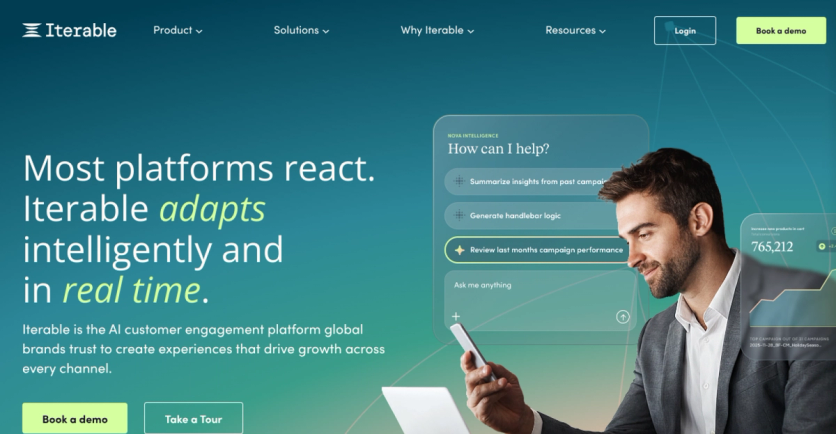
Iterable is a cross-channel marketing platform popular with subscription brands and fintechs that need flexible journey logic without enterprise-level lock-in. Companies like Calm, DoorDash and Zillow run their lifecycle programs on it. The segmentation model is built around a unified profile that combines events, custom fields and channel preferences, and it lets marketers build dynamic segments that update as new data arrives.
Iterable Features
The standout feature for segmentation work is AI Brain – an optimization layer that picks the best send time, channel and content variant per profile inside an existing segment. So instead of building 12 micro-segments by hand, marketers define one broader segment and let the system route individuals based on past behavior. It is less rigid than rule-based tools but also less transparent in how decisions are made.
• Unified customer profiles combining events, attributes and channel preferences
• Dynamic segments that recalculate as data updates
• AI Brain for send-time, channel and content optimization
• Drag-and-drop journey builder with branching logic
• Native channels: email, SMS, push, in-app, web push, embedded
Iterable Pricing Plans
Iterable does not publish prices. Plans scale by contact count and channel usage. Entry contracts typically start in the $30K–$50K/year range; larger deployments with full AI Brain access generally fall between $80K and $150K annually. A separate Activate plan exists for early-stage brands but is not sold self-serve.
Iterable Support
All paid plans include email support and the Iterable Academy library. Mid-market and enterprise tiers add a Customer Success Manager. Reviewers consistently flag support response times as a weak spot – the practical workaround is engaging Iterable’s partner network of agencies for ongoing optimization.
Pain Points Check
| Pain Point | How Iterable Handles It |
|---|---|
| Learning Curve | Moderate. Journey builder is approachable; advanced segmentation with AI Brain requires more setup time. |
| Workaround Trap | Medium. UI feels dated in places; some teams build internal tools to manage template variants. |
| Success Tax | Medium. Pricing scales with contact count, not just MAU, which can be friendlier for low-frequency apps. |
| Support Ghosting | Reported weakness. Enterprise tiers fare better than mid-market. |
| Performance Gaps | Generally stable; some reviewers cite occasional latency on bulk sends. |
| Data Friction | Easier than Braze for non-technical marketers; webhook and API ingestion is standard. |
Iterable Pros and Cons
| Pros | Cons |
|---|---|
| Flexible journey orchestration with branching logic | UI feels dated compared to newer competitors |
| AI Brain optimizes channel and timing inside segments | Support response times are a common complaint |
| Easier ramp-up than Braze for marketing teams | Pricing not public – sales process is required |
| Strong native cross-channel coverage | Reporting depth is shallower than Amplitude or Bloomreach |
Sender: Best for Budget-Friendly Segmentation for Small and Growing Businesses
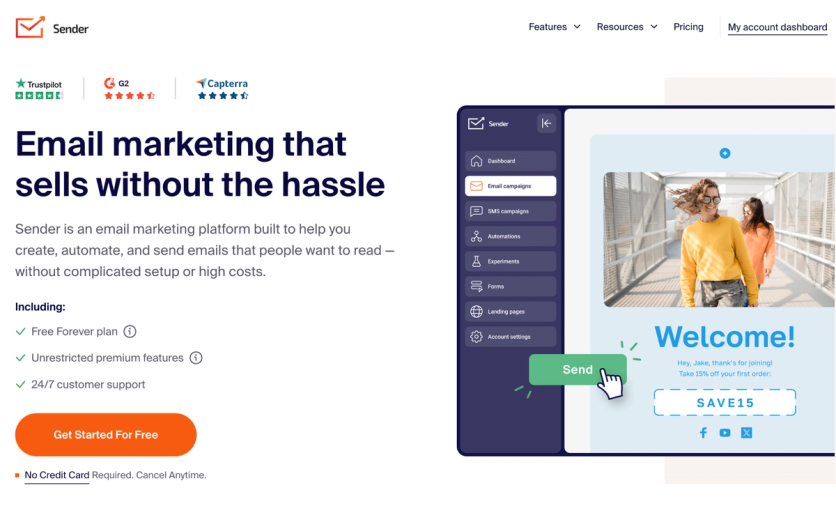
Sender is an email and SMS marketing platform built for small and growing businesses that want practical segmentation without enterprise pricing or a steep learning curve. Rather than a real-time CDP, it offers dynamic, condition-based segmentation layered on top of subscriber data, ecommerce activity, and custom fields – enough to power the campaigns and lifecycle flows that drive most email-attributed revenue for SMB and ecommerce teams.
Sender Features
Sender’s segmentation is built around groups (static, tag-like lists) and segments (dynamic audiences that update automatically as subscribers meet defined conditions). Marketers can combine multiple conditions across subscription status, contact details, campaign and SMS activity, ecommerce behavior, and custom fields, then use those segments inside campaigns and automation workflows.
• Dynamic segments that auto-update as subscribers meet conditions
• Segmentation by ecommerce activity – orders, products purchased, total spend, abandoned cart
• Custom fields (text, number, date) and a group-tag system for organizing audiences
• Segment conditions inside automations to branch paths and prevent over-messaging
• Email and SMS in one workflow, with custom events to capture site/app signals
• Drag-and-drop email builder, signup forms, popups, landing pages, and transactional email
Sender Pricing Plans
Sender publishes transparent, subscriber-based pricing with no hidden fees. The Free Forever plan covers up to 2,500 subscribers and 15,000 emails per month, including automation and segmentation. Paid plans start at $7/month (Standard), which adds SMS and removes Sender branding, while the Professional plan adds free SMS credits, advanced automation, and priority support. An Enterprise plan offers custom volume, a dedicated success manager, and dedicated IPs. Unlike MTU- or MAU-based tools, costs scale predictably with list size rather than tracked users.
Sender Support
Sender includes 24/7 live chat and email support on every plan, including the free tier – unusual at this price point. Response times are fast, with live chat often answering in seconds. Self-serve resources include an extensive Help Center, guides, and training videos, and dedicated migration assistance helps teams switch from another platform. The Enterprise plan adds a dedicated success manager and phone support.
Pain Points Check
| Pain Point | How Sender Handles It |
|---|---|
| Learning Curve | Low. Intuitive drag-and-drop interface and a gentle learning curve; reviewers consistently cite ease of use for beginners and small teams. |
| Workaround Trap | Covers core SMB needs – segmentation, automation, email/SMS, forms, landing pages, transactional email. No real-time CDP, predictive AI, or built-in CRM, so data-heavy or enterprise use cases may need other tools. |
| Success Tax | Transparent, subscriber-based pricing from $7/month with a generous free plan. Scales predictably with list size; no MTU/MAU surprises. |
| Support Ghosting | 24/7 live chat and email on all plans including Free, often answering in seconds. Dedicated success manager on Enterprise. |
| Performance Gaps | Segments are dynamic and auto-update (date-based refresh daily), but this is condition-based segmentation, not real-time in-session CDP processing. |
| Data Friction | Native plugins for WordPress, WooCommerce, Shopify and PrestaShop, plus API, webhooks, and Zapier (5,000+ apps). Fewer native integrations than enterprise platforms. |
Sender Pros and Cons
| Pros | Cons |
|---|---|
| Generous free plan (2,500 subscribers, 15,000 emails/month) with automation and segmentation included | No real-time CDP or in-session personalization |
| Transparent, affordable pricing that scales predictably with list size | No predictive/AI segmentation |
| Dynamic segments usable inside email, SMS, and automation workflows | No built-in CRM |
| Email and SMS in one workflow, with custom events | Fewer native integrations than enterprise tools |
| 24/7 live chat and email support on every plan | Not built for enterprise-scale or mobile-app-first use cases |
| Easy to use with a gentle learning curve | Sender branding on the free plan |
Conclusion
You need to think about your data volume, integration needs, technical expertise, and budget before you decide. Large enterprises with extensive customer bases probably do better with Maestra, given its implementation speed, superior data quality, and overall cost-effectiveness.
| Pain Point | What It Looks Like | How to Diagnose Early | Best Performers |
|---|---|---|---|
| Learning Curve | Platforms so complex you need a PhD just to send a targeted email | Request a sandbox or free trial and try building a basic segment yourself. Ask for reference calls with teams similar to yours – ask how long it took them to feel comfortable. Check G2/Capterra reviews filtered by “ease of use.” Look at the documentation: is it clear, or do you need a developer to interpret it? | Maestra (Forward Deployed Marketer builds everything for you), Klaviyo (Shopify-native, marketers can self-serve) |
| Workaround Trap | You find out six months in that the tool is missing one tiny but crucial feature | Before the demo, list your 3–5 must-have use cases and ask to see each one built live – not just described. Request reference calls with customers in your industry and ask directly: “What can’t you do natively?” Check community forums or feature request boards for recurring complaints. | Maestra (full-featured: segmentation, omnichannel, loyalty, personalization, paid media), Bloomreach (comprehensive with AI-powered segmentation and 17-channel support) |
| Success Tax | Costs that skyrocket the moment your business starts growing | Get the full pricing tier structure in writing – not just your starting tier. Ask: “What would I pay at 2x and 5x my current volume?” Look for caps on API calls, emails, seats, or contacts. Ask reference customers if they’ve experienced unexpected price jumps. | Maestra (transparent pricing, unlimited emails/API calls, no long-term contracts), HubSpot (free tier, transparent published pricing) |
| Support Ghosting | All smiles during sales, but getting help post-contract becomes a struggle | Ask for the SLA document with guaranteed response times. During your trial, submit a support ticket and see how fast and helpful the response is. On reference calls, ask specifically: “What’s your experience been with support after go-live?” Check review sites for patterns like “great product, terrible support.” | Maestra (dedicated Forward Deployed Marketer, Slack channel, 5-min live chat response, weekly Zoom calls), Bloomreach (2-minute average response, 24/7 tiered support) |
| Performance Gaps | Data lags that hinder real-time action and miss the moment of customer intent | Ask whether data syncs in real-time or in batches – and how large the delay is. Request a technical POC to test latency yourself. Ask: “Can I trigger a personalization or message based on what someone is doing right now on my site?” Check if “real-time” in their marketing actually means real-time in their architecture. | Maestra (real-time CDP with in-session personalization), Bloomreach (In-Memory Framework stores data in RAM), Amplitude (lightning-fast live queries) |
| Data Friction | Tools that don’t play nice with each other, creating silos where information goes to die | List your current stack and ask which integrations are native vs. third-party. Ask if data flows bidirectionally or one-way. During a trial, test an actual integration – don’t just take their word for it. Ask reference customers how smooth (or painful) their integrations were to set up and maintain. | Segment (+700 integrations, historical data replay), Klaviyo (350 integrations, ecommerce-native), Maestra (150 integrations, Forward Deployed Marketer handles migration at no extra cost) |
Key Takeaways
Customer segmentation tools are game-changers for business growth, with the right platform delivering measurable results that directly impact your bottom line.
- Advanced segmentation delivers precisely what customers want, when they want it, resulting in dramatically higher conversion rates.
- AI-powered segmentation boosts customer lifetime value as machine learning capabilities enable sharper targeting and personalized experiences that keep customers engaged longer.
- Real-time data processing is essential for modern marketing.
- Platforms with unified customer data and instant updates enable timely, relevant customer interactions across all channels.
- The best segmentation tools seamlessly connect with existing marketing stacks, eliminating data silos and enabling comprehensive customer views.
- The future belongs to businesses that leverage data-driven segmentation to create personalized customer experiences.
- Companies using advanced segmentation models consistently achieve higher engagement and sales than those relying on traditional methods, making the right tool selection crucial for competitive advantage.
FAQs
- Segmentation turns a broadcast channel into a precision tool – and the business case is concrete. Unidragon implemented behavior- and region-based segmentation in Maestra and generated 195% ROI within 92 days: $2.95 earned for every $1 invested. Selkirk Sport runs five audience types in parallel – direct consumers, influencers, tournament organizers, and retail partners – each receiving messaging built for their role. After consolidating all segments into Maestra, the brand saw 55% email revenue growth and 149% SMS revenue growth year-over-year. The core benefit isn’t just higher open rates – it’s that every touchpoint carries context: purchase history, browsing behavior, audience category. When segments update in real time, the right message fires before the moment passes.
- Essential features include real-time behavioral triggers, RFM (recency, frequency, monetary) analysis, predictive scoring, and cross-channel activation. Advanced platforms like Maestra add nested segments and calculated fields – for example, Magnum Bikes uses product-based segmentation in Maestra to branch abandoned browse and cart flows by category, so premium e-bike shoppers receive feature-focused messaging while pre-owned browsers see outlet-specific offers. The result? They doubled their online orders. Look for platforms where segments update in real time rather than on a batch schedule.
- Scalability varies widely. Some tools are optimized for SMB databases under 100K contacts and slow down at higher volumes. Enterprise platforms like Salesforce Data 360 (formerly Salesforce CDP) and Adobe handle large databases but require significant implementation effort. Maestra supports databases from 30K to 65M+ records with consistent sub-300ms processing and capacity for 2M emails per hour. Always load-test with your actual data volume before committing.
- The top customer segmentation platforms for ecommerce include Optimizely (experimentation-driven segments), Bloomreach (AI-powered product discovery segments), and Maestra (real-time behavioral segmentation with sub-300ms processing). The best choice depends on your database size and segmentation complexity. Platforms handle scale differently – verify whether your vendor can segment databases of 30K to 65M+ records without delays, as batch-processing tools can take hours to refresh segments at scale.
- Well-executed segmentation directly correlates with revenue growth across multiple documented cases. Sena achieved 8.6x campaign revenue growth compared to their previous Klaviyo setup after implementing more granular segmentation. G-Plan doubled their LTV thanks to personalized journeys for new and repeat customers. The common factor in these results is moving beyond basic demographic segments to behavioral, predictive, and real-time segments that trigger personalized content across channels.
- Very important – and often underestimated when evaluating tools. A segment that refreshes once a day cannot power real-time use cases: abandoned cart emails that fire within minutes, back-in-stock alerts that beat competitors, or post-purchase upsells that land while the purchase is still top of mind. Maestra processes segment updates in under 300ms. JOLYN uses this to personalize popup offers in real time: the system analyzes each visitor’s behavior and decides on the spot whether to show a 10% discount, 15%, or no offer at all – the result was a 21% increase in email capture rate. Batch-processing platforms – which is most of the market – refresh segments on a schedule, not on user action. For high-velocity e-commerce, that lag directly costs revenue.
- Rule-based segmentation uses manually defined criteria – “customers who bought in the last 30 days” or “users in California with AOV over $100.” You set the rules; the segment is static until you change them. AI-powered segmentation uses machine learning to automatically identify patterns, predict behaviors, and surface audiences you’d never think to build manually. Tools like Maestra (real-time behavioral signals), MoEngage (affinity modeling), Klaviyo (predictive CLV and churn risk), and Insider (purchase probability scoring) continuously refine audience groups as new data arrives – no analyst required. The practical difference: rule-based is reliable and auditable; AI-powered finds high-value micro-segments that drive incremental revenue.
- Some can partially, but most can’t fully replace a dedicated CDP. Platforms like Bloomreach and Insider include a built-in CDP layer that handles identity resolution and profile unification across touchpoints. Others – Braze, Klaviyo, MoEngage – are strong at activation but rely on an upstream CDP or data warehouse for complex data modeling. Maestra is one of the few tools that combines a real-time CDP with segmentation and omnichannel activation in a single platform, eliminating the need for a separate CDP for most ecommerce brands. If you need 700+ integrations and total data pipeline control, Segment (Twilio) remains the dedicated CDP of choice.
- Klaviyo is the default Shopify segmentation tool – native sync, pre-built segments based on purchase history and browsing behavior, and a free tier up to 250 contacts. For brands that have outgrown Klaviyo and need a real-time CDP with omnichannel activation (email, SMS, push, and on-site personalization in one place), Maestra is the strongest Shopify-native option. MoEngage and Insider are less Shopify-native and work better for mobile-first app businesses or enterprise ecommerce with custom tech stacks.
- Predictive segmentation uses machine learning to score customers by future behavior – most likely to churn, most likely to buy next, highest predicted lifetime value – and groups them into forward-looking audiences. Tools with genuine predictive segmentation: Klaviyo (churn risk score, next order date, predicted CLV), Insider (purchase probability, LTV prediction), Braze (Predictive Suite on higher tiers), and Segment/Twilio (natural-language Generative Audiences). Maestra takes a real-time behavioral approach: rather than batch-scoring customers overnight, it updates segments in under 300ms as behavior happens – so a customer who just reached their 3rd purchase enters a VIP flow in seconds, not the following morning.